
agentic-threat-hunting-framework v0.19.0
ATHF ist ein Framework für agentisches Threat Hunting - Systeme, die sich erinnern, lernen und mit zunehmender Autonomie handeln können.
Agentic Threat Hunting Framework (ATHF)




Quick Start • Installation • Documentation • Examples
Geben Sie Ihrem Threat-Hunting-Programm Gedächtnis und Handlungsfähigkeit.
Das Agentic Threat Hunting Framework (ATHF) ist die Gedächtnis- und Automatisierungsschicht für Ihr Threat-Hunting-Programm. Es verleiht Ihren Hunts Struktur, Persistenz und Kontext – und macht jede vergangene Untersuchung sowohl für Menschen als auch für KI zugänglich.
ATHF funktioniert mit jeder Hunting-Methodik (PEAK, TaHiTI oder Ihrem eigenen Prozess). Es ist kein Ersatz; es ist die Schicht, die Ihren bestehenden Prozess KI-fähig macht.
Was ist ATHF?
ATHF bietet Struktur und Persistenz für Threat-Hunting-Programme. Es ist ein Markdown-basiertes Framework, das:
- Hunts mithilfe des LOCK-Musters dokumentiert (Learn → Observe → Check → Keep)
- Ein durchsuchbares Repository vergangener Untersuchungen pflegt
- KI-Assistenten in die Lage versetzt, auf Ihre Umgebung und frühere Arbeiten zu verweisen
- Mit jeder SIEM/EDR-Plattform funktioniert
- NEU: KI-gestützte Research- und Hypothesengenerierungs-Agenten enthält (v0.3.0+)
Das Problem
Die meisten Threat-Hunting-Programme verlieren wertvollen Kontext, sobald ein Hunt endet. Notizen liegen in Slack oder Tickets, Queries werden einmal geschrieben und vergessen, und Lessons Learned existieren nur in den Köpfen der Analysten.
Selbst KI-Tools starten jedes Mal bei null, ohne Zugriff auf Ihre Umgebung, Ihre Daten oder Ihre vergangenen Hunts.
ATHF ändert das, indem es Ihren Hunts Struktur, Persistenz und Kontext verleiht.
Mehr lesen: docs/why-athf.md
Das LOCK-Muster
Jeder Threat Hunt folgt derselben grundlegenden Schleife: Learn → Observe → Check → Keep.
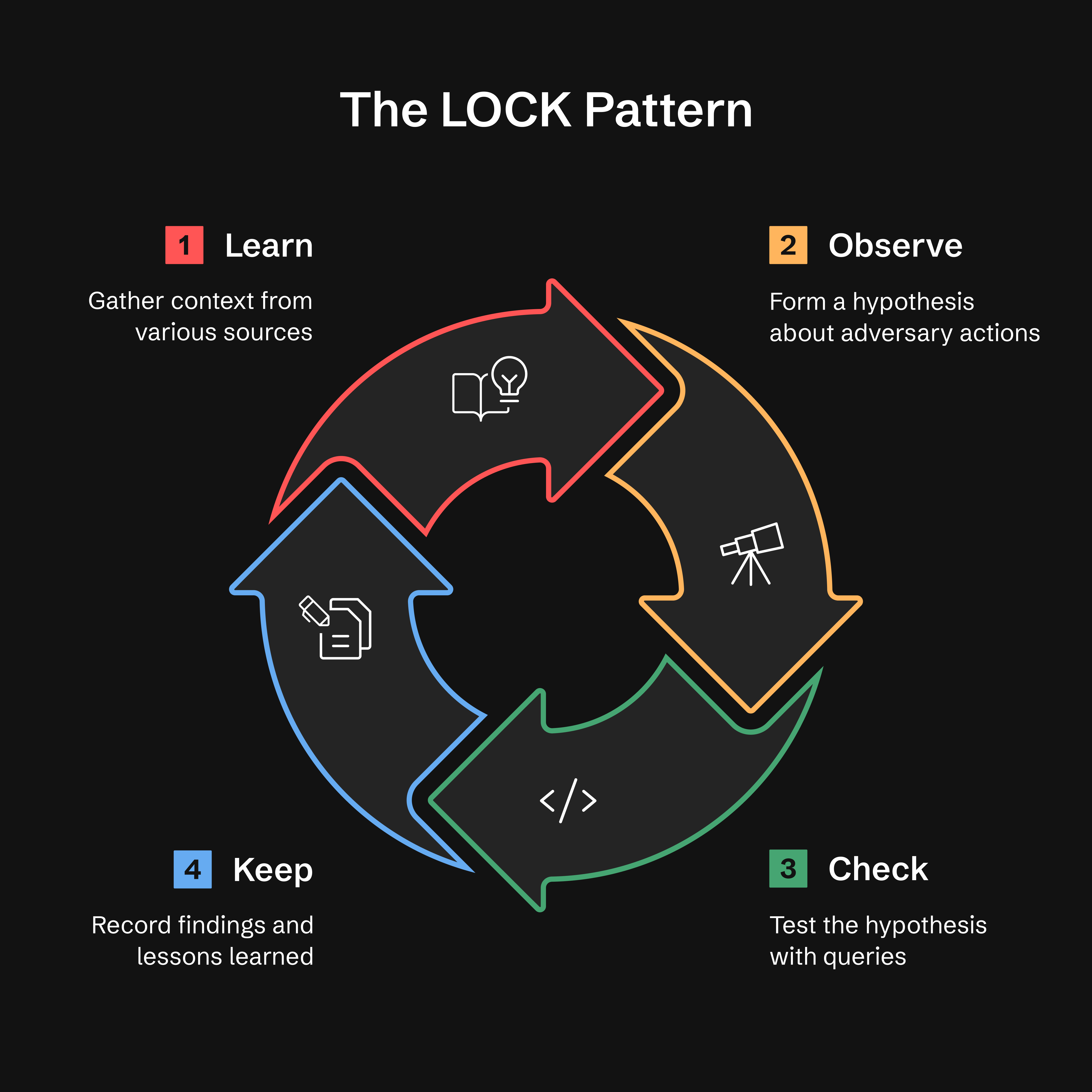
- Learn: Kontext aus Threat Intel, Alerts oder Anomalien sammeln
- Observe: Eine Hypothese über das Verhalten des Angreifers bilden
- Check: Hypothesen mit gezielten Queries testen
- Keep: Erkenntnisse und Lessons Learned festhalten
Warum LOCK? Es ist klein genug, um verwendet zu werden, und streng genug, damit Agenten es interpretieren können. Indem jeder Hunt in diesem Format erfasst wird, ermöglicht ATHF KI-Assistenten, frühere Arbeiten abzurufen und verfeinerte Queries auf Basis vergangener Ergebnisse vorzuschlagen.
Mehr lesen: docs/lock-pattern.md
GATES-Methode: Validierung der Hunt-zu-Detection-Beförderung
Nach Abschluss der KEEP-Phase eines Hunts validiert die GATES-Methode, ob Ihre Erkenntnisse zu Produktions-Detections, wiederkehrenden Hunts oder Advisories befördert werden sollten.
Generalizable, Additive, Tunable, Exposure-tested, Sustainable
Hinweis: GATES ist darauf ausgelegt, mit dem ATHF-Framework zu arbeiten, und wurde in diesem Kontext umfassend getestet. Während die Methodik (5 BASE-Kriterien, Verdict-Typen) konzeptionell übertragbar ist, empfehlen wir, sie als Teil des vollständigen ATHF-Workflows zu verwenden, um beste Ergebnisse zu erzielen. Siehe
.claude/skills/gates/für die vollständige Integration.
Installation: GATES ist derzeit nur über
git cloneverfügbar. Benutzer, die überpip installinstalliert haben, sollten das Repository klonen, um auf GATES zuzugreifen. Wir arbeiten daran, GATES in die pip-Distribution aufzunehmen (verfolgt als Issue #21).
GATES bewertet aus Hunts abgeleitete Detections mithilfe eines zweistufigen Frameworks: 5 BASE-Kriterien (bewertet anhand von Hunt-Daten) identifizieren Deployment-Kandidaten, während 5 ADVANCED-Kriterien (in der Produktion validiert) resiliente Detections mit niedrigen False-Positive- und False-Negative-Raten sicherstellen:
| Gate | Frage | Erkennt |
|---|---|---|
| G - Generalizable | Ist dies wiederholbar? | IOC-basierte Regeln, die schnell ablaufen |
| A - Additive | Füllt es eine Coverage-Lücke? | Doppelte oder redundante Detections |
| T - Tunable | Können wir Angriff von Normal unterscheiden? | Baseline-Rauschen-Mismatch (häufigste FP-Ursache) |
| E - Exposure-tested | Haben wir Evasions abgedeckt? | Eindimensionale Detections |
| S - Sustainable | Können wir dies aufrechterhalten? | Regeln mit hohem Volumen und niedrigem TP |
Verdicts basieren auf BASE-Scores (/5). Siehe .claude/skills/gates/ für ADVANCED-Validierungsmethoden.
Quick Start — geben Sie dies in Ihren Assistenten ein; /gates ist ein Skill, kein Shell-Befehl:
/gates --hunt H-0001
Verdict-Typen:
- ✅ PROMOTE (4.0-5.0) - Als dauerhafte Erkennung einsetzen
- ⚠️ CONDITIONAL (3.0-3.9) - Nach Erfüllung der Voraussetzungen einsetzen
- ❌ HOLD (0.0-2.9) - Logik bewahren, nicht einsetzen
- ⏱️ TIME_BOX - Kampagnenspezifisch, 90-Tage-Aktualisierung
- 🔄 RECURRING_HUNT - Vierteljährliche Ausführung, nicht 24/7
- 🚫 DROP - Nicht erkennenswert; aufgezeichnet, damit es nicht erneut vorgeschlagen wird
Ein Gate-FAIL überschreibt das Score-Band, und wenn zwei Gates fehlschlagen, gewinnt der erste Treffer in
dieser Reihenfolge: A→DROP, G→TIME_BOX, E→HOLD, S→RECURRING_HUNT, T→CONDITIONAL. Die
obigen Bänder gelten nur, wenn kein Gate fehlgeschlagen ist. Vollständige Regel:
.claude/skills/gates/SKILL.md Schritt 4.
Hinweis: Das GATES-Urteil „PROMOTE" bedeutet das Einsetzen einer Erkennungsregel. Dies ist verschieden von athf hunt promote, das Hunt-Dateien zwischen Verzeichnissen verschiebt.
Integration mit ADEF (Detection Engineering Framework):
Nach der GATES-Validierung fahren Sie mit ADEF für das Produktions-Detection-Engineering fort:
ATHF Workspace                    ADEF Workspace
──────────────                    ──────────────
Hunt (LOCK)
   ↓
GATES Validate
   ↓
H-XXXX_GATES.yaml  ────────────→  FORGE (F-O-R-G-E)
                                     ↓
                                  Production Rule
Vollständiger Workflow:
-
Im ATHF-Workspace den Hunt validieren — Assistenten-Eingabe, kein Shell-Befehl:
/gates --hunt H-0903→ schreibt
hunt-promotion-analysis/H-0903_GATES.yaml(eine Datei pro Hunt, N Kandidaten darin). Ein Hunt, dessen Verdict archivierend ist (HOLD,DROP,TIME_BOX,RECURRING_HUNT), gibt stattdessen eine.md-Erzählung aus — es gibt keine Regel zu erstellen, also gilt Schritt 2 nur für.yaml-Ausgabe. -
Importiere dieses Dokument in ADEF:
adef hunt-promote --gates ~/athf-workspace/hunt-promotion-analysis/H-0903_GATES.yaml
# --dry-run first to preview what it would mint