
Specter-FlipperZero v2.7
👻 Specter — passive 13.56 MHz NFC reader/skimmer bug-sweep for Flipper Zero. Counter-surveillance EMF meter using the onboard NFC chip. No extra hardware.
Specter 👻
Sweep for the readers you can't see.


-26E8CA?style=for-the-badge)



Specter turns your Flipper Zero into a pocket counter-surveillance bug-sweep for active 13.56 MHz NFC readers. It passively listens for the RF field that a powered-on reader is constantly emitting — a hidden card skimmer slipped into a payment terminal, a covert reader behind a door panel, a rogue logger taped under a desk — then tells you where it is, what kind of thing it is, whether the room is clean, and — left on watch — the moment one appears while you're away. It never transmits.
The readers are invisible. Specter makes them visible.
📟 On the Flipper
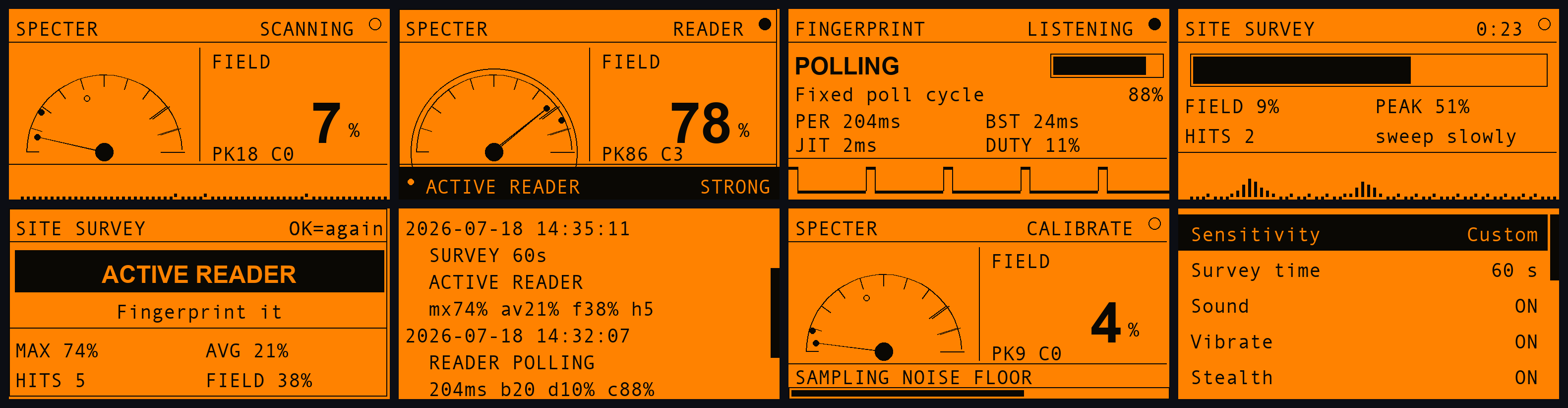
Sweep (quiet) · Sweep (reader locked) · Fingerprint · Survey (running) · Survey (verdict)
Watch (clear) · Watch (reader!) · Logbook · Calibrate · Settings
✨ The five modes
Specter is five tools around one sensor. Each answers a different question, so the right one depends on what you are actually trying to find out:
| Mode | The question it answers | Use it when |
|---|---|---|
| 🔍 Sweep | Where is it? | You suspect a device and want to pinpoint it by moving around |
| 🔬 Fingerprint | What kind of thing is it? | You have found an emitter and want to know how it behaves |
| 🗺️ Site Survey | Is this room clean? | You want one verdict for a whole space, hands-free |
| 🛰️ Watch Mode | Did one appear while I was away? | You are leaving the Flipper somewhere to stand guard |
| 📖 Logbook | What did I find, and when? | You are writing it up, or comparing today with last week |
🔍 Sweep — where is it?
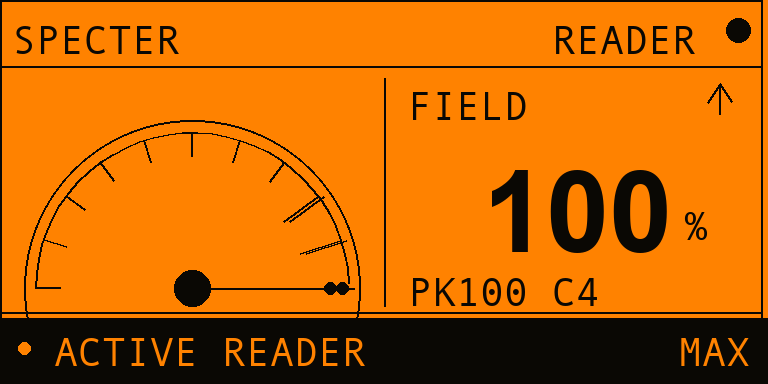
What it does. A live EMF-style meter. Hold the Flipper flat and move it slowly over the thing you're checking — a card terminal, a door reader, the underside of an ATM lip, a parcel, a desk. The needle rides the field strength in real time.
What you see.
- The dial — needle = live reading, the small dot = peak-hold (the strongest spot you've touched, so you can compare positions).
FIELD %— the same reading as a number, with a ▲ / ▼ trend arrow telling you whether the last half-second made things warmer or colder. When you're hunting, that arrow matters more than the number.PK/C— peak reading and how many separate contacts you've had.- Bottom strip — the live waveform and your current sensitivity while quiet;
it flips to a black
● ACTIVE READERalarm bar with a proximity word the moment a carrier is detected. - Proximity —
FAINT → NEAR → CLOSE → STRONG → MAX.MAXmeans the meter is pegged: you're as close as this measurement can resolve.
Sound. Optional geiger clicks that speed up as you get closer, so you can sweep with the Flipper in your pocket and hunt by ear alone.
| Key | Action |
|---|---|
OK | Reset peak-hold and contact count |
hold OK | Save this reading to the logbook |
LEFT | Calibrate to the room's noise floor (3 s) |
🔬 Fingerprint — what kind of thing is it?
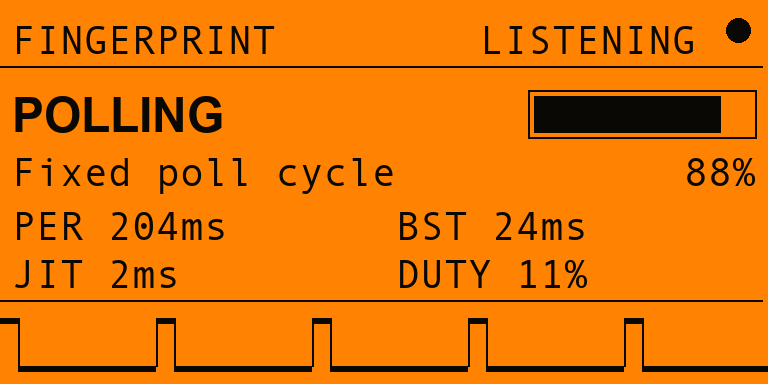
What it does. Once Sweep has found something, hold the Flipper still against it. Fingerprint stops measuring proximity and starts timing the carrier's on/off edges, which is what actually distinguishes one kind of emitter from another.
What you see. A verdict, a confidence bar, and the evidence behind both:
| Class | What it means in practice |
|---|---|
| CONTINUOUS | The carrier is held permanently up |
| POLLING | A fixed, crystal-timed poll cycle — the period is shown in ms |
| INTERMITTENT | Bursty but irregular — often a phone or a reader in use |
Underneath are PER (poll period), BST (burst width), JIT (jitter) and
DUTY (true duty-cycle), plus a logic-analyser pulse train of the raw
carrier — so the verdict is never something you have to take on faith. A genuine
polling reader shows up as an unmistakable square wave.
A
~before a timing means it's close to the 2 ms sampling floor, and the confidence is discounted to match.
| Key | Action |
|---|---|
OK | Save the finding to the logbook |
hold OK | Restart the measurement |
🗺️ Site Survey — is this room clean?
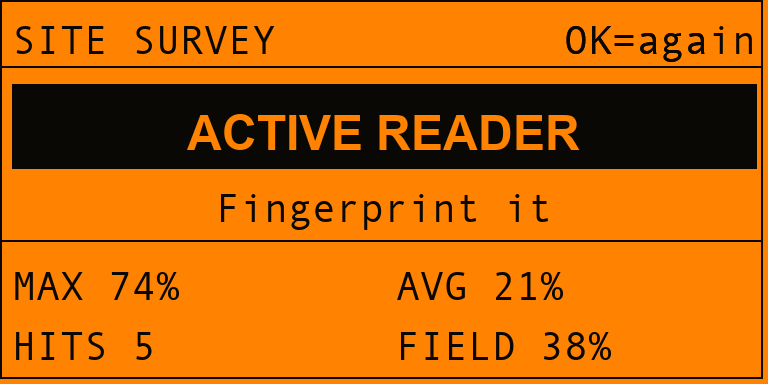
What it does. A timed sweep of a whole space. Start it, walk the room normally, and get a single verdict at the end — no needle-watching.
What you see. A countdown and progress bar while it runs, then a verdict card:
CLEAN— nothing crossed the noise floorTRACE— brief or faint hits; worth a slower second passACTIVE READER— something was genuinely up and emitting
…with MAX / AVG field, contact count, and FIELD % — how much of the survey
a carrier was actually up, which is often the most telling number of the four.
Runs for 30 s, 60 s or 2 min, and logs the result automatically.
| Key | Action |
|---|---|
OK | Run the survey again |
🛰️ Watch Mode — did one appear while I was away?
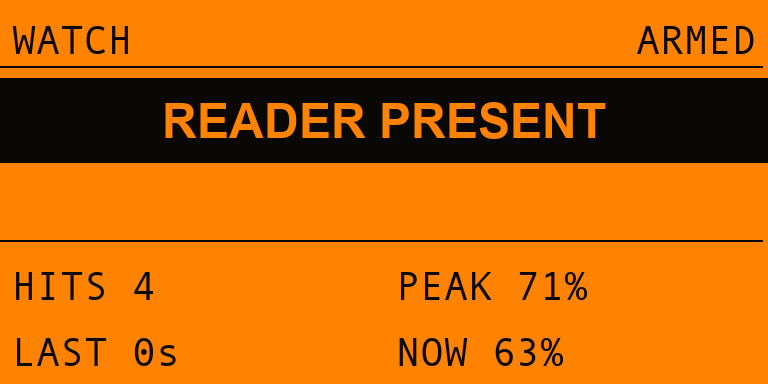
What it does. Stands guard indefinitely. Arm it, set the Flipper down, walk away. Where Sweep is you hunting and Survey is a fixed-length test, Watch just waits — for minutes or hours.
What you see. A large elapsed clock and ALL CLEAR while nothing is there.
The instant a reader appears the band inverts to READER PRESENT, the
screen wakes, and the alarm sounds. The band is steady rather than flashing —
a small marker pulses instead, so it reads as live without strobing at you. After it passes, the screen keeps the
evidence: HITS (how many separate contacts), PEAK, LAST (how long ago the
most recent one was) and SEEN (total time a carrier was actually up).
Watch deliberately ignores stealth mode — a dark, silent guard that never tells you it saw something would be worse than useless.
| Key | Action |
|---|---|
OK | Re-arm — clears the clock and counters |
📖 Logbook — what did I find, and when?
Findings are saved twice, from one action, so they're readable on the device and already a spreadsheet — no export step to remember:
logbook.txt — grouped, for the on-device viewer | logbook.csv — one flat row per entry |
|---|---|
|
|
Entries are tagged SWEEP, READER, SURVEY or WATCH and stamped from the
Flipper's clock. Both files live in apps_data/specter/ on the SD card. Nothing
ever leaves the device. Clear them from Settings → Clear logbook (confirmed
first — it's the one irreversible thing the app can do).
⚙️ The supporting bits
🎯 Auto-calibration
Press LEFT on the Sweep screen and Specter listens to the ambient noise floor for 3 seconds, then sets the detection threshold just above whatever it measured — saved as your Custom sensitivity. Every room has a different RF floor; this tunes to the one you're standing in rather than a number baked in at build time. Stand somewhere quiet when you run it.
🕶️ Stealth mode
Keeps the screen and LED dark for the whole sweep, so the Flipper doesn't glow
while you're the one doing the looking. Sound and vibration keep working — the
point isn't to disable the feedback you're sweeping by. Exiting a stealth screen
re-lights the display, so BACK always lands you on a lit menu.
📏 Reading the meter
Why a reader you're touching doesn't emit 100% of the time. The detector measures one physical thing: what fraction of the time a 13.56 MHz carrier is up. But readers poll — a short burst, a sleep, another burst. A typical terminal is only radiating 20–35% of the time, so raw duty-cycle saturates around 30% no matter how close you get.
Showing that raw number on the gauge made a perfect detection look like a third of one. The meter is scaled against that real polling band instead:
| Raw carrier duty | Meter | Proximity |
|---|---|---|
| 3% (room noise) | 10% | FAINT |
| 12% | 40% | NEAR |
| 20% | 67% | CLOSE |
| 28% | 93% | STRONG |
| ≥30% (resting on a reader) | 100% | MAX |
The raw duty is never lost: the noise floor, auto-calibration and the
Fingerprint screen's DUTY all still work in true duty-cycle, because those
describe the signal, not your distance from it. Want the literal number?
Settings → Meter → Raw.
💾 Everything persists
Sensitivity, survey length, sound, vibe, LED, stealth, logging and meter mode are saved to the SD card the moment you change them. A sweep kit that forgets its setup is worse than no persistence at all.
🧠 How it works
Every powered-on NFC reader continuously pings the air with a 13.56 MHz carrier, waiting for a card to wake up. You can't see it, but the Flipper's NFC chip can: the ST25R3916 has a hardware external-field detector (the same circuit that lets the Flipper emulate a card and know when a reader is talking to it). Specter parks the chip in detect-only mode and samples that "field present?" bit ~500 times a second — without ever switching on its own carrier.
That single bit, sampled fast enough, carries two independent signals:
flowchart LR
    R["🔍 Hidden 13.56 MHz reader / skimmer<br/>(constantly polling its field)"] -- "RF carrier" --> A

    subgraph FLIP["Flipper Zero — Specter.fap"]
      A["ST25R3916 NFC chip<br/>external-field detector"] --> S["Sampler thread<br/>~500 samples/s"]
      S --> M["<b>How much?</b><br/>carrier duty-cycle<br/>peak · average · contacts"]
      S --> C["<b>What rhythm?</b><br/>burst / gap edge timing<br/>period · jitter"]
      M --> G["EMF gauge · waveform<br/>geiger clicks · LED · vibe"]
      M --> V["Survey verdict<br/>CLEAN / TRACE / ACTIVE"]
      C --> K["Emitter class<br/>CONTINUOUS / POLLING /<br/>INTERMITTENT + pulse train"]
      V --> L["📖 SD logbook"]
      K --> L
    end
How much → strength. Over a short window Specter measures what fraction of the time a carrier is present and smooths it into the FIELD %. A reader sitting right on top of the Flipper pegs the meter; a weaker or further one nudges it. That drives the needle, the proximity word and the click rate.
What rhythm → identity. Separately, every transition of that bit is timed. A reader that wakes for 20 ms every 200 ms produces a burst/gap pattern with almost no jitter, because its polling loop is driven by a crystal-timed state machine. Hand movement and RF noise are not that steady. That difference is what separates POLLING from INTERMITTENT.
The decision layers are tested on a real computer
The places where Specter turns numbers into a claim — "this is a polling reader", "this room is clean", "this is what the needle should read" — are pure C with no hardware dependencies, and they're pinned down by host tests rather than discovered on the device:
make -C test # 300 checks: classifier, verdict, meter scaling, presence
🚀 Install
No devboard, no firmware to flash — it's a single .fap.
Option A — prebuilt .fap (easiest)
-
Grab the right
.fapfrom the Releases page:Your firmware File Official / stock specter.fapUnleashed, RogueMaster, Momentum or anything newer specter-fw-dev.fapIf the Flipper says
APP:87 < FW:88 — This app might not work, you have the wrong one — take the other file. The app's API version is fixed when it's compiled, so a single build can't satisfy both firmware lines. It usually still runs if you press Continue, but the matching build won't ask. -
Open qFlipper, drag the file onto
SD Card / apps / NFC /. -
On the Flipper: Apps → NFC → Specter.
Option B — build it yourself with ufbt
# one-time
python3 -m pip install --upgrade ufbt

# from the repo root, with your Flipper plugged in over USB:
ufbt            # build specter.fap into ./dist
ufbt launch     # build, upload to the Flipper and open it
make -C test    # run the host tests for the pure logic
The .fap lands in dist/specter.fap; ufbt launch copies it to apps/NFC/ and starts it for you.
Icons in
icons/, screenshots and the banner inimages/are generated — regenerate withpython3 tools_gen_icons.py,python3 tools_gen_mockups.pyandpython3 tools_gen_banner.py(needspillow).
🎮 Using it
A sweep, end to end:
- Launch Specter. On the Sweep screen, press LEFT and hold still for 3 seconds to calibrate to the room's noise floor.
- Hold the Flipper flat and move it slowly across the thing you're checking — a card terminal, a
door reader, the underside of an ATM lip, a parcel, a desk.
- Quiet / flat waveform → no active reader in range.
- Needle climbing, clicks speeding up → you're approaching an emitter. Keep going toward the peak.
● ACTIVE READER+ alarm border → an active reader is right here.
- Found something? Back out and open Fingerprint. Hold the Flipper still against it and let the cadence settle — a few seconds is usually enough. Press OK to save the finding.
- Clearing a whole room instead? Open Site Survey, walk the space until the bar fills, and read the verdict.
- Leaving the area? Drop the Flipper in Watch Mode and it'll stand guard, waking and sounding off if a reader turns up while you're gone.
- Check Logbook for everything you've saved, timestamped — or pull
logbook.csvoff the card into a spreadsheet.
💡 Sweep a known-good reader first (your own phone doing NFC, or a contactless terminal you trust) to see what a strong, legitimate field looks like on the meter — and what its fingerprint reads as. Then go hunting.
Controls
| Screen | Key | Action |
|---|---|---|
| Sweep | OK | Reset peak / contacts |
hold OK | Log the current reading | |
LEFT | Calibrate the noise floor (3 s) | |
| Fingerprint | OK | Save the finding to the logbook |
hold OK | Restart the measurement | |
| Site Survey | OK | Run the survey again |
| Watch Mode | OK | Re-arm (clear count and clock) |
| anywhere | BACK | Up a level |
🔬 Honest limitations
- 13.56 MHz (HF) only. Specter senses the NFC band — the one used by contactless payment skimmers, most modern access readers, transit and hotel readers. It cannot see 125 kHz (LF) readers (older HID Prox / EM4100 door panels); the Flipper's LF path has no equivalent field-detect bit.
- It senses a reader's carrier, not what it reads. Specter tells you an active reader is here, roughly how close, and what rhythm it polls on — it does not decode, identify, or capture anything the reader does.
- Strength is relative, not calibrated.
FIELD %and the proximity words are a comparative "warmer / colder" guide for sweeping, not a measured distance in cm. It's a scaled reading of carrier duty-cycle against a typical polling band (see Reading the meter); a reader that polls unusually sparsely will read lower at the same distance, and one in continuous-wave mode will peg from further away. - The meter tops out.
MAXmeans the carrier is up as much as this reader ever keeps it up — past that point, closing in genuinely cannot produce a bigger number. Use thePKpeak-hold to compare positions instead. - Cadence resolves to ~2 ms. That's the sampling period. Timings anywhere near it are shown with a
~and the confidence is discounted accordingly — Specter would rather flag its own resolution floor than quote a precise-looking number it can't stand behind. CLEANmeans clean at the sensitivity you chose. A dormant skimmer that only wakes on a real tap, or one that's shielded, stays invisible at any threshold. Absence of a reading isn't a guarantee of absence.- One radio at a time. Specter takes over the NFC chip while sweeping, so close any other NFC app first (it'll say NFC unavailable if something else holds the radio).
⚖️ Legal & ethical
Specter is a defensive, listen-only tool — it never transmits, never powers a field, never touches the reader. Use it to sweep your own POS area, door, desk or belongings, or hardware you're explicitly authorised to assess. You are responsible for how you use it. Know your local laws.
🗺️ Roadmap
- Persist sensitivity / sound / vibe / LED across reboots
- "Logbook" of detections with timestamps to the SD card
- Background sweep with the screen off — stealth mode
- Adjustable threshold for finer range control — auto-calibration + Custom sensitivity
- Fingerprint an emitter by its polling cadence
- Timed site survey with a room verdict
- Export the logbook as CSV for reporting — written live alongside the .txt
- Long-run unattended watch mode with a wake-on-detection alarm
- Make the meter use its full range against real polling readers
- Warmer/colder trend arrow while hunting
- Investigate an LF (125 kHz) coil-based reader sense as a separate mode
- On-device logbook filtering by type
🗂️ Project layout
Specter-FlipperZero/
├── application.fam               # Flipper app manifest (category: NFC)
├── specter.c / specter_i.h       # app entry, wiring, alert feedback, stealth
├── helpers/
│   ├── field_detector.{c,h}      # worker thread: samples the field-present bit,
│   │                             #   duty-cycle + edge timing + calibration
│   ├── emitter_classify.{c,h}    # pure: cadence -> CONTINUOUS/POLLING/INTERMITTENT
│   ├── survey_verdict.{c,h}      # pure: survey stats -> CLEAN/TRACE/ACTIVE
│   ├── field_scale.{c,h}         # pure: raw carrier duty -> full-scale meter
│   ├── present_hold.h            # pure: debounce presence across poll gaps
│   ├── specter_settings.{c,h}    # persisted settings (saved_struct)
│   └── specter_log.{c,h}         # SD logbook, RTC-stamped .txt + live .csv
├── views/
│   ├── sweep_view.{c,h}          # the EMF gauge / waveform / alarm screen
│   ├── fingerprint_view.{c,h}    # classification card + pulse-train trace
│   ├── survey_view.{c,h}         # progress + verdict card
│   └── watch_view.{c,h}          # unattended guard: clock + count + alarm
├── scenes/                       # scene-manager navigation
├── test/                         # host tests for the pure decision layers
├── icons/                        # 1-bit Flipper icons (generated)
├── images/                       # banner + screen mockups (generated)
└── tools_gen_*.py                # regenerate icons / mockups / banner
🙏 Credits
- Built by at0m-b0mb.
- Part of a Flipper security-tool family: Argus (Wi-Fi deauth / evil-twin watchdog), GhostTag (BLE anti-stalking hunter) and Cerberus (Sub-GHz RF watchdog).
- Powered by the Flipper Zero firmware NFC HAL (
furi_hal_nfcfield detection) + ufbt.
📄 License
MIT © 2026 at0m-b0mb