 hackinglz/gibson
أداة مراقبة الشبكة التي ترسم خرائط الاتصالات بين العمليات والشبكة، وتحدد مزودي الخدمات السحابية، وتكتشف نشاط التوجيه (البيكنج).

أداة مراقبة شبكة ترسم اتصالات العمليات بالشبكة، وتحدد مزودي الخدمات السحابية، وتنشئ قواعد جدار الحماية. وكيل خفيف للتجميع، خادم للتجميع، محلل للتحليل.
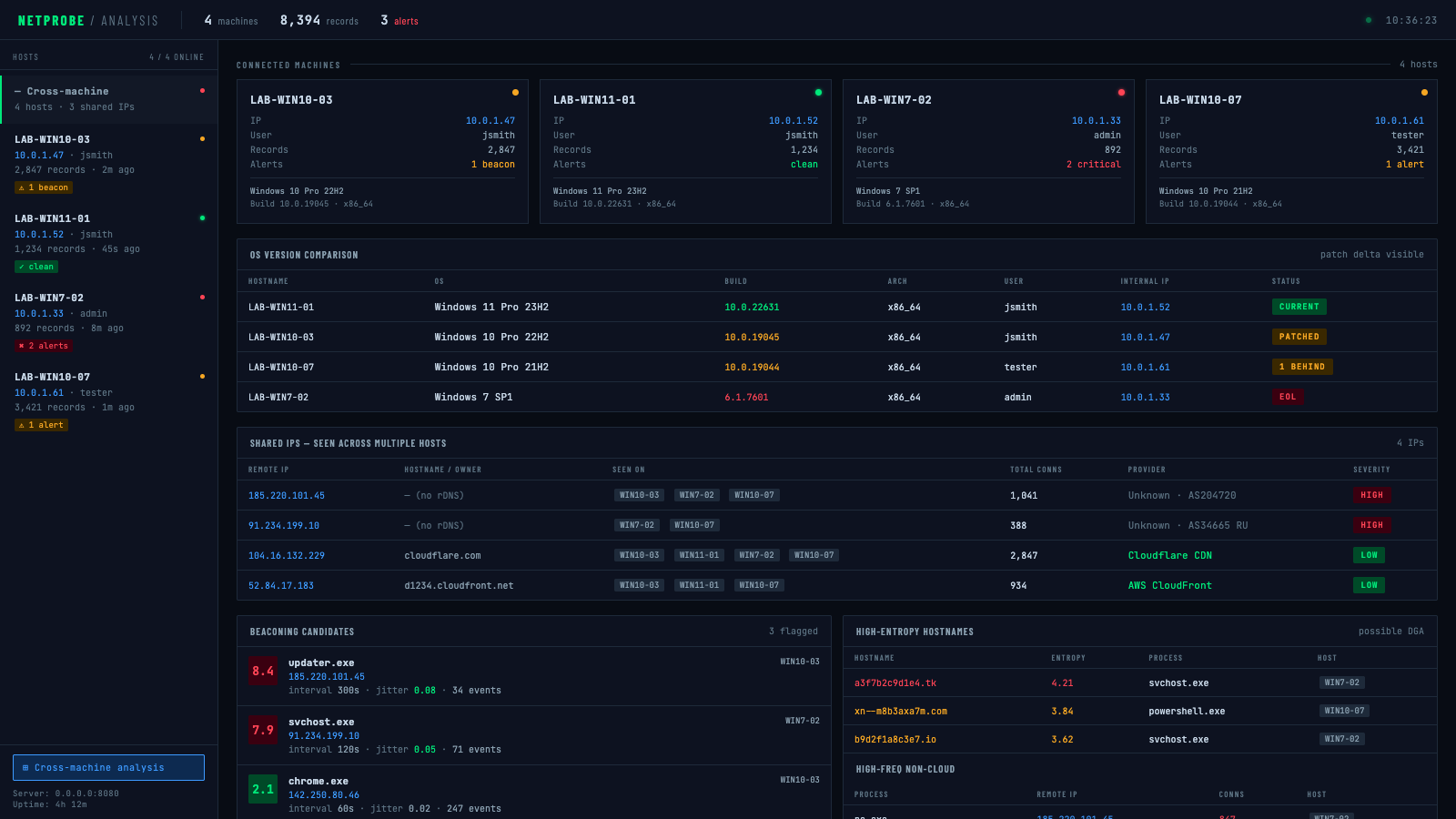
نظرة عامة عبر الأجهزة — مقارنة إصدارات نظام التشغيل، اكتشاف عنوان IP مشترك، مرشحين للاتصالات المنتظمة عبر جميع المضيفين:
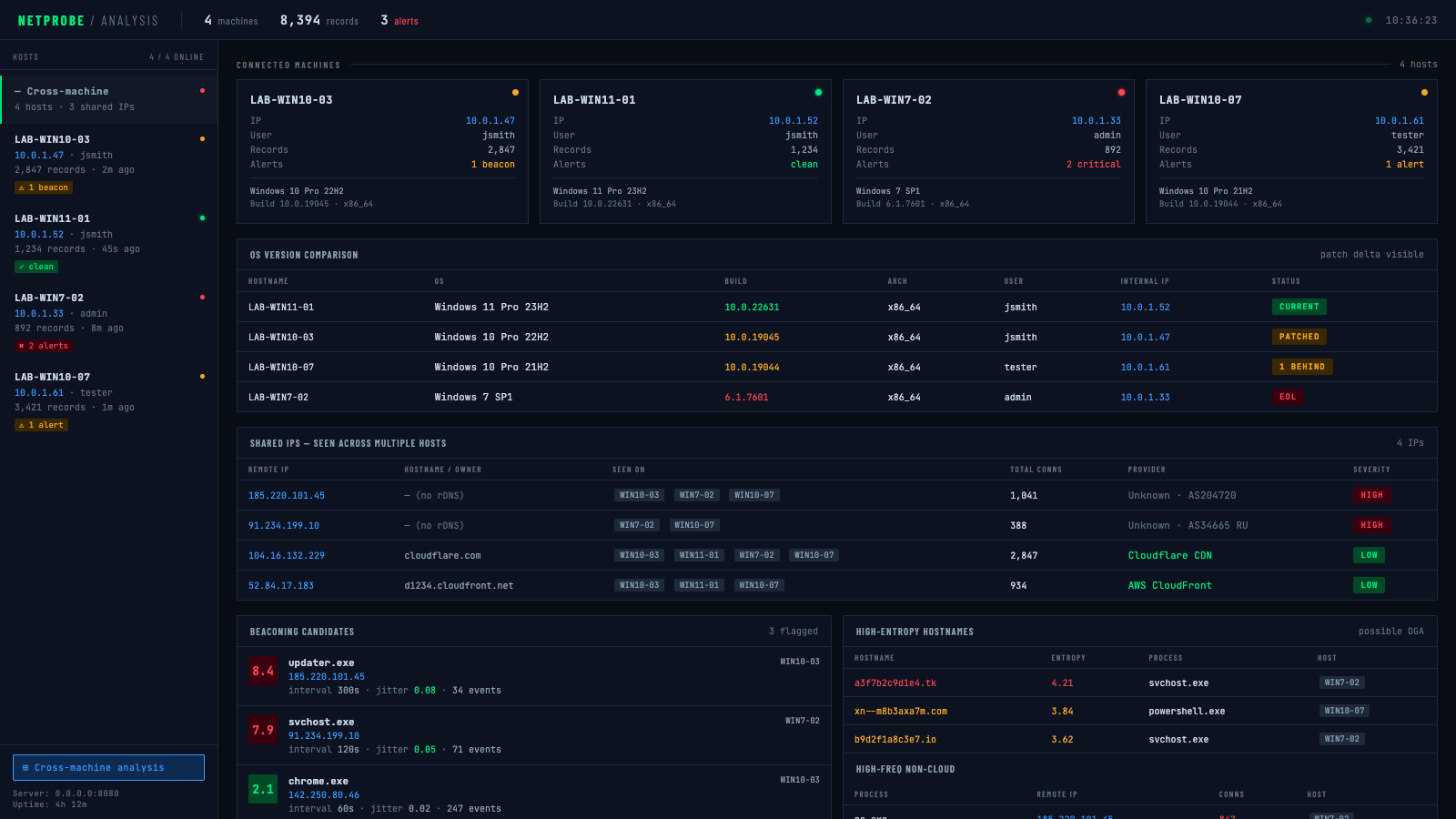
تفاصيل لكل مضيف — تنبيهات حرجة (نظام تشغيل منتهي الدعم، nc.exe يتصل منتظماً بعنوان IP غير معروف):
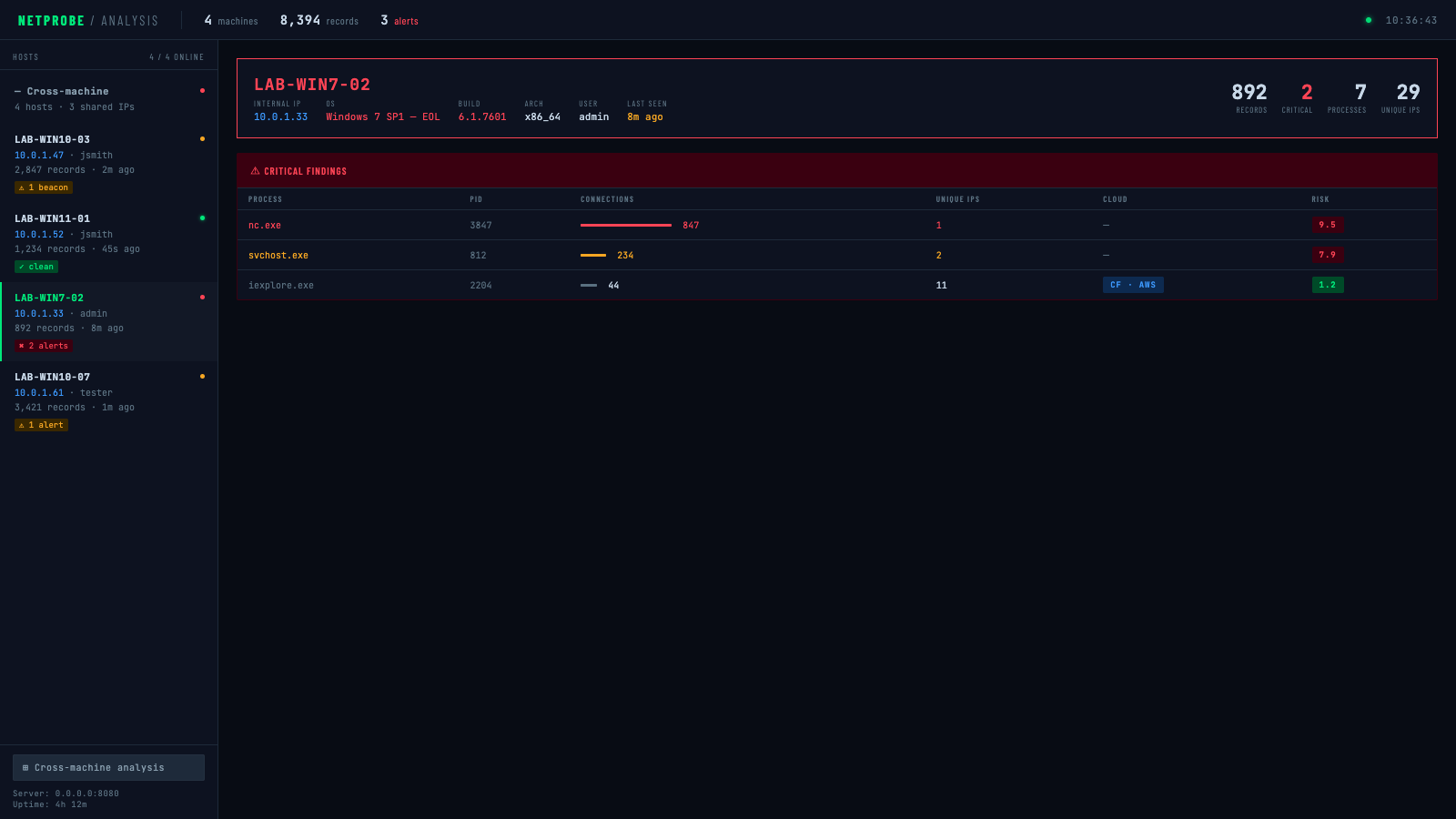
تفاصيل لكل مضيف — تحذير (مرشح اتصال منتظم مُعلّم):
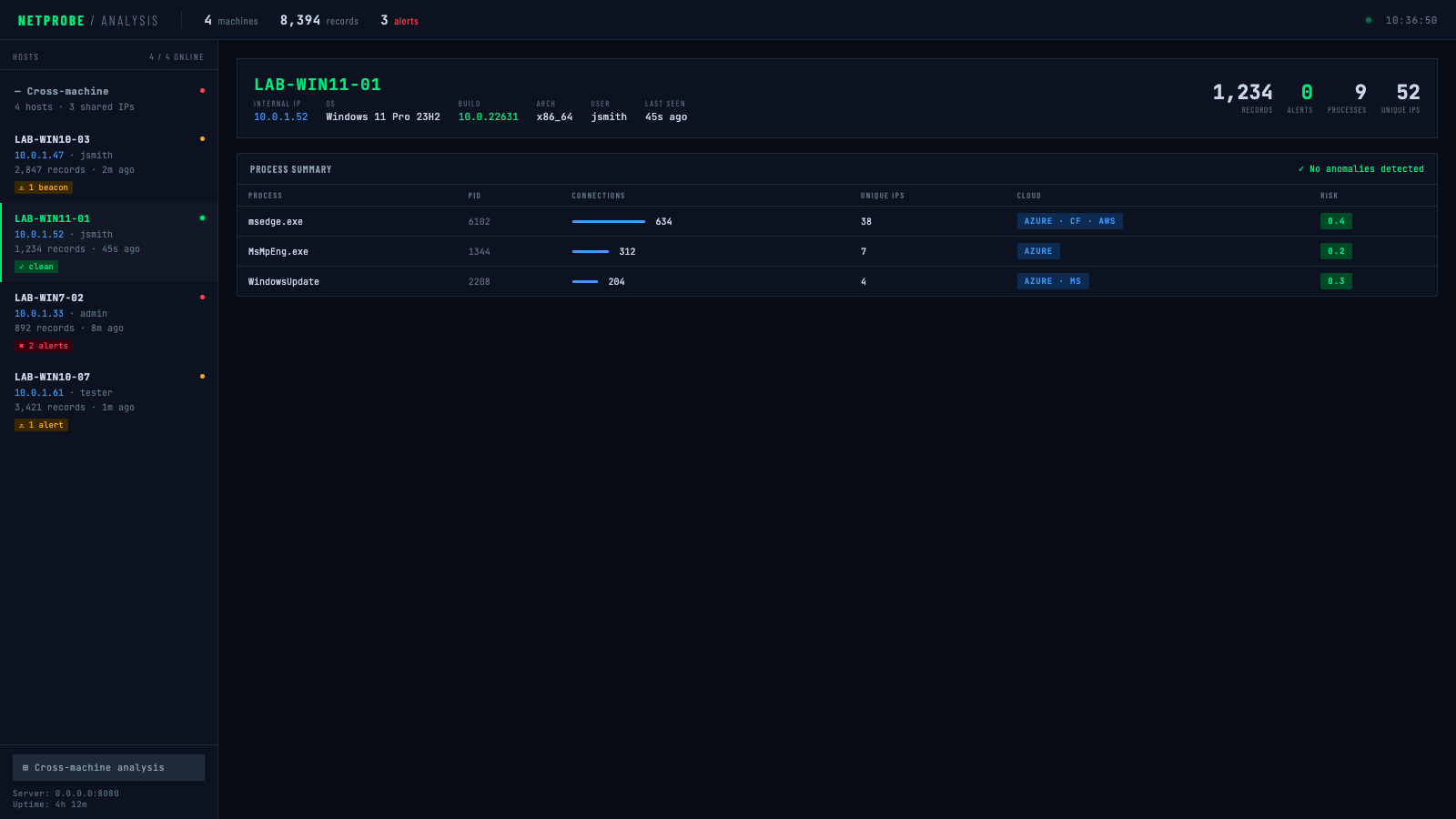
تفاصيل لكل مضيف — نظيف (لا شذوذ):
cargo build --release
# Simple collection
cargo run --release -- collect --duration-seconds 300

# With DNS lookups
cargo run --release -- collect --duration-seconds 300 --enable-dns

# With compression and encryption
cargo run --release -- collect \
  --duration-seconds 300 \
  --compress \
  --encrypt-key "your-secret-password"
# Generate all reports
cargo run --release -- parse \
  --input connections.jsonl \
  --process-summary processes.json \
  --cloud-analysis cloud.json \
  --firewall-rules-iptables firewall.sh \
  --database-export network.sql

# Offline ownership lookup with local ASN DB (no network calls)
cargo run --release -- parse \
  --input connections.jsonl \
  --cloud-analysis cloud.json \
  --asn-db ip2asn-v4.tsv

# Live ARIN lookup with persistent cache (re-run skips already-queried IPs)
cargo run --release -- parse \
  --input connections.jsonl \
  --cloud-analysis cloud.json \
  --arin-lookup \
  --arin-cache arin_cache.json
# Quick 5-minute analysis
cargo run --release -- monitor \
  --duration-seconds 300 \
  --output-dir ./analysis \
  --full-analysis
الملف الثنائي agent هو هدف نشر بسيط بدون أعلام. كل الإعدادات تُحرق في الملف الثنائي في وقت التجميع عبر متغيرات البيئة — أسقطه على الهدف وشغّله بدون وسائط.
AGENT_SERVER="http://10.0.1.5:8080/upload" \
AGENT_KEY="labkey123" \
AGENT_INTERVAL="5" \
AGENT_BATCH="200" \
AGENT_DURATION="0" \
AGENT_DNS="false" \
AGENT_ENCRYPT_KEY="mysecretpassword" \
cargo build --release --bin agent
الملف الثنائي الناتج في target/release/agent ليس له تبعيات خارجية ولا يحتاج أعلام:
./agent
| المتغير | القيمة الافتراضية | الوصف |
|---|---|---|
AGENT_SERVER | http://localhost:8080/upload | عنوان URL لنقطة رفع البيانات |
AGENT_KEY | (لا شيء) | قيمة رأس X-API-Key |
AGENT_INTERVAL | 5 | الفاصل الزمني لاستقصاء المقابس بالثواني |
AGENT_BATCH | 200 | عدد السجلات لكل دفعة رفع |
AGENT_DURATION | 0 | مدة التشغيل بالثواني (0 = تشغيل للأبد) |
AGENT_DNS | false | حل عناوين IP إلى أسماء مضيفين |
AGENT_ESTABLISHED | true | اتصالات ESTABLISHED فقط |
AGENT_LOCAL_COPY | false | الاحتفاظ بنسخة محلية .jsonl بجانب عمليات الرفع |
AGENT_COMPRESS | false | ضغط gzip قبل الرفع |
AGENT_ENCRYPT_KEY | (لا شيء) | تشفير الحمولة بـ AES-256-GCM (كلمة مرور أو مفتاح سداسي عشري بطول 64 حرفاً) |
AGENT_UA | (افتراضي reqwest) | رأس HTTP User-Agent |
AGENT_SERVER="https://collector.internal/upload" \
AGENT_KEY="prod-api-key" \
AGENT_DURATION="0" \
AGENT_INTERVAL="30" \
AGENT_COMPRESS="true" \
AGENT_ENCRYPT_KEY="$(cat /etc/gibson/key)" \
cargo build --release --bin agent
cargo run --release -- collect \
  --duration-seconds 3600 \
  --interval-seconds 10 \
  --compress \
  --encrypt-key "your-32-char-hex-key-or-password" \
  --upload-url "https://your-server.com/api/upload" \
  --api-key "your-api-key" \
  --batch-size 50 \
  --delete-after-upload
cargo run --release -- collect \
  --duration-seconds 86400 \
  --interval-seconds 30 \
  --output connections_daily.jsonl \
  --enable-dns \
  --compress
يدعم المحلل مسارين متنافيين لتحديد من يملك عناوين IP غير المتطابقة:
| الطريقة | العلم | السرعة | الشبكة | الأفضل لـ |
|---|---|---|---|---|
| قاعدة بيانات ASN محلية | --asn-db | فوري | لا شيء | تحليل متكرر، بيئات معزولة عن الشبكة |
| ARIN RDAP مباشر | --arin-lookup | بطيء (لكل IP) | نعم | عمليات بحث لمرة واحدة، لا تتوفر قاعدة بيانات محلية |
تنزيل قاعدة بيانات ip2asn (تُحدّث أسبوعياً):
curl -O https://iptoasn.com/data/ip2asn-v4.tsv.gz && gunzip ip2asn-v4.tsv.gz
عند تقديم --asn-db، يتم تجاهل --arin-lookup. استخدم --arin-cache لتخزين نتائج ARIN على القرص بحيث تتخطى عمليات التشغيل المتكررة عناوين IP التي تم الاستعلام عنها بالفعل.
# Parse with cloud detection focus
cargo run --release -- parse \
  --input connections.jsonl \
  --cloud-analysis cloud_report.json \
  --min-connections 5 \
  --whitelist-processes "chrome,firefox,safari,edge"
أنشئ collector_server.py:
from flask import Flask, request, jsonify
import os
import json
import base64
from datetime import datetime
from Crypto.Cipher import AES
import gzip

app = Flask(__name__)

# Configuration
UPLOAD_DIR = "./collected_data"
API_KEY = "your-secure-api-key"
ENCRYPTION_KEY = bytes.fromhex("your-32-byte-hex-key")  # Optional

os.makedirs(UPLOAD_DIR, exist_ok=True)

def decrypt_data(encrypted_data, key):
    """Decrypt AES-256-GCM encrypted data"""
    decoded = base64.b64decode(encrypted_data)
    nonce = decoded[:12]
    ciphertext = decoded[12:]

    cipher = AES.new(key, AES.MODE_GCM, nonce=nonce)
    plaintext = cipher.decrypt_and_verify(ciphertext[:-16], ciphertext[-16:])
    return plaintext

@app.route('/api/upload', methods=['POST'])
def upload():
    # Verify API key
    if request.headers.get('X-API-Key') != API_KEY:
        return jsonify({"error": "Invalid API key"}), 401

    try:
        data = request.get_data()

        # If data is base64 encoded (encrypted)
        if data.startswith(b'eyJ'):  # JSON starts with {"
            # Not encrypted, parse directly
            batch = json.loads(data)
        else:
            # Encrypted data
            decrypted = decrypt_data(data, ENCRYPTION_KEY)
            batch = json.loads(decrypted)

        # Save to file
        hostname = batch.get('hostname', 'unknown')
        timestamp = datetime.now().strftime('%Y%m%d_%H%M%S')
        filename = f"{UPLOAD_DIR}/{hostname}_{timestamp}.json"

        with open(filename, 'w') as f:
            json.dump(batch, f)

        return jsonify({"status": "success", "file": filename}), 200

    except Exception as e:
        return jsonify({"error": str(e)}), 500
