
يجمع تفاصيل CVE، وقواعد بيانات الاستغلال، ونتائج EPSS مع تقييم المخاطر بالذكاء الاصطناعي واستيراد ماسح الثغرات من أجل التصحيح ذي الأولوية.
SploitScan هي أداة قوية وسهلة الاستخدام مصممة لتبسيط عملية تحديد الثغرات الأمنية المعروفة واحتمالية استغلالها. تمكن المتخصصين في الأمن السيبراني من التعرف السريع على الثغرات المعروفة وتطبيقها واختبارها. وهي ذات قيمة خاصة للمتخصصين الذين يسعون إلى تعزيز إجراءاتهم الأمنية أو تطوير استراتيجيات كشف قوية ضد التهديدات الناشئة.
استرجاع معلومات CVE
استرجاع معلومات مفصلة عن الثغرات الأمنية.
تكامل EPSS
التحقق من احتمالية الاستغلال باستخدام بيانات من نظام تسجيل التنبؤ بالاستغلال.
تجميع الثغرات العامة
جمع بيانات الثغرات المتاحة للجمهور لمساعدتك في فهم سياق كل ثغرة.
تكامل CISA KEV
معرفة سريعة ما إذا كانت الثغرة مدرجة في كتالوج الثغرات المستغلة المعروفة لدى CISA.
تقييم المخاطر باستخدام الذكاء الاصطناعي
الحصول على تقييمات للمخاطر باستخدام مزودي ذكاء اصطناعي متعددين (OpenAI ChatGPT, Google Gemini, Grok AI, أو DeepSeek) تشرح المخاطر المحتملة وتقدم أفكارًا للتخفيف منها.
تقارير HackerOne
معرفة ما إذا كانت الثغرة قد ظهرت في تقارير مكافآت الأخطاء في HackerOne، بما في ذلك التصنيف الأساسي وتفاصيل الخطورة.
نظام أولوية التصحيح
الحصول على تصنيف أولوية بسيط للتصحيح بناءً على CVSS و EPSS ومعلومات الثغرات المتاحة.
دعم CVEs متعددة وخيارات التصدير
العمل مع عدة CVEs في وقت واحد وتصدير النتائج إلى صيغ HTML أو JSON أو CSV.
استيراد ماسحات الثغرات
استيراد نتائج الفحص من ماسحات الثغرات الشائعة (Nessus, Nexpose, OpenVAS, Docker) للبحث مباشرة عن الثغرات المعروفة. يدعم الآن الاستيراد القائم على الدليل باستخدام --input-dir للمعالجة الدفعية لتقارير متعددة.
اختيار دقيق للطرق
اختيار طرق استرجاع البيانات المحددة التي تريد تشغيلها (مثل CISA, EPSS, HackerOne, AI، إلخ) بحيث تحصل فقط على المعلومات التي تحتاجها.
تحديث قاعدة بيانات CVE المحلية واستنساخها
الحفاظ على نسخة محلية من مستودع CVE List V5. يتيح لك ذلك تحديث بيانات CVE بالكامل على جهازك للاستخدام دون اتصال والبحث.
البحث عن CVE بالكلمات المفتاحية عبر المصادر
البحث عن CVEs باستخدام كلمات مفتاحية (مثل "Apple") عبر كل من قاعدة البيانات المحلية والمصادر البعيدة مثل CISA و Nuclei Templates.
الوضع السريع لإخراج مبسط
استخدام الوضع السريع لعرض معلومات CVE الأساسية فقط، مع تخطي عمليات البحث الإضافية للحصول على نتائج أسرع.
واجهة سهلة الاستخدام
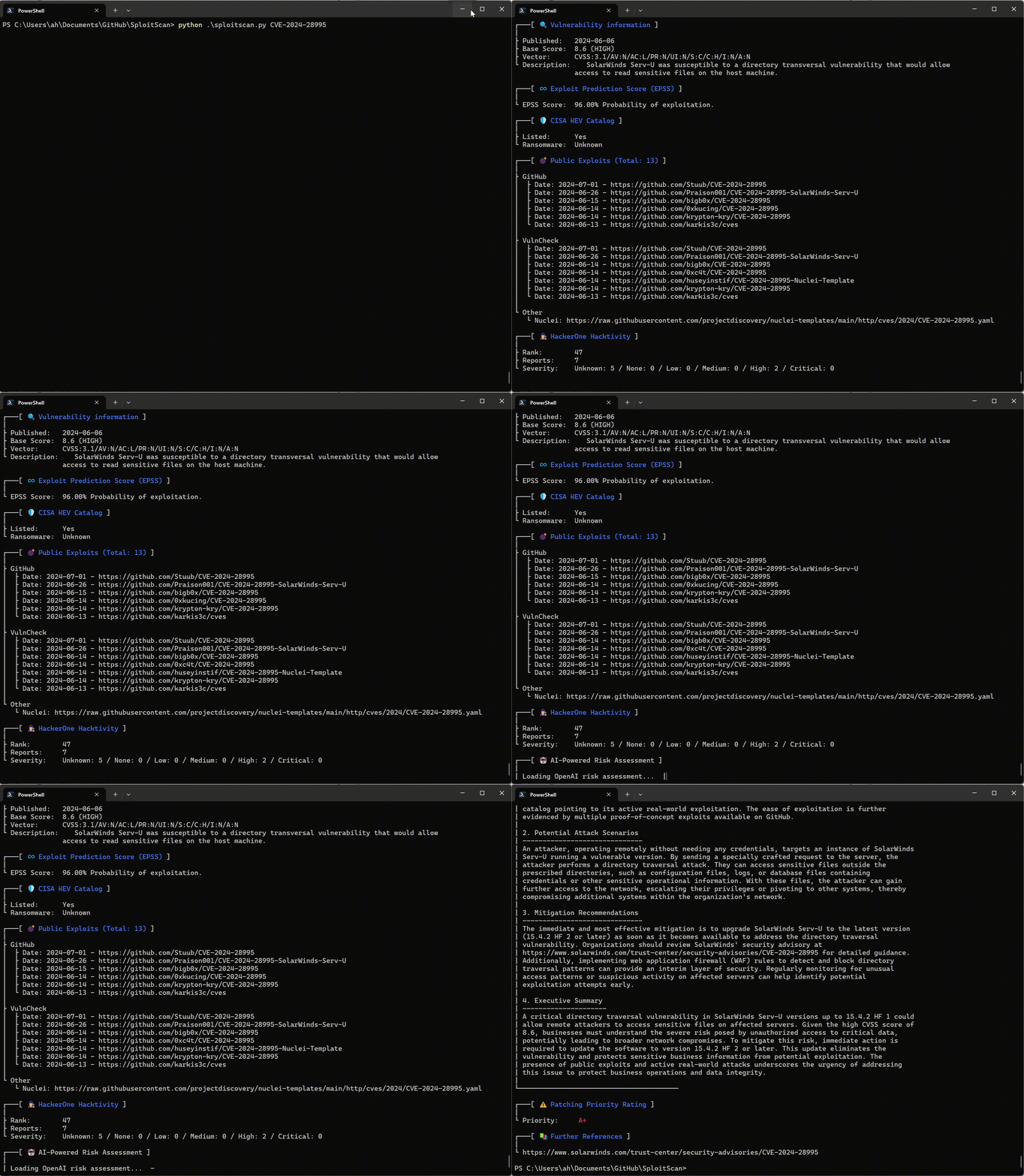
استمتع بواجهة واضحة ومباشرة تعرض جميع المعلومات بتنسيق سهل القراءة.
git clone https://github.com/xaitax/SploitScan.git cd sploitscan pip install -r requirements.txt
### pip```shell
pip install --user sploitscan
apt install sploitscan
### الحصول على مفاتيح API
- **VulnCheck**: اشترك للحصول على حساب مجاني في [VulnCheck](https://vulncheck.com/) للحصول على مفتاح API الخاص بك.
- **OpenAI**: أنشئ حسابًا واحصل على مفتاح API في [OpenAI](https://platform.openai.com/signup/).
- **Google Gemini**: أنشئ حسابًا واحصل على مفتاح API في [Google AI Studio](https://aistudio.google.com/app/apikey).
- **xAI Grok**: أنشئ حسابًا واحصل على مفتاح API في [xAI](https://x.ai/api).
- **DeepSeek**: أنشئ حسابًا واحصل على مفتاح API في [DeepSeek](https://platform.deepseek.com/api_keys).
### ملف الإعدادات
يبحث SploitScan عن `config.json` في مواقع متعددة افتراضيًا. سيقوم بتحميل أول ملف صالح يجده، بالترتيب التالي:
1. **المسار المخصص الذي تم تمريره عبر `--config` أو `-c`**
2. **متغير البيئة**: `SPLOITSCAN_CONFIG_PATH`
3. **مواقع ملفات الإعدادات المحلية والقياسية**:
- دليل العمل الحالي
- `~/.sploitscan/config.json`
- `~/.config/sploitscan/config.json`
- `~/Library/Application Support/sploitscan/config.json` (macOS)
- `%APPDATA%/sploitscan/config.json` (Windows)
- `/etc/sploitscan/config.json`
> **ملاحظة**: يتم تحميل ملف واحد فقط — أول ملف يتم العثور عليه في التسلسل أعلاه. يمكنك وضع `config.json` الخاص بك في أي من هذه المسارات.
قد يبدو ملف `config.json` النموذجي هكذا:```json
{
"vulncheck_api_key": "",
"openai_api_key": "",
"google_ai_api_key": "",
"grok_api_key": "",
"deepseek_api_key": ""
}
$ python .\sploitscan.py -h
███████╗██████╗ ██╗ ██████╗ ██╗████████╗███████╗ ██████╗ █████╗ ███╗ ██╗ ██╔════╝██╔══██╗██║ ██╔═══██╗██║╚══██╔══╝██╔════╝██╔════╝██╔══██╗████╗ ██║ ███████╗██████╔╝██║ ██║ ██║██║ ██║ ███████╗██║ ███████║██╔██╗ ██║ ╚════██║██╔═══╝ ██║ ██║ ██║██║ ██║ ╚════██║██║ ██╔══██║██║╚██╗██║ ███████║██║ ███████╗╚██████╔╝██║ ██║ ███████║╚██████╗██║ ██║██║ ╚████║ ╚══════╝╚═╝ ╚══════╝ ╚═════╝ ╚═╝ ╚═╝ ╚══════╝ ╚═════╝╚═╝ ╚═╝╚═╝ ╚═══╝ v0.14.0 / Alexander Hagenah / @xaitax / [email protected]
usage: sploitscan.py [-h] [-e {json,csv,html}] [-t {nessus,nexpose,openvas,docker}] [--ai {openai,google,grok,deepseek}] [-k KEYWORDS [KEYWORDS ...]] [-local] [-f] [-m METHODS] [-i IMPORT_FILE] [-c CONFIG] [-d] [cve_ids ...]
SploitScan: Retrieve and display vulnerability and exploit data for specified CVE ID(s).
positional arguments: cve_ids Enter one or more CVE IDs (e.g., CVE-YYYY-NNNNN). This is optional if an import file is provided via -i.
options: -h, --help show this help message and exit -e {json,csv,html}, --export {json,csv,html} Export the results in the specified format ('json', 'csv', or 'html'). -t {nessus,nexpose,openvas,docker}, --type {nessus,nexpose,openvas,docker} Specify the type of the import file ('nessus', 'nexpose', 'openvas', or 'docker'). --ai {openai,google,grok,deepseek} Select the AI provider for risk assessment (e.g., 'openai', 'google', 'grok', or 'deepseek'). -k KEYWORDS [KEYWORDS ...], --keywords KEYWORDS [KEYWORDS ...] Search for CVEs related to specific keywords (e.g., product name). -local, --local-database Download the cvelistV5 repository into the local directory. Use the local database over online research if available. -f, --fast-mode Enable fast mode: only display basic CVE information without fetching additional exploits or data. -m METHODS, --methods METHODS Specify which methods to run, separated by commas (e.g., 'cisa,epss,hackerone,ai,prio,references'). -i IMPORT_FILE, --import-file IMPORT_FILE Path to an import file. When provided, positional CVE IDs can be omitted. The file should be a plain text list with one CVE per line. --input-dir INPUT_DIR Path to a directory containing vulnerability reports to scan for CVE IDs. -c CONFIG, --config CONFIG Path to a custom configuration file. -d, --debug Enable debug output.
### استعلام CVE فردي```bash
sploitscan CVE-2024-1709
sploitscan CVE-2024-1709 CVE-2024-21413
### تحديث قاعدة بيانات CVE المحلية
يمكنك الآن تحديث (أو استنساخ أولي) مستودع CVE List V5 الكامل محليًا باستخدام الخيار `--local`. لاحظ أن حجم هذا المستودع يبلغ عدة غيغابايت، لذا قد يستغرق التنزيل بعض الوقت. على سبيل المثال:```bash
sploitscan -local
███████╗██████╗ ██╗ ██████╗ ██╗████████╗███████╗ ██████╗ █████╗ ███╗ ██╗
██╔════╝██╔══██╗██║ ██╔═══██╗██║╚══██╔══╝██╔════╝██╔════╝██╔══██╗████╗ ██║
███████╗██████╔╝██║ ██║ ██║██║ ██║ ███████╗██║ ███████║██╔██╗ ██║
╚════██║██╔═══╝ ██║ ██║ ██║██║ ██║ ╚════██║██║ ██╔══██║██║╚██╗██║
███████║██║ ███████╗╚██████╔╝██║ ██║ ███████║╚██████╗██║ ██║██║ ╚████║
╚══════╝╚═╝ ╚══════╝ ╚═════╝ ╚═╝ ╚═╝ ╚══════╝ ╚═════╝╚═╝ ╚═╝╚═╝ ╚═══╝
v0.14.0 / Alexander Hagenah / @xaitax / [email protected]
📥 Cloning CVE List V5 into 'C:\Users\ah/.sploitscan\cvelistV5'.
⚠️ Warning: The repository is several GB in size and the download may take a while.
🔄 Progress: 100.00% - 940.62 MiB | 4.97 MiB/s
✅ CVE List V5 cloned successfully.
ابحث عن CVEs بالكلمات الرئيسية (مثل "Apple") عبر قاعدة البيانات المحلية و CISA و Nuclei Templates.
[!TIP] يمكن أن يحل هذا محل searchsploit إلى حد كبير لأن ExploitDB لم يعد يتم تحديثه بانتظام.```bash sploitscan -k "Outlook Express"
███████╗██████╗ ██╗ ██████╗ ██╗████████╗███████╗ ██████╗ █████╗ ███╗ ██╗ ██╔════╝██╔══██╗██║ ██╔═══██╗██║╚══██╔══╝██╔════╝██╔════╝██╔══██╗████╗ ██║ ███████╗██████╔╝██║ ██║ ██║██║ ██║ ███████╗██║ ███████║██╔██╗ ██║ ╚════██║██╔═══╝ ██║ ██║ ██║██║ ██║ ╚════██║██║ ██╔══██║██║╚██╗██║ ███████║██║ ███████╗╚██████╔╝██║ ██║ ███████║╚██████╗██║ ██║██║ ╚████║ ╚══════╝╚═╝ ╚══════╝ ╚═════╝ ╚═╝ ╚═╝ ╚══════╝ ╚═════╝╚═╝ ╚═╝╚═╝ ╚═══╝ v0.14.0 / Alexander Hagenah / @xaitax / [email protected]
┌───[ 🕵️ Searching local database for keywords: outlook express ] Processing CVE files: 100%|████████████████████████████████████████████████████████████████████████████████████████████████████████████████████████████████████| 282372/282372 [04:38<00:00, 1013.92it/s]
╔═══════════════════════════════════════════╗ ║ Found 48 CVE(s) matching: Outlook Express ║ ╚═══════════════════════════════════════════╝
CVE-1999-0967, CVE-1999-1016, CVE-1999-1033, CVE-2000-0036, CVE-2000-0105, CVE-2000-0415, CVE-2000-0524, CVE-2000-0567, CVE-2000-0621, CVE-2000-0653, CVE-2001-0145, CVE-2001-0149, CVE-2001-0945, CVE-2001-0999, CVE-2001-1088, CVE-2001-1325, CVE-2001-1547, CVE-2002-0152, CVE-2002-0285, CVE-2002-0637, CVE-2002-0862, CVE-2002-1121, CVE-2002-1179, CVE-2002-2164, CVE-2002-2202, CVE-2003-0301, CVE-2003-1105, CVE-2003-1378, CVE-2004-0215, CVE-2004-0380, CVE-2004-0526, CVE-2004-2137, CVE-2004-2694, CVE-2005-1213, CVE-2005-2226, CVE-2005-4840, CVE-2006-0014, CVE-2006-2111, CVE-2006-2386, CVE-2006-2766, CVE-2007-2225, CVE-2007-2227, CVE-2007-3897, CVE-2007-4040, CVE-2008-1448, CVE-2008-5424, CVE-2010-0816, CVE-2024-1187
╔═══════════════════════╗ ║ CVE ID: CVE-2001-1547 ║ ╚═══════════════════════╝
┌───[ 🔍 Vulnerability information ] | ├ Published: 2005-07-14 ├ Base Score: N/A (N/A) ├ Vector: N/A └ Description: Outlook Express 6.0, with "Do not allow attachments to be saved or opened that could potentially be a virus" enabled, does not block email attachments from forwarded messages, which could allow remote attackers to execute arbitrary code. [...]
### Fast Mode
قم بتمكين الوضع السريع لعرض معلومات CVE الأساسية فقط (تخطي عمليات البحث الإضافية).```bash
sploitscan CVE-2024-1709 --fast-mode
حدد النوع: 'nessus', 'nexpose', 'openvas', أو 'docker' وقدم مسار الملف.```bash sploitscan --import-file path/to/yourfile.nessus --type nessus
### استيراد من المجلد
قم بمسح مجلد كامل بشكل متكرر للبحث عن تقارير الثغرات واستخراج معرفات CVE من جميع الملفات.```bash
sploitscan --input-dir path/to/reports/directory
لتشغيل طرق استرجاع بيانات محددة فقط (مثل CISA و EPSS و AI risk assessment)، استخدم الوسيط -m:```bash
sploitscan CVE-2024-1709 -m cisa,epss
### تصدير النتائج
حدد تنسيق التصدير: 'json', 'csv', أو 'html'.```bash
sploitscan CVE-2024-1709 -e html
تأكد من تثبيت Docker. للحصول على تعليمات التثبيت، راجع دليل التثبيت الرسمي لـ Docker.
لبناء وتشغيل SploitScan في Docker:```shell docker build -t sploitscan . docker run --rm sploitscan CVE-2024-1709
مع وحدة تخزين مثبتة من الدليل الحالي
#### Windows (Powershell)```shell
docker run -v ${PWD}:/app --rm sploitscan CVE-2024-1709 -e JSON
docker run -v $(pwd):/app --rm sploitscan CVE-2024-1709 -e JSON
## 🤖 تقييم المخاطر المدعوم بالذكاء الاصطناعي
اختر مزود ذكاء اصطناعي لتقييم المخاطر (OpenAI ChatGPT وGoogle Gemini وGrok AI وDeepSeek).
يتكامل SploitScan مع OpenAI لتوفير تقييم شامل للمخاطر مدعوم بالذكاء الاصطناعي لكل CVE. تتضمن هذه الميزة:
- تقييم مخاطر مفصل: فهم طبيعة الثغرة الأمنية وتأثيرها التجاري.
- سيناريوهات الهجوم المحتملة: الحصول على أوصاف لسيناريوهات الهجوم المحتملة التي تستغل الثغرة.
- توصيات التخفيف: تلقي توصيات محددة قابلة للتنفيذ لتخفيف المخاطر.
- ملخص تنفيذي: ملخص موجز يمكن لأصحاب المصلحة غير التقنيين فهمه، يسلط الضوء على التأثير التجاري والإلحاح.
### مثال على المخرجات```text
$ sploitscan.py --ai openai CVE-2024-21413
[...]
┌───[ 🤖 AI-Powered Risk Assessment ]
|
| 1. Risk Assessment
| -------------------
| The vulnerability identified by CVE-2024-21413 is a critical remote code execution flaw in
| Microsoft Outlook with a CVSS score of 9.8. The impact on business operations can be severe due to
| its high potential to be exploited over a network without any user interactions or elevated
| privileges. This unvalidated input vulnerability (CWE-20) could allow an attacker to execute
| arbitrary code on the target system, thereby compromising the confidentiality, integrity, and
| availability of critical business data and systems. Given its critical rating and the existence of
| multiple exploits on public repositories like GitHub, the likelihood of exploitation is very high.
| This necessitates immediate attention from the security teams to mitigate the risks associated.
|
| 2. Potential Attack Scenarios
| ------------------------------
| An attacker could exploit this vulnerability by sending a specially crafted email to a victim
| using Microsoft Outlook. Once the email is opened or previewed, the malicious payload would
| execute, allowing the attacker to gain control over the victim's system. The process involves: 1.
| Crafting a malicious email leveraging the specific flaw in email handling within Microsoft
| Outlook. 2. Sending the email to the intended victim. 3. Upon opening or previewing the email, the
| victim’s system executes the malicious code. The potential outcomes of this attack include theft
| of sensitive information, installation of malware or ransomware, and compromising other systems
| within the same network due to lateral movement capabilities.
|
| 3. Mitigation Recommendations
| ------------------------------
| Immediate mitigation recommendation includes: 1. Applying the latest security patches provided by
| Microsoft. Reference: https://msrc.microsoft.com/update-guide/vulnerability/CVE-2024-21413 2.
| Implementing network-level protections such as email filtering and network segmentation to limit
| the spread of potential infections. 3. Conducting regular security awareness training for users to
| recognize phishing and malicious emails. 4. Monitoring network and system activity for signs of
| suspicious behavior and unauthorized execution. 5. Regularly backing up critical data and ensuring
| the integrity of backups.
|
| 4. Executive Summary
| ---------------------
| CVE-2024-21413, a critical remote code execution vulnerability in Microsoft Outlook, poses a
| significant risk to businesses due to its potential to be exploited without user interaction.
| Multiple exploit proofs are publicly available, increasing the likelihood of attacks.
| Organizations must act swiftly by applying the necessary patches from Microsoft, enhancing their
| email security protocols, and educating their staff to identify potential phishing attempts.
| Mitigating this vulnerability is essential to protect sensitive information, maintain business
| integrity, and ensure system availability, thus preventing potential financial and reputational
| damage. Immediate action is crucial to safeguard the organization against this severe threat.
|
└────────────────────────────────────────
يوفر نظام تحديد أولوية التصحيح في SplootScan نهجًا استراتيجيًا لتحديد أولويات تصحيحات الأمان بناءً على شدة الثغرات الأمنية وإمكانية استغلالها. وهو مستوحى من نموذج CVE Prioritizer مع تحسينات للتعامل مع الاستغلالات المتاحة للعموم. يساعد هذا النظام المستخدمين على اتخاذ قرارات مستنيرة بشأن أي الثغرات الأمنية يجب تصحيحها أولاً، مع مراعاة تأثيرها المحتمل واحتمالية استغلالها. يمكن تغيير العتبات وفقًا لاحتياجات عملك. إليك كيفية عمل النظام:
إذا كان هناك استغلال عام معروف لثغرة أمنية لم يتم تصنيفها بالفعل كـ A+، فسيتم تصعيد أولويتها بمستويين. على سبيل المثال:
يضمن ذلك معالجة الثغرات الأمنية ذات احتمالية الاستغلال المعروفة بالإلحاح المناسب.
المساهمات مرحب بها! سواء كان ذلك عن طريق إصلاح الأخطاء، أو إضافة ميزات جديدة، أو تحسين الوثائق، لا تتردد في عمل fork للمستودع وتقديم طلب سحب. يمكنك أيضًا الإبلاغ عن المشكلات أو اقتراح التحسينات من خلال متتبع المشكلات في GitHub.
شكر خاص لـ:
للحصول على قائمة مفصلة بالتحديثات والإصلاحات والميزات الجديدة، راجع سجل التغييرات.