
دليل لبناء آيفون افتراضي باستخدام مكونات VPHONE600AP من برنامج PCC الخاص بشركة أبل، مع تصحيح البرامج الثابتة (firmware)، وتعديل سلسلة الإقلاع (bootchain)، وتصحيح أخطاء النواة (kernel debugging) لأبحاث أمن iOS.
في أواخر عام 2024، بدأت Apple في تقديم Private Cloud Compute، مدعية فتح آفاق جديدة لخصوصية الذكاء الاصطناعي السحابي. بعد ذلك، في أواخر عام 2025، ظهرت بعض الأخبار المثيرة للاهتمام: أضافت Apple مكونات متعلقة بـ vphone600ap إلى برنامج PCC الثابت، بدءًا من cloudOS 26.

المصدر: https://x.com/matteyeux/status/2006339694783848660/photo/1
"الآلة الافتراضية لبيئة أبحاث iPhone"؟
هل هذه خطوة مخططة من Apple لبناء وتوزيع بيئة iPhone افتراضية لباحثي الأمن الآخرين في المستقبل، أم أنها مجرد خطأ؟ نظرًا لأنه تم اكتشاف نواة بناء DEVELOPMENT/KASAN في تحديثات OTA من iOS 15.0 beta إلى 15.1 beta3 مرة أخرى في عام 2021، فلا يمكن استبعاد احتمال حدوث زلة. في ذلك الوقت، ظلت النواة مضمنة لمدة 4 أشهر تقريبًا، من يونيو إلى أكتوبر 2021 تقريبًا.
ثم، في حوالي يناير من هذا العام، تم نشر تغريدة تُظهر iPhone افتراضيًا قيد الإقلاع باستخدام هذه المكونات المتعلقة بـ vphone600ap.

المصدر: https://x.com/_inside/status/2008951845725548783
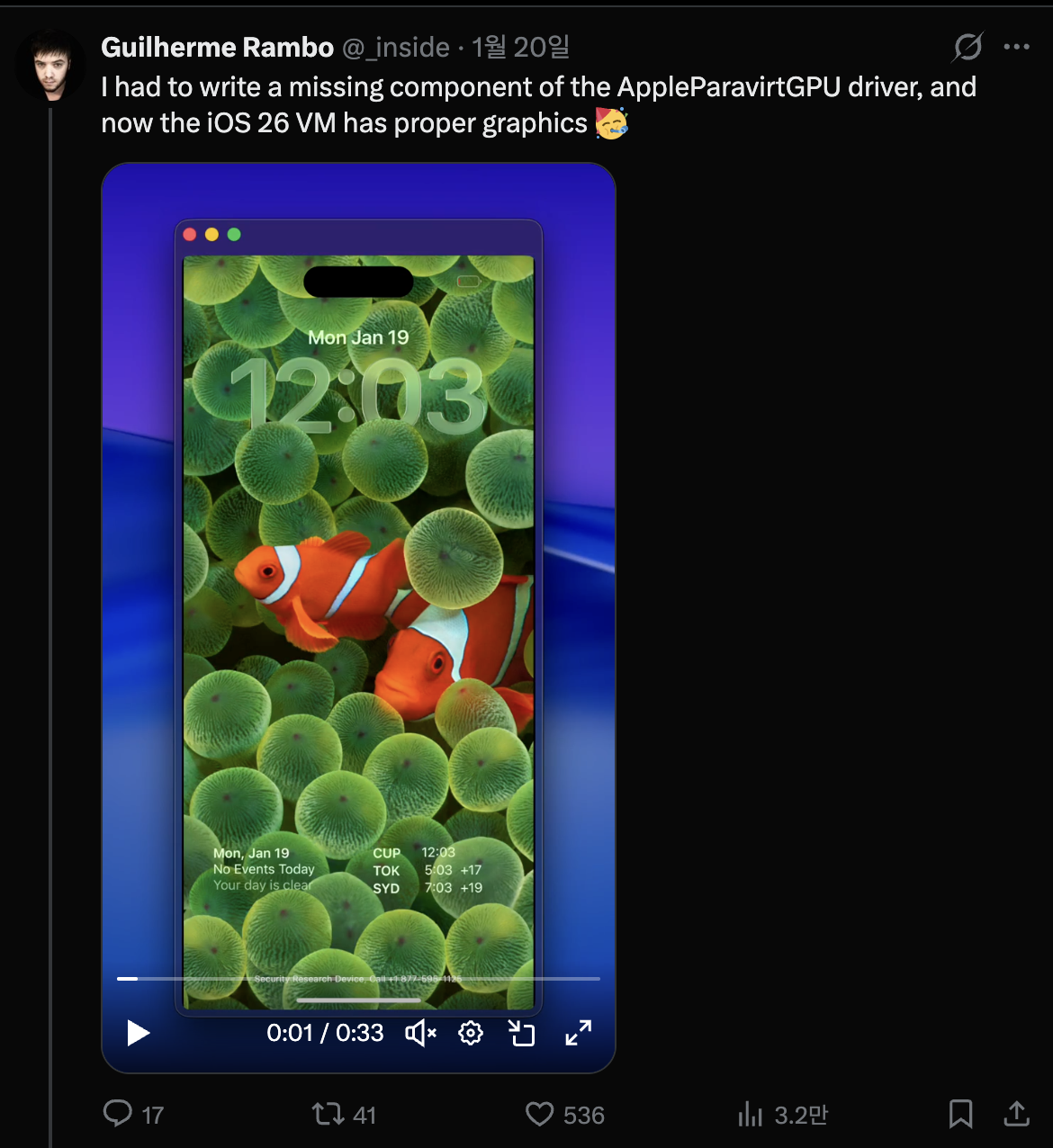
مما رأيته، كان كل شيء يعمل بشكل أنيق حقًا. مقارنة بمشروع QEMUAppleSilicon(Inferno) الذي رأيته سابقًا، فإنه يعمل بسرعة وسلاسة أكبر. علاوة على ذلك، بدا أنه يدعم تسريع Metal. في النهاية، كنت مفتونًا به تمامًا، وبدأت في بناء iPhone الافتراضي الخاص بي في 31 يناير.

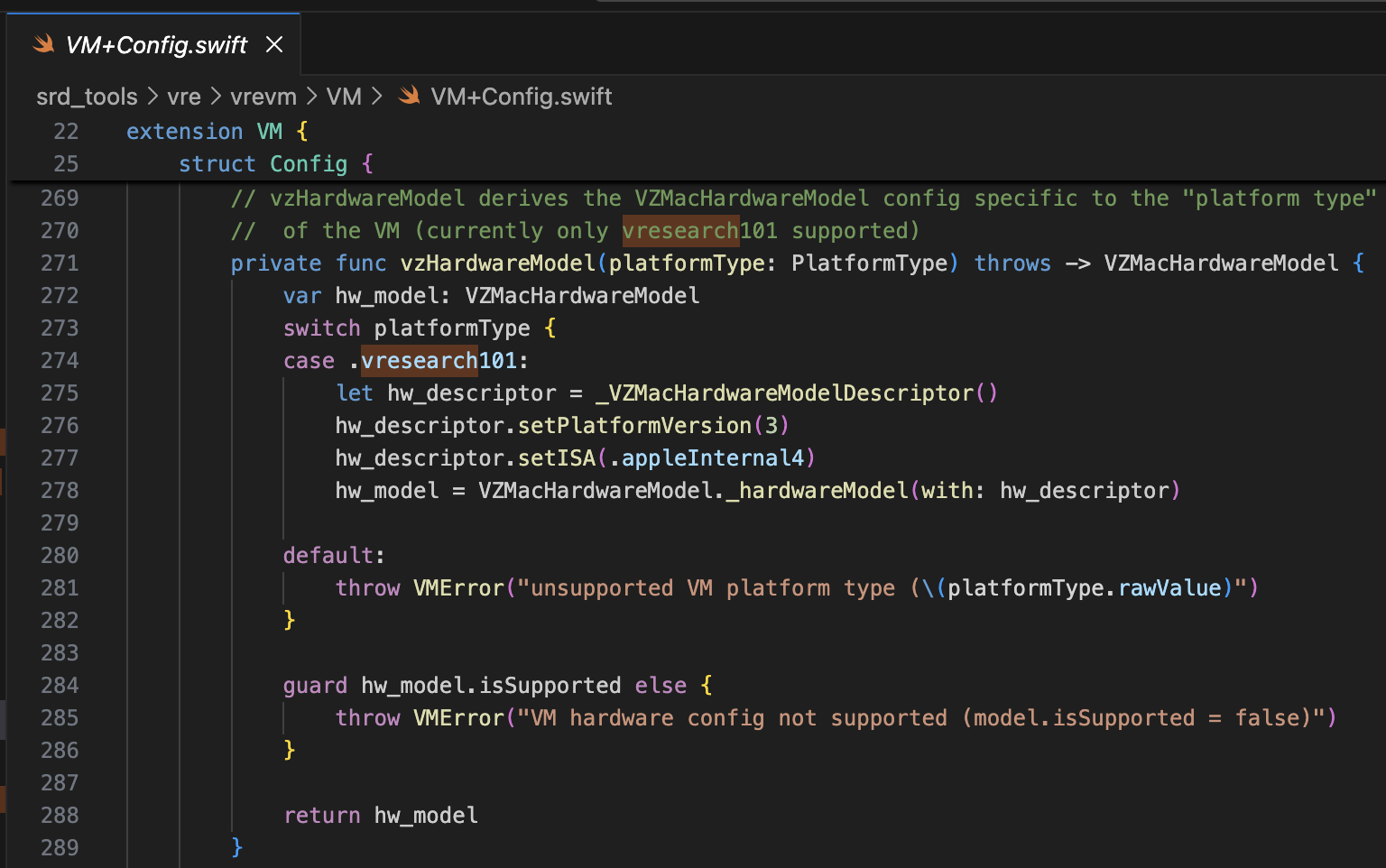
المشروع المرجعي هو security-pcc. إنه يتوافق مع الكود المصدري للثنائي /System/Library/SecurityResearch/usr/bin/vrevm. نقطة مثيرة للاهتمام هي أنه يستخدم طرقًا خاصة يوفرها إطار Virtualization.framework. في الآلة الافتراضية المستخدمة لأبحاث PCC، يمكنك رؤية أن ISA و PlatformVersion يتم تحديدهما صراحةً أثناء عملية تهيئة نموذج الأجهزة.
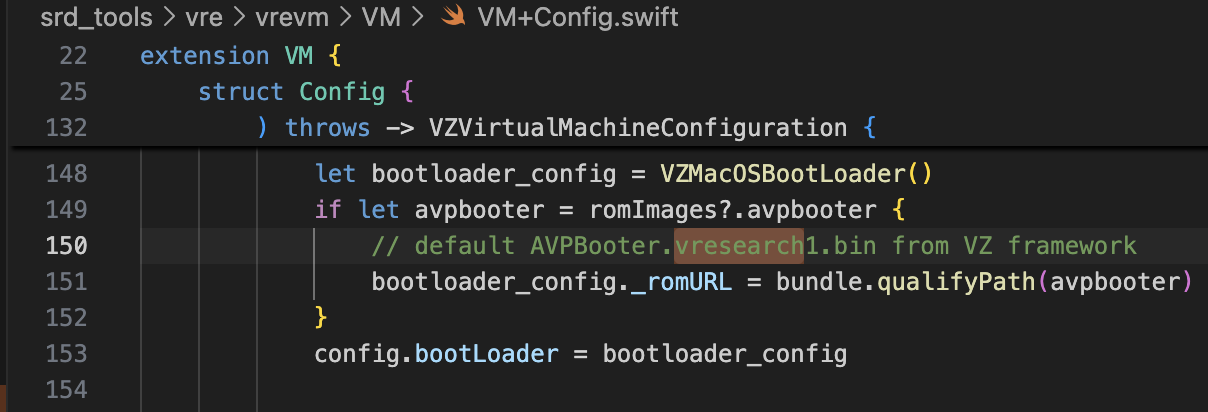
بالنسبة للـ bootrom، يتم استخدام AVPBooter.vresearch1.bin (/System/Library/Frameworks/Virtualization.framework/Resources/AVPBooter.vresearch1.bin)
وبالنسبة للـ SEPROM (avpsepbooter)، يتم استخدام AVPSEPBooter.vresearch1.bin، والذي يقوم بتحميل ملف SEPStorage بشكل منفصل يعمل بشكل مشابه لـ AuxiliaryStorage. (/System/Library/Frameworks/Virtualization.framework/Versions/A/Resources/AVPSEPBooter.vresearch1.bin)
نقطة أخرى مثيرة للاهتمام هي أنه إذا نظرت إلى كود ضبط الدقة، فهي مضبوطة على 1290x2796، وهو ما يتوافق مع أجهزة iPhone 14 Pro Max و15 Plus و15 Pro Max و16 Plus.
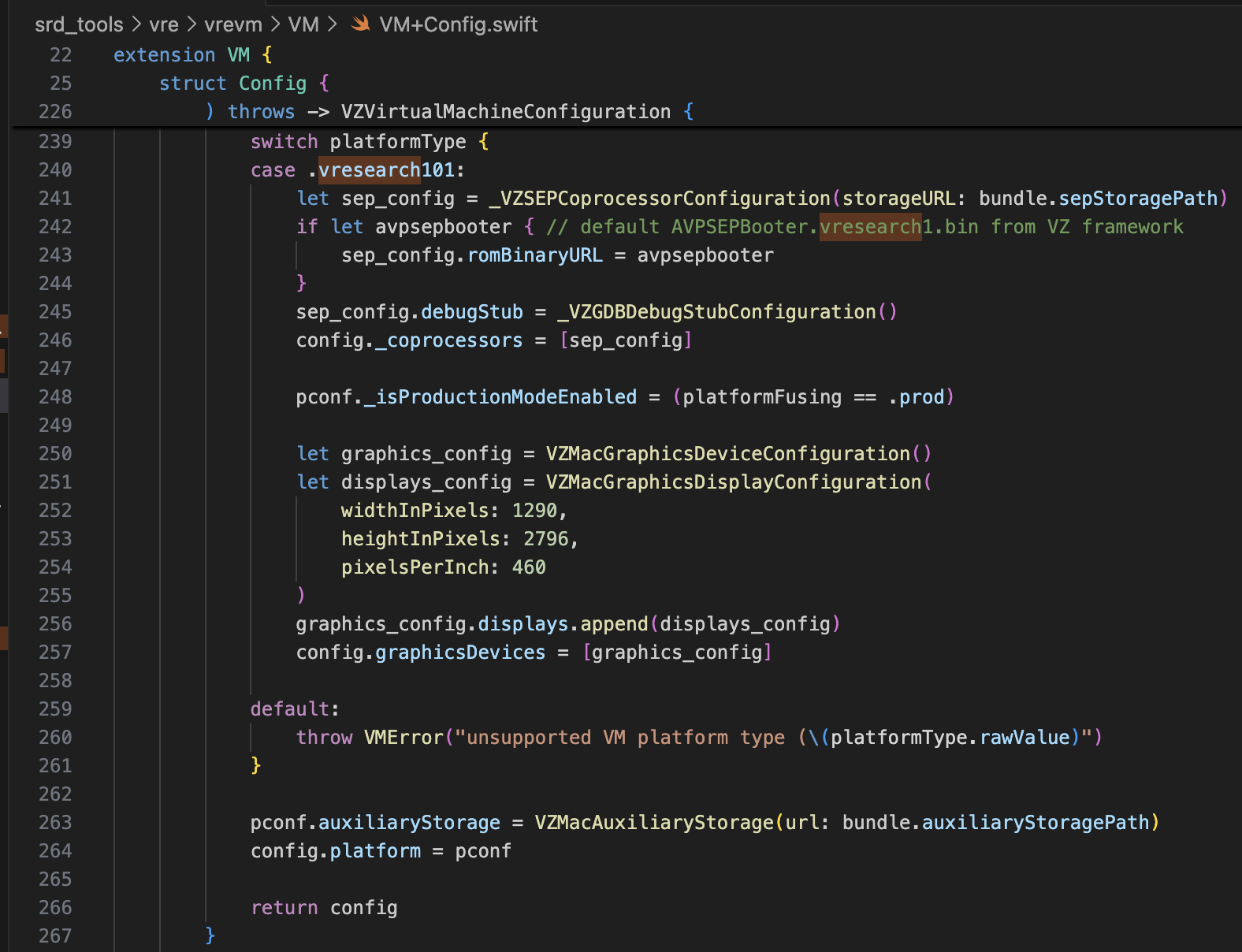
بهذه المعلومات فقط، يجب أن تكون كافية لتعديل super-tart لإقلاع iPhone الافتراضي. لقد أجريت التعديلات كما هو موضح أدناه.
/Sources/tart/VM.swift```swift ... class VM: NSObject, VZVirtualMachineDelegate, ObservableObject { ... // vzHardwareModel derives the VZMacHardwareModel config specific to the "platform type" // of the VM (currently only vresearch101 supported) static private func vzHardwareModel_VRESEARCH101() throws -> VZMacHardwareModel { var hw_model: VZMacHardwareModel
guard let hw_descriptor = _VZMacHardwareModelDescriptor() else { fatalError("Failed to create hardware descriptor") } hw_descriptor.setPlatformVersion(3) // .appleInternal4 = 3 hw_descriptor.setBoardID(0x90) hw_descriptor.setISA(2) hw_model = VZMacHardwareModel._hardwareModel(withDescriptor: hw_descriptor)
guard hw_model.isSupported else { fatalError("VM hardware config not supported (model.isSupported = false)") }
return hw_model }
static func craftConfiguration( diskURL: URL, nvramURL: URL, romURL: URL, sepromURL: URL? = nil, vmConfig: VMConfig, network: Network = NetworkShared(), additionalStorageDevices: [VZStorageDeviceConfiguration], directorySharingDevices: [VZDirectorySharingDeviceConfiguration], serialPorts: [VZSerialPortConfiguration], suspendable: Bool = false, nested: Bool = false, audio: Bool = true, clipboard: Bool = true, sync: VZDiskImageSynchronizationMode = .full, caching: VZDiskImageCachingMode? = nil ) throws -> VZVirtualMachineConfiguration { let configuration: VZVirtualMachineConfiguration = .init()
// Boot loader let bootloader = try vmConfig.platform.bootLoader(nvramURL: nvramURL) Dynamic(bootloader)._setROMURL(romURL) configuration.bootLoader = bootloader
// SEP ROM let homeURL = FileManager.default.homeDirectoryForCurrentUser var sepstoragePath = homeURL.appendingPathComponent(".tart/vms/vphone/SEPStorage").path let sepstorageURL = URL(fileURLWithPath: sepstoragePath) let sep_config = Dynamic._VZSEPCoprocessorConfiguration(storageURL: sepstorageURL) if let sepromURL { // default AVPSEPBooter.vresearch1.bin from VZ framework sep_config.romBinaryURL = sepromURL } sep_config.debugStub = Dynamic._VZGDBDebugStubConfiguration(port: 8001) configuration._setCoprocessors([sep_config.asObject])
// Some vresearch101 config let pconf = VZMacPlatformConfiguration() pconf.hardwareModel = try vzHardwareModel_VRESEARCH101()
let serial = Dynamic._VZMacSerialNumber.initWithString("AAAAAA1337") let identifier = Dynamic.VZMacMachineIdentifier._machineIdentifierWithECID(0x1111111111111111, serialNumber: serial.asObject) pconf.machineIdentifier = identifier.asObject as! VZMacMachineIdentifier
pconf._setProductionModeEnabled(true) var auxiliaryStoragePath = homeURL.appendingPathComponent(".tart/vms/vphone/nvram.bin").path let auxiliaryStorageURL = URL(fileURLWithPath: auxiliaryStoragePath) pconf.auxiliaryStorage = VZMacAuxiliaryStorage(url: auxiliaryStorageURL)
if #available(macOS 14, *) { let keyboard = VZUSBKeyboardConfiguration() configuration.keyboards = [keyboard] }
if #available(macOS 14, *) { let touch = _VZUSBTouchScreenConfiguration() configuration._setMultiTouchDevices([touch]) } ... configuration.platform = pconf
# تعديل البرامج الثابتة
المشروع المشار إليه هو [vma2pwn](https://github.com/nick-botticelli/vma2pwn). وتحديدًا للإصدار 12.0.1، يقوم بتشغيل جهاز Mac افتراضي مع تعديل سلسلة الإقلاع بالكامل تقريبًا.
لننظر أولاً إلى السكربت [prepare.sh](https://github.com/nick-botticelli/vma2pwn/blob/main/prepare.sh). يقوم باستخراج مكونات البرامج الثابتة، مثل محمل الإقلاع والنواة المضغوطة بتنسيق IM4P، إلى تنسيق RAW ويقوم بتصحيح التعليمات/البيانات في عناوين محددة مشفرة. RestoreRamdisk هو نظام الملفات الجذري المستخدم عند استعادة البرامج الثابتة، وAVPBooter هو BootROM المستخدم في الجهاز الافتراضي.
باختصار، يقوم باستخراج الملفات الفردية المضمنة في البرامج الثابتة ويقوم بتصحيح فحوصات السلامة للسماح باستعادة البرامج الثابتة المخصصة، أو يعدل معلمات boot-args لتسهيل عرض سجلات الإقلاع.
أخيرًا، [vma2pwn.sh](https://github.com/nick-botticelli/vma2pwn/blob/main/vma2pwn.sh) مسؤول عن استعادة البرامج الثابتة المخصصة. ويقوم بذلك عن طريق الدخول في وضع DFU مسبقًا. هنا، يستخدم الجهاز الافتراضي شيئًا يسمى super-tart. هذه نسخة من الجهاز الافتراضي tart الحالي مع ميزات إضافية مثل bootrom مخصص، وإخراج تسلسلي، ووضع DFU، وتصحيح GDB. (لاحظ أنه يجب تعطيل SIP/AMFI لكي يعمل هذا.)
لقد استخدمته بشكل مفيد مؤخرًا أثناء [دراسة ثغرات XNU kernel من نوع 1-day (CVE-2021-30937, CVE-2021-30955)](https://github.com/wh1te4ever/xnu_1day_practice). إنه رائع لأنه يدعم تصحيح النواة المباشر.
## بناء البرامج الثابتة المخصصة
لقد قمت بخلط مكونات cloudOS 26.1 (23B85) و iOS 26.1 (iPhone17,3; 23B85)، اه،،، لكن... لا أتذكر التفاصيل الدقيقة. على وجه الدقة، كان علي أن أخلط بشكل صحيح مكونات iPhone 16 والمكونات المتعلقة بـ vphone لإنشاء البرامج الثابتة المخصصة، لكني نسيت بالضبط أي منها قمت بخلطها. على حد ما أتذكر:
- BuildManifest.plist:
قمت بتعديل عناصر القاموس تحت مفتاح Manifest. قمت بتكوينه بحيث يتم استخدام SystemVolume و SystemVolumeCanonicalMetadata و OS و StaticTrustCache و RestoreTrustCache و RestoreRamDisk من طراز iPhone 16 (iOS 26.1) أثناء عملية الاستعادة. تم إعداد الباقي لاستخدام الملفات المتعلقة بـ vphone من البرامج الثابتة PCC.
- Restore.plist:
أعتقد أنني أضفت خصائص متعلقة بـ DeviceMap أو SupportedProductTypes، أو غيرت عنصر SystemRestoreImageFileSystems.
الملفات أدناه هي النتيجة النهائية لمزيجي.
[Restore.plist](https://github.com/wh1te4ever/super-tart-vphone-writeup/blob/HEAD/contents/Restore.plist)
[BuildManifest.plist](https://github.com/wh1te4ever/super-tart-vphone-writeup/blob/HEAD/contents/BuildManifest.plist)
- get_fw.py (Partial)```python
...
# 3. Import things from cloudOS
# kernelcache
os.system("cp 399b664dd623358c3de118ffc114e42dcd51c9309e751d43bc949b98f4e31349_extracted/kernelcache.* iPhone17,3_26.1_23B85_Restore")
# agx, all_flash, ane, dfu, pmp...
os.system("cp 399b664dd623358c3de118ffc114e42dcd51c9309e751d43bc949b98f4e31349_extracted/Firmware/agx/* iPhone17,3_26.1_23B85_Restore/Firmware/agx")
os.system("cp 399b664dd623358c3de118ffc114e42dcd51c9309e751d43bc949b98f4e31349_extracted/Firmware/all_flash/* iPhone17,3_26.1_23B85_Restore/Firmware/all_flash")
os.system("cp 399b664dd623358c3de118ffc114e42dcd51c9309e751d43bc949b98f4e31349_extracted/Firmware/ane/* iPhone17,3_26.1_23B85_Restore/Firmware/ane")
os.system("cp 399b664dd623358c3de118ffc114e42dcd51c9309e751d43bc949b98f4e31349_extracted/Firmware/dfu/* iPhone17,3_26.1_23B85_Restore/Firmware/dfu")
os.system("cp 399b664dd623358c3de118ffc114e42dcd51c9309e751d43bc949b98f4e31349_extracted/Firmware/pmp/* iPhone17,3_26.1_23B85_Restore/Firmware/pmp")
# sptm, txm, etc...
os.system("cp 399b664dd623358c3de118ffc114e42dcd51c9309e751d43bc949b98f4e31349_extracted/Firmware/*.im4p iPhone17,3_26.1_23B85_Restore/Firmware")
# 4. TODO: parse what things needed from BuildManifest.plist, Restore.plist in cloudOS 26.1
# It will be really complicated, so import things from already parse completed
os.system("sudo cp custom_26.1/BuildManifest.plist iPhone17,3_26.1_23B85_Restore")
os.system("sudo cp custom_26.1/Restore.plist iPhone17,3_26.1_23B85_Restore")
os.system("echo 'Done, grabbed all needed components for restoring'")
لقد رجعت إلى ذلك المنشور. يجب عليك تصحيح image4_validate_property_callback من أجل تحميل أداة الإقلاع المخصصة بعد ذلك. ما عليك سوى استخدام ميزة "البحث عن النص (بطيء!)" في IDA Pro للبحث عن "0x4447"، وتصحيح خاتمة الدالة المقابلة لجعلها ترجع دائمًا 0.

قبل استعادة البرنامج الثابت، كانت هناك حاجة إلى بعض التعديلات لدعم نموذج vresearch101ap. بمجرد البناء، يصبح من الممكن استعادة البرنامج الثابت باستخدام أداة idevicerestore.
https://github.com/wh1te4ever/libirecovery

على غرار AVPBooter، تم تصحيح أدوات الإقلاع المستخدمة للاستعادة، iBSS و iBEC، لتجاوز التحقق من التوقيع. كما قمت بتمكين إخراج سجل المنفذ التسلسلي بحيث إذا كانت هناك أي مشكلات في الإقلاع، يمكن تحديد السبب فورًا.
كما سترى لاحقًا، مطلوب تجاوز التحقق من نظام الحجم الموقع (SSV) لتحميل Cryptex عشوائي. يتم ذلك في LLB، الذي يتم تحميله عند الإقلاع في الوضع العادي بدلاً من وضع DFU، ويتم التحقق أيضًا أحيانًا في النواة.
بالإضافة إلى ذلك، قمت بتصحيح TXM بحيث حتى إذا لم يتم تسجيل ملف ثنائي/مكتبة في Trustcache، يتم التعرف عليها كما لو كانت مسجلة.
patch(0x9D10, 0xd503201f) #nop patch(0x9D14, 0xd2800000) #mov x0, #0
patch(0x122d4, 0xd0000082) #adrp x2, #0x12000 patch(0x122d8, 0x9101c042) #add x2, x2, #0x70 patch(0x24070, "serial=3 -v debug=0x2014e %s")
patch(0xA0D8, 0xd503201f) #nop patch(0xA0DC, 0xd2800000) #mov x0, #0
patch(0x12888, 0xD0000082) #adrp x2, #0x12000 patch(0x1288C, 0x91264042) #add x2, x2, #0x990 patch(0x24990, "serial=3 -v debug=0x2014e %s")
patch(0x2BFE8, 0x1400000b) patch(0x2bca0, 0xd503201f) patch(0x2C03C, 0x17ffff6a) patch(0x2fcec, 0xd503201f) patch(0x2FEE8, 0x14000009)
patch(0x1AEE4, 0xd503201f) #nop
patch(0x2c1f8, 0xd2800000) #FFFFFFF0170301F8 patch(0x2bef4, 0xd2800000) #FFFFFFF01702FEF4 patch(0x2c060, 0xd2800000) #FFFFFFF017030060
patch(0x2476964, 0xd503201f) #FFFFFE000947A964
patch(0x23cfde4, 0xd503201f) #FFFFFE00093D3DE4
patch(0xf6d960, 0xd503201f) #FFFFFE0007F71960 ...
بعد التحويل إلى تنسيق RAW وتصحيحه، تحتاج إلى تحويله مرة أخرى إلى IM4P.
في حالة kernel أو TXM، يوجد هيكل PAYP، لذلك كان من الضروري الحفاظ على هذا الهيكل.
فيما يلي الكود الذي يحول IM4P → RAW → IM4P باستخدام أداة [pyimg4](https://pypi.org/project/pyimg4/)، و[img4tool](https://github.com/tihmstar/img4tool)، و[img4](https://github.com/xerub/img4lib).
- patch_fw.py (محتوى جزئي، الجزء 2)```python
...
# Patch iBSS
if not os.path.exists("iPhone17,3_26.1_23B85_Restore/Firmware/dfu/iBSS.vresearch101.RELEASE.im4p.bak"):
os.system("cp iPhone17,3_26.1_23B85_Restore/Firmware/dfu/iBSS.vresearch101.RELEASE.im4p iPhone17,3_26.1_23B85_Restore/Firmware/dfu/iBSS.vresearch101.RELEASE.im4p.bak")
os.system("tools/img4 -i iPhone17,3_26.1_23B85_Restore/Firmware/dfu/iBSS.vresearch101.RELEASE.im4p.bak -o iBSS.vresearch101.RELEASE")
... # patch things from raw
os.system("tools/img4tool -c iPhone17,3_26.1_23B85_Restore/Firmware/dfu/iBSS.vresearch101.RELEASE.im4p -t ibss iBSS.vresearch101.RELEASE")
# Patch iBEC
if not os.path.exists("iPhone17,3_26.1_23B85_Restore/Firmware/dfu/iBEC.vresearch101.RELEASE.im4p.bak"):
os.system("cp iPhone17,3_26.1_23B85_Restore/Firmware/dfu/iBEC.vresearch101.RELEASE.im4p iPhone17,3_26.1_23B85_Restore/Firmware/dfu/iBEC.vresearch101.RELEASE.im4p.bak")
os.system("tools/img4 -i iPhone17,3_26.1_23B85_Restore/Firmware/dfu/iBEC.vresearch101.RELEASE.im4p.bak -o iBEC.vresearch101.RELEASE")
... # patch things from raw
os.system("tools/img4tool -c iPhone17,3_26.1_23B85_Restore/Firmware/dfu/iBEC.vresearch101.RELEASE.im4p -t ibec iBEC.vresearch101.RELEASE")
# Patch LLB
if not os.path.exists("iPhone17,3_26.1_23B85_Restore/Firmware/all_flash/LLB.vresearch101.RESEARCH_RELEASE.im4p.bak"):
os.system("cp iPhone17,3_26.1_23B85_Restore/Firmware/all_flash/LLB.vresearch101.RESEARCH_RELEASE.im4p iPhone17,3_26.1_23B85_Restore/Firmware/all_flash/LLB.vresearch101.RESEARCH_RELEASE.im4p.bak")
os.system("tools/img4 -i iPhone17,3_26.1_23B85_Restore/Firmware/all_flash/LLB.vresearch101.RESEARCH_RELEASE.im4p.bak -o LLB.vresearch101.RESEARCH_RELEASE")
... # patch things from raw
os.system("tools/img4tool -c iPhone17,3_26.1_23B85_Restore/Firmware/all_flash/LLB.vresearch101.RESEARCH_RELEASE.im4p -t illb LLB.vresearch101.RESEARCH_RELEASE")
# 6. Grab & Patch TXM
if not os.path.exists("iPhone17,3_26.1_23B85_Restore/Firmware/txm.iphoneos.research.im4p.bak"):
os.system("cp iPhone17,3_26.1_23B85_Restore/Firmware/txm.iphoneos.research.im4p iPhone17,3_26.1_23B85_Restore/Firmware/txm.iphoneos.research.im4p.bak")
os.system("pyimg4 im4p extract -i iPhone17,3_26.1_23B85_Restore/Firmware/txm.iphoneos.research.im4p.bak -o txm.raw")
... # patch things from raw
#create im4p
os.system("pyimg4 im4p create -i txm.raw -o txm.im4p -f trxm --lzfse")
# preserve payp structure
txm_im4p_data = Path('iPhone17,3_26.1_23B85_Restore/Firmware/txm.iphoneos.research.im4p.bak').read_bytes()
payp_offset = txm_im4p_data.rfind(b'PAYP')
if payp_offset == -1:
print("Couldn't find payp structure !!!")
sys.exit()
with open('txm.im4p', 'ab') as f:
f.write(txm_im4p_data[(payp_offset-10):])
payp_sz = len(txm_im4p_data[(payp_offset-10):])
print(f"payp sz: {payp_sz}")
txm_im4p_data = bytearray(open('txm.im4p', 'rb').read())
txm_im4p_data[2:5] = (int.from_bytes(txm_im4p_data[2:5], 'big') + payp_sz).to_bytes(3, 'big')
open('txm.im4p', 'wb').write(txm_im4p_data)
os.system("mv txm.im4p iPhone17,3_26.1_23B85_Restore/Firmware/txm.iphoneos.research.im4p")
# 7. Grab & patch kernelcache
if not os.path.exists("iPhone17,3_26.1_23B85_Restore/kernelcache.research.vphone600.bak"):
os.system("cp iPhone17,3_26.1_23B85_Restore/kernelcache.research.vphone600 iPhone17,3_26.1_23B85_Restore/kernelcache.research.vphone600.bak")
os.system("pyimg4 im4p extract -i iPhone17,3_26.1_23B85_Restore/kernelcache.research.vphone600.bak -o kcache.raw")
... # patch things from raw
#create im4p
os.system("pyimg4 im4p create -i kcache.raw -o krnl.im4p -f krnl --lzfse")
# preserve payp structure
kernel_im4p_data = Path('iPhone17,3_26.1_23B85_Restore/kernelcache.research.vphone600.bak').read_bytes()
payp_offset = kernel_im4p_data.rfind(b'PAYP')
if payp_offset == -1:
print("Couldn't find payp structure !!!")
sys.exit()
with open('krnl.im4p', 'ab') as f:
f.write(kernel_im4p_data[(payp_offset-10):])
payp_sz = len(kernel_im4p_data[(payp_offset-10):])
print(f"payp sz: {payp_sz}")
kernel_im4p_data = bytearray(open('krnl.im4p', 'rb').read())
kernel_im4p_data[2:5] = (int.from_bytes(kernel_im4p_data[2:5], 'big') + payp_sz).to_bytes(3, 'big')
open('krnl.im4p', 'wb').write(kernel_im4p_data)
os.system("mv krnl.im4p iPhone17,3_26.1_23B85_Restore/kernelcache.research.vphone600")
...
بمجرد أن يصبح كل شيء جاهزًا، دعنا نضع الجهاز الافتراضي في وضع DFU ونحاول استعادته.
أدناه لقطة شاشة للـ panic الذي يحدث إذا لم يتم تكوين SEP بشكل صحيح. إذا قمت بإعداده بشكل صحيح، فيجب أن يتجاوز هذه النقطة دون أي مشاكل.

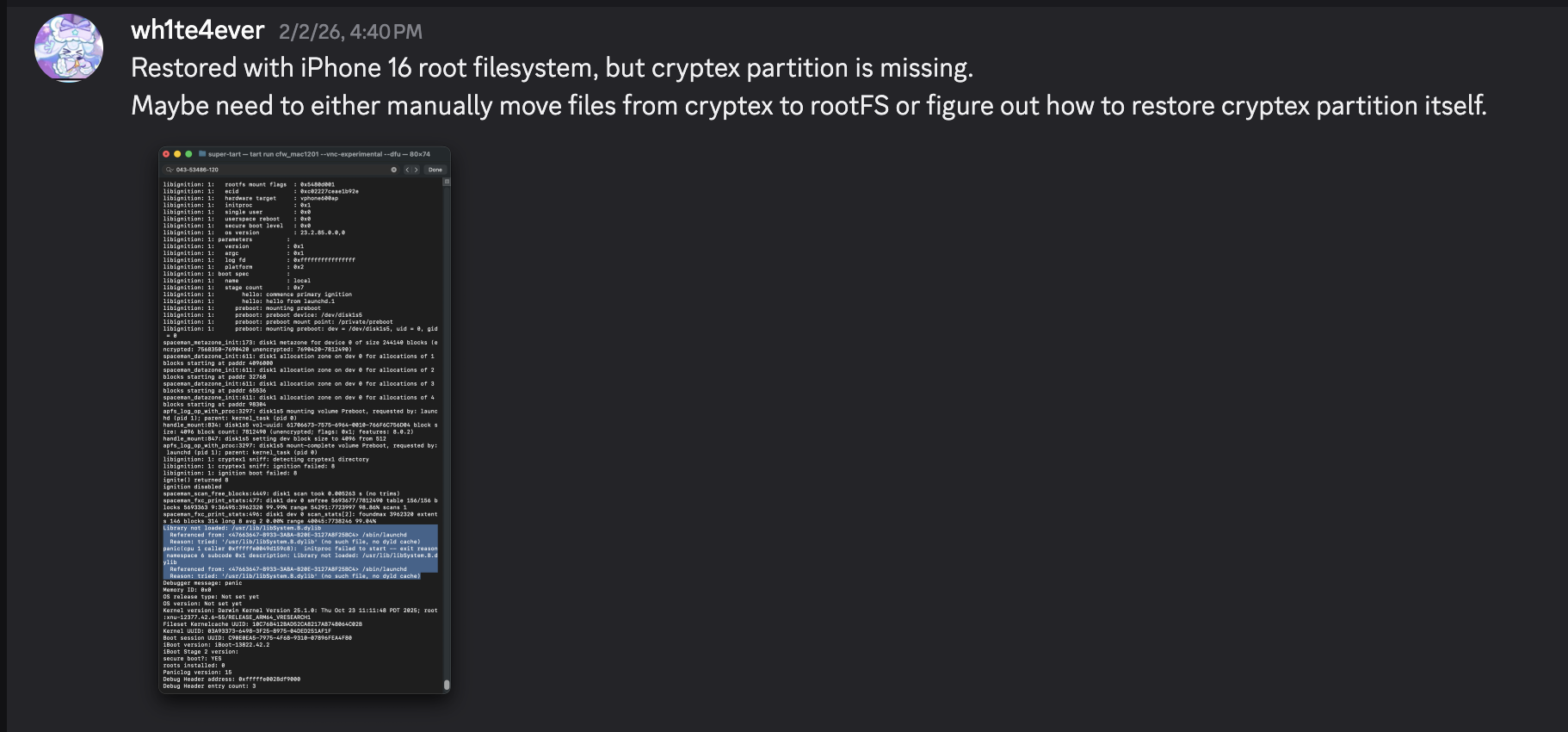
بعد اكتمال الاستعادة، يعاد تشغيله تلقائيًا. ومع ذلك، يحدث panic في عملية launchd لأن المكتبة /usr/lib/libSystem.B.dylib مفقودة. توجد هذه المكتبة داخل dyld_shared_cache على قسم Cryptex، ولسبب ما، تعذر استعادة قسم Cryptex. كحل مؤقت، يجب عليك إنشاء SSH Ramdisk لتعديل نظام الملفات الجذر وحقن الملفات الضرورية. وهذا هو بالضبط سبب الحاجة إلى التصحيح المتعلق بالتحقق من SSV.


سأحاول إصلاح مشكلة فشل الإقلاع باستخدام الـ ramdisk المستخدم في https://github.com/verygenericname/SSHRD_Script.
لرفع وتحميل مكونات مثل bootloader أو kernel باستخدام أداة irecovery في وضع DFU، يلزم وجود صورة IMG4، والتي تتطلب ملف IM4M. لذلك، قمت أولاً بجلب ملف shsh باستخدام أداة idevicerestore، ثم قمت بتحويله إلى ملف IM4M.```bash idevicerestore -e -y ./iPhone17,3_26.1_23B85_Restore -t
mv shsh/[ECID]-iPhone99,11-26.1.shsh shsh/[ECID]-iPhone99,11-26.1.shsh.gz
gunzip shsh/[ECID]-iPhone99,11-26.1.shsh.gz
...
pyimg4 im4m extract -i shsh/[ECID]-iPhone99,11-26.1.shsh -o vphone.im4m
بعد ذلك، باستخدام ملف IM4M ذلك، قمت بإنشاء عدة ملفات IMG4 لكل من مكونات البرامج الثابتة المستخدمة، مثل iBSS و iBEC وشجرة الأجهزة.```python
# 1. Grab & Patch iBSS
if not os.path.exists("iPhone17\\,3_26.1_23B85_Restore/Firmware/dfu/iBSS.vresearch101.RELEASE.im4p.bak"):
os.system("cp iPhone17\\,3_26.1_23B85_Restore/Firmware/dfu/iBSS.vresearch101.RELEASE.im4p iPhone17\\,3_26.1_23B85_Restore/Firmware/dfu/iBSS.vresearch101.RELEASE.im4p.bak")
os.system("tools/img4 -i iPhone17\\,3_26.1_23B85_Restore/Firmware/dfu/iBSS.vresearch101.RELEASE.im4p.bak -o iBSS.vresearch101.RELEASE")
... # patch things from raw
os.system("tools/img4tool -c iBSS.vresearch101.RELEASE.im4p -t ibss iBSS.vresearch101.RELEASE")
os.system("tools/img4 -i iBSS.vresearch101.RELEASE.im4p -o ./Ramdisk/iBSS.vresearch101.RELEASE.img4 -M ./vphone.im4m")
# 2. Grab & Patch iBEC
if not os.path.exists("iPhone17\\,3_26.1_23B85_Restore/Firmware/dfu/iBEC.vresearch101.RELEASE.im4p.bak"):
os.system("cp iPhone17\\,3_26.1_23B85_Restore/Firmware/dfu/iBEC.vresearch101.RELEASE.im4p iPhone17\\,3_26.1_23B85_Restore/Firmware/dfu/iBEC.vresearch101.RELEASE.im4p.bak")
os.system("tools/img4 -i iPhone17\\,3_26.1_23B85_Restore/Firmware/dfu/iBEC.vresearch101.RELEASE.im4p -o iBEC.vresearch101.RELEASE")
... # patch things from raw
os.system("tools/img4tool -c iBEC.vresearch101.RELEASE.im4p -t ibec iBEC.vresearch101.RELEASE")
os.system("tools/img4 -i iBEC.vresearch101.RELEASE.im4p -o Ramdisk/iBEC.vresearch101.RELEASE.img4 -M vphone.im4m")
# 3. Grab SPTM
os.system("tools/img4 -i iPhone17\\,3_26.1_23B85_Restore/Firmware/sptm.vresearch1.release.im4p -o Ramdisk/sptm.vresearch1.release.img4 -M vphone.im4m -T sptm")
# 4. Grab devicetree
os.system("tools/img4 -i iPhone17\\,3_26.1_23B85_Restore/Firmware/all_flash/DeviceTree.vphone600ap.im4p -o Ramdisk/DeviceTree.vphone600ap.img4 -M vphone.im4m -T rdtr")
# 5. Grab sep
os.system("tools/img4 -i iPhone17\\,3_26.1_23B85_Restore/Firmware/all_flash/sep-firmware.vresearch101.RELEASE.im4p -o Ramdisk/sep-firmware.vresearch101.RELEASE.img4 -M vphone.im4m -T rsep")
# 6. Grab & Patch TXM
if not os.path.exists("iPhone17\\,3_26.1_23B85_Restore/Firmware/txm.iphoneos.release.im4p.bak"):
os.system("cp iPhone17\\,3_26.1_23B85_Restore/Firmware/txm.iphoneos.release.im4p iPhone17\\,3_26.1_23B85_Restore/Firmware/txm.iphoneos.release.im4p.bak")
os.system("pyimg4 im4p extract -i iPhone17\\,3_26.1_23B85_Restore/Firmware/txm.iphoneos.release.im4p.bak -o txm.raw")
... # patch things from raw
#create im4p
os.system("pyimg4 im4p create -i txm.raw -o txm.im4p -f trxm --lzfse")
# preserve payp structure
txm_im4p_data = Path('iPhone17,3_26.1_23B85_Restore/Firmware/txm.iphoneos.release.im4p.bak').read_bytes()
payp_offset = txm_im4p_data.rfind(b'PAYP')
if payp_offset == -1:
print("Couldn't find payp structure !!!")
sys.exit()
with open('txm.im4p', 'ab') as f:
f.write(txm_im4p_data[(payp_offset-10):])
payp_sz = len(txm_im4p_data[(payp_offset-10):])
print(f"payp sz: {payp_sz}")
txm_im4p_data = bytearray(open('txm.im4p', 'rb').read())
txm_im4p_data[2:5] = (int.from_bytes(txm_im4p_data[2:5], 'big') + payp_sz).to_bytes(3, 'big')
open('txm.im4p', 'wb').write(txm_im4p_data)
# sign
os.system("pyimg4 img4 create -p txm.im4p -o Ramdisk/txm.img4 -m vphone.im4m")
# 7. Grab & patch kernelcache
if not os.path.exists("iPhone17\\,3_26.1_23B85_Restore/kernelcache.research.vphone600.bak"):
os.system("cp iPhone17\\,3_26.1_23B85_Restore/kernelcache.research.vphone600 iPhone17\\,3_26.1_23B85_Restore/kernelcache.research.vphone600.bak")
os.system("pyimg4 im4p extract -i iPhone17\\,3_26.1_23B85_Restore/kernelcache.research.vphone600.bak -o kcache.raw")
... # patch things from raw
#create im4p
os.system("pyimg4 im4p create -i kcache.raw -o krnl.im4p -f rkrn --lzfse")
# preserve payp structure
kernel_im4p_data = Path('iPhone17,3_26.1_23B85_Restore/kernelcache.research.vphone600.bak').read_bytes()
payp_offset = kernel_im4p_data.rfind(b'PAYP')
if payp_offset == -1:
print("Couldn't find payp structure !!!")
sys.exit()
with open('krnl.im4p', 'ab') as f:
f.write(kernel_im4p_data[(payp_offset-10):])
payp_sz = len(kernel_im4p_data[(payp_offset-10):])
print(f"payp sz: {payp_sz}")
kernel_im4p_data = bytearray(open('krnl.im4p', 'rb').read())
kernel_im4p_data[2:5] = (int.from_bytes(kernel_im4p_data[2:5], 'big') + payp_sz).to_bytes(3, 'big')
open('krnl.im4p', 'wb').write(kernel_im4p_data)
# sign
os.system("pyimg4 img4 create -p krnl.im4p -o Ramdisk/krnl.img4 -m vphone.im4m")
# 8. Grab ramdisk & build custom ramdisk
os.system("pyimg4 im4p extract -i iPhone17,3_26.1_23B85_Restore/043-53775-129.dmg -o ramdisk.dmg")
os.system("mkdir SSHRD")
os.system("sudo hdiutil attach -mountpoint SSHRD ramdisk.dmg -owners off")
os.system("sudo hdiutil create -size 254m -imagekey diskimage-class=CRawDiskImage -format UDZO -fs APFS -layout NONE -srcfolder SSHRD -copyuid root ramdisk1.dmg")
os.system("sudo hdiutil detach -force SSHRD")
os.system("sudo hdiutil attach -mountpoint SSHRD ramdisk1.dmg -owners off")
... #remove unneccessary files for expand space
#resign all things preserving ents
target_path= [
"SSHRD/usr/local/bin/*", "SSHRD/usr/local/lib/*",
"SSHRD/usr/bin/*", "SSHRD/bin/*",
"SSHRD/usr/lib/*", "SSHRD/sbin/*", "SSHRD/usr/sbin/*", "SSHRD/usr/libexec/*"
]
for pattern in target_path:
for path in glob.glob(pattern):
if os.path.isfile(path) and not os.path.islink(path):
if "Mach-O" in subprocess.getoutput(f"file \"{path}\""):
os.system(f"tools/ldid_macosx_arm64 -S -M -Cadhoc \"{path}\"")
#8-2. Grab & build custom ramdisk's trustcache while building custom ramdisk
os.system("pyimg4 im4p extract -i iPhone17,3_26.1_23B85_Restore/Firmware/043-53775-129.dmg.trustcache -o trustcache.raw")
os.system("tools/trustcache_macos_arm64 create sshrd.tc SSHRD")
os.system("pyimg4 im4p create -i sshrd.tc -o trustcache.im4p -f rtsc")
# sign
os.system("pyimg4 img4 create -p trustcache.im4p -o Ramdisk/trustcache.img4 -m vphone.im4m")
#8-2. end
os.system("sudo hdiutil detach -force SSHRD")
os.system("sudo hdiutil resize -sectors min ramdisk1.dmg")
# sign
os.system("pyimg4 im4p create -i ramdisk1.dmg -o ramdisk1.dmg.im4p -f rdsk")
os.system("pyimg4 img4 create -p ramdisk1.dmg.im4p -o Ramdisk/ramdisk.img4 -m vphone.im4m")
بعد إنشاء جميع صور IMG4، دعنا نحملها واحدة تلو الأخرى ونقم بالإقلاع باستخدام Ramdisk.
sleep 1; irecovery -f Ramdisk/sptm.vresearch1.release.img4 irecovery -c firmware
irecovery -f Ramdisk/txm.img4 irecovery -c firmware
irecovery -f Ramdisk/trustcache.img4 irecovery -c firmware irecovery -f Ramdisk/ramdisk.img4 irecovery -c ramdisk irecovery -f Ramdisk/DeviceTree.vphone600ap.img4 irecovery -c devicetree irecovery -f Ramdisk/sep-firmware.vresearch101.RELEASE.img4 irecovery -c firmware irecovery -f Ramdisk/krnl.img4 irecovery -c bootx
ثم سترى وجه "Creeper" من لعبة Minecraft في النافذة الثالثة من اليسار، كما هو موضح أدناه.
إذا قمت بفحص قائمة USB في تطبيق "معلومات النظام" ورأيت "iPhone Research..."،
يمكنك الآن الوصول إلى شِل iPhone الافتراضي باستخدام أداة [iproxy](https://github.com/libimobiledevice/libusbmuxd/blob/master/tools/iproxy.c). (`iproxy 2222 22 &`)

لتعديل نظام ملفات الجذر، قم بإعادة تسمية اللقطة.```python
ssh [email protected] -p2222
#pw: alpine
mount_apfs -o rw /dev/disk1s1 /mnt1
snaputil -l /mnt1
# (then will output will be printed with hash, result may be differ)
com.apple.os.update-8AAB8DBA5C8F1F756928411675F4A892087B04559CFB084B9E400E661ABAD119
snaputil -n <com.apple.os.update-hash> orig-fs /mnt1
umount /mnt1
exit
قم بفك تشفير ملف AEA باستخدام أداة ipsw لإنشاء ملف dmg، وقم بتركيبه، ثم انقل الملفات من قسم Cryptex إلى الجهاز الافتراضي. إلى جانب نقل الملفات، كانت هناك حاجة إلى تصحيحات محددة. للراحة، أضفت ثلاث عمليات محددة لبدء التشغيل تلقائيًا: bash، وdropbear، وtrollvnc.
واجه seputil مشكلة حيث لم يتمكن من العثور على ملف gigalocker بشكل صحيح، لذا قمت بتصحيحه ليبحث دائمًا عن AA.gl. علاوة على ذلك، قمت بتصحيح launchd_cache_loader لضمان تحميل الملف المعدل /System/Library/xpc/launchd.plist بشكل صحيح.```python ... ========= INSTALL CRYPTEX(SystemOS, AppOS) =========
key = subprocess.check_output("ipsw fw aea --key iPhone17,3_26.1_23B85_Restore/043-54303-126.dmg.aea", shell=True, text=True).strip() print(f"key: {key}") os.system(f"aea decrypt -i iPhone17,3_26.1_23B85_Restore/043-54303-126.dmg.aea -o CryptexSystemOS.dmg -key-value '{key}'")
os.system(f"cp iPhone17,3_26.1_23B85_Restore/043-54062-129.dmg CryptexAppOS.dmg")
os.system("mkdir CryptexSystemOS") os.system("sudo hdiutil attach -mountpoint CryptexSystemOS CryptexSystemOS.dmg -owners off")
os.system("mkdir CryptexAppOS") os.system("sudo hdiutil attach -mountpoint CryptexAppOS CryptexAppOS.dmg -owners off")
remote_cmd("/sbin/mount_apfs -o rw /dev/disk1s1 /mnt1")
remote_cmd("/bin/rm -rf /mnt1/System/Cryptexes/App") remote_cmd("/bin/rm -rf /mnt1/System/Cryptexes/OS")
remote_cmd("/bin/mkdir -p /mnt1/System/Cryptexes/App") remote_cmd("/bin/chmod 0755 /mnt1/System/Cryptexes/App") remote_cmd("/bin/mkdir -p /mnt1/System/Cryptexes/OS") remote_cmd("/bin/chmod 0755 /mnt1/System/Cryptexes/OS")
print("Copying cryptexs to vphone! Will take about 3 mintues...") os.system("tools/sshpass -p 'alpine' scp -q -r -ostricthostkeychecking=false -ouserknownhostsfile=/dev/null -o StrictHostKeyChecking=no -P 2222 CryptexSystemOS/. '[email protected]:/mnt1/System/Cryptexes/OS'") os.system("tools/sshpass -p 'alpine' scp -q -r -ostricthostkeychecking=false -ouserknownhostsfile=/dev/null -o StrictHostKeyChecking=no -P 2222 CryptexAppOS/. '[email protected]:/mnt1/System/Cryptexes/App'")
remote_cmd("/bin/ln -sf ../../../System/Cryptexes/OS/System/Library/Caches/com.apple.dyld /mnt1/System/Library/Caches/com.apple.dyld")
remote_cmd("/bin/ln -sf ../../../../System/Cryptexes/OS/System/DriverKit/System/Library/dyld /mnt1/System/DriverKit/System/Library/dyld")
os.system("rm custom_26.1/seputil 2>/dev/null") os.system("rm custom_26.1/seputil.bak 2>/dev/null")
file_path = "/mnt1/usr/libexec/seputil.bak" if not check_remote_file_exists(file_path): print(f"Created backup {file_path}") remote_cmd("/bin/cp /mnt1/usr/libexec/seputil /mnt1/usr/libexec/seputil.bak")
os.system("tools/sshpass -p 'alpine' scp -q -o StrictHostKeyChecking=no -o UserKnownHostsFile=/dev/null -P 2222 [email protected]:/mnt1/usr/libexec/seputil.bak ./custom_26.1") os.system("mv custom_26.1/seputil.bak custom_26.1/seputil")
fp = open("custom_26.1/seputil", "r+b") patch(0x1B3F1, "AA") fp.close()
os.system("tools/ldid_macosx_arm64 -S -M -Ksigncert.p12 -Icom.apple.seputil custom_26.1/seputil")
os.system("tools/sshpass -p 'alpine' scp -q -r -ostricthostkeychecking=false -ouserknownhostsfile=/dev/null -o StrictHostKeyChecking=no -P 2222 custom_26.1/seputil '[email protected]:/mnt1/usr/libexec/seputil'") remote_cmd("/bin/chmod 0755 /mnt1/usr/libexec/seputil")
os.system("rm custom_26.1/seputil 2>/dev/null")
remote_cmd("/sbin/mount_apfs -o rw /dev/disk1s3 /mnt3") remote_cmd("/bin/mv /mnt3/*.gl /mnt3/AA.gl")
... # ========= INSTALL AppleParavirtGPUMetalIOGPUFamily =========
os.system("tools/sshpass -p 'alpine' scp -q -r -ostricthostkeychecking=false -ouserknownhostsfile=/dev/null -o StrictHostKeyChecking=no -P 2222 jb/iosbinpack64.tar '[email protected]:/mnt1'")
remote_cmd("/usr/bin/tar --preserve-permissions --no-overwrite-dir -xvf /mnt1/iosbinpack64.tar -C /mnt1") remote_cmd("/bin/rm /mnt1/iosbinpack64.tar")
''' /iosbinpack64/bin/mkdir -p /var/dropbear /iosbinpack64/bin/cp /iosbinpack64/etc/profile /var/profile /iosbinpack64/bin/cp /iosbinpack64/etc/motd /var/motd '''
os.system("rm custom_26.1/launchd_cache_loader 2>/dev/null") os.system("rm custom_26.1/launchd_cache_loader.bak 2>/dev/null")
file_path = "/mnt1/usr/libexec/launchd_cache_loader.bak" if not check_remote_file_exists(file_path): print(f"Created backup {file_path}") remote_cmd("/bin/cp /mnt1/usr/libexec/launchd_cache_loader /mnt1/usr/libexec/launchd_cache_loader.bak")
os.system("tools/sshpass -p 'alpine' scp -q -o StrictHostKeyChecking=no -o UserKnownHostsFile=/dev/null -P 2222 [email protected]:/mnt1/usr/libexec/launchd_cache_loader.bak ./custom_26.1") os.system("mv custom_26.1/launchd_cache_loader.bak custom_26.1/launchd_cache_loader")
fp = open("custom_26.1/launchd_cache_loader", "r+b") patch(0xB58, 0xd503201f) fp.close()
os.system("tools/ldid_macosx_arm64 -S -M -Ksigncert.p12 -Icom.apple.launchd_cache_loader custom_26.1/launchd_cache_loader")
os.system("tools/sshpass -p 'alpine' scp -q -r -ostricthostkeychecking=false -ouserknownhostsfile=/dev/null -o StrictHostKeyChecking=no -P 2222 custom_26.1/launchd_cache_loader '[email protected]:/mnt1/usr/libexec/launchd_cache_loader'") remote_cmd("/bin/chmod 0755 /mnt1/usr/libexec/launchd_cache_loader")
os.system("rm custom_26.1/launchd_cache_loader 2>/dev/null")
os.system("tools/sshpass -p 'alpine' scp -q -r -ostricthostkeychecking=false -ouserknownhostsfile=/dev/null -o StrictHostKeyChecking=no -P 2222 jb/LaunchDaemons/bash.plist '[email protected]:/mnt1/System/Library/LaunchDaemons'") os.system("tools/sshpass -p 'alpine' scp -q -r -ostricthostkeychecking=false -ouserknownhostsfile=/dev/null -o StrictHostKeyChecking=no -P 2222 jb/LaunchDaemons/dropbear.plist '[email protected]:/mnt1/System/Library/LaunchDaemons'") os.system("tools/sshpass -p 'alpine' scp -q -r -ostricthostkeychecking=false -ouserknownhostsfile=/dev/null -o StrictHostKeyChecking=no -P 2222 jb/LaunchDaemons/trollvnc.plist '[email protected]:/mnt1/System/Library/LaunchDaemons'") remote_cmd("/bin/chmod 0644 /mnt1/System/Library/LaunchDaemons/bash.plist") remote_cmd("/bin/chmod 0644 /mnt1/System/Library/LaunchDaemons/dropbear.plist") remote_cmd("/bin/chmod 0644 /mnt1/System/Library/LaunchDaemons/trollvnc.plist")
os.system("rm custom_26.1/launchd.plist 2>/dev/null") os.system("rm custom_26.1/launchd.plist.bak 2>/dev/null")
file_path = "/mnt1/System/Library/xpc/launchd.plist.bak" if not check_remote_file_exists(file_path): print(f"Created backup {file_path}") remote_cmd("/bin/cp /mnt1/System/Library/xpc/launchd.plist /mnt1/System/Library/xpc/launchd.plist.bak")
os.system("tools/sshpass -p 'alpine' scp -q -o StrictHostKeyChecking=no -o UserKnownHostsFile=/dev/null -P 2222 [email protected]:/mnt1/System/Library/xpc/launchd.plist.bak ./custom_26.1") os.system("mv custom_26.1/launchd.plist.bak custom_26.1/launchd.plist")
os.system("plutil -convert xml1 custom_26.1/launchd.plist")
target_file = 'custom_26.1/launchd.plist' source_file = 'jb/LaunchDaemons/bash.plist' insert_key = '/System/Library/LaunchDaemons/bash.plist'
with open(target_file, 'rb') as ft, open(source_file, 'rb') as fs: target_data = plistlib.load(ft) source_data = plistlib.load(fs)
target_data.setdefault('LaunchDaemons', {})[insert_key] = source_data
with open(target_file, 'wb') as f: plistlib.dump(target_data, f, sort_keys=False)
source_file = 'jb/LaunchDaemons/dropbear.plist' insert_key = '/System/Library/LaunchDaemons/dropbear.plist'
with open(target_file, 'rb') as ft, open(source_file, 'rb') as fs: target_data = plistlib.load(ft) source_data = plistlib.load(fs)
target_data.setdefault('LaunchDaemons', {})[insert_key] = source_data
with open(target_file, 'wb') as f: plistlib.dump(target_data, f, sort_keys=False)
source_file = 'jb/LaunchDaemons/trollvnc.plist' insert_key = '/System/Library/LaunchDaemons/trollvnc.plist'
with open(target_file, 'rb') as ft, open(source_file, 'rb') as fs: target_data = plistlib.load(ft) source_data = plistlib.load(fs)
target_data.setdefault('LaunchDaemons', {})[insert_key] = source_data
with open(target_file, 'wb') as f: plistlib.dump(target_data, f, sort_keys=False)
os.system("tools/sshpass -p 'alpine' scp -q -r -ostricthostkeychecking=false -ouserknownhostsfile=/dev/null -o StrictHostKeyChecking=no -P 2222 custom_26.1/launchd.plist '[email protected]:/mnt1/System/Library/xpc'") remote_cmd("/bin/chmod 0644 /mnt1/System/Library/xpc/launchd.plist")
os.system("rm custom_26.1/launchd.plist 2>/dev/null")
... remote_cmd("/sbin/halt") ...
# محاولة الإقلاع الأولى
من المفترض أن تعمل عملية الإقلاع بشكل جيد الآن، ولكن عندما تحاول المتابعة بعد شاشة الإعداد السوداء، فإنها تعيد التشغيل ولن تذهب أبعد من ذلك.


# تنفيذ Metal
عند التحقق باستخدام برنامج مخصص يسمى MetalTest، يظهر أن Metal غير مدعوم.```python
#import <stdio.h>
#import <Metal/Metal.h>
#import <Foundation/Foundation.h>
int main(int argc, char *argv[], char *envp[]) {
id<MTLDevice> device = MTLCreateSystemDefaultDevice();
NSLog(@"device: %@", device);
if (device) {
NSLog(@"Metal Device Create Success: %@", [device name]);
} else {
NSLog(@"Metal Not Supported!");
}
return 0;
}
عادةً، كان يجب أن يبدو الناتج مثل النتيجة أدناه.```python
seo@seos-Virtual-Machine Desktop % sysctl kern.version
kern.version: Darwin Kernel Version 25.0.0: Mon Aug 25 21:17:21 PDT 2025; root:xnu-12377.1.9~3/RELEASE_ARM64_VMAPPLE
seo@seos-Virtual-Machine Desktop % ./MetalTest
2026-02-08 23:16:56.846 MetalTest[682:5810] device: <AppleParavirtDevice: 0x102c48fe0>
name = Apple Paravirtual device
2026-02-08 23:16:56.847 MetalTest[682:5810] Metal Device Create Success: Apple Paravirtual device
seo@seos-Virtual-Machine Desktop %
التحقق باستخدام ioreg -l، كما ترى، كان النواة تتعرف بالفعل على AppleParavirtGPU.

عند التحقق على iPad الجيل السابع الذي يعمل بنظام iOS 16.6.1، فإن استدعاء الدالة MTLCreateSystemDefaultDevice يصل داخليًا إلى برنامج تشغيل IOGPU من خلال مكتبة محددة تسمى AGXMetalA10. توجد هذه المكتبة AGXMetalA10 في المسار /System/Library/Extensions.
خطرت في بالي فجأة فكرة: ألن تكون هناك مكتبات متعلقة بـ GPU/Metal تُستخدم أيضًا في iPhone الافتراضي؟

بالتحقق من نفس المسار في الجهاز الافتراضي PCC، يتبين وجود 7 ملفات هناك.
أخذت الحزمة /System/Library/Extensions/AppleParavirtGPUMetalIOGPUFamily.bundle المستخدمة في PCC ووضعتها مباشرة في iPhone الافتراضي. (استخدمت SSH Ramdisk لهذا الغرض.)

بفحص MetalTest مرة أخرى، تعمل الدالة MTLCreateSystemDefaultDevice الآن بشكل صحيح.

ومع ذلك، نظرًا لعدم وجود ملف dylib معين في ذاكرة التخزين المؤقت المشتركة dyld (dsc) لطراز iPhone 16، كان عليّ إجراء هندسة عكسية وتنفيذه بشكل منفصل من dsc الخاص بـ PCC.


بعد التنفيذ، ستستقبلك شاشة الإعداد مع خلفية.
نظرًا لأنني لم أتمكن من تنفيذ زر الصفحة الرئيسية بشكل صحيح، فقد حللت المشكلة باستخدام حل مؤقت عن طريق التحكم فيه عبر iproxy/VNC.

هذا متوافق فقط مع أجهزة Mac بشريحة Apple Silicon، والأجهزة/الإصدارات التي تم تأكيد عملها هي كالتالي:
أتوقع أنه سيعمل على أي هدف يدعم pccvre.

المصدر: https://security.apple.com/documentation/private-cloud-compute/vresetup
خلافًا لإصدار Tahoe 26، فإن التفاعل باللمس غير ممكن باستخدام كائن VZVirtualMachineView فقط، لذلك كان من الضروري تجاوز دوال أحداث الماوس.
// Display let graphics_config = VZMacGraphicsDeviceConfiguration() let displays_config = VZMacGraphicsDisplayConfiguration( widthInPixels: 1179, heightInPixels: 2556, pixelsPerInch: 460 ) graphics_config.displays.append(displays_config) configuration.graphicsDevices = [graphics_config] ...