
Skip to content
KitploitKITPLOIT
أدواتالمدونة
إرسال
أدواتالمدونة
إرسال

أدوات الاختراق واختبار الاختراق والأمن السيبراني لترسانتك الأمنية!

Kitploit هو دليل لأدوات الاختراق والأمن السيبراني واختبار الاختراق. اكتشف آخر تحديثات المشاريع للعثور على الثغرات وتحليل الأنظمة وأتمتة الاختبارات وتعزيز أمنك.

··الخلاصات·اتصال·الخصوصية·© 2026 Kitploit

دليل الأدوات

الفئات

عرض جميع الفئات
Loading categories
Android-PIN-Bruteforce — افتح هاتف أندرويد (أو جهاز) عن طريق تخمين رمز PIN لشاشة القفل. حوّل هاتف Kali Nethunter الخاص بك إلى أداة تخمين رمز PIN للأجهزة التي تعمل بنظام أندرويد! (بدون صلاحيات الجذر، بدون ADB) | Kitploit
أدوات/GitHubGitHub/urbanadventurer/android-pin-bruteforce
أمان أندرويدهجمات كلمات المروراختراق الأجهزةأمن الجوال
GitHuburbanadventurer/android-pin-bruteforce

Android-PIN-Bruteforce

افتح هاتف أندرويد (أو جهاز) عن طريق تخمين رمز PIN لشاشة القفل. حوّل هاتف Kali Nethunter الخاص بك إلى أداة تخمين رمز PIN للأجهزة التي تعمل بنظام أندرويد! (بدون صلاحيات الجذر، بدون ADB)

عرض المستودع

الأكثر شعبية

عرض الكل →

اكتشف الأدوات الأكثر استخدامًا من قبل مجتمعنا.

استكشف جميع الأدوات

تصفح مجموعتنا من الأدوات

عرض جميع الأدوات →
مشاركة
4.8k83269منذ 4 سنواتتمت المراجعة من قبل Kitploit

🔓📱 Android-PIN-Bruteforce

افتح هاتفًا (أو جهازًا) يعمل بنظام Android عن طريق اختبار رمز PIN الخاص بشاشة القفل بالقوة.

حوِّل هاتف Kali Nethunter الخاص بك إلى أداة اختراق رمز PIN لأجهزة Android!

📱 كيف يعمل

يستخدم كابل USB OTG لتوصيل الهاتف المقفل بجهاز Nethunter. يحاكي لوحة مفاتيح، ويجرب PINs تلقائيًا، وينتظر بعد محاولات خاطئة كثيرة جدًا.
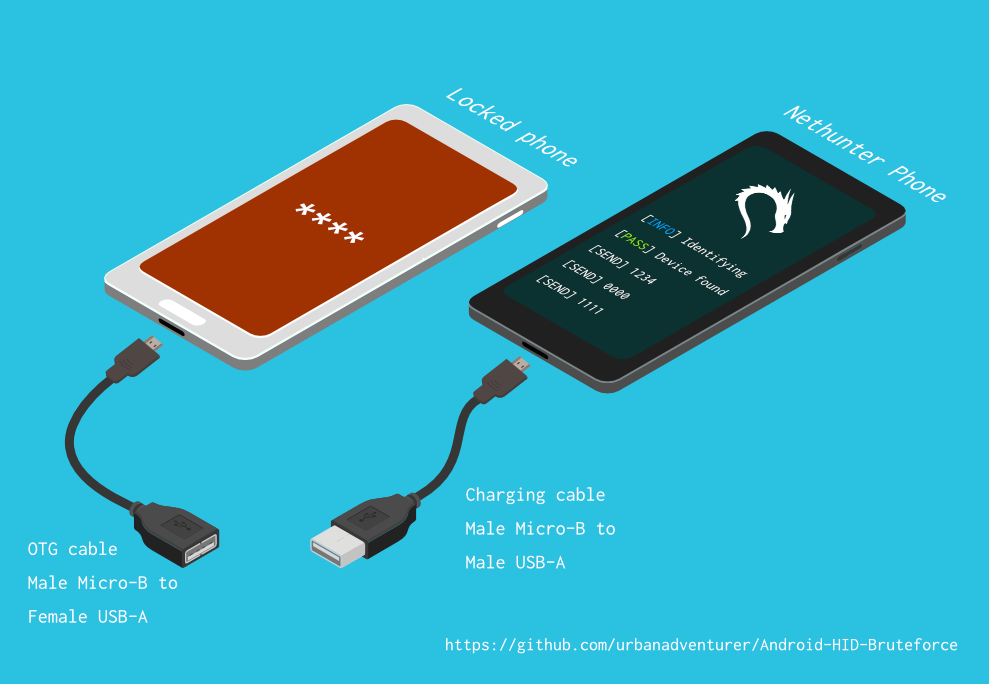
كيفية توصيل الهواتف

[هاتف Nethunter] <--> [كابل USB] <--> [محول USB OTG] <--> [هاتف Android مقفل]

يوفر برنامج تشغيل USB HID Gadget محاكاة لأجهزة الواجهة البشرية (HID). يتيح ذلك لجهاز Android Nethunter محاكاة إدخال لوحة المفاتيح إلى الهاتف المقفل. الأمر أشبه بتوصيل لوحة مفاتيح بالهاتف المقفل والضغط على المفاتيح.

⏱ يستغرق هذا أكثر بقليل من 16.6 ساعة باستخدام Samsung S5 لتجربة جميع PINs المكونة من 4 أرقام، ولكن مع قائمة PIN المحسنة، يجب أن يستغرق وقتًا أقل بكثير.

ستحتاج إلى

  • هاتف Android مقفل
  • هاتف Nethunter (أو أي Android متجذر مع دعم نواة HID)
  • كابل/محول USB OTG (On The Go) (USB ذكر Micro-B إلى أنثى USB A)، وكابل شحن قياسي (USB ذكر Micro-B إلى ذكر A).
  • هذا كل شيء!

🌟 الفوائد

  • حوِّل هاتف NetHunter الخاص بك إلى آلة اختراق PIN لأجهزة Android
  • على عكس الطرق الأخرى، لا تحتاج إلى تمكين ADB أو تصحيح USB على الهاتف المقفل
  • لا يحتاج هاتف Android المقفل إلى التجذير
  • لا تحتاج إلى شراء أجهزة خاصة، مثل Rubber Ducky أو Teensy أو Cellebrite أو XPIN Clip إلخ.
  • يمكنك بسهولة تعديل وقت التوقف لاختراق أنواع أخرى من الأجهزة
  • إنها تعمل!

⭐ الميزات

  • اختراق PINs من أي طول من 1 إلى 10 أرقام
  • استخدام ملفات التكوين لدعم الهواتف المختلفة
  • قوائم PIN محسنة لـ 3 و 4 و 5 و 6 أرقام
  • يتجاوز النوافذ المنبثقة للهاتف بما في ذلك تحذير الطاقة المنخفضة
  • يكتشف عند فصل الهاتف أو إيقاف تشغيله، وينتظر مع إعادة المحاولة كل 5 ثوانٍ
  • تأخيرات قابلة للتكوين لمدة N ثانية بعد كل X محاولة PIN
  • ملف سجل

التثبيت

قريبًا

تنفيذ البرنامج النصي

إذا قمت بتثبيت البرنامج النصي في /sdcard/، يمكنك تنفيذه باستخدام الأمر التالي.bash ./android-pin-bruteforce

Note that Android mounts /sdcard with the noexec flag. You can verify this with mount.

Usage

root@kitploit:~
Android-PIN-Bruteforce (0.2) يُستخدم لفتح هاتف (أو جهاز) Android عن طريق تخمين رقم التعريف الشخصي (PIN) لقفل الشاشة.
  اعثر على مزيد من المعلومات في: https://github.com/urbanadventurer/Android-PIN-Bruteforce

الأوامر:
  crack                بدء تخمين أرقام التعريف الشخصي
  resume               الاستئناف من رقم تعريف شخصي محدد
  rewind               تخمين أرقام التعريف الشخصي بالعكس من رقم محدد
  diag                 عرض معلومات التشخيص
  version              عرض معلومات الإصدار والخروج

الخيارات:
  -f, --from PIN       الاستئناف من رقم التعريف الشخصي هذا
  -a, --attempts       البدء من NUM محاولة خاطئة
  -m, --mask REGEX     استخدام قناع للأرقام المعروفة في رقم التعريف الشخصي
  -t, --type TYPE      اختيار تخمين رقم التعريف الشخصي أو النمط
  -l, --length NUM     تخمين أرقام التعريف الشخصي بطول NUM
  -c, --config FILE    تحديد ملف الإعدادات للتحميل
  -p, --pinlist FILE   تحديد قائمة أرقام تعريف شخصي مخصصة
  -d, --dry-run        تشغيل تجريبي للاختبار. لا يرسل أي مفاتيح.
  -v, --verbose        إخراج سجلات مفصلة

الاستخدام:
  android-pin-bruteforce <command> [options]```


## Supported Android Phones/Devices

This has been successfully tested with various phones including the Samsung S5, S7, Motorola G4 Plus and G5 Plus.

It can unlock Android versions 6.0.1 through to 10.0. The ability to perform a bruteforce attack doesn't depend on the Android version in use. It depends on how the device vendor developed their own lockscreen.

Check the Phone Database for more details
https://github.com/urbanadventurer/Android-PIN-Bruteforce/wiki/Phone-Database

## 🎳 PIN Lists

Optimised PIN lists are used by default unless the user selects a custom PIN list.  

### Cracking PINs of different lengths

Use the `--length` commandline option.

Use this command to crack a 3 digit PIN, 
`./android-pin-bruteforce crack --length 3`

Use this command to crack a 6 digit PIN
`./android-pin-bruteforce crack --length 6`

### Where did the optimised PIN lists come from?

The optimised PIN lists were generated by extracting numeric passwords from database leaks then sorting by frequency. All PINs that did not appear in the password leaks were appended to the list. 

The optimised PIN lists were generated from *Ga$$Pacc DB Leak* (21GB decompressed, 688M Accounts, 243 Databases, 138920 numeric passwords).

#### The 4 digit PIN list

The reason that the 4 digit PIN list is used from a different source is because it gives better results than the generated list from *Ga$$Pacc DB Leak*.

`optimised-pin-length-4.txt` is an optimised list of all possible 4 digit PINs, sorted by order of likelihood.
It can be found with the filename `pinlist.txt` at https://github.com/mandatoryprogrammer/droidbrute

This list is used with permission from Justin Engler & Paul Vines from Senior Security Engineer, iSEC Partners,
and was used in their Defcon talk, [Electromechanical PIN Cracking with Robotic Reconfigurable Button Basher (and C3BO)](https://www.defcon.org/html/defcon-21/dc-21-speakers.html#Engler)

### Cracking with Masks

Masks use regular expressions with the standard grep extended format.

`./android-pin-bruteforce crack --mask "...[45]" --dry-run`

- To try all years from 1900 to 1999, use a mask of `19..`
- To try PINs that have a 1 in the first digit, and a 1 in the last digit, use a mask of `1..1`
- To try PINs that end in 4 or 5, use `...[45]`

## 📱 Configuration for different phones

Device manufacturers create their own lock screens that are different to the default or stock Android. 
To find out what keys your phone needs, plug a keyboard into the phone and try out different combinations.

Load a different configuration file, with the `--config FILE` commandline parameter.

Example:
`./android-pin-bruteforce --config ./config.samsung.s5 crack`

You can also edit the `config` file by customising the timing and keys sent.

The following configuration variables can be used to support a different phone's lockscreen.

التوقيت

DELAY_BETWEEN_KEYS هي الفترة الزمنية بالثواني للانتظار بعد إرسال كل مفتاح

DELAY_BETWEEN_KEYS=0.25

تعمل متغيرات PROGRESSIVE_COOLDOWN_ARRAY كمصفوفة متعددة الأبعاد لتخصيص فترة التهدئة التدريجية

PROGRESSIVE_ARRAY_ATTEMPT_COUNT__________ هو رقم المحاولة

PROGRESSIVE_ARRAY_ATTEMPTS_UNTIL_COOLDOWN هو عدد المحاولات قبل الدخول في فترة التهدئة

PROGRESSIVE_ARRAY_COOLDOWN_IN_SECONDS____ هو فترة التهدئة بالثواني

PROGRESSIVE_ARRAY_ATTEMPT_COUNT__________=(1 11 41) PROGRESSIVE_ARRAY_ATTEMPTS_UNTIL_COOLDOWN=(5 1 1) PROGRESSIVE_ARRAY_COOLDOWN_IN_SECONDS____=(30 30 60)

SEND_KEYS_DISMISS_POPUPS_N_SECONDS_BEFORE_COOLDOWN_END يحدد عدد الثواني قبل نهاية فترة التهدئة التي سيتم فيها إرسال المفاتيح

اضبط على 0 لتعطيل

SEND_KEYS_DISMISS_POPUPS_N_SECONDS_BEFORE_COOLDOWN_END=5

SEND_KEYS_DISMISS_POPUPS_AT_COOLDOWN_END يضبط المفاتيح التي يتم إرسالها لتجاهل الرسائل والنوافذ المنبثقة قبل نهاية فترة التهدئة

SEND_KEYS_DISMISS_POPUPS_AT_COOLDOWN_END="enter enter enter"

KEYS_BEFORE_EACH_PIN يضبط المفاتيح التي يتم إرسالها لاستدعاء شاشة القفل. يتم إرسال هذا قبل كل رقم PIN.

بشكل افتراضي يرسل "escape enter"، لكن بعض الهواتف تستجيب لمفاتيح أخرى.

أمثلة:

KEYS_BEFORE_EACH_PIN="ctrl_escape enter"

KEYS_BEFORE_EACH_PIN="escape space"

KEYS_BEFORE_EACH_PIN="escape enter"

KEYS_STAY_AWAKE_DURING_COOLDOWN المفاتيح التي يتم إرسالها خلال فترة التهدئة لإبقاء الهاتف نشطًا

KEYS_STAY_AWAKE_DURING_COOLDOWN="enter"

SEND_KEYS_STAY_AWAKE_DURING_COOLDOWN_EVERY_N_SECONDS كم مرة يتم إرسال المفاتيح، بالثواني

SEND_KEYS_STAY_AWAKE_DURING_COOLDOWN_EVERY_N_SECONDS=5

DELAY_BEFORE_STARTING هي الفترة الزمنية بالثواني للانتظار قبل بدء القوة العمياء

DELAY_BEFORE_STARTING=2

KEYS_BEFORE_STARTING يضبط المفاتيح التي يتم إرسالها قبل بدء القوة العمياء

KEYS_BEFORE_STARTING="enter"```

Popups

We send keys before the end of the cooldown period, or optionally during the cooldown period. This is to keep the lockscreen app active and to dismiss any popups about the number of incorrect PIN attempts or a low battery warning.

Test sending keys from the NetHunter phone

Test sending keys from the terminal

Use ssh from your laptop to the NetHunter phone, and use this command to test sending keys:

In this example, the enter key is sent.

echo "enter" | /system/xbin/hid-keyboard /dev/hidg0 keyboard

In this example, ctrl-escape is sent.

echo "left-ctrl escape" | /system/xbin/hid-keyboard /dev/hidg0 keyboard

Note: Sending combinations of keys in config file variables is different. Currently only ctrl_escape is supported.

In this example, keys a, b, c are sent.

echo a b c | /system/xbin/hid-keyboard /dev/hidg0 keyboard

Test sending keys from an app

This Android app is a virtual USB Keyboard that you can use to test sending keys.

https://store.nethunter.com/en/packages/remote.hid.keyboard.client/

How to send special keys

Use this list for the following variables:

  • KEYS_BEFORE_EACH_PIN
  • KEYS_STAY_AWAKE_DURING_COOLDOWN
  • KEYS_BEFORE_STARTING

To send special keys use the following labels. This list can be found in the hid_gadget_test source code.

To send more than one key at the same time, use the following list:

  • ctrl_escape (This sends left-ctrl and escape)

If you need more key combinations please open a new issue in the GitHub issues list.

Customising the Progressive Cooldown

The following section of the config file controls the progressive cooldown.

root@kitploit:~
## متغيرات PROGRESSIVE_COOLDOWN_ARRAY تعمل كمصفوفة متعددة الأبعاد لتخصيص التبريد التدريجي
## PROGRESSIVE_ARRAY_ATTEMPT_COUNT__________ هو رقم المحاولة
## PROGRESSIVE_ARRAY_ATTEMPTS_UNTIL_COOLDOWN هو عدد المحاولات قبل بدء التبريد
## PROGRESSIVE_ARRAY_COOLDOWN_IN_SECONDS____ هو مدة التبريد بالثواني

PROGRESSIVE_ARRAY_ATTEMPT_COUNT__________=(1  11 41)
PROGRESSIVE_ARRAY_ATTEMPTS_UNTIL_COOLDOWN=(5   1  1)
PROGRESSIVE_ARRAY_COOLDOWN_IN_SECONDS____=(30 30 60)```

The array is the same as this table.

| attempt number   | attempts until cooldown  | cooldown   |
| ---------------- | ------------------------ | ---------- |
| 1                | 5                        | 30         |
| 11               | 1                        | 30         |
| 41               | 1                        | 60         |


### Why can't you use a laptop, or is a Windows or Linux version coming soon?

This script works by emulating USB Human Interface Devices (HID), in this case it is keyboard and mouse input. Laptops have uni-directional USB ports and an Android mobile device/ phone has a bi-directional USB port. A bi-directional port is required to emulate a keyboard.

This might change in the future as USB-C is supposed to be uni-directional.

### How Android emulates a keyboard

Keys are sent using `/system/xbin/hid-keyboard`. To test this and send the key 1 you can use `echo 1 | /system/xbin/hid-keyboard dev/hidg0 keyboard`

In Kali Nethunter, `/system/xbin/hid-keyboard` is a compiled copy of `hid_gadget_test.c`. This is a small program for testing the HID gadget driver that is included in the Linux Kernel. The source code for this file can be found at https://www.kernel.org/doc/html/latest/usb/gadget_hid.html and https://github.com/aagallag/hid_gadget_test.

## 🔧 Troubleshooting

### If it is not bruteforcing PINs

#### Check the orientation of the cables

The Nethunter phone should have a regular USB cable attached, while the locked phone should have an OTG adaptor attached.

The OTG cable should be connected to the locked Android phone. The regular USB cable should be connected to the Nethunter phone.

Refer to the graphic on how to connect the phones.

#### Check it is emulating a keyboard

You can verify that the NetHunter phone is succesfully emulating a keyboard by connecting it to a computer using a regular charging/data USB cable. Open a text editor like Notepad while it is cracking and you should see it entering PIN numbers into the text editor.

Note that you will not need an OTG cable for this. 

#### Try restarting the phones

Try powering off the phones and even taking out the batteries if that is possible.

#### Try new cables

Try using new cables/adaptors as you may have a faulty cable/adaptor.

### If it doesn't unlock the phone with a correct PIN

You might be sending keys too fast for the phone to process. Increase the DELAY_BETWEEN_KEYS variable in the config file.
💡 If you don't see 4 dots come up on the phone's screen then maybe it is not receiving 4 keys.

### 🔋 Managing Power Consumption

If your phone runs out of power too soon, follow these steps:

- Make sure both phones are fully charged to 100% before you begin
- Reduce the screen brightness on both the victim phone and NetHunter phone if possible
- Place both phones into Airplane mode, however you may want to enable WiFi to access the NetHunter phone via SSH.
- The locked phone will power the NetHunter phone, because it appears as a keyboard accessory
- Use a USB OTG cable with a Y splitter for an external power supply, to allow charging of the NetHunter phone while cracking
- Take breaks to charge your devices. Pause the script with CTRL-Z and resume with the `fg` shell command.
- Avoid the SEND_KEYS_STAY_AWAKE_DURING_COOLDOWN_EVERY_N_SECONDS configuration option. This will cause the locked phone to use more battery to keep the screen powered. Instead use the SEND_KEYS_DISMISS_POPUPS_N_SECONDS_BEFORE_COOLDOWN_END option (Default).

### Check the Diagnostics Report

Use the command `diag` display diagnostic information.

```bash ./android-pin-bruteforce diag```
إذا تلقيت هذه الرسالة عند توصيل كابل USB، فحاول إخراج البطارية من هاتف Android المقفل وإعادة تشغيله.```[FAIL] HID USB device not ready. Return code from /system/xbin/hid-keyboard was 5.```

### How the usb-devices command works

The diagnostics command uses the `usb-devices` script but it is only necessary as part of determining whether the USB cables are incorrectly connected. This can be downloaded from
https://github.com/gregkh/usbutils/blob/master/usb-devices

### Use verbose output

Use the `--verbose` option to check the configuration is as expected. This is especially useful when you are modifying the configuration.

### Use the dry-run

Use the `--dry-run` option to check how it operates without sending any keys to a device. This is especially useful when you are modifying the configuration or during development.

Dry run will:

- Not send any keys
- Will continue instead of aborting if the `KEYBOARD_DEVICE` or `HID_KEYBOARD` is missing.

### HID USB Mode

Try this command in a shell on the NetHunter phone:
```/system/bin/setprop sys.usb.config hid```
## 💣 المشاكل المعروفة

- لا يمكن لهذه الأداة اكتشاف متى يتم تخمين رمز PIN الصحيح وفتح الهاتف.
- قد تنفد بطارية هاتفك 🔋 قبل العثور على رمز PIN الصحيح.
- لا تثق في ملفات تكوين الهاتف من مصادر غير معروفة دون مراجعتها أولاً. ملفات التكوين هي نصوص شل برمجية وقد تتضمن أوامر ضارة.

## 🚀 خارطة الطريق

- [تم] يعمل
- [تم] يكتشف فشل USB HID
- [تم] تحسين الاستخدام وخيارات سطر الأوامر/ملفات التكوين
- [تم] إضافة التخمين العنيف لرموز PIN ذات n أرقام
- [تم] قناع للأرقام المعروفة
- [تم] كسر قائمة PIN بالعكس (لمعرفة أي PIN حديث فتح الجهاز)
- [تم] تنفيذ موجه شاشة القفل القابل للتكوين
- [تم] تنفيذ تغيير فترة التهدئة بعد 10 محاولات
- [قيد العمل] العثور/اختبار المزيد من الأجهزة للتخمين العنيف
- إضافة شريط التقدم
- إضافة الوقت المقدر
- رسم ASCII
- واجهة رسومية أفضل لـ NetHunter
- تنفيذ لـ iPhone
- اكتشاف عندما يتم فتح قفل الهاتف (استخدام كاميرا Nethunter كمستشعر؟)
- كسر أنماط Android (تجربة الأنماط الشائعة أولاً)

## 🙋 المساهمة

نرحب بطلبات السحب (Pull requests). بالنسبة للتغييرات الكبيرة، يرجى فتح مشكلة (issue) أولاً لمناقشة ما ترغب في تغييره.

يرجى التأكد من تحديث الاختبارات حسب الاقتضاء.

## 😎 المؤلفون والإقرار

تم تطويره بواسطة Andrew Horton (@urbanadventurer).

👏 الأشخاص التاليون كانوا مفيدين جدًا:

- Vlad Filatov (@v1adf): اختبار العديد من الهواتف لقاعدة بيانات Wiki للهواتف

### الدافع

كان دافعي الأصلي لتطوير هذا هو فتح هاتف Samsung S5 يعمل بنظام Android. كان قد توفي صاحبه، وكانت عائلته بحاجة إلى الوصول إلى البيانات الموجودة عليه. وبما أنني لم يكن لدي USB Rubber Ducky أو أي جهاز آخر في متناول اليد، حاولت استخدام مجموعة متنوعة من الطرق، وأدركت في النهاية أنني اضطررت لتطوير شيء جديد.

### الإشادة

قائمة PIN المحسّنة من Justin Engler (@justinengler) و Paul Vines من Senior Security Engineer، iSEC Partners
وقد استُخدمت في محاضرتهم في Defcon، [Electromechanical PIN Cracking with Robotic Reconfigurable Button Basher (and C3BO).](https://www.defcon.org/html/defcon-21/dc-21-speakers.html#Engler).

### الرسومات

صممها Andrew Horton وباستخدام حزم المتجهات المجانية التالية بامتنان:

- [USB Ports Isometric Free Vector by VisionHeldup](https://www.vecteezy.com/vector-art/159576-usb-ports-isometric-free-vector)
- [HDMI and USB Vector Set by Mary Winkler](https://www.vecteezy.com/vector-art/107006-hdmi-and-usb-vector-set)
- [Isometric Data Security Illustration by Rizal.Medanguide](https://www.vecteezy.com/vector-art/661831-isometric-data-security-illustration)
- شعار Kali NetHunter

## 🗿 مقارنة مع مشاريع أخرى وطرق فتح هاتف Android مقفل

### ما الذي يجعل هذا المشروع فريدًا؟

لقد سُئلت عن ماهية هذا المشروع الفريد عندما توجد مشاريع مفتوحة المصدر أخرى لكسر PIN في Android.

Android-PIN-Bruteforce فريد لأنه يكسر PIN على هواتف Android من هاتف NetHunter ولا يحتاج إلى أن يكون الهاتف المقفل مخترقًا مسبقًا.

يعمل:
- دون الحاجة لشراء أجهزة خاصة مثل Rubber Ducky أو Celebrite أو XPIN Clip.
- دون الحاجة إلى ADB أو صلاحيات الجذر (لا يحتاج الهاتف إلى أن يكون مخترقًا مسبقًا).

| المشروع                                               | ADB/USB Debugging  | يتطلب root | يتطلب أجهزة $ | تجاري      |
------------------------------------------------------- | ------------------ | ---------- | ------------- | ----------- | 
| ⭐ Android-PIN-Bruteforce                             | لا                 | لا         | هاتف Nethunter | لا         | 
| github.com/PentesterES/AndroidPINCrack                | نعم                | نعم        | لا            | لا          |
| github.com/ByteRockstar1996/Cracking-Android-Pin-Lock | نعم                | نعم        | لا            | لا          |
| github.com/sch3m4/androidpatternlock                  | نعم                | نعم        | لا            | لا          |
| github.com/georgenicolaou/androidlockcracker          | نعم                | نعم        | لا            | لا          |
| github.com/MGF15/P-Decode                             | نعم                | نعم        | لا            | لا          |
| github.com/BitesFor/ABL                               | نعم                | نعم        | لا            | لا          |
| github.com/wuseman/WBRUTER                            | نعم                | لا         | لا            | لا          |
| github.com/Gh005t/Android-BruteForce                  | نعم                | لا         | لا            | لا          |
| github.com/mandatoryprogrammer/droidbrute             | لا                 | لا         | Rubber Ducky $ | لا          |
| github.com/hak5darren/USB-Rubber-Ducky                | لا                 | لا         | Rubber Ducky $ | نعم         |
| github.com/bbrother/stm32f4androidbruteforce          | لا                 | لا         | لوحة STM32F4 dev $ | لا      |
| hdb-team.com/product/hdbox/                           | لا                 | لا         | HDBOX  $$      | نعم         |
| xpinclip.com                                          | لا                 | لا         | XPINClip  $$   | نعم         |
| cellebrite.com/en/ufed/                               | لا                 | لا         | Cellebrite UFED $$$ | نعم     |

بعض هذه المشاريع/المنتجات رائعة حقًا لكنها تحقق هدفًا مختلفًا عن Android-PIN-Bruteforce.

إذا كان المشروع يتطلب ملف gestures.key أو password.key، فقد أدرجته على أنه يتطلب root.
إذا كان المشروع يتطلب محمل إقلاع مخصص، فقد أدرجته على أنه يتطلب ADB و root معًا.
إذا كنت ترغب في إدراج مشروعك في هذا الجدول، فيرجى فتح مشكلة (issue) جديدة.
هناك روابط لكل من هذه المشاريع في قسم 📚 المشاريع ذات الصلة وقراءة إضافية.

### 😭 مستخدمو الهواتف العاديون

- جرب أول 20 رمز PIN من تحليل [DataGenetics PIN](https://datagenetics.com/blog/september32012/index.html) الذي يفترض أنه يفتح 26.83% من الهواتف.
- استخدم تطبيق تجاوز شاشة القفل عبر الرسائل النصية (يتطلب تثبيت التطبيق قبل قفل الهاتف)
- استخدم Samsung Find My Mobile (يتطلب إعداده قبل قفل الهاتف)
- تعطل واجهة شاشة القفل (Android 5.0 و 5.1)
- استخدم Google Forgot pattern أو Forgot PIN أو Forgot password (Android 4.4 KitKat والإصدارات الأقدم)
- إعادة ضبط المصنع (ستفقد جميع بياناتك 😭)

### 🤖 المستخدمون الذين استبدلوا روم Android بالفعل

إذا كان الهاتف قد تم تجذيره بالفعل، أو تم تمكين تصحيح USB، أو تم تمكين adb.

- قم بوميض ملف ZIP `Pattern Password Disable` باستخدام استرداد مخصص (يتطلب TWRP أو CMW أو Xrec إلخ.)
- حذف `/data/system/gesture.key` أو `password.key` (يتطلب root و adb على الجهاز المقفل)
- كسر ملفات `/data/system/gesture.key` و `password.key` (يتطلب root و adb على الجهاز المقفل)
- تحديث قاعدة بيانات sqlite3 `settings.db` (يتطلب root و adb على الجهاز المقفل)

### 🔬 المحققون الجنائيون

هذه الطرق قد تكون باهظة الثمن وعادة ما يستخدمها فقط محققو الهواتف المتخصصون.

حسب الصعوبة والتكلفة:

- الاستفادة من تمكين تصحيح USB (Oxygen Forensic Suite)
- التخمين العنيف بمحاكاة لوحة المفاتيح (⭐ Android-PIN-Bruteforce, هجوم RubberDucky, XPIN Clip, HBbox)
- JTAG (الواجهة مع منافذ الاختبار (TAPs) على لوحة الجهاز)
- البرمجة داخل النظام (ISP) (تتضمن الاتصال المباشر بدبابيس رقاقات الذاكرة الوميضية على لوحة الجهاز)
- إزالة الشريحة (فك لحام رقاقات الذاكرة الوميضية من الجهاز)
- هجوم التوقيت الساعي / حقن عطل الجهد (هجمات توقيت وحدة المعالجة المركزية في الأجهزة لتجاوز قيود PIN)
- ثغرات محمل الإقلاع (ثغرات اليوم الصفري التي تهاجم محمل الإقلاع. GrayKey من Grayshift و Cellebrite)

تقنيات JTAG و ISP وإزالة الشريحة أصبحت أقل فائدة الآن لأن معظم الأجهزة مشفرة.
لا أعرف أي هجمات عملية على رموز PIN للهواتف تستخدم هجوم التوقيت الساعي، إذا كنت تعرف منتجًا يستخدم هذه التقنية، فيرجى إخباري لأدرجه.

### 🕵 محترفو الأمن والمستخدمون التقنيون للهواتف

استخدم التخمين العنيف للوحة المفاتيح HID USB مع بعض الأجهزة المخصصة.

- RubberDucky ونص برمجي للهجوم العنيف من Darren Kitchen's Hak5
- كتابة نص برمجي لـ USB Teensy
- شراء أجهزة جنائية باهظة الثمن
- أو يمكنك استخدام Android-PIN-Bruteforce مع هاتف NetHunter الخاص بك!

محاولات استخدام مشروع رائع آخر Duck Hunter لمحاكاة حمولة RubberDucky لكسر PIN في Android لم تنجح. لقد أدى إلى تعطل الهاتف ربما بسبب طول الحمولة.

## 📚 المشاريع ذات الصلة وقراءة إضافية

### أجهزة USB HID بدون NetHunter

hak5 12x17: اختراق أي رمز PIN مكون من 4 أرقام في هاتف Android خلال 16 ساعة باستخدام USB Rubber Ducky 
https://archive.org/details/hak5_12x17

Hak5: USB Rubber Ducky
https://shop.hak5.org/products/usb-rubber-ducky-deluxe

حمولات USB-Rubber-Ducky
https://github.com/hak5darren/USB-Rubber-Ducky/wiki/Payloads

Teensy
https://www.pjrc.com/teensy/

التخمين العنيف لهاتف Android باستخدام لوحة تطوير STM32F4Discovery
https://github.com/bbrother/stm32f4androidbruteforce
https://hackaday.com/2013/11/10/brute-forcing-an-android-phone/

هجوم التخمين العنيف الآلي ضد رمز PIN لواجهة EFI لنظام Mac (باستخدام Teensy)
https://orvtech.com/atacar-efi-pin-macbook-pro-en.html
https://hackaday.io/project/2196-efi-bruteforcer

Droidbrute: حمولة USB rubber ducky لكسر PIN في Android محسّنة باستخدام قائمة كلمات تم إنشاؤها إحصائيًا.
https://github.com/mandatoryprogrammer/droidbrute

منتدى نقاش حول حلقة hak5، والتخمين العنيف لرمز PIN المكون من 4 أرقام في Android
https://forums.hak5.org/topic/28165-payload-android-brute-force-4-digit-pin/

### هجمات لوحة المفاتيح HID في NetHunter

هجمات لوحة المفاتيح HID في NetHunter
https://www.kali.org/docs/nethunter/nethunter-hid-attacks/

### دعم HID في نواة Linux

أجهزة الواجهة البشرية (HID)
https://www.kernel.org/doc/html/latest/hid/index.html#

برنامج تشغيل أداة USB HID لنواة Linux وبرنامج hid-keyboard
https://www.kernel.org/doc/html/latest/usb/gadget_hid.html
https://github.com/aagallag/hid_gadget_test

نص usb-devices
https://github.com/gregkh/usbutils/blob/master/usb-devices

### كسر ملفات PIN والنمط في Android

AndroidPINCrack - التخمين العنيف لكلمة مرور Android بالنظر إلى التجزئة والملح (يتطلب root على الهاتف)
https://github.com/PentesterES/AndroidPINCrack

Android Pattern Lock Cracker - التخمين العنيف لنمط Android بالنظر إلى تجزئة SHA1 (يتطلب root على الهاتف)
https://github.com/sch3m4/androidpatternlock

### طرق الاسترداد العامة

[Android][دليل] اختراق وتجاوز كلمة مرور/نمط/وجه/PI في Android
https://forum.xda-developers.com/showthread.php?t=2620456

التخمين العنيف لـ Android باستخدام ADB وبرمجة Shell
https://github.com/Gh005t/Android-BruteForce

### الطرق والأجهزة الجنائية

PATCtech Digital Forensics: تجاوز رمز المرور في Android
http://patc.com/online/a/Portals/965/Android%20Passcode.pdf

XPIN Clip
https://xpinclip.com/

HDBox من HDB Team
https://hdb-team.com/product/hdbox/

Cellebrite UFED
https://www.cellebrite.com/en/ufed/

GrayKey من Grayshift
https://www.grayshift.com/graykey/

### تحليل PIN

التخمين العنيف الكهروميكانيكي لـ PIN باستخدام Robotic Reconfigurable Button Basher (و C3BO)
https://www.defcon.org/html/defcon-21/dc-21-speakers.html#Engler

تحليل PIN من DataGenetics https://datagenetics.com/blog/september32012/index.html
تنزيل الأداة
Key labelKey label
left-ctrlf6
right-ctrlf7
left-shiftf8
right-shiftf9
left-altf10
right-altf11
left-metaf12
right-metainsert
returnhome
escpageup
bckspcdel
tabend
spacebarpagedown
caps-lockright
f1left
f2down
f3kp-enter
f4up
f5num-lock