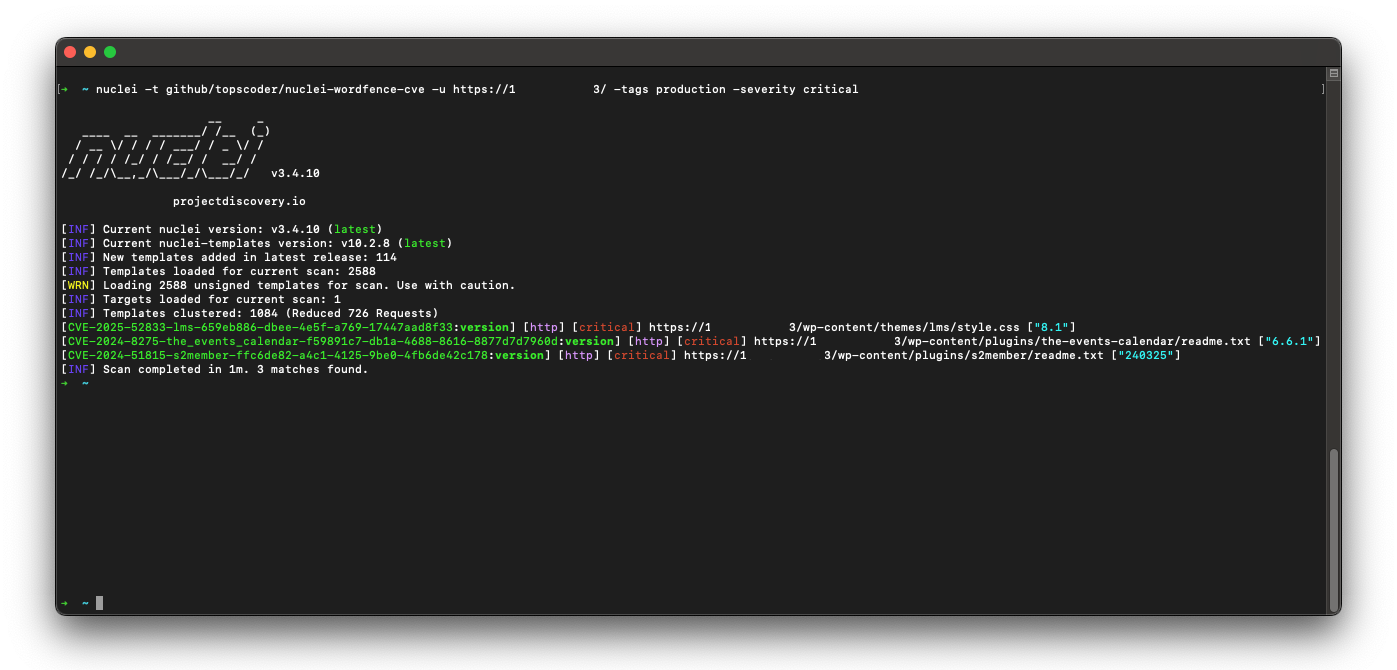

أكثر من 80 ألف قالب Nuclei لـ WordPress، تُحدَّث يوميًا من بيانات Wordfence الاستخباراتية — صفِّ حسب الخطورة/الوسوم/CVE وافحص في سطر واحد. 🚀🔒
ارتقِ بمستوى تأمين موقع ووردبريس الخاص بك! يحتوي هذا المشروع على كنزٍ من قوالب Nuclei الحديثة لووردبريس. افحص نقاط الضعف في النواة (Core) والإضافات والقوالب – كل ذلك استنادًا إلى أحدث المعلومات من Wordfence.com.
إليك لماذا سيصبح هذا المشروع صديقك المفضل الجديد:
إذا كنت تحرس موقع ووردبريس، فهذا المشروع هو سلاحك السري لتحديد الثغرات قبل أن يفعلها الأشرار. توقّف عن إضاعة الوقت وثبّت مواقعك كالمحترفين!
لتثبيت مستودع nuclei-wordfence-cve هذا للاستخدام مع Nuclei، يمكنك استخدام الأوامر التالية:
export GITHUB_TEMPLATE_REPO=topscoder/nuclei-wordfence-cve
nuclei -update-templates
بعد تثبيت مستودع القوالب هذا باستخدام الأوامر أعلاه، يمكنك تشغيل الأمر التالي لفحص الثغرات باستخدام Nuclei:
nuclei -t github/topscoder/nuclei-wordfence-cve -u https://target.com
توفر Wordfence موجزين منفصلين للثغرات. يتضمن الموجز الأول ثغرات الإنتاج فقط، ولكل منها CVE معيّن. بينما يحتوي الموجز الثاني على ثغرات مرشّحة (candidate) لم يُعيَّن لها CVE بعد، وقد تُرقّى إلى موجز الإنتاج أو لا. للتمييز بين القوالب المُولّدة من هذين الموجزين، يُعيَّن لكل قالب وسم — إما production أو candidate — مما يتيح لك استهدافها باستخدام فلتر الوسوم.
تضمين قوالب الإنتاج فقط:
nuclei -t github/topscoder/nuclei-wordfence-cve -tags production -u https://target.com
تضمين القوالب المرشّحة فقط:
nuclei -t github/topscoder/nuclei-wordfence-cve -tags candidate -u https://target.com
فيما يلي بعض الأمثلة حول كيفية استخدام القوالب:
nuclei -t github/topscoder/nuclei-wordfence-cve -u https://target.com
nuclei -t github/topscoder/nuclei-wordfence-cve -template-id cve-2023-32961 -u https://target.com
nuclei -t github/topscoder/nuclei-wordfence-cve -severity critical -u https://target.com
nuclei -t github/topscoder/nuclei-wordfence-cve -tags wp-core -u https://target.com
nuclei -t github/topscoder/nuclei-wordfence-cve -tags wp-plugin -u https://target.com
nuclei -t github/topscoder/nuclei-wordfence-cve -tags wp-theme -u https://target.com
nuclei -t github/topscoder/nuclei-wordfence-cve -tags wp-plugin,wp-theme -severity critical,high
-tc) الذي يسمح بتعبيرات معقدة مثل التالية:nuclei -t github/topscoder/nuclei-wordfence-cve -template-condition "contains(to_lower(name),'cross-site scripting') || contains(to_upper(name),'XSS')" -u https://target.com
nuclei -t github/topscoder/nuclei-wordfence-cve -template-condition "contains(to_lower(name),'sql injection') || contains(to_lower(description),'sql injection')" -u https://target.com
nuclei -t github/topscoder/nuclei-wordfence-cve -template-condition "contains(to_lower(name),'file inclusion') || contains(to_lower(description),'file inclusion')" -u https://target.com
nuclei -t github/topscoder/nuclei-wordfence-cve -template-condition "contains(to_upper(name),'CSRF') || contains(to_upper(description),'CSRF')" -u https://target.com
يتم ضبط درجة خطورة القالب بواسطة المحلل اللغوي (parser) لتعكس بشكل أفضل الأثر الواقعي. تفحص الدالة determine_severity في src/lib/wordfence_api_parser.py عنوان الثغرة ووصفها، وتخفّض مستوى المشكلات التي تقتصر على المستخدمين المصادَق عليهم (مثل تلك التي تتطلب تسجيل الدخول أو صلاحيات مرتفعة).
مثال (مبسّط):
authenticated (وليس unauthenticated)، تتعامل الدالة مع المشكلة على أنها أقل خطورة وتُرجع Low بدلاً من تصنيف CVSS أعلى.يساعد هذا في تجنّب تعيين درجات خطورة Medium/High للثغرات التي تؤثر فقط على المستخدمين المسجّلين، مما يقلل الضوضاء عند فحص المواقع المتاحة للعموم.
إذا كنت ترغب في المساهمة في هذا المشروع، فلا تتردد في عمل fork للمستودع وتقديم pull request.
هذا المشروع مرخّص بموجب رخصة MIT.
[!NOTE] ~~ يرجى استخدامه بمسؤولية!