 synacktiv/octoscan
Octoscan هو ماسح ثغرات أمنية ثابت لسير عمل GitHub Actions.

Octoscan هو ماسح ضوئي ثابت للثغرات الأمنية في سير عمل GitHub Actions.

$ go mod tidy
$ go build
أو باستخدام docker:
$ docker pull ghcr.io/synacktiv/octoscan:latest
يمكن تشغيل Octoscan على مستودع git محلي، أو يمكنك تنزيل جميع سير العمل باستخدام إجراء dl:
$ octoscan dl -h
Octoscan.

Usage:
	octoscan dl [options] --org <org> [--repo <repo> --token <pat> --default-branch --max-branches <num> --path <path> --output-dir <dir> --include-archives]

Options:
	-h, --help  						Show help
	-d, --debug  						Debug output
	--verbose  						Verbose output
	--org <org>  						Organizations to target
	--repo <repo>  						Repository to target
	--token <pat>  						GHP to authenticate to GitHub
	--default-branch  					Only download workflows from the default branch
	--max-branches <num>  					Limit the number of branches to download
	--path <path>  						GitHub file path to download [default: .github/workflows]
	--output-dir <dir>  					Output dir where to download files [default: octoscan-output]
	--include-archives  					Also download archived repositories
./octoscan dl --token ghp_<token> --org apache --repo incubator-answer
إذا كنت لا تعرف ما الذي يجب تشغيله، فشغّل هذا:
./octoscan scan path/to/repos/ --disable-rules shellcheck,local-action --filter-triggers external
سيؤدي ذلك إلى تقليل النتائج الإيجابية الخاطئة ومنح النتائج الأكثر إثارة للاهتمام.
إذا قمت بتنزيل سير العمل باستخدام أمر dl، فقد تحصل على سير عمل مكررة لأن octoscan سينزّل افتراضيًا جميع سير العمل من جميع الفروع. لحذف سير العمل المكررة وتسريع التحليل، يمكنك استخدام أمر fdupes قبل تشغيل التحليل:
fdupes -n -r -N -d path/to/repo
$ octoscan scan -h
octoscan

Usage:
	octoscan scan [options] --list-rules
	octoscan scan [options] <target>
	octoscan scan [options] <target> [--debug-rules --filter-triggers=<triggers> --filter-run --ignore=<pattern> ((--disable-rules | --enable-rules ) <rules>) --config-file <config>]

Options:
	-h, --help
	-v, --version
	-d, --debug
	--verbose
	--format <format>  				Output format, json, sarif or custom template to format error messages in Go template syntax. See https://github.com/rhysd/actionlint/tree/main/docs/usage.md#format
	--oneline 					Use one line per one error. Useful for reading error messages from programs

Args:
	<target>					Target File or directory to scan
	--filter-triggers <triggers>			Scan workflows with specific triggers (comma separated list: "push,pull_request_target" or pre-configured: external/allnopr)
	--filter-run					Search for expression injection only in run shell scripts.
	--ignore <pattern>				Regular expression matching to error messages you want to ignore.
	--disable-rules <rules>				Disable specific rules. Split on ","
	--enable-rules <rules>				Enable specific rules, this will disable all other rules. Split on ","
	--debug-rules					Enable debug rules.
	--config-file <config>				Config file.

Examples:
	$ octoscan scan ci.yml --disable-rules shellcheck,local-action --filter-triggers external
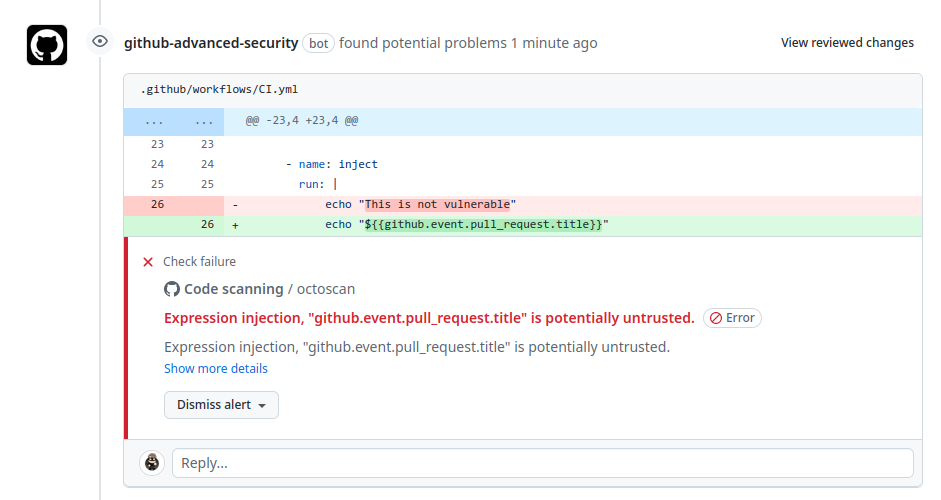
يمكن أيضًا استخدام هذه الأداة مباشرةً كإجراء GitHub لفحص مستودعك عند أحداث push/pull_request. لمزيد من المعلومات، يرجى الاطلاع على هذا المستودع.
يمكن العثور على القائمة الكاملة للقواعد باستخدام هذا الأمر:
$ octoscan scan --list-rules
2024/08/07 16:50:48 [INFO] Available rules
- shellcheck
	Checks for shell script sources in "run:" using shellcheck
- credentials
	Checks for credentials in "services:" configuration
- dangerous-action
	Check for dangerous actions.
- dangerous-checkout
	Check for dangerous checkout.
- expression-injection
	Check for expression injection.
- dangerous-write
	Check for dangerous write operation on $GITHUB_OUTPUT or $GITHUB_ENV.
- local-action
	Check for local actions.
- runner-label
	Checks for GitHub-hosted and preset self-hosted runner labels in "runs-on:"
- unsecure-commands
	Check 'ACTIONS_ALLOW_UNSECURE_COMMANDS' env variable.
- known-vulnerability
	Check for known vulnerabilities.
- bot-check
	Check for if statements that are based on a bot identity.
- dangerous-artefact
	Check for workflow that upload artefacts containing sensitive files.
- debug-external-trigger
	Check for workflow that can be externally triggered.
- debug-artefacts
	Check for workflow that upload artefacts.
- debug-js-exec
	Check for workflow that execute system commands in JS scripts.
- debug-oidc-action
	Check for OIDC actions.
- repo-jacking
	Verify that external actions are pointing to a valid GitHub user or organization.
المشغلات مثل workflow_run أو pull_request_target تعمل في سياق مميَّز، حيث تمتلك صلاحية قراءة الأسرار وربما صلاحية كتابة على المستودع المستهدف. إجراء عملية checkout صريحة على الكود غير الموثوق سيؤدي إلى تنزيل كود المهاجم في هذا السياق.

تحذّر هذه القاعدة المستخدم إذا تم استخدام إجراء خطير. وهي تركّز بشكل أساسي على القطع الأثرية غير الموثوقة.
من الشائع استخدام القطع الأثرية (artifacts) لنقل البيانات بين سير العمل المختلفة. كثيرًا ما نواجه هذا مع مشغّل workflow_run حيث يقوم سير العمل المُشغِّل بإعداد بعض البيانات التي سيتم إرسالها بعد ذلك إلى سير العمل المُشغَّل. نظرًا للطبيعة غير الموثوقة لبيانات القطع الأثرية هذه، فمن الضروري التعامل معها بحذر والاعتراف بها كتهديد محتمل. تنشأ الثغرة من حقيقة أن كيانات خارجية، مثل جهات خبيثة، يمكنها التأثير على محتوى بيانات القطعة الأثرية.

