 pvharmo2/gha-lab-6c3094af9e
مختبر أبحاث أمنية مُصرّح به لإعادة إنتاج CVE-2026-27941 (طلب pwn في سير عمل pull_request_target) — لقطة من openlit/openlit

أداة بحث آلية — ليست المشروع الأصلي.
هذا المستودع عبارة عن مختبر قابل للتصرف مبني بواسطة نظام آلي لأطروحة ماجستير في جامعة لافال حول إعادة إنتاج ثغرات سير عمل GitHub Actions المنشورة. وهو لقطة حرفية من
openlit/openlitعند الالتزام8529a7746ce2cae946bd2346cb3792c22f86cbee(2026-02-24)، معاد توزيعه بموجب ترخيص المشروع نفسه، الذي تم تضمين ملفه دون تغيير في هذه اللقطة.المشروع الأصلي ليس مشاركًا، ولا يُستهدف أبدًا، والثغرة المدروسة هنا عامة بالفعل. كل سر ومتغير في هذا المستودع هو قيمة وهمية مولّدة عشوائيًا — لا توجد أي بيانات اعتماد حقيقية موجودة. مراجع الإجراءات وصور المشغّل مثبتة على ما تم حله في 2026-02-24؛ راجع
pinning.mdفي مخرجات النظام الآلي لمعرفة كل تغيير تم إجراؤه على اللقطة.الأسئلة أو الاعتراضات: [email protected]

التوثيق | البدء السريع | Python SDK | Typescript SDK |
❤️ ادعم هذا المشروع ❤️





OpenLIT يتيح لك تبسيط سير عمل تطوير الذكاء الاصطناعي، خاصةً للذكاء الاصطناعي التوليدي ونماذج اللغات الكبيرة (LLMs). فهو يبسّط المهام الأساسية مثل التجربة مع نماذج اللغات الكبيرة، وتنظيم المطالبات وإدارة إصداراتها، والتعامل الآمن مع مفاتيح API. بسطر واحد فقط من التعليمات البرمجية، يمكنك تفعيل مراقبة أصلية لـ OpenTelemetry، مما يوفر مراقبة شاملة تشمل نماذج اللغات الكبيرة وقواعد بيانات المتجهات ووحدات معالجة الرسومات (GPUs). وهذا يمكّن المطورين من بناء ميزات وتطبيقات الذكاء الاصطناعي بثقة، والانتقال بسلاسة من الاختبار إلى الإنتاج.
يفتخر هذا المشروع باتباع والحفاظ على الاتفاقيات الدلالية مع مجتمع OpenTelemetry، ويتم تحديثه باستمرار ليتوافق مع أحدث المعايير في المراقبة.
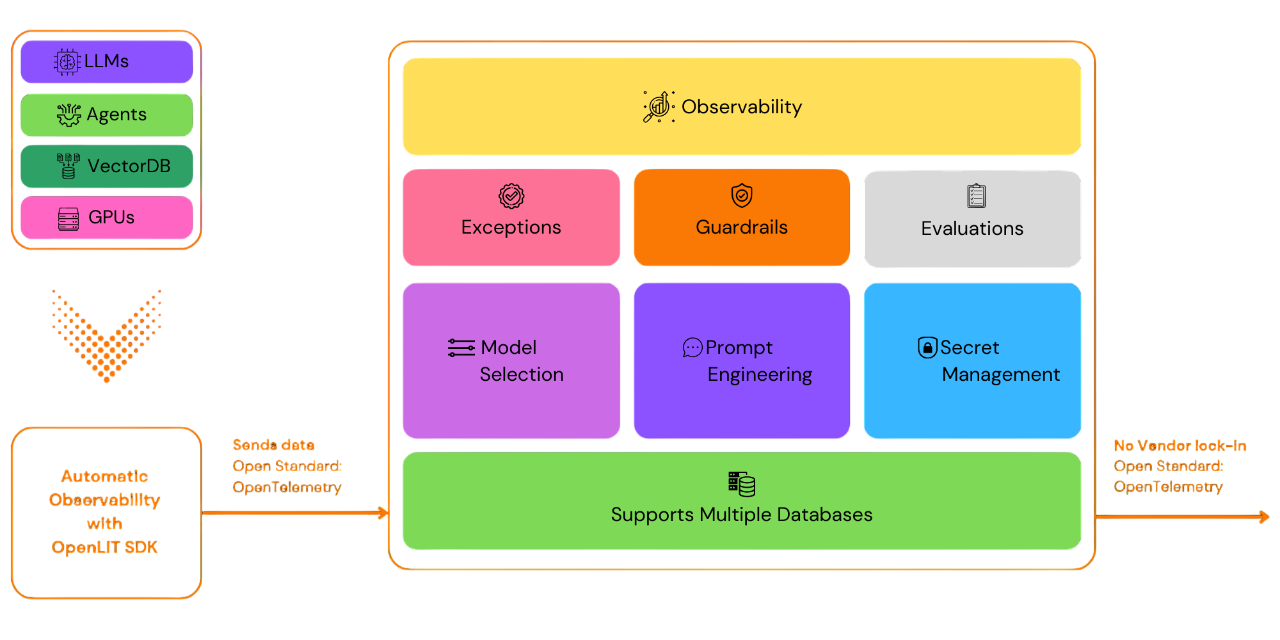
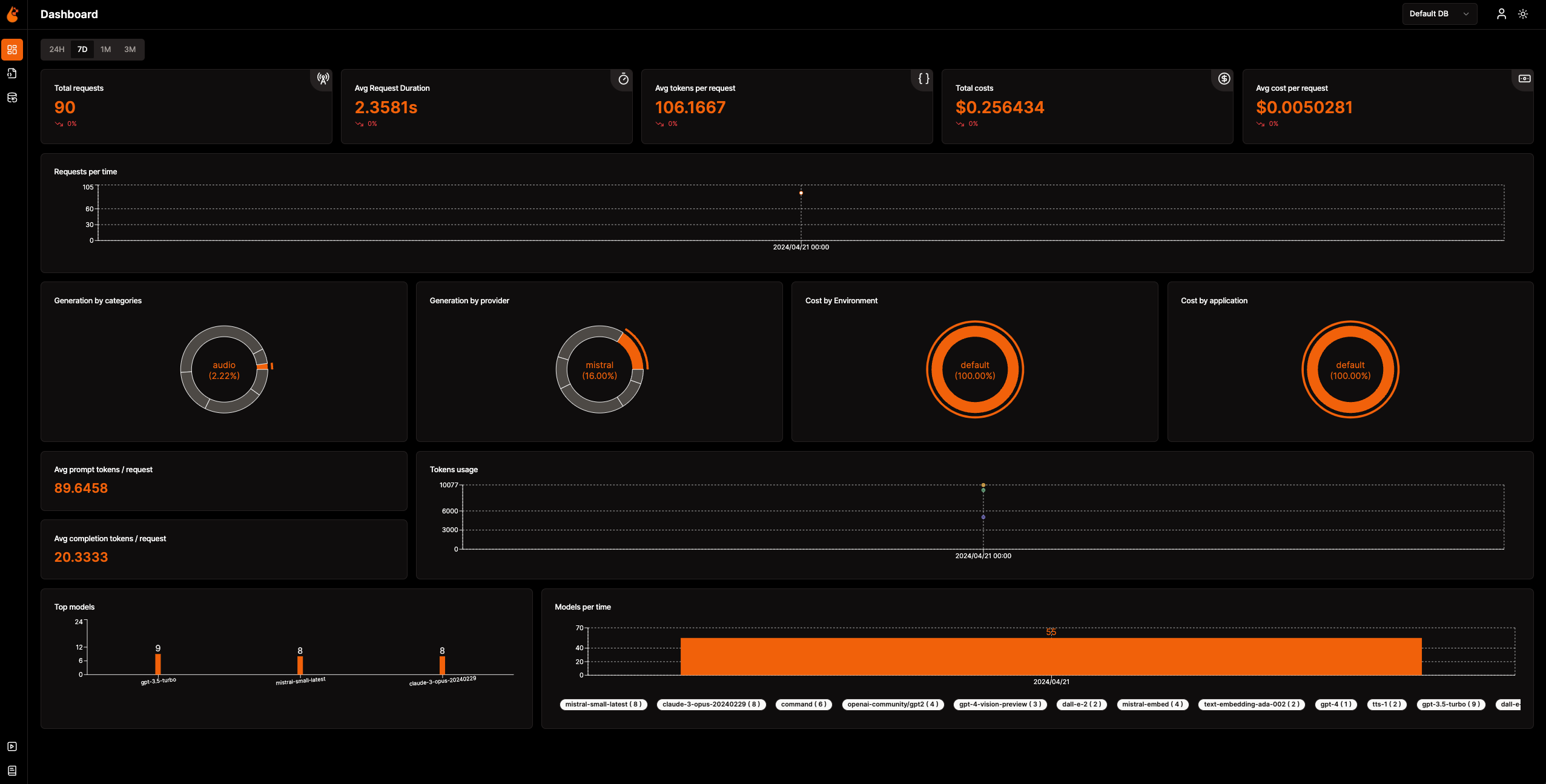
📈 لوحة التحليلات: راقب صحة وأداء تطبيق الذكاء الاصطناعي الخاص بك من خلال لوحات تفصيلية تتبع المقاييس والتكاليف وتفاعلات المستخدمين، مما يوفر رؤية واضحة للكفاءة العامة.
🔌 SDKs مراقبة أصلية لـ OpenTelemetry: SDKs محايدة تجاه البائعين لإرسال التتبعات والمقاييس إلى أدوات المراقبة الحالية لديك.
💲 تتبع التكاليف للنماذج المخصصة والمضبوطة بدقة: خصّص تقديرات التكلفة لنماذج محددة باستخدام ملفات تسعير مخصصة لوضع ميزانية دقيقة.
🐛 لوحة مراقبة الاستثناءات: اكتشف المشكلات وحلّها بسرعة من خلال تتبع الاستثناءات والأخطاء الشائعة باستخدام لوحة مراقبة مخصصة.
💭 إدارة المطالبات: أدر المطالبات وتحكم في إصداراتها باستخدام Prompt Hub للوصول السهل والمتسق عبر التطبيقات.
🔑 إدارة مفاتيح API والأسرار: تعامل بأمان مع مفاتيح API والأسرار الخاصة بك بشكل مركزي، متجنبًا الممارسات غير الآمنة.
🎮 جرّب نماذج لغات كبيرة مختلفة: استخدم OpenGround لاستكشاف واختبار ومقارنة نماذج لغات كبيرة متنوعة جنبًا إلى جنب.
🚀 Fleet Hub لإدارة OpAMP: أدر وراقب مجمعات OpenTelemetry Collectors مركزيًا عبر البنية التحتية الخاصة بك باستخدام بروتوكول OpAMP (بروتوكول إدارة الوكلاء المفتوح) مع اتصال TLS آمن.
flowchart TB; subgraph " " direction LR; subgraph " " direction LR; OpenLIT_SDK[OpenLIT SDK] -->|Sends Traces & Metrics| OTC[OpenTelemetry Collector]; OTC -->|Stores Data| ClickHouseDB[ClickHouse]; end subgraph " " direction RL; OpenLIT_UI[OpenLIT] -->|Pulls Data| ClickHouseDB; end end
### الخطوة 1: نشر حزمة OpenLIT

1. استنساخ مستودع OpenLIT عبر Git

   افتح سطر الأوامر أو الطرفية وشغّل:   ```shell
   git clone [email protected]:openlit/openlit.git
الاستضافة الذاتية باستخدام Docker
قم بنشر وتشغيل OpenLIT باستخدام الأمر التالي: ```shell docker compose up -d
للحصول على تعليمات التثبيت في Kubernetes باستخدام Helm، راجع دليل تثبيت Kubernetes Helm.
افتح سطر الأوامر أو الطرفية لديك وقم بتشغيل:```bash pip install openlit
> للحصول على إرشادات حول استخدام TypeScript SDK، تفضل بزيارة [دليل تثبيت TypeScript SDK](https://github.com/openlit/openlit/tree/main/sdk/typescript#-installation).

### الخطوة 3: تهيئة OpenLIT في تطبيقك

قم بدمج OpenLIT في تطبيقات الذكاء الاصطناعي الخاصة بك عن طريق إضافة الأسطر التالية إلى الكود الخاص بك.```python
import openlit

openlit.init()
قم بتكوين وجهة بيانات القياس عن بُعد (Telemetry) كما يلي:
| الغرض | المعامل/متغير البيئة | للإرسال إلى OpenLIT |
|---|---|---|
| إرسال البيانات إلى نقطة نهاية OTLP عبر HTTP | otlp_endpoint أو OTEL_EXPORTER_OTLP_ENDPOINT | "http://127.0.0.1:4318" |
| مصادقة أنظمة القياس عن بُعد الخلفية | otlp_headers أو OTEL_EXPORTER_OTLP_HEADERS | غير مطلوب افتراضيًا |
💡 معلومات: إذا لم يتم توفير
otlp_endpointأوOTEL_EXPORTER_OTLP_ENDPOINT، فسيقوم OpenLIT SDK بإخراج التتبعات (traces) مباشرة إلى وحدة التحكم الخاصة بك، وهو ما يُنصح به خلال مرحلة التطوير.
أضف السطرين التاليين إلى كود تطبيقك: ```python import openlit
openlit.init( otlp_endpoint="http://127.0.0.1:4318", )
</details>

---

<details>

---

<summary>التهيئة باستخدام متغيرات البيئة</summary>

أضف السطرين التاليين إلى كود تطبيقك:  ```python
import openlit

openlit.init()
ثم، قم بتكوين نقطة نهاية OTLP الخاصة بك باستخدام متغير البيئة: ```env export OTEL_EXPORTER_OTLP_ENDPOINT = "http://127.0.0.1:4318"
</details>
---
### الخطوة 4: التصور والتحسين
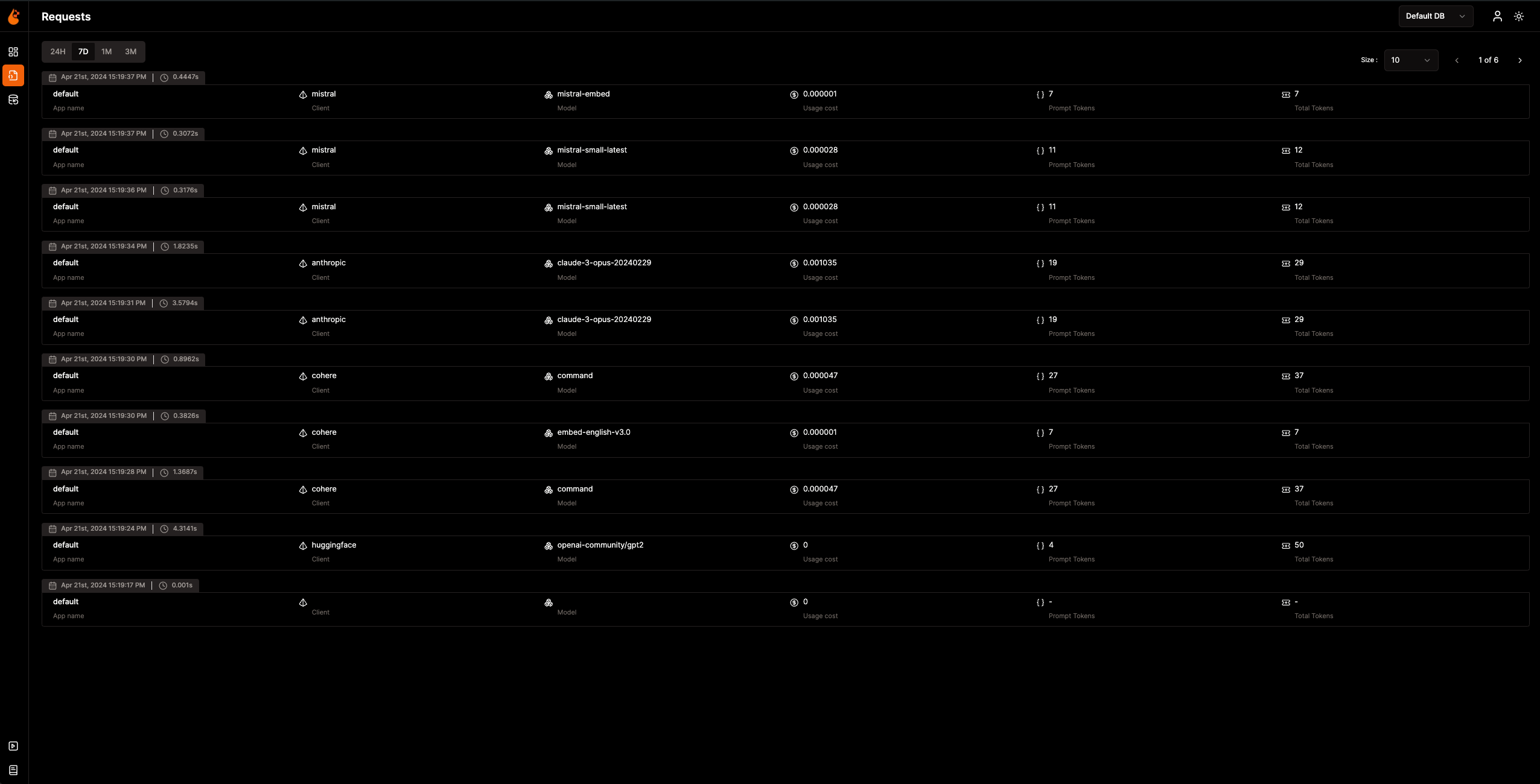
مع جمع بيانات المراقبة وإرسالها الآن إلى OpenLIT، تتمثل الخطوة التالية في تصور هذه البيانات وتحليلها للحصول على رؤى حول أداء تطبيق الذكاء الاصطناعي الخاص بك وسلوكه وتحديد مجالات التحسين.
فقط توجه إلى OpenLIT على `127.0.0.1:3000` في متصفحك لبدء الاستكشاف. يمكنك تسجيل الدخول باستخدام بيانات الاعتماد الافتراضية:
- **البريد الإلكتروني**: `[email protected]`
- **كلمة المرور**: `openlituser`
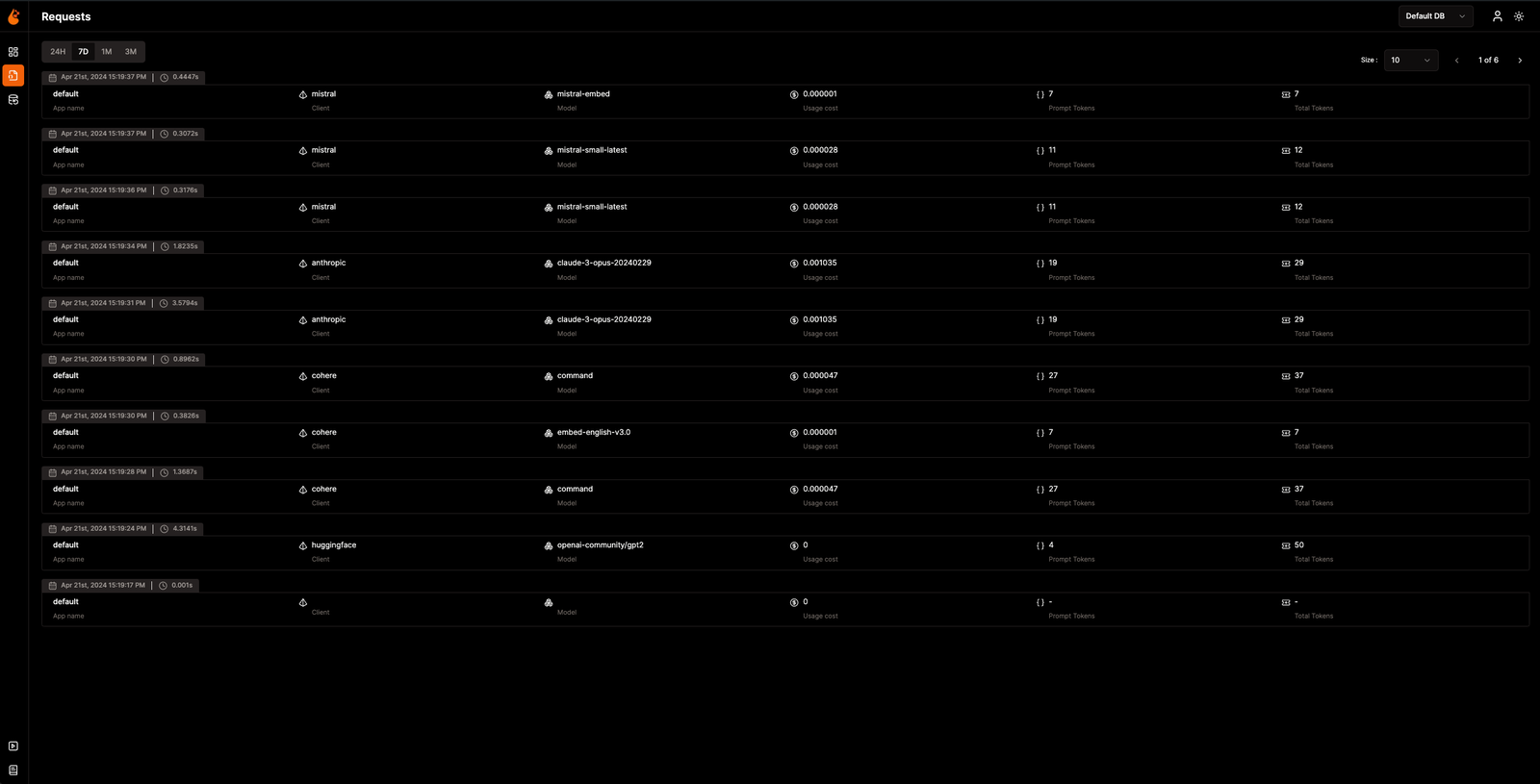
## 📦 التكاملات المدعومة
يقوم OpenLIT تلقائيًا بدمج **أكثر من 44 مزودًا لنماذج LLM وأطر عمل الذكاء الاصطناعي وقواعد بيانات المتجهات** بسطر واحد من التعليمات البرمجية. ينتج كل تكامل [تتبعات ومقاييس أصلية لـ OpenTelemetry](https://opentelemetry.io/). انقر على أي بطاقة لعرض وثائق التكامل.
<sub>
<img src="https://img.shields.io/badge/Python-3776AB?logo=python&logoColor=white&style=flat-square" height="16"> Python SDK
<img src="https://img.shields.io/badge/TypeScript-3178C6?logo=typescript&logoColor=white&style=flat-square" height="16"> TypeScript SDK
</sub>
### مزودو LLM
<table>
<tr>
<td align="center" width="160"><a href="https://docs.openlit.io/latest/sdk/integrations/openai"><b>OpenAI</b></a><br/><img src="https://img.shields.io/badge/Python-3776AB?logo=python&logoColor=white&style=flat-square" height="18"> <img src="https://img.shields.io/badge/TypeScript-3178C6?logo=typescript&logoColor=white&style=flat-square" height="18"></td>
<td align="center" width="160"><a href="https://docs.openlit.io/latest/sdk/integrations/anthropic"><b>Anthropic</b></a><br/><img src="https://img.shields.io/badge/Python-3776AB?logo=python&logoColor=white&style=flat-square" height="18"> <img src="https://img.shields.io/badge/TypeScript-3178C6?logo=typescript&logoColor=white&style=flat-square" height="18"></td>
<td align="center" width="160"><a href="https://docs.openlit.io/latest/sdk/integrations/cohere"><b>Cohere</b></a><br/><img src="https://img.shields.io/badge/Python-3776AB?logo=python&logoColor=white&style=flat-square" height="18"> <img src="https://img.shields.io/badge/TypeScript-3178C6?logo=typescript&logoColor=white&style=flat-square" height="18"></td>
<td align="center" width="160"><a href="https://docs.openlit.io/latest/sdk/integrations/mistral"><b>Mistral AI</b></a><br/><img src="https://img.shields.io/badge/Python-3776AB?logo=python&logoColor=white&style=flat-square" height="18"> <img src="https://img.shields.io/badge/TypeScript-3178C6?logo=typescript&logoColor=white&style=flat-square" height="18"></td>
</tr>
<tr>
<td align="center" width="160"><a href="https://docs.openlit.io/latest/sdk/integrations/groq"><b>Groq</b></a><br/><img src="https://img.shields.io/badge/Python-3776AB?logo=python&logoColor=white&style=flat-square" height="18"> <img src="https://img.shields.io/badge/TypeScript-3178C6?logo=typescript&logoColor=white&style=flat-square" height="18"></td>
<td align="center" width="160"><a href="https://docs.openlit.io/latest/sdk/integrations/google-ai-studio"><b>Google AI Studio</b></a><br/><img src="https://img.shields.io/badge/Python-3776AB?logo=python&logoColor=white&style=flat-square" height="18"> <img src="https://img.shields.io/badge/TypeScript-3178C6?logo=typescript&logoColor=white&style=flat-square" height="18"></td>
<td align="center" width="160"><a href="https://docs.openlit.io/latest/sdk/integrations/together"><b>Together AI</b></a><br/><img src="https://img.shields.io/badge/Python-3776AB?logo=python&logoColor=white&style=flat-square" height="18"> <img src="https://img.shields.io/badge/TypeScript-3178C6?logo=typescript&logoColor=white&style=flat-square" height="18"></td>
<td align="center" width="160"><a href="https://docs.openlit.io/latest/sdk/integrations/ollama"><b>Ollama</b></a><br/><img src="https://img.shields.io/badge/Python-3776AB?logo=python&logoColor=white&style=flat-square" height="18"> <img src="https://img.shields.io/badge/TypeScript-3178C6?logo=typescript&logoColor=white&style=flat-square" height="18"></td>
</tr>
<tr>
<td align="center" width="160"><a href="https://docs.openlit.io/latest/sdk/integrations/bedrock"><b>AWS Bedrock</b></a><br/><img src="https://img.shields.io/badge/Python-3776AB?logo=python&logoColor=white&style=flat-square" height="18"> <img src="https://img.shields.io/badge/TypeScript-3178C6?logo=typescript&logoColor=white&style=flat-square" height="18"></td>
<td align="center" width="160"><a href="https://docs.openlit.io/latest/sdk/integrations/azure-ai-inference"><b>Azure AI Inference</b></a><br/><img src="https://img.shields.io/badge/Python-3776AB?logo=python&logoColor=white&style=flat-square" height="18"></td>
<td align="center" width="160"><a href="https://docs.openlit.io/latest/sdk/integrations/vertexai"><b>Vertex AI</b></a><br/><img src="https://img.shields.io/badge/Python-3776AB?logo=python&logoColor=white&style=flat-square" height="18"></td>
<td align="center" width="160"><a href="https://docs.openlit.io/latest/sdk/integrations/vllm"><b>vLLM</b></a><br/><img src="https://img.shields.io/badge/Python-3776AB?logo=python&logoColor=white&style=flat-square" height="18"></td>
</tr>
<tr>
<td align="center" width="160"><a href="https://docs.openlit.io/latest/sdk/integrations/reka"><b>Reka</b></a><br/><img src="https://img.shields.io/badge/Python-3776AB?logo=python&logoColor=white&style=flat-square" height="18"></td>
<td align="center" width="160"><a href="https://docs.openlit.io/latest/sdk/integrations/litellm"><b>LiteLLM</b></a><br/><img src="https://img.shields.io/badge/Python-3776AB?logo=python&logoColor=white&style=flat-square" height="18"></td>
<td align="center" width="160"><a href="https://docs.openlit.io/latest/sdk/integrations/huggingface"><b>Hugging Face</b></a><br/><img src="https://img.shields.io/badge/Python-3776AB?logo=python&logoColor=white&style=flat-square" height="18"></td>
<td align="center" width="160"><a href="https://docs.openlit.io/latest/sdk/integrations/ai21"><b>AI21</b></a><br/><img src="https://img.shields.io/badge/Python-3776AB?logo=python&logoColor=white&style=flat-square" height="18"></td>
</tr>
<tr>
<td align="center" width="160"><a href="https://docs.openlit.io/latest/sdk/integrations/gpt4all"><b>GPT4All</b></a><br/><img src="https://img.shields.io/badge/Python-3776AB?logo=python&logoColor=white&style=flat-square" height="18"></td>
<td align="center" width="160"><a href="https://docs.openlit.io/latest/sdk/integrations/premai"><b>PremAI</b></a><br/><img src="https://img.shields.io/badge/Python-3776AB?logo=python&logoColor=white&style=flat-square" height="18"></td>
<td align="center" width="160"><a href="https://docs.openlit.io/latest/sdk/integrations/sarvam"><b>Sarvam AI</b></a><br/><img src="https://img.shields.io/badge/Python-3776AB?logo=python&logoColor=white&style=flat-square" height="18"></td>
<td align="center" width="160"><a href="https://docs.openlit.io/latest/sdk/integrations/julep-ai"><b>Julep</b></a><br/><img src="https://img.shields.io/badge/Python-3776AB?logo=python&logoColor=white&style=flat-square" height="18"></td>
</tr>
<tr>
<td align="center" width="160"><a href="https://docs.openlit.io/latest/sdk/integrations/multion"><b>MultiOn</b></a><br/><img src="https://img.shields.io/badge/Python-3776AB?logo=python&logoColor=white&style=flat-square" height="18"></td>
</tr>
</table>
### أطر عمل الذكاء الاصطناعي
<table>
<tr>
<td align="center" width="160"><a href="https://docs.openlit.io/latest/sdk/integrations/langchain"><b>LangChain</b></a><br/><img src="https://img.shields.io/badge/Python-3776AB?logo=python&logoColor=white&style=flat-square" height="18"> <img src="https://img.shields.io/badge/TypeScript-3178C6?logo=typescript&logoColor=white&style=flat-square" height="18"></td>
<td align="center" width="160"><a href="https://docs.openlit.io/latest/sdk/integrations/llama-index"><b>LlamaIndex</b></a><br/><img src="https://img.shields.io/badge/Python-3776AB?logo=python&logoColor=white&style=flat-square" height="18"> <img src="https://img.shields.io/badge/TypeScript-3178C6?logo=typescript&logoColor=white&style=flat-square" height="18"></td>
<td align="center" width="160"><a href="https://docs.openlit.io/latest/sdk/integrations/crewai"><b>CrewAI</b></a><br/><img src="https://img.shields.io/badge/Python-3776AB?logo=python&logoColor=white&style=flat-square" height="18"></td>
<td align="center" width="160"><a href="https://docs.openlit.io/latest/sdk/integrations/pydantic"><b>Pydantic AI</b></a><br/><img src="https://img.shields.io/badge/Python-3776AB?logo=python&logoColor=white&style=flat-square" height="18"></td>
</tr>
<tr>
<td align="center" width="160"><a href="https://docs.openlit.io/latest/sdk/integrations/phidata"><b>Agno</b></a><br/><img src="https://img.shields.io/badge/Python-3776AB?logo=python&logoColor=white&style=flat-square" height="18"></td>
<td align="center" width="160"><a href="https://docs.openlit.io/latest/sdk/integrations/browser-use"><b>Browser Use</b></a><br/><img src="https://img.shields.io/badge/Python-3776AB?logo=python&logoColor=white&style=flat-square" height="18"></td>
<td align="center" width="160"><a href="https://docs.openlit.io/latest/sdk/integrations/haystack"><b>Haystack</b></a><br/><img src="https://img.shields.io/badge/Python-3776AB?logo=python&logoColor=white&style=flat-square" height="18"></td>
<td align="center" width="160"><a href="https://docs.openlit.io/latest/sdk/integrations/letta"><b>Letta</b></a><br/><img src="https://img.shields.io/badge/Python-3776AB?logo=python&logoColor=white&style=flat-square" height="18"></td>
</tr>
<tr>
<td align="center" width="160"><a href="https://docs.openlit.io/latest/sdk/integrations/mem0"><b>Mem0</b></a><br/><img src="https://img.shields.io/badge/Python-3776AB?logo=python&logoColor=white&style=flat-square" height="18"></td>
<td align="center" width="160"><a href="https://docs.openlit.io/latest/sdk/integrations/ag2"><b>AG2 (AutoGen)</b></a><br/><img src="https://img.shields.io/badge/Python-3776AB?logo=python&logoColor=white&style=flat-square" height="18"></td>
<td align="center" width="160"><a href="https://docs.openlit.io/latest/sdk/integrations/controlflow"><b>Controlflow</b></a><br/><img src="https://img.shields.io/badge/Python-3776AB?logo=python&logoColor=white&style=flat-square" height="18"></td>
<td align="center" width="160"><a href="https://docs.openlit.io/latest/sdk/integrations/crawl4ai"><b>Crawl4AI</b></a><br/><img src="https://img.shields.io/badge/Python-3776AB?logo=python&logoColor=white&style=flat-square" height="18"></td>
</tr>
<tr>
<td align="center" width="160"><a href="https://docs.openlit.io/latest/sdk/integrations/dynamiq"><b>Dynamiq</b></a><br/><img src="https://img.shields.io/badge/Python-3776AB?logo=python&logoColor=white&style=flat-square" height="18"></td>
<td align="center" width="160"><a href="https://docs.openlit.io/latest/sdk/integrations/openai-agents"><b>OpenAI Agents</b></a><br/><img src="https://img.shields.io/badge/Python-3776AB?logo=python&logoColor=white&style=flat-square" height="18"></td>
<td align="center" width="160"><a href="https://docs.openlit.io/latest/sdk/integrations/firecrawl"><b>Firecrawl</b></a><br/><img src="https://img.shields.io/badge/Python-3776AB?logo=python&logoColor=white&style=flat-square" height="18"></td>
</tr>
</table>
### قواعد بيانات المتجهات
<table>
<tr>
<td align="center" width="160"><a href="https://docs.openlit.io/latest/sdk/integrations/pinecone"><b>Pinecone</b></a><br/><img src="https://img.shields.io/badge/Python-3776AB?logo=python&logoColor=white&style=flat-square" height="18"> <img src="https://img.shields.io/badge/TypeScript-3178C6?logo=typescript&logoColor=white&style=flat-square" height="18"></td>
<td align="center" width="160"><a href="https://docs.openlit.io/latest/sdk/integrations/chromadb"><b>ChromaDB</b></a><br/><img src="https://img.shields.io/badge/Python-3776AB?logo=python&logoColor=white&style=flat-square" height="18"></td>
<td align="center" width="160"><a href="https://docs.openlit.io/latest/sdk/integrations/qdrant"><b>Qdrant</b></a><br/><img src="https://img.shields.io/badge/Python-3776AB?logo=python&logoColor=white&style=flat-square" height="18"></td>
<td align="center" width="160"><a href="https://docs.openlit.io/latest/sdk/integrations/milvus"><b>Milvus</b></a><br/><img src="https://img.shields.io/badge/Python-3776AB?logo=python&logoColor=white&style=flat-square" height="18"></td>
</tr>
<tr>
<td align="center" width="160"><a href="https://docs.openlit.io/latest/sdk/integrations/astradb"><b>Astra DB</b></a><br/><img src="https://img.shields.io/badge/Python-3776AB?logo=python&logoColor=white&style=flat-square" height="18"></td>
<td align="center" width="160"><a href="https://docs.openlit.io/latest/sdk/integrations/psycopg"><b>PostgreSQL</b></a><br/><img src="https://img.shields.io/badge/Python-3776AB?logo=python&logoColor=white&style=flat-square" height="18"></td>
</tr>
</table>
### أدوات متخصصة
<table>
<tr>
<td align="center" width="160"><a href="https://docs.openlit.io/latest/sdk/integrations/elevenlabs"><b>ElevenLabs</b></a><br/><img src="https://img.shields.io/badge/Python-3776AB?logo=python&logoColor=white&style=flat-square" height="18"></td>
<td align="center" width="160"><a href="https://docs.openlit.io/latest/sdk/integrations/assemblyai"><b>AssemblyAI</b></a><br/><img src="https://img.shields.io/badge/Python-3776AB?logo=python&logoColor=white&style=flat-square" height="18"></td>
</tr>
</table>
## 🛣️ خارطة الطريق
نحن ملتزمون بالتحسين المستمر لـ OpenLIT. إليك نظرة على ما تم إنجازه وما هو قادم في الأفق:
| الميزة | الحالة |
| --------------------------------------------------------------------------------------------------------------------------------- | ------------- |
| [SDK مراقبة أصلي لـ OpenTelemetry للتتبعات والمقاييس](https://github.com/openlit/openlit/tree/text-upgrade/sdk/python) | ✅ مكتمل |
| [مراقبة GPU أصلية لـ OpenTelemetry](https://docs.openlit.io/latest/features/gpu) | ✅ مكتمل |
| [مراقبة الاستثناءات والأخطاء](https://docs.openlit.io/latest/features/exceptions) | ✅ مكتمل |
| [مركز المطالبات لإدارة وإصدار المطالبات](https://docs.openlit.io/latest/features/prompt-hub) | ✅ مكتمل |
| [OpenGround لاختبار ومقارنة نماذج LLM](https://docs.openlit.io/latest/features/openground) | ✅ مكتمل |
| [Vault للإدارة المركزية لمفاتيح API وأسرار LLM](https://docs.openlit.io/latest/features/vault) | ✅ مكتمل |
| [تتبع التكاليف للنماذج المخصصة](https://docs.openlit.io/latest/features/pricing) | ✅ مكتمل |
| [تنفيذ الحواجز الوقائية في الوقت الفعلي](https://docs.openlit.io/latest/features/guardrails) | ✅ مكتمل |
| [التقييم البرمجي لاستجابة LLM](https://docs.openlit.io/latest/features/evaluations) | ✅ مكتمل |
| [Fleet Hub لإدارة OpAMP](https://docs.openlit.io/latest/openlit/observability/fleet-hub) | ✅ مكتمل |
| [مقاييس التقييم التلقائي بناءً على الاستخدام](https://github.com/openlit/openlit/issues/470) | 🔜 قريبًا |
| [التغذية الراجعة البشرية لأحداث LLM](https://github.com/openlit/openlit/issues/471) | 🔜 قريبًا |
| [توليد مجموعات البيانات بناءً على أحداث LLM](https://github.com/openlit/openlit/issues/472) | 🔜 قريبًا |
| [البحث في التتبعات]() | 🔜 قريبًا |
## 🌱 المساهمة
سواء كانت كبيرة أو صغيرة، نحن نحب المساهمات 💚. اطلع على [دليل المساهمة](https://github.com/pvharmo2/gha-lab-6c3094af9e/blob/main/CONTRIBUTING.md) للبدء
لست متأكدًا من أين تبدأ؟ إليك بعض الطرق للمشاركة:
- انضم إلى مجتمعنا على [Slack](https://join.slack.com/t/openlit/shared_invite/zt-2etnfttwg-TjP_7BZXfYg84oAukY8QRQ) أو [Discord](https://discord.gg/rjvTm6zd) لمناقشة الأفكار ومشاركة الملاحظات والتواصل مع فريقنا ومجتمع OpenLIT الأوسع.
مدخلاتك تساعدنا على النمو والتحسن، ونحن هنا لدعمك في كل خطوة على الطريق.
[](https://www.producthunt.com/posts/openlit?embed=true&utm_source=badge-featured&utm_medium=badge&utm_souce=badge-openlit)
<a href="https://fazier.com/launches/openlit-2" target="_blank" rel="noopener noreferrer"><img src="https://fazier.com/api/v1/public/badges/embed_image.svg?launch_id=779&badge_type=daily" width="270" alt="Example Image" class="d-inline-block mt-3 p-3 rounded img-fluid" /></a>
## 💚 المجتمع والدعم
تواصل مع مجتمع OpenLIT والمشرفين للحصول على الدعم والمناقشات والتحديثات:
- 🌟 إذا أعجبك، اترك نجمة على [GitHub](https://github.com/openlit/openlit/).
- 🌍 انضم إلى مجتمعنا على [Slack](https://join.slack.com/t/openlit/shared_invite/zt-2etnfttwg-TjP_7BZXfYg84oAukY8QRQ) أو [Discord](https://discord.gg/CQnXwNT3) للتفاعلات المباشرة والأسئلة.
- 🐞 أبلغ عن الأخطاء على [GitHub Issues](https://github.com/openlit/openlit/issues) لمساعدتنا في تحسين OpenLIT.
- 𝕏 تابعنا على [X](https://twitter.com/openlit_io) لآخر التحديثات والأخبار.
## الترخيص
OpenLIT متاح بموجب [رخصة Apache-2.0](https://github.com/pvharmo2/gha-lab-6c3094af9e/blob/main/LICENSE).
## 🙇♂️ شكر وتقدير
<p>هذا المشروع مدعوم بفخر من:</p>
<p>
<a href="https://www.testmuai.com/?utm_medium=sponsor&utm_source=openlit" target="_blank">
<img src="https://assets.kitploit.com/production/public/readmes/54232/59e406ce9676e24c2e228a1804d1810579038817584ead02e904e630264533c7/3ca662f501e7be9fcc4af3ff06d2755ca0712b463591ada282d81325365618bb-display-v1.webp" style={{ verticalAlign: 'middle' }} height="80" />
</a>
<a href="https://www.digitalocean.com/">
<img src="https://opensource.nyc3.cdn.digitaloceanspaces.com/attribution/assets/SVG/DO_Logo_horizontal_blue.svg" height="80px" width="200px">
</a>
</p>