 mschwager/route-detect
ابحث عن ثغرات أمان تتعلق بالمصادقة (authn) والترخيص (authz) في مسارات تطبيقات الويب.




ابحث عن ثغرات الأمان الخاصة بالمصادقة (authn) والتفويض (authz) في مسارات تطبيقات الويب:
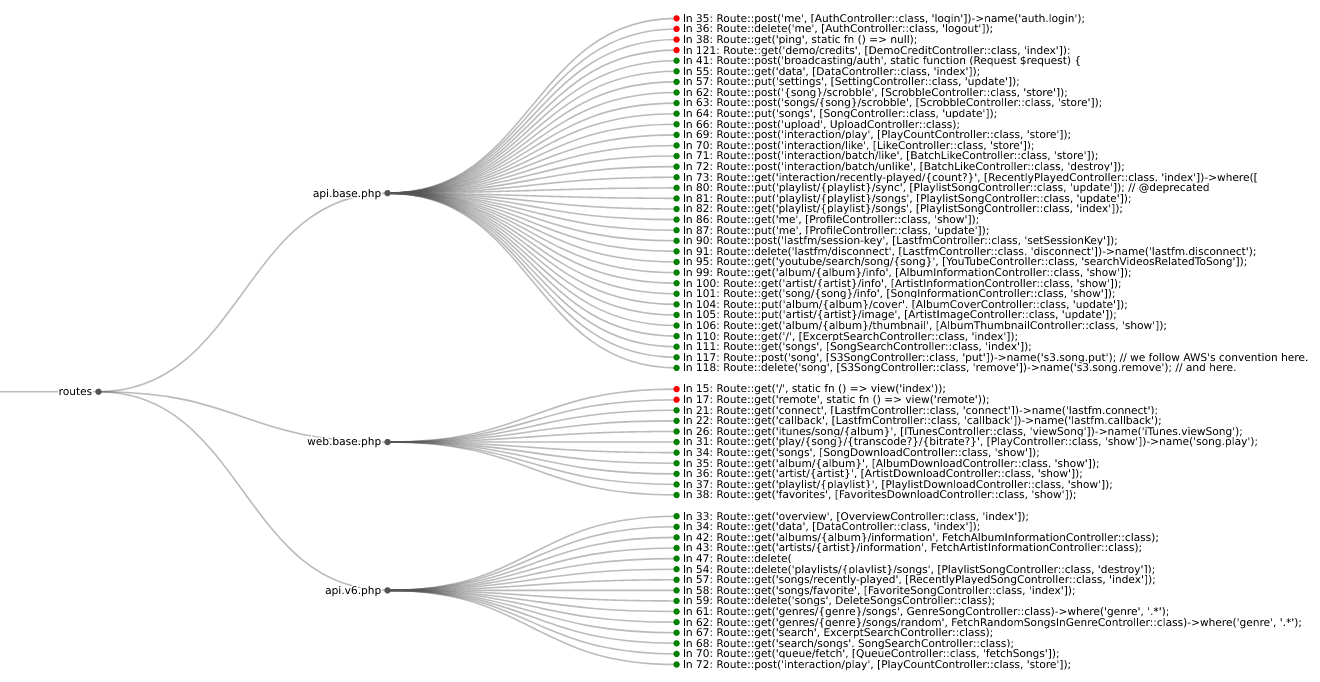
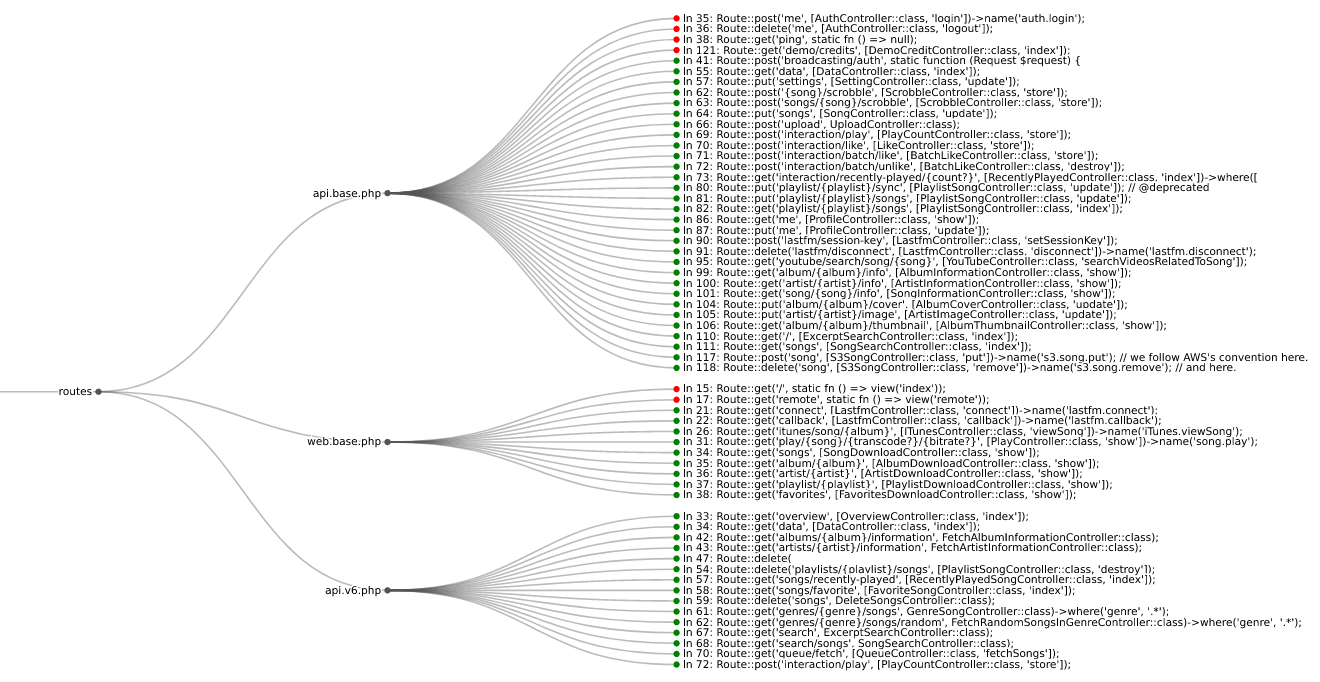
المسارات من koel خادم البث
تعد ثغرات المصادقة (authn) والتفويض (authz) في مسارات HTTP لتطبيقات الويب من أكثر مشكلات الأمان شيوعًا اليوم. تسلط هذه الموارد القياسية الصناعية الضوء على خطورة المشكلة:
| اللغة | الإطار | Semgrep | CodeQL |
|---|---|---|---|
| Python | Django | ✅ | ❌ |
| Python | Django REST framework | ✅ | ❌ |
| Python | Flask | ✅ | ❌ |
| Python | Sanic | ✅ | ❌ |
| Python | FastAPI | ✅ | ❌ |
| PHP | Laravel | ✅ | ❌ |
| PHP | Symfony | ✅ | ❌ |
| PHP | CakePHP | ✅ | ❌ |
| Ruby | Rails | ❌ | ✅ |
| Ruby | Grape | ✅ | ❌ |
| Java | JAX-RS | ✅ | ❌ |
| Java | Spring | ✅ | ❌ |
| Go | Gorilla | ✅ | ❌ |
| Go | Gin | ✅ | ❌ |
| Go | Chi | ✅ | ❌ |
| JavaScript/TypeScript | Express | ✅ | ❌ |
| JavaScript/TypeScript | React | ✅ | ❌ |
| JavaScript/TypeScript | Angular | ✅ | ❌ |
استخدم pip لتثبيت route-detect:
$ python -m pip install --upgrade route-detect
يمكنك التحقق من تثبيت route-detect بشكل صحيح باستخدام الأمر التالي:
$ echo 'print(1 == 1)' | semgrep --config $(routes which test-route-detect) -
Scanning 1 file.

Findings:

  /tmp/stdin
     routes.rules.test-route-detect
        Found '1 == 1', your route-detect installation is working correctly

          1┆ print(1 == 1)


Ran 1 rule on 1 file: 1 finding.
يستخدم route-detect أمر CLI routes ويوفر شجرة الأوامر التالية:
routes
whichvizأولاً، تأكد من تثبيت semgrep وإضافته إلى PATH الخاص بك.
[!IMPORTANT] The Semgrep functionality
route-detectdepends on to display code snippets has been moved behind their cloud app. For more information see #10762. However, earlier versions of Semgrep still support this behavior. When usingroute-detect, make sure to install a version of Semgrep before1.97.0. This can be accomplished with the following command:python -m pip install 'semgrep<1.97.0'.
استخدم الأمر الفرعي which لتوجيه semgrep إلى قواعد تطبيق الويب الصحيحة:
$ semgrep --config $(routes which django) path/to/django/code
استخدم الأمر الفرعي viz لتصور معلومات المسار في متصفحك:
$ semgrep --json --config $(routes which django) --output routes.json path/to/django/code
$ routes viz --browser routes.json
إذا لم تكن متأكدًا من الإطار الذي تبحث عنه، يمكنك استخدام المعرف الخاص all للتحقق من كل شيء:
$ semgrep --json --config $(routes which all) --output routes.json path/to/code
إذا كان لديك منطق مخصص للمصادقة أو التفويض، يمكنك نسخ قواعد route-detect:
$ cp $(routes which django) my-django.yml
ثم يمكنك تعديل القاعدة حسب الحاجة وتشغيلها كما هو موضح أعلاه:
$ semgrep --json --config my-django.yml --output routes.json path/to/django/code
$ routes viz --browser routes.json
أولاً، تأكد من تثبيت codeql وإضافته إلى PATH الخاص بك.
استخدم الأمر الفرعي which لتثبيت تبعيات الحزمة أولاً، ثم تشغيل الاستعلامات المناسبة:
$ codeql pack install $(poetry run routes which -c rails)
$ codeql database analyze \
    --output routes.sarif \
    --format sarif-latest \
    --sarif-add-file-contents \
    --no-group-results \
    -- \
    /path/to/codeql/db \
    $(routes which --codeql rails)
استخدم الأمر الفرعي viz لتصور معلومات المسار في متصفحك:
$ routes viz --codeql --browser routes.sarif
يستخدم route-detect poetry لإدارة التبعيات والتكوين.
قبل المتابعة، قم بتثبيت تبعيات المشروع باستخدام الأمر التالي:
$ poetry install --with dev
قم بفحص جميع ملفات المشروع باستخدام الأمر التالي:
$ poetry run pre-commit run --all-files
قم بتشغيل اختبارات Python باستخدام الأمر التالي:
$ poetry run pytest --cov
قم بتشغيل اختبارات قواعد Semgrep باستخدام الأمر التالي:
$ poetry run semgrep --test --config routes/rules/ tests/test_rules/
قم بتشغيل اختبارات استعلامات CodeQL باستخدام الأمر التالي:
$ codeql test run routes/queries/rails/test/
