
Skip to content
KitploitKITPLOIT
أدواتالمدونة
إرسال
أدواتالمدونة
إرسال

أدوات الاختراق واختبار الاختراق والأمن السيبراني لترسانتك الأمنية!

Kitploit هو دليل لأدوات الاختراق والأمن السيبراني واختبار الاختراق. اكتشف آخر تحديثات المشاريع للعثور على الثغرات وتحليل الأنظمة وأتمتة الاختبارات وتعزيز أمنك.

··الخلاصات·اتصال·الخصوصية·© 2026 Kitploit

دليل الأدوات

الفئات

عرض جميع الفئات
Loading categories
GPT_Vuln-analyzer — يستخدم واجهة برمجة تطبيقات ChatGPT وواجهة برمجة تطبيقات Bard وLlama2 ووحدات Python-Nmap وDNS Recon وPCAP وJWT recon، ويستعمل نموذج GPT3 لإنشاء تقارير الثغرات بناءً على بيانات فحص Nmap ومعلومات فحص DNS. يمكنه أيضًا إجراء تعداد النطاقات الفرعية إلى حد كبير. | Kitploit
أدوات/GitHubGitHub/morpheuslord/gpt_vuln-analyzer
الاستطلاعماسحات الثغرات الأمنيةتخطيط الشبكةمسح المنافذتحليل الثغرات الأمنيةتعداد DNS والنطاقات الفرعيةجمع المعلوماتاختبار الاختراقتحليل DNS

الأكثر شعبية

عرض الكل →

اكتشف الأدوات الأكثر استخدامًا من قبل مجتمعنا.

استكشف جميع الأدوات

تصفح مجموعتنا من الأدوات

عرض جميع الأدوات →
مشاركة
أمن الذكاء الاصطناعي
GitHubmorpheuslord/gpt_vuln-analyzer

GPT_Vuln-analyzer

يستخدم واجهة برمجة تطبيقات ChatGPT وواجهة برمجة تطبيقات Bard وLlama2 ووحدات Python-Nmap وDNS Recon وPCAP وJWT recon، ويستعمل نموذج GPT3 لإنشاء تقارير الثغرات بناءً على بيانات فحص Nmap ومعلومات فحص DNS. يمكنه أيضًا إجراء تعداد النطاقات الفرعية إلى حد كبير.

عرض المستودع
59567منذ سنة واحدةتمت المراجعة من قبل Kitploit

GPT_Vuln-analyzer

هذا تطبيق لإثبات المفهوم يوضح كيف يمكن استخدام الذكاء الاصطناعي لتوليد نتائج دقيقة لتحليل الثغرات، كما يتيح الاستفادة الإضافية من ChatGPT المفيد جدًا والمبني باستخدام وحدات openai-api وpython-nmap وdnsresolver البرمجية، بالإضافة إلى استخدام customtkinter وtkinter للنسخة ذات الواجهة الرسومية من الكود. يحتوي هذا المشروع أيضًا على واجهة سطر أوامر (CLI) وواجهة رسومية (GUI)، وهو قادر على إجراء تحليل ثغرات الشبكة، تعداد DNS، وتعداد النطاقات الفرعية.

المتطلبات

  • Python 3.10 أو أحدث
  • جميع الحزم المذكورة في ملف requirements.txt
  • OpenAI API
  • Bard API (MakerSuite Palm)
  • نقطة نهاية Runpod الخادمية بدون حالة
  • IPGeolocation API
  • Docker
  • Wireshark و tshark (كلاهما مضافان إلى مسار النظام)

حزمة الاستخدام

استيراد الحزم```bash

cd package && pip3/pip install .

root@kitploit:~
قم ببساطة باستيراد أي من الحزم الثلاث ثم قم بتعريف المتغيرات وفقًا لذلك```python
from GVA.scanner import NetworkScanner
from GVA.dns_recon import DNSRecon
from GVA.geo import geo_ip_recon
from GVA.jwt import JWTAnalyzer
from GVA.menus import Menus
from GVA.packet_analysis import PacketAnalysis
from GVA.ai_models import NMAP_AI_MODEL
from GVA.ai_models import DNS_AI_MODEL
from GVA.ai_models import JWT_AI_MODEL
from GVA.assets import Assets
from GVA.subdomain import sub_enum
from GVA import gui

# The components defined
dns_enum = DNSRecon()
geo_ip = geo_ip_recon()
p_ai_models = NMAP_AI_MODEL()
dns_ai_models = DNS_AI_MODEL()
port_scanner = NetworkScanner()
jwt_analizer = JWTAnalyzer()
sub_recon = sub_enum()
asset_codes = Assets()
packet_analysis = PacketAnalysis()

# KEEP IT BLANK IF YOU HAVE NO CLUE THE MENU WILL ASK TO FILL IT ONCE ACTIVE
lkey = "LLAMA API KEY"
lendpoint = "LLAMA ENDPOINT"
keyset = "AI API KEY"
output_loc = "OUTPUT LOCATION FOR PCAP"
threads = 200 # Default INT 200 but can be increased.
target_ip_hostname_or_token = "TARGET IP, HOSTNAME OR TOKEN"
profile_num = "PROFILE FOR NMAP SCAN"
ai_set = "AI OF CHOICE"
akey_set = "OPENAI API KEY"
bkey_set = "BARD API KEY"
ai_set_args = ""  # Keep it blank at any cost
llamakey = "LLAMA RUNPOD API KEY"
llamaendpoint = "LLAMA RUNPOD ENDPOINT"

Menus(
    lamma_key=lkey,
    llama_api_endpoint=lendpoint,
    initial_keyset=keyset,
    threads=threads,
    output_loc=output_loc,
    target=target_ip_hostname,
    profile_num=profile_num,
    ai_set=ai_set,
    openai_akey_set=akey_set,
    bard_key_set=bkey_set,
    ai_set_args=ai_set_args,
    llama_runpod_key=llamakey,
    llama_endpoint=llamaendpoint
)


gui.application()

تحديث لـ passcracker في الحزمة ولا تزال الواجهة الرسومية قيد التطوير.

استخدام CLI

  • قم أولاً بتغيير جزء "OPENAI_API_KEY" و"GEOIP_API_KEY" و"BARD_API_KEY" من الكود باستخدام مفتاح OpenAI API ومفتاح IPGeolocation API في ملف .env
  • بالنسبة لخيار llama-api أو تحديد خيار نشر نقطة النهاية serverless لـ llama runpod، فإنه يتطلب منك إدخال serverless endpoint ID من runpod بالإضافة إلى `RUNPOD API KEY````python GEOIP_API_KEY = '' OPENAI_API_KEY = '' BARD_API_KEY = '' RUNPOD_ENDPOINT_ID = '' RUNPOD_API_KEY = ''
root@kitploit:~
- ثانياً، قم بتثبيت الحزم```bash
pip3 install -r requirements.txt
or
pip install -r requirements.txt
  • قم بتشغيل الكود python3 gpt_vuln.py```bash

Regular Help Menu

python gpt_vuln.py --help

Rich Help Menu

python gpt_vuln.py --r help

Specify target with the attack

python gpt_vuln.py --target <IP/hostname/token> --attack dns/nmap/jwt

Specify target and profile for nmap

python gpt_vuln.py --target <IP/hostname/token> --attack nmap --profile <1-13> (Default:1)

Specify target for DNS no profile needed

python gpt_vuln.py --target <IP/hostname/token> --attack dns

Specify target for Subdomain Enumeration no profile used default list file

python gpt_vuln.py --target --attack sub

Specify target for Subdomain Enumeration no profile used custom list file

python gpt_vuln.py --target --attack sub --sub_list

Specify target for geolocation lookup

python gpt_vuln.py --target --attack geo

Specify PCAP file for packet analysis

python gpt_vuln.py --target --attack pcap --output --thread NUM of threads <200:default>

Specify the AI to be used for nmap

python gpt_vuln.py --target --attack nmap --profile <1-5> --ai llama /llama-api /bard / openai

Specify the AI to be used for dns

python gpt_vuln.py --target --attack dns --ai llama /llama-api /bard / openai

Specify the AI to be used for JWT analysis

python gpt_vuln.py --target --attack jwt --ai llama /llama-api /bard / openai

Password Cracker

python gpt_vuln.py --password_hash --wordlist_file --algorithm --parallel --complexity

Interactive step by step cli interface

python gpt_vuln.py --menu True

root@kitploit:~
#### خيار واجهة CLI```bash
  ________________________
| GVA Usage in progress... |
  ========================
                        \
                         \
                           ^__^
                           (oo)\_______
                           (__)\       )\/\
                               ||----w |
                               ||     ||
┏━━━━━━━━━┳━━━━━━━━━━━━━━━━┓
┃ Options ┃ Utility        ┃
┡━━━━━━━━━╇━━━━━━━━━━━━━━━━┩
│ 1       │ Nmap Enum      │
│ 2       │ DNS Enum       │
│ 3       │ Subdomain Enum │
│ 4       │ GEO-IP Enum    │
| 5       | JWT Analysis   |
| 6       | PCAP Analysis  |
| 6       | Hash Cracker   |
│ q       │ Quit           │
└─────────┴────────────────┘
Enter your choice:

الواجهة السطرية (CLI) تحتوي على بعض الملاحظات.

  • يجب توفير مفاتيح API يدويًا.
  • تلك المحددة في ملفات .env تعمل مع خيارات الوسائط (args).
  • العملية مشابهة لكنها أكثر تنظيمًا.

وجهة نظري حول Bard

إنه مشابه لـ OpenAI GPT3.5 ولكنه أسرع. يمكنه توليد نفس الإجابة ولكن بضعف السرعة.

الأنظمة المدعومة

فهم الكود

الملفات الشخصية (Profiles):

الملف الشخصي (profile) هو نوع الفحص الذي سيتم تنفيذه بواسطة العملية الفرعية (subprocess) لـ nmap. سيتم توفير الـ IP أو الهدف عبر argparse. في البداية، يتم تشغيل فحص nmap المخصص الذي يحتوي على جميع الوسائط الأساسية لاستمرار الفحص. بعد ذلك، يتم استخراج بيانات الفحص من الكم الهائل من البيانات التي يولدها nmap. كائن "scan" يحتوي على قائمة من البيانات الفرعية تحت "tcp" كل منها مُسمى وفقًا للمنافذ المفتوحة. بمجرد استخراج البيانات، يتم إرسالها إلى API OpenAI نموذج Davinci عبر موجه (prompt). يطلب الموجه بشكل محدد مخرجات JSON واستخدام البيانات بطريقة معينة.

الهيكل الكامل للطلب الذي يجب إرساله إلى API OpenAI مصمم في قسم الإكمال (completion) من البرنامج.```python class NetworkScanner(): profile_arguments = { 1: '-Pn -sV -T4 -O -F', 2: '-Pn -T4 -A -v', 3: '-Pn -sS -sU -T4 -A -v', 4: '-Pn -p- -T4 -A -v', 5: '-Pn -sS -sU -T4 -A -PE -PP -PY -g 53 --script=vuln', 6: '-Pn -sV -p- -A', 7: '-Pn -sS -sV -O -T4 -A', 8: '-Pn -sC', 9: '-Pn -p 1-65535 -T4 -A -v', 10: '-Pn -sU -T4', 11: '-Pn -sV --top-ports 100', 12: '-Pn -sS -sV -T4 --script=default,discovery,vuln', 13: '-Pn -F' }

root@kitploit:~
def scanner(self, ip: Optional[str], profile: int, akey: Optional[str],
            bkey: Optional[str], lkey, lendpoint, AI: str) -> str:
    nm.scan(ip, arguments=self.profile_arguments.get(profile))
    json_data = nm.analyse_nmap_xml_scan()
    analyze = json_data["scan"]

    try:
        ai_methods = {
            'openai': lambda: AIModels.GPT_AI(akey, analyze),
            'bard': lambda: AIModels.BardAI(bkey, analyze),
            'llama': lambda: AIModels.Llama_AI(analyze, "local", lkey, lendpoint),
            'llama-api': lambda: AIModels.Llama_AI(analyze, "runpod", lkey, lendpoint)
        }

        if AI in ai_methods and (akey or bkey):
            response = ai_methods[AI]()
        else:
            raise ValueError("Invalid AI type or missing keys")

    except KeyboardInterrupt:
        print("Bye")
        quit()

    return str(response)
root@kitploit:~
# Regex

نستخدم Regex لاستخراج المعلومات الهامة فقط من الموجه المخصص المقدم، مما يقلل من إجمالي البيانات غير المرغوب فيها.

يحدد كود الذكاء الاصطناعي تنسيقًا للمخرجات ويوجه الذكاء الاصطناعي لاتباع بعض القواعد المحددة مسبقًا لزيادة الدقة. يقوم كود استخراج Regex بعملية الاستخراج، ثم تقوم الدالة الرئيسية بترتيبها في جداول.

## استخدام Bard AI

لاستخدام Bard AI، يجب عليك التسجيل في MakerSuit Palm API للحصول على وصول المطورين وإنشاء مفتاح API الخاص بك من هناك. للروابط وكيفية العمل، يمكنك استخدام هذا الفيديو [MakerSuit](https://www.youtube.com/watch?v=Ce1AOchQMzA&t=128s).

بمجرد الحصول على API، ما عليك سوى إضافته إلى ملف `.env` وستكون جاهزًا للانطلاق.

## تنفيذ LLama2 القديم

يعد استخدام LLama2 أحد أفضل الخيارات المجانية وغير المتصلة بالإنترنت المتاحة. وهو قيد التحسين حاليًا، حيث أعمل على موجه يدمج بشكل أفضل منظور الأمن السيبراني في الذكاء الاصطناعي.

يجب أن أشكر **@thisserand** ومستودعه [llama2_local](https://github.com/thisserand/llama2_local) وكذلك فيديوهاته على يوتيوب [YT_Video](https://youtu.be/WzCS8z9GqHw). لقد كانت موارد رائعة. لأكون صريحًا، كود llama2 هو 95% من عمله، أنا فقط أخذت الكود وأضفت وظيفة Flask API إليه.

كانت دقة الذكاء الاصطناعي في وضع عدم الاتصال وخارج اختبارات الكود ممتازة وكانت بنفس دقة openai أو bard، لكن أثناء استخدامه داخل الكود واجه بعض المشكلات بسبب التوجيه وما شابه. سأحاول إصلاح ذلك.

تعتمد السرعة على نظامك وتكوينات GPU و CPU لديك. حاليًا، يستخدم النموذج `TheBloke/Llama-2-7B-Chat-GGML` ويمكن تغييره عبر ملفي `portscanner` و `dnsrecon`.

في الوقت الحالي، يتم التعامل مع كود llama والمسح الضوئي بشكل مختلف. بعد بعض الاختبارات، اكتشفت أن llama يحتاج إلى القليل من التدريب ليعمل بالطريقة التي نويتها، لذا فهو يحتاج إلى بعض الوقت. أي اقتراحات حول كيفية القيام بذلك يمكن إضافتها إلى مناقشات هذا المستودع [رابط المناقشات](https://github.com/morpheuslord/GPT_Vuln-analyzer/discussions). في الوقت الحالي، لن يكون المخرجات قائمة مقسمة لجميع البيانات، بل سيكون شرحًا للثغرات أو المشكلات التي اكتشفها الذكاء الاصطناعي.

يبدو الموجه لاستخدام النموذج كالتالي:```prompt
[INST] <<SYS>> {user_instruction}<</SYS>> NMAP Data to be analyzed: {user_message} [/INST]

تبدو التعليمات هكذا:```prompt Do a NMAP scan analysis on the provided NMAP scan information. The NMAP output must return in a asked format accorging to the provided output format. The data must be accurate in regards towards a pentest report. The data must follow the following rules: 1) The NMAP scans must be done from a pentester point of view 2) The final output must be minimal according to the format given. 3) The final output must be kept to a minimal. 4) If a value not found in the scan just mention an empty string. 5) Analyze everything even the smallest of data. 6) Completely analyze the data provided and give a confirm answer using the output format. 7) mention all the data you found in the output format provided so that regex can be used on it. 8) avoid unnecessary explaination. 9) the critical score must be calculated based on the CVE if present or by the nature of the services open 10) the os information must contain the OS used my the target. 11) the open ports must include all the open ports listed in the data[tcp] and varifying if it by checking its states value. you should not negect even one open port. 12) the vulnerable services can be determined via speculation of the service nature or by analyzing the CVE's found. The output format: critical score: - Give info on the criticality "os information": - List out the OS information "open ports and services": - List open ports - List open ports services "vulnerable service": - Based on CVEs or nature of the ports opened list the vulnerable services "found cve": - List the CVE's found and list the main issues.

root@kitploit:~
باستخدام مجموعة التعليمات والبيانات المقدمة عبر الموجه، يقوم نموذج llama AI بتوليد مخرجاته.

للاستخدام الأمثل، أقترح إنشاء نشر نقطة نهاية خادم بدون خادم (serverless endpoint) لـ llama على runpod، ويمكنك الرجوع إلى هذا البرنامج التعليمي لذلك: [tutorial](https://www.youtube.com/watch?v=Ftb4vbGUr7U). يمكنك متابعة البرنامج التعليمي للحصول على استخدام أفضل.

### Llama2 Ollama

يستخدم هذا التحديث الأخير صورة ollama docker لتنفيذ نظام llama الموضعي، وهذا يزيد من دقة المخرجات لسبب ما، ربما بسبب تكوين أفضل أو شيء من هذا القبيل. لن أتعمق في التفاصيل حول هذا، لكنني سأعمل على جزء دمج وحدة معالجة الرسومات (GPU) في الكود لهذا الغرض حتى نتمكن من إضافة قوة GPU إلى المعالجة وجعلها أكثر كفاءة. شكرًا لـ @andr6 على بدء المناقشة، إذا كان لدى أي شخص فهم أفضل لهذا التنفيذ، فلا تتردد في الابتكار وإنشاء طلب سحب (PR).

### المخرجات

#### مخرجات JWT:```
                                            GVA Report for JWT
┏━━━━━━━━━━━━━━━━━━━━━┳━━━━━━━━━━━━━━━━━━━━━━━━━━━━━━━━━━━━━━━━━━━━━━━━━━━━━━━━━━━━━━━━━━━━━━━━━━━━━━━━━━┓
┃ Variables           ┃ Results                                                                          ┃
┡━━━━━━━━━━━━━━━━━━━━━╇━━━━━━━━━━━━━━━━━━━━━━━━━━━━━━━━━━━━━━━━━━━━━━━━━━━━━━━━━━━━━━━━━━━━━━━━━━━━━━━━━━┩
│ Algorithm Used      │ HS256                                                                            │
│ Header              │ eyJhbGciOiAiSFMyNTYiLCAidHlwIjogIkpXVCJ9                                         │
│ Payload             │ eyJzdWIiOiAiMTIzNDU2Nzg5MCIsICJuYW1lIjogIkpvaG4gRG9lIiwgImlhdCI6IDE1MTYyMzkwMjJ9 │
│ Signature           │                                                                                  │
│ PossibleAttacks     │ None identified                                                                  │
│ VulnerableEndpoints │ Unable to determine without additional information                               │
└─────────────────────┴──────────────────────────────────────────────────────────────────────────────────┘

مخرجات Nmap:

OpenAI و Bard:```table

┏━━━━━━━━━━━━━━━━━━━━┳━━━━━━━━━━━━━━━━━━━━━━━━━━━━━━━━━━━━━━━━━━━━━━━━━━━━━┓ ┃ Elements ┃ Results ┃ ┡━━━━━━━━━━━━━━━━━━━━╇━━━━━━━━━━━━━━━━━━━━━━━━━━━━━━━━━━━━━━━━━━━━━━━━━━━━━┩ │ critical score │ High │ │ os information │ Microsoft Windows 11 21H2 │ │ open ports │ 80, 22, 445, 902, 912 │ │ open services │ http, ssh, microsoft-ds, vmware-auth, vmware-auth │ │ vulnerable service │ OpenSSH │ │ found cve │ CVE-2023-28531 │ └────────────────────┴─────────────────────────────────────────────────────┘

root@kitploit:~
##### LLama2```table
╭───────────────────────────────────────────── The GVA LLama2 ──────────────────────────────────────────────╮
│                                                                                                           │
│                                                                                                           │
│                                                                                                           │
│  Based on the provided NMAP data, I have conducted a thorough analysis of the target system's open ports  │
│  and services, vulnerabilities, and operating system information. Here is my findings: Critical Score:    │
│  The critical score for this target system is 7 out of 10. The system has several open ports that could   │
│  potentially be exploited, including port 80 (HTTP), port 135 (RPC), and port 445 (Microsoft DS). While   │
│  These ports are not necessarily vulnerable, they do indicate that the system is running services that    │
│  could be targeted by attackers. Additionally, the system has an outdated version of Microsoft IIS        │
│  running on port 80, which could be a potential vulnerability. OS Information: The target system is       │
│  running Microsoft Windows 10 1607. Open Ports and Services: The target system has the following open     │
│  ports:                                                                                                   │
│                                                                                                           │
│   • Port 80: HTTP (Microsoft IIS httpd)                                                                   │
│   • Port 135: RPC (Microsoft Windows RPC)                                                                 │
│   • Port 445: Microsoft DS                                                                                │
│   • Port 8000: Splunkd httpd All of these ports are currently open and have a state of "open".            │
│     Vulnerable Services: Based on the CVEs found in the NMAP data, there are several potential            │
│     vulnerabilities in the target system's services. These include:                                       │
│   • CVE-2019-1489: An elevation of privilege vulnerability in Microsoft IIS that could be exploited by    │
│     an attacker to gain control of the system. This vulnerability is related to the outdated version of   │
│     Microsoft IIS running on port 80.                                                                     │
│   • CVE-2017-0143: A remote code execution vulnerability in Microsoft Windows RPC that could be           │
│     exploited by an attacker to execute arbitrary code on the target system. This vulnerability is        │
│     related to the outdated version of Microsoft Windows RPC running on port 135.                         │
│   • CVE-2020-1362: A remote code execution vulnerability in Microsoft DS that could be exploited by an    │
│     attacker to execute arbitrary code on the target system. This vulnerability is related to the         │
│     outdated version of Microsoft DS running on port 445. Found CVEs: The following C                     │
│                                                                                                           │
╰───────────────────────────────────────────────────────────────────────────────────────────────────────────╯

مخرجات DNS:

الهدف هو jainuniversity.ac.in```table ┏━━━━━━━━━━┳━━━━━━━━━━━━━━━━━━━━━━━━━━━━━━━━━━━━━━━━━━━━━━━━━━━━━━━━━━━━━━━━━━━━━━━━━━━━━━━━━━━━━━━━━━━━━━━━━━━━━━━━━━━━━━━━━━━┓ ┃ Elements ┃ Results ┃ ┡━━━━━━━━━━╇━━━━━━━━━━━━━━━━━━━━━━━━━━━━━━━━━━━━━━━━━━━━━━━━━━━━━━━━━━━━━━━━━━━━━━━━━━━━━━━━━━━━━━━━━━━━━━━━━━━━━━━━━━━━━━━━━━━┩ │ A │ 172.67.147.95", "104.21.41.132 │ │ AAA │ │ │ NS │ mia.ns.cloudflare.com.","paul.ns.cloudflare.com. │ │ MX │ 30 aspmx5.googlemail.com.","30 aspmx4.googlemail.com.","20 alt2.aspmx.l.google.com.","30 │ │ │ aspmx3.googlemail.com.","30 aspmx2.googlemail.com.","20 alt1.aspmx.l.google.com.","10 aspmx.l.google.com. │ │ PTR │ │ │ SOA │ mia.ns.cloudflare.com. dns.cloudflare.com. 2309618668 10000 2400 604800 3600 │ │ TXT │ atlassian-sending-domain-verification=5b358ce4-5ad3-404d-b4b4-005bf933603b","include:_spf.atlassian.net │ └──────────┴───────────────────────────────────────────────────────────────────────────────────────────────────────────────────┘

root@kitploit:~
#### مخرجات الموقع الجغرافي:```table
┏━━━━━━━━━━━━━━━━━━━━━━━━━━━━━┳━━━━━━━━━━━━━━━━━━━━━━━━━━━━━━━━━━━━━━━━━━━━━━━━━━━━━━━━━━━━━━━━━━━━━━━━━┓
┃ Identifiers                 ┃ Data                                                                    ┃
┡━━━━━━━━━━━━━━━━━━━━━━━━━━━━━╇━━━━━━━━━━━━━━━━━━━━━━━━━━━━━━━━━━━━━━━━━━━━━━━━━━━━━━━━━━━━━━━━━━━━━━━━━┩
│ ip                          │ █████████████                                                           │
│ continent_code              │ AS                                                                      │
│ continent_name              │ Asia                                                                    │
│ country_code2               │ IN                                                                      │
│ country_code3               │ IND                                                                     │
│ country_name                │ India                                                                   │
│ country_capital             │ New Delhi                                                               │
│ state_prov                  │ Haryana                                                                 │
│ state_code                  │ IN-HR                                                                   │
│ district                    │                                                                         │
│ city                        │ Gurugram                                                                │
│ zipcode                     │ 122003                                                                  │
│ latitude                    │ 28.44324                                                                │
│ longitude                   │ 77.05501                                                                │
│ is_eu                       │ False                                                                   │
│ calling_code                │ +91                                                                     │
│ country_tld                 │ .in                                                                     │
│ languages                   │ en-IN,hi,bn,te,mr,ta,ur,gu,kn,ml,or,pa,as,bh,sat,ks,ne,sd,kok,doi,mni,… │
│ country_flag                │ https://ipgeolocation.io/static/flags/in_64.png                         │
│ geoname_id                  │ 9148991                                                                 │
│ isp                         │ Bharti Airtel Limited                                                   │
│ connection_type             │                                                                         │
│ organization                │ Bharti Airtel Limited                                                   │
│ currency.code               │ INR                                                                     │
│ currency.name               │ Indian Rupee                                                            │
│ currency.symbol             │ ₹                                                                       │
│ time_zone.name              │ Asia/Kolkata                                                            │
│ time_zone.offset            │ 5.5                                                                     │
│ time_zone.current_time      │ 2023-07-11 17:08:35.057+0530                                            │
│ time_zone.current_time_unix │ 1689075515.057                                                          │
│ time_zone.is_dst            │ False                                                                   │
│ time_zone.dst_savings       │ 0                                                                       │
└─────────────────────────────┴─────────────────────────────────────────────────────────────────────────┘

PCAP مخرجات```

Collecting Json Data Extracting IP details... Extracting DNS details... Extracting EAPOL details... Extracting TCP STREAMS details... TCP streams can take some time.. Total Streams combination: 252 Number of workers in progress: 250 Completed GVA Report for PCAP ┏━━━━━━━━━━━━━━━━━━━━━━━━━━━━━━━━━━━━┳━━━━━━━━━━━━━━━━━━━━━━━━━━━━━━━━━━━━━━━━━━━━━━━━━━━━━━━━━━━━━━━━━━━━━━━━━━━━━━━━━━━━━━━━━━━━━━━━━━━━┓ ┃ Identifiers ┃ Data ┃ ┡━━━━━━━━━━━━━━━━━━━━━━━━━━━━━━━━━━━━╇━━━━━━━━━━━━━━━━━━━━━━━━━━━━━━━━━━━━━━━━━━━━━━━━━━━━━━━━━━━━━━━━━━━━━━━━━━━━━━━━━━━━━━━━━━━━━━━━━━━━┩ │ PacketAnalysis.Services │ ['49943', '49958', '49934', '49944', '49931', '443', '49957'] │ │ PacketAnalysis.TCP Streams │ ['1', '4', '5', '2', '0', '3'] │ │ PacketAnalysis.Sources Address │ ['█████████████', '1.1.1.1', '█████████████', '█████████████', '█████████████', '█████████████'] │ │ PacketAnalysis.Destination Address │ ['█████████████', '1.1.1.1', '█████████████', '█████████████', '█████████████', '█████████████'] │ │ PacketAnalysis.DNS Resolved │ [] │ │ PacketAnalysis.DNS Query │ ['oneclient.sfx.ms'] │ │ PacketAnalysis.DNS Response │ ['oneclient.sfx.ms.edgekey.net', 'e9659.dspg.akamaiedge.net', 'oneclient.sfx.ms'] │ │ PacketAnalysis.EAPOL Data │ [] │ │ PacketAnalysis. Total Streams Data │ 126 │ └────────────────────────────────────┴────────────────────────────────────────────────────────────────────────────────────────────────────┘

root@kitploit:~
#### إخراج كاسر كلمة المرور```
  ________________________
| GVA Usage in progress... |
  ========================
                        \
                         \
                           ^__^
                           (oo)\_______
                           (__)\       )\/\
                               ||----w |
                               ||     ||
Cracking... ━━━━━━━━━━━━━━━━━━━━━━━━━━━━━━━━━━━━━━━━ 100% 0:00:00
╭────────────────────────────────────────────── The GVA Password Cracker  ──────────────────────────────────────────────╮      │                                                                                                                       │ │                                                                                                                       │
│                                        Password Cracked! Password:  legion                                            │
│                                                                                                                       │
╰───────────────────────────────────────────────────────────────────────────────────────────────────────────────────────╯

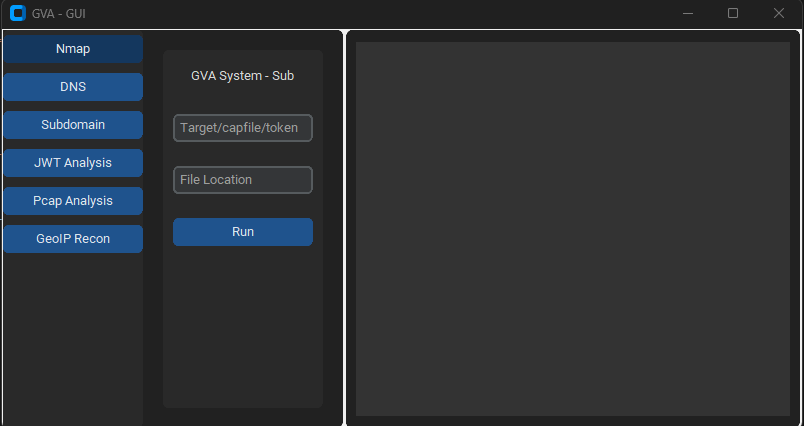
استخدام الواجهة الرسومية

تستخدم الواجهة الرسومية customtkinter لتشغيل الكود. الواجهة مباشرة، الشيء الوحيد الذي يجب تذكره هو:

  • عند استخدام هجوم dns، لا تحدد الملف الشخصي```bash python GVA_gui.py
root@kitploit:~
### النافذة الأولية

![init](https://assets.kitploit.com/production/public/readmes/5784/03469f428403c0d8ea05932b8b8854649e26d8b325f5468a7af7358d658464a7.png)

### نافذة NMAP

![nmap](https://assets.kitploit.com/production/public/readmes/5784/d795e0f39f8eda944ea6d76b5a150ef73bb4cce3f070e7bbcc76623f433b217a.png)

### نافذة DNS

![dns](https://assets.kitploit.com/production/public/readmes/5784/8420ce56819a0063f3268ca1650645fdd1faa3440c11b0cd699c6b66be67c00e.png)

### نافذة GEOIP

![geoip](https://assets.kitploit.com/production/public/readmes/5784/309b00715f1b645259b2d80f153f0b6be45622b34a4c4321cbd17cdaf707d1d8.png)

### نافذة PCAP

![pcap](https://assets.kitploit.com/production/public/readmes/5784/c25ebeee2e87706c1145382ade9142ca8449cfd77412000c849c1f000f115de0.png)

### نافذة النطاق الفرعي

![subdomain](https://assets.kitploit.com/production/public/readmes/5784/5ecffc756794097d6f77939aefbd029078575eb77ee3512add7174f03e7aacc2.png)

### نافذة JWT

![jwt](https://assets.kitploit.com/production/public/readmes/5784/f00ff0ff586b10ab3523a92bc62808875fcb4bb48fa3024f482614dc7dfdb3ef.png)
تنزيل الأداة
PreviewCodeNameWorking StatusOpenAI StatusBard StatusLLama2 Status
LINGNU/Linux✅✅✅❌ [لم يتم الاختبار]
WINWindows✅✅✅✅
ParameterReturn dataDescriptionNmap Command
p1jsonفحص فعال-Pn -sV -T4 -O -F
p2jsonفحص بسيط-Pn -T4 -A -v
p3jsonفحص منخفض الطاقة-Pn -sS -sU -T4 -A -v
p4jsonفحص مكثف جزئي-Pn -p- -T4 -A -v
p5jsonفحص مكثف كامل-Pn -sS -sU -T4 -A -PE -PP -PY -g 53 --script=vuln
p6jsonكشف شامل لإصدارات الخدمات-Pn -sV -p- -A
p7jsonفحص عدواني مع كشف نظام التشغيل-Pn -sS -sV -O -T4 -A
p8jsonفحص نصي للثغرات الشائعة-Pn -sC
p9jsonفحص مكثف، جميع منافذ TCP-Pn -p 1-65535 -T4 -A -v
p10jsonفحص UDP-Pn -sU -T4
p11jsonكشف الخدمات والإصدارات لأهم المنافذ-Pn -sV --top-ports 100
p12jsonفحص عدواني مع نصوص NSE للثغرات-Pn -sS -sV -T4 --script=default,discovery,vuln
p13jsonفحص سريع للمنافذ الشائعة-Pn -F