
أداة أمان Azure قابلة للتوسيع - التوثيق
أداة الأمان السحابي القابلة للتوسع من Azure (يُشار إليها لاحقًا باسم E.A.S.T) هي أداة لتقييم ضوابط الأمان في Azure وإلى حد ما في Azure AD. الاستخدام الأساسي لـ EAST هو جمع بيانات الأمان للتقييم في تقييمات Azure. يمكن بعد ذلك استخدام هذه المعلومات (محتوى JSON) في أدوات إعداد التقارير المختلفة، والتي نستخدمها لمزيد من الربط والتحقيق في البيانات.
هذه الأداة مرخصة بموجب رخصة MIT.
جدول المحتويات
الإصدار v 0.5
miGeneral.jsquery.jsالإصدار v 0.4
تم تقديم الفرع التجريبي
التغييرات:
يأخذ التثبيت الآن في الاعتبار استخدام الإصدار المُحدَّث من Azure Cloud Shell فيما يتعلق بالتبعيات (يحتوي Cloud Shell الآن على Node.js الإصدار 16)
التحقق من أنواع مجموعات Databricks وفقًا للاستشارة
أصبح Content.json يحتوي الآن على فرز يعتمد على المفتاح والمحتوى. وهذا يتيح إجراء فحوصات الفرق باستخدام git diff HEAD^1 ¹ حيث أن content.json له ترتيب محدد مسبقًا للنتائج
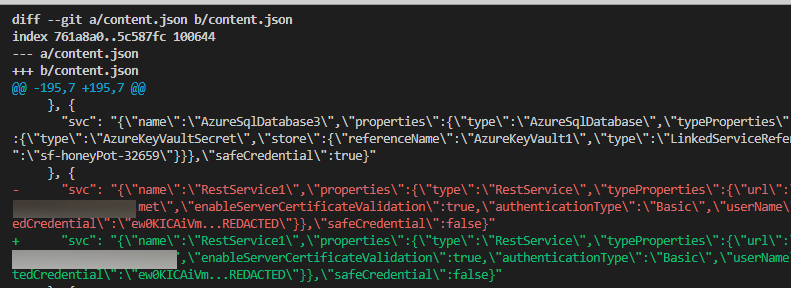
¹ ⚠️ كلمة تحذير، إذا كنت تريد التحقق من فرق content.json، فسيلزم "إلغاء تجاهل" content.json من
.gitignoreمما يعرض النتائج لأي مستودع بعيد قد قمت بتكوينه.استخدم هذه الميزة بحذر، وتأكد من عدم وجود مستودع بعيد عام للفرع الذي تستخدم هذه الميزة فيه
تغيير أنماط البرمجة لتجنب حالات السباق المحتملة مع مجموعات البيانات الأكبر. هذه غالبًا تغييرات استخدام var إلى let في حلقات for await
⚠️ الحالة الحالية للأداة هي بيتا
exec() بشكل واسع - على الرغم من أنني لم أراجع جميع المسارات، أعتقد أن تحقيق تنفيذ كود شيل سهل. هذه الأداة لا تفترض مدخلات عدائية، لذا التوصية هي عدم لصق وسائط الإطلاق في سطر الأوامر دون مراجعتها أولاً.لتقليل حجم الكود، نستخدم التبعيات التالية للتشغيل والجماليات (الشكر لمشرفي هذه الحزم الرائعة)
| package | aesthetics | operation | license |
|---|---|---|---|
| axios | ✅ | MIT | |
| yargs | ✅ | MIT | |
| jsonwebtoken | ✅ | MIT | |
| chalk | ✅ | MIT | |
| js-beautify | ✅ | MIT |
تبعيات أخرى لتشغيل الأداة: إذا كنت تخطط لتشغيل هذا في Azure Cloud Shell، فلن تحتاج إلى تثبيت Azure CLI:
Azure Cloud Shell (BASH) أو توزيعة Linux مناسبة / WSL
| المتطلب | الوصف | التثبيت |
|---|---|---|
| ✅ AZ CLI | استخدام AZCLI | curl -sL https://aka.ms/InstallAzureCLIDeb | sudo bash |
| ✅ Node.js runtime 14 | بيئة تشغيل Node.js لـ EAST | التثبيت باستخدام NVM |
توفر EAST ثلاث فئات من الضوابط: أساسية، ومتقدمة، ومركبة
يبدو التحكم القابل للقراءة آليًا هكذا، بغض النظر عن النوع (أساسي/متقدم/مركب):```json { "name": "fn-sql-2079", "resource": "/subscriptions/6193053b-408b-44d0-b20f-4e29b9b67394/resourcegroups/rg-fn-2079/providers/microsoft.web/sites/fn-sql-2079", "controlId": "managedIdentity", "isHealthy": true, "id": "/subscriptions/6193053b-408b-44d0-b20f-4e29b9b67394/resourcegroups/rg-fn-2079/providers/microsoft.web/sites/fn-sql-2079", "Description": "\r\n Ensure The Service calls downstream resources with managed identity", "metadata": { "principalId": { "type": "SystemAssigned", "tenantId": "033794f5-7c9d-4e98-923d-7b49114b7ac3", "principalId": "cb073f1e-03bc-440e-874d-5ed3ce6df7f8" }, "roles": [{ "role": [{ "properties": { "roleDefinitionId": "/subscriptions/6193053b-408b-44d0-b20f-4e29b9b67394/providers/Microsoft.Authorization/roleDefinitions/b24988ac-6180-42a0-ab88-20f7382dd24c", "principalId": "cb073f1e-03bc-440e-874d-5ed3ce6df7f8", "scope": "/subscriptions/6193053b-408b-44d0-b20f-4e29b9b67394/resourceGroups/RG-FN-2079", "createdOn": "2021-12-27T06:03:09.7052113Z", "updatedOn": "2021-12-27T06:03:09.7052113Z", "createdBy": "4257db31-3f22-4c0f-bd57-26cbbd4f5851", "updatedBy": "4257db31-3f22-4c0f-bd57-26cbbd4f5851" }, "id": "/subscriptions/6193053b-408b-44d0-b20f-4e29b9b67394/resourceGroups/RG-FN-2079/providers/Microsoft.Authorization/roleAssignments/ada69f21-790e-4386-9f47-c9b8a8c15674", "type": "Microsoft.Authorization/roleAssignments", "name": "ada69f21-790e-4386-9f47-c9b8a8c15674", "RoleName": "Contributor" }] }] }, "category": "Access" },
### أساسي
تتضمن الضوابط الأساسية فحوصات على كائن ARM الأولي لإعدادات بسيطة من نوع "تشغيل/إيقاف" منطقية للخدمة المذكورة.
**مثال: Azure Container Registry adminUser**
[acr_adminUser](https://github.com/jsa2/east/blob/public/providers/microsoft.containerregistry/functions/acr_adminUser.js)
البوابة|EAST
-|-
 | ``if (item.properties?.adminUserEnabled == false ){returnObject.isHealthy = true }``
### متقدم
تتضمن الضوابط المتقدمة فحوصات تتجاوز كائن ARM الأولي. وغالبًا ما تستدعي طلبات جديدة للحصول على مزيد من المعلومات حول المورد المعني وعلاقته بالخدمات الأخرى.
**مثال: Role Assignments**
بالإضافة إلى التحقق من تعيينات أدوار الاشتراك، يتم إجراء فحص إضافي عبر Azure AD Conditional Access Reporting لـ MFA، والتأكد من أن الحسابات المميزة ليست محمية بكلمات المرور فقط (SPN's مع أسرار العميل).
**مثال: Azure Data Factory**
[ADF_pipeLineRuns](https://github.com/jsa2/east/blob/public/providers/microsoft.datafactory/functions/ADF_pipeLineRuns.js)
يقوم تعيين مسار Azure Data Factory بدمج المسارات -> الأنشطة -> وأهداف البيانات معًا ثم يتحقق من تسرب الأسرار في السجلات عبر تاريخ تشغيل الأنشطة المذكورة.

---
### مركب
تجمع الضوابط المركبة نتيجتين أو أكثر من نتائج التحكم من المسار لتشكيل تحكم جديد واحد أو أكثر. يحل استخدام المركبات حالتَي استخدام لـ EAST
1. لا يمكنك ضمان ترتيب نتائج التحكم التي يتم إرجاعها في المسار
2. تحتاج إلى إرجاع أكثر من نتيجة تحكم من فحص واحد
**مثال: [composite_resolve_alerts](https://github.com/jsa2/east/blob/public/composites/composite_resolve_alerts.js)**
1. الحصول على التنبيهات من Microsoft Cloud Defender عند فحص الاشتراك
2. تشكيل ضوابط جديدة لكل resourceProvider للتنبيهات
## التقارير
لا يركز EAST على توفير توليد تقارير تلقائي، حيث يوفر في الغالب ملفات JSON مع حالة التحكم والتقييم. الفكرة هي استخدام أدوات منفصلة لإنشاء التقارير، والتي من السهل أتمتتها عبر نصوص إنشاء Markdown وأدوات مثل [Pandoc](https://github.com/jgm/pandoc#the-universal-markup-converter)
- على الرغم من أن التركيز ليس على التقارير، إلا أن هذا المستودع يتضمن أتمتة مثال لإنشاء التقارير باستخدام pandoc لتسهيل قراءة النتائج في تنسيق مستند واحد.
بينما لا يوزع هذه الأداة pandoc، يمكن استخدامه عند إنشاء التقارير، وبالتالي تمت إضافة الاقتباس التالي: https://github.com/jgm/pandoc/blob/master/CITATION.cff```
cff-version: 1.2.0
title: Pandoc
message: "If you use this software, please cite it as below."
type: software
url: "https://github.com/jgm/pandoc"
authors:
- given-names: John
family-names: MacFarlane
email: [email protected]
orcid: 'https://orcid.org/0000-0003-2557-9090'
- given-names: Albert
family-names: Krewinkel
email: [email protected]
orcid: '0000-0002-9455-0796'
- given-names: Jesse
family-names: Rosenthal
email: [email protected]
يحتوي هذا الجزء على دليل حول كيفية تشغيل هذا إما على BASH@linux، أو BASH على Azure Cloud Shell (من الواضح أن Cloud Shell هو Linux أيضًا، لكنه لا يتطلب أن يكون لديك جهاز Linux خاص بك لاستخدام هذا)
⚠️ إذا كنت تقوم بتشغيل الأداة في Cloud Shell، فقد تحتاج إلى إعادة تطبيق بعض التثبيتات مرة أخرى لأن Cloud Shell لا يحتفظ بإعدادات الجلسة المختلفة.
المتطلبات الأساسية التي يتم إعدادها مرة واحدة فقط على cloud shell```bash curl -o- https://raw.githubusercontent.com/jsa2/EAST/preview/sh/initForuse.sh | bash;
[الانتقال إلى الخطوة التالية](#login-az-cli-and-run-the-scan)
#### المتطلبات الأساسية التفصيلية (هذا إذا اخترت عدم استخدام نسخة "fire and forget")
**المتطلبات الأساسية**```bash
git clone https://github.com/jsa2/EAST --branch preview
cd EAST;
npm install
تثبيت Pandoc على cloud shell```bash
wget "https://github.com/jgm/pandoc/releases/download/2.17.1.1/pandoc-2.17.1.1-linux-amd64.tar.gz"; tar xvzf "pandoc-2.17.1.1-linux-amd64.tar.gz" --strip-components 1 -C ~
**تثبيت pandoc على التوزيعات التي تدعم APT**```bash
# Get pandoc for reporting (first time only)
sudo apt install pandoc
az account clear az login
cd EAST
subId=6193053b-408b-44d0-b20f-4e29b9b67394
node ./plugins/main.js --batch=10 --nativescope=true --roleAssignments=true --helperTexts=true --checkAad=true --scanAuditLogs --composites --subInclude=$subId

**إنشاء تقرير**
``cd EAST; node templatehelpers/eastReports.js --doc``
- إذا كنت ترغب في تضمين جميع نتائج معيار أمان Azure في التقرير
``cd EAST; node templatehelpers/eastReports.js --doc --asb``
**تصدير التقرير من Cloud Shell**
`` pandoc -s fullReport2.md -f markdown -t docx --reference-doc=pandoc-template.docx -o fullReport2.docx ``

**Azure DevOps (تجريبي)**
يوجد تحكم في Azure DevOps لتفريغ سجلات خطوط الأنابيب. يمكنك تحديد تشغيل التحكم باتباع المثال التالي:``` node ./plugins/main.js --batch=10 --nativescope=true --roleAssignments=true --helperTexts=true --checkAad=true --scanAuditLogs --composites --subInclude=$subId --azdevops "organizationName" ```
---
## Licensing
**Community use**
- Share relevant controls across multiple environments as community effort
**Company use**
- Companies have possibility to develop company specific controls which apply to company specific work. Companies can then control these implementations by decision to share, or not share them based on the operating principle of that company.
**Non IPR components**
- Code logic and functions are under MIT license. since code logic and functions are alredy based on open-source components & vendor API's, it does not make sense to restrict something that is already based on open source
If you use this tool as part of your commercial effort we only require, that you follow the very relaxed terms of [MIT license](https://github.com/jsa2/east/blob/public/LICENSE)
[Read license](https://github.com/jsa2/EAST/blob/public/LICENSE)
---
# Tool operation documentation
## Principles
### AZCLI USE
**Existing tooling enhanced with Node.js runtime**
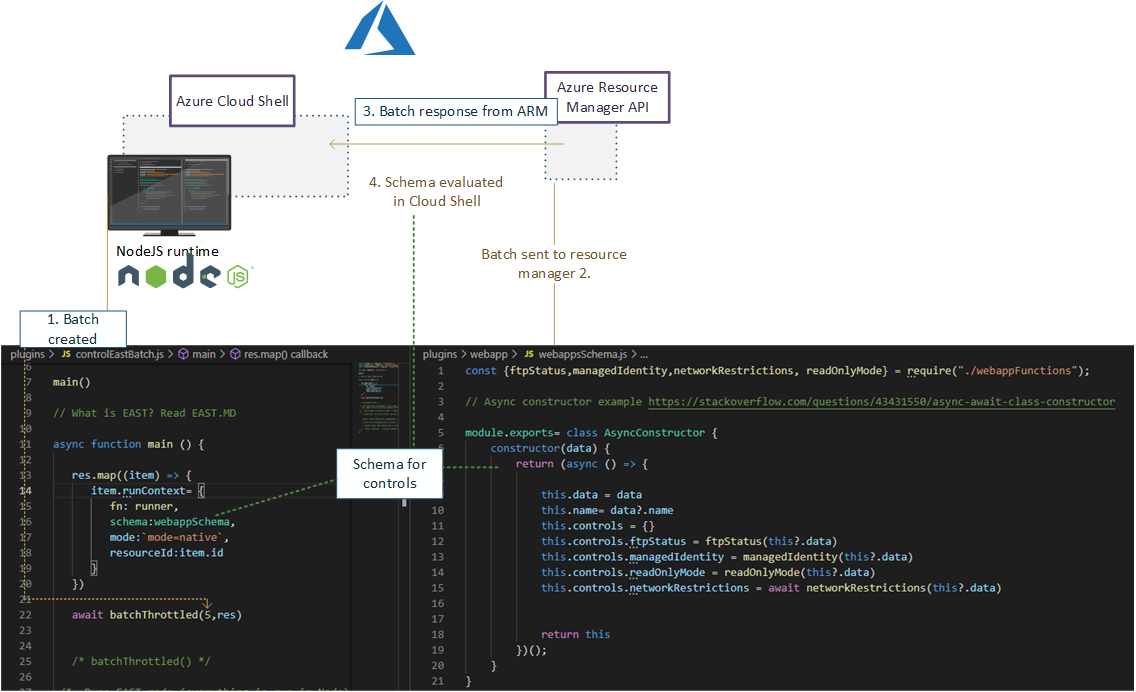
Use rich and maintained context of [Microsoft Azure CLI](https://github.com/Azure/azure-cli#microsoft-azure-cli) ``login & commands`` with Node.js control flow which supplies enhanced rest-requests and maps results to schema.
- This tool does not include or distribute Microsoft Azure CLI, but rather uses it when it has been installed on the source system (Such as Azure Cloud Shell, which is primary platform for running EAST)
### Speedup
View more [details](https://github.com/jsa2/east/blob/public/speedup.md)
✅ Using Node.js runtime as orchestrator utilises Nodes asynchronous nature allowing batching of requests. Batching of requests utilizes the full extent of Azure Resource Managers incredible speed.
✅ Compared to running requests one-by-one, the speedup can be up to 10x, when Node executes the batch of requests instead of single request at time
## Parameters reference
**Example:**
```shell
node ./plugins/main.js --batch=10 --nativescope --roleAssignments --helperTexts=true --checkAad --scanAuditLogs --composites --shuffle --clearTokens```
Param| Description | Default if undefined
-|-|-
`` --nativescope `` | Currently mandatory parameter | no values
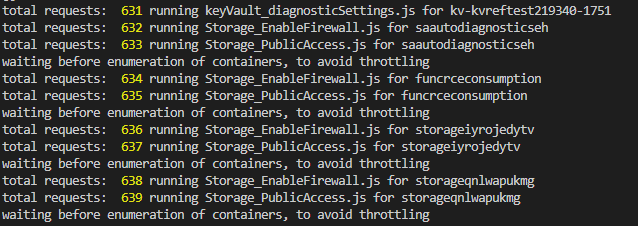
`` --shuffle `` | Can help with throttling. Shuffles the resource list to reduce the possibility of resource provider throttling threshold being met | no values
`` --roleAssignments `` | Checks controls as per [microsoft.authorization](https://github.com/jsa2/east/blob/public/providers/microsoft.authorization/controls) | no values
`` --includeRG `` | Checks controls with ResourceGroups as per [microsoft.authorization](https://github.com/jsa2/east/blob/public/providers/microsoft.authorization/controls) | no values
`` --checkAad `` | Checks controls as per [microsoft.azureactivedirectory](https://github.com/jsa2/east/blob/public/providers/microsoft.azureactivedirectory/controls) | no values
`` --subInclude `` | Defines subscription scope | no default, requires subscriptionID/s, if not defined will enumerate all subscriptions the user have access to
`` --namespace `` | text filter which matches full, or part of the resource ID <br> **example** `` /microsoft.storage/storageaccounts`` all storage accounts in the scope| optional parameter
`` --notIncludes `` | text filter which matches full, or part of the resource ID <br> **example** `` /microsoft.storage/storageaccounts`` all storage accounts in the scope are **excluded**| optional parameter
`` --batch `` | size of batch interval between throttles |5
`` --wait `` | size of batch interval between throttles | 1500
`` --scanAuditLogs `` | optional parameter. When defined in hours will toggle Azure Activity Log scanning for weak authentication events <br> **defined in:** [scanAuditLogs](https://github.com/jsa2/east/blob/public/providers/microsoft.authorization/functions/scanAuditLogs.js) | 24h
`` --composites `` | read [composite](#composite)| no values
`` --clearTokens `` | clears tokens in session folder, use this if you get authorization errors, or have just changed to other `` az login `` account <br> use `` az account clear`` if you want to clear AZ CLI cache too | no values
`` --tag `` | Filter all results in the end based on single tag``--tag=svc=aksdev`` | no values
``--ignorePreCheck`` | use this option when used with browser delegated tokens| no values
``--helperTexts`` | Will append text descriptions from [general](https://github.com/jsa2/east/blob/public/providers/microsoft.general/controls) to manual controls| no values
``--reprocess`` | Will update results to existing content.json. Useful for incremental runs| no values
**Parameters reference for example report:**
```shell
node templatehelpers/eastReports.js --asb```
Param| Description | Default if undefined
-|-|-
`` --asb `` | gets all ASB results available to users | no values
`` --policy `` | gets all Policy results available to users | no values
`` --doc`` | prints pandoc string for export to console | no values
## (Highly experimental) Running in restricted environments where only browser use is available
Read here [Running in restricted environments](https://github.com/jsa2/EAST/tree/DelegationToken#highly-experimental---bypassing-trusted-device-requirements-for-azure-cli-in-highly-restricted-environments-where-apis-are-available-for-browser-sessions)
## Developing controls
Developer guide including control flow description is here [``dev-guide.md``](https://github.com/jsa2/east/blob/public/dev-guide.md)
## Updates and examples
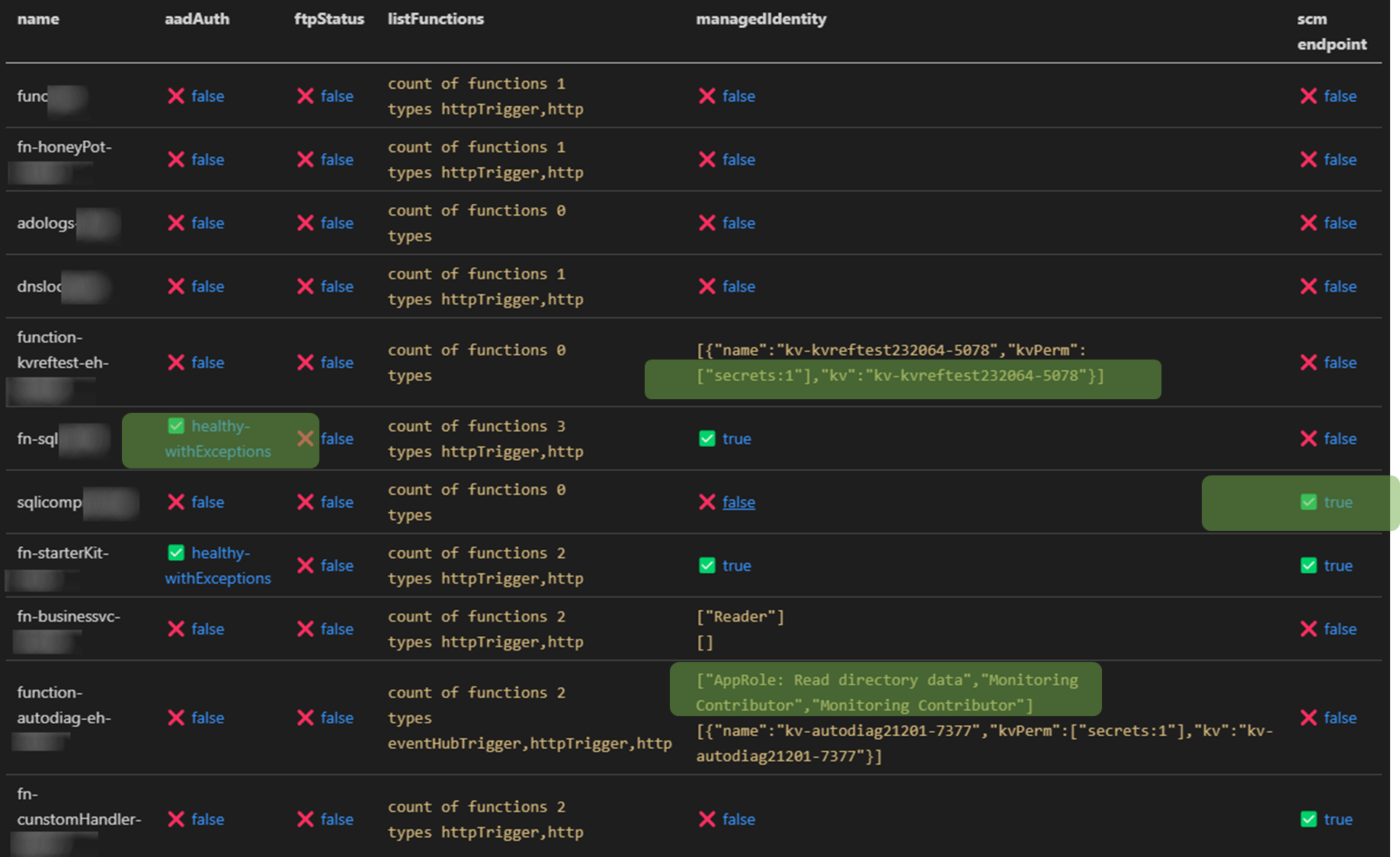
### Auditing Microsoft.Web provider (Functions and web apps)
✅ Check roles that are assigned to function managed identity in Azure AD and all Azure Subscriptions the audit account has access to <br>
✅ Relation mapping, check which keyVaults the function uses across all subs the audit account has access to<br>
✅ Check if Azure AD authentication is enabled
✅ Check that generation of access tokens to the api requires assigment ``.appRoleAssignmentRequired`` <br>
✅ Audit bindings <br>
- Function or Azure AD Authentication enabled
- Count and type of triggers
<br>
✅ Check if [SCM](https://docs.microsoft.com/en-us/azure/azure-functions/security-concepts#secure-the-scm-endpoint) and [FTP](https://docs.microsoft.com/en-us/azure/azure-functions/security-concepts#disable-ftp) endpoints are secured

### Azure RBAC baseline authorization
⚠️ Detect principals in privileged subscriptions roles protected only by password-based single factor authentication.
- Checks for users without MFA policies applied for set of conditions
- Checks for ServicePrincipals protected only by password (as opposed to using Certificate Credential, workload federation and or workload identity CA policy)
Maps to [App Registration Best Practices](https://docs.microsoft.com/en-us/azure/active-directory/develop/security-best-practices-for-app-registration#credential-configuration)
- *An unused credential on an application can result in security breach. While it's convenient to use <span style="color:red">password</span>. secrets as a credential, we strongly recommend that you use x509 certificates as the only credential type for getting tokens for your application*
``✅State healthy`` - **User result example**
```JSON
{
"subscriptionName": "EAST -msdn",
"friendlyName": "[email protected]",
"mfaResults": {
"oid": "138ac68f-d8a7-4000-8d41-c10ff26a9097",
"appliedPol": [{
"GrantConditions": "challengeWithMfa",
"policy": "baseline",
"oid": "138ac68f-d8a7-4000-8d41-c10ff26a9097"
}],
"checkType": "mfa"
},
"basicAuthResults": {
"oid": "138ac68f-d8a7-4000-8d41-c10aa26a9097",
"appliedPol": [{
"GrantConditions": "challengeWithMfa",
"policy": "baseline",
"oid": "138ac68f-d8a7-4000-8d41-c10aa26a9097"
}],
"checkType": "basicAuth"
},
}
⚠️State unHealthy - Application principal example
{
"subscriptionName": "EAST - HoneyPot",
"friendlyName": "thx138-kvref-6193053b-408b-44d0-b20f-4e29b9b67394",
"creds": {
"@odata.context": "https://graph.microsoft.com/beta/$metadata#servicePrincipals(id,displayName,appId,keyCredentials,passwordCredentials,servicePrincipalType)/$entity",
"id": "babec804-037d-4caf-946e-7a2b6de3a45f",
"displayName": "thx138-kvref-6193053b-408b-44d0-b20f-4e29b9b67394",
"appId": "5af1760e-89ff-46e4-a968-0ac36a7b7b69",
"servicePrincipalType": "Application",
"keyCredentials": [],
"passwordCredentials": [],
"OnlySingleFactor": [{
"customKeyIdentifier": null,
"endDateTime": "2023-10-20T06:54:59.2014093Z",
"keyId": "7df44f81-a52c-4fd6-b704-4b046771f85a",
"startDateTime": "2021-10-20T06:54:59.2014093Z",
"secretText": null,
"hint": null,
"displayName": null
}],
"StrongSingleFactor": []
}
}
Following methods work for contributing for the time being: