 cyberark/skywrapper
SkyWrapper يساعد في اكتشاف أشكال الإنشاء المشبوهة واستخدامات الرموز المؤقتة في AWS




SkyWrapper هو مشروع مفتوح المصدر يحلل سلوك الرموز المؤقتة المنشأة في حساب AWS معين. يهدف الأداة إلى إيجاد أشكال واستخدامات مشبوهة للرموز المؤقتة لاكتشاف النشاط الضار في الحساب. تقوم الأداة بتحليل حساب AWS وإنشاء جدول Excel يشمل جميع الرموز المؤقتة النشطة حاليًا. يتم طباعة ملخص النتائج على الشاشة بعد كل تشغيل.
عرض توضيحي لـ SkyWrapper:
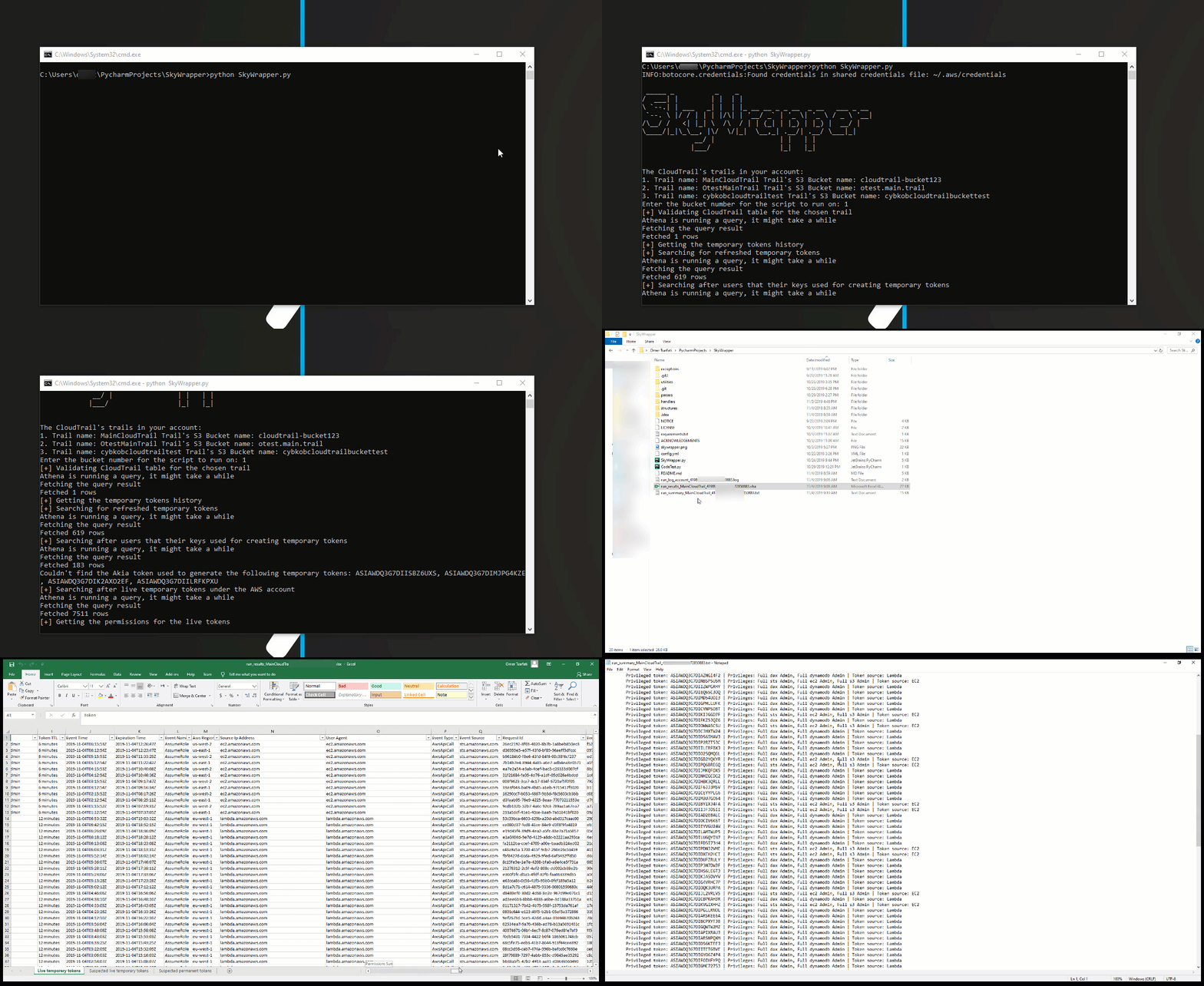
python SkyWrapper.py
لتشغيل هذا السكربت، ستحتاج على الأقل إلى سياسة الصلاحيات التالية:
{
    "Version": "2012-10-17",
    "Statement": [
        {
            "Sid": "S3TrailBucketPermissions",
            "Effect": "Allow",
            "Action": [
                "s3:GetObject",
                "s3:ListBucketMultipartUploads",
                "s3:ListBucket",
                "s3:GetBucketLocation",
                "s3:ListMultipartUploadParts"
            ],
            "Resource": [
                "arn:aws:s3:::{cloudtrail_bucket_name}/*",
                "arn:aws:s3:::{cloudtrail_bucket_name}
            ]
        },
        {
            "Sid": "IAMReadPermissions",
            "Effect": "Allow",
            "Action": [
                "iam:ListAttachedRolePolicies",
                "iam:ListRolePolicies",
                "iam:GetRolePolicy",
                "iam:GetPolicyVersion",
                "iam:GetPolicy",
                "iam:ListRoles"
            ],
            "Resource": [
                "arn:aws:iam::*:policy/*",
                "arn:aws:iam::*:role/*"
            ]
        },
        {
            "Sid": "GLUEReadWritePermissions",
            "Effect": "Allow",
            "Action": [
                "glue:CreateTable",
                "glue:CreateDatabase",
                "glue:GetTable",
                "glue:GetDatabase"
            ],
            "Resource": "*"
        },
        {
            "Sid": "CLOUDTRAILReadPermissions",
            "Effect": "Allow",
            "Action": [
                "cloudtrail:DescribeTrails"
            ],
            "Resource": "*"
        },
        {
            "Sid": "ATHENAReadPermissions",
            "Effect": "Allow",
            "Action": [
                "athena:GetQueryResults",
                "athena:StartQueryExecution",
                "athena:GetQueryExecution"
            ],
            "Resource": "arn:aws:athena:*:*:workgroup/*"
        },
        {
            "Sid": "S3AthenaResultsBucketPermissions",
            "Effect": "Allow",
            "Action": [
                "s3:PutObject",
                "s3:GetObject",
                "s3:ListBucketMultipartUploads",
                "s3:CreateBucket",
                "s3:ListBucket",
                "s3:GetBucketLocation",
                "s3:ListMultipartUploadParts"
            ],
            "Resource": "arn:aws:s3:::aws-athena-query-results-*"
        }
    ]
}
تأكد من تغيير "{cloudtrail_bucket_name}" باسم دلو الـ trail الخاص بك!
في حال كان لديك أكثر من trail وتريد تشغيل السكربت عليها أيضًا، يجب إضافتها إلى قسم الموارد في سياسة الصلاحيات.
"config.yaml" هو ملف الإعدادات. في معظم الحالات، يمكنك ترك الإعدادات كما هي. في حال احتجت لتغييرها، فإن ملف الإعدادات موثق.
athena: # Athena configuration
  database_name: default # The name of the database Athena uses for querying the trail bucket.
  table_name: cloudtrail_logs_{table_name} # The table name of the trail bucket name
  output_location: s3://aws-athena-query-results-{account_id}-{region}/ # The default output location bucket for the query results
output:
  excel_output_file: run_results_{trail}_{account_id}-{date}.xlsx # Excel results file
  summary_output_file: run_summary_{trail}_{account_id}-{date}.txt # Summary text results file
verify_https: True # Enable/ Disable verification of SSL certificates for HTTP requests
account:
    account_id: 0 # The account id - Keep it as 0 in case you don't know it
    aws_access_key_id: # If you keep it empty, the script will look after the default AWS credentials stored in ~/.aws/credentials
    aws_secret_access_key: # If you keep it empty, the script will look after the default AWS credentials stored in ~/.aws/credentials
    aws_session_token: # If you keep it empty, the script will look after the default AWS credentials stored in ~/.aws/credentials
للمزيد من التعليقات أو الاقتراحات أو الأسئلة، يمكنك التواصل مع Omer Tsarfati (@OmerTsarfati) وCyberArk Labs. يمكنك العثور على المزيد من المشاريع التي طورناها في https://github.com/cyberark/.
