
Skip to content
KitploitKITPLOIT
أدواتالمدونة
إرسال
أدواتالمدونة
إرسال

أدوات الاختراق واختبار الاختراق والأمن السيبراني لترسانتك الأمنية!

Kitploit هو دليل لأدوات الاختراق والأمن السيبراني واختبار الاختراق. اكتشف آخر تحديثات المشاريع للعثور على الثغرات وتحليل الأنظمة وأتمتة الاختبارات وتعزيز أمنك.

··الخلاصات·اتصال·الخصوصية·© 2026 Kitploit

دليل الأدوات

الفئات

عرض جميع الفئات
Loading categories
MITM_Intercept — طريقة أقل اختراقية بقليل لاعتراض وتعديل بروتوكولات غير HTTP عبر Burp وغيرها. | Kitploit
أدوات/GitHubGitHub/cyberark/mitm_intercept
بروكسيات الويب والاعتراضاختبار الاختراق
GitHubcyberark/mitm_intercept

MITM_Intercept

طريقة أقل اختراقية بقليل لاعتراض وتعديل بروتوكولات غير HTTP عبر Burp وغيرها.

عرض المستودع
21932منذ 4 سنواتتمت المراجعة من قبل Kitploit

الأكثر شعبية

عرض الكل →

اكتشف الأدوات الأكثر استخدامًا من قبل مجتمعنا.

استكشف جميع الأدوات

تصفح مجموعتنا من الأدوات

عرض جميع الأدوات →
مشاركة

MITM_Intercept

طريقة أقل احترافية قليلاً لاعتراض وتعديل البروتوكولات غير HTTP عبر Burp وغيرها مع دعم اعتراض SSL و TLS. هذه الأداة مخصصة للباحثين ومختبرِي الاختراق التطبيقي الذين يقومون بتقييم أمان العملاء السميكين (Thick Clients).

نسخة محسّنة من المشروع الرائع mitm_relay.

القصة

كجزء من عملنا في قسم الأبحاث في CyberArk Labs، احتجنا إلى طريقة لفحص اتصالات SSL و TLS عبر TCP، مع إمكانية تعديل محتوى الحزم أثناء التنقل. هناك عدة طرق للقيام بذلك (مثل امتداد Burp Suite المعروف NoPE)، لكن لم يعمل أي منها معنا في بعض الحالات. في النهاية عثرنا على mitm_relay.

mitm_relay هي طريقة سريعة وسهلة لإجراء MITM لأي بروتوكول يعتمد على TCP من خلال برامج اعتراض HTTP الحالية مثل وكيل Burp Suite. وهي مفيدة بشكل خاص لتقييم أمان العملاء السميكين. لكنها لم تعمل بشكل كامل معنا، لذا احتجنا إلى تخصيصها. بعد الكثير من التخصيصات، تطلب كل تغيير جديد الكثير من العمل، وانتهى بنا الأمر إلى إعادة كتابة كل شيء بطريقة معيارية أكثر.

نأمل أن يجد الآخرون هذا السكريبت مفيدًا، ونأمل أن تكون إضافة الوظائف سهلة.

كيف يعمل

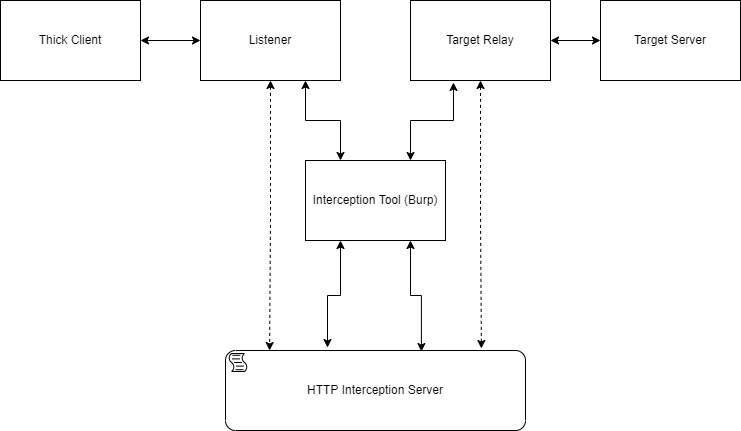
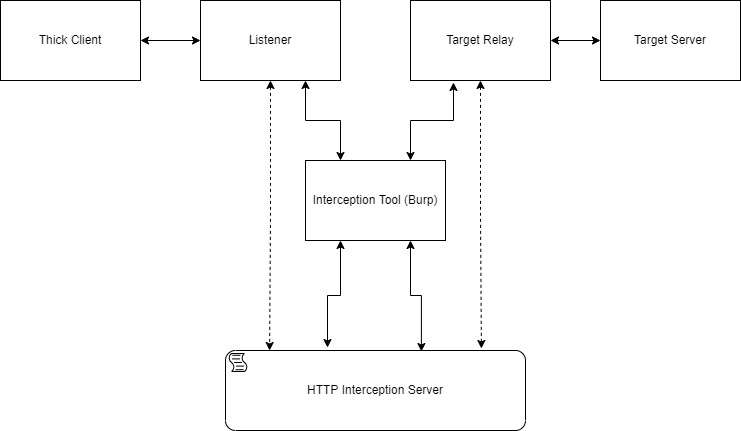
في البداية، يجب تكوين عناوين ومنافذ المستمعين. لكل مستمع، يجب أيضًا تكوين هدف (عنوان ومنفذ). سيتم تغليف كل البيانات المستلمة من المستمع في نص طلب HTTP POST مع عنوان URL يحتوي على "CLIENT_REQUEST". سيتم تغليف كل البيانات المستلمة من الهدف في نص طلب HTTP POST مع عنوان URL يحتوي على "SERVER_RESPONSE". يتم إرسال هذه الطلبات إلى خادم اعتراض HTTP محلي.

هناك خيار لتكوين وكيل HTTP واستخدام أداة مثل burp suite كأداة اعتراض HTTP وعرض الرسائل هناك. بهذه الطريقة، من السهل تعديل الرسائل باستخدام ميزة "Match and Replace" من Burp، أو الامتدادات، أو حتى يدويًا (تذكر أن آلية المهلة للبروتوكول المعترض يمكن أن تكون قصيرة جدًا).

طريقة أخرى لتعديل الرسائل هي باستخدام سكريبت بايثون سيقوم خادم اعتراض HTTP بتشغيله عند استلام الرسائل.

سيتم طباعة نص الرسائل المرسلة إلى خادم اعتراض HTTP في الصدفة. سيتم طباعة الرسائل بعد التغييرات إذا تم تقديم سكريبت التعديل. بعد كل التعديلات، سيعيد خادم الاعتراض أيضًا الصدى كجسم استجابة HTTP.

لفك تشفير اتصال SSL/TLS، يجب تزويد mitm_intercept بشهادة ومفتاح يقبلهما العميل عند بدء المصافحة مع المستمع. إذا كان الخادم الهدف يتطلب شهادة محددة للمصافحة، فهناك خيار لإعطاء شهادة ومفتاح.

مخطط صغير يوضح تدفق حركة المرور النموذجي:
test

الاختلافات عن mitm_relay

mitm_intercept متوافق مع الإصدارات الأحدث من Python 3 (Python 3.9) ومتوافق أيضًا مع Windows (على سبيل المثال، socket.MSG_DONTWAIT غير موجود في Windows). أبقينا على خيار استخدام "STARTTLS" وأطلقنا عليه اسم "Mixed" mode. تم تحديث استخدام ملف مفتاح SSL (الخيار المدمج لاستخدامه جديد من Python 3.8)، وأضفنا خيار تغيير رأس sni. الآن، تتم إدارة الاتصالات الواردة والصادرة بواسطة socketserver، ويتم إرسال جميع البيانات إلى فئة فرعية من ThreadingHTTPServer التي تتعامل مع تمثيل البيانات وتعديلها. بهذه الطريقة، من الممكن رؤية التغييرات المطبقة بواسطة سكريبت التعديل في الاستجابة (مفيد لاستخدام Burp). أيضًا، يمكننا الآن تغيير التشفيرات المتاحة التي يستخدمها السكريبت باستخدام تنسيق قائمة تشفيرات OpenSSL.

المتطلبات الأساسية

  1. Python 3.9
  2. requests: $ python -m pip install requests

الاستخدام

root@kitploit:~
usage: mitm_intercept.py [-h] [-m] -l [u|t:]<interface>:<port> [[u|t:]<interface>:<port> ...] -t
                         [u|t:]<addr>:<port> [[u|t:]<addr>:<port> ...] [-lc <cert_path>]
                         [-lk <key_path>] [-tc <cert_path>] [-tk <key_path>] [-w <interface>:<port>]
                         [-p <addr>:<port>] [-s <script_path>] [--sni <server_name>]
                         [-tv <defualt|tls12|tls11|ssl3|tls1|ssl2>] [-ci <ciphers>]

mitm_intercept version 1.6

options:
  -h, --help            show this help message and exit
  -m, --mix-connection  Perform TCP relay without SSL handshake. If one of the relay sides starts an
                        SSL handshake, wrap the connection with SSL, and intercept the
                        communication. A listener certificate and private key must be provided.
  -l [u|t:]<interface>:<port> [[u|t:]<interface>:<port> ...], --listen [u|t:]<interface>:<port> [[u|t:]<interface>:<port> ...]
                        Creates SSLInterceptServer listener that listens on the specified interface
                        and port. Can create multiple listeners with a space between the parameters.
                        Adding "u:" before the address will make the listener listen in UDP
                        protocol. TCP protocol is the default but adding "t:" for cleanliness is
                        possible. The number of listeners must match the number of targets. The i-th
                        listener will relay to the i-th target.
  -t [u|t:]<addr>:<port> [[u|t:]<addr>:<port> ...], --target [u|t:]<addr>:<port> [[u|t:]<addr>:<port> ...]
                        Directs each SSLInterceptServer listener to forward the communication to a
                        target address and port. Can create multiple targets with a space between
                        the parameters. Adding "u:" before the address will make the target
                        communicate in UDP protocol.TCP protocol is the default but adding "t:" for
                        cleanliness is possible. The number of listeners must match the number of
                        targets. The i-th listener will relay to the i-th target.
  -lc <cert_path>, --listener-cert <cert_path>
                        The certificate that the listener uses when a client contacts him. Can be a
                        self-sign certificate if the client will accept it.
  -lk <key_path>, --listener-key <key_path>
                        The private key path for the listener certificate.
  -tc <cert_path>, --target-cert <cert_path>
                        The certificate that used to create a connection with the target. Can be a
                        self-sign certificate if the target will accept it. Doesn't necessary if the
                        target doesn't require a specific certificate.
  -tk <key_path>, --target-key <key_path>
                        The private key path for the target certificate.
  -w <interface>:<port>, --webserver <interface>:<port>
                        Specifies the interface and the port the InterceptionServer webserver will
                        listens on. If omitted the default is 127.0.0.1:49999
  -p <addr>:<port>, --proxy <addr>:<port>
                        Specifies the address and the port of a proxy between the InterceptionServer
                        webserver and the SSLInterceptServer. Can be configured so the communication
                        will go through a local proxy like Burp. If omitted, the communication will
                        be printed in the shell only.
  -s <script_path>, --script <script_path>
                        A path to a script that the InterceptionServer webserver executes. Must
                        contain the function handle_request(message) that will run before sending it
                        to the target or handle_response(message) after receiving a message from the
                        target. Can be omitted if doesn't necessary.
  --sni <server_name>   If there is a need to change the server name in the SSL handshake with the
                        target. If omitted, it will be the server name from the handshake with the
                        listener.
  -tv <defualt|tls12|tls11|ssl3|tls1|ssl2>, --tls-version <defualt|tls12|tls11|ssl3|tls1|ssl2>
                        If needed can be specified a specific TLS version.
  -ci <ciphers>, --ciphers <ciphers>
                        Sets different ciphers than the python defaults for the TLS handshake. It
                        should be a string in the OpenSSL cipher list format
                        (https://www.openssl.org/docs/manmaster/man1/ciphers.html).

For dumping SSL (pre-)master secrets to a file, set the environment variable SSLKEYLOGFILE with a
file path. Useful for Wireshark.

يجب توجيه الاتصال إلى المستمع لاعتراض البروتوكولات التعسفية. تعتمد الطريقة على كيفية عمل العميل. أحيانًا يستخدم عنوان DNS، وسيكون تغيير ملف hosts كافيًا لحل عنوان المستمع. إذا كان العنوان مشفرًا بشكل ثابت (hard-coded)، فيجب تطبيق طرق أكثر إبداعًا (عادةً بعض التعديلات على جدول التوجيه، أو تعديل العميل، أو استخدام VM و iptables).

سكريبت التعديل

يمكن لخادم اعتراض HTTP تشغيل سكريبت يتم تمريره إليه بواسطة العلم -s. يتم تشغيل هذا السكريبت عند استلام طلبات HTTP. الاستجابة من خادم اعتراض HTTP هي الطلب المستلم بعد تشغيل السكريبت.

عند تكوين وكيل (مثل Burp)، ستحدث تعديلات الطلب قبل تشغيل السكريبت، وتعديلات الاستجابة ستحدث بعده. التغييرات على الطلب والاستجابة بواسطة الوكيل أو سكريبت التعديل ستغير الرسالة الأصلية قبل الوصول إلى الوجهة.

يجب أن يحتوي السكريبت على الدالتين handle_request(message) و handle_response(message). سيقوم خادم اعتراض HTTP باستدعاء handle_request(message) عندما تكون الرسالة من العميل إلى الخادم، و handle_response(message) عندما تكون الرسالة من الخادم إلى العميل.

مثال لسكريبت يضيف بايت فارغ في نهاية الرسالة:

root@kitploit:~
def handle_request(message):
    return message + b"\x00"

def handle_response(message):
    # يجب أن تعيد كلتا الدالتين رسالة.
    return message

الشهادات

تتطلب الأداة شهادة خادم ومفتاح خاص لاعتراض SSL. يمكن العثور على معلومات حول إنشاء شهادة موقعة ذاتيًا أو شهادة Burp هنا.

إذا كان الخادم يتطلب شهادة محددة، يمكن تزويد الأداة بشهادة ومفتاح.

عرض توضيحي

العرض التوضيحي أدناه يوضح كيفية اعتراض اتصال مع MSSQL (تم تنفيذ هذا العرض التوضيحي على DVTA):

https://user-images.githubusercontent.com/28649672/162933166-21c1f37d-ee6c-4162-8c00-2bc724cc10a7.mp4

يتم الاتصال بـ MSSQL عبر بروتوكول TDS فوق TCP. يتم إجراء المصادقة نفسها باستخدام TLS فوق بروتوكول TDS. لرؤية اعتراض عملية TLS هذه، سنحتاج إلى سكريبتين تعديل مؤقتين (patchy).

demo_script.py:

root@kitploit:~
from time import time
from struct import pack
from pathlib import Path


def handle_request(message):

    if message.startswith(b"\x17\x03"):
        return message

    with open("msg_req" + str(time()), "wb") as f:
        f.write(message[:8])

    return message[8:]


def handle_response(message):

    if message.startswith(b"\x17\x03"):
        return message

    path = Path(".")
    try:
        msg_res = min(i for i in path.iterdir() if i.name.startswith("msg_res"))
        data = msg_res.read_bytes()
        msg_res.unlink()
    except ValueError:
        data = b'\x12\x01\x00\x00\x00\x00\x01\x00'

    return data[:2] + pack(">h", len(message)+8) + data[4:] + message

demo_script2.py:

root@kitploit:~
from time import time
from struct import pack
from pathlib import Path

def handle_request(message):

    if message.startswith(b"\x17\x03"):
        return message

    path = Path(".")
    try:
        msg_req = min(i for i in path.iterdir() if i.name.startswith("msg_req"))
        data = msg_req.read_bytes()
        msg_req.unlink()
    except ValueError:
        data = b'\x12\x01\x00\x00\x00\x00\x01\x00'


    return data[:2] + pack(">h", len(message)+8) + data[4:] + message


def handle_response(message):

    if message.startswith(b"\x17\x03"):
        return message

    with open("msg_res" + str(time()), "wb") as f:
        f.write(message[:8])

    return message[8:]

سنرى بعضًا من اتصال TLS مع هذه السكريبتات المؤقتة، لكن ثم سيفشل العميل (لأنه مع هذه السكريبتات غير الاحترافية، نقوم بتغيير سيء لاتصال TDS باستثناء جزء TLS).

https://user-images.githubusercontent.com/28649672/162976250-75f2e3c5-f328-4bcc-ad49-a9561d493cb1.mp4

الترخيص

حقوق النشر (c) 2022 CyberArk Software Ltd. جميع الحقوق محفوظة
هذا المستودع مرخص بموجب رخصة Apache-2.0 - راجع LICENSE لمزيد من التفاصيل.

تنزيل الأداة