 buybitart/cloudflare-security-art
Cloudflare Free Plan security rules (Zero Trust approach) for small websites

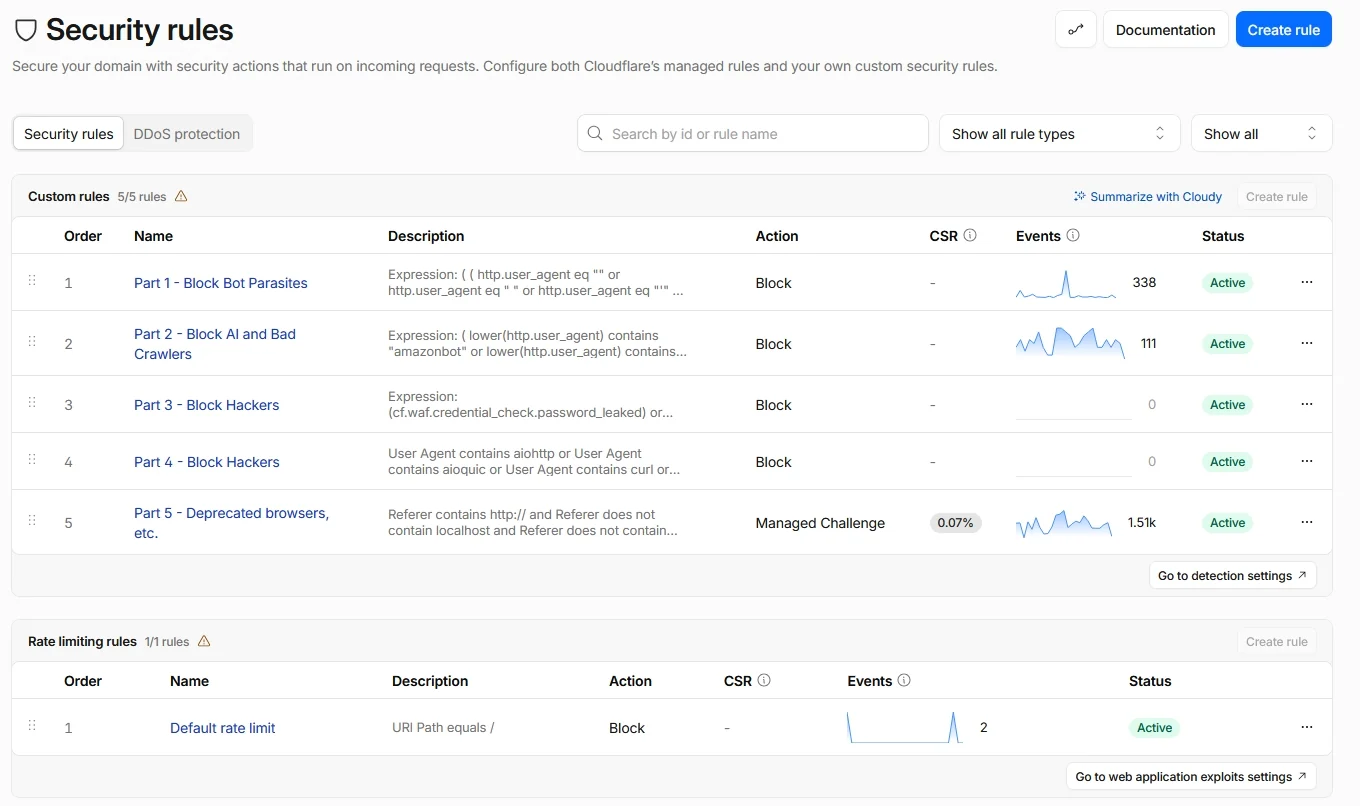
This guide helps you protect your website using Cloudflare's Free Plan. The goal is to make website security simple and reliable with WAF rules, DDoS protection, security headers, and bot settings.
Free Cloudflare WAF rules for artists, bloggers, and small websites. Block unwanted bots, AI crawlers, and suspicious requests with the Free Plan.
It includes:
My Cloudflare rule is:
AI bots try to copy your content!. See Is AI the greatest art heist in history? and ‘Mass theft’: Thousands of artists call for AI art auction to be cancelled
"One of the main points of art is to dialogue with culture.
Even if unintentional, every piece of art reflects the unique background of its creator-shaped by food, religion, music, ethics, visual art, and more.Imagine a child raised in isolation, shown only paintings 16 hours a day, and punished if their weekly drawing doesn't replicate those images closely enough. They don’t know why they draw-they just mimic. They aren’t creating. They aren’t dialoguing with art.
A computer is even simpler. It doesn't feel, doesn't reflect, doesn't remember the sound of jazz in the 1920s or the first time it saw Warhol.
But a human artist does.
They carry experience, emotion, and intention. They borrow from the past, mix it with the present, and speak in their own voice. That’s art. That’s the difference.When art is just imitation for profit, it’s empty. But when it speaks-it matters."
In 2024, OpenAI’s chief technology officer Mira Murati told an interviewer that the creative jobs destroyed by her company’s product maybe “shouldn’t have been there in the first place”.
AI pretend to be search engines, but they don't bring you visitors.
Some even use fake user agents, so basic Cloudflare settings may not stop them.
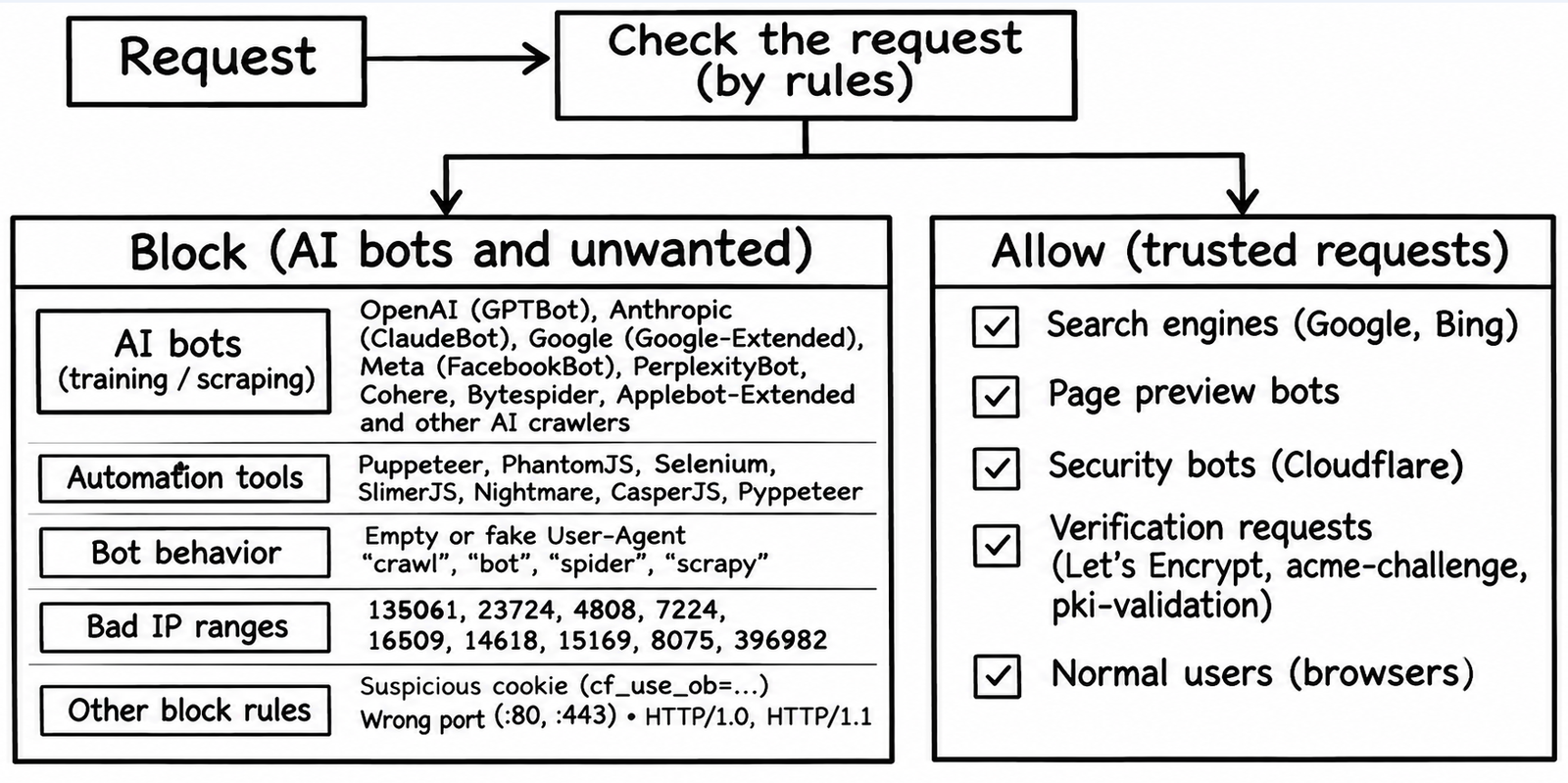
This rule blocks all bots by default, and then only allows useful bots that help your website get indexed.
I highly recommend reading Block AI scrapers with Cloudflare and My Blog's Biggest Fans Are AI Bots. So I Fought Back.
| Step | Description |
|---|---|
| STEP 1 – Web Application Firewall (WAF) Rules | Blocks bots, crawlers, exploits and malicious requests (Parts 1‑5). |
| STEP 2 – DDoS L7 Protection & Rate Limiting | Adds Layer‑7 override and rate limits to stop floods. |
| STEP 3 – Bot Management | Configures Cloudflare bot settings to block AI and unwanted bots. |
| STEP 4 – Security Headers | Sets recommended HTTP headers to harden the site. |
[!IMPORTANT] Bot Fight Mode: Off
I recommend disabling Bot Fight Mode in Cloudflare Security settings.
This guide uses WAF rules to block unwanted bots and AI crawlers. Rule 1 makes exceptions for selected verified bots.
Allowed bot categories:
- Search Engine Crawler
- Page Preview
- Security
User-Agent matches:
- bing
- slurp
- duckduckbot
- cloudflare
- google-inspectiontool
- google-siteverification
- telegram
- googlebot
- chrome-lighthouse
- adsbot-google
- google-adwords
- let's encrypt
URL path matches:
- acme-challenge
- pki-validation
The exception requires a matching verified bot category and one of the listed User-Agent or URL path values.
Bot Fight Mode may challenge these bots, so I keep it disabled.
Note: These exceptions apply only to one part of Rule 1. Other WAF checks and rules can still block these requests.
Copy these expressions into your Cloudflare dashboard for custom WAF rules.
Read Create a custom rule in the dashboard.
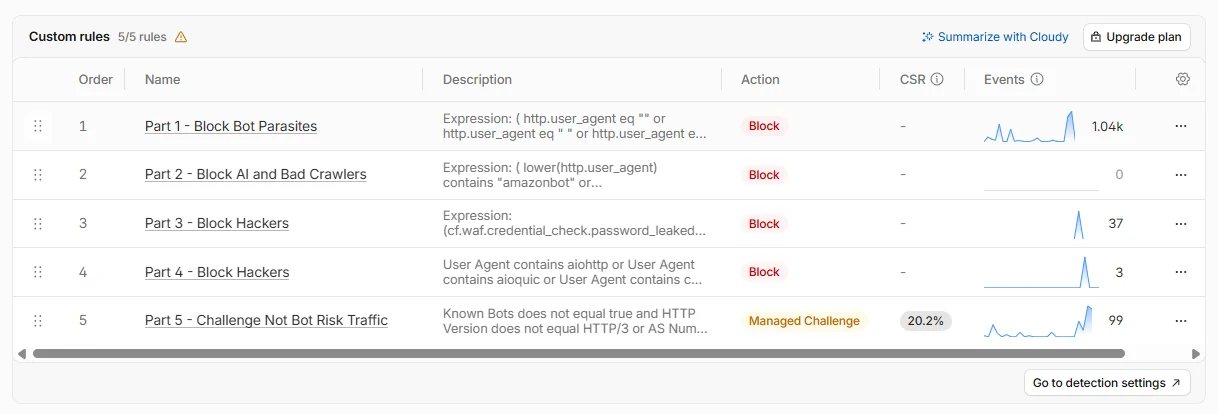
The Cloudflare rule I provide below will block not just AI scrapers but all web parasites that suck traffic from your site. This is achieved by applying a Zero Trust approach, which assumes all crawlers are harmful and only explicitly permits those that are useful for your organization.
NOTE🔒 This rule stops about 90% of all threats. It cuts off bad bot traffic before it reaches the application.
Action: Block
(
  http.user_agent eq ""
  or http.user_agent eq " "
  or http.user_agent eq "'"
  or http.request.headers["user-agent"][0] eq ""
  or lower(http.user_agent) contains "puppeteer"
  or lower(http.user_agent) contains "phantomjs"
  or lower(http.user_agent) contains "selenium"
  or lower(http.user_agent) contains "slimerjs"
  or lower(http.user_agent) contains "nightmare"
  or lower(http.user_agent) contains "casperjs"
  or lower(http.user_agent) contains "pyppeteer"
)
or (
  ip.src.asnum in {135061 23724 4808}
  and http.user_agent contains "siteaudit"
)
or (
  http.host contains ":80"
)
or (
  http.host contains ":443"
)
or (
  http.cookie contains "cf_use_ob="
  and not http.cookie contains "0"
  and not http.cookie contains "80"
  and not http.cookie contains "443"
  and not cf.client.bot
)
or






