
Skip to content
KitploitKITPLOIT
أدواتعمليات الاستغلالالمدونة
Log in
إرسال
أدواتعمليات الاستغلالالمدونة
إرسال

أدوات الاختراق واختبار الاختراق والأمن السيبراني لترسانتك الأمنية!

Kitploit هو دليل لأدوات الاختراق والأمن السيبراني واختبار الاختراق. اكتشف آخر تحديثات المشاريع للعثور على الثغرات وتحليل الأنظمة وأتمتة الاختبارات وتعزيز أمنك.

الخلاصاتاتصالالخصوصية© 2026 Kitploit

دليل الأدوات

الفئات

عرض جميع الفئات
Loading categories
0 — Software infrastructure to build and deploy sovereign, persistent AI security agents that continuously find, prove and fix security risks. Open source. Web UI, CLI, CI and MCP. | Kitploit
أدوات/GitHubGitHub/0sec-labs/0
Static AnalysisVulnerability ScannersVulnerability AnalysisFuzzingPenetration TestingDevSecOpsBinary AnalysisRed TeamingAI Security
GitHub0sec-labs/0

0

Software infrastructure to build and deploy sovereign, persistent AI security agents that continuously find, prove and fix security risks. Open source. Web UI, CLI, CI and MCP.


1.4k193194منذ 2س 21دتمت المراجعة من قبل Kitploit
عرض المستودعالموقع الإلكتروني
مشاركة
المحتوى غير متوفر باللغة المطلوبة. عرض النسخة الإنجليزية.

0security

Sovereign AI security agents

By the Swiss Applied AI & Cybersecurity Research Lab

Backed by Y Combinator

Latest release MIT or Apache-2.0 license GitHub stars

0security is software infrastructure to deploy sovereign, persistent AI security agents that find and fix security risks across any tech stack, work with any model, and run anywhere.


Documentation Security research Install locally Enterprise

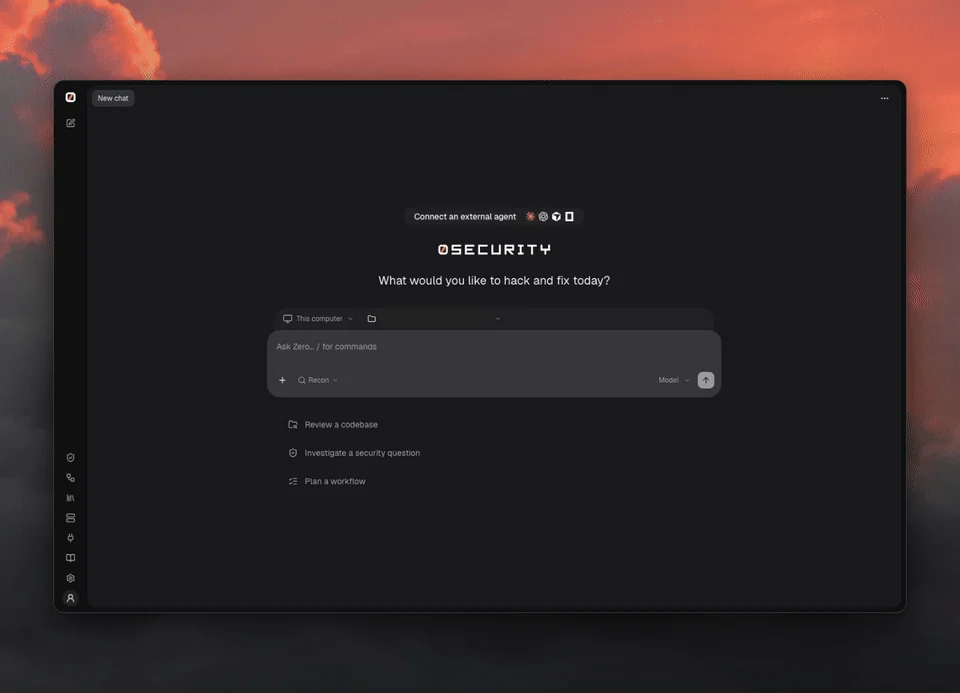
0 web UI: review a demo API, watch the investigation, then open findings with suggested fixes and verification

Quick start

curl -fsSL https://raw.githubusercontent.com/0sec-labs/0security/main/install.sh | bash
0

Prefer the terminal?

export OPENAI_API_KEY="your-api-key"
0 threads send new "Review ./your-repo for security problems"
0 findings list

Any supported provider works: set its key instead (Anthropic, OpenRouter, DeepSeek and more, see Models), or connect one in the browser with 0.

Windows, Docker and source installs
  • Windows (experimental): download 0-windows-x64.exe from Releases.
  • Docker: docker run --rm ghcr.io/0sec-labs/0security:latest --help. See the Docker guide.
  • Source: Node.js 24+ and pnpm, then pnpm install --frozen-lockfile && pnpm build.
  • install.sh supports Apple Silicon macOS and x64/ARM64 Linux. Set INSTALL_DIR to change the location.

Only point 0 at systems you own or are authorized to test. See Scope.
What can you do with 0?

  • Talk to a security agent about a folder on your computer or a remote Computer, in a Thread
  • Review findings on a board, with source evidence, and export them
  • Verify fixes: a finding is marked Verified by or Not verified
  • Build persistent security agents: Agents are standing threads that wake on a schedule or on every pull request, with skills, memory and automations written as prompts
  • Keep memory as plain notes that every thread can read
  • Extend it with extensions and skills, or drive it from coding agents over MCP

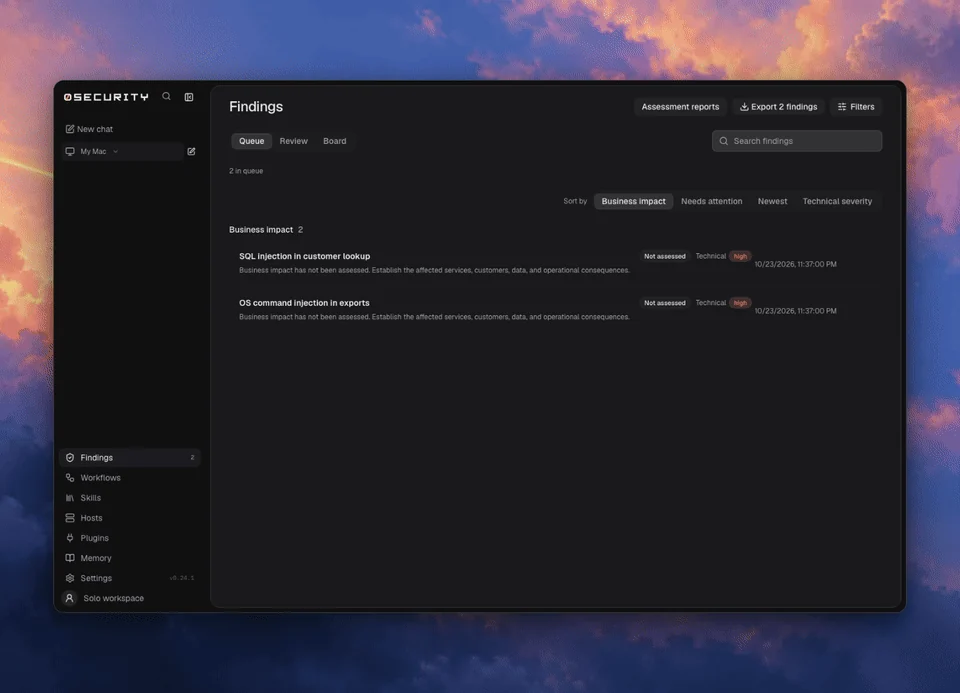
0 findings: review the queue, organize the board, and inspect source evidence

Why 0?

  • Open source: MIT or Apache-2.0, built in the open
  • Private: runs on your computer, in your CI or in a container, and only the context you send to your chosen model leaves it
  • Flexible: any provider key or local OpenAI-compatible server, from the CLI, CI or a coding agent over MCP
  • Evidence first: every finding links to its source evidence
  • Verified: a finding says whether it was verified, and by what
  • Proven in public: disclosed vulnerabilities and upstream fixes, including in the Linux kernel

Coding agents

0 agents run <id> --task "Review this pull request" --yes
0 lab mcp-server --automations --workspace /absolute/path/to/repo

See extensions and MCP and the command reference.

Learn more

  • Documentation
  • Models and providers
  • Extensions and MCP
  • Command reference
  • Security research
  • Enterprise

Contributing

0 is built in the open. Huge thanks to everyone who has filed a bug, fixed a doc or sent a patch.

  • Report bugs in issues
  • Improve the docs
  • Write an extension or a skill
  • Found a vulnerability in 0? See SECURITY.md

Start with the contributing guide. Run pnpm install and pnpm dev to work on the engine. Open an issue before large changes.


Contributors to 0sec-labs/0security

License

MIT OR Apache-2.0. Public disclosures and upstream fixes.

تنزيل الأداة

الأكثر شعبية

عرض الكل →

اكتشف الأدوات الأكثر استخدامًا من قبل مجتمعنا.

  • 1

    OsintHunter

    letox4/osinthunter

    🎯 مجموعة أدوات OSINT المثالية: رسم بياني للتحقيق، وتقييم الثقة، وعائلات الأسماء المستعارة، وخريطة، وخط زمني، وتقارير. 49 وحدة، وأكثر من 400 موقع، دون الحاجة إلى مفاتيح API.

    546
  • 2

    ghostlock-app

    yukonga/ghostlock-app

    # تطبيق GhostLock للتنفيذ بنقرة واحدة (CVE-2026-43499)

    477
  • 3

    ARTEX

    baarai/artex

    منصة اختبار اختراق مستقلة متعددة الوكلاء تعتمد على LLM، مع وكلاء تخطيط وتنفيذ، ومخططات للأصول والاستكشاف، وتسجيل حركة مرور MITM، وإعادة اختبار الثغرات.

    377
  • 4

    redforge

    cybersecurity91/redforge

    مجموعة أدوات الفريق الأحمر في المتصفح مع 102 أداة دون اتصال للاستطلاع، وتوليد الحمولات، وهجمات بيانات الاعتماد، والتشفير، والترميز، وإعداد تقارير المهام.

    324
  • 5

    estorides

    grisuno/estorides

    يجمع أكثر من 99 مصدرًا مجانيًا من مصادر OSINT بالتوازي، ويحوّل الكيانات إلى رسم بياني معرفي، ويصدّر بصيغة STIX 2.1 أو MISP أو GraphML مع تحليل بمساعدة LLM.

    269
  • 6

    CyberStrikeAI

    ed1s0nz/cyberstrikeai

    نظام العمل للأمن السيبراني الأصلي بالذكاء الاصطناعي — حيث تتحول النية إلى تنفيذ محكوم، وتصبح الأدلة ذاكرة تشغيلية، وكل عملية تحسن التي تليها.

    252

استكشف جميع الأدوات

تصفح مجموعتنا من الأدوات

عرض جميع الأدوات →