 unkn0wn-root/resterm
Terminal API client for HTTP, GraphQL, gRPC, WebSocket and SSE. Plain .http files you can diff and version, with scripted tests, workflows, mocks, recorder, and a CLI runner.

<h1 align="center">
  <img src="https://assets.kitploit.com/production/public/readmes/9255/fbbb3a11ae3be73099da760872eb38c475c9d1b4912908cc6e94ee5f40173c7b.png" alt="Resterm" width="200" />
  <br>
  Resterm
</h1>

<p align="center">
  <em>An API-as-code workbench for the terminal.</em>
  <br>
  <a href="https://resterm.app">resterm.app</a> · <a href="https://resterm.app/docs/">docs</a>
</p>

<p align="center">
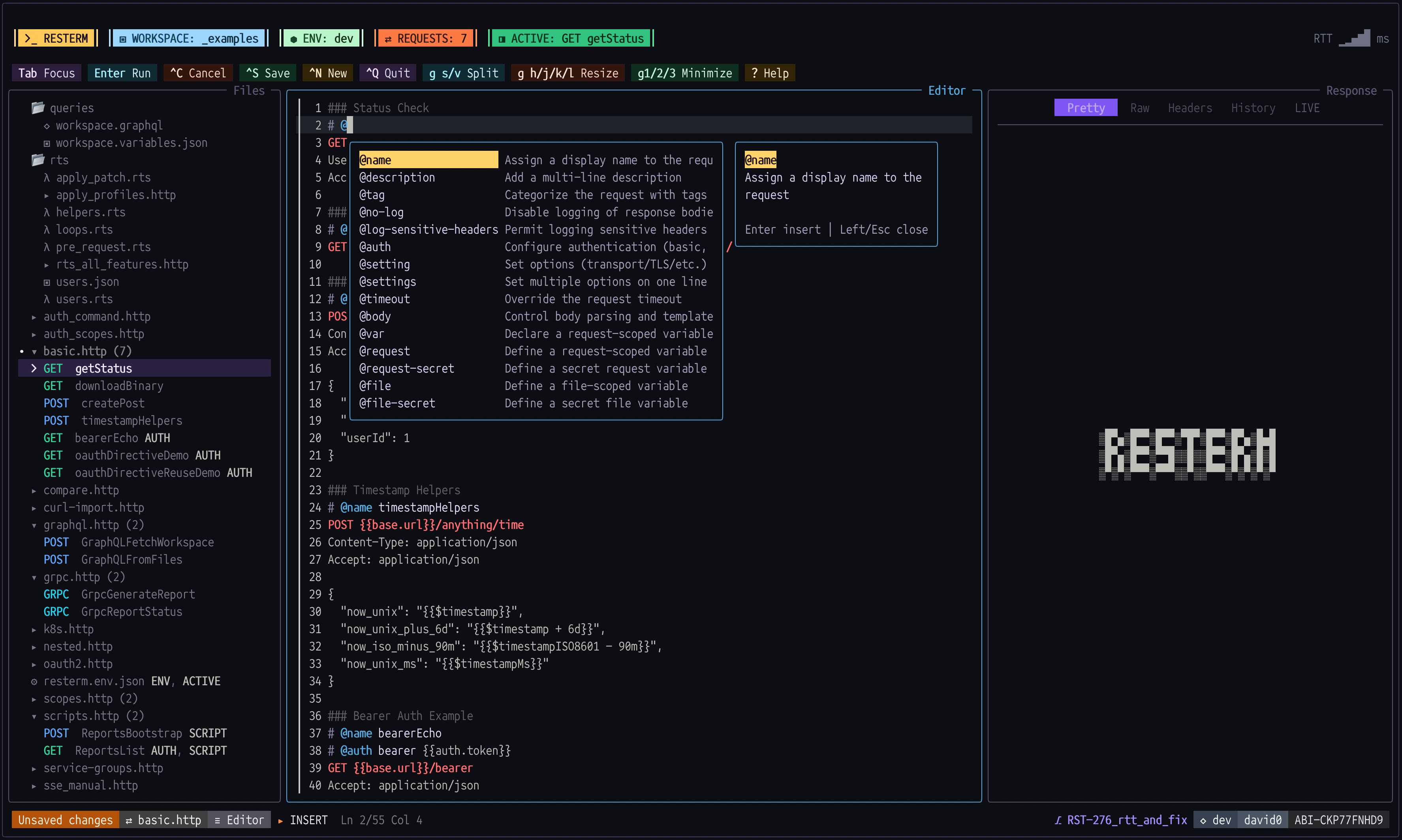
  <img src="https://assets.kitploit.com/production/public/readmes/9255/165e5afbbfbae610d2faedd80e3aee887977daa533f2989d904f4390b32f0848/bedc9e3f4bbab0389d6fca7eb6e47e000d8df954d1d8c07dde02ad39f7c93864-display-v1.webp" alt="Screenshot of Resterm TUI base" width="720" />
</p>

Resterm treats the file as the interface. A request is plain text in a `.http` or `.rest` file: method, URL, headers, body, auth, checks and settings. Environments, workflows and local mocks work the same way, and so do themes and key bindings. You can use the terminal UI, or run the same files from the CLI with `resterm run`. If your API sits behind an SSH bastion or inside a Kubernetes cluster, Resterm opens the tunnel or port-forward for you.

## Features

- HTTP, GraphQL, gRPC (with reflection and streaming), WebSocket and SSE
- environment files, grouped environments, dotenv files and OS variables
- bearer tokens, OAuth 2.0 and tokens from CLIs like `gh auth token`
- TLS client certificates, custom root CAs, proxies, HTTP/2 and a cookie jar per environment
- captures and checks with `@capture` and `@assert`, plus `@poll` and `@retry`
- workflows that chain requests into steps, with `@if` and `@for-each`
- RestermScript for logic and `@rts test` blocks
- editor with Vim motions, completion and inline diagnostics
- `@compare` to send one request to several environments and diff the results
- timeline tracing with per-phase budgets, and export to OpenTelemetry
- `@profile` with latency stats, a histogram, P95 and P99
- SSH tunnels and Kubernetes port-forwards
- local mock servers, and a proxy that records traffic as requests or mocks
- `resterm run` to run requests and workflows from the command line, with JSON or JUnit output
- headless Go API to run the same files from your own Go code
- import from curl and OpenAPI, and share collections as bundles or zip files
- custom key bindings and themes
- open a file in `$EDITOR`, or a response body in your default app

No account and no telemetry.

> [!NOTE]
> Resterm has no MCP server or built-in AI features. To help your LLM use Resterm, install the skill with `resterm skill --agent claude` or `resterm skill --agent codex`. See the [skill docs](https://resterm.app/docs/cli/skill/) for other agents. You can also point your agent at [`docs/`](https://github.com/unkn0wn-root/resterm/blob/main/docs) or [resterm.app/docs](https://resterm.app/docs/).

## Screenshots

<p align="center">
  <strong>Trace and timeline</strong>
</p>

<p align="center">
  <img src="https://assets.kitploit.com/production/public/readmes/9255/3c14a406f55fdc5efdf6080f791e661e391882435a4e0b423060da6437416e54.png" alt="Screenshot of Resterm with timeline" width="720" />
</p>

<details>
<summary>Click to see more of the UI</summary>

<p align="center">
  <strong>Workflows</strong>
</p>

<p align="center">
  <img src="https://assets.kitploit.com/production/public/readmes/9255/1b1c75ae16ecab6c514ab21193dd4fb409a6e3c5d09022d0dc88cc559be69991.png" alt="Screenshot of Resterm with Workflow" width="720" />
</p>

<p align="center">
  <strong>Profiler</strong>
</p>

<p align="center">
  <img src="https://assets.kitploit.com/production/public/readmes/9255/6d6638969702fe3c5e40670861f7e53cb4d9f1b8f7ad89d8b34a3479da196e53.png" alt="Screenshot of Resterm profiler" width="720" />
</p>

<p align="center">
  <strong>Explain</strong>
</p>

<p align="center">
  <img src="https://assets.kitploit.com/production/public/readmes/9255/6cddc040db5f7c648eda66979494802f8d3da10b8c27bdc8939663ea3b87287c.png" alt="Screenshot of Resterm Explain Tab" width="720" />
</p>

<p align="center">
  <strong>RestermScript</strong>
</p>

<p align="center">
  <img src="https://assets.kitploit.com/production/public/readmes/9255/fd8c0678c1e02347d875afacd1308fffe8e2c21f622074d98933d6eae3af6bb3.png" alt="Screenshot of Resterm with RestermScript" width="720" />
</p>

</details>

## Install

macOS and Linux:

```bash
brew install resterm
# or
curl -fsSL https://resterm.app/install.sh | sh
```

Windows:

```powershell
irm https://resterm.app/install.ps1 | iex
```

With Go 1.25 or newer:

```bash
go install github.com/unkn0wn-root/resterm/cmd/resterm@latest
```

Prebuilt binaries for macOS, Linux and Windows are on the [releases page](https://github.com/unkn0wn-root/resterm/releases). The macOS binaries need **macOS 13 Ventura** or newer, and the Linux binaries need **glibc 2.32** or newer.

To update a Homebrew installation, run `brew upgrade resterm`. For release binaries or installations made with the scripts, run `resterm --update`. If you installed with Go, rerun the `go install` command above. More in the [install guide](https://resterm.app/docs/install/).

## Quick start

```bash
mkdir my-api && cd my-api
resterm init
resterm
```

`resterm init` creates a `requests.http` file with a few sample requests and local mocks to answer them, so you don't need a real API to try it. Press `g Shift+M` to start the mock server, move the cursor to a request and press `Ctrl+Enter` to send it. Press `?` for help at any time.

You don't need `init` either. Run `resterm`, type a URL or paste a curl command, and press `Ctrl+Enter`.

The same file also runs without the UI. Start the mocks in one terminal and run a request in another:

```bash
resterm mock requests.http                       # terminal 1
resterm run --request CreateUser requests.http   # terminal 2
```

## Request files

Resterm reads the standard `.http` format and adds `# @` directives on top for settings and automation:

```http
# @setting base-url https://api.example.com/v1/

### Create users
// Send this request once for each name in the list.
# @for-each ["david", "tom"] as name
# @when env.meta.name == "dev"
# @assert response.statusCode == 201
# @rts test "user has an id"
> if response.json().id == null {
>   t.error("no id for", name)
> }
POST users
Content-Type: application/json

{"name":"{{= name }}"}
```

A `@setting` before the first request applies to the whole file. `###` starts a new request. Directives above a request can repeat it, skip it or check the response, either with `@assert` or with an `@rts test` block of [RestermScript](https://resterm.app/docs/rts/) code.

There are more examples at [resterm.app/examples](https://resterm.app/examples/) and in [`_examples/`](https://github.com/unkn0wn-root/resterm/blob/main/_examples), and every directive is listed in the [request file reference](https://resterm.app/docs/request-files/).

## Documentation

The full docs are at [resterm.app/docs](https://resterm.app/docs/). Good places to start are [workflows](https://resterm.app/docs/workflows/), [mock servers](https://resterm.app/docs/mock-servers/), [recording](https://resterm.app/docs/recording/), [the CLI](https://resterm.app/docs/cli/) and [RestermScript](https://resterm.app/docs/rts/).

Inside the TUI, `:help <topic>` opens the built-in manual and `:docs <topic>` opens the same page on the website.

To run request files from your own Go code, see the [`headless`](https://github.com/unkn0wn-root/resterm/blob/main/headless) package.

## Contributing

To suggest a feature, start a discussion in the [Ideas](https://github.com/unkn0wn-root/resterm/discussions/categories/ideas) category. To report a bug, [open an issue](https://github.com/unkn0wn-root/resterm/issues). To contribute code, open a [pull request](https://github.com/unkn0wn-root/resterm/pulls).

Reporting bugs and suggesting features helps just as much as code.

## Sponsor

Resterm is and always will be free and open source. If you like my work, you can [sponsor it on GitHub](https://github.com/sponsors/unkn0wn-root).

## License

[Apache License 2.0](https://github.com/unkn0wn-root/resterm/blob/main/LICENSE).





