
Skip to content
KitploitKITPLOIT
ИнструментыБлог
Отправить
ИнструментыБлог
Отправить

Инструменты для хакинга, пентеста и кибербезопасности — ваш арсенал защиты!

Kitploit — это каталог инструментов для хакинга, кибербезопасности и пентестинга. Находите последние обновления проектов для поиска уязвимостей, анализа систем, автоматизации тестирования и усиления вашей безопасности.

··Ленты·Контакты·Конфиденциальность·© 2026 Kitploit

Каталог инструментов

Категории

Все категории
Loading categories
Steganography-Online-Codec-JavaScript — Стеганографический онлайн-кодек позволяет скрыть зашифрованное паролем сообщение внутри изображений и фотографий с использованием алгоритма шифрования AES с 256-битным ключом, полученным на основе PBKDF2. | Kitploit
Инструменты/GitHubGitHub/pelock/steganography-online-codec-javascript
Инструменты шифрования/дешифрованияВеб-безопасностьСтеганографияКриптографияКонфиденциальность
GitHubpelock/steganography-online-codec-javascript

Steganography-Online-Codec-JavaScript

Стеганографический онлайн-кодек позволяет скрыть зашифрованное паролем сообщение внутри изображений и фотографий с использованием алгоритма шифрования AES с 256-битным ключом, полученным на основе PBKDF2.

Популярное

Смотреть все →

Откройте для себя самые используемые инструменты нашего сообщества.

Изучить все инструменты

Просмотрите нашу коллекцию инструментов

Смотреть все инструменты →
Поделиться
Репозиторий
Сайт
354 месяцев назадЕщё не проверено

Steganography Online Codec SDK для JavaScript и NPM

Steganographic Online Codec позволяет скрывать сообщение, зашифрованное паролем, внутри изображений и фотографий с помощью алгоритма шифрования AES с ключом, полученным на основе 256-битного PBKDF2.

Вы можете использовать его бесплатно по адресу:

https://www.pelock.com/products/steganography-online-codec

Этот SDK предоставляет программный доступ к кодеку и его функциям кодирования и декодирования через интерфейс WebAPI.

Что такое стеганография и как она работает?

Стеганография — это термин, описывающий искусство и науку сокрытия информации путем встраивания сообщений в другие, на первый взгляд безобидные файлы изображений.

В данном случае отдельные биты зашифрованного скрытого сообщения сохраняются как наименее значимые (LSB) биты в компонентах RGB-цвета в пикселях выбранного изображения.
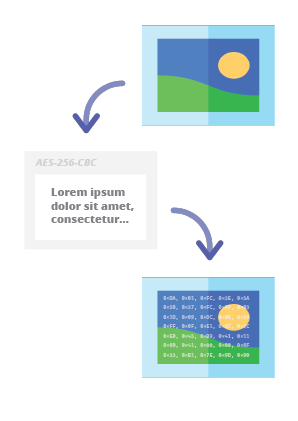
Steganography Online Codec - Hide Message in Image

С помощью нашего стеганографического кодера вы сможете надежно скрыть любое текстовое сообщение в изображении и отправить его, не вызывая никаких подозрений. Прочитать сообщение можно будет только после ввода корректного пароля для расшифровки.

Установка

Предпочтительный способ установки Web API SDK — через NPM (Node Package Manager).

Выполните:

root@kitploit:~
npm i steganography-online-codec

Или добавьте эту запись:

root@kitploit:~
  "dependencies": {
    "steganography-online-codec": "latest"
  },

напрямую в раздел dependencies вашего файла package.json.

Установочный пакет доступен по адресу https://www.npmjs.com/package/steganography-online-codec

Пакеты для других языков программирования

Установочные пакеты были загружены в репозитории для нескольких популярных языков программирования, а их исходные коды опубликованы на GitHub:

Альтернативное использование

Если вы не хотите использовать модуль Python, вы можете импортировать напрямую из файла:

root@kitploit:~
from pelock.steganography_online_codec import *

Как скрыть секретное сообщение внутри файла изображения

root@kitploit:~
"use strict";

/******************************************************************************
 *
 * Steganography Online Codec WebApi interface usage example.
 *
 * In this example shows how to hide an encrypted secret message in an image file.
 *
 * Version      : v1.00
 * Language     : JavaScript
 * Author       : Bartosz Wójcik (original example)
 * Project      : https://www.pelock.com/products/steganography-online-codec
 * Homepage     : https://www.pelock.com
 *
 * @link https://www.pelock.com/products/steganography-online-codec
 * @copyright Copyright (c) 2020-2025 PELock LLC
 * @license Apache-2.0
 *
/*****************************************************************************/

// include Steganography Online Codec module
import { SteganographyOnlineCodec, Errors } from 'steganography-online-codec';
// or if tested locally use:
//import { SteganographyOnlineCodec, Errors } from '../src/SteganographyOnlineCodec.mjs';

// create Steganography Online Codec class instance (we are using our activation key)
const mySteganographyOnlineCodec = new SteganographyOnlineCodec('YOUR-WEB-API-KEY');

// encode a hidden message (encrypted with your password) within an image file
(async () => {

	const inputFile = 'input_file.jpg';
	const secretMessage = 'Secret message';
	const password = 'Pa$$word';
	const outputFile = 'output_file_with_hidden_secret_message.png';

	try {
		const result = await mySteganographyOnlineCodec.encode(inputFile, secretMessage, password, outputFile);

		// result object holds the encoding results as well as other information
		console.log('Secret messaged encoded and saved to the output PNG file.');
	} catch (err) {
		console.error('Encoding failed:', err.error_message || err.message || String(err));
	}
})();

Более сложный пример с подробным объяснением и правильной проверкой кодов ошибок

root@kitploit:~
"use strict";

/******************************************************************************
 *
 * Steganography Online Codec WebApi interface usage example.
 *
 * In this example, we will see how to hide an encrypted message in an
 * image file using our codec.
 *
 * Version      : v1.00
 * Language     : JavaScript
 * Author       : Bartosz Wójcik
 * Project      : https://www.pelock.com/products/steganography-online-codec
 * Homepage     : https://www.pelock.com
 *
 * @link https://www.pelock.com/products/steganography-online-codec
 * @copyright Copyright (c) 2020-2025 PELock LLC
 * @license Apache-2.0
 *
 /*****************************************************************************/

// include Steganography Online Codec module
import { SteganographyOnlineCodec, Errors } from 'steganography-online-codec';
// or if tested locally use:
//import { SteganographyOnlineCodec, Errors } from '../src/SteganographyOnlineCodec.mjs';


// create Steganography Online Codec class instance (we are using our activation key)
const mySteganographyOnlineCodec = new SteganographyOnlineCodec('YOUR-WEB-API-KEY');

// encode a hidden message within the source image file
(async () => {
	// full version image size limit is set to 10 MB (demo 50 kB max)
	// supported image formats are PNG, JPG, GIF, BMP, WBMP, GD2, AVIF, WEBP (mail me for more)
	const inputFilePath = 'input_file.webp';

	// full version message size is unlimited (demo 16 chars max)
	const secretMessage = 'Secret message';

	// full version password length is 128 characters max (demo 8 chars max)
	const password = 'Pa$$word';

	// where to save encoded image with the secret message
	const outputFilePath = 'output_file_with_hidden_secret_message.png';

	try {
		// encode a hidden message (encrypted with your password) within an image file
		const result = await mySteganographyOnlineCodec.encode(inputFilePath, secretMessage, password, outputFilePath);

		// result object holds the encoding results as well as other information
		const versionType = result.license && result.license.activationStatus ? 'full' : 'demo';
		console.log(`You are running in ${versionType} version`);

		console.log(`Secret messaged encoded and saved to ${outputFilePath}`);
		if (result.license && result.license.usagesCount !== undefined) {
			console.log(`Remaining number of usage credits - ${result.license.usagesCount}`);
		}
	} catch (err) {
		const errorCode = err.error;

		switch (errorCode) {
			case Errors.INVALID_INPUT:
				console.log(`Invalid input file ${inputFilePath} or file doesn't exist`);
				break;
			case Errors.MESSAGE_TOO_LONG:
				console.log('Message is too long for the provided image file, use larger file');
				break;
			case Errors.IMAGE_TOO_BIG:
				console.log(`Image file is too big, current limit is set to ${err.raw?.limits?.maxFileSize ?? 'unknown'}`);
				break;
			case Errors.LIMIT_MESSAGE:
				console.log(`Message is too long, current limit is set to ${err.raw?.limits?.maxMessageLen ?? 'unknown'}`);
				break;
			case Errors.LIMIT_PASSWORD:
				console.log(`Password is too long, current limit is set to ${err.raw?.limits?.maxPasswordLen ?? 'unknown'}`);
				break;
			case Errors.INVALID_PASSWORD:
				console.log('Invalid password');
				break;
			default:
				console.log(`An error occurred: ${err.error_message ?? `Error code ${errorCode}`}`);
		}
	}
})();

Как извлечь закодированное секретное сообщение из файла изображения

root@kitploit:~
"use strict";

/******************************************************************************
 *
 * Steganography Online Codec WebApi interface usage example.
 *
 * In this example, we will see how to extract a previously encrypted & hidden
 * secret message from an image file.
 *
 * Version      : v1.00
 * Language     : JavaScript
 * Author       : Bartosz Wójcik
 * Project      : https://www.pelock.com/products/steganography-online-codec
 * Homepage     : https://www.pelock.com
 *
 * @link https://www.pelock.com/products/steganography-online-codec
 * @copyright Copyright (c) 2020-2025 PELock LLC
 * @license Apache-2.0
 *
 /*****************************************************************************/

// include Steganography Online Codec module
import { SteganographyOnlineCodec, Errors } from 'steganography-online-codec';
// or if tested locally use:
//import { SteganographyOnlineCodec, Errors } from '../src/SteganographyOnlineCodec.mjs';

// create Steganography Online Codec class instance (we are using our activation key)
const mySteganographyOnlineCodec = new SteganographyOnlineCodec('YOUR-WEB-API-KEY');

// extract a hidden message from the previously encoded image file
(async () => {
	// full version image size limit is set to 10 MB (demo 50 kB max)
	// supported image format is PNG and only PNG!
	const inputFilePath = 'output_file_with_hidden_secret_message.png';

	// full version password length is 128 characters max (demo 8 chars max)
	const password = 'Pa$$word';

	try {
		// extract a hidden message from the image (PNG files only)
		const result = await mySteganographyOnlineCodec.decode(inputFilePath, password);

		// result object holds the decoding results as well as other information
		console.log(`You are running in ${result.license?.activationStatus ? 'full' : 'demo'} version`);

		console.log(`Secret message is "${result.message}"`);

		if (result.license && result.license.usagesCount !== undefined) {
			console.log(`Remaining number of usage credits - ${result.license.usagesCount}`);
		}
	} catch (err) {
		switch (err.error) {
			case Errors.INVALID_INPUT:
				console.log(`Invalid input file ${inputFilePath} or file doesn't exist`);
				break;
			case Errors.IMAGE_TOO_BIG:
				console.log(`Image file is too big, current limit is set to ${err.raw?.limits?.maxFileSize ?? 'unknown'}`);
				break;
			case Errors.LIMIT_MESSAGE:
				console.log(`Extracted message is too long, current limit is set to ${err.raw?.limits?.maxMessageLen ?? 'unknown'}`);
				break;
			case Errors.LIMIT_PASSWORD:
				console.log(`Password is too long, current limit is set to ${err.raw?.limits?.maxPasswordLen ?? 'unknown'}`);
				break;
			case Errors.INVALID_PASSWORD:
				console.log('Invalid password');
				break;
			default:
				console.log(`An error occurred: ${err.error_message ?? String(err)}`);
		}
	}
})();

Как проверить статус лицензионного ключа и текущие лимиты

root@kitploit:~
"use strict";

/******************************************************************************
 *
 * Steganography Online Codec WebApi interface usage example.
 *
 * In this example we will verify our activation key status.
 *
 * Version      : v1.00
 * Language     : JavaScript
 * Author       : Bartosz Wójcik
 * Project      : https://www.pelock.com/products/steganography-online-codec
 * Homepage     : https://www.pelock.com
 *
 * @link https://www.pelock.com/products/steganography-online-codec
 * @copyright Copyright (c) 2020-2025 PELock LLC
 * @license Apache-2.0
 *
 /*****************************************************************************/

// include Steganography Online Codec module
import { SteganographyOnlineCodec, Errors } from 'steganography-online-codec';
// or if tested locally use:
//import { SteganographyOnlineCodec, Errors } from '../src/SteganographyOnlineCodec.mjs';

// create Steganography Online Codec class instance (we are using our activation key)
const mySteganographyOnlineCodec = new SteganographyOnlineCodec('YOUR-WEB-API-KEY');

// login to the service
(async () => {
	try {
		const result = await mySteganographyOnlineCodec.login();

		// result object holds the information about the license & current limits
		const versionType = result.license && result.license.activationStatus ? 'full' : 'demo';
		console.log(`You are running in ${versionType} version`);

		// information about the current license
		if (result.license && result.license.activationStatus) {
			console.log(`Registered for - ${result.license.userName}`);
			const licenseType = result.license.type === 0 ? 'personal' : 'company';
			console.log(`License type - ${licenseType}`);
			console.log(`Total number of purchased usage credits - ${result.license.usagesTotal}`);
			console.log(`Remaining number of usage credits - ${result.license.usagesCount}`);
		}

		// current limits (different for DEMO and FULL versions)
		if (result.limits) {
			console.log(`Max. password length - ${result.limits.maxPasswordLen}`);
			const msgLen = result.limits.maxMessageLen === -1 ? 'unlimited' : result.limits.maxMessageLen;
			console.log(`Max. message length - ${msgLen}`);
			console.log(`Max. input image file size - ${mySteganographyOnlineCodec.convert_size(result.limits.maxFileSize)}`);
		}
	} catch (err) {
		console.error(`Login failed: ${err.error_message || String(err)}`);
	}
})();

Остались вопросы?

Если вас интересует Steganography Online Codec Web API или у вас есть вопросы относительно пакетов SDK, технические вопросы или что-то неясно, пожалуйста, свяжитесь со мной. Я с радостью отвечу на все ваши вопросы.

Бартош Вуйцик

  • Посетите мой сайт — https://www.pelock.com
  • X — https://x.com/PELock
  • GitHub — https://github.com/PELock
Скачать инструмент
RepositoryLanguageInstallationPackageGitHub
PyPI repository for PythonPythonВыполните pip install steganography-online-codecPyPISources
NPM repository for JavaScript and TypeScriptJavaScript, TypeScriptВыполните npm i steganography-online-codec или добавьте "steganography-online-codec": "latest" в раздел dependencies файла package.jsonNPMSources
Rust crates.ioRustВыполните cargo add steganography-online-codec или добавьте steganography-online-codec = "1" в Cargo.toml (необязательно: git / path для невыпущенных или вендорных сборок)crates.ioSources