 nebulock-inc/agentic-threat-hunting-framework
ATHF is a framework for agentic threat hunting - building systems that can remember, learn, and act with increasing autonomy.





Quick Start • Installation • Documentation • Examples
Give your threat hunting program memory and agency.
The Agentic Threat Hunting Framework (ATHF) is the memory and automation layer for your threat hunting program. It gives your hunts structure, persistence, and context - making every past investigation accessible to both humans and AI.
ATHF works with any hunting methodology (PEAK, TaHiTI, or your own process). It's not a replacement; it's the layer that makes your existing process AI-ready.
ATHF provides structure and persistence for threat hunting programs. It's a markdown-based framework that:
Most threat hunting programs lose valuable context once a hunt ends. Notes live in Slack or tickets, queries are written once and forgotten, and lessons learned exist only in analysts' heads.
Even AI tools start from zero every time without access to your environment, your data, or your past hunts.
ATHF changes that by giving your hunts structure, persistence, and context.
Read more: docs/why-athf.md
Every threat hunt follows the same basic loop: Learn → Observe → Check → Keep.
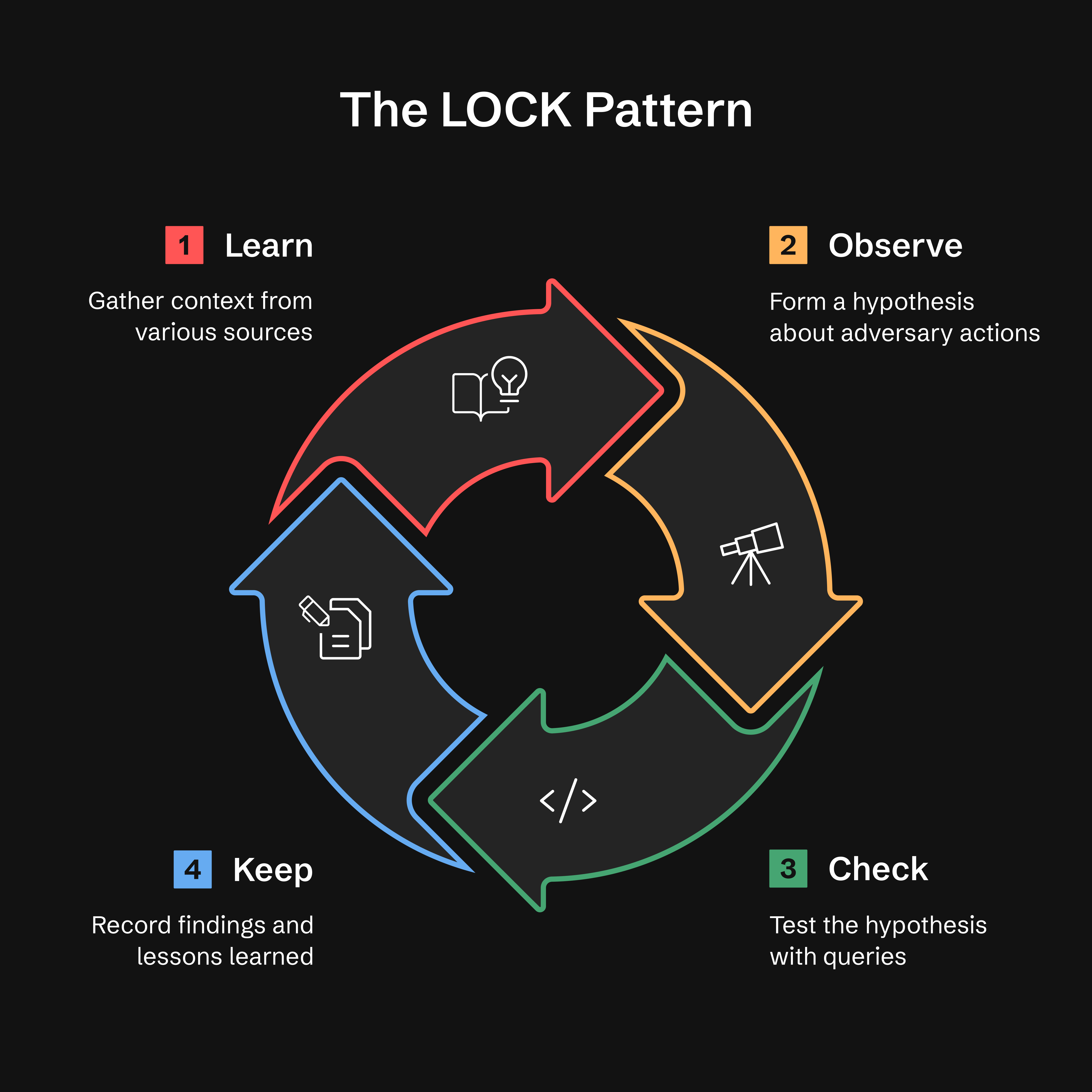
Why LOCK? It's small enough to use and strict enough for agents to interpret. By capturing every hunt in this format, ATHF makes it possible for AI assistants to recall prior work and suggest refined queries based on past results.
Read more: docs/lock-pattern.md
After completing a hunt's KEEP phase, the GATES method validates whether your findings should be promoted to production detections, recurring hunts, or advisories.
Generalizable, Additive, Tunable, Exposure-tested, Sustainable
Note: GATES is designed to work with the ATHF framework and has been extensively tested in that context. While the methodology (5 BASE criteria, verdict types) is conceptually portable, we recommend using it as part of the complete ATHF workflow for best results. See
.claude/skills/gates/for the full integration.
Installation: GATES is currently available via
git cloneonly. Users who installed viapip installshould clone the repository to access GATES. We're working on including GATES in the pip distribution (tracked as Issue #21).
GATES evaluates hunt-derived detections using a two-tier framework: 5 BASE criteria (assessed from hunt data) identify deployment candidates, while 5 ADVANCED criteria (validated in production) ensure resilient detections with low false positive and false negative rates:
| Gate | Question | Catches |
|---|---|---|
| G - Generalizable | Is this repeatable? | IOC-based rules that expire quickly |
| A - Additive | Does it fill a coverage gap? | Duplicate or redundant detections |
| T - Tunable | Can we distinguish attack from normal? | Baseline noise mismatch (top FP cause) |
| E - Exposure-tested | Did we cover evasions? | Single-dimensional detections |
| S - Sustainable | Can we maintain this? | High-volume, low-TP rules |
Verdicts are based on BASE scores (/5). See .claude/skills/gates/ for ADVANCED validation methods.
Quick Start — type this to your assistant; /gates is a skill, not a shell command:
/gates --hunt H-0001
Verdict Types:
A gate FAIL overrides the score band, and when two gates fail the first match in
this order wins: A→DROP, G→TIME_BOX, E→HOLD, S→RECURRING_HUNT, T→CONDITIONAL. The
bands above apply only when no gate FAILed. Full rule:
.claude/skills/gates/SKILL.md Step 4.
Note: GATES "PROMOTE" verdict means deploying a detection rule. This is distinct from athf hunt promote, which moves hunt files between directories.
Integration with ADEF (Detection Engineering Framework):
After GATES validation, proceed to ADEF for production detection engineering:
ATHF Workspace                    ADEF Workspace
──────────────                    ──────────────
Hunt (LOCK)
   ↓
GATES Validate
   ↓
H-XXXX_GATES.yaml  ────────────→  FORGE (F-O-R-G-E)
                                     ↓
                                  Production Rule
Complete Workflow:
In the ATHF workspace, validate the hunt — assistant input, not a shell command:
/gates --hunt H-0062
→ writes hunt-promotion-analysis/H-0062_GATES.yaml (one file per hunt, N
candidates inside). A hunt whose verdict is archival (HOLD, DROP, TIME_BOX,
RECURRING_HUNT) emits a .md narrative instead — there is no rule to build, so
step 2 applies to .yaml output only.
Import that document into ADEF:
adef hunt-promote --gates ~/athf-workspace/hunt-promotion-analysis/H-0062_GATES.yaml
# --dry-run first to preview what it would mint
Deployable candidates each land at the Find stage with a D-XXXX, a catalog record
and a journal; archival ones are reported as skipped. No cd needed — ADEF resolves
its workspace from ADEF_WORKSPACE (default ~/work/adef-workspace/). Confirm your
ADEF has this mode with adef hunt-promote --help.
ADEF Repository: https://github.com/Nebulock-Inc/agentic-detection-engineering-framework
GATES ensures you deploy the right detections the right way, avoiding alert fatigue and operational friction.
Read more: .claude/skills/gates/README.md
ATHF defines a simple maturity model. Each level builds on the previous one.

