
Skip to content
KitploitKITPLOIT
ИнструментыБлог
Отправить
ИнструментыБлог
Отправить

Инструменты для хакинга, пентеста и кибербезопасности — ваш арсенал защиты!

Kitploit — это каталог инструментов для хакинга, кибербезопасности и пентестинга. Находите последние обновления проектов для поиска уязвимостей, анализа систем, автоматизации тестирования и усиления вашей безопасности.

··Ленты·Контакты·Конфиденциальность·© 2026 Kitploit

Каталог инструментов

Категории

Все категории
Loading categories
hayduk — Graphical attack management console for Metasploit: the lineage of Armitage as a single Go binary with a browser UI. Live network topology, campaign workflows, Hail Mary, sessions, report export, and team mode. | Kitploit
Инструменты/GitHubGitHub/jolovicdev/hayduk
Penetration Testing FrameworksVulnerability ScannersExploit FrameworksNetwork MappingPost-ExploitationRed Teaming
GitHubjolovicdev/hayduk

hayduk

Graphical attack management console for Metasploit: the lineage of Armitage as a single Go binary with a browser UI. Live network topology, campaign workflows, Hail Mary, sessions, report export, and team mode.

Репозиторий
61691 день назадЕщё не проверено

Популярное

Смотреть все →

Откройте для себя самые используемые инструменты нашего сообщества.

Изучить все инструменты

Просмотрите нашу коллекцию инструментов

Смотреть все инструменты →
Поделиться
Контент недоступен на запрошенном языке. Показываем английскую версию.

Hayduk: Open-source Metasploit GUI and Armitage alternative

CI Release License: MIT

Hayduk is a free, open-source Metasploit GUI for authorized penetration testing. It brings the Armitage workflow to your browser: map hosts, browse modules, manage Meterpreter and shell sessions, and export campaign reports.

Download one binary. Run it. Connect to Metasploit. No Java, Go, or Node.js installation is required to run a release binary. The browser UI is included.

Hayduk connects to a separate Metasploit Framework instance through msfrpcd. It does not bundle Metasploit.

Download the latest release · Quickstart · ·

Try the Docker lab
Team mode

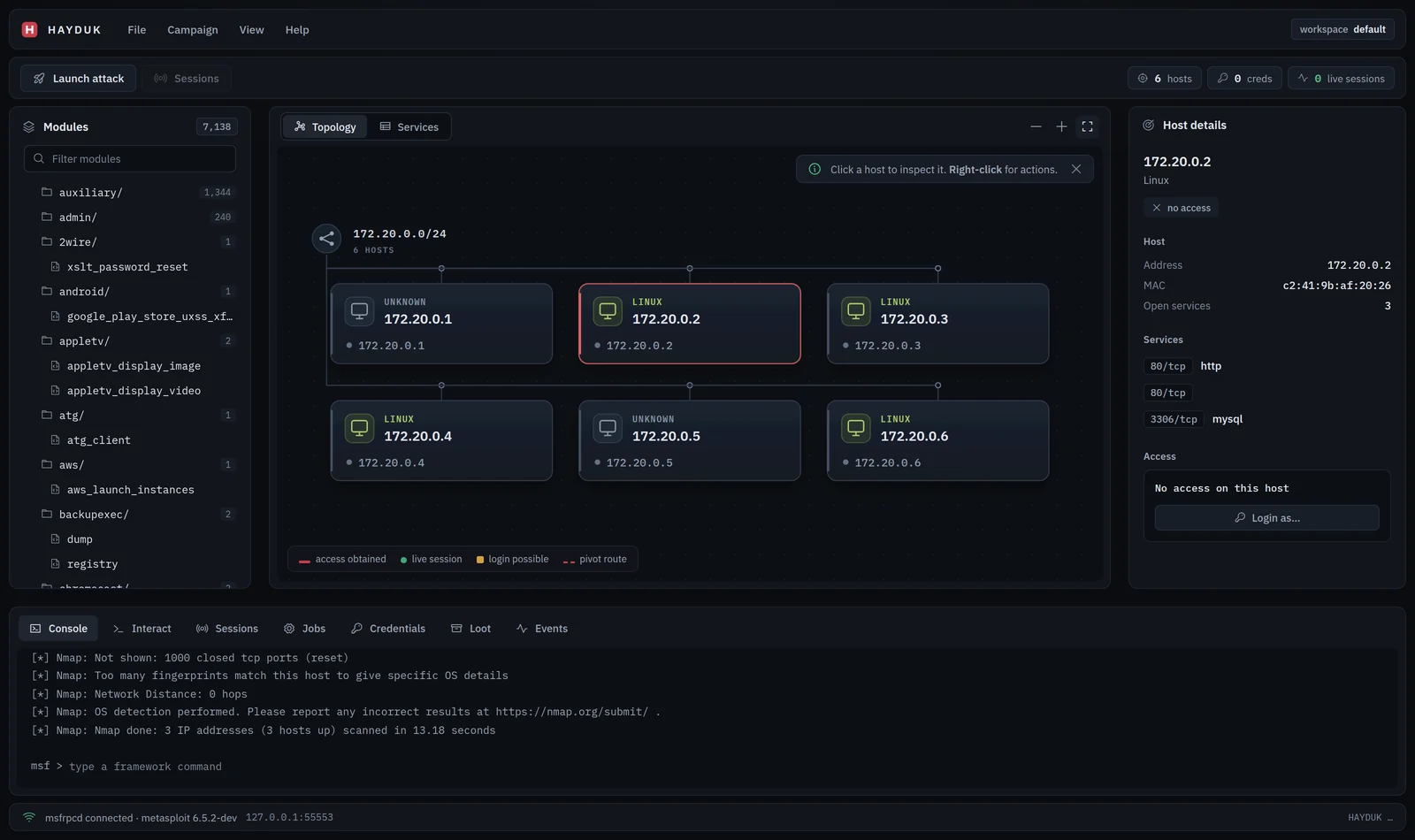
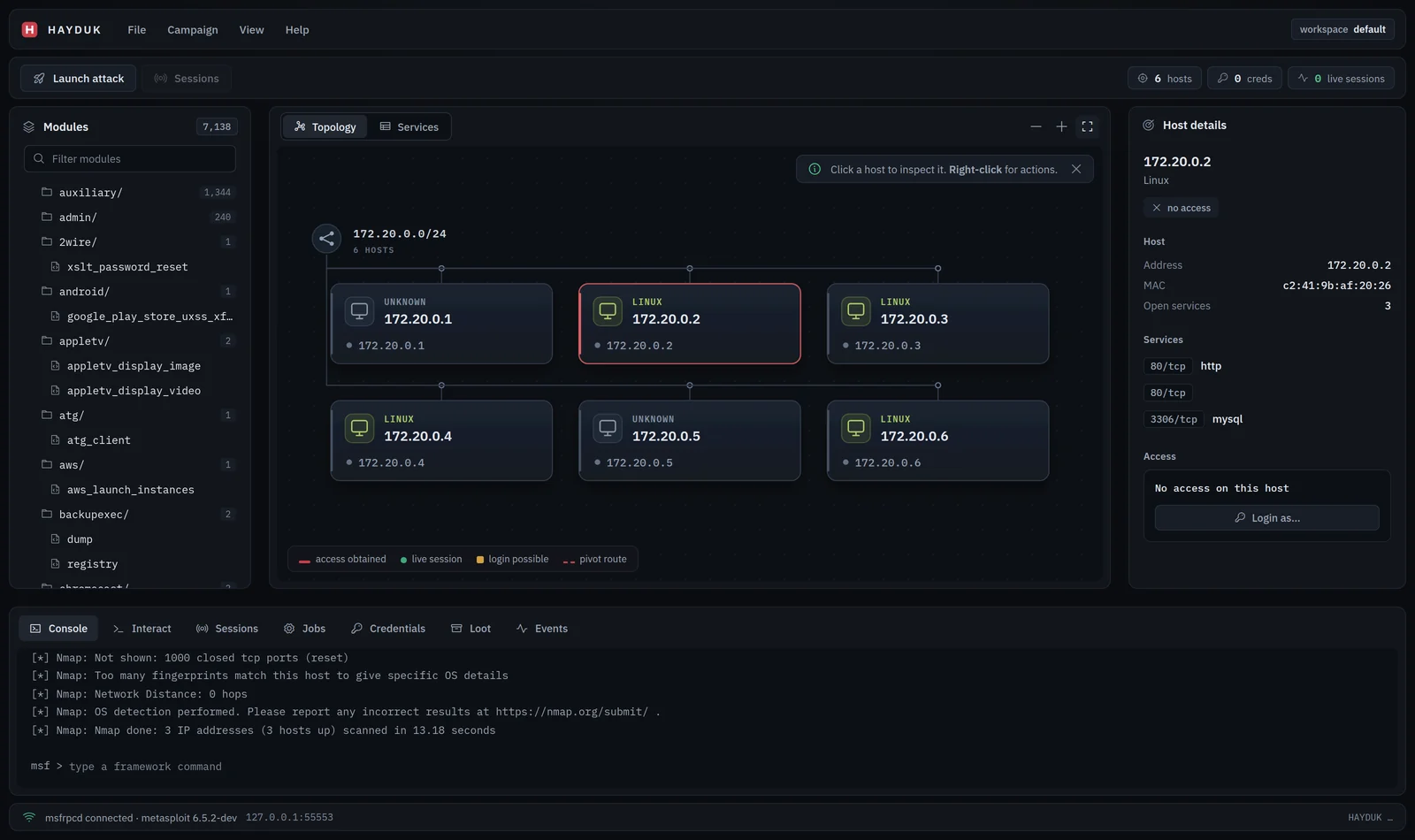
Hayduk campaign overview with network topology, host inspection, module library, and live console

Interface shown with illustrative campaign data.

Quickstart

You need a Hayduk release binary, a browser, and a running Metasploit Framework instance. For workspace features such as hosts, services, credentials, and loot, Metasploit also needs a connected database.

The steps below assume Hayduk and Metasploit run on the same machine. If you need a ready-made Metasploit setup with a database and disposable targets, use the Docker lab.

1. Download and extract Hayduk

Open the latest release and choose the archive matching your operating system and processor. Extract the archive into a folder. There is no Hayduk installer or separate UI setup.

2. Start Metasploit RPC

On the machine running Metasploit, open a terminal and run:

root@kitploit:~
msfrpcd -P 'yourpassword' -S -f -a 127.0.0.1 -p 55553

Replace yourpassword with your own password. Keep this terminal open. This command binds RPC to localhost on port 55553; -S disables SSL for this local connection.

If you already run msfrpcd, use its existing connection settings instead of starting another instance.

3. Run Hayduk

Open another terminal in the extracted folder.

Linux and macOS:

root@kitploit:~
./hayduk

Windows PowerShell:

root@kitploit:~
.\hayduk.exe

Hayduk opens the UI in your browser. If the browser does not open, copy the full URL printed in the terminal, including ?token=.... The port is assigned automatically.

4. Connect

In Connect to msfrpcd, enter the settings from step 2:

FieldValue
Host127.0.0.1
Port55553
Usermsf
PasswordThe password you set above
use SSLUnchecked

Click Connect. A cold Metasploit instance can take about half a minute to respond; connection progress appears in the dialog.

Keep Hayduk running while you use the UI. Press Ctrl+C in its terminal to stop it.

Your first campaign

Use a system or network you are authorized to test. Scans run from the connected Metasploit instance, so targets must be reachable from that machine.

Click a module to configure it. Right-click hosts, sessions, table rows, and modules in the tree to open their action menus.

Use the campaign summary cards to open hosts, services, sessions, or credentials. Discover hosts, Scan services, and Export report are also available directly above the network map.

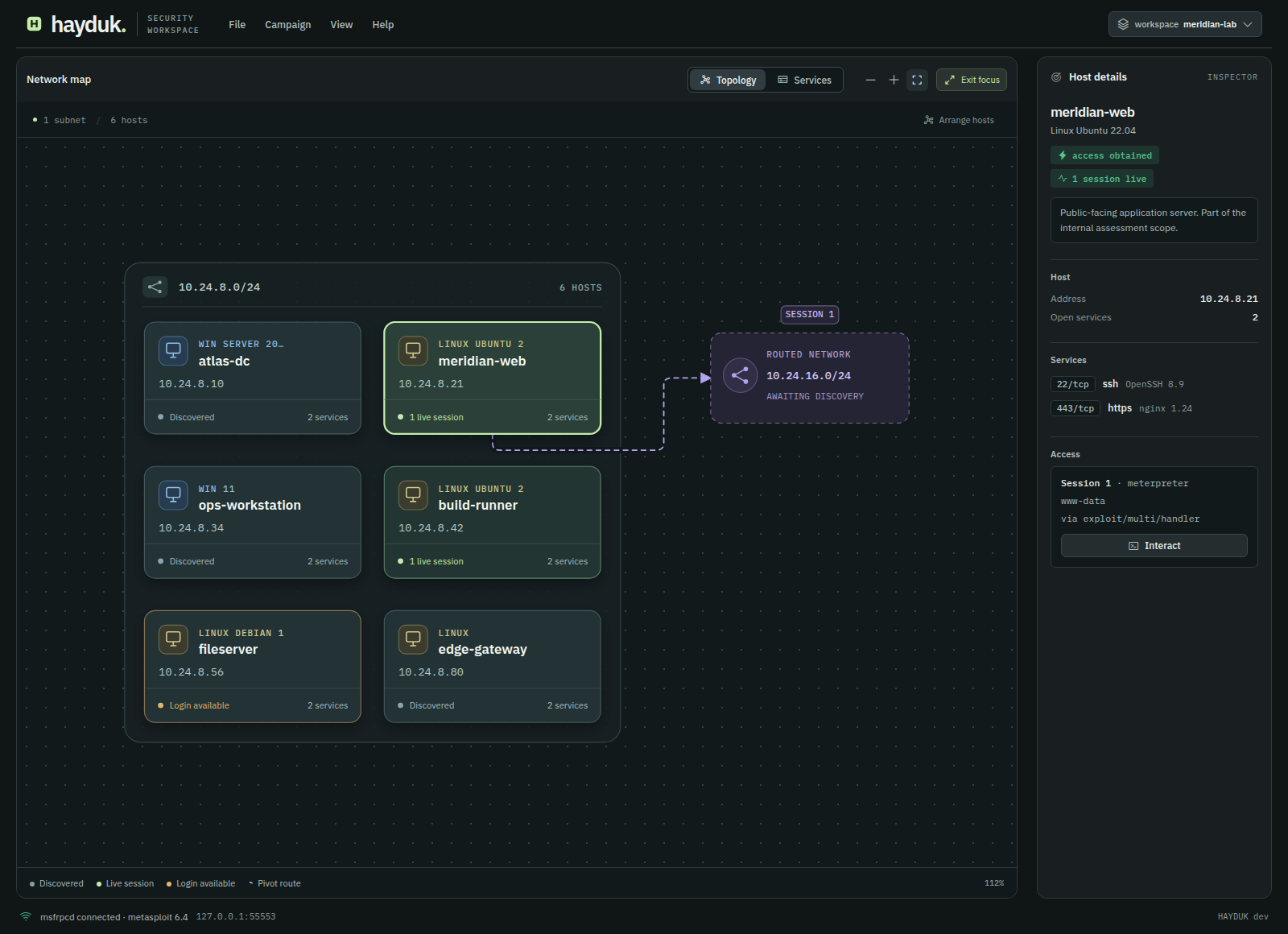
The network map adapts host columns to the available canvas. Choose Focus to expand the map and host inspector. Arrange hosts replaces saved positions with an automatic layout. Host cards show open service counts and access state; violet paths identify pivot routes.
  1. Choose a workspace. Click the workspace chip to switch between existing Metasploit workspaces, or use the current workspace. The active workspace scopes the database tables, topology, and exported report, keeping each client's campaign data separate. Events and sessions retain their originating workspace for report attribution; the Sessions tab shows sessions across workspaces.
  2. Discover hosts. Open Campaign → Discover hosts…, enter your target host or CIDR range, select a scanner, and click Configure…. Review the module options and click Launch.
  3. Scan and inspect services. Open Campaign → Scan services… and configure a scan for your target. Review the options before launching it. Open View → Topology to see discovered hosts, or View → Services to inspect service results.
  4. Launch an exploit and open a session. Right-click an exploit module in the tree and choose Launch…, or open Campaign → Find attacks… and click a match's Launch button to prefill the target host and matched port. Review the module options and payload, then click Launch. If a session opens, click its row in the Sessions tab, or right-click its host and choose Interact with session , to open the live console in Interact.
  5. Export a report. Choose File → Export report… to download a self-contained HTML campaign report.

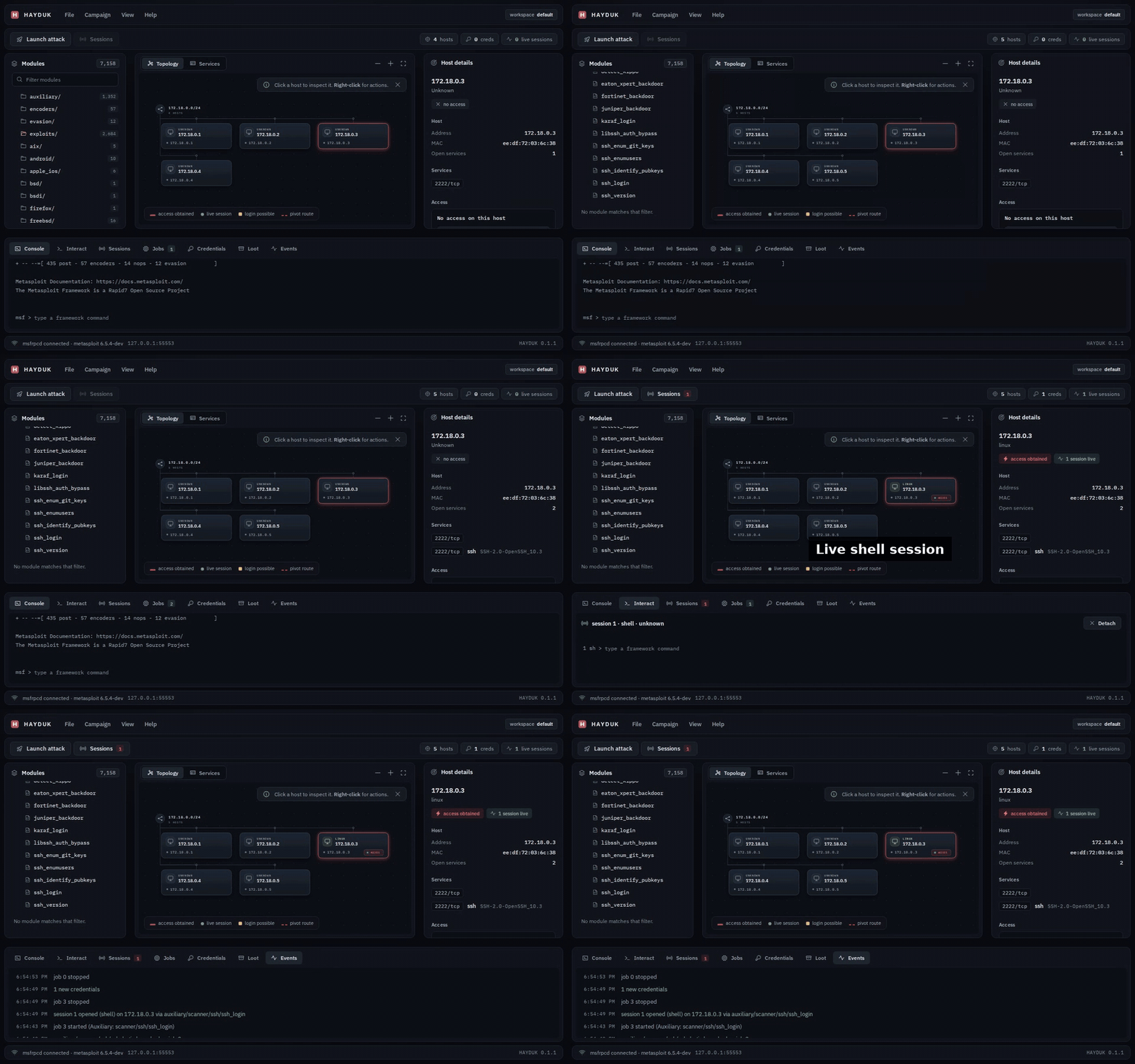
Hayduk demo: select a host on the topology map and run commands in its live shell session

Demo uses illustrative campaign data.

Features

CapabilityWhat you can do
Network topologyExplore adaptive subnet groups, host service counts, and pivot routes. Drag hosts, zoom, or expand the map in Focus mode.
Metasploit modulesBrowse the module tree, inspect reliability ranks, configure options, and select payloads.
Campaign workflowsDiscover hosts, scan services, and find exploit candidates matching known services.
Session managementInteract with Meterpreter and shell sessions, upgrade shells, and terminate sessions.
Credentials and lootReview workspace data and use recovered credentials in login workflows.
Hail MaryLaunch matching exploits against selected hosts, with paced launches and an event log.
ReportingExport a self-contained HTML report for campaign review and client delivery.
Team modeShare a campaign with multiple operators on a trusted network.

Hayduk graph focus mode with adaptive subnet layout, host states, and a routed network

Graph focus mode with illustrative campaign data.

Try the Docker lab

The repository includes a disposable Metasploit lab with a database and optional target containers. Run it to try the workflow from the demo against live targets.

You need Git, Docker, and Docker Compose. Run these commands from a shell that supports the repository's .sh scripts:

root@kitploit:~
git clone https://github.com/jolovicdev/hayduk.git
cd hayduk
scripts/msf/up.sh --with-vulnbox

The script prints the target container IP addresses when the lab is ready. Start your downloaded Hayduk binary and connect with Host 127.0.0.1, Port 55553, User msf, Password testpass123, and use SSL unchecked. Use a printed target IP for your first scan.

To start only Metasploit and its database, run scripts/msf/up.sh without --with-vulnbox.

When finished, run this from the repository root. It removes the lab containers and their volumes, including lab database data:

root@kitploit:~
scripts/msf/down.sh

Team mode

Run the downloaded binary with a specific interface address that your operators can reach:

root@kitploit:~
./hayduk --team --listen 192.168.1.10:8787

Replace 192.168.1.10 with your machine's address. Team mode requires an explicit, non-loopback address; wildcard addresses such as 0.0.0.0 are refused.

Share the full token URL printed in the terminal. Each operator opens it in a browser and chooses a name. The event log attributes actions to those names.

Team mode uses one shared token and plain HTTP. Operator names are labels, not verified identities. Treat the token URL like a password and use team mode only on trusted networks. Read the security policy for the full trust model.

Troubleshooting

ProblemWhat to check
The browser does not openOpen the full token URL printed by Hayduk. You can also start with ./hayduk --no-browser.
Hayduk cannot connectCheck that msfrpcd is running and that the host, port, user, and password match.
SSL connection failsLeave use SSL unchecked when msfrpcd runs with -S; enable it when the daemon uses SSL.
Connection takes timeWatch the connection dialog. A cold Metasploit instance can take about half a minute to respond.
Hosts or services are missingCheck the selected workspace, Metasploit's database connection, and target reachability from Metasploit.

FAQ

Is Hayduk an Armitage alternative?

Yes. Hayduk follows Armitage's graphical Metasploit workflow, including network topology, module launching, Hail Mary, and shared campaigns. It is a separate implementation with a browser UI and a single Go binary.

Does Hayduk include Metasploit Framework?

No. Hayduk is a GUI client for Metasploit's msfrpcd service. Use your existing Metasploit installation or the included Docker lab.

Do I need Go, Node.js, Java, or Docker?

No additional language runtime is required for the Hayduk release binary. Go and Node.js are needed to build from source. Docker is needed only if you choose the included lab.

Can Hayduk connect to Metasploit on another machine?

Yes. Enter the Metasploit machine's reachable address in Host and match its RPC port, credentials, and SSL setting. The localhost-only RPC command in Quickstart accepts connections only from the same machine.

Is Hayduk free and open source?

Yes. Hayduk is released under the MIT license.

Build from source

For development, use Go 1.26.1 or newer, Node.js 24 as used in CI, npm, and Make. From the repository root:

root@kitploit:~
make
./bin/hayduk

make installs UI dependencies, builds and embeds the UI, and compiles bin/hayduk.

Development

After the initial build, run the UI server in one terminal:

root@kitploit:~
cd ui
npm run dev

In a second terminal at the repository root:

root@kitploit:~
make dev

Open the URL printed by Hayduk. UI changes reload through the development proxy.

Checks

Run these commands from the repository root:

root@kitploit:~
make test          # Go and UI tests
npm --prefix ui run lint
make               # Type-check, build the UI, and compile the binary
make integration   # Requires the running Docker lab

Protocol types are generated. With tygo available, run make gen after editing internal/protocol/protocol.go; make gen-check checks for generated type drift.

Credits and license

Hayduk draws on the graphical attack management workflow established by Armitage, created by Raphael Mudge. It connects to Metasploit through go-msf.

Licensed under MIT. See third-party notices for bundled assets and licenses.

Скачать инструмент