 hahwul/gori
A fast, keyboard-driven HTTP intercepting proxy and pentesting toolkit for the terminal built for humans and AI agents alike.

Откройте для себя самые используемые инструменты нашего сообщества.
Данных о популярности пока нет.

A fast, keyboard-driven HTTP intercepting proxy and pentesting toolkit for the terminal,
built for humans and AI agents.



Installation • Usage • Documentation • Contributing
gori (고리, Korean for ring, link, loop) sits in the loop between your client and its target.
It captures every request and response as a flow you can replay, fuzz, and scan across HTTP/1.1,
HTTP/2, WebSocket, gRPC, and SSE, and holds HTTP/1.1 and HTTP/2 traffic for editing in flight.
The TUI, gori run, and MCP share one engine and one project, so scripts and AI agents can drive
the same engagement. The capability matrix
lists what each protocol and surface supports.
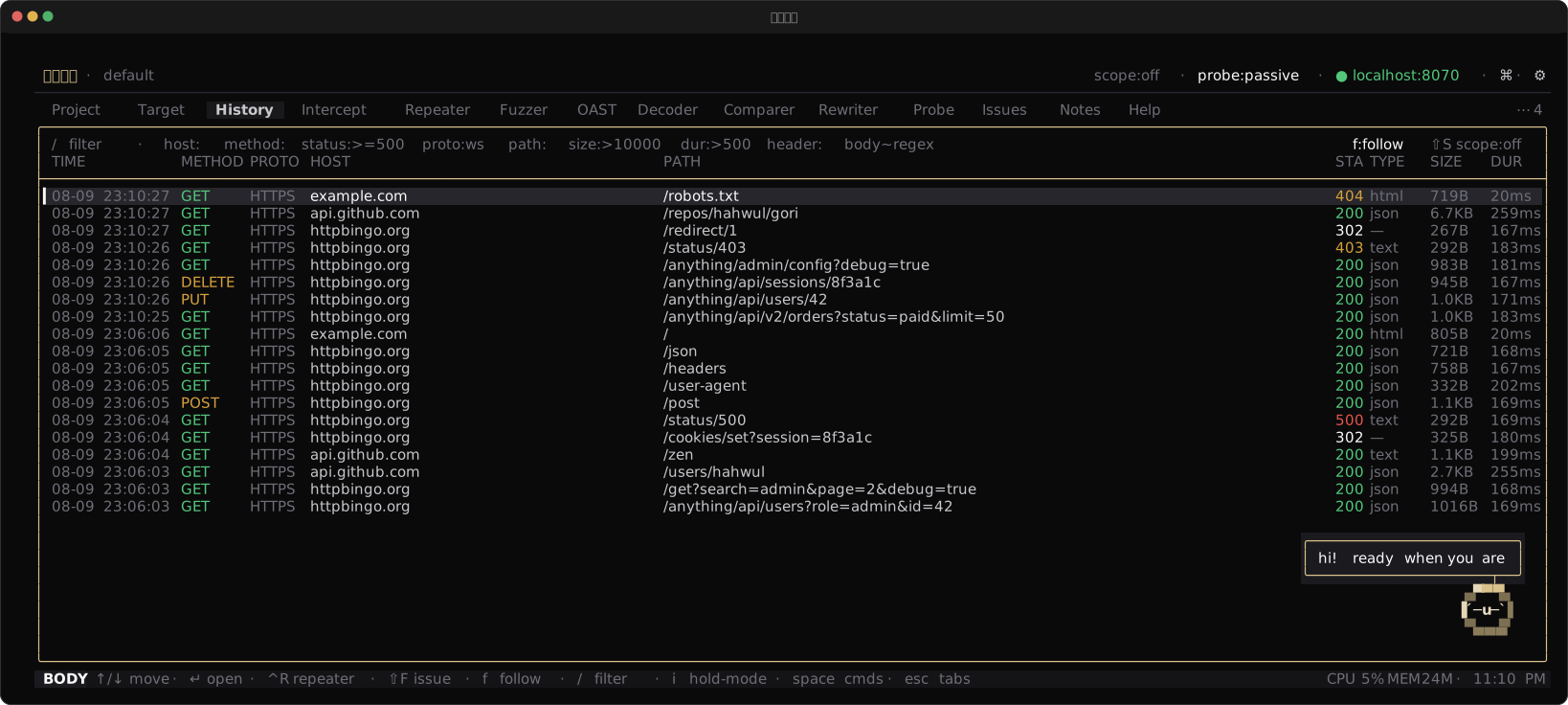
proto:wsfetch, Go, httpie, or a CSRF PoCCtrl-P) and space menu (Space) reach every actiongori run for scripts and CIgori mcp, an MCP server for AI agents (it does not start a capture proxy)curl -fsSL https://gori.hahwul.com/install.sh | bash
Update with gori update. On a Chocolatey, Homebrew, Snap, or AUR install it prints the package manager's command.
On Windows, use Chocolatey, or download gori-windows-x86_64.exe from Releases, rename it to gori.exe, and put it on your PATH.
The Chocolatey package installs the Windows x86_64 binary:
choco install gori
brew tap hahwul/gori
brew install gori
nix run github:hahwul/gori               # run without installing
nix profile install github:hahwul/gori   # install
Requires Crystal >= 1.21.0 and pkg-config.
git clone https://github.com/hahwul/gori.git
cd gori
shards build --release   # writes bin/gori
System libraries (Brotli / Zstd), offline builds, and other options are in the Installation guide.
One engine and one project, three entry points.
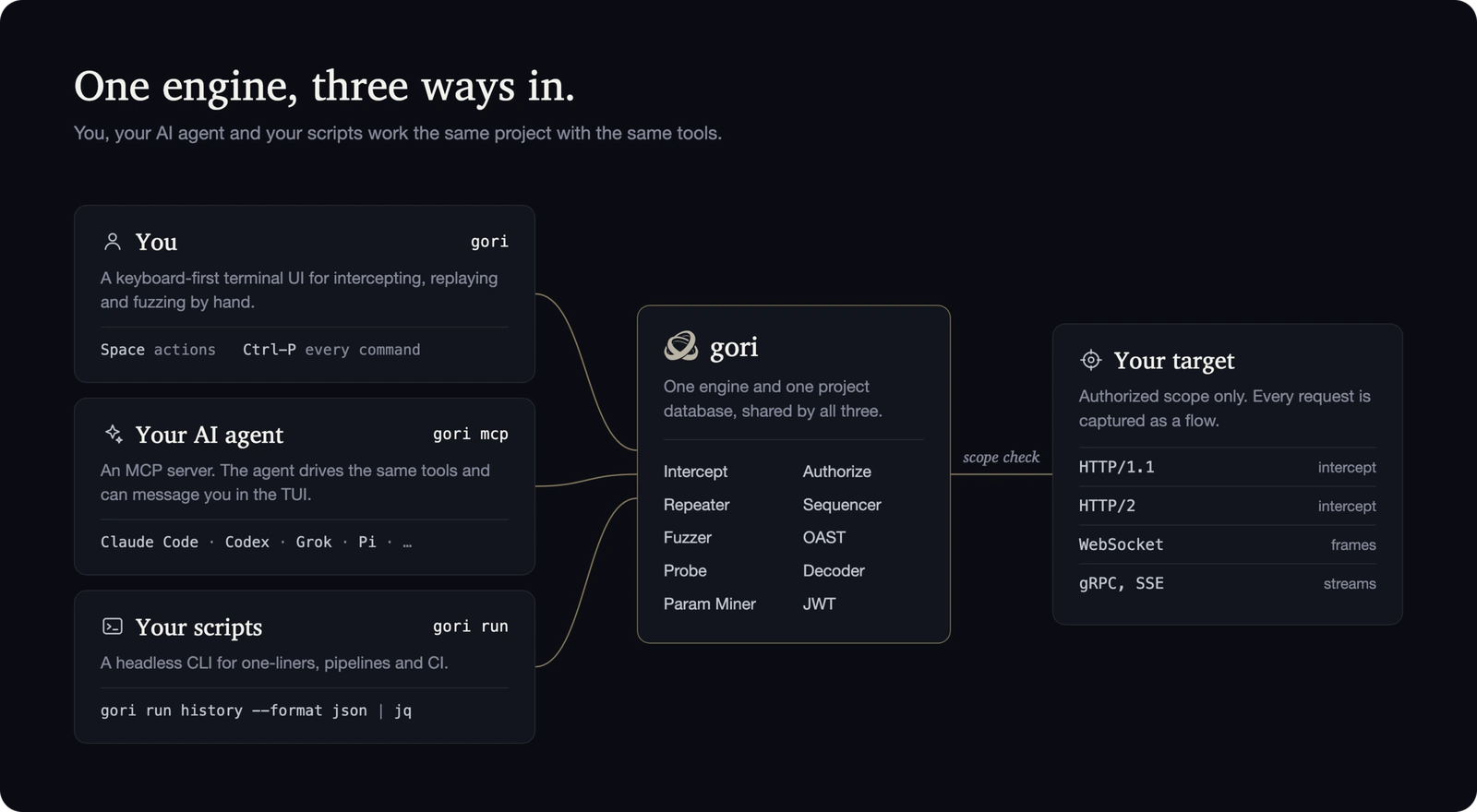
gori (TUI)gori
The proxy listens on 127.0.0.1:8070. A short first-run wizard picks the theme, and a new
global default bind if that port is taken (projects can pin their own later). To intercept
HTTPS, trust gori's root CA: Open browser in the palette (Ctrl-P) launches a browser that
already trusts it and is proxied. Captured traffic lands in History. Ctrl-P opens the
command palette and Space the context actions.
gori --listen 0.0.0.0 --port 8080 # global bind for this run only (not persisted)
gori mcp (MCP server)gori mcp is a Model Context Protocol server. An AI client
spawns it over stdio, reads your traffic, and uses the tools you do. Write the config for your
agent, then restart the client:
gori mcp --install-claude-code   # Claude Code   (~/.claude.json)
gori mcp --install-claude        # Claude Desktop
gori mcp --install-codex         # OpenAI Codex
gori mcp --install-agy           # Antigravity CLI
gori mcp --install-grok          # Grok
gori mcp --install-hermes        # Hermes        (~/.hermes/config.yaml)
gori mcp --install-pi            # Pi            (~/.pi/agent/mcp.json)
Pi needs an MCP adapter, such as pi-mcp-adapter
(pi install npm:pi-mcp-adapter). The installer honors PI_CODING_AGENT_DIR when set.
Add --read-only for an untrusted agent: read tools only, no live requests. The
AI Setup guide covers connecting an agent and
running a first request.
gori run (headless CLI)gori run runs the same engines without the UI, for scripts, CI, or an agent's shell:
gori run history --format json      # dump captured flows as JSON
gori run sitemap                    # endpoints seen so far
gori run --help                     # every subcommand
All three share one project database. The full guide is in the documentation and in the app's Help tab.
shards build          # debug binary at bin/gori (add --release to optimise)
shards run gori       # run without installing
If linking fails with undefined BrotliDecoder* symbols, libbrotlidec is missing or
pkg-config cannot find it. The
Installation guide covers the system
libraries and the -Dwithout_native_codecs offline build.