 google/magika
Быстрое и точное обнаружение типов содержимого файлов на основе ИИ








Magika — это инновационный инструмент определения типа файлов на основе ИИ, который опирается на недавние достижения глубокого обучения для обеспечения точного определения. В своей основе Magika использует специальную, высокооптимизированную модель, которая весит всего несколько мегабайт и позволяет точно идентифицировать файлы за миллисекунды даже при работе на одном CPU. Magika была обучена и оценена на наборе данных из ~100 млн образцов по более чем 200 типам содержимого (охватывающих как бинарные, так и текстовые форматы файлов), и достигает средней точности ~99% на нашем тестовом наборе.
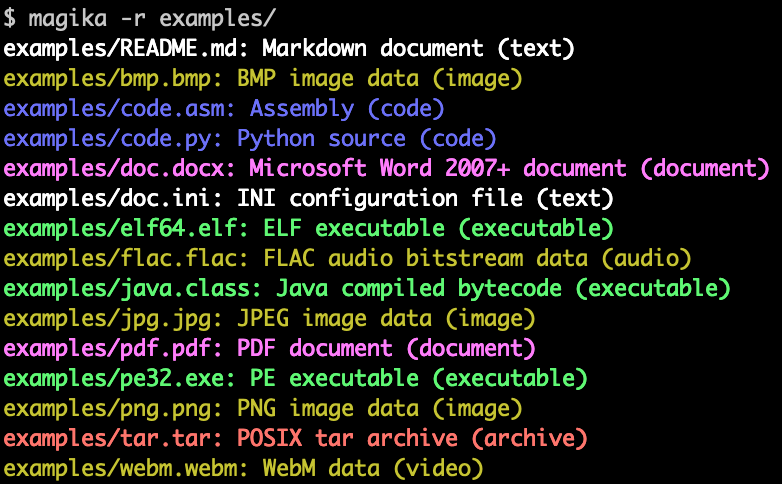
Вот пример того, как выглядит вывод командной строки Magika:
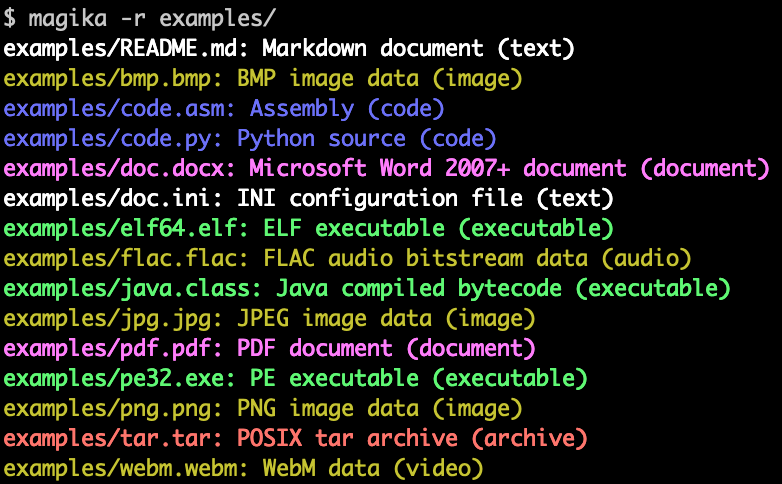
Magika используется в масштабе для повышения безопасности пользователей Google путём направления файлов Gmail, Drive и Safe Browsing к соответствующим сканерам политик безопасности и содержимого, обрабатывая сотни миллиардов образцов еженедельно. Magika также была интегрирована с VirusTotal (пример) и abuse.ch (пример).
Для получения дополнительного контекста вы можете прочитать наш первоначальный анонсирующий пост в блоге Google OSS, ознакомиться с веб-сайтом Magika и узнать больше в нашей научной статье, опубликованной на конференции IEEE/ACM International Conference on Software Engineering (ICSE) 2025.
Вы можете попробовать Magika без установки, используя наше веб-демо, которое работает локально в вашем браузере!
-r для рекурсивного сканирования каталога.high-confidence, medium-confidence и best-guess.Magika поставляется с CLI, написанным на Rust, и может быть установлена несколькими способами.
Через Python-пакет magika:
pipx install magika
Через brew (macOS / Linux)
brew install magika
Через установочный скрипт:
curl -LsSf https://securityresearch.google/magika/install.sh | sh
или:
powershell -ExecutionPolicy Bypass -c "irm https://securityresearch.google/magika/install.ps1 | iex"
Через Rust-пакет magika-cli:
cargo install --locked magika-cli
pip install magika
npm install magika
Здесь вы найдёте несколько кратких примеров, которые помогут вам начать работу.
Чтобы узнать о внутреннем устройстве Magika, см. раздел Core Concepts на сайте Magika.
% cd tests_data/basic && magika -r * | head
asm/code.asm: Assembly (code)
batch/simple.bat: DOS batch file (code)
c/code.c: C source (code)
css/code.css: CSS source (code)
csv/magika_test.csv: CSV document (code)
dockerfile/Dockerfile: Dockerfile (code)
docx/doc.docx: Microsoft Word 2007+ document (document)
docx/magika_test.docx: Microsoft Word 2007+ document (document)
eml/sample.eml: RFC 822 mail (text)
empty/empty_file: Empty file (inode)
% magika ./tests_data/basic/python/code.py --json
[
  {
    "path": "./tests_data/basic/python/code.py",
    "result": {
      "status": "ok",
      "value": {
        "dl": {
          "description": "Python source",
          "extensions": [
            "py",
            "pyi"
          ],
          "group": "code",
          "is_text": true,
          "label": "python",
          "mime_type": "text/x-python"
        },
        "output": {
          "description": "Python source",
          "extensions": [
            "py",
            "pyi"
          ],
          "group": "code",
          "is_text": true,
          "label": "python",
          "mime_type": "text/x-python"
        },
        "score": 0.996999979019165
      }
    }
  }
]
% cat tests_data/basic/ini/doc.ini | magika -
-: INI configuration file (text)
% magika --help
Determines file content types using AI

Usage: magika [OPTIONS] [PATH]...

Arguments:
  [PATH]...
          List of paths to the files to analyze.

          Use a dash (-) to read from standard input (can only be used once).

Options:
  -r, --recursive
          Identifies files within directories instead of identifying the directory itself


