 dcarrero/mboxshell
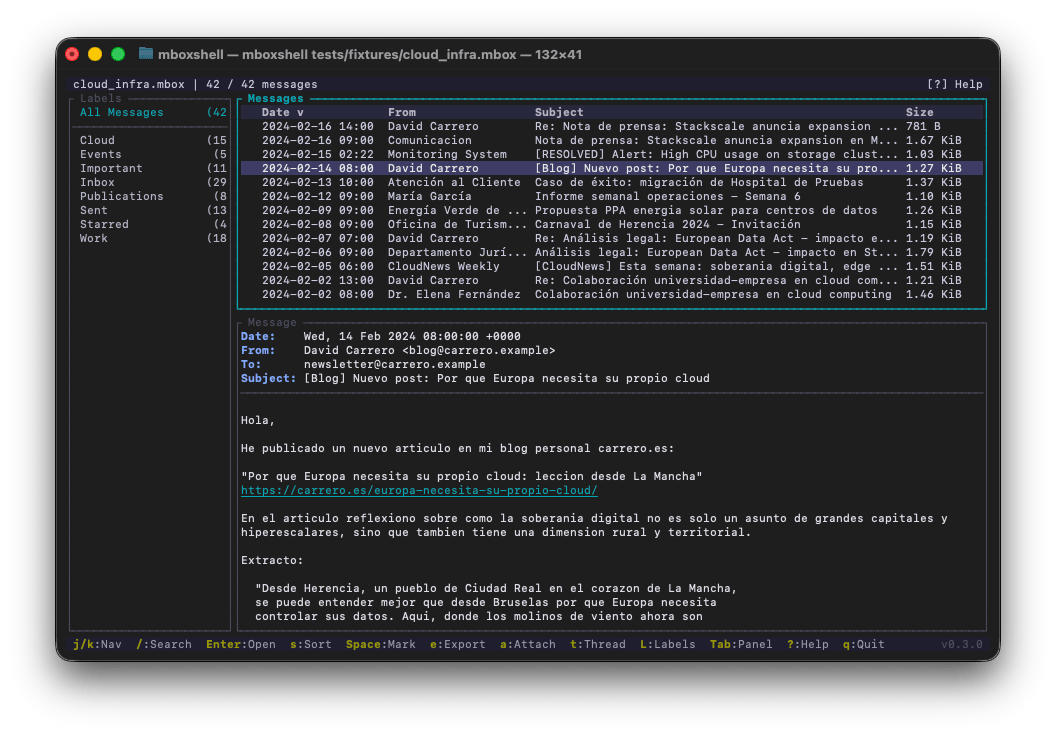
mboxShell. Fast terminal viewer for MBOX files of any size. Open, search and export emails from Gmail Takeout backups (50GB+) without loading them into memory. Built in Rust.

Fast terminal viewer for MBOX files of any size. Open, search and export emails from Gmail Takeout backups (50 GB+) without loading them into memory.


When you export your email from Gmail using Google Takeout, you get one or more .mbox files that can weigh tens of gigabytes — plus one more mailbox per Google Group you own, which is easy to miss and can be larger than the Gmail export itself. There is no cross-platform terminal tool that lets you open, search and browse those files efficiently without loading them entirely into memory.
mboxShell was built to solve that problem: open a 50 GB MBOX in seconds, navigate hundreds of thousands of messages smoothly, search by sender, date or content, and export whatever you need. All from the terminal, with no GUI, no server, no external dependencies.
If you prefer a native graphical experience on macOS, check out mboxViewer — a native Mac app built by the same team. It provides a familiar mailbox-style interface to open, browse and search MBOX files without ever importing them into a mail client. Drag and drop your .mbox file, and you get instant access to all your messages, attachments and labels in a clean macOS-native window. Ideal for users who want the power of mboxShell's parsing engine with the comfort of a desktop GUI.
Need to peek at an MBOX file without installing anything? Try Online Mbox Viewer — a free, MIT-licensed web app by the same author. It opens and renders .mbox files entirely in your browser: nothing is uploaded to any server, so your email stays on your machine. Perfect for a quick look from any device. Source code at github.com/dcarrero/online-mbox-viewer.
.mboxshell.idx) so subsequent opens take less than a second.X-Gmail-Labels as virtual folders in a sidebar panel, letting you filter by Inbox, Sent, Starred, custom labels, etc.topics.mbox files a Takeout archive ships for every group you own, names them after the group instead of the meaningless file name, shows the group as a virtual label, and threads conversations by the exact X-GM-THRID id.encoding_rs.from:, subject:, date:, body:, has:attachment, label:, etc.), date ranges, size filters, AND/OR operators, and negation.Download the latest release for your platform from the Releases page:
| Platform | Binary |
|---|---|
| Linux x86_64 | mboxshell-linux-x86_64 |
| Linux ARM64 | mboxshell-linux-aarch64 |
| Linux RISC-V 64 | mboxshell-linux-riscv64 |
| FreeBSD x86_64 | mboxshell-freebsd-x86_64 |
| macOS Intel | mboxshell-macos-x86_64 |
| macOS Apple Silicon | mboxshell-macos-aarch64 |
| Windows x86_64 | mboxshell-windows-x86_64.exe |
| Windows ARM64 | mboxshell-windows-arm64.exe |
After downloading, make it executable and move it to your PATH:
# Linux / macOS
chmod +x mboxshell-*
sudo mv mboxshell-* /usr/local/bin/mboxshell

# Or place it in a user-local directory
mv mboxshell-* ~/.local/bin/mboxshell
On Windows, move mboxshell-windows-x86_64.exe to a folder in your PATH, or run it directly.
Requirements: Rust 1.85 or later.
# Clone and build
git clone https://github.com/dcarrero/mboxshell.git
cd mboxshell
cargo build --release

# The binary is at target/release/mboxshell
# Install it system-wide:
sudo cp target/release/mboxshell /usr/local/bin/

# Or for the current user only:
cp target/release/mboxshell ~/.local/bin/
# Add the target you need
rustup target add aarch64-apple-darwin      # macOS Apple Silicon
rustup target add x86_64-unknown-linux-gnu  # Linux x86_64
rustup target add aarch64-unknown-linux-gnu # Linux ARM64

# Build for a specific target
cargo build --release --target aarch64-apple-darwin
cargo install --git https://github.com/dcarrero/mboxshell.git
# Open an MBOX file in the terminal UI
mboxshell mail.mbox

# Index and show statistics
mboxshell index mail.mbox
mboxshell stats mail.mbox

# Search from the command line
mboxshell search mail.mbox "from:[email protected] date:2024"
mboxshell search mail.mbox "has:attachment subject:invoice" --json

# Export messages
mboxshell export mail.mbox --format eml --output ./emails/
mboxshell export mail.mbox --format csv --output summary.csv

# Hand over only part of an archive: a new mailbox with just the matches
mboxshell export mail.mbox --format mbox --query "from:[email protected]" -o handover.mbox

# Convert to Maildir (read/replied/flagged state kept as Maildir flags)
mboxshell export mail.mbox --format maildir -o ~/Maildir/Archive

# Extract attachments
mboxshell attachments mail.mbox --output ./attachments/

# Merge multiple MBOX files (duplicates are removed by default)
mboxshell merge file1.mbox file2.mbox -o merged.mbox

# Merge tagging every message with the mailbox it came from
mboxshell merge Inbox.mbox Sent.mbox -o merged.mbox --source-header

# Generate shell completions
mboxshell completions bash > /etc/bash_completion.d/mboxshell
mboxshell completions zsh > ~/.zfunc/_mboxshell
mboxshell completions fish > ~/.config/fish/completions/mboxshell.fish
