
 alirezaparsi/copg
Advanced per-app device / CPU / GPU spoofer for rooted Android — device profiles, per-app CPU models, prop & Android-ID spoofing, all driven by a full on-device WebUI. Zygisk module for KernelSU / Magisk / APatch.

<div align="center">
<img src="https://assets.kitploit.com/production/public/readmes/7356/6071daf4c8ea07909be185284e988c63a939fc1819a5f2ba374c0636cd5475d5.png" width="560" alt="COPG banner" />
# 🎮 COPG — Advanced Android Customization & Spoofing
**A powerful platform for device & app spoofing, system-level control, and advanced ROM capabilities.**
<br>
[](https://github.com/AlirezaParsi/COPG/releases)
[](https://github.com/topjohnwu/Magisk)
[](https://www.android.com/)
[](https://github.com/AlirezaParsi/COPG/releases)
[](LICENSE)
<a href="#-installation"><img src="https://img.shields.io/badge/%E2%AC%87_Install-818cf8?style=for-the-badge" alt="Install" /></a>
<a href="#-webui"><img src="https://img.shields.io/badge/%F0%9F%96%A5_WebUI-1f2937?style=for-the-badge" alt="WebUI" /></a>
<a href="#-faq"><img src="https://img.shields.io/badge/%E2%9D%93_FAQ-1f2937?style=for-the-badge" alt="FAQ" /></a>
<a href="https://t.me/COPG_module"><img src="https://img.shields.io/badge/%F0%9F%92%AC_Telegram-2CA5E0?style=for-the-badge" alt="Telegram" /></a>
<a href="https://vendors.copg.my">COPG Website</a>
<a href="#-support-copg"><img src="https://img.shields.io/badge/Support-f59e0b?style=for-the-badge&logo=bitcoin&logoColor=white" alt="Support" /></a>
**🌐 Official website — download COPG free & buy COPG PRO: [vendors.copg.my](https://vendors.copg.my)**
🌐 Languages / 语言:**English** · [简体中文](https://github.com/alirezaparsi/copg/blob/JSON/README.zh.md)
</div>
---
## ✨ Why COPG?
COPG is a **Zygisk module** that makes most games and apps believe they are running on a different,
fully‑featured flagship device — unlocking the high‑FPS modes, HD graphics and premium tiers that
are otherwise gated to specific hardware. It pairs that with a **CPU spoofer**, a userspace
**comfort‑tweak controller**, and a beautiful on‑device **WebUI** to manage everything — all
**without rebooting**.
> 🎙️ **A COPG exclusive — concurrent microphone.** COPG is the **only Zygisk / Magisk / KernelSU module that lets two apps use the microphone at the same time** on Android — run a game's in-game voice chat *and* a screen recorder together, or keep recording while you're on a call. No other root module does simultaneous microphone access. See **[Concurrent Mic](#-features)** below.
## 🧰 Features
> **Legend** — `FREE` no license · `PRO` license-unlocked · ⚠️ **risk-gated**: a resident (detectable) hook behind an in-app *use-at-your-own-risk* warning — **never for anti-cheat games**. Everything unmarked is **stealth** — the module unloads before the app runs, so nothing of COPG stays mapped in memory.
<details>
<summary><b>🎯 Device & Hardware</b></summary>
- **Device Spoofing** `FREE` — per-app Build profile: brand, model, fingerprint, SDK, baseband, serial + 12 extra Build fields, so each app sees the exact flagship it rewards.
- **Per-User Spoofing** — a different device per Android user / app-clone (HyperOS, One UI, work profiles); each clone gets its own derived Android ID / serial / advertising ID / IMEI. The app picker's **Apps for** drawer finds clones automatically.
- **CPU Spoofing** `FREE` — report flagship-class silicon for apps that gate features on the chipset.
- **GPU Spoofing** `PRO` ⚠️ — OpenGL renderer/vendor + Vulkan device name, per app.
- **Refresh-Rate Spoof** `FREE` ⚠️ — a custom panel refresh rate (120 / 144 / 165 Hz) plus the full supported-modes list.
- **Sensor Spoof** `PRO` ⚠️ — a per-app sensor-list fingerprint (name + vendor) so sensor-hashing anti-fraud SDKs see a consistent device.
</details>
<details>
<summary><b>🧬 Identity & Fingerprint</b></summary>
- **Prop + Android ID** `PRO` — stealth copy-on-write prop spoof (fingerprint, build props) and per-app Android ID. *(CPU, device profiles, Build/serial and block-CPU stay `FREE`.)*
- **IMEI / Device ID** `PRO` — fake IMEI per app, or **device-wide Global IMEI** (Settings, `*#06#` and every app — runs in a separate process, no risk gate).
- **DRM / Widevine** `PRO` — report a higher Widevine security level (L1 / L2 / L3) and spoof the DRM device & system ID.
- **Advertising ID** `PRO` — each app its own Google Advertising ID (auto per-app, or pin a UUID).
- **App Set ID** `PRO` ⚠️ — each app its own Google App Set ID (auto per-app, or pin a UUID).
- **Wallpaper ID** `PRO` — a per-app wallpaper ID, a data-clear-surviving link signal fraud SDKs read. *(stealth, system_server)*
- **getprop Consistency** `PRO` ⚠️ — make an app's child `getprop` return the same spoofed values as the API, so the cross-check lines up (pair with the COW prop spoof).
- **Google Account** `PRO` — a different Google-account list per app: hide all accounts, or one fake email per persona. *(stealth, system_server — beats DoorDash / Forter linking)*
</details>
<details>
<summary><b>📡 Network & Location</b></summary>
- **SIM / Carrier** `PRO` — carrier name, operator code (MCC/MNC) & country, per app and per SIM slot; also per-app/slot IMSI & ICCID. **Safe** mode is stealth; **Aggressive** mode is resident ⚠️.
- **Cell Tower** `PRO` ⚠️ — a fake serving cell: area code (LAC/TAC), cell ID (CID/CI/NCI) + optional MCC/MNC, consistent across `getAllCellInfo`.
- **GPS Location** `PRO` ⚠️ — put an app anywhere (135 built-in places, or custom lat/lng); covers the normal location APIs and Google's Fused/GMS provider.
- **Per-App Proxy** `PRO` — route one app through your own SOCKS5 / HTTP / SOCKS4 proxy (kernel-level, no interface the app can see, ban-safe). Pair with a matching SIM/region so device, SIM and IP agree.
- **Timezone + Language** `FREE` — a per-app timezone and language/region (BCP-47); apps read and even render in the fake locale. *(stealth, system-side)*
</details>
<details>
<summary><b>🧩 App & System</b></summary>
- **Play Source + PairIP Bypass** `PRO` — make an app look Play-installed and block Google's PairIP license check, so paid/locked apps open. *(stealth, out-of-app)*
- **Tensor Feature Unlock** `PRO` — chosen apps see Google's Pixel **Tensor** system features (Tensor-gated AI). *(stealth, system_server)*
- **WebView User-Agent** `PRO` — give any WebView app its own browser User-Agent, from a reusable named profile.
- **WebView Canvas** `PRO` ⚠️ — per-app stable canvas-fingerprint noise (including iframes); breaks canvas tracking. *(WebGL is covered by GPU spoof.)*
- **Fake Uptime** `PRO` — make an app think the device has run for days (Java + native readers), useful against anti-fraud / referral flows.
</details>
<details>
<summary><b>🔒 Privacy & Unlocks</b></summary>
- **Privacy Hides** — **Hide VPN** (Java + native, pairip-safe) `FREE` · **Mock-Location hide** `PRO` · **Hide Developer Options + USB debugging** `FREE` — pass the checks banking / privacy apps run.
- **Screenshot + Storage** `FREE` — disable **FLAG_SECURE** device-wide to capture apps that block it (banking, chat, wallets); **No Storage Restrict** re-enables picking Android/data, obb, the SD-card root and Download in the file picker.
- **Install Patches** `FREE` — install modified / re-signed / downgraded APKs: disable signature verification, allow downgrade, skip the install verifier (Play Protect scan), allow compressed `resources.arsc`. *(system_server — this lowers a real security boundary; only install APKs you trust.)*
- **Concurrent Mic** `FREE` 🏆 — **the only module that lets two apps use the microphone at the same time** (a game's voice chat + a screen recorder, or recording while on a call). Android normally silences one capturer; COPG stops that device-wide. *(out-of-process, audio server, no reboot)*
</details>
<details>
<summary><b>🎛️ Comfort Tweaks</b></summary>
- **Per-App Comfort Tweaks** `FREE` — auto Do-Not-Disturb, disable auto-brightness, keep screen on, stop logging, and a per-app screen DPI — applied only while a tagged game is active, then restored.
</details>
> 🔁 Add or remove devices, games & apps **without a reboot** · 🌍 10-language WebUI · 🎨 Light / Dark / AMOLED themes.
---
## 🚀 Maximize Your Gaming
<div align="center">
| Game | Unlock |
|------|--------|
| **Call of Duty Mobile** | 120 FPS (BR / MP) |
| **PUBG Mobile / BGMI** | 120 FPS · Haptic Feedback |
| **Delta Force** | 120 FPS · HD Graphics |
| **Free Fire / Free Fire MAX** | 144 FPS |
| **Mobile Legends: Bang Bang** | 144 FPS |
| **Fortnite** | 120 FPS |
| **Asphalt 9** | 120 FPS |
| **Farlight 84** | Max Graphics |
| **Arena Breakout** | 90 / 120 FPS |
| **Honor of Kings** | High‑FPS mode |
| _…and 69+ more_ | Premium tiers unlocked |
</div>
#### 📱 App Enhancements
- **TikTok** — stream in full 1080p
---
## 🖼️ Screenshots
<div align="center">
<table>
<tr>
<td align="center" width="25%">
<img src="https://raw.githubusercontent.com/AlirezaParsi/COPG/screenshots/Screenshot_20260703-114658_WebUI%20X.png?raw=true" alt="Dashboard" />
<br><sub><b>Dashboard</b> · System info</sub>
</td>
<td align="center" width="25%">
<img src="https://raw.githubusercontent.com/AlirezaParsi/COPG/screenshots/Screenshot_20260712-032329_WebUI%20X.png?raw=true" alt="Library packages" />
<br><sub><b>Library</b> · Packages</sub>
</td>
<td align="center" width="25%">
<img src="https://raw.githubusercontent.com/AlirezaParsi/COPG/screenshots/Screenshot_20260711-113747_WebUI%20X.png?raw=true" alt="Per-app spoof toggles" />
<br><sub><b>Per-App</b> · Spoof toggles</sub>
</td>
<td align="center" width="25%">
<img src="https://raw.githubusercontent.com/AlirezaParsi/COPG/screenshots/Screenshot_20260702-162602_WebUI%20X.png?raw=true" alt="GPU profile editor" />
<br><sub><b>GPU</b> · Profile editor</sub>
</td>
</tr>
</table>
</div>
---
## 📦 Installation
### Requirements
- A **rooted** Android device (**9.0+**)
- One root solution **+ a Zygisk implementation**:
| Root | Min version | Zygisk |
|------|:------:|--------|
|  | 24 | [Zygisk Next](https://github.com/Dr-TSNG/ZygiskNext) · [ReZygisk](https://github.com/PerformanC/ReZygisk) · [NeoZygisk](https://github.com/JingMatrix/NeoZygisk) |
|  | 0.6.6 | [Zygisk Next](https://github.com/Dr-TSNG/ZygiskNext) · [ReZygisk](https://github.com/PerformanC/ReZygisk) · [NeoZygisk](https://github.com/JingMatrix/NeoZygisk) |
|  | 0.10 | [Zygisk Next](https://github.com/Dr-TSNG/ZygiskNext) · [ReZygisk](https://github.com/PerformanC/ReZygisk) · [NeoZygisk](https://github.com/JingMatrix/NeoZygisk) |
> [!IMPORTANT]
> Standard / built‑in **Magisk Zygisk is _not_ supported** (not safe). Use one of the Zygisk
> implementations above.
### Get the module
[](https://mmrl.dev/repository/zguectZGR/COPG)
[](https://github.com/Magisk-Modules-Alt-Repo/COPG)
[](https://github.com/KernelSU-Modules-Repo/COPG)
Install from **[MMRL](https://mmrl.dev/repository/zguectZGR/COPG)** (auto‑updates), from the
**[Magisk Alt Repo](https://github.com/Magisk-Modules-Alt-Repo/COPG)** or the
**[KernelSU Modules Repo](https://github.com/KernelSU-Modules-Repo/COPG)**, or grab the latest
`COPG.zip` from **[Releases](https://github.com/AlirezaParsi/COPG/releases)**.
### Steps
1. Download the latest **`COPG.zip`** from [Releases](https://github.com/AlirezaParsi/COPG/releases).
2. Install via your root manager → **Modules → Install from storage → select the ZIP**.
3. **Reboot.**
4. Verify it shows up in your root manager (look for **✨ COPG spoof ✨**).
5. Open the module's **WebUI** to manage devices, games and tweaks.
---
## 🖥️ WebUI
A no‑reboot, on‑device control panel built into the module. On **KernelSU** and **APatch** it opens
straight from the manager. On **Magisk**, install the **KSU WebUI** app and open COPG from there.
- 📋 **Library** — add & manage **device profiles** and **per‑app spoof lists** with search,
sort & filters
- ➕ **Add Package** — pick any installed app, choose a device profile, toggle **CPU / GPU / SIM /
Prop / Android ID / Advertising ID (GAID) / App Set ID / DRM / IMEI / Sensor / Canvas / Tensor /
GPS / Proxy / Timezone / Language / WebView User‑Agent / Fake Uptime / Mock‑Location / Hide VPN /
Hide Developer Options** and the **DND / Auto‑Brightness / Keep‑Screen‑On / Screen‑DPI** tweaks
- 📊 **Dashboard** — live system info: Android, ABI, Zygisk variant, root & kernel
- ✅ **Hook Status** — device‑wide board (Settings) showing the spoof values COPG has actually served
recently (model, CPU, Android ID, sensors, carrier…) with which app and when
- 🆔 **Advertising ID** — view, randomize, set a custom one or restore your real ID (Settings · free)
- 📡 **Global Hooks** — device‑wide **Global IMEI** (Settings): one fake IMEI for every app, `*#06#`
and the dialer
- 💾 **Backup / Restore** & **Sync from GitHub**
- 🎨 **Light / Dark / AMOLED** themes · 🌍 **10 languages** (EN, FA, AR, DE, ES, PT‑BR, ID, TH, TR, ZH)
<details>
<summary><b>⚙️ Advanced — edit profiles by hand</b></summary>
<br>
The WebUI is the recommended way to manage profiles, but you can also edit
`/data/adb/modules/COPG/COPG.json` directly:
```json
{
"PACKAGES_REDMAGIC_9_PRO": [
"com.mobilelegends.mi",
"com.supercell.brawlstars:with_cpu"
],
"PACKAGES_REDMAGIC_9_PRO_DEVICE": {
"BRAND": "ZTE",
"MODEL": "NX769J",
"FINGERPRINT": "ZTE/NX769J/..."
}
}
```
Package **tags** are colon suffixes — e.g. `:cpu=<model>` (CPU spoof + pick the chip),
`:gpu=<model>` (GPU spoof + pick the GPU), `:cow` (prop spoof), `:aid` (Android ID),
`:serial` (per‑app serial), `:gaid` (Advertising ID), `:appset` (App Set ID), `:drm` (Widevine),
`:imei` (IMEI), `:sim=<carrier>` / `:simx=<carrier>` (SIM · safe / aggressive), `:tz=<zone>` (timezone),
`:lang=<bcp47>` (language / region), `:ua=<profile>` (WebView User‑Agent), `:uptime=<sec>` (fake uptime),
`:sensor` (sensor‑roster spoof), `:webfp` (WebView canvas spoof), `:tensorfeat` (Pixel Tensor features),
`:gps=<lat>,<lng>` (GPS location), `:proxy` (per‑app proxy),
`:mock` (mock‑location hide), `:vpn` / `:vpns` (VPN hide), `:hidedev` (hide developer options),
`:blocked` (force real CPU), `:dnd` / `:dab` / `:kso` / `:nolog` / `:dpi=<n>` (comfort tweaks).
</details>
---
## ❓ FAQ
<details>
<summary><b>🤔 What does COPG stand for?</b></summary>
<br>
Originally <b>CO</b> (Call of Duty) + <b>PG</b> (PUBG) — the two games it was first built for. It
now supports most games and apps, but the name is kept for its history.
</details>
<details>
<summary><b>📌 Will this get me banned?</b></summary>
<br>
COPG is designed to be undetectable, but safety can't be guaranteed. <b>Use at your own risk.</b>
</details>
<details>
<summary><b>⚡ Does it affect performance?</b></summary>
<br>
Minimal. The spoof runs only at app launch and doesn't touch in‑game performance.
</details>
<details>
<summary><b>🔧 How do I open the WebUI?</b></summary>
<br>
On <b>KernelSU</b> and <b>APatch</b>, open it straight from the manager. On <b>Magisk</b>, install
the <b>KSU WebUI</b> app and open COPG from there.
</details>
---
## 💬 Community
<div align="center">
[](https://t.me/COPG_module)
[](https://t.me/TheAOSP)
[](mailto:[email protected])
**📧 Support email: [[email protected]](mailto:[email protected])**
</div>
> 🌐 **Translations are community‑driven.** Only English & Persian are maintained by the author —
> PRs for the other languages are very welcome!
---
## ₿ Support COPG
COPG is developed in my spare time and given away free. If it leveled up your games or apps, please consider
supporting with **any amount you wish** — every bit is real motivation for stronger, continued
development. And a ⭐ on GitHub helps a lot too!
| Network | Address |
| --- | --- |
|  | `0xB8eb7Ea033823C9aA4616B0648B89CDbC931BAAd` |
|  | `0xB8eb7Ea033823C9aA4616B0648B89CDbC931BAAd` |
|  | `UQAOHoREeGeJ0_kzJpSW3m-6Dlb_lzdHpT1a-gA7NkbuCM8N` |
> ⚠️ Double‑check the **network** before sending — funds sent on the wrong chain can be lost.
---
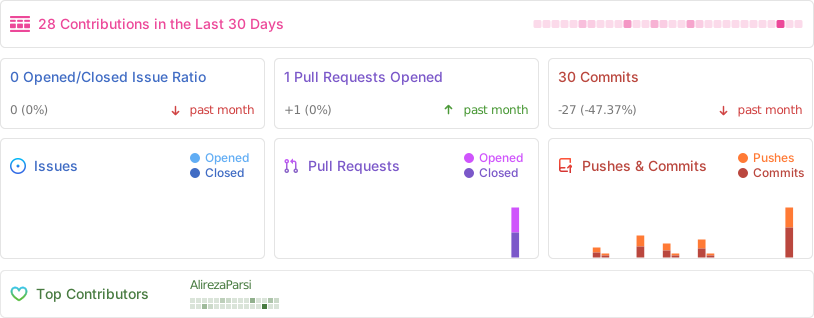
## 📈 Activity
<div align="center">
</div>
---
<div align="center">
**If COPG leveled up your games or apps, drop a ⭐ — it really helps!**
Made with ❤️ by **Alireza Parsi** · © 2026 COPG Project
</div>