
Guia para construir um iPhone virtual usando componentes VPHONE600AP do firmware PCC da Apple, com correção de firmware, modificação da cadeia de inicialização e depuração do kernel para pesquisa de segurança no iOS.
Por volta do final de 2024, a Apple começou a introduzir o Private Cloud Compute, alegando abrir um novo horizonte para a privacidade de IA baseada em nuvem. Então, por volta do final de 2025, surgiram algumas notícias interessantes: a Apple adicionou recentemente componentes relacionados ao vphone600ap ao firmware PCC, a partir do cloudOS 26.

Fonte: https://x.com/matteyeux/status/2006339694783848660/photo/1
"Máquina Virtual de Ambiente de Pesquisa do iPhone"?
Isso é um movimento planejado da Apple para construir e distribuir um ambiente de iPhone virtual para outros pesquisadores de segurança no futuro, ou foi simplesmente um erro? Dado que o kernel de compilação DEVELOPMENT/KASAN foi descoberto nas OTAs do iOS 15.0 beta ao 15.1 beta3 em 2021, a possibilidade de um deslize não pode ser descartada. Naquela época, o kernel permaneceu incluído por cerca de 4 meses, aproximadamente de junho a outubro de 2021.
Então, por volta de janeiro deste ano, um tweet foi postado mostrando um iPhone virtual sendo inicializado utilizando esses componentes relacionados ao vphone600ap.

Fonte: https://x.com/_inside/status/2008951845725548783
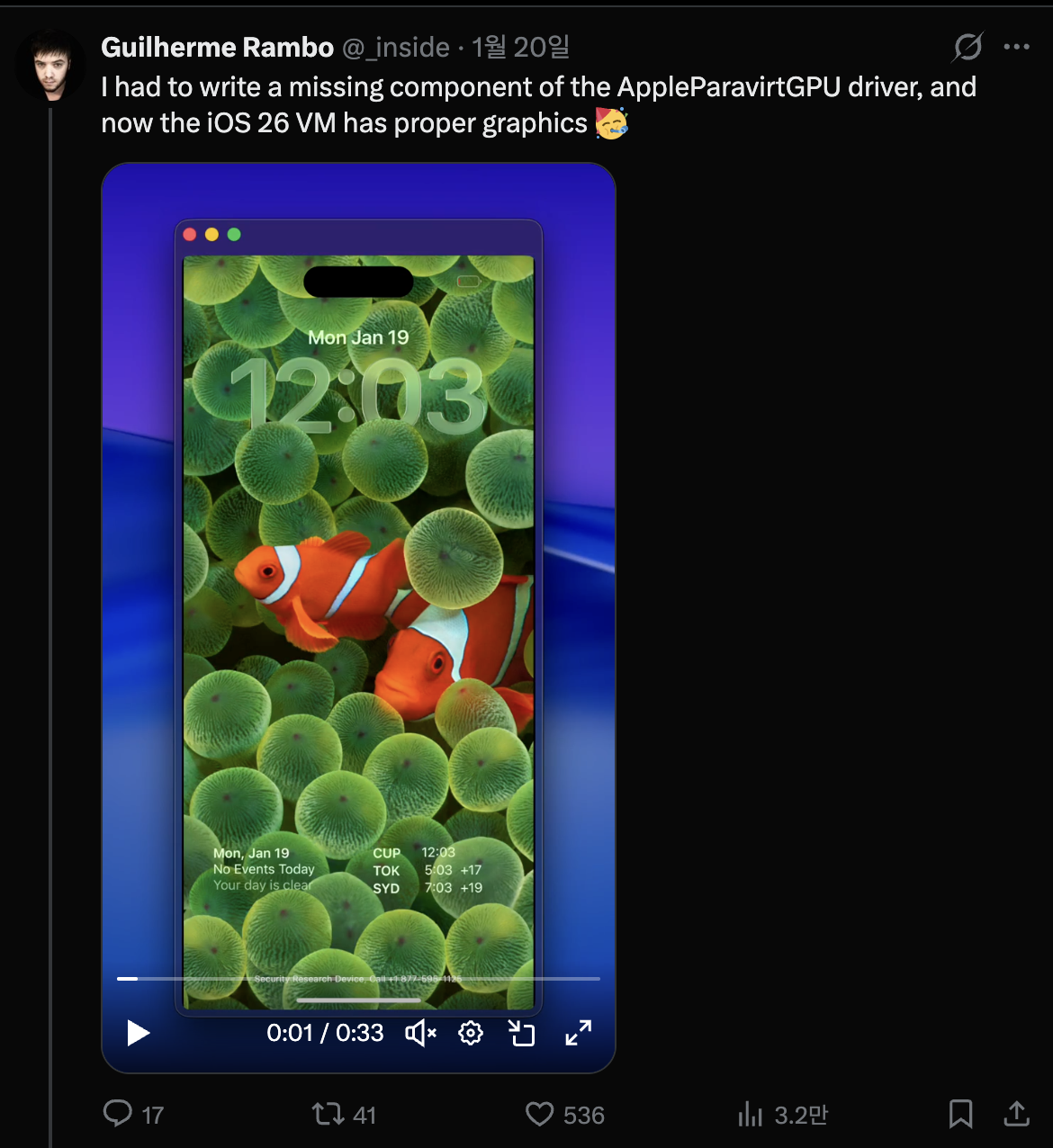
Pelo que vi, quase tudo funcionou de forma verdadeiramente elegante. Comparado ao projeto QEMUAppleSilicon(Inferno) que eu tinha visto antes, ele roda muito mais rápido e suave. Além disso, parecia até suportar aceleração Metal. Por fim, completamente cativado por ele, mergulhei de cabeça e comecei a construir meu próprio iPhone virtual em 31 de janeiro.

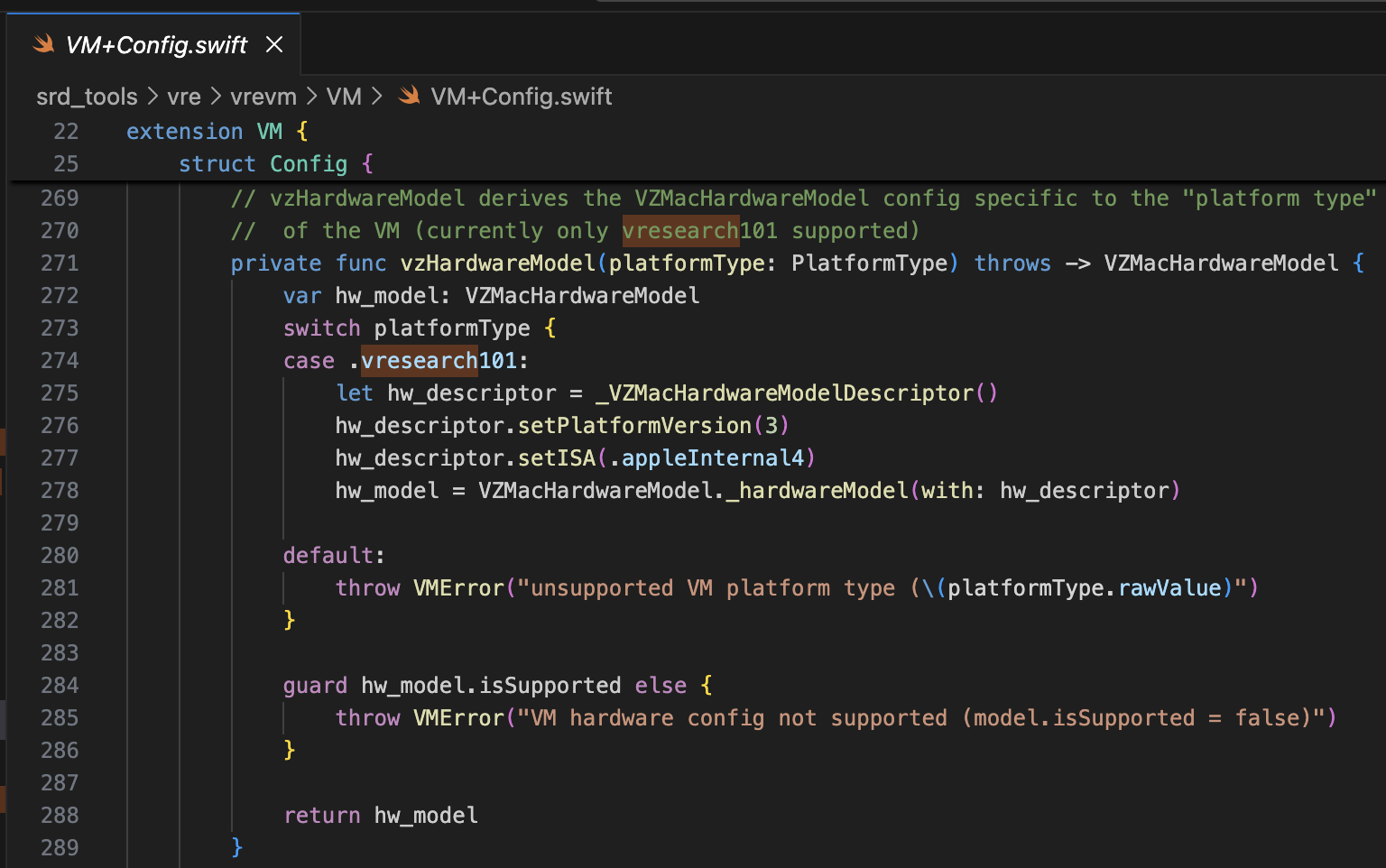
O projeto referenciado é o security-pcc. Ele corresponde ao código-fonte do binário /System/Library/SecurityResearch/usr/bin/vrevm. Um ponto interessante é que ele usa métodos privados fornecidos pelo Virtualization.framework. Na máquina virtual usada para pesquisa PCC, você pode ver que ISA e PlatformVersion são explicitamente especificados durante o processo de inicialização do modelo de hardware.
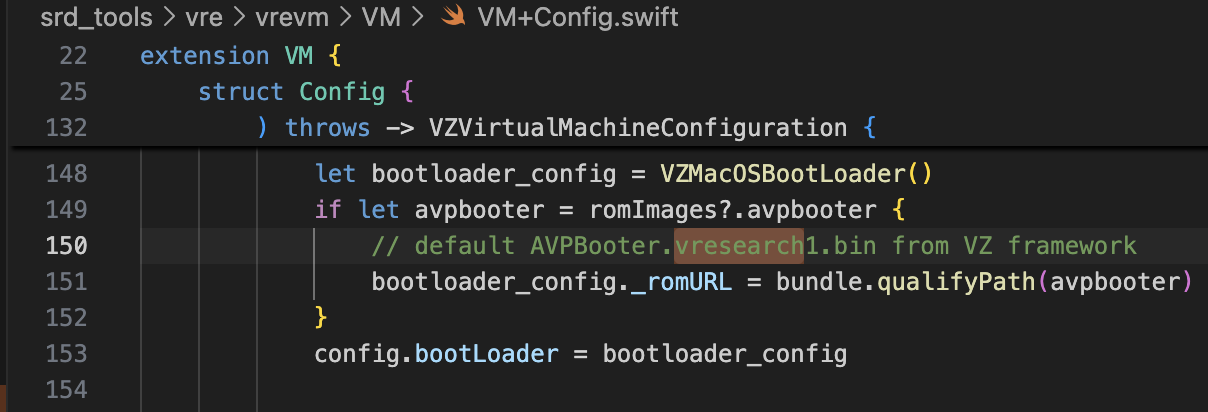
Para o bootrom, AVPBooter.vresearch1.bin é usado (/System/Library/Frameworks/Virtualization.framework/Resources/AVPBooter.vresearch1.bin)
e para o SEPROM (avpsepbooter), AVPSEPBooter.vresearch1.bin é usado, que carrega separadamente um arquivo SEPStorage que funciona de forma semelhante ao AuxiliaryStorage. (/System/Library/Frameworks/Virtualization.framework/Versions/A/Resources/AVPSEPBooter.vresearch1.bin)
Outro ponto interessante é que, se você olhar o código para definir a resolução, ela é definida como 1290x2796, que corresponde aos dispositivos iPhone 14 Pro Max, 15 Plus, 15 Pro Max e 16 Plus.
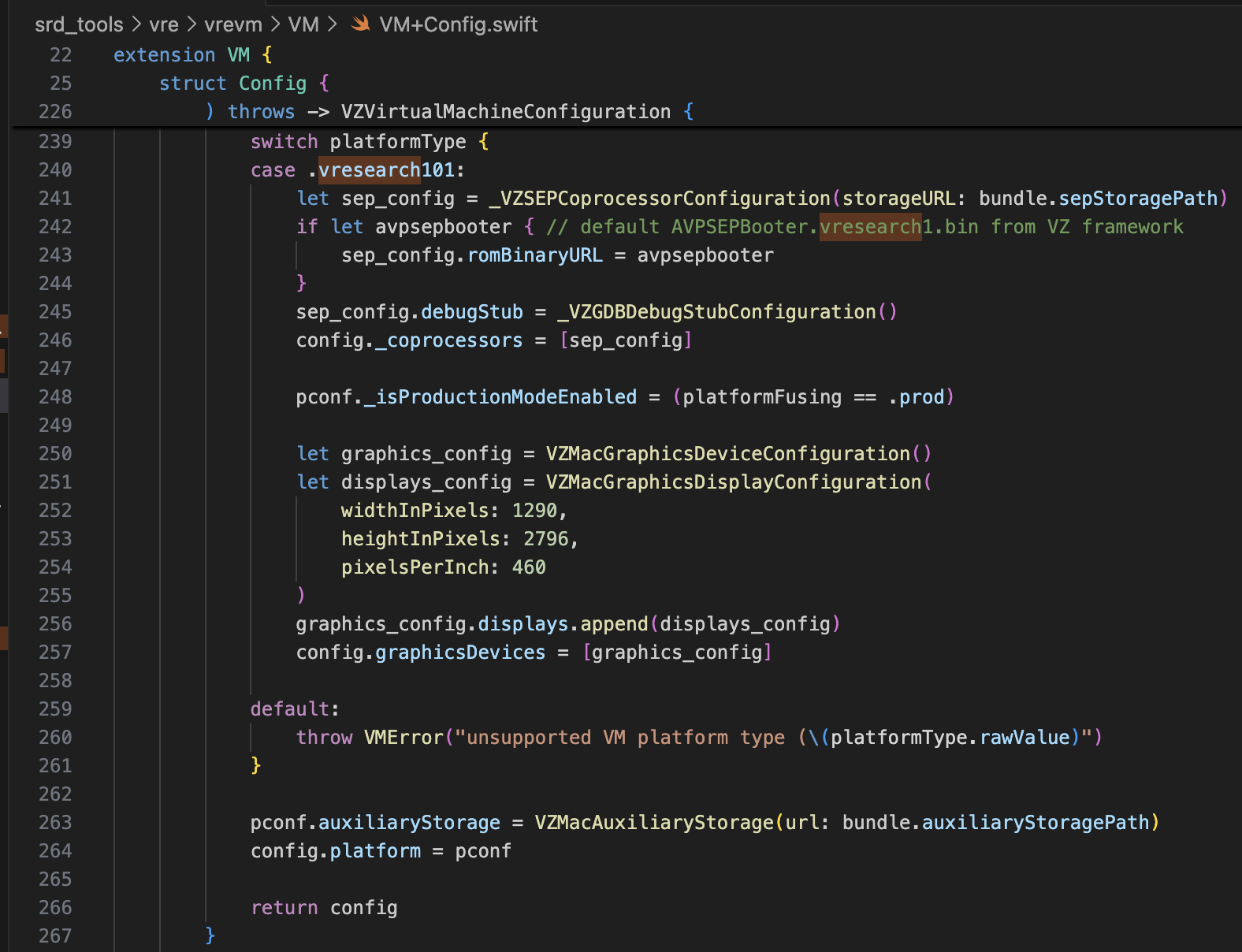
Com apenas essa informação, deve ser mais que suficiente para modificar o super-tart para inicializar o iPhone virtual. Fiz as modificações conforme mostrado abaixo.
/Sources/tart/VM.swift```swift ... class VM: NSObject, VZVirtualMachineDelegate, ObservableObject { ... // vzHardwareModel derives the VZMacHardwareModel config specific to the "platform type" // of the VM (currently only vresearch101 supported) static private func vzHardwareModel_VRESEARCH101() throws -> VZMacHardwareModel { var hw_model: VZMacHardwareModel
guard let hw_descriptor = _VZMacHardwareModelDescriptor() else { fatalError("Failed to create hardware descriptor") } hw_descriptor.setPlatformVersion(3) // .appleInternal4 = 3 hw_descriptor.setBoardID(0x90) hw_descriptor.setISA(2) hw_model = VZMacHardwareModel._hardwareModel(withDescriptor: hw_descriptor)
guard hw_model.isSupported else { fatalError("VM hardware config not supported (model.isSupported = false)") }
return hw_model }
static func craftConfiguration( diskURL: URL, nvramURL: URL, romURL: URL, sepromURL: URL? = nil, vmConfig: VMConfig, network: Network = NetworkShared(), additionalStorageDevices: [VZStorageDeviceConfiguration], directorySharingDevices: [VZDirectorySharingDeviceConfiguration], serialPorts: [VZSerialPortConfiguration], suspendable: Bool = false, nested: Bool = false, audio: Bool = true, clipboard: Bool = true, sync: VZDiskImageSynchronizationMode = .full, caching: VZDiskImageCachingMode? = nil ) throws -> VZVirtualMachineConfiguration { let configuration: VZVirtualMachineConfiguration = .init()
// Boot loader let bootloader = try vmConfig.platform.bootLoader(nvramURL: nvramURL) Dynamic(bootloader)._setROMURL(romURL) configuration.bootLoader = bootloader
// SEP ROM let homeURL = FileManager.default.homeDirectoryForCurrentUser var sepstoragePath = homeURL.appendingPathComponent(".tart/vms/vphone/SEPStorage").path let sepstorageURL = URL(fileURLWithPath: sepstoragePath) let sep_config = Dynamic._VZSEPCoprocessorConfiguration(storageURL: sepstorageURL) if let sepromURL { // default AVPSEPBooter.vresearch1.bin from VZ framework sep_config.romBinaryURL = sepromURL } sep_config.debugStub = Dynamic._VZGDBDebugStubConfiguration(port: 8001) configuration._setCoprocessors([sep_config.asObject])
// Some vresearch101 config let pconf = VZMacPlatformConfiguration() pconf.hardwareModel = try vzHardwareModel_VRESEARCH101()
let serial = Dynamic._VZMacSerialNumber.initWithString("AAAAAA1337") let identifier = Dynamic.VZMacMachineIdentifier._machineIdentifierWithECID(0x1111111111111111, serialNumber: serial.asObject) pconf.machineIdentifier = identifier.asObject as! VZMacMachineIdentifier
pconf._setProductionModeEnabled(true) var auxiliaryStoragePath = homeURL.appendingPathComponent(".tart/vms/vphone/nvram.bin").path let auxiliaryStorageURL = URL(fileURLWithPath: auxiliaryStoragePath) pconf.auxiliaryStorage = VZMacAuxiliaryStorage(url: auxiliaryStorageURL)
if #available(macOS 14, *) { let keyboard = VZUSBKeyboardConfiguration() configuration.keyboards = [keyboard] }
if #available(macOS 14, *) { let touch = _VZUSBTouchScreenConfiguration() configuration._setMultiTouchDevices([touch]) } ... configuration.platform = pconf
# Modificando o Firmware
O projeto referenciado é [vma2pwn](https://github.com/nick-botticelli/vma2pwn). Especificamente para a versão 12.0.1, ele inicializa uma máquina virtual Mac com quase toda a cadeia de inicialização modificada.
Vamos primeiro olhar o script [prepare.sh](https://github.com/nick-botticelli/vma2pwn/blob/main/prepare.sh). Ele extrai componentes do firmware, como o bootloader e o kernel comprimidos no formato IM4P, para o formato RAW e corrige instruções/dados em endereços específicos codificados. RestoreRamdisk é o sistema de arquivos raiz usado ao restaurar o firmware, e AVPBooter é o BootROM usado na máquina virtual.
Resumindo, ele extrai os arquivos individuais incluídos no firmware e corrige as verificações de integridade para permitir a restauração de firmware personalizado, ou modifica os parâmetros boot-args para facilitar a visualização dos logs relacionados à inicialização.
Finalmente, [vma2pwn.sh](https://github.com/nick-botticelli/vma2pwn/blob/main/vma2pwn.sh) é responsável por restaurar o firmware personalizado. Ele faz isso entrando no modo DFU antes. Aqui, a máquina virtual usa algo chamado super-tart. Esta é uma versão da máquina virtual tart existente com recursos adicionados, como um bootrom personalizado, saída serial, modo DFU e depuração GDB. (Observe que SIP/AMFI devem estar desativados para que isso funcione.)
Tenho usado isso de forma bastante útil recentemente enquanto [estudava vulnerabilidades 1-day do kernel XNU (CVE-2021-30937, CVE-2021-30955)](https://github.com/wh1te4ever/xnu_1day_practice). É fantástico porque oferece suporte à depuração ao vivo do kernel.
## Construindo Firmware Personalizado
Misturei os componentes do cloudOS 26.1 (23B85) e iOS 26.1 (iPhone17,3; 23B85), uh,,, mas... não me lembro dos detalhes exatos. Para ser preciso, precisei misturar adequadamente os componentes do iPhone 16 e relacionados ao vphone para criar o firmware personalizado, mas esqueci exatamente quais acabei misturando. Pelo que me lembro:
- BuildManifest.plist:
Modifiquei os elementos do dicionário sob a chave Manifest. Configurei para que durante o processo de restauração, o SystemVolume, SystemVolumeCanonicalMetadata, OS, StaticTrustCache, RestoreTrustCache e RestoreRamDisk do modelo iPhone 16 (iOS 26.1) fossem usados. O restante foi configurado para usar arquivos relacionados ao vphone do firmware PCC.
- Restore.plist:
Acredito que adicionei propriedades relacionadas a DeviceMap ou SupportedProductTypes, ou alterei o elemento SystemRestoreImageFileSystems.
Os arquivos abaixo são o resultado final da minha mistura.
[Restore.plist](https://github.com/wh1te4ever/super-tart-vphone-writeup/blob/HEAD/contents/Restore.plist)
[BuildManifest.plist](https://github.com/wh1te4ever/super-tart-vphone-writeup/blob/HEAD/contents/BuildManifest.plist)
- get_fw.py (Parcial)```python
...
# 3. Import things from cloudOS
# kernelcache
os.system("cp 399b664dd623358c3de118ffc114e42dcd51c9309e751d43bc949b98f4e31349_extracted/kernelcache.* iPhone17,3_26.1_23B85_Restore")
# agx, all_flash, ane, dfu, pmp...
os.system("cp 399b664dd623358c3de118ffc114e42dcd51c9309e751d43bc949b98f4e31349_extracted/Firmware/agx/* iPhone17,3_26.1_23B85_Restore/Firmware/agx")
os.system("cp 399b664dd623358c3de118ffc114e42dcd51c9309e751d43bc949b98f4e31349_extracted/Firmware/all_flash/* iPhone17,3_26.1_23B85_Restore/Firmware/all_flash")
os.system("cp 399b664dd623358c3de118ffc114e42dcd51c9309e751d43bc949b98f4e31349_extracted/Firmware/ane/* iPhone17,3_26.1_23B85_Restore/Firmware/ane")
os.system("cp 399b664dd623358c3de118ffc114e42dcd51c9309e751d43bc949b98f4e31349_extracted/Firmware/dfu/* iPhone17,3_26.1_23B85_Restore/Firmware/dfu")
os.system("cp 399b664dd623358c3de118ffc114e42dcd51c9309e751d43bc949b98f4e31349_extracted/Firmware/pmp/* iPhone17,3_26.1_23B85_Restore/Firmware/pmp")
# sptm, txm, etc...
os.system("cp 399b664dd623358c3de118ffc114e42dcd51c9309e751d43bc949b98f4e31349_extracted/Firmware/*.im4p iPhone17,3_26.1_23B85_Restore/Firmware")
# 4. TODO: parse what things needed from BuildManifest.plist, Restore.plist in cloudOS 26.1
# It will be really complicated, so import things from already parse completed
os.system("sudo cp custom_26.1/BuildManifest.plist iPhone17,3_26.1_23B85_Restore")
os.system("sudo cp custom_26.1/Restore.plist iPhone17,3_26.1_23B85_Restore")
os.system("echo 'Done, grabbed all needed components for restoring'")
Eu referenciei esse post. Você deve corrigir image4_validate_property_callback para carregar um bootloader personalizado posteriormente. Simplesmente use o recurso "Pesquisa de texto (lento!)" no IDA Pro para buscar por "0x4447" e corrija o epílogo da função correspondente para sempre retornar 0.

Antes de restaurar o firmware, algumas modificações foram necessárias para suportar o modelo vresearch101ap. Uma vez compilado, a restauração do firmware se torna possível usando a ferramenta idevicerestore.
https://github.com/wh1te4ever/libirecovery

Semelhante ao AVPBooter, os bootloaders usados para restauração, iBSS e iBEC, foram corrigidos para ignorar a verificação de assinatura. Também habilitei a saída de log serial para que, se houver problemas de inicialização, a causa possa ser identificada imediatamente.
Como você verá mais adiante, contornar a verificação do SSV (Signed System Volume) é necessário para carregar um Cryptex arbitrário. Isso é realizado no LLB, que é carregado ao inicializar no modo normal em vez do modo DFU, e a verificação também é realizada algumas vezes no kernel.
Além disso, corrigi o TXM para que mesmo que um binário/biblioteca não esteja registrado no Trustcache, seja reconhecido como se estivesse.
patch(0x9D10, 0xd503201f) #nop patch(0x9D14, 0xd2800000) #mov x0, #0
patch(0x122d4, 0xd0000082) #adrp x2, #0x12000 patch(0x122d8, 0x9101c042) #add x2, x2, #0x70 patch(0x24070, "serial=3 -v debug=0x2014e %s")
patch(0xA0D8, 0xd503201f) #nop patch(0xA0DC, 0xd2800000) #mov x0, #0
patch(0x12888, 0xD0000082) #adrp x2, #0x12000 patch(0x1288C, 0x91264042) #add x2, x2, #0x990 patch(0x24990, "serial=3 -v debug=0x2014e %s")
patch(0x2BFE8, 0x1400000b) patch(0x2bca0, 0xd503201f) patch(0x2C03C, 0x17ffff6a) patch(0x2fcec, 0xd503201f) patch(0x2FEE8, 0x14000009)
patch(0x1AEE4, 0xd503201f) #nop
patch(0x2c1f8, 0xd2800000) #FFFFFFF0170301F8 patch(0x2bef4, 0xd2800000) #FFFFFFF01702FEF4 patch(0x2c060, 0xd2800000) #FFFFFFF017030060
patch(0x2476964, 0xd503201f) #FFFFFE000947A964
patch(0x23cfde4, 0xd503201f) #FFFFFE00093D3DE4
patch(0xf6d960, 0xd503201f) #FFFFFE0007F71960 ...
Após converter para o formato RAW e aplicar o patch, você precisa convertê-lo de volta para IM4P.
No caso do kernel ou TXM, existe uma estrutura PAYP, então foi necessário preservar essa estrutura.
Abaixo está o código que converte IM4P → RAW → IM4P usando [pyimg4](https://pypi.org/project/pyimg4/), [img4tool](https://github.com/tihmstar/img4tool), [img4](https://github.com/xerub/img4lib).
- patch_fw.py (Conteúdo parcial, Parte 2)```python
...
# Patch iBSS
if not os.path.exists("iPhone17,3_26.1_23B85_Restore/Firmware/dfu/iBSS.vresearch101.RELEASE.im4p.bak"):
os.system("cp iPhone17,3_26.1_23B85_Restore/Firmware/dfu/iBSS.vresearch101.RELEASE.im4p iPhone17,3_26.1_23B85_Restore/Firmware/dfu/iBSS.vresearch101.RELEASE.im4p.bak")
os.system("tools/img4 -i iPhone17,3_26.1_23B85_Restore/Firmware/dfu/iBSS.vresearch101.RELEASE.im4p.bak -o iBSS.vresearch101.RELEASE")
... # patch things from raw
os.system("tools/img4tool -c iPhone17,3_26.1_23B85_Restore/Firmware/dfu/iBSS.vresearch101.RELEASE.im4p -t ibss iBSS.vresearch101.RELEASE")
# Patch iBEC
if not os.path.exists("iPhone17,3_26.1_23B85_Restore/Firmware/dfu/iBEC.vresearch101.RELEASE.im4p.bak"):
os.system("cp iPhone17,3_26.1_23B85_Restore/Firmware/dfu/iBEC.vresearch101.RELEASE.im4p iPhone17,3_26.1_23B85_Restore/Firmware/dfu/iBEC.vresearch101.RELEASE.im4p.bak")
os.system("tools/img4 -i iPhone17,3_26.1_23B85_Restore/Firmware/dfu/iBEC.vresearch101.RELEASE.im4p.bak -o iBEC.vresearch101.RELEASE")
... # patch things from raw
os.system("tools/img4tool -c iPhone17,3_26.1_23B85_Restore/Firmware/dfu/iBEC.vresearch101.RELEASE.im4p -t ibec iBEC.vresearch101.RELEASE")
# Patch LLB
if not os.path.exists("iPhone17,3_26.1_23B85_Restore/Firmware/all_flash/LLB.vresearch101.RESEARCH_RELEASE.im4p.bak"):
os.system("cp iPhone17,3_26.1_23B85_Restore/Firmware/all_flash/LLB.vresearch101.RESEARCH_RELEASE.im4p iPhone17,3_26.1_23B85_Restore/Firmware/all_flash/LLB.vresearch101.RESEARCH_RELEASE.im4p.bak")
os.system("tools/img4 -i iPhone17,3_26.1_23B85_Restore/Firmware/all_flash/LLB.vresearch101.RESEARCH_RELEASE.im4p.bak -o LLB.vresearch101.RESEARCH_RELEASE")
... # patch things from raw
os.system("tools/img4tool -c iPhone17,3_26.1_23B85_Restore/Firmware/all_flash/LLB.vresearch101.RESEARCH_RELEASE.im4p -t illb LLB.vresearch101.RESEARCH_RELEASE")
# 6. Grab & Patch TXM
if not os.path.exists("iPhone17,3_26.1_23B85_Restore/Firmware/txm.iphoneos.research.im4p.bak"):
os.system("cp iPhone17,3_26.1_23B85_Restore/Firmware/txm.iphoneos.research.im4p iPhone17,3_26.1_23B85_Restore/Firmware/txm.iphoneos.research.im4p.bak")
os.system("pyimg4 im4p extract -i iPhone17,3_26.1_23B85_Restore/Firmware/txm.iphoneos.research.im4p.bak -o txm.raw")
... # patch things from raw
#create im4p
os.system("pyimg4 im4p create -i txm.raw -o txm.im4p -f trxm --lzfse")
# preserve payp structure
txm_im4p_data = Path('iPhone17,3_26.1_23B85_Restore/Firmware/txm.iphoneos.research.im4p.bak').read_bytes()
payp_offset = txm_im4p_data.rfind(b'PAYP')
if payp_offset == -1:
print("Couldn't find payp structure !!!")
sys.exit()
with open('txm.im4p', 'ab') as f:
f.write(txm_im4p_data[(payp_offset-10):])
payp_sz = len(txm_im4p_data[(payp_offset-10):])
print(f"payp sz: {payp_sz}")
txm_im4p_data = bytearray(open('txm.im4p', 'rb').read())
txm_im4p_data[2:5] = (int.from_bytes(txm_im4p_data[2:5], 'big') + payp_sz).to_bytes(3, 'big')
open('txm.im4p', 'wb').write(txm_im4p_data)
os.system("mv txm.im4p iPhone17,3_26.1_23B85_Restore/Firmware/txm.iphoneos.research.im4p")
# 7. Grab & patch kernelcache
if not os.path.exists("iPhone17,3_26.1_23B85_Restore/kernelcache.research.vphone600.bak"):
os.system("cp iPhone17,3_26.1_23B85_Restore/kernelcache.research.vphone600 iPhone17,3_26.1_23B85_Restore/kernelcache.research.vphone600.bak")
os.system("pyimg4 im4p extract -i iPhone17,3_26.1_23B85_Restore/kernelcache.research.vphone600.bak -o kcache.raw")
... # patch things from raw
#create im4p
os.system("pyimg4 im4p create -i kcache.raw -o krnl.im4p -f krnl --lzfse")
# preserve payp structure
kernel_im4p_data = Path('iPhone17,3_26.1_23B85_Restore/kernelcache.research.vphone600.bak').read_bytes()
payp_offset = kernel_im4p_data.rfind(b'PAYP')
if payp_offset == -1:
print("Couldn't find payp structure !!!")
sys.exit()
with open('krnl.im4p', 'ab') as f:
f.write(kernel_im4p_data[(payp_offset-10):])
payp_sz = len(kernel_im4p_data[(payp_offset-10):])
print(f"payp sz: {payp_sz}")
kernel_im4p_data = bytearray(open('krnl.im4p', 'rb').read())
kernel_im4p_data[2:5] = (int.from_bytes(kernel_im4p_data[2:5], 'big') + payp_sz).to_bytes(3, 'big')
open('krnl.im4p', 'wb').write(kernel_im4p_data)
os.system("mv krnl.im4p iPhone17,3_26.1_23B85_Restore/kernelcache.research.vphone600")
...
Assim que tudo estiver pronto, vamos colocar a máquina virtual no modo DFU e tentar restaurá-la.
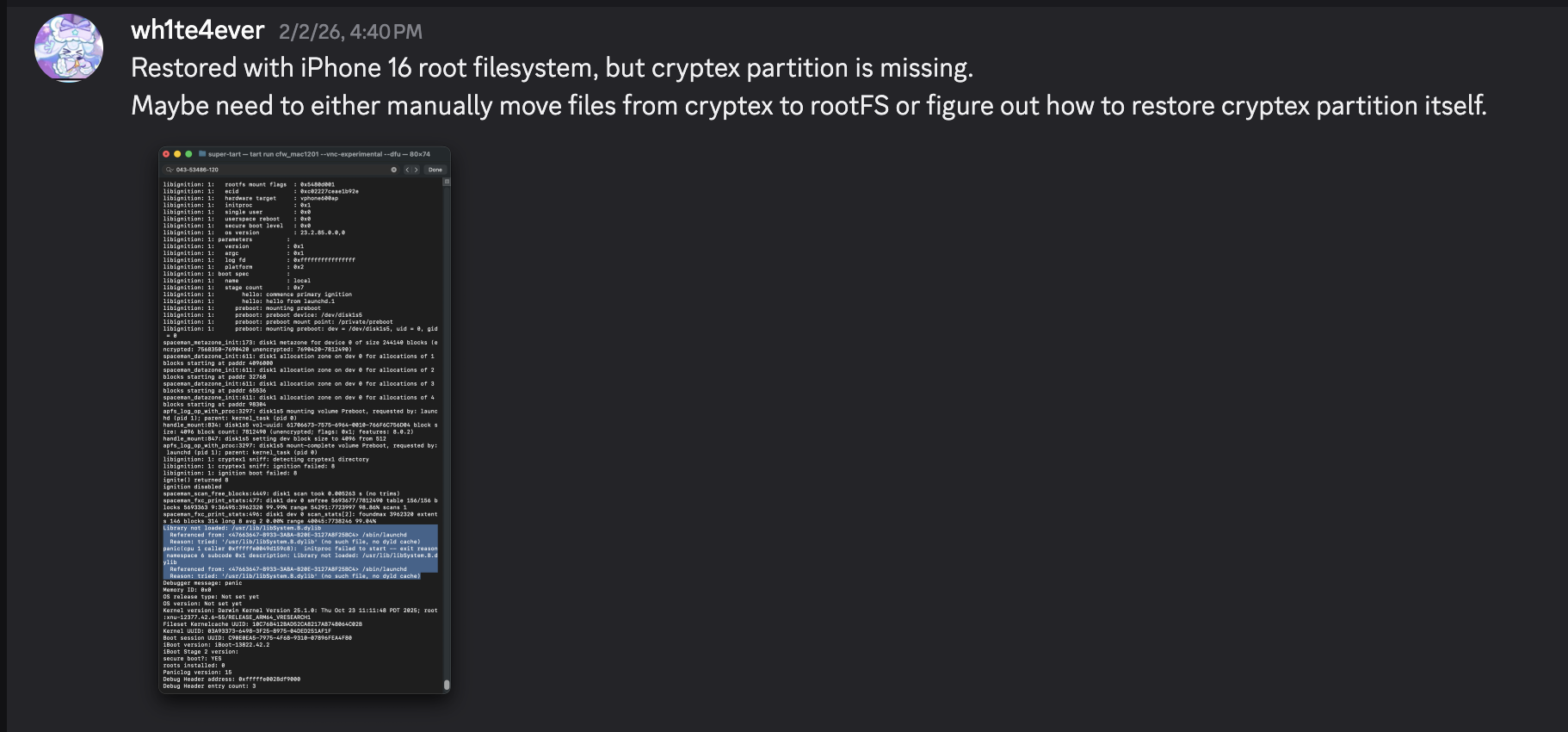
Abaixo está uma captura de tela do pânico que ocorre se o SEP não estiver configurado corretamente. Se você configurá-lo corretamente, ele deve passar por este ponto sem problemas.

Após a restauração ser concluída, ela reinicia automaticamente. No entanto, ocorre um pânico no processo launchd porque a biblioteca /usr/lib/libSystem.B.dylib está ausente. Esta biblioteca está localizada dentro do dyld_shared_cache na partição Cryptex e, por algum motivo, a partição Cryptex não pôde ser restaurada. Como solução temporária, você deve criar um SSH Ramdisk para modificar o sistema de arquivos raiz e injetar os arquivos necessários. É exatamente por isso que o patch relacionado à verificação SSV era necessário.


Vou tentar corrigir o problema de falha na inicialização utilizando o ramdisk usado em https://github.com/verygenericname/SSHRD_Script.
Para carregar e enviar componentes como bootloader ou kernel usando a ferramenta irecovery no modo DFU, é necessária uma imagem IMG4, que requer um arquivo IM4M. Portanto, primeiro busquei o arquivo shsh usando a ferramenta idevicerestore e, em seguida, converti-o em um arquivo IM4M.```bash idevicerestore -e -y ./iPhone17,3_26.1_23B85_Restore -t
mv shsh/[ECID]-iPhone99,11-26.1.shsh shsh/[ECID]-iPhone99,11-26.1.shsh.gz
gunzip shsh/[ECID]-iPhone99,11-26.1.shsh.gz
...
pyimg4 im4m extract -i shsh/[ECID]-iPhone99,11-26.1.shsh -o vphone.im4m
Em seguida, usando aquele arquivo IM4M, gerei vários arquivos IMG4 para cada um dos componentes de firmware utilizados, como iBSS, iBEC e a devicetree.```python
# 1. Grab & Patch iBSS
if not os.path.exists("iPhone17\\,3_26.1_23B85_Restore/Firmware/dfu/iBSS.vresearch101.RELEASE.im4p.bak"):
os.system("cp iPhone17\\,3_26.1_23B85_Restore/Firmware/dfu/iBSS.vresearch101.RELEASE.im4p iPhone17\\,3_26.1_23B85_Restore/Firmware/dfu/iBSS.vresearch101.RELEASE.im4p.bak")
os.system("tools/img4 -i iPhone17\\,3_26.1_23B85_Restore/Firmware/dfu/iBSS.vresearch101.RELEASE.im4p.bak -o iBSS.vresearch101.RELEASE")
... # patch things from raw
os.system("tools/img4tool -c iBSS.vresearch101.RELEASE.im4p -t ibss iBSS.vresearch101.RELEASE")
os.system("tools/img4 -i iBSS.vresearch101.RELEASE.im4p -o ./Ramdisk/iBSS.vresearch101.RELEASE.img4 -M ./vphone.im4m")
# 2. Grab & Patch iBEC
if not os.path.exists("iPhone17\\,3_26.1_23B85_Restore/Firmware/dfu/iBEC.vresearch101.RELEASE.im4p.bak"):
os.system("cp iPhone17\\,3_26.1_23B85_Restore/Firmware/dfu/iBEC.vresearch101.RELEASE.im4p iPhone17\\,3_26.1_23B85_Restore/Firmware/dfu/iBEC.vresearch101.RELEASE.im4p.bak")
os.system("tools/img4 -i iPhone17\\,3_26.1_23B85_Restore/Firmware/dfu/iBEC.vresearch101.RELEASE.im4p -o iBEC.vresearch101.RELEASE")
... # patch things from raw
os.system("tools/img4tool -c iBEC.vresearch101.RELEASE.im4p -t ibec iBEC.vresearch101.RELEASE")
os.system("tools/img4 -i iBEC.vresearch101.RELEASE.im4p -o Ramdisk/iBEC.vresearch101.RELEASE.img4 -M vphone.im4m")
# 3. Grab SPTM
os.system("tools/img4 -i iPhone17\\,3_26.1_23B85_Restore/Firmware/sptm.vresearch1.release.im4p -o Ramdisk/sptm.vresearch1.release.img4 -M vphone.im4m -T sptm")
# 4. Grab devicetree
os.system("tools/img4 -i iPhone17\\,3_26.1_23B85_Restore/Firmware/all_flash/DeviceTree.vphone600ap.im4p -o Ramdisk/DeviceTree.vphone600ap.img4 -M vphone.im4m -T rdtr")
# 5. Grab sep
os.system("tools/img4 -i iPhone17\\,3_26.1_23B85_Restore/Firmware/all_flash/sep-firmware.vresearch101.RELEASE.im4p -o Ramdisk/sep-firmware.vresearch101.RELEASE.img4 -M vphone.im4m -T rsep")
# 6. Grab & Patch TXM
if not os.path.exists("iPhone17\\,3_26.1_23B85_Restore/Firmware/txm.iphoneos.release.im4p.bak"):
os.system("cp iPhone17\\,3_26.1_23B85_Restore/Firmware/txm.iphoneos.release.im4p iPhone17\\,3_26.1_23B85_Restore/Firmware/txm.iphoneos.release.im4p.bak")
os.system("pyimg4 im4p extract -i iPhone17\\,3_26.1_23B85_Restore/Firmware/txm.iphoneos.release.im4p.bak -o txm.raw")
... # patch things from raw
#create im4p
os.system("pyimg4 im4p create -i txm.raw -o txm.im4p -f trxm --lzfse")
# preserve payp structure
txm_im4p_data = Path('iPhone17,3_26.1_23B85_Restore/Firmware/txm.iphoneos.release.im4p.bak').read_bytes()
payp_offset = txm_im4p_data.rfind(b'PAYP')
if payp_offset == -1:
print("Couldn't find payp structure !!!")
sys.exit()
with open('txm.im4p', 'ab') as f:
f.write(txm_im4p_data[(payp_offset-10):])
payp_sz = len(txm_im4p_data[(payp_offset-10):])
print(f"payp sz: {payp_sz}")
txm_im4p_data = bytearray(open('txm.im4p', 'rb').read())
txm_im4p_data[2:5] = (int.from_bytes(txm_im4p_data[2:5], 'big') + payp_sz).to_bytes(3, 'big')
open('txm.im4p', 'wb').write(txm_im4p_data)
# sign
os.system("pyimg4 img4 create -p txm.im4p -o Ramdisk/txm.img4 -m vphone.im4m")
# 7. Grab & patch kernelcache
if not os.path.exists("iPhone17\\,3_26.1_23B85_Restore/kernelcache.research.vphone600.bak"):
os.system("cp iPhone17\\,3_26.1_23B85_Restore/kernelcache.research.vphone600 iPhone17\\,3_26.1_23B85_Restore/kernelcache.research.vphone600.bak")
os.system("pyimg4 im4p extract -i iPhone17\\,3_26.1_23B85_Restore/kernelcache.research.vphone600.bak -o kcache.raw")
... # patch things from raw
#create im4p
os.system("pyimg4 im4p create -i kcache.raw -o krnl.im4p -f rkrn --lzfse")
# preserve payp structure
kernel_im4p_data = Path('iPhone17,3_26.1_23B85_Restore/kernelcache.research.vphone600.bak').read_bytes()
payp_offset = kernel_im4p_data.rfind(b'PAYP')
if payp_offset == -1:
print("Couldn't find payp structure !!!")
sys.exit()
with open('krnl.im4p', 'ab') as f:
f.write(kernel_im4p_data[(payp_offset-10):])
payp_sz = len(kernel_im4p_data[(payp_offset-10):])
print(f"payp sz: {payp_sz}")
kernel_im4p_data = bytearray(open('krnl.im4p', 'rb').read())
kernel_im4p_data[2:5] = (int.from_bytes(kernel_im4p_data[2:5], 'big') + payp_sz).to_bytes(3, 'big')
open('krnl.im4p', 'wb').write(kernel_im4p_data)
# sign
os.system("pyimg4 img4 create -p krnl.im4p -o Ramdisk/krnl.img4 -m vphone.im4m")
# 8. Grab ramdisk & build custom ramdisk
os.system("pyimg4 im4p extract -i iPhone17,3_26.1_23B85_Restore/043-53775-129.dmg -o ramdisk.dmg")
os.system("mkdir SSHRD")
os.system("sudo hdiutil attach -mountpoint SSHRD ramdisk.dmg -owners off")
os.system("sudo hdiutil create -size 254m -imagekey diskimage-class=CRawDiskImage -format UDZO -fs APFS -layout NONE -srcfolder SSHRD -copyuid root ramdisk1.dmg")
os.system("sudo hdiutil detach -force SSHRD")
os.system("sudo hdiutil attach -mountpoint SSHRD ramdisk1.dmg -owners off")
... #remove unneccessary files for expand space
#resign all things preserving ents
target_path= [
"SSHRD/usr/local/bin/*", "SSHRD/usr/local/lib/*",
"SSHRD/usr/bin/*", "SSHRD/bin/*",
"SSHRD/usr/lib/*", "SSHRD/sbin/*", "SSHRD/usr/sbin/*", "SSHRD/usr/libexec/*"
]
for pattern in target_path:
for path in glob.glob(pattern):
if os.path.isfile(path) and not os.path.islink(path):
if "Mach-O" in subprocess.getoutput(f"file \"{path}\""):
os.system(f"tools/ldid_macosx_arm64 -S -M -Cadhoc \"{path}\"")
#8-2. Grab & build custom ramdisk's trustcache while building custom ramdisk
os.system("pyimg4 im4p extract -i iPhone17,3_26.1_23B85_Restore/Firmware/043-53775-129.dmg.trustcache -o trustcache.raw")
os.system("tools/trustcache_macos_arm64 create sshrd.tc SSHRD")
os.system("pyimg4 im4p create -i sshrd.tc -o trustcache.im4p -f rtsc")
# sign
os.system("pyimg4 img4 create -p trustcache.im4p -o Ramdisk/trustcache.img4 -m vphone.im4m")
#8-2. end
os.system("sudo hdiutil detach -force SSHRD")
os.system("sudo hdiutil resize -sectors min ramdisk1.dmg")
# sign
os.system("pyimg4 im4p create -i ramdisk1.dmg -o ramdisk1.dmg.im4p -f rdsk")
os.system("pyimg4 img4 create -p ramdisk1.dmg.im4p -o Ramdisk/ramdisk.img4 -m vphone.im4m")
Depois que todas as imagens IMG4 forem criadas, vamos carregá-las uma por uma e iniciar com o Ramdisk.
sleep 1; irecovery -f Ramdisk/sptm.vresearch1.release.img4 irecovery -c firmware
irecovery -f Ramdisk/txm.img4 irecovery -c firmware
irecovery -f Ramdisk/trustcache.img4 irecovery -c firmware irecovery -f Ramdisk/ramdisk.img4 irecovery -c ramdisk irecovery -f Ramdisk/DeviceTree.vphone600ap.img4 irecovery -c devicetree irecovery -f Ramdisk/sep-firmware.vresearch101.RELEASE.img4 irecovery -c firmware irecovery -f Ramdisk/krnl.img4 irecovery -c bootx
Então, você verá o rosto do Creeper do Minecraft na terceira janela da esquerda, conforme mostrado abaixo.
Se você verificar o menu USB no aplicativo Informações do Sistema e vir "iPhone Research...",
agora você pode acessar o shell virtual do iPhone usando a ferramenta [iproxy](https://github.com/libimobiledevice/libusbmuxd/blob/master/tools/iproxy.c). (`iproxy 2222 22 &`)

Para modificar o sistema de arquivos raiz, renomeie o snapshot.```python
ssh [email protected] -p2222
#pw: alpine
mount_apfs -o rw /dev/disk1s1 /mnt1
snaputil -l /mnt1
# (then will output will be printed with hash, result may be differ)
com.apple.os.update-8AAB8DBA5C8F1F756928411675F4A892087B04559CFB084B9E400E661ABAD119
snaputil -n <com.apple.os.update-hash> orig-fs /mnt1
umount /mnt1
exit
Descriptografe o ficheiro AEA usando a ferramenta ipsw para criar um ficheiro dmg, monte-o e, em seguida, transfira os ficheiros da partição Cryptex para a máquina virtual. Juntamente com a transferência de ficheiros, foram necessários patches específicos. Por conveniência, adicionei três processos específicos para iniciar no arranque: bash, dropbear e trollvnc.
seputil tinha um problema em que não conseguia encontrar corretamente o ficheiro gigalocker, por isso corrigi-o para procurar sempre AA.gl. Além disso, corrigi launchd_cache_loader para garantir que o /System/Library/xpc/launchd.plist modificado carrega corretamente.```python ... ========= INSTALL CRYPTEX(SystemOS, AppOS) =========
key = subprocess.check_output("ipsw fw aea --key iPhone17,3_26.1_23B85_Restore/043-54303-126.dmg.aea", shell=True, text=True).strip() print(f"key: {key}") os.system(f"aea decrypt -i iPhone17,3_26.1_23B85_Restore/043-54303-126.dmg.aea -o CryptexSystemOS.dmg -key-value '{key}'")
os.system(f"cp iPhone17,3_26.1_23B85_Restore/043-54062-129.dmg CryptexAppOS.dmg")
os.system("mkdir CryptexSystemOS") os.system("sudo hdiutil attach -mountpoint CryptexSystemOS CryptexSystemOS.dmg -owners off")
os.system("mkdir CryptexAppOS") os.system("sudo hdiutil attach -mountpoint CryptexAppOS CryptexAppOS.dmg -owners off")
remote_cmd("/sbin/mount_apfs -o rw /dev/disk1s1 /mnt1")
remote_cmd("/bin/rm -rf /mnt1/System/Cryptexes/App") remote_cmd("/bin/rm -rf /mnt1/System/Cryptexes/OS")
remote_cmd("/bin/mkdir -p /mnt1/System/Cryptexes/App") remote_cmd("/bin/chmod 0755 /mnt1/System/Cryptexes/App") remote_cmd("/bin/mkdir -p /mnt1/System/Cryptexes/OS") remote_cmd("/bin/chmod 0755 /mnt1/System/Cryptexes/OS")
print("Copying cryptexs to vphone! Will take about 3 mintues...") os.system("tools/sshpass -p 'alpine' scp -q -r -ostricthostkeychecking=false -ouserknownhostsfile=/dev/null -o StrictHostKeyChecking=no -P 2222 CryptexSystemOS/. '[email protected]:/mnt1/System/Cryptexes/OS'") os.system("tools/sshpass -p 'alpine' scp -q -r -ostricthostkeychecking=false -ouserknownhostsfile=/dev/null -o StrictHostKeyChecking=no -P 2222 CryptexAppOS/. '[email protected]:/mnt1/System/Cryptexes/App'")
remote_cmd("/bin/ln -sf ../../../System/Cryptexes/OS/System/Library/Caches/com.apple.dyld /mnt1/System/Library/Caches/com.apple.dyld")
remote_cmd("/bin/ln -sf ../../../../System/Cryptexes/OS/System/DriverKit/System/Library/dyld /mnt1/System/DriverKit/System/Library/dyld")
os.system("rm custom_26.1/seputil 2>/dev/null") os.system("rm custom_26.1/seputil.bak 2>/dev/null")
file_path = "/mnt1/usr/libexec/seputil.bak" if not check_remote_file_exists(file_path): print(f"Created backup {file_path}") remote_cmd("/bin/cp /mnt1/usr/libexec/seputil /mnt1/usr/libexec/seputil.bak")
os.system("tools/sshpass -p 'alpine' scp -q -o StrictHostKeyChecking=no -o UserKnownHostsFile=/dev/null -P 2222 [email protected]:/mnt1/usr/libexec/seputil.bak ./custom_26.1") os.system("mv custom_26.1/seputil.bak custom_26.1/seputil")
fp = open("custom_26.1/seputil", "r+b") patch(0x1B3F1, "AA") fp.close()
os.system("tools/ldid_macosx_arm64 -S -M -Ksigncert.p12 -Icom.apple.seputil custom_26.1/seputil")
os.system("tools/sshpass -p 'alpine' scp -q -r -ostricthostkeychecking=false -ouserknownhostsfile=/dev/null -o StrictHostKeyChecking=no -P 2222 custom_26.1/seputil '[email protected]:/mnt1/usr/libexec/seputil'") remote_cmd("/bin/chmod 0755 /mnt1/usr/libexec/seputil")
os.system("rm custom_26.1/seputil 2>/dev/null")
remote_cmd("/sbin/mount_apfs -o rw /dev/disk1s3 /mnt3") remote_cmd("/bin/mv /mnt3/*.gl /mnt3/AA.gl")
... # ========= INSTALL AppleParavirtGPUMetalIOGPUFamily =========
os.system("tools/sshpass -p 'alpine' scp -q -r -ostricthostkeychecking=false -ouserknownhostsfile=/dev/null -o StrictHostKeyChecking=no -P 2222 jb/iosbinpack64.tar '[email protected]:/mnt1'")
remote_cmd("/usr/bin/tar --preserve-permissions --no-overwrite-dir -xvf /mnt1/iosbinpack64.tar -C /mnt1") remote_cmd("/bin/rm /mnt1/iosbinpack64.tar")
''' /iosbinpack64/bin/mkdir -p /var/dropbear /iosbinpack64/bin/cp /iosbinpack64/etc/profile /var/profile /iosbinpack64/bin/cp /iosbinpack64/etc/motd /var/motd '''
os.system("rm custom_26.1/launchd_cache_loader 2>/dev/null") os.system("rm custom_26.1/launchd_cache_loader.bak 2>/dev/null")
file_path = "/mnt1/usr/libexec/launchd_cache_loader.bak" if not check_remote_file_exists(file_path): print(f"Created backup {file_path}") remote_cmd("/bin/cp /mnt1/usr/libexec/launchd_cache_loader /mnt1/usr/libexec/launchd_cache_loader.bak")
os.system("tools/sshpass -p 'alpine' scp -q -o StrictHostKeyChecking=no -o UserKnownHostsFile=/dev/null -P 2222 [email protected]:/mnt1/usr/libexec/launchd_cache_loader.bak ./custom_26.1") os.system("mv custom_26.1/launchd_cache_loader.bak custom_26.1/launchd_cache_loader")
fp = open("custom_26.1/launchd_cache_loader", "r+b") patch(0xB58, 0xd503201f) fp.close()
os.system("tools/ldid_macosx_arm64 -S -M -Ksigncert.p12 -Icom.apple.launchd_cache_loader custom_26.1/launchd_cache_loader")
os.system("tools/sshpass -p 'alpine' scp -q -r -ostricthostkeychecking=false -ouserknownhostsfile=/dev/null -o StrictHostKeyChecking=no -P 2222 custom_26.1/launchd_cache_loader '[email protected]:/mnt1/usr/libexec/launchd_cache_loader'") remote_cmd("/bin/chmod 0755 /mnt1/usr/libexec/launchd_cache_loader")
os.system("rm custom_26.1/launchd_cache_loader 2>/dev/null")
os.system("tools/sshpass -p 'alpine' scp -q -r -ostricthostkeychecking=false -ouserknownhostsfile=/dev/null -o StrictHostKeyChecking=no -P 2222 jb/LaunchDaemons/bash.plist '[email protected]:/mnt1/System/Library/LaunchDaemons'") os.system("tools/sshpass -p 'alpine' scp -q -r -ostricthostkeychecking=false -ouserknownhostsfile=/dev/null -o StrictHostKeyChecking=no -P 2222 jb/LaunchDaemons/dropbear.plist '[email protected]:/mnt1/System/Library/LaunchDaemons'") os.system("tools/sshpass -p 'alpine' scp -q -r -ostricthostkeychecking=false -ouserknownhostsfile=/dev/null -o StrictHostKeyChecking=no -P 2222 jb/LaunchDaemons/trollvnc.plist '[email protected]:/mnt1/System/Library/LaunchDaemons'") remote_cmd("/bin/chmod 0644 /mnt1/System/Library/LaunchDaemons/bash.plist") remote_cmd("/bin/chmod 0644 /mnt1/System/Library/LaunchDaemons/dropbear.plist") remote_cmd("/bin/chmod 0644 /mnt1/System/Library/LaunchDaemons/trollvnc.plist")
os.system("rm custom_26.1/launchd.plist 2>/dev/null") os.system("rm custom_26.1/launchd.plist.bak 2>/dev/null")
file_path = "/mnt1/System/Library/xpc/launchd.plist.bak" if not check_remote_file_exists(file_path): print(f"Created backup {file_path}") remote_cmd("/bin/cp /mnt1/System/Library/xpc/launchd.plist /mnt1/System/Library/xpc/launchd.plist.bak")
os.system("tools/sshpass -p 'alpine' scp -q -o StrictHostKeyChecking=no -o UserKnownHostsFile=/dev/null -P 2222 [email protected]:/mnt1/System/Library/xpc/launchd.plist.bak ./custom_26.1") os.system("mv custom_26.1/launchd.plist.bak custom_26.1/launchd.plist")
os.system("plutil -convert xml1 custom_26.1/launchd.plist")
target_file = 'custom_26.1/launchd.plist' source_file = 'jb/LaunchDaemons/bash.plist' insert_key = '/System/Library/LaunchDaemons/bash.plist'
with open(target_file, 'rb') as ft, open(source_file, 'rb') as fs: target_data = plistlib.load(ft) source_data = plistlib.load(fs)
target_data.setdefault('LaunchDaemons', {})[insert_key] = source_data
with open(target_file, 'wb') as f: plistlib.dump(target_data, f, sort_keys=False)
source_file = 'jb/LaunchDaemons/dropbear.plist' insert_key = '/System/Library/LaunchDaemons/dropbear.plist'
with open(target_file, 'rb') as ft, open(source_file, 'rb') as fs: target_data = plistlib.load(ft) source_data = plistlib.load(fs)
target_data.setdefault('LaunchDaemons', {})[insert_key] = source_data
with open(target_file, 'wb') as f: plistlib.dump(target_data, f, sort_keys=False)
source_file = 'jb/LaunchDaemons/trollvnc.plist' insert_key = '/System/Library/LaunchDaemons/trollvnc.plist'
with open(target_file, 'rb') as ft, open(source_file, 'rb') as fs: target_data = plistlib.load(ft) source_data = plistlib.load(fs)
target_data.setdefault('LaunchDaemons', {})[insert_key] = source_data
with open(target_file, 'wb') as f: plistlib.dump(target_data, f, sort_keys=False)
os.system("tools/sshpass -p 'alpine' scp -q -r -ostricthostkeychecking=false -ouserknownhostsfile=/dev/null -o StrictHostKeyChecking=no -P 2222 custom_26.1/launchd.plist '[email protected]:/mnt1/System/Library/xpc'") remote_cmd("/bin/chmod 0644 /mnt1/System/Library/xpc/launchd.plist")
os.system("rm custom_26.1/launchd.plist 2>/dev/null")
... remote_cmd("/sbin/halt") ...
# Primeira Tentativa de Inicialização
O processo de inicialização deve funcionar agora, mas quando você tenta prosseguir além da tela preta de configuração, ele executa um respring e não avança mais.


# Implementando Metal
Ao verificar com um programa personalizado chamado MetalTest, mostra que o Metal não é suportado.```python
#import <stdio.h>
#import <Metal/Metal.h>
#import <Foundation/Foundation.h>
int main(int argc, char *argv[], char *envp[]) {
id<MTLDevice> device = MTLCreateSystemDefaultDevice();
NSLog(@"device: %@", device);
if (device) {
NSLog(@"Metal Device Create Success: %@", [device name]);
} else {
NSLog(@"Metal Not Supported!");
}
return 0;
}
Normalmente, a saída deveria ter se parecido com o resultado abaixo.```python
seo@seos-Virtual-Machine Desktop % sysctl kern.version
kern.version: Darwin Kernel Version 25.0.0: Mon Aug 25 21:17:21 PDT 2025; root:xnu-12377.1.9~3/RELEASE_ARM64_VMAPPLE
seo@seos-Virtual-Machine Desktop % ./MetalTest
2026-02-08 23:16:56.846 MetalTest[682:5810] device: <AppleParavirtDevice: 0x102c48fe0>
name = Apple Paravirtual device
2026-02-08 23:16:56.847 MetalTest[682:5810] Metal Device Create Success: Apple Paravirtual device
seo@seos-Virtual-Machine Desktop %
Verificando com ioreg -l, como pode ver, o kernel estava realmente reconhecendo o AppleParavirtGPU.

Ao verificar em um iPad de 7ª geração executando iOS 16.6.1, chamar a função MTLCreateSystemDefaultDevice internamente acessa o driver IOGPU através de uma biblioteca específica chamada AGXMetalA10. Esta biblioteca AGXMetalA10 está localizada em /System/Library/Extensions.
De repente, um pensamento me veio à mente: não haveria bibliotecas relacionadas a GPU/Metal usadas para o iPhone virtual também?

Verificando o mesmo caminho na máquina virtual PCC revela que 7 arquivos existem lá.
Peguei o /System/Library/Extensions/AppleParavirtGPUMetalIOGPUFamily.bundle usado no PCC e coloquei diretamente no iPhone virtual. (Usei o SSH Ramdisk para isso.)

Verificando o MetalTest novamente, a função MTLCreateSystemDefaultDevice agora funciona corretamente.

No entanto, como um arquivo dylib específico não existe no dsc (cache compartilhado de dyld) do modelo iPhone 16, precisei fazer engenharia reversa separadamente e implementá-lo a partir do dsc do PCC.


Uma vez implementado, você é recebido pela tela de configuração com um fundo. Como não consegui implementar o botão home corretamente, resolvi isso usando uma solução temporária, controlando-o via iproxy/VNC.

É compatível apenas com Macs Apple Silicon, e os dispositivos/versões confirmados para funcionar são os seguintes:
Espero que provavelmente funcione em qualquer alvo que suporte pccvre.

Fonte: https://security.apple.com/documentation/private-cloud-compute/vresetup
Ao contrário da versão Tahoe 26, a interação por toque não é possível usando apenas o objeto VZVirtualMachineView, então foi necessário sobrescrever as funções de evento do mouse.
// Display let graphics_config = VZMacGraphicsDeviceConfiguration() let displays_config = VZMacGraphicsDisplayConfiguration( widthInPixels: 1179, heightInPixels: 2556, pixelsPerInch: 460 ) graphics_config.displays.append(displays_config) configuration.graphicsDevices = [graphics_config] ...