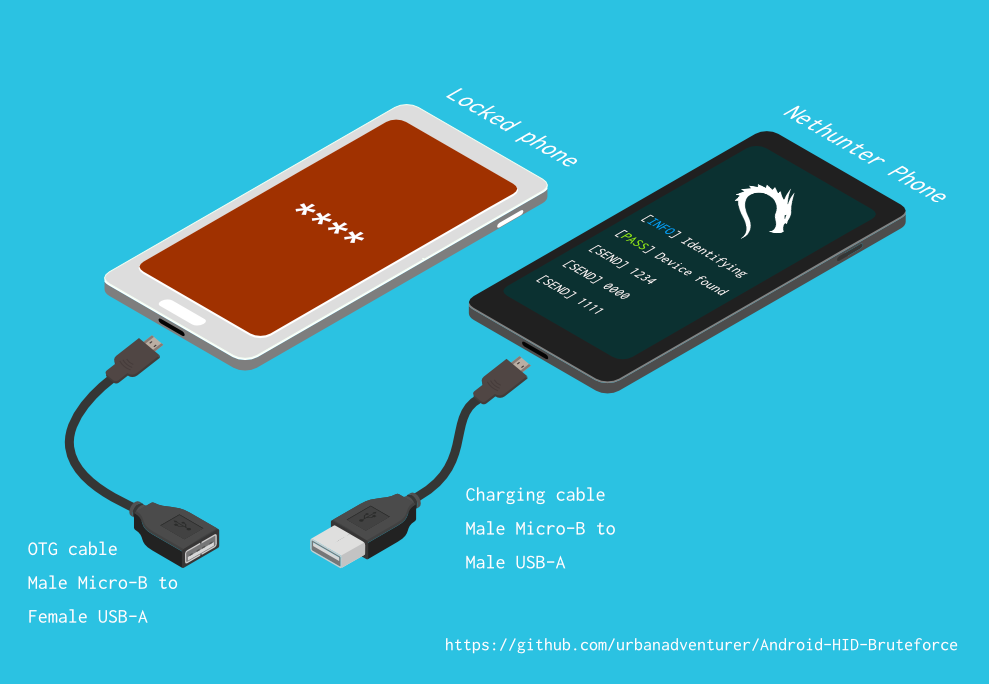

Desbloqueie um telefone Android (ou dispositivo) por meio de força bruta no PIN da tela de bloqueio. Transforme seu telefone Kali Nethunter em um quebrador de PIN por força bruta para dispositivos Android! (sem root, sem adb)
Desbloqueie um telefone Android (ou dispositivo) fazendo bruteforce no PIN da tela de bloqueio.
Transforme seu telefone Kali Nethunter em um cracker de PIN por bruteforce para dispositivos Android!
Ele usa um cabo USB OTG para conectar o telefone bloqueado ao dispositivo Nethunter. Ele emula um teclado, testa PINs automaticamente e aguarda após muitas tentativas erradas.
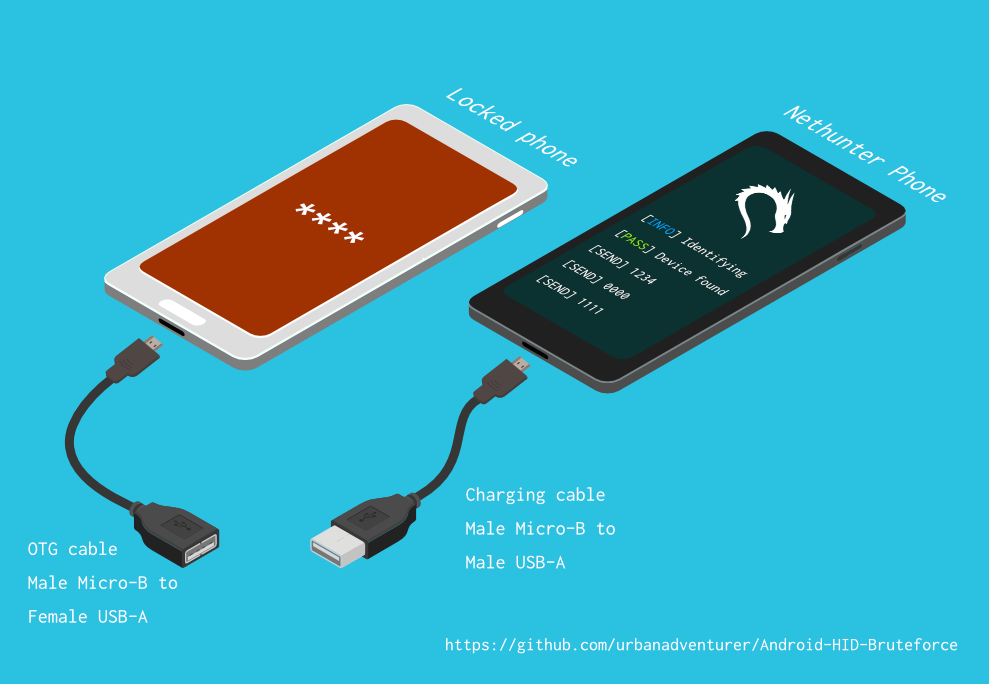
[Telefone Nethunter] <--> [Cabo USB] <--> [Adaptador USB OTG] <--> [Telefone Android bloqueado]
O driver USB HID Gadget fornece emulação de Dispositivos de Interface Humana (HID) via USB. Isso permite que um dispositivo Android Nethunter emule a entrada do teclado para o telefone bloqueado. É como conectar um teclado ao telefone bloqueado e pressionar teclas.
⏱ Isso leva pouco mais de 16,6 horas com um Samsung S5 para testar todos os PINs de 4 dígitos possíveis, mas com a lista de PINs otimizada, deve levar muito menos tempo.
A definir
Se você instalou o script em /sdcard/, pode executá-lo com o seguinte comando.bash ./android-pin-bruteforce
Note that Android mounts /sdcard with the noexec flag. You can verify this with mount.
Android-PIN-Bruteforce (0.2) é usado para desbloquear um telefone Android (ou dispositivo) por meio de força bruta no PIN da tela de bloqueio.
Encontre mais informações em: https://github.com/urbanadventurer/Android-PIN-Bruteforce
Comandos:
crack Iniciar a quebra de PINs
resume Retomar a partir de um PIN escolhido
rewind Quebrar PINs em ordem reversa a partir de um PIN escolhido
diag Exibir informações de diagnóstico
version Exibir informações de versão e sair
Opções:
-f, --from PIN Retomar a partir deste PIN
-a, --attempts Começar a partir de NUM tentativas incorretas
-m, --mask REGEX Usar uma máscara para dígitos conhecidos no PIN
-t, --type TYPE Selecionar quebra de PIN ou PADRÃO
-l, --length NUM Quebrar PINs de comprimento NUM
-c, --config FILE Especificar arquivo de configuração a ser carregado
-p, --pinlist FILE Especificar uma lista de PINs personalizada
-d, --dry-run Teste simulado. Não envia nenhuma tecla.
-v, --verbose Exibir logs detalhados
Uso:
android-pin-bruteforce <comando> [opções]```
## Supported Android Phones/Devices
This has been successfully tested with various phones including the Samsung S5, S7, Motorola G4 Plus and G5 Plus.
It can unlock Android versions 6.0.1 through to 10.0. The ability to perform a bruteforce attack doesn't depend on the Android version in use. It depends on how the device vendor developed their own lockscreen.
Check the Phone Database for more details
https://github.com/urbanadventurer/Android-PIN-Bruteforce/wiki/Phone-Database
## 🎳 PIN Lists
Optimised PIN lists are used by default unless the user selects a custom PIN list.
### Cracking PINs of different lengths
Use the `--length` commandline option.
Use this command to crack a 3 digit PIN,
`./android-pin-bruteforce crack --length 3`
Use this command to crack a 6 digit PIN
`./android-pin-bruteforce crack --length 6`
### Where did the optimised PIN lists come from?
The optimised PIN lists were generated by extracting numeric passwords from database leaks then sorting by frequency. All PINs that did not appear in the password leaks were appended to the list.
The optimised PIN lists were generated from *Ga$$Pacc DB Leak* (21GB decompressed, 688M Accounts, 243 Databases, 138920 numeric passwords).
#### The 4 digit PIN list
The reason that the 4 digit PIN list is used from a different source is because it gives better results than the generated list from *Ga$$Pacc DB Leak*.
`optimised-pin-length-4.txt` is an optimised list of all possible 4 digit PINs, sorted by order of likelihood.
It can be found with the filename `pinlist.txt` at https://github.com/mandatoryprogrammer/droidbrute
This list is used with permission from Justin Engler & Paul Vines from Senior Security Engineer, iSEC Partners,
and was used in their Defcon talk, [Electromechanical PIN Cracking with Robotic Reconfigurable Button Basher (and C3BO)](https://www.defcon.org/html/defcon-21/dc-21-speakers.html#Engler)
### Cracking with Masks
Masks use regular expressions with the standard grep extended format.
`./android-pin-bruteforce crack --mask "...[45]" --dry-run`
- To try all years from 1900 to 1999, use a mask of `19..`
- To try PINs that have a 1 in the first digit, and a 1 in the last digit, use a mask of `1..1`
- To try PINs that end in 4 or 5, use `...[45]`
## 📱 Configuration for different phones
Device manufacturers create their own lock screens that are different to the default or stock Android.
To find out what keys your phone needs, plug a keyboard into the phone and try out different combinations.
Load a different configuration file, with the `--config FILE` commandline parameter.
Example:
`./android-pin-bruteforce --config ./config.samsung.s5 crack`
You can also edit the `config` file by customising the timing and keys sent.
The following configuration variables can be used to support a different phone's lockscreen.
DELAY_BETWEEN_KEYS=0.25
PROGRESSIVE_ARRAY_ATTEMPT_COUNT__________=(1 11 41) PROGRESSIVE_ARRAY_ATTEMPTS_UNTIL_COOLDOWN=(5 1 1) PROGRESSIVE_ARRAY_COOLDOWN_IN_SECONDS____=(30 30 60)
SEND_KEYS_DISMISS_POPUPS_N_SECONDS_BEFORE_COOLDOWN_END=5
SEND_KEYS_DISMISS_POPUPS_AT_COOLDOWN_END="enter enter enter"
KEYS_BEFORE_EACH_PIN="escape enter"
KEYS_STAY_AWAKE_DURING_COOLDOWN="enter"
SEND_KEYS_STAY_AWAKE_DURING_COOLDOWN_EVERY_N_SECONDS=5
DELAY_BEFORE_STARTING=2
KEYS_BEFORE_STARTING="enter"```
We send keys before the end of the cooldown period, or optionally during the cooldown period. This is to keep the lockscreen app active and to dismiss any popups about the number of incorrect PIN attempts or a low battery warning.
Use ssh from your laptop to the NetHunter phone, and use this command to test sending keys:
In this example, the enter key is sent.
echo "enter" | /system/xbin/hid-keyboard /dev/hidg0 keyboard
In this example, ctrl-escape is sent.
echo "left-ctrl escape" | /system/xbin/hid-keyboard /dev/hidg0 keyboard
Note: Sending combinations of keys in config file variables is different. Currently only ctrl_escape is supported.
In this example, keys a, b, c are sent.
echo a b c | /system/xbin/hid-keyboard /dev/hidg0 keyboard
This Android app is a virtual USB Keyboard that you can use to test sending keys.
https://store.nethunter.com/en/packages/remote.hid.keyboard.client/
Use this list for the following variables:
To send special keys use the following labels. This list can be found in the hid_gadget_test source code.
To send more than one key at the same time, use the following list:
If you need more key combinations please open a new issue in the GitHub issues list.
The following section of the config file controls the progressive cooldown.
## As variáveis PROGRESSIVE_COOLDOWN_ARRAY atuam como um array multidimensional para personalizar o resfriamento progressivo
## PROGRESSIVE_ARRAY_ATTEMPT_COUNT__________ é o número da tentativa
## PROGRESSIVE_ARRAY_ATTEMPTS_UNTIL_COOLDOWN é quantas tentativas tentar antes de resfriar
## PROGRESSIVE_ARRAY_COOLDOWN_IN_SECONDS____ é o resfriamento em segundos
PROGRESSIVE_ARRAY_ATTEMPT_COUNT__________=(1 11 41)
PROGRESSIVE_ARRAY_ATTEMPTS_UNTIL_COOLDOWN=(5 1 1)
PROGRESSIVE_ARRAY_COOLDOWN_IN_SECONDS____=(30 30 60)```
The array is the same as this table.
| attempt number | attempts until cooldown | cooldown |
| ---------------- | ------------------------ | ---------- |
| 1 | 5 | 30 |
| 11 | 1 | 30 |
| 41 | 1 | 60 |
### Why can't you use a laptop, or is a Windows or Linux version coming soon?
This script works by emulating USB Human Interface Devices (HID), in this case it is keyboard and mouse input. Laptops have uni-directional USB ports and an Android mobile device/ phone has a bi-directional USB port. A bi-directional port is required to emulate a keyboard.
This might change in the future as USB-C is supposed to be uni-directional.
### How Android emulates a keyboard
Keys are sent using `/system/xbin/hid-keyboard`. To test this and send the key 1 you can use `echo 1 | /system/xbin/hid-keyboard dev/hidg0 keyboard`
In Kali Nethunter, `/system/xbin/hid-keyboard` is a compiled copy of `hid_gadget_test.c`. This is a small program for testing the HID gadget driver that is included in the Linux Kernel. The source code for this file can be found at https://www.kernel.org/doc/html/latest/usb/gadget_hid.html and https://github.com/aagallag/hid_gadget_test.
## 🔧 Troubleshooting
### If it is not bruteforcing PINs
#### Check the orientation of the cables
The Nethunter phone should have a regular USB cable attached, while the locked phone should have an OTG adaptor attached.
The OTG cable should be connected to the locked Android phone. The regular USB cable should be connected to the Nethunter phone.
Refer to the graphic on how to connect the phones.
#### Check it is emulating a keyboard
You can verify that the NetHunter phone is succesfully emulating a keyboard by connecting it to a computer using a regular charging/data USB cable. Open a text editor like Notepad while it is cracking and you should see it entering PIN numbers into the text editor.
Note that you will not need an OTG cable for this.
#### Try restarting the phones
Try powering off the phones and even taking out the batteries if that is possible.
#### Try new cables
Try using new cables/adaptors as you may have a faulty cable/adaptor.
### If it doesn't unlock the phone with a correct PIN
You might be sending keys too fast for the phone to process. Increase the DELAY_BETWEEN_KEYS variable in the config file.
💡 If you don't see 4 dots come up on the phone's screen then maybe it is not receiving 4 keys.
### 🔋 Managing Power Consumption
If your phone runs out of power too soon, follow these steps:
- Make sure both phones are fully charged to 100% before you begin
- Reduce the screen brightness on both the victim phone and NetHunter phone if possible
- Place both phones into Airplane mode, however you may want to enable WiFi to access the NetHunter phone via SSH.
- The locked phone will power the NetHunter phone, because it appears as a keyboard accessory
- Use a USB OTG cable with a Y splitter for an external power supply, to allow charging of the NetHunter phone while cracking
- Take breaks to charge your devices. Pause the script with CTRL-Z and resume with the `fg` shell command.
- Avoid the SEND_KEYS_STAY_AWAKE_DURING_COOLDOWN_EVERY_N_SECONDS configuration option. This will cause the locked phone to use more battery to keep the screen powered. Instead use the SEND_KEYS_DISMISS_POPUPS_N_SECONDS_BEFORE_COOLDOWN_END option (Default).
### Check the Diagnostics Report
Use the command `diag` display diagnostic information.
```bash ./android-pin-bruteforce diag```
Se receber esta mensagem quando o cabo USB estiver conectado, tente remover a bateria do telefone Android bloqueado e reiniciá-lo.```[FAIL] HID USB device not ready. Return code from /system/xbin/hid-keyboard was 5.```
### How the usb-devices command works
The diagnostics command uses the `usb-devices` script but it is only necessary as part of determining whether the USB cables are incorrectly connected. This can be downloaded from
https://github.com/gregkh/usbutils/blob/master/usb-devices
### Use verbose output
Use the `--verbose` option to check the configuration is as expected. This is especially useful when you are modifying the configuration.
### Use the dry-run
Use the `--dry-run` option to check how it operates without sending any keys to a device. This is especially useful when you are modifying the configuration or during development.
Dry run will:
- Not send any keys
- Will continue instead of aborting if the `KEYBOARD_DEVICE` or `HID_KEYBOARD` is missing.
### HID USB Mode
Try this command in a shell on the NetHunter phone:
```/system/bin/setprop sys.usb.config hid```
## 💣 Problemas Conhecidos
- Isto não consegue detetar quando o PIN correto é adivinhado e o telemóvel desbloqueia.
- Os teus telemóveis podem ficar sem 🔋 bateria antes de o PIN correto ser encontrado.
- Não confies em ficheiros de configuração de telemóveis de fontes desconhecidas sem os rever primeiro. Os ficheiros de configuração são scripts de shell e podem incluir comandos maliciosos.
## 🚀 Roteiro
- [CONCLUÍDO] Funciona
- [CONCLUÍDO] Deteta falhas de USB HID
- [CONCLUÍDO] Melhorar uso e opções de linha de comando/ficheiros de configuração
- [CONCLUÍDO] Adicionar brute force para PINs com n dígitos
- [CONCLUÍDO] Máscara para dígitos conhecidos
- [CONCLUÍDO] Craquear lista de PIN invertida (para descobrir qual PIN recente desbloqueou o dispositivo)
- [CONCLUÍDO] Implementar prompt de ecrã de bloqueio configurável
- [CONCLUÍDO] Implementar alteração de cooldown após 10 tentativas
- [EM ANDAMENTO] Encontrar/testar mais dispositivos para brute force
- Adicionar barra de progresso
- Adicionar ETA
- Arte ASCII
- GUI melhor para o NetHunter
- Implementar para iPhone
- Detetar quando um telemóvel está desbloqueado (Usar a câmara do Nethunter como sensor?)
- Craquear Padrões Android (tentar padrões comuns primeiro)
## 🙋 Contribuir
Pull requests são bem-vindos. Para alterações importantes, por favor abre uma issue primeiro para discutir o que gostarias de alterar.
Por favor certifica-te de atualizar os testes conforme apropriado.
## 😎 Autores e agradecimento
Desenvolvido por Andrew Horton (@urbanadventurer).
👏 As seguintes pessoas têm sido muito úteis:
- Vlad Filatov (@v1adf): Testar muitos telemóveis para a Base de Dados de Telemóveis na Wiki
### Motivação
A minha motivação original para desenvolver isto foi desbloquear um telemóvel Samsung S5 Android. Pertencia a alguém que tinha falecido, e a família precisava de aceder aos dados do mesmo. Como não tinha um USB Rubber Ducky ou outro hardware disponível, tentei usar vários métodos e eventualmente percebi que tinha de desenvolver algo novo.
### Crédito
A lista otimizada de PIN é de Justin Engler (@justinengler) e Paul Vines, da Senior Security Engineer, iSEC Partners
e foi usada na sua palestra na Defcon, [Electromechanical PIN Cracking with Robotic Reconfigurable Button Basher (and C3BO).](https://www.defcon.org/html/defcon-21/dc-21-speakers.html#Engler).
### Gráficos
Desenhados por Andrew Horton e usando estes pacotes vetoriais gratuitos com gratidão:
- [USB Ports Isometric Free Vector by VisionHeldup](https://www.vecteezy.com/vector-art/159576-usb-ports-isometric-free-vector)
- [HDMI and USB Vector Set by Mary Winkler](https://www.vecteezy.com/vector-art/107006-hdmi-and-usb-vector-set)
- [Isometric Data Security Illustration by Rizal.Medanguide](https://www.vecteezy.com/vector-art/661831-isometric-data-security-illustration)
- Logótipo Kali NetHunter
## 🗿 Comparação com outros projetos e métodos para desbloquear um telemóvel Android bloqueado
### O que torna este projeto único?
Perguntaram-me o que torna este projeto único quando existem outros projetos open-source de craqueamento de PIN Android.
Android-PIN-Bruteforce é único porque craqueia o PIN em telemóveis Android a partir de um telemóvel NetHunter e não precisa de que o telemóvel bloqueado esteja previamente hackeado.
Funciona:
- Sem ter de comprar hardware especial, como um Rubber Ducky, Celebrite ou XPIN Clip.
- Sem ADB ou acesso root (o telemóvel não tem de estar previamente hackeado).
| Projeto | ADB/USB Debugging | Requer root | Requer hardware $ | Comercial |
| ----------------------------------------------------- | ----------------- | ----------- | ----------------- | --------- |
| ⭐ Android-PIN-Bruteforce | Não | Não | Telemóvel Nethunter | Não |
| github.com/PentesterES/AndroidPINCrack | Sim | Sim | Não | Não |
| github.com/ByteRockstar1996/Cracking-Android-Pin-Lock | Sim | Sim | Não | Não |
| github.com/sch3m4/androidpatternlock | Sim | Sim | Não | Não |
| github.com/georgenicolaou/androidlockcracker | Sim | Sim | Não | Não |
| github.com/MGF15/P-Decode | Sim | Sim | Não | Não |
| github.com/BitesFor/ABL | Sim | Sim | Não | Não |
| github.com/wuseman/WBRUTER | Sim | Não | Não | Não |
| github.com/Gh005t/Android-BruteForce | Sim | Não | Não | Não |
| github.com/mandatoryprogrammer/droidbrute | Não | Não | Rubber Ducky $ | Não |
| github.com/hak5darren/USB-Rubber-Ducky | Não | Não | Rubber Ducky $ | Sim |
| github.com/bbrother/stm32f4androidbruteforce | Não | Não | Placa STM32F4 dev $ | Não |
| hdb-team.com/product/hdbox/ | Não | Não | HDBOX $$ | Sim |
| xpinclip.com | Não | Não | XPINClip $$ | Sim |
| cellebrite.com/en/ufed/ | Não | Não | Cellebrite UFED $$$ | Sim |
Alguns destes projetos/produtos são realmente fantásticos, mas atingem um objetivo diferente do Android-PIN-Bruteforce.
Se um projeto requer um ficheiro gestures.key ou password.key, listei-o como requerendo root.
Se um projeto requer um bootloader personalizado, listei-o como requerendo ADB e root.
Se gostarias que o teu projeto fosse listado nesta tabela, por favor abre uma nova issue.
Existem links para cada um destes projetos na secção 📚 Projetos Relacionados e Leitura Adicional.
### 😭 Utilizadores comuns de telemóveis
- Tenta os 20 PINs principais da [análise de PIN da DataGenetics](https://datagenetics.com/blog/september32012/index.html) que aparentemente desbloqueiam 26,83% dos telemóveis.
- Usa uma app de bypass do ecrã de bloqueio por SMS (requer instalação da app antes do telemóvel ser bloqueado)
- Usa o Samsung Find My Mobile (requer configuração antes do telemóvel ser bloqueado)
- Bloquear a UI do ecrã de bloqueio (Android 5.0 e 5.1)
- Usar o Google Esqueci padrão, Esqueci PIN ou Esqueci palavra-passe (Android 4.4 KitKat e anteriores)
- Reposição de Fábrica (perdes todos os teus dados 😭)
### 🤖 Utilizadores que já substituíram a ROM Android
Se o telemóvel já tiver root, depuração USB ativada ou ADB ativado.
- Flash do ZIP `Pattern Password Disable` usando uma recovery personalizada (requer TWRP, CMW, Xrec, etc.)
- Apagar `/data/system/gesture.key` ou `password.key` (requer root e ADB no dispositivo bloqueado)
- Craquear `/data/system/gesture.key` e `password.key` (requer root e ADB no dispositivo bloqueado)
- Atualizar a base de dados sqlite3 `settings.db` (requer root e ADB no dispositivo bloqueado)
### 🔬 Investigadores Forenses
Estes métodos podem ser caros e são geralmente usados apenas por investigadores forenses especializados em telemóveis.
Por ordem de dificuldade e custo:
- Aproveitar que a depuração USB está ativada (Oxygen Forensic Suite)
- Brute force com emulação de teclado (⭐ Android-PIN-Bruteforce, ataque RubberDucky, XPIN Clip, HBbox)
- JTAG (Interface com TAPs (Test Access Ports) na placa do dispositivo)
- Programação In-System (ISP) (Envolve ligar diretamente a pinos em chips de memória flash na placa do dispositivo)
- Chip Off (Dessoldar e remover chips de memória flash do dispositivo)
- Clock Glitching / Voltage Fault Injection (Ataques de temporização de CPU por hardware para contornar restrições de PIN)
- Exploits de bootloader (Exploits de dia zero que atacam o bootloader. GrayKey da Grayshift e Cellebrite)
As técnicas de JTAG, ISP e Chip Off são menos úteis agora porque a maioria dos dispositivos está encriptada.
Não conheço ataques práticos a PINs de telemóveis que usem clock glitching; se souberes de um produto que use esta técnica, por favor informa-me para que o possa incluir.
### 🕵 Profissionais de Segurança e Utilizadores Técnicos de Telemóveis
Usa o Ataque de Brute Force por Teclado USB HID com algum hardware dedicado.
- Um RubberDucky e o script de brute force do Darren Kitchen's Hak5
- Escrever um script para um USB Teensy
- Comprar hardware forense caro
- Ou podes usar o Android-PIN-Bruteforce com o teu telemóvel NetHunter!
Tentativas de usar o projeto Duck Hunter, que é fantástico noutros aspetos, para emular um payload RubberDucky para craqueamento de PIN Android não funcionaram. Bloqueou o telemóvel, provavelmente devido ao comprimento do payload.
## 📚 Projetos Relacionados e Leitura Adicional
### Hardware USB HID sem NetHunter
hak5 12x17: Hack Any 4-digit Android PIN in 16 hours with a USB Rubber Ducky
https://archive.org/details/hak5_12x17
Hak5: USB Rubber Ducky
https://shop.hak5.org/products/usb-rubber-ducky-deluxe
USB-Rubber-Ducky Payloads
https://github.com/hak5darren/USB-Rubber-Ducky/wiki/Payloads
Teensy
https://www.pjrc.com/teensy/
Brute Forcing An Android Phone with a STM32F4Discovery Development Board
https://github.com/bbrother/stm32f4androidbruteforce
https://hackaday.com/2013/11/10/brute-forcing-an-android-phone/
Automated brute force attack against the Mac EFI PIN (Using a Teensy)
https://orvtech.com/atacar-efi-pin-macbook-pro-en.html
https://hackaday.io/project/2196-efi-bruteforcer
Droidbrute: An Android PIN cracking USB rubber ducky payload made efficient with a statistically generated wordlist.
https://github.com/mandatoryprogrammer/droidbrute
Discussion forum about the hak5 episode, and Android Brute Force 4-digit pin
https://forums.hak5.org/topic/28165-payload-android-brute-force-4-digit-pin/
### Ataques de teclado HID no NetHunter
NetHunter HID Keyboard Attacks
https://www.kali.org/docs/nethunter/nethunter-hid-attacks/
### Suporte HID no Kernel Linux
Human Interface Devices (HID)
https://www.kernel.org/doc/html/latest/hid/index.html#
Linux USB HID gadget driver and hid-keyboard program
https://www.kernel.org/doc/html/latest/usb/gadget_hid.html
https://github.com/aagallag/hid_gadget_test
The usb-devices script
https://github.com/gregkh/usbutils/blob/master/usb-devices
### Craquear ficheiros de PIN e Padrão Android
AndroidPINCrack - bruteforce the Android Passcode given the hash and salt (requires root on the phone)
https://github.com/PentesterES/AndroidPINCrack
Android Pattern Lock Cracker - bruteforce the Android Pattern given an SHA1 hash (requires root on the phone)
https://github.com/sch3m4/androidpatternlock
### Métodos de Recuperação Gerais
[Android][Guide]Hacking And Bypassing Android Password/Pattern/Face/PI
https://forum.xda-developers.com/showthread.php?t=2620456
Android BruteForce using ADB & Shell Scripting
https://github.com/Gh005t/Android-BruteForce
### Métodos e Hardware Forense
PATCtech Digital Forensics: Getting Past the Android Passcode
http://patc.com/online/a/Portals/965/Android%20Passcode.pdf
XPIN Clip
https://xpinclip.com/
HDBox from HDB Team
https://hdb-team.com/product/hdbox/
Cellebrite UFED
https://www.cellebrite.com/en/ufed/
GrayKey from Grayshift
https://www.grayshift.com/graykey/
### Análise de PIN
Electromechanical PIN Cracking with Robotic Reconfigurable Button Basher (and C3BO)
https://www.defcon.org/html/defcon-21/dc-21-speakers.html#Engler
DataGenetics PIN analysis https://datagenetics.com/blog/september32012/index.html
| Key label | Key label |
|---|
| left-ctrl | f6 |
| right-ctrl | f7 |
| left-shift | f8 |
| right-shift | f9 |
| left-alt | f10 |
| right-alt | f11 |
| left-meta | f12 |
| right-meta | insert |
| return | home |
| esc | pageup |
| bckspc | del |
| tab | end |
| spacebar | pagedown |
| caps-lock | right |
| f1 | left |
| f2 | down |
| f3 | kp-enter |
| f4 | up |
| f5 | num-lock |