 thewhiteh4t/seeker
Localize com precisão smartphones usando Engenharia Social





Disponível em




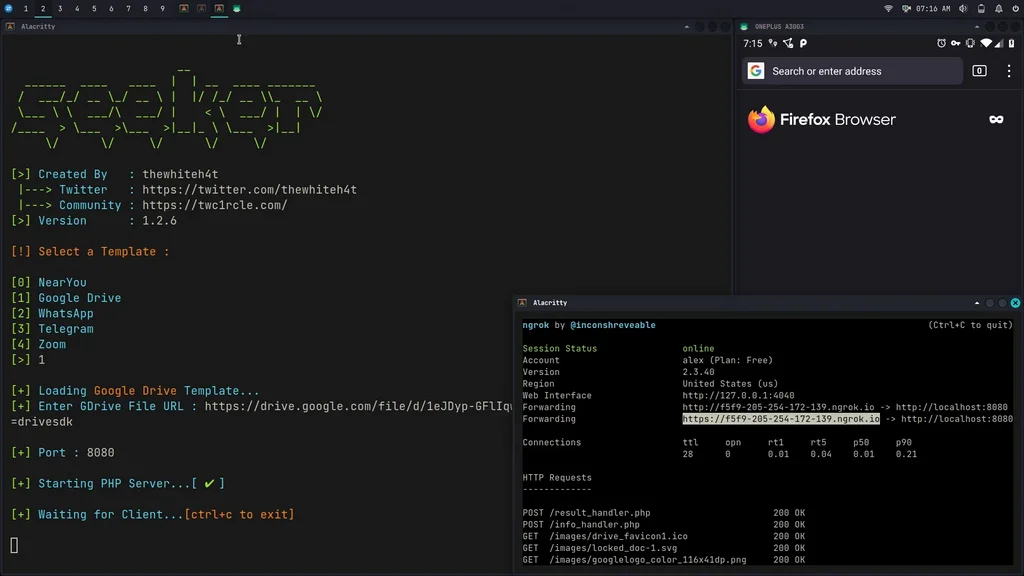
O conceito por trás do Seeker é simples, assim como hospedamos páginas de phishing para obter credenciais, por que não hospedar uma página falsa que solicita sua localização como muitos sites populares baseados em localização? Leia mais no blog do thewhiteh4t . O Seeker hospeda um site falso que pede permissão de localização e, se o alvo permitir, podemos obter:
Junto com as informações de localização, também obtemos Informações do Dispositivo sem nenhuma permissão:
O Reconhecimento Automático de Endereço IP é realizado após o recebimento das informações acima.
Esta ferramenta é uma Prova de Conceito e é apenas para fins educacionais. O Seeker mostra quais dados um site malicioso pode coletar sobre você e seus dispositivos e por que você não deve clicar em links aleatórios e permitir permissões críticas como Localização, etc.
Outras ferramentas e serviços oferecem IP Geolocalização, que NÃO é precisa e não fornece a localização do alvo, mas sim a localização aproximada do ISP.
O Seeker usa a API HTML e obtém a Permissão de Localização, depois captura Longitude e Latitude usando o hardware GPS presente no dispositivo, portanto o Seeker funciona melhor com smartphones. Se o hardware GPS não estiver presente, como em um laptop, o Seeker recorre à IP Geolocalização ou procura por Coordenadas em Cache.
Geralmente, se um usuário aceitar a permissão de localização, a precisão das informações recebidas é precisa em aproximadamente 30 metros
A precisão depende de múltiplos fatores que você pode ou não controlar, como:
Modelos disponíveis:
Crie seu próprio modelo! As etapas para você criar seu modelo estão descritas neste how-to
Depois que seu modelo estiver pronto, não se esqueça de propô-lo à comunidade através de um PR (pull request)
git clone https://github.com/thewhiteh4t/seeker.git
cd seeker/
chmod +x install.sh
./install.sh
sudo pacman -S seeker
docker pull thewhiteh4t/seeker
git clone https://github.com/thewhiteh4t/seeker.git
cd seeker/
python3 seeker.py
Para executar no modo de túnel, instale o ngrok executando este comando no terminal:
brew install ngrok/ngrok/ngrok

ngrok http 8080
python3 seeker.py -h

usage: seeker.py [-h] [-k KML] [-p PORT] [-u] [-v] [-t TEMPLATE] [-d] [--telegram token:chatId] [--webhook WEBHOOK]

options:
  -h, --help                            show this help message and exit
  -k KML, --kml KML                     KML filename
  -p PORT, --port PORT                  Web server port [ Default : 8080 ]
  -u, --update                          Check for updates
  -v, --version                         Prints version
  -t TEMPLATE, --template TEMPLATE      Auto choose the template with the given index
  -d, --debugHTTP                       Disable auto http --> https redirection for testing purposes
                                        (only works for the templates having index_temp.html file)
  --telegram                            Send info to a telegram bot, provide telegram token and chat to use
                                        format = token:chatId separated by a colon
  --webhook                             Send events to a webhook endpoint to be processed
                                        Note : endpoint must be unauthenticated and accept POST request

#########################
# Environment Variables #
#########################

Some of the options above can also be enabled via environment variables, to ease deployment.
Other parameters can be provided via environment variables to avoid interactive mode.

Variables:
  DEBUG_HTTP            Same as -d, --debugHTTP
  PORT                  Same as -p, --port
  TEMPLATE              Same as -t, --template
  TITLE                 Provide the group title or the page title
  REDIRECT              Provide the URL to redirect the user to, after the job is done
  IMAGE                 Provide the image to use, can either be remote (http or https) or local
                        Note : Remote image will be downloaded locally during the startup
  DESC                  Provide the description of the item (group or webpage depending on the template)
  SITENAME              Provide the name of the website
  DISPLAY_URL           Provide the URL to display on the page
  MEM_NUM               Provide the number of group membres (Telegram so far)
  ONLINE_NUM            Provide the number of the group online members (Telegram so far)
  TELEGRAM              Provide telegram token and chat to use to send info to a telegram bot
                        format = token:chatId separated by a colon
  WEBHOOK               Provide the webhook url to forward the events to
                        Note : endpoint should be unauthenticated and accept POST method


##################
# Usage Examples #
##################

# Step 1 : In first terminal
$ python3 seeker.py
