
Exibe informações sobre arquivos em diferentes formatos de arquivo e encontra gadgets para construir cadeias de ROP para diferentes arquiteturas (x86/x86_64, ARM/ARM64, MIPS, PowerPC, SPARC64). Para desmontagem, o ropper usa o incrível Capstone Framework.
Você pode usar o ropper para exibir informações sobre arquivos binários em diferentes formatos de arquivo e pesquisar gadgets para construir cadeias rop para diferentes arquiteturas (x86/X86_64, ARM/ARM64, MIPS/MIPS64, PowerPC/PowerPC64, SPARC64). Para desmontagem, o ropper usa o excelente Capstone Framework.
Instale Capstone com PyPi:
$ sudo pip install capstone
Instale filebytes com PyPi:
$ sudo pip install filebytes
Opcional (não necessário para executar o ropper, apenas para procurar gadgets):
Instale Keystone:
$ sudo pip install keystone-engine
Instale e execute o Ropper
$ python setup.py install
$ ropper
Você também pode instalar o Ropper com pip
$ pip install ropper
Se quiser, você pode usar o Ropper sem instalação
$ ./Ropper.py
Se você não quiser instalar o filebytes, o filebytes é um submódulo do repositório ropper. Isso significa que você não precisa instalar o filebytes e o ropper.
$ git clone https://github.com/sashs/ropper.git
$ cd ropper
$ git submodule init
$ git submodule update
$ ./Ropper.py
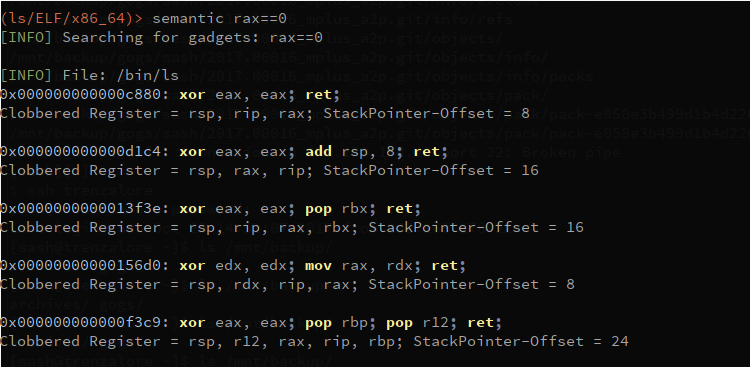
ESTA FUNCIONALIDADE AINDA ESTÁ EM DESENVOLVIMENTO! O Ropper possui um comando de busca semântica, que oferece a possibilidade de pesquisar gadgets.
$ ropper --file <afile> --semantic "<any constraint>"
As seguintes dependências opcionais são necessárias para usar a busca semântica:
Instale pyvex
$ sudo pip install pyvex
Instale z3py
$ python scripts/mk_make.py
$ cd build
$ make
$ sudo make install
reg == reg - atribuir registrador a outro
reg == number - atribuir número ao registrador
reg == [reg] - atribuir memória ao registrador
reg += number/reg/[reg]
reg -= number/reg/[reg]
reg *= number/reg/[reg]
reg /= number/reg/[reg]
eax==1 !ebx - define eax como 1 e procura gadgets que não alterem ebx
usage: Ropper.py [-h] [--help-examples] [-v] [--console]
[-f <file> [<file> ...]] [-r] [-a <arch>]
[--section <section>] [--string [<string>]] [--hex]
[--asm [<asm> [H|S|R] ...]] [--disasm <opcode>]
[--disassemble-address <address:length>] [-i] [-e]
[--imagebase] [-c] [-s] [-S] [--imports] [--symbols]
[--set <option>] [--unset <option>] [-I <imagebase>] [-p]
[-j <reg>] [--stack-pivot] [--inst-count <n bytes>]
[--search <regex>] [--quality <quality>] [--opcode <opcode>]
[--instructions <instructions>] [--type <type>] [--detailed]
[--all] [--cfg-only] [--chain <generator>] [-b <badbytes>]
[--nocolor] [--clear-cache] [--no-load] [--analyse <quality>]
[--semantic constraint]
[--count-of-findings <count of gadgets>] [--single]
Você pode usar o ropper para exibir informações sobre arquivos binários em diferentes formatos de arquivo
e pesquisar gadgets para construir cadeias rop para diferentes arquiteturas
tipos de arquivo suportados:
ELF
PE
Mach-O
Raw
arquiteturas suportadas:
x86 [x86]
x86_64 [x86_64]
MIPS [MIPS, MIPS64]
ARM/Thumb [ARM, ARMTHUMB]
ARM64 [ARM64]
PowerPC [PPC, PPC64]
SPARC [SPARC64]
geradores de cadeia rop disponíveis:
execve (execve[=<cmd>], padrão /bin/sh) [Linux x86, x86_64]
mprotect (mprotect=<address>:<size>) [Linux x86, x86_64]
virtualprotect (virtualprotect=<address iat vp>:<size>) [Windows x86]
opções:
-h, --help mostra esta mensagem de ajuda e sai
--help-examples Exibe exemplos
-v, --version Exibe a versão
--console Inicia a linha de comando interativa
-f <file> [<file> ...], --file <file> [<file> ...]
O arquivo a ser carregado
-r, --raw Carrega o arquivo como arquivo raw
-a <arch>, --arch <arch>
A arquitetura do arquivo carregado
--section <section> Os dados desta seção devem ser exibidos
--string [<string>] Procura pela string <string> em todas as seções de dados
--hex Exibe as seções selecionadas em formato hexadecimal
--asm [<asm> [H|S|R] ...]
Uma string para montar e um formato de saída
(H=HEX, S=STRING, R=RAW, padrão: H)
--disasm <opcode> Opcode para desmontar (ex.: ffe4, 89c8c3, ...)
--disassemble-address <address:length>
Desmonta a instrução no endereço <address>
(0x12345678:L3). A quantidade de instruções a
desmontar pode ser especificada (0x....:L...)
-i, --info Exibe o cabeçalho do arquivo [ELF/PE/Mach-O]
-e Exibe o EntryPoint
--imagebase Exibe a ImageBase [ELF/PE/Mach-O]
-c, --dllcharacteristics
Exibe as DllCharacteristics [PE]
-s, --sections Exibe as seções do arquivo [ELF/PE/Mach-O]
-S, --segments Exibe os segmentos do arquivo [ELF/Mach-O]
--imports Exibe as importações [ELF/PE]
--symbols Exibe os símbolos [ELF]
--set <option> Define opções. Opções disponíveis: aslr nx
--unset <option> Desativa opções. Opções disponíveis: aslr nx
-I <imagebase> Usa esta imagebase para gadgets
-p, --ppr Procura por instruções 'pop reg; pop reg; ret'
[apenas x86/x86_64]
-j <reg>, --jmp <reg>
Procura por instruções 'jmp reg' (-j reg[,reg...])
[apenas x86/x86_64]
--stack-pivot Exibe todos os gadgets de stack pivot
--inst-count <n bytes>
Especifica a quantidade máxima de instruções em um gadget
(padrão: 6)
--search <regex> Procura por gadgets
--quality <quality> A qualidade dos gadgets encontrados pela pesquisa (1 =
melhor)
--opcode <opcode> Procura por opcodes (ex.: ffe4 ou ffe? ou ff??)
--instructions <instructions>
Procura por instruções (ex.: "jmp esp", "pop eax;
ret")
--type <type> Define o tipo de gadgets [rop, jop, sys, all]
(padrão: all)
--detailed Exibe gadgets com mais detalhes
--all Não remove gadgets duplicados
--cfg-only Filtra gadgets que falham na verificação CFG da Microsoft.
Apenas para arquivos PE compilados com verificação CFG
ativada (verifique DllCharachteristics) [PE]
--chain <generator> Gera uma cadeia rop [generator parameter=value[
parameter=value]]
-b <badbytes>, --badbytes <badbytes>
Define bytes que não devem estar contidos nos gadgets
--nocolor Desativa a saída colorida
--clear-cache Limpa o cache
--no-load Não carrega os gadgets automaticamente ao iniciar o console
(--console)
--analyse <quality> usado apenas para a implementação da busca semântica
--semantic constraint
busca semântica por gadgets
--count-of-findings <count of gadgets>
Quantidade máxima de gadgets que serão exibidos com
busca semântica (0 = indefinido, padrão: 5)
--single Nenhum processo múltiplo é usado para escanear gadgets
exemplos de uso:
[Genérico]
./Ropper.py
./Ropper.py --file /bin/ls --console
[Informações]
./Ropper.py --file /bin/ls --info
./Ropper.py --file /bin/ls --imports
./Ropper.py --file /bin/ls --sections
./Ropper.py --file /bin/ls --segments
./Ropper.py --file /bin/ls --set nx
./Ropper.py --file /bin/ls --unset nx
./Ropper.py --file /bin/ls --inst-count 5
./Ropper.py --file /bin/ls --search "sub eax" --badbytes 000a0d
./Ropper.py --file /bin/ls --search "sub eax" --detail
./Ropper.py --file /bin/ls --filter "sub eax"
./Ropper.py --file /bin/ls --inst-count 5 --filter "sub eax"
./Ropper.py --file /bin/ls --opcode ffe4
./Ropper.py --file /bin/ls --opcode ffe?
./Ropper.py --file /bin/ls --opcode ??e4
./Ropper.py --file /bin/ls --detailed
./Ropper.py --file /bin/ls --ppr --nocolor
./Ropper.py --file /bin/ls --jmp esp,eax
./Ropper.py --file /bin/ls --type jop
./Ropper.py --file /bin/ls --chain execve
./Ropper.py --file /bin/ls --chain "execve cmd=/bin/sh" --badbytes 000a0d
./Ropper.py --file /bin/ls --chain "mprotect address=0xbfdff000 size=0x21000"
./Ropper.py --file /bin/ls /lib/libc.so.6 --console
[Montar/Desmontar]
./Ropper.py --asm "jmp esp"
./Ropper.py --asm "mov eax, ecx; ret"
./Ropper.py --disasm ffe4
[Busca]
./Ropper.py --file /bin/ls --search <searchstring>
? qualquer caractere
% qualquer string
Exemplo:
./Ropper.py --file /bin/ls --search "mov e?x"
0x000067f1: mov edx, dword ptr [ebp + 0x14]; mov dword ptr [esp], edx; call eax
0x00006d03: mov eax, esi; pop ebx; pop esi; pop edi; pop ebp; ret ;
0x00006d6f: mov ebx, esi; mov esi, dword ptr [esp + 0x18]; add esp, 0x1c; ret ;
0x000076f8: mov eax, dword ptr [eax]; mov byte ptr [eax + edx], 0; add esp, 0x18; pop ebx; ret ;
./Ropper.py --file /bin/ls --search "mov [%], edx"
0x000067ed: mov dword ptr [esp + 4], edx; mov edx, dword ptr [ebp + 0x14]; mov dword ptr [esp], edx; call eax;
0x00006f4e: mov dword ptr [ecx + 0x14], edx; add esp, 0x2c; pop ebx; pop esi; pop edi; pop ebp; ret ;
0x000084b8: mov dword ptr [eax], edx; ret ;
0x00008d9b: mov dword ptr [eax], edx; add esp, 0x18; pop ebx; ret ;
./Ropper.py --file /bin/ls --search "mov [%], edx" --quality 1
0x000084b8: mov dword ptr [eax], edx; ret ;; ret ;
#!/usr/bin/env python
from ropper import RopperService
# not all options need to be given
options = {'color' : False, # if gadgets are printed, use colored output: default: False
'badbytes': '00', # bad bytes which should not be in addresses or ropchains; default: ''
'all' : False, # Show all gadgets, this means to not remove double gadgets; default: False
'inst_count' : 6, # Number of instructions in a gadget; default: 6
'type' : 'all', # rop, jop, sys, all; default: all
'detailed' : False} # if gadgets are printed, use detailed output; default: False
rs = RopperService(options)
##### change options ######
rs.options.color = True
rs.options.badbytes = '00'
rs.options.badbytes = ''
rs.options.all = True
##### open binaries ######
# it is possible to open multiple files
rs.addFile('test-binaries/ls-x86')
rs.addFile('ls', bytes=open('test-binaries/ls-x86','rb').read()) # other possiblity
rs.addFile('ls_raw', bytes=open('test-binaries/ls-x86','rb').read(), raw=True, arch='x86')
##### close binaries ######
rs.removeFile('ls')
rs.removeFile('ls_raw')
# Set architecture of a binary, so it is possible to look for gadgets for a different architecture
# It is useful for ARM if you want to look for ARM gadgets or Thumb gadgets
# Or if you opened a raw file
ls = 'test-binaries/ls-x86'
rs.setArchitectureFor(name=ls, arch='x86')
rs.setArchitectureFor(name=ls, arch='x86_64')
rs.setArchitectureFor(name=ls, arch='ARM')
rs.setArchitectureFor(name=ls, arch='ARMTHUMB')
rs.setArchitectureFor(name=ls, arch='ARM64')
rs.setArchitectureFor(name=ls, arch='MIPS')
rs.setArchitectureFor(name=ls, arch='MIPS64')
rs.setArchitectureFor(name=ls, arch='PPC')
rs.setArchitectureFor(name=ls, arch='PPC64')
rs.setArchitectureFor(name=ls, arch='SPARC64')
rs.setArchitectureFor(name=ls, arch='x86')
##### load gadgets ######
# load gadgets for all opened files
rs.loadGadgetsFor()
# load gadgets for only one opened file
ls = 'test-binaries/ls-x86'
rs.loadGadgetsFor(name=ls)
# change gadget type
rs.options.type = 'jop'
rs.loadGadgetsFor()
rs.options.type = 'rop'
rs.loadGadgetsFor()
# change instruction count
rs.options.inst_count = 10
rs.loadGadgetsFor()
##### print gadgets #######
rs.printGadgetsFor() # print all gadgets
rs.printGadgetsFor(name=ls)
##### Get gadgets ######
gadgets = rs.getFileFor(name=ls).gadgets
##### search pop pop ret ######
pprs = rs.searchPopPopRet(name=ls) # looks for ppr only in 'test-binaries/ls-x86'
pprs = rs.searchPopPopRet() # looks for ppr in all opened files
for file, ppr in pprs.items():
for p in ppr:
print p
##### load jmp reg ######
jmp_regs = rs.searchJmpReg(name=ls, regs=['esp', 'eax']) # looks for jmp reg only in 'test-binaries/ls-x86'
jmp_regs = rs.searchJmpReg(regs=['esp', 'eax'])
jmp_regs = rs.searchJmpReg() # looks for jmp esp in all opened files
for file, jmp_reg in jmp_regs.items():
for j in jmp_reg:
print j
##### search opcode ######
ls = 'test-binaries/ls-x86'
gadgets_dict = rs.searchOpcode(opcode='ffe4', name=ls)
gadgets_dict = rs.searchOpcode(opcode='ffe?')
gadgets_dict = rs.searchOpcode(opcode='??e4')
for file, gadgets in gadgets_dict.items():
for g in gadgets:
print g
##### search instructions ######
ls = 'test-binaries/ls-x86'
for file, gadget in rs.search(search='mov e?x', name=ls):
print file, gadget
for file, gadget in rs.search(search='mov [e?x%]'):
print file, gadget
result_dict = rs.searchdict(search='mov eax')
for file, gadgets in result_dict.items():
print file
for gadget in gadgets:
print gadget
##### assemble instructions ######
hex_string = rs.asm('jmp esp')
print '"jmp esp" assembled to hex string =', hex_string
raw_bytes = rs.asm('jmp esp', format='raw')
print '"jmp esp" assembled to raw bytes =', raw_bytes
string = rs.asm('jmp esp', format='string')
print '"jmp esp" assembled to string =',string
arm_bytes = rs.asm('bx sp', arch='ARM')
print '"bx sp" assembled to hex string =', arm_bytes
##### disassemble bytes #######
arm_instructions = rs.disasm(arm_bytes, arch='ARM')
print arm_bytes, 'disassembled to "%s"' % arm_instructions
# Change the imagebase, this also change the imagebase for all loaded gadgets of this binary
rs.setImageBaseFor(name=ls, imagebase=0x0)
# reset image base
rs.setImageBaseFor(name=ls, imagebase=None)
gadgets = rs.getFileFor(name=ls).gadgets
# gadget address
print hex(gadgets[0].address)
# get instruction bytes of gadget
print bytes(gadgets[0].bytes).encode('hex')
# remove all gadgets containing bad bytes in address
rs.options.badbytes = '000a0d' # gadgets are filtered automatically


