
Enumera todos os sites nas redes de uma organização através de transferências de zona DNS e masscan, armazena respostas, e permite consultar tecnologias web vulneráveis conhecidas e padrões regex personalizados.
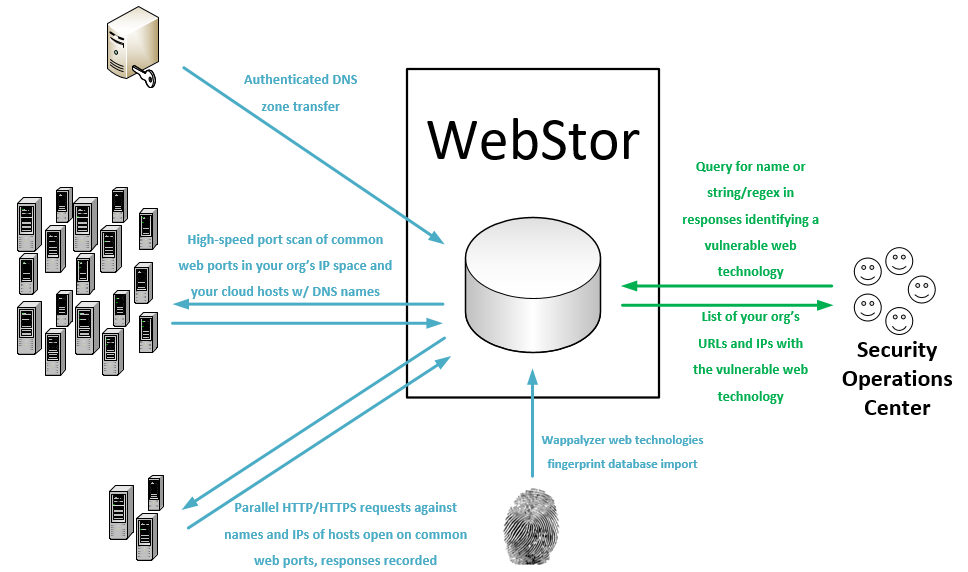
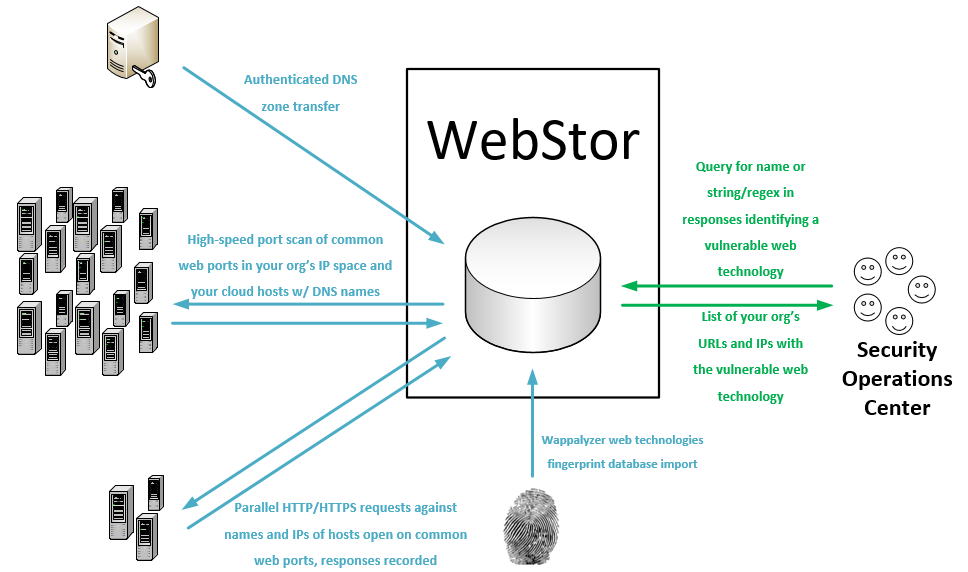
WebStor é uma ferramenta implementada em Python sob a licença MIT para enumerar rapidamente todos os sites em todas as redes da sua organização, armazenar suas respostas e consultar tecnologias e versões web conhecidas, como aquelas com vulnerabilidades de dia zero. Destina-se, em particular, a resolver o problema único apresentado em organizações de médio a grande porte com administração descentralizada, onde pode ser quase impossível rastrear todas as tecnologias web implantadas por vários administradores distribuídos em diferentes unidades e redes.
WebStor alcança seu objetivo realizando as seguintes ações:
WebStor atualmente será executado em sistemas Linux. Como é escrito em Python, a conversão para suportar Windows seria trivial e provavelmente acontecerá no futuro.
webstor.py [-h] [--ADD-HTTP-PORT HTTPPORTTOADD] [--CLEAR-HTTP]
[--ADD-HTTPS-PORT HTTPSPORTTOADD] [--CLEAR-HTTPS]
[--ADD-CUSTOM-FINGERPRINT FINGERPRINT]
[--DELETE-CUSTOM-FINGERPRINT FINGERPRINTNAMETODELETE]
[--IMPORT-CUSTOM-FINGERPRINT IMPORTFINGERPRINTFILE]
[--CLEAR-CUSTOM-FINGERPRINTS] [--SHOW-CONFIG]
[--SHOW-CONFIG-FULL] [--RUN-MASSCAN]
[--SET-MASSCAN-RANGES SETSCANRANGES]
[--ADD-RANGE RANGETOADD] [--DELETE-RANGE RANGETODELETE]
[--IMPORT-MASSCAN-RANGES IMPORTSCANRANGES]
[--ADD-PATH PATHTOADD] [--DELETE-PATH PATHTODELETE]
[--CLEAR-PATHS] [--REFRESH-RESPONSES]
[--RESPONSES-ADD-FOR-PATH RESPONSESADDFORPATH]
[--SEARCH-PATTERN SEARCHPATTERN]
[--SEARCH-CUSTOM-FINGERPRINT SEARCHFINGERPRINT]
[--SEARCH-WAPPALYZER SEARCHWAPPALYZER] [--NO-TSIG-KEY]
[--TSIG-KEY-IMPORT IMPORTTSIGFILE]
[--TSIG-KEY-REPLACE REPLACEMENTTSIGFILE]
[--DELETE-TSIG TSIGTODELETE]
[--USE-TSIG-FILE-ONLY USETSIGFILEONLY]
[--DOWNLOAD-NEW-WAPPALYZER] [--LIST-WAPPALYZER-TECH-NAMES]
[--ZONE-XFER] [--ADD-DOMAIN DOMAINDETAILS]
[--DELETE-DOMAIN DOMAINTODELETE]
[--IMPORT-ZONE-FILE IMPORTZONEFILE] [--CLEAR-DOMAINS]
[--LIST-DOMAINS] [--LIST-OUTSIDE] [--SQL-CREDS SQLCREDSFILE]
optional arguments:
-h, --help show this help message and exit
--ADD-HTTP-PORT HTTPPORTTOADD, -a HTTPPORTTOADD
Add a custom HTTP port.
--CLEAR-HTTP, -aC Clear any custom HTTP ports and revert to default of
80.
--ADD-HTTPS-PORT HTTPSPORTTOADD, -b HTTPSPORTTOADD
Add a custom HTTPS port.
--CLEAR-HTTPS, -bC Clear any custom HTTPS ports and revert to default of
443.
--ADD-CUSTOM-FINGERPRINT FINGERPRINT, -c FINGERPRINT
Add a custom fingerprint in the form <Name>,<RegEx>.
--DELETE-CUSTOM-FINGERPRINT FINGERPRINTNAMETODELETE, -cD FINGERPRINTNAMETODELETE
Delete a custom fingerprint by name.
--IMPORT-CUSTOM-FINGERPRINT IMPORTFINGERPRINTFILE, -cI IMPORTFINGERPRINTFILE
Import a custom fingerprint file with the path
specified.
--CLEAR-CUSTOM-FINGERPRINTS, -cC
Clears all custom fingerprints stored in DB.
--SHOW-CONFIG, -g Show current WebStor configuration (brief).
--SHOW-CONFIG-FULL, -gF
Show current WebStor configuration (full).
--RUN-MASSCAN, -m Runs a new port scan with Masscan on all configured
TCP ports for HTTP and HTTPS, against all configured
ranges and any IP addresses from DNS records that are
outside those ranges.
--SET-MASSCAN-RANGES SETSCANRANGES, -mR SETSCANRANGES
Scan range or ranges, replaces existing ranges in DB,
comma separated, such as: -s
10.10.0.0/16,10.13.0.0/16,192.168.1.0/24
--IMPORT-MASSCAN-RANGES IMPORTSCANRANGES, -mI IMPORTSCANRANGES
Import scan ranges (CIDR blocks) from a specified
file.
--DELETE-RANGE RANGETODELETE, -mD RANGETODELETE
Delete scan range.
--ADD-PATH PATHTOADD, -p PATHTOADD
Add paths for which to request and store responses
besides '/'.
--DELETE-PATH PATHTODELETE, -pD PATHTODELETE
Delete paths for which to request and store responses
besides '/'.
--CLEAR-PATHS, -pC Clear any custom URL request paths and revert to
default of '/'.
--REFRESH-RESPONSES, -r
Refresh URL responses in DB.
--RESPONSES-ADD-FOR-PATH RESPONSESADDFORPATH, -rP RESPONSESADDFORPATH
Add URL responses for a one-time path in with the
current responses in the DB.
--SEARCH-PATTERN SEARCHPATTERN, -sP SEARCHPATTERN
Search for string or regular expression in WebStor
database.
--SEARCH-CUSTOM-FINGERPRINT SEARCHFINGERPRINT, -sC SEARCHFINGERPRINT
Search for technology by name of user-provided custom
fingerprint.
--SEARCH-WAPPALYZER SEARCHWAPPALYZER, -sW SEARCHWAPPALYZER
Search for technology by name (from Wappalyzer Tech
DB) in WebStor DB.
--NO-TSIG-KEY, -tN Do not use DNSSec TSIG key stored in database or a
file, even if present.
--TSIG-KEY-IMPORT IMPORTTSIGFILE, -tI IMPORTTSIGFILE
Import a specified TSIG key file into the database
--TSIG-KEY-REPLACE REPLACEMENTTSIGFILE, -tR REPLACEMENTTSIGFILE
Replace a TSIG key in the database with a specified
file
--DELETE-TSIG TSIGTODELETE, -dT TSIGTODELETE
Delete a TSIG key from the database by name.
--USE-TSIG-FILE-ONLY USETSIGFILEONLY, -tF USETSIGFILEONLY
Only use tsig file specified (full path), do not use
TSIGs stored in the DB. Applies to all domains,
limiting WebStor to one TSIG for zone transfers in the
current execution.
--DOWNLOAD-NEW-WAPPALYZER, -w
Download a new Wappalyzer fingerprints file directly
from GitHub. Overwrites existing Wappalyzer
fingerprint data.
--LIST-WAPPALYZER-TECH-NAMES, -wL
List the names of all Wappalyzer technologies in the
database.
--ZONE-XFER, -z Forces a new zone transfer using all domains, servers,
and associated TSIG keys in DB
--ADD-DOMAIN DOMAINDETAILS, -zA DOMAINDETAILS
Add a domain in the form <Domain name>,<Server>,<TSIG
Key Name>.
--DELETE-DOMAIN DOMAINTODELETE, -zD DOMAINTODELETE
Delete a DNS domain from the database by name.
--IMPORT-ZONE-FILE IMPORTZONEFILE, -zI IMPORTZONEFILE
Add domains for zone transfers from a file.
--CLEAR-DOMAINS, -zC Clears all DNS domains stored in DB.
--LIST-DOMAINS, -zL Lists all DNS domains stored in DB.
--LIST-OUTSIDE, -e Prints a list of all names and IPs from our zone
transfers that are outside defined net ranges.
--SQL-CREDS SQLCREDSFILE, -q SQLCREDSFILE
Use SQL credentials in file at specified path.
NOTA: Estas etapas assumem que sua organização usa apenas uma chave TSIG para transferências de zona e que todos os registros podem ser consultados de um servidor DNS. Se não for o caso, consulte a seção de casos de uso seguros/esotéricos abaixo.
# Procure por uma string/regex associada a uma tecnologia web:
./webstor.py -sP "content=\"wordpress 4.[7-9]"
# Uma lista de sites com esta regex, respostas esperadas de sites Wordpress v4.7-9,
# será retornada.
# Para salvar a regex do exemplo acima como uma impressão digital personalizada que você pode consultar
# pelo nome (e não precisa lembrar da regex toda vez):
./webstor.py -c "wordpress4.7-9,content=\"wordpress 4.[7-9]"
# Após executar o comando acima, a consulta pode ser realizada simplesmente com:
./webstor.py -sC wordpress4.7-9
# Usando o WebStor para procurar sites Wordpress via definições do Wappalyzer:
./webstor.py -sW wordpress
# Uma lista de sites Wordpress acessíveis nas redes da sua organização será
# retornada. NOTA: As pesquisas do Wappalyzer podem ser mais lentas do que pesquisas de padrão/regex
# devido ao número de propriedades consultadas para verificar.
Os sites são consultados com base nas respostas tanto para nomes quanto para endereços IP. Isso é importante porque alguns servidores web hospedam vários sites sob vários nomes. Outros servidores podem servir apenas um site padrão ou a resposta padrão do provedor de hospedagem quando solicitados pelo IP (por exemplo, https://68.66.216.42), e um site real de linha de negócio quando consultados pelo nome (por exemplo, https://www.seekerdlp.com). Por esse motivo, se você tiver um site nomeado que também é servido quando o IP do servidor web é solicitado, você verá resultados de consulta para ambos.
Recomenda-se que você configure um cron job para executar o WebStor diariamente para que seus resultados de consulta sempre reflitam o estado atual da sua rede.
Se você não quiser usar as credenciais padrão do MariaDB (root, senha em branco), pode usar a opção -q para especificar o caminho para um arquivo com credenciais. A primeira linha do arquivo deve ser o servidor, por exemplo, localhost. A segunda linha deve ser o nome do usuário sql. A terceira linha deve ser a senha.
Se você não deseja armazenar sua chave TSIG no banco de dados, pode usar a opção -tF para especificar o caminho para um arquivo de chave TSIG com ACL.
Se sua organização utiliza múltiplas chaves TSIG, você precisará armazená-las no banco de dados. Cada uma pode ser adicionada com a opção -tI e os domínios podem ser adicionados através das opções normais, especificando a chave e o servidor apropriados.
O WebStor usa o banco de dados de tecnologias do Wappalyzer para consultas de tecnologia pré-populadas e indexadas por nome contra as respostas armazenadas do WebStor. O Wappalyzer é licenciado sob os termos da licença MIT.
WebStor foi escrito por Ross Geerlings <rjgeer@umich.edu>, <ross@seekerdlp.com>.
WebStor é licenciado sob os termos da licença MIT, reproduzida abaixo.
The MIT License
Copyright (c) 2020-2024 The University of Michigan Board of Regents.
Permission is hereby granted, free of charge, to any person obtaining a copy of this software and associated documentation files (the "Software"), to deal in the Software without restriction, including without limitation the rights to use, copy, modify, merge, publish, distribute, sublicense, and/or sell copies of the Software, and to permit persons to whom the Software is furnished to do so, subject to the following conditions:
The above copyright notice and this permission notice shall be included in all copies or substantial portions of the Software.
THE SOFTWARE IS PROVIDED "AS IS", WITHOUT WARRANTY OF ANY KIND, EXPRESS OR IMPLIED, INCLUDING BUT NOT LIMITED TO THE WARRANTIES OF MERCHANTABILITY, FITNESS FOR A PARTICULAR PURPOSE AND NONINFRINGEMENT. IN NO EVENT SHALL THE AUTHORS OR COPYRIGHT HOLDERS BE LIABLE FOR ANY CLAIM, DAMAGES OR OTHER LIABILITY, WHETHER IN AN ACTION OF CONTRACT, TORT OR OTHERWISE, ARISING FROM, OUT OF OR IN CONNECTION WITH THE SOFTWARE OR THE USE OR OTHER DEALINGS IN THE SOFTWARE.