
Automatize a ofuscação e virtualização de código-fonte de scripts PowerShell com uma API Web flexível para Python (pacote pip).
PowerShell Pro Obfuscator protege scripts .ps1 proprietários com renomeação, criptografia polimórfica de strings e inteiros, achatamento de fluxo de controle, autômatos finitos (FSA), um motor de VM, verificações de integridade autodefensivas, um linker de proteção e sondas anti-debugging.
Ofusque, virtualize & proteja scripts PowerShell .ps1 com criptografia polimórfica de strings, motor de VM, transformações de autômatos finitos, verificações de auto-integridade & anti-debugging — via GUI, CLI, ferramenta online ou API.
Mais detalhes técnicos, downloads e documentação disponíveis em:
https://www.pelock.com/products/powershell-pro-obfuscator
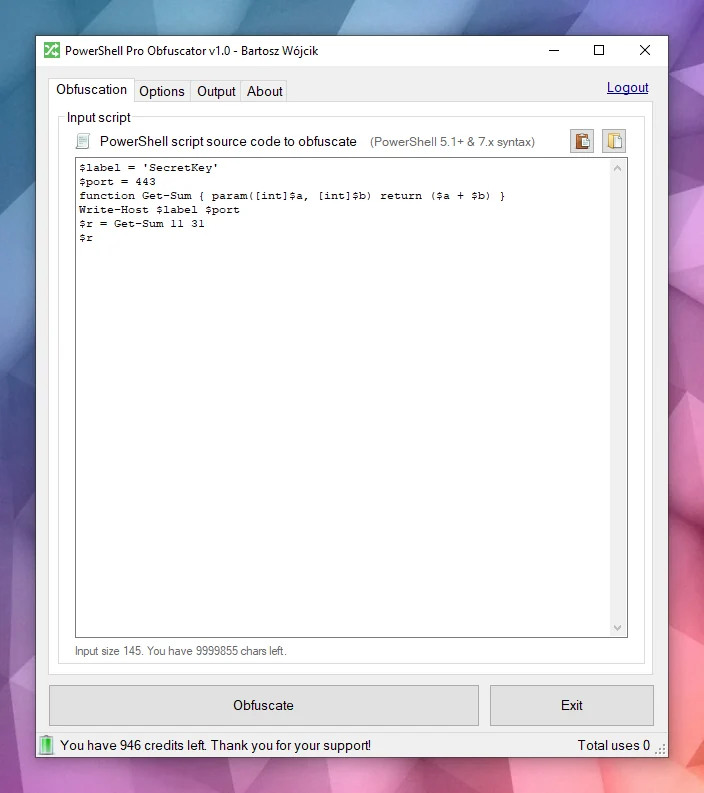
Está disponível para Windows & Linux:
Múltiplas APIs de programação disponíveis:
Uma interface de ofuscação online:
Scripts são normalmente distribuídos como arquivos .ps1 simples ou embutidos em módulos. Essa conveniência significa que qualquer pessoa com acesso ao arquivo pode ler toda a lógica, procurar credenciais ou chaves de API em strings e roubar seus algoritmos, a menos que você tome medidas extras para ocultar a intenção.
PowerShell é um shell e linguagem de script multiplataforma construído sobre .NET. É amplamente utilizado para automação, configuração, pipelines de DevOps e gerenciamento de endpoints no Windows e Linux.
O PowerShell Pro Obfuscator vem com muitas estratégias avançadas de ofuscação, virtualização e proteção. Você pode facilmente ajustar a proteção em relação ao tamanho e desempenho.
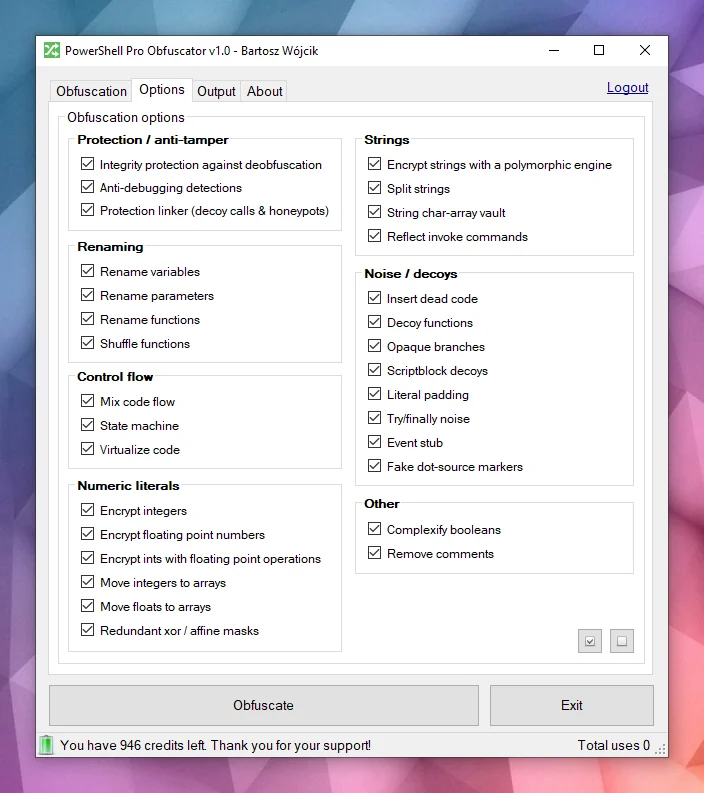
Ofuscação poderosaO PowerShell Pro Obfuscator usa estratégias de ofuscação de última geração, como criptografia polimórfica de strings, criptografia de inteiros e floats, e ruído de isca. O resultado oculta literais e estrutura, preservando o comportamento de runtime testado.
Virtualização de códigoInstruções selecionadas são elevadas para opcodes de um motor de VM gerado aleatoriamente, com casos de switch embaralhados, opcodes de isca e um loop de despacho ofuscado. Analistas devem interpretar a máquina virtual em vez de ler PowerShell simples.
Autômatos finitos (FSA)A ofuscação por autômatos finitos (FSA) reescreve blocos lineares de instruções PowerShell em autômatos de estado duplo com agendadores opacos e manipuladores de despacho embaralhados. Em vez de ler o código de cima para baixo, analistas devem seguir estados numéricos, tabelas de transição e caminhos de isca para reconstruir a ordem original.
Anti-debuggingA proteção anti-debugging insere sondas polimórficas que detectam depuradores anexados, breakpoints do PowerShell, preferências de depuração e modos de rastreamento, e sinais relacionados do host. Quando uma verificação é acionada, o script ofuscado sai silenciosamente em vez de revelar lógica protegida sob análise interativa.
Verificações de auto-integridadeUma sonda de bootstrap verifica a forma do script em disco (contagens de funções e tokens de integridade) e define uma chave de adulteração quando o arquivo não corresponde mais à compilação ofuscada. Os descriptografadores de strings consomem essa chave, então scripts corrigidos retornam lixo em vez de texto simples. Essa camada autodefensiva aumenta o custo de desofuscação casual e edições de arquivo.
Linker de proteçãoUma passagem tardia conecta resolvedores de honeypot, chamadas de ajuda falsas com argumentos aleatórios e armadilhas de pilha rasa que permanecem ativas apenas antes da conclusão do bootstrap. Trechos extraídos mantêm superfícies de chamada ruidosas que parecem reais sob revisão estática. A execução normal após uma verificação de integridade bem-sucedida permanece inalterada.
Veja este exemplo — o mesmo script se torna mais difícil de ler rapidamente após a ofuscação.
function Get-Greeting {
param([string]$Name)
Write-Host "Hello World from $Name!"
}
Get-Greeting "PowerShell Pro Obfuscator"
$script:_HnJTskg = 0
$jwNTQ = 297 * 400 + 36
$x4e8bfda = [Math]::Abs($jwNTQ - 8074)
$_EvKocNn = [Math]::Max($jwNTQ, $x4e8bfda) - [Math]::Min($jwNTQ, $x4e8bfda)
[void]$_EvKocNn
$script:_jUoXkBYh = 0
function gnJjzMCN3V8P {
param([int]$slot, [int]$salt, [int]$guard)
if (-not ((Get-Variable -Name _HnJTskg -Scope Script -ErrorAction SilentlyContinue).Value)) { return '' }
@('JFE', 'm0ao', 'R8Ysw') | ForEach-Object { $_.ToUpper() } | Out-Null
if ((((($slot * 31) + $salt) -band 65535) -ne $guard)) { return '' }
$tk = (Get-Variable -Name _jUoXkBYh -Scope Script -ErrorAction SilentlyContinue).Value
$IEm39CSpDOEFp = @{ 'Ouj1' = 455; 'vjzO' = 170; 'IQNV' = 291 }
$IEm39CSpDOEFp['R5LrM'] = $IEm39CSpDOEFp['Ouj1'] + $IEm39CSpDOEFp['vjzO']
$YWxSO = ($IEm39CSpDOEFp.Values | Measure-Object -Sum).Sum
[void]$YWxSO
if ($null -eq $tk) { [long]$tk = 0 }
$v93a130f2e4 = 508
switch ($v93a130f2e4) {
524 { $_GYF7IA14Go = 'H1Vph' }
561 { $_GYF7IA14Go = 'HAWoB' }
default { $_GYF7IA14Go = $v93a130f2e4 * 2 }
}
[void]$_GYF7IA14Go
$dk = (Get-Variable -Name vb6a18ffee4 -Scope Script -ErrorAction SilentlyContinue).Value
try { $xgLN5KZyEusFo7 = [Math]::Sqrt(850) } finally { [void]$xgLN5KZyEusFo7 }
if ($null -eq $dk) { [long]$dk = 0 }
$d = @(46866, 46865)
if ((((-not 113))-and(([int](272 -ne 272) -eq 21)))-and(([Math]::Sign(-12) -eq 4))) { $w4iTzi2hooy1GW = @(711, 562, 665); $w4iTzi2hooy1GW = ($w4iTzi2hooy1GW | Measure-Object -Sum).Sum }
$r = ''
for ($s9qOSpiZzufQlVyV = 0; $s9qOSpiZzufQlVyV -lt $d.Length; $s9qOSpiZzufQlVyV++) {
[long]$v = [long]$d[$s9qOSpiZzufQlVyV]
for ($jL9gL7PEtQeIS = 2; $jL9gL7PEtQeIS -ge 0; $jL9gL7PEtQeIS--) {
for ($PsbomDHxAy = 2; $PsbomDHxAy -ge 0; $PsbomDHxAy--) {
[long]$v = [long]$v + ([long](https://github.com/pelock/powershell-pro-obfuscator-python/blob/HEAD/230))
}
}
for ($zhH33vzxjIzegl9 = 0; $zhH33vzxjIzegl9 -ge 0; $zhH33vzxjIzegl9--) {
[long]$v = [long]$v + ([long]([int]((((((236 + (-3 * $s9qOSpiZzufQlVyV) + (3 * $zhH33vzxjIzegl9))) % 256) + 256) % 256))))
[long]$v = [long]$v -bxor ([long](https://github.com/pelock/powershell-pro-obfuscator-python/blob/HEAD/53766))
}
[long]$v = [long]$v - ([long]($salt + $slot + $tk + $dk + 0))
if ([long]$v -ge 0 -and [long]$v -le 0xFFFF) { $r += [char][int][long]$v }
elseif ([long]$v -ge 0x10000 -and [long]$v -le 0x10FFFF) { $r += [System.Char]::ConvertFromUtf32([int][long]$v) }
}
return $r
}
and more...
Você ainda reconheceria a intenção original se tivesse apenas o texto ofuscado e nenhuma cópia anterior do script?

O motor analisa o código-fonte PowerShell em uma árvore AST e, em seguida, aplica transformações selecionáveis: renomeação de identificadores, achatamento de fluxo de controle, autômatos finitos (FSA), virtualização de VM, criptografia polimórfica de strings e inteiros, inserção de ruído e iscas, sondas de integridade autodefensivas, o linker de proteção e verificações anti-debugging. Muitas técnicas são específicas deste produto; algumas ideias são compartilhadas com nossas outras ferramentas de proteção.

Quando todas as passagens terminam, o motor emite um novo .ps1. Casos extremos na gramática do PowerShell e em ambientes de hospedagem significam que você deve sempre testar a saída no seu runtime de destino.
Não corra riscos, use o PowerShell Pro Obfuscator para ofuscar, virtualizar e proteger seus scripts e algoritmos PowerShell.
Nossa empresa tem uma longa história em tecnologias de ofuscação e ofuscadores de código (veja nossos ofuscadores de x86 Assembly, AutoIt e Java).
Corrigimos bugs ativamente, pesquisamos e desenvolvemos novas estratégias de ofuscação para nossas ferramentas.
Você pode contar com nossa experiência e suporte neste campo.
A forma preferida de instalação da interface WebApi é via pip.
Execute:
pip install powershell-pro-obfuscator
ou
python3 -m pip install powershell-pro-obfuscator
E então adicione este import ao seu código-fonte:
from powershellproobfuscator import PowerShellProObfuscator
O pacote de instalação está disponível em https://pypi.org/project/powershell-pro-obfuscator/
#!/usr/bin/env python
###############################################################################
#
# PowerShell Pro Obfuscator WebApi interface usage example.
#
# In this example we will obfuscate sample source with default options.
#
# Version : v1.0.0
# Language : Python
# Author : Bartosz Wójcik
# Web page : https://www.pelock.com
#
###############################################################################
#
# include PowerShell Pro Obfuscator module
#
from powershellproobfuscator import PowerShellProObfuscator
#
# if you don't want to use Python module, you can import directly from the file
#
#from pelock.powershellproobfuscator import PowerShellProObfuscator
#
# create PowerShell Pro Obfuscator class instance (we are using our activation key)
#
myPowerShellProObfuscator = PowerShellProObfuscator("ABCD-ABCD-ABCD-ABCD")
#
# source code in PowerShell format
#
scriptSourceCode = """function Get-Greeting {
param([string]$Name)
Write-Host "Hello World from $Name!"
}
Get-Greeting "PowerShell Pro Obfuscator\""""
#
# by default all obfuscation options are enabled, so we can just simply call
#
result = myPowerShellProObfuscator.obfuscate_script_source(scriptSourceCode)
#
# it's also possible to pass a PowerShell script file path instead of a string with the source e.g.
#
# result = myPowerShellProObfuscator.obfuscate_script_file("/path/to/project/script.ps1")
#
# result[] array holds the obfuscation results as well as other information
#
# result["error"] - error code
# result["output"] - obfuscated code
# result["demo"] - was it used in demo mode (invalid or empty activation key was used)
# result["credits_left"] - usage credits left after this operation
# result["credits_total"] - total number of credits for this activation code
# result["expired"] - if this was the last usage credit for the activation key it will be set to True
#
if result and "error" in result:
# display obfuscated code
if result["error"] == PowerShellProObfuscator.ERROR_SUCCESS:
# format output code for HTML display
print(result["output"])
else:
print(f'An error occurred, error code: {result["error"]}')
else:
print("Something unexpected happen while trying to obfuscate the code.")
#!/usr/bin/env python
###############################################################################
#
# PowerShell Pro Obfuscator WebApi interface usage example.
#
# In this example we will obfuscate sample source with custom options.
#
# Version : v1.0.0
# Language : Python
# Author : Bartosz Wójcik
# Web page : https://www.pelock.com
#
###############################################################################
#
# include PowerShell Pro Obfuscator module
#
from powershellproobfuscator import PowerShellProObfuscator
#
# if you don't want to use Python module, you can import directly from the file
#
#from pelock.powershellproobfuscator import PowerShellProObfuscator
#
# create PowerShell Pro Obfuscator class instance (we are using our activation key)
#
myPowerShellProObfuscator = PowerShellProObfuscator("ABCD-ABCD-ABCD-ABCD")
#
# should the source code be compressed (both input & compressed)
#
myPowerShellProObfuscator.enableCompression = False
#
# global obfuscation options
#
# you can disable a particular obfuscation strategy globally if it
# fails or you don't want to use it without modifying the source codes
#
# by default all obfuscation strategies are enabled
#
#
# protection against tampering with protected code (integrity verification)
#
myPowerShellProObfuscator.selfDefending = True
#
# protection linker (decoy call graph)
#
myPowerShellProObfuscator.protectionLinker = True
#
# rename variable names to random string values
#
myPowerShellProObfuscator.renameVariables = True
#
# rename parameter names to random string values
#
myPowerShellProObfuscator.renameParameters = True
#
# rename function names to random string values
#
myPowerShellProObfuscator.renameFunctions = True
#
# shuffle function order in the output source
#
myPowerShellProObfuscator.shuffleFunctions = True
#
# change linear code execution flow via control-flow flattening
#
myPowerShellProObfuscator.controlFlowFlatten = True
#
# rewrite statement blocks into finite-state automata (state-machine obfuscation)
#
myPowerShellProObfuscator.stateMachine = True
#
# lift selected statements into a VM engine (virtualized statements)
#
myPowerShellProObfuscator.vmStrategy = True
#
# encrypt integers
#
myPowerShellProObfuscator.encryptIntegers = True
#
# split strings into concatenated chunks
#
myPowerShellProObfuscator.splitStrings = True
#
# encrypt strings using randomly generated polymorphic encryption algorithms
#
myPowerShellProObfuscator.encryptStrings = True
#
# move integers to arrays
#
myPowerShellProObfuscator.integersToArrays = True
#
# move floats to arrays
#
myPowerShellProObfuscator.floatsToArrays = True
#
# insert dead code
#
myPowerShellProObfuscator.insertDeadCode = True
#
# replace boolean conditions with equivalent complex expressions
#
myPowerShellProObfuscator.complexifyBooleans = True
#
# represent integers via floating-point math
#
myPowerShellProObfuscator.integersToFloating = True
#
# encrypt floating point numbers
#
myPowerShellProObfuscator.encryptFloating = True
#
# insert decoy functions
#
myPowerShellProObfuscator.decoyFunctions = True
#
# insert anti-debugging detections
#
myPowerShellProObfuscator.detectDebugger = True
#
# insert fake dot-source comment markers
#
myPowerShellProObfuscator.fakeDotSourceMarkers = True
#
# insert opaque predicate branches
#
myPowerShellProObfuscator.opaqueBranches = True
#
# insert scriptblock decoys
#
myPowerShellProObfuscator.scriptblockDecoys = True
#
# insert here-string padding
#
myPowerShellProObfuscator.literalPadding = True
#
# use indirect command invocation
#
myPowerShellProObfuscator.reflectInvokeCommands = True
#
# store string fragments in char-code array vaults
#
myPowerShellProObfuscator.stringCharArrayVault = True
#
# wrap code in try/finally blocks with dead noise
#
myPowerShellProObfuscator.tryFinallyNoise = True
#
# apply redundant xor / affine integer masks
#
myPowerShellProObfuscator.affineIntegerMask = True
#
# insert dead event/timer stubs
#
myPowerShellProObfuscator.eventStub = True
#
# strip comments from the output source
#
myPowerShellProObfuscator.removeComments = True
#
# source code in PowerShell format
#
scriptSourceCode = """function Get-Greeting {
param([string]$Name)
Write-Host "Hello World from $Name!"
}
Get-Greeting "PowerShell Pro Obfuscator\""""
#
# by default all obfuscation options are enabled, so we can just simply call
#
result = myPowerShellProObfuscator.obfuscate_script_source(scriptSourceCode)
#
# it's also possible to pass a PowerShell script file path instead of a string with the source e.g.
#
# result = myPowerShellProObfuscator.obfuscate_script_file("/path/to/project/script.ps1")
#
# result[] array holds the obfuscation results as well as other information
#
# result["error"] - error code
# result["output"] - obfuscated code
# result["demo"] - was it used in demo mode (invalid or empty activation key was used)
# result["credits_left"] - usage credits left after this operation
# result["credits_total"] - total number of credits for this activation code
# result["expired"] - if this was the last usage credit for the activation key it will be set to True
#
if result and "error" in result:
# display obfuscated code
if result["error"] == PowerShellProObfuscator.ERROR_SUCCESS:
# format output code for HTML display
print(result["output"])
else:
print(f'An error occurred, error code: {result["error"]}')
else:
print("Something unexpected happen while trying to obfuscate the code.")
#!/usr/bin/env python
###############################################################################
#
# PowerShell Pro Obfuscator WebApi interface usage example.
#
# In this example we will verify our activation key status.
#
# Version : v1.0.0
# Language : Python
# Author : Bartosz Wójcik
# Web page : https://www.pelock.com
#
###############################################################################
#
# include PowerShell Pro Obfuscator module
#
from powershellproobfuscator import PowerShellProObfuscator
#
# if you don't want to use Python module, you can import directly from the file
#
#from pelock.powershellproobfuscator import PowerShellProObfuscator
#
# create PowerShell Pro Obfuscator class instance (we are using our activation key)
#
myPowerShellProObfuscator = PowerShellProObfuscator("ABCD-ABCD-ABCD-ABCD")
#
# login to the service
#
result = myPowerShellProObfuscator.login()
#
# result[] array holds the information about the license
#
# result["demo"] - is it a demo mode (invalid or empty activation key was used)
# result["credits_left"] - usage credits left after this operation
# result["credits_total"] - total number of credits for this activation code
# result["string_limit"] - max. source code size allowed (it's 1000 bytes for demo mode)
#
if result:
print(f'Demo version status - {"True" if result["demo"] else "False"}')
print(f'Usage credits left - {result["credits_left"]}')
print(f'Total usage credits - {result["credits_total"]}')
print(f'Max. source code size - {result["string_limit"]}')
else:
print("Something unexpected happen while trying to login to the service.")
A interface online do PowerShell Pro Obfuscator está disponível em:
https://www.pelock.com/powershell-pro-obfuscator/


Você pode baixá-lo em:
https://www.pelock.com/products/powershell-pro-obfuscator/download
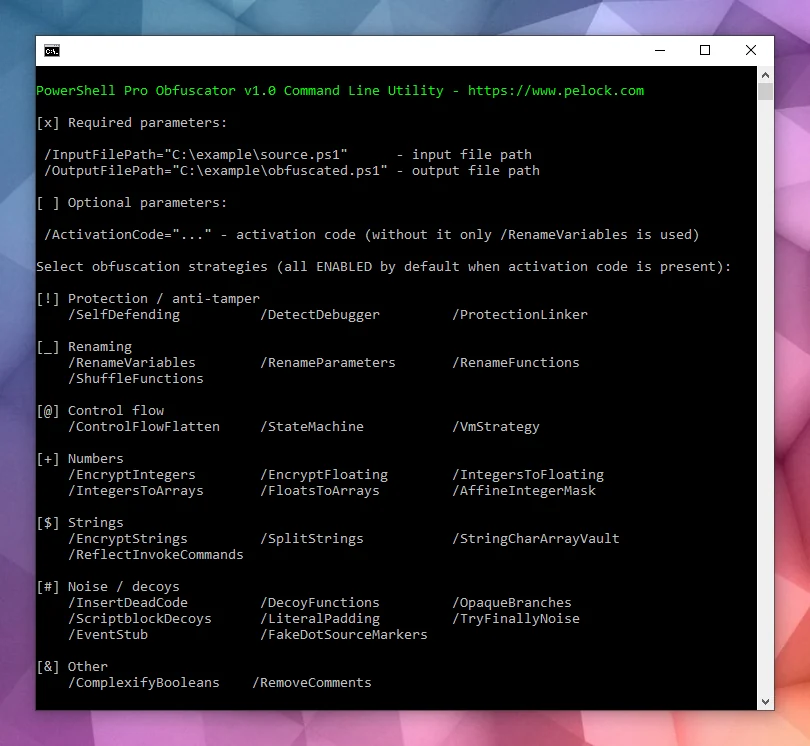
O pacote de instalação contém uma interface de linha de comando adicional:

O PowerShell Pro Obfuscator vem com uma interface de linha de comando para automação no Windows e Linux.
Use-a para integrar a ofuscação em servidores de build, jobs de CI ou empacotamento em lote.
Bartosz Wójcik