
Skip to content
KitploitKITPLOIT
FerramentasBlog
Enviar
FerramentasBlog
Enviar

Ferramentas de Hacking, PenTest e Cibersegurança para o seu Arsenal de Segurança!

Kitploit é um diretório de ferramentas de hacking, cibersegurança e pentesting. Descubra as últimas atualizações de projetos para encontrar vulnerabilidades, analisar sistemas, automatizar testes e fortalecer sua segurança.

··Feeds·Contato·Privacidade·© 2026 Kitploit

Diretório de Ferramentas

Categorias

Ver todas as categorias
Loading categories
GPT_Vuln-analyzer — Utiliza a API do ChatGPT, API do Bard e Llama2, módulos Python-Nmap, DNS Recon, PCAP e JWT recon e utiliza o modelo GPT3 para criar relatórios de vulnerabilidades baseados em dados de varredura Nmap e informações de varredura DNS. Também pode realizar enumeração de subdomínios em grande extensão. | Kitploit
Ferramentas/GitHubGitHub/morpheuslord/gpt_vuln-analyzer
ReconhecimentoScanners de VulnerabilidadesMapeamento de RedeEscaneamento de PortasAnálise de VulnerabilidadesEnumeração de DNS e SubdomíniosColeta de InformaçõesTestes de PenetraçãoAnálise de DNS

Mais Populares

Ver todos →

Descubra as ferramentas mais usadas pela nossa comunidade.

Explore todas as ferramentas

Navegue pela nossa coleção de ferramentas

Ver todas as ferramentas →
Segurança de IA
GitHubmorpheuslord/gpt_vuln-analyzer

GPT_Vuln-analyzer

Ver Repositório
59567há 1 anoRevisado pelo Kitploit

Sobre

Utiliza a API do ChatGPT, API do Bard e Llama2, módulos Python-Nmap, DNS Recon, PCAP e JWT recon e utiliza o modelo GPT3 para criar relatórios de vulnerabilidades baseados em dados de varredura Nmap e informações de varredura DNS. Também pode realizar enumeração de subdomínios em grande extensão.

Compartilhar

GPT_Vuln-analyzer

Esta é uma aplicação de Prova de Conceito que demonstra como a IA pode ser usada para gerar resultados precisos para análise de vulnerabilidades e também permite a utilização adicional do já super útil ChatGPT, feito usando os módulos Python openai-api, python-nmap, dnsresolver e também usando customtkinter e tkinter para a versão GUI do código. Este projeto também possui uma interface CLI e GUI, sendo capaz de realizar análise de vulnerabilidades de rede, enumeração de DNS e também enumeração de subdomínios.

Requisitos

  • Python 3.10 ou superior
  • Todos os pacotes mencionados no arquivo requirements.txt
  • OpenAI API
  • Bard API (MakerSuite Palm)
  • Runpod serverless endpoint
  • IPGeolocation API
  • Docker
  • Wireshark e tshark (ambos adicionados ao path)

Pacote de Uso

Importar pacotes```bash

cd package && pip3/pip install .

root@kitploit:~
Simplesmente importe qualquer um dos 3 pacotes e, em seguida, defina as variáveis de acordo.```python
from GVA.scanner import NetworkScanner
from GVA.dns_recon import DNSRecon
from GVA.geo import geo_ip_recon
from GVA.jwt import JWTAnalyzer
from GVA.menus import Menus
from GVA.packet_analysis import PacketAnalysis
from GVA.ai_models import NMAP_AI_MODEL
from GVA.ai_models import DNS_AI_MODEL
from GVA.ai_models import JWT_AI_MODEL
from GVA.assets import Assets
from GVA.subdomain import sub_enum
from GVA import gui

# The components defined
dns_enum = DNSRecon()
geo_ip = geo_ip_recon()
p_ai_models = NMAP_AI_MODEL()
dns_ai_models = DNS_AI_MODEL()
port_scanner = NetworkScanner()
jwt_analizer = JWTAnalyzer()
sub_recon = sub_enum()
asset_codes = Assets()
packet_analysis = PacketAnalysis()

# KEEP IT BLANK IF YOU HAVE NO CLUE THE MENU WILL ASK TO FILL IT ONCE ACTIVE
lkey = "LLAMA API KEY"
lendpoint = "LLAMA ENDPOINT"
keyset = "AI API KEY"
output_loc = "OUTPUT LOCATION FOR PCAP"
threads = 200 # Default INT 200 but can be increased.
target_ip_hostname_or_token = "TARGET IP, HOSTNAME OR TOKEN"
profile_num = "PROFILE FOR NMAP SCAN"
ai_set = "AI OF CHOICE"
akey_set = "OPENAI API KEY"
bkey_set = "BARD API KEY"
ai_set_args = ""  # Keep it blank at any cost
llamakey = "LLAMA RUNPOD API KEY"
llamaendpoint = "LLAMA RUNPOD ENDPOINT"

Menus(
    lamma_key=lkey,
    llama_api_endpoint=lendpoint,
    initial_keyset=keyset,
    threads=threads,
    output_loc=output_loc,
    target=target_ip_hostname,
    profile_num=profile_num,
    ai_set=ai_set,
    openai_akey_set=akey_set,
    bard_key_set=bkey_set,
    ai_set_args=ai_set_args,
    llama_runpod_key=llamakey,
    llama_endpoint=llamaendpoint
)


gui.application()

update for passcracker in the package and gui is still in progress.

Uso da CLI

  • Primeiro, altere as partes "OPENAI_API_KEY", "GEOIP_API_KEY" e "BARD_API_KEY" do código com a chave da API OpenAI e a chave da API IPGeolocation no arquivo .env
  • Para a opção llama-api ou a opção específica de implantação do endpoint serverless do llama runpod, é necessário inserir o serverless endpoint ID do runpod e também a sua `RUNPOD API KEY````python GEOIP_API_KEY = '' OPENAI_API_KEY = '' BARD_API_KEY = '' RUNPOD_ENDPOINT_ID = '' RUNPOD_API_KEY = ''
root@kitploit:~
- segundo instale os pacotes```bash
pip3 install -r requirements.txt
or
pip install -r requirements.txt
  • Execute o código python3 gpt_vuln.py```bash

Regular Help Menu

python gpt_vuln.py --help

Rich Help Menu

python gpt_vuln.py --r help

Specify target with the attack

python gpt_vuln.py --target <IP/hostname/token> --attack dns/nmap/jwt

Specify target and profile for nmap

python gpt_vuln.py --target <IP/hostname/token> --attack nmap --profile <1-13> (Default:1)

Specify target for DNS no profile needed

python gpt_vuln.py --target <IP/hostname/token> --attack dns

Specify target for Subdomain Enumeration no profile used default list file

python gpt_vuln.py --target --attack sub

Specify target for Subdomain Enumeration no profile used custom list file

python gpt_vuln.py --target --attack sub --sub_list

Specify target for geolocation lookup

python gpt_vuln.py --target --attack geo

Specify PCAP file for packet analysis

python gpt_vuln.py --target --attack pcap --output --thread NUM of threads <200:default>

Specify the AI to be used for nmap

python gpt_vuln.py --target --attack nmap --profile <1-5> --ai llama /llama-api /bard / openai

Specify the AI to be used for dns

python gpt_vuln.py --target --attack dns --ai llama /llama-api /bard / openai

Specify the AI to be used for JWT analysis

python gpt_vuln.py --target --attack jwt --ai llama /llama-api /bard / openai

Password Cracker

python gpt_vuln.py --password_hash --wordlist_file --algorithm --parallel --complexity

Interactive step by step cli interface

python gpt_vuln.py --menu True

root@kitploit:~
#### Opção de Interface CLI```bash
  ________________________
| GVA Usage in progress... |
  ========================
                        \
                         \
                           ^__^
                           (oo)\_______
                           (__)\       )\/\
                               ||----w |
                               ||     ||
┏━━━━━━━━━┳━━━━━━━━━━━━━━━━┓
┃ Options ┃ Utility        ┃
┡━━━━━━━━━╇━━━━━━━━━━━━━━━━┩
│ 1       │ Nmap Enum      │
│ 2       │ DNS Enum       │
│ 3       │ Subdomain Enum │
│ 4       │ GEO-IP Enum    │
| 5       | JWT Analysis   |
| 6       | PCAP Analysis  |
| 6       | Hash Cracker   |
│ q       │ Quit           │
└─────────┴────────────────┘
Enter your choice:

A interface CLI tem alguns pontos a serem observados.

  • As chaves da API devem ser fornecidas manualmente.
  • As definidas nos arquivos .env funcionam com as opções de argumentos
  • O processo é semelhante, porém mais organizado.

Minhas opiniões sobre o Bard

É o mesmo que o OpenAI GPT3.5, porém mais rápido. Consegue gerar a mesma resposta no dobro da velocidade.

SOs Suportados

Compreendendo o código

Perfis:

O perfil é o tipo de varredura que será executada pelo subprocesso do nmap. O IP ou alvo será fornecido via argparse. Inicialmente, a varredura customizada do nmap é executada, contendo todos os argumentos cruciais para que a varredura prossiga. Em seguida, os dados da varredura são extraídos do enorme conjunto de dados gerado pelo nmap. O objeto "scan" possui uma lista de sub-dados sob "tcp", cada um rotulado de acordo com as portas abertas. Uma vez extraídos, os dados são enviados para o modelo Davinci da API OpenAI por meio de um prompt. O prompt solicita especificamente uma saída JSON e que os dados também sejam utilizados de uma determinada forma.

Toda a estrutura da requisição a ser enviada para a API OpenAI é projetada na seção de conclusão do programa.```python class NetworkScanner(): profile_arguments = { 1: '-Pn -sV -T4 -O -F', 2: '-Pn -T4 -A -v', 3: '-Pn -sS -sU -T4 -A -v', 4: '-Pn -p- -T4 -A -v', 5: '-Pn -sS -sU -T4 -A -PE -PP -PY -g 53 --script=vuln', 6: '-Pn -sV -p- -A', 7: '-Pn -sS -sV -O -T4 -A', 8: '-Pn -sC', 9: '-Pn -p 1-65535 -T4 -A -v', 10: '-Pn -sU -T4', 11: '-Pn -sV --top-ports 100', 12: '-Pn -sS -sV -T4 --script=default,discovery,vuln', 13: '-Pn -F' }

root@kitploit:~
def scanner(self, ip: Optional[str], profile: int, akey: Optional[str],
            bkey: Optional[str], lkey, lendpoint, AI: str) -> str:
    nm.scan(ip, arguments=self.profile_arguments.get(profile))
    json_data = nm.analyse_nmap_xml_scan()
    analyze = json_data["scan"]

    try:
        ai_methods = {
            'openai': lambda: AIModels.GPT_AI(akey, analyze),
            'bard': lambda: AIModels.BardAI(bkey, analyze),
            'llama': lambda: AIModels.Llama_AI(analyze, "local", lkey, lendpoint),
            'llama-api': lambda: AIModels.Llama_AI(analyze, "runpod", lkey, lendpoint)
        }

        if AI in ai_methods and (akey or bkey):
            response = ai_methods[AI]()
        else:
            raise ValueError("Invalid AI type or missing keys")

    except KeyboardInterrupt:
        print("Bye")
        quit()

    return str(response)
root@kitploit:~
# Regex

Usamos Regex para extrair apenas as informações importantes do prompt personalizado fornecido, o que reduz a quantidade total de dados indesejados.

O código da IA define um formato de saída e comanda a IA a seguir algumas regras pré-determinadas para aumentar a precisão.
O código de extração de regex faz a extração e, em seguida, a função principal organiza os dados em tabelas.

## Usando o Bard AI

Para usar o Bard AI, você deve se inscrever na API MakerSuit Palm para obter acesso de desenvolvedor e gerar sua chave de API a partir daí. Para links e como isso funciona, você pode usar este vídeo [MakerSuit](https://www.youtube.com/watch?v=Ce1AOchQMzA&t=128s)

Depois de adquirir a API, basta adicioná-la ao arquivo `.env` e você estará pronto.

## Antiga Implementação do LLama2

Usar o LLama2 é uma das melhores opções offline e gratuitas disponíveis. Atualmente está em melhoria; estou trabalhando em um prompt que incorpore melhor a perspectiva de cibersegurança na IA.
Agradeço ao **@thisserand** e ao seu repositório [llama2_local](https://github.com/thisserand/llama2_local) e também ao seu vídeo no YT [YT_Video](https://youtu.be/WzCS8z9GqHw). Eles foram ótimos recursos. Para ser sincero, o código do llama2 é 95% dele; eu apenas peguei o código e adicionei uma funcionalidade de API Flask a ele.

A precisão da IA offline e fora dos testes de código foi ótima e teve precisão igual à do openai ou bard, mas enquanto estava no código, enfrentou alguns problemas devido ao prompting e outros. Tentarei corrigir isso.
A velocidade depende do seu sistema e das configurações de GPU e CPU que você possui. Atualmente, está usando o modelo `TheBloke/Llama-2-7B-Chat-GGML` e pode ser alterado através dos arquivos `portscanner` e `dnsrecon`.

Por enquanto, o código do llama e as varreduras são tratados de forma diferente. Após alguns testes, descobri que o llama precisa ser treinado um pouco para operar como eu pretendia, então precisa de algum tempo. Qualquer sugestão sobre como posso fazer isso pode ser adicionada às discussões deste repositório [Link para Discussões](https://github.com/morpheuslord/GPT_Vuln-analyzer/discussions). Por enquanto, a saída não será uma lista dividida de todos os dados, mas sim uma explicação da vulnerabilidade ou dos problemas descobertos pela IA.

O prompt para o uso do modelo é assim:```prompt
[INST] <<SYS>> {user_instruction}<</SYS>> NMAP Data to be analyzed: {user_message} [/INST]

As instruções são assim:```prompt Do a NMAP scan analysis on the provided NMAP scan information. The NMAP output must return in a asked format accorging to the provided output format. The data must be accurate in regards towards a pentest report. The data must follow the following rules: 1) The NMAP scans must be done from a pentester point of view 2) The final output must be minimal according to the format given. 3) The final output must be kept to a minimal. 4) If a value not found in the scan just mention an empty string. 5) Analyze everything even the smallest of data. 6) Completely analyze the data provided and give a confirm answer using the output format. 7) mention all the data you found in the output format provided so that regex can be used on it. 8) avoid unnecessary explaination. 9) the critical score must be calculated based on the CVE if present or by the nature of the services open 10) the os information must contain the OS used my the target. 11) the open ports must include all the open ports listed in the data[tcp] and varifying if it by checking its states value. you should not negect even one open port. 12) the vulnerable services can be determined via speculation of the service nature or by analyzing the CVE's found. The output format: critical score: - Give info on the criticality "os information": - List out the OS information "open ports and services": - List open ports - List open ports services "vulnerable service": - Based on CVEs or nature of the ports opened list the vulnerable services "found cve": - List the CVE's found and list the main issues.

root@kitploit:~
Usando o conjunto de instruções e os dados fornecidos através do prompt, a IA llama gera sua saída.

Para a maioria dos usos, sugiro que você crie uma implantação de endpoint serverless no RunPod para llama; você pode consultar este tutorial para isso [tutorial](https://www.youtube.com/watch?v=Ftb4vbGUr7U). Você pode seguir o tutorial para um melhor uso.

### Llama2 Ollama

Esta atualização mais recente usa uma imagem docker do Ollama para implementar o sistema llama localizado e isso aumenta a precisão da saída por algum motivo, talvez devido a uma melhor configuração ou algo assim. Não vou entrar em muitos detalhes sobre isso, mas estarei trabalhando na parte de integração de GPU do código para isso, para que possamos adicionar poder de GPU ao processamento e torná-lo mais eficiente. Agradecimentos a @andr6 por iniciar a discussão; se alguém tiver um melhor entendimento desta implementação, sinta-se à vontade para improvisar e criar um PR.

### Saída

#### Saída JWT:```
                                            GVA Report for JWT
┏━━━━━━━━━━━━━━━━━━━━━┳━━━━━━━━━━━━━━━━━━━━━━━━━━━━━━━━━━━━━━━━━━━━━━━━━━━━━━━━━━━━━━━━━━━━━━━━━━━━━━━━━━┓
┃ Variables           ┃ Results                                                                          ┃
┡━━━━━━━━━━━━━━━━━━━━━╇━━━━━━━━━━━━━━━━━━━━━━━━━━━━━━━━━━━━━━━━━━━━━━━━━━━━━━━━━━━━━━━━━━━━━━━━━━━━━━━━━━┩
│ Algorithm Used      │ HS256                                                                            │
│ Header              │ eyJhbGciOiAiSFMyNTYiLCAidHlwIjogIkpXVCJ9                                         │
│ Payload             │ eyJzdWIiOiAiMTIzNDU2Nzg5MCIsICJuYW1lIjogIkpvaG4gRG9lIiwgImlhdCI6IDE1MTYyMzkwMjJ9 │
│ Signature           │                                                                                  │
│ PossibleAttacks     │ None identified                                                                  │
│ VulnerableEndpoints │ Unable to determine without additional information                               │
└─────────────────────┴──────────────────────────────────────────────────────────────────────────────────┘

Saída do Nmap:

OpenAI e Bard:```table

┏━━━━━━━━━━━━━━━━━━━━┳━━━━━━━━━━━━━━━━━━━━━━━━━━━━━━━━━━━━━━━━━━━━━━━━━━━━━┓ ┃ Elements ┃ Results ┃ ┡━━━━━━━━━━━━━━━━━━━━╇━━━━━━━━━━━━━━━━━━━━━━━━━━━━━━━━━━━━━━━━━━━━━━━━━━━━━┩ │ critical score │ High │ │ os information │ Microsoft Windows 11 21H2 │ │ open ports │ 80, 22, 445, 902, 912 │ │ open services │ http, ssh, microsoft-ds, vmware-auth, vmware-auth │ │ vulnerable service │ OpenSSH │ │ found cve │ CVE-2023-28531 │ └────────────────────┴─────────────────────────────────────────────────────┘

root@kitploit:~
##### LLama2```table
╭───────────────────────────────────────────── The GVA LLama2 ──────────────────────────────────────────────╮
│                                                                                                           │
│                                                                                                           │
│                                                                                                           │
│  Based on the provided NMAP data, I have conducted a thorough analysis of the target system's open ports  │
│  and services, vulnerabilities, and operating system information. Here is my findings: Critical Score:    │
│  The critical score for this target system is 7 out of 10. The system has several open ports that could   │
│  potentially be exploited, including port 80 (HTTP), port 135 (RPC), and port 445 (Microsoft DS). While   │
│  These ports are not necessarily vulnerable, they do indicate that the system is running services that    │
│  could be targeted by attackers. Additionally, the system has an outdated version of Microsoft IIS        │
│  running on port 80, which could be a potential vulnerability. OS Information: The target system is       │
│  running Microsoft Windows 10 1607. Open Ports and Services: The target system has the following open     │
│  ports:                                                                                                   │
│                                                                                                           │
│   • Port 80: HTTP (Microsoft IIS httpd)                                                                   │
│   • Port 135: RPC (Microsoft Windows RPC)                                                                 │
│   • Port 445: Microsoft DS                                                                                │
│   • Port 8000: Splunkd httpd All of these ports are currently open and have a state of "open".            │
│     Vulnerable Services: Based on the CVEs found in the NMAP data, there are several potential            │
│     vulnerabilities in the target system's services. These include:                                       │
│   • CVE-2019-1489: An elevation of privilege vulnerability in Microsoft IIS that could be exploited by    │
│     an attacker to gain control of the system. This vulnerability is related to the outdated version of   │
│     Microsoft IIS running on port 80.                                                                     │
│   • CVE-2017-0143: A remote code execution vulnerability in Microsoft Windows RPC that could be           │
│     exploited by an attacker to execute arbitrary code on the target system. This vulnerability is        │
│     related to the outdated version of Microsoft Windows RPC running on port 135.                         │
│   • CVE-2020-1362: A remote code execution vulnerability in Microsoft DS that could be exploited by an    │
│     attacker to execute arbitrary code on the target system. This vulnerability is related to the         │
│     outdated version of Microsoft DS running on port 445. Found CVEs: The following C                     │
│                                                                                                           │
╰───────────────────────────────────────────────────────────────────────────────────────────────────────────╯

Saída do DNS:

alvo é jainuniversity.ac.in```table ┏━━━━━━━━━━┳━━━━━━━━━━━━━━━━━━━━━━━━━━━━━━━━━━━━━━━━━━━━━━━━━━━━━━━━━━━━━━━━━━━━━━━━━━━━━━━━━━━━━━━━━━━━━━━━━━━━━━━━━━━━━━━━━━━┓ ┃ Elements ┃ Results ┃ ┡━━━━━━━━━━╇━━━━━━━━━━━━━━━━━━━━━━━━━━━━━━━━━━━━━━━━━━━━━━━━━━━━━━━━━━━━━━━━━━━━━━━━━━━━━━━━━━━━━━━━━━━━━━━━━━━━━━━━━━━━━━━━━━━┩ │ A │ 172.67.147.95", "104.21.41.132 │ │ AAA │ │ │ NS │ mia.ns.cloudflare.com.","paul.ns.cloudflare.com. │ │ MX │ 30 aspmx5.googlemail.com.","30 aspmx4.googlemail.com.","20 alt2.aspmx.l.google.com.","30 │ │ │ aspmx3.googlemail.com.","30 aspmx2.googlemail.com.","20 alt1.aspmx.l.google.com.","10 aspmx.l.google.com. │ │ PTR │ │ │ SOA │ mia.ns.cloudflare.com. dns.cloudflare.com. 2309618668 10000 2400 604800 3600 │ │ TXT │ atlassian-sending-domain-verification=5b358ce4-5ad3-404d-b4b4-005bf933603b","include:_spf.atlassian.net │ └──────────┴───────────────────────────────────────────────────────────────────────────────────────────────────────────────────┘

root@kitploit:~
#### Saída de Localização Geográfica:```table
┏━━━━━━━━━━━━━━━━━━━━━━━━━━━━━┳━━━━━━━━━━━━━━━━━━━━━━━━━━━━━━━━━━━━━━━━━━━━━━━━━━━━━━━━━━━━━━━━━━━━━━━━━┓
┃ Identifiers                 ┃ Data                                                                    ┃
┡━━━━━━━━━━━━━━━━━━━━━━━━━━━━━╇━━━━━━━━━━━━━━━━━━━━━━━━━━━━━━━━━━━━━━━━━━━━━━━━━━━━━━━━━━━━━━━━━━━━━━━━━┩
│ ip                          │ █████████████                                                           │
│ continent_code              │ AS                                                                      │
│ continent_name              │ Asia                                                                    │
│ country_code2               │ IN                                                                      │
│ country_code3               │ IND                                                                     │
│ country_name                │ India                                                                   │
│ country_capital             │ New Delhi                                                               │
│ state_prov                  │ Haryana                                                                 │
│ state_code                  │ IN-HR                                                                   │
│ district                    │                                                                         │
│ city                        │ Gurugram                                                                │
│ zipcode                     │ 122003                                                                  │
│ latitude                    │ 28.44324                                                                │
│ longitude                   │ 77.05501                                                                │
│ is_eu                       │ False                                                                   │
│ calling_code                │ +91                                                                     │
│ country_tld                 │ .in                                                                     │
│ languages                   │ en-IN,hi,bn,te,mr,ta,ur,gu,kn,ml,or,pa,as,bh,sat,ks,ne,sd,kok,doi,mni,… │
│ country_flag                │ https://ipgeolocation.io/static/flags/in_64.png                         │
│ geoname_id                  │ 9148991                                                                 │
│ isp                         │ Bharti Airtel Limited                                                   │
│ connection_type             │                                                                         │
│ organization                │ Bharti Airtel Limited                                                   │
│ currency.code               │ INR                                                                     │
│ currency.name               │ Indian Rupee                                                            │
│ currency.symbol             │ ₹                                                                       │
│ time_zone.name              │ Asia/Kolkata                                                            │
│ time_zone.offset            │ 5.5                                                                     │
│ time_zone.current_time      │ 2023-07-11 17:08:35.057+0530                                            │
│ time_zone.current_time_unix │ 1689075515.057                                                          │
│ time_zone.is_dst            │ False                                                                   │
│ time_zone.dst_savings       │ 0                                                                       │
└─────────────────────────────┴─────────────────────────────────────────────────────────────────────────┘

SAÍDA PCAP```

Collecting Json Data Extracting IP details... Extracting DNS details... Extracting EAPOL details... Extracting TCP STREAMS details... TCP streams can take some time.. Total Streams combination: 252 Number of workers in progress: 250 Completed GVA Report for PCAP ┏━━━━━━━━━━━━━━━━━━━━━━━━━━━━━━━━━━━━┳━━━━━━━━━━━━━━━━━━━━━━━━━━━━━━━━━━━━━━━━━━━━━━━━━━━━━━━━━━━━━━━━━━━━━━━━━━━━━━━━━━━━━━━━━━━━━━━━━━━━┓ ┃ Identifiers ┃ Data ┃ ┡━━━━━━━━━━━━━━━━━━━━━━━━━━━━━━━━━━━━╇━━━━━━━━━━━━━━━━━━━━━━━━━━━━━━━━━━━━━━━━━━━━━━━━━━━━━━━━━━━━━━━━━━━━━━━━━━━━━━━━━━━━━━━━━━━━━━━━━━━━┩ │ PacketAnalysis.Services │ ['49943', '49958', '49934', '49944', '49931', '443', '49957'] │ │ PacketAnalysis.TCP Streams │ ['1', '4', '5', '2', '0', '3'] │ │ PacketAnalysis.Sources Address │ ['█████████████', '1.1.1.1', '█████████████', '█████████████', '█████████████', '█████████████'] │ │ PacketAnalysis.Destination Address │ ['█████████████', '1.1.1.1', '█████████████', '█████████████', '█████████████', '█████████████'] │ │ PacketAnalysis.DNS Resolved │ [] │ │ PacketAnalysis.DNS Query │ ['oneclient.sfx.ms'] │ │ PacketAnalysis.DNS Response │ ['oneclient.sfx.ms.edgekey.net', 'e9659.dspg.akamaiedge.net', 'oneclient.sfx.ms'] │ │ PacketAnalysis.EAPOL Data │ [] │ │ PacketAnalysis. Total Streams Data │ 126 │ └────────────────────────────────────┴────────────────────────────────────────────────────────────────────────────────────────────────────┘

root@kitploit:~
#### Saída do Quebrador de Senhas```
  ________________________
| GVA Usage in progress... |
  ========================
                        \
                         \
                           ^__^
                           (oo)\_______
                           (__)\       )\/\
                               ||----w |
                               ||     ||
Cracking... ━━━━━━━━━━━━━━━━━━━━━━━━━━━━━━━━━━━━━━━━ 100% 0:00:00
╭────────────────────────────────────────────── The GVA Password Cracker  ──────────────────────────────────────────────╮      │                                                                                                                       │ │                                                                                                                       │
│                                        Password Cracked! Password:  legion                                            │
│                                                                                                                       │
╰───────────────────────────────────────────────────────────────────────────────────────────────────────────────────────╯

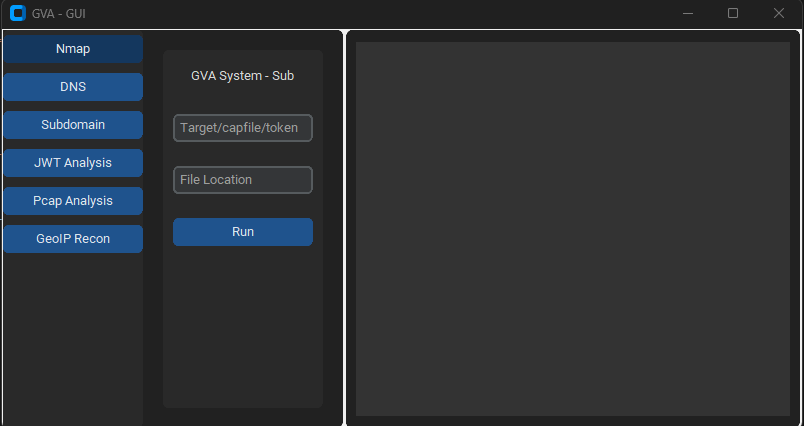
Usage GUI

A GUI usa customtkinter para a execução do código. A interface é direta, a única coisa necessária a lembrar é:

  • Ao usar o ataque dns, não especifique o perfil```bash python GVA_gui.py
root@kitploit:~
### Janela inicial

![inicial](https://assets.kitploit.com/production/public/readmes/5784/03469f428403c0d8ea05932b8b8854649e26d8b325f5468a7af7358d658464a7.png)

### Janela do NMAP

![nmap](https://assets.kitploit.com/production/public/readmes/5784/d795e0f39f8eda944ea6d76b5a150ef73bb4cce3f070e7bbcc76623f433b217a.png)

### Janela do DNS

![dns](https://assets.kitploit.com/production/public/readmes/5784/8420ce56819a0063f3268ca1650645fdd1faa3440c11b0cd699c6b66be67c00e.png)

### Janela do GEOIP

![geoip](https://assets.kitploit.com/production/public/readmes/5784/309b00715f1b645259b2d80f153f0b6be45622b34a4c4321cbd17cdaf707d1d8.png)

### Janela do PCAP

![pcap](https://assets.kitploit.com/production/public/readmes/5784/c25ebeee2e87706c1145382ade9142ca8449cfd77412000c849c1f000f115de0.png)

### Janela do SUBDOMÍNIO

![subdomínio](https://assets.kitploit.com/production/public/readmes/5784/5ecffc756794097d6f77939aefbd029078575eb77ee3512add7174f03e7aacc2.png)

### Janela do JWT

![jwt](https://assets.kitploit.com/production/public/readmes/5784/f00ff0ff586b10ab3523a92bc62808875fcb4bb48fa3024f482614dc7dfdb3ef.png)
Baixar ferramenta
Pré-visualizaçãoCódigoNomeEstado de funcionamentoStatus OpenAIStatus BardStatus LLama2
LINGNU/Linux✅✅✅❌ [não testado]
WINWindows✅✅✅✅
ParâmetroDados retornadosDescriçãoComando Nmap
p1jsonVarredura Efetiva-Pn -sV -T4 -O -F
p2jsonVarredura Simples-Pn -T4 -A -v
p3jsonVarredura de Baixa Potência-Pn -sS -sU -T4 -A -v
p4jsonVarredura Intensa Parcial-Pn -p- -T4 -A -v
p5jsonVarredura Intensa Completa-Pn -sS -sU -T4 -A -PE -PP -PY -g 53 --script=vuln
p6jsonDetecção Abrangente de Versão de Serviço-Pn -sV -p- -A
p7jsonVarredura Agressiva com Detecção de SO-Pn -sS -sV -O -T4 -A
p8jsonVarredura de Script para Vulnerabilidades Comuns-Pn -sC
p9jsonVarredura Intensa, Todas as Portas TCP-Pn -p 1-65535 -T4 -A -v
p10jsonVarredura UDP-Pn -sU -T4
p11jsonDetecção de Serviço e Versão para Principais Portas-Pn -sV --top-ports 100
p12jsonVarredura Agressiva com Scripts NSE para Vulnerab.-Pn -sS -sV -T4 --script=default,discovery,vuln
p13jsonVarredura Rápida para Portas Comuns-Pn -F