
Skip to content
KitploitKITPLOIT
FerramentasBlog
Enviar
FerramentasBlog
Enviar

Ferramentas de Hacking, PenTest e Cibersegurança para o seu Arsenal de Segurança!

Kitploit é um diretório de ferramentas de hacking, cibersegurança e pentesting. Descubra as últimas atualizações de projetos para encontrar vulnerabilidades, analisar sistemas, automatizar testes e fortalecer sua segurança.

··Feeds·Contato·Privacidade·© 2026 Kitploit

Diretório de Ferramentas

Categorias

Ver todas as categorias
Loading categories
Ferramentas/GitHubGitHub/jas502n/burpsuite-plugin
Frameworks de Testes de PenetraçãoAnálise de VulnerabilidadesProxies Web e InterceptaçãoExploração de Aplicações WebSegurança Web
GitHubjas502n/burpsuite-plugin

BurpSuite-Plugin

Plugin Para BurpSuite (Pentester)

Ver Repositório
3717há 3 anosRevisado pelo Kitploit

Mais Populares

Ver todos →

Descubra as ferramentas mais usadas pela nossa comunidade.

Explore todas as ferramentas

Navegue pela nossa coleção de ferramentas

Ver todas as ferramentas →
Compartilhar

PT-Manager

Penetration Test Vulnerabilities Manager is an extension for Burp Suite, written in Jython, was developed by Barak Tawily in order to ease application security people manage vulnerabilities
alt tag

Installation

  1. root@kitploit:~
        Download Burp Suite (obviously): http://portswigger.net/burp/download.html
    
  2. root@kitploit:~
        Download Jython standalone JAR (version >= 2.7): http://www.jython.org/downloads.html
    
  3. root@kitploit:~
        Open Burp -> Extender -> Options -> Python Environment -> Select File -> Choose the Jython standalone JAR
    
  4. root@kitploit:~
        Install PT Manager from the BApp Store or follow these steps:
    
  5. root@kitploit:~
        Download the PTManager.py file (and XlsxWriter-0.7.3 if you would like to generate an xlsx report).
    
  6. root@kitploit:~
        Open Burp -> Extender -> Extensions -> Add -> Choose PTManager.py file.
    
  7. root@kitploit:~
        See the PT Manager tab and manage your vulnerabilities and project easily :)
    

User Guide - How to use?

After installation, the PT Manager tab will be added to Burp.

Project Settings Tab: alt tag
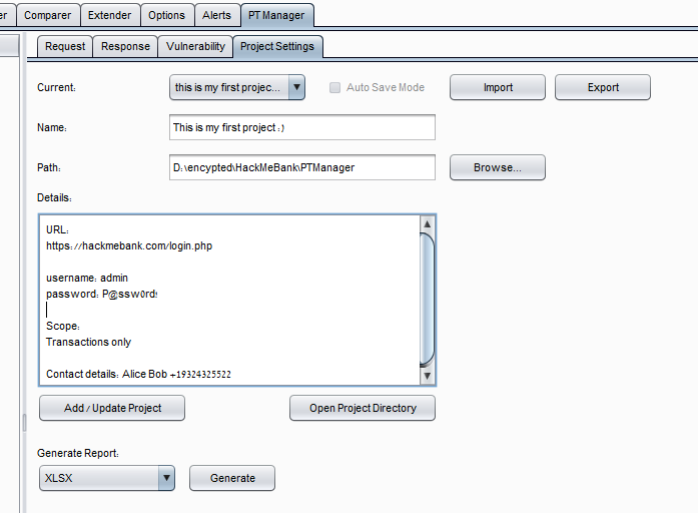
  1. root@kitploit:~
        Open the Project Settings tab (PT Manager -> Project Settings) and create a new project, make sure you are creating it under the encrypted partition.
    
  2. root@kitploit:~
        "Details" text area can be used in order to save any details about the project such as URLs, credentials, contact details, or any other comments.
    
  3. root@kitploit:~
        Generate report section can be used in order to generate project report in HTML, XLSX, DOCX, TXT.
    
  4. root@kitploit:~
        import and export buttons can be used in order to send other people reports and allows them import it in the extension.
    
  5. root@kitploit:~
        "Open project directory" - will open your project directory, as you would expect ? :)
    

Vulnerability Tab: alt tag
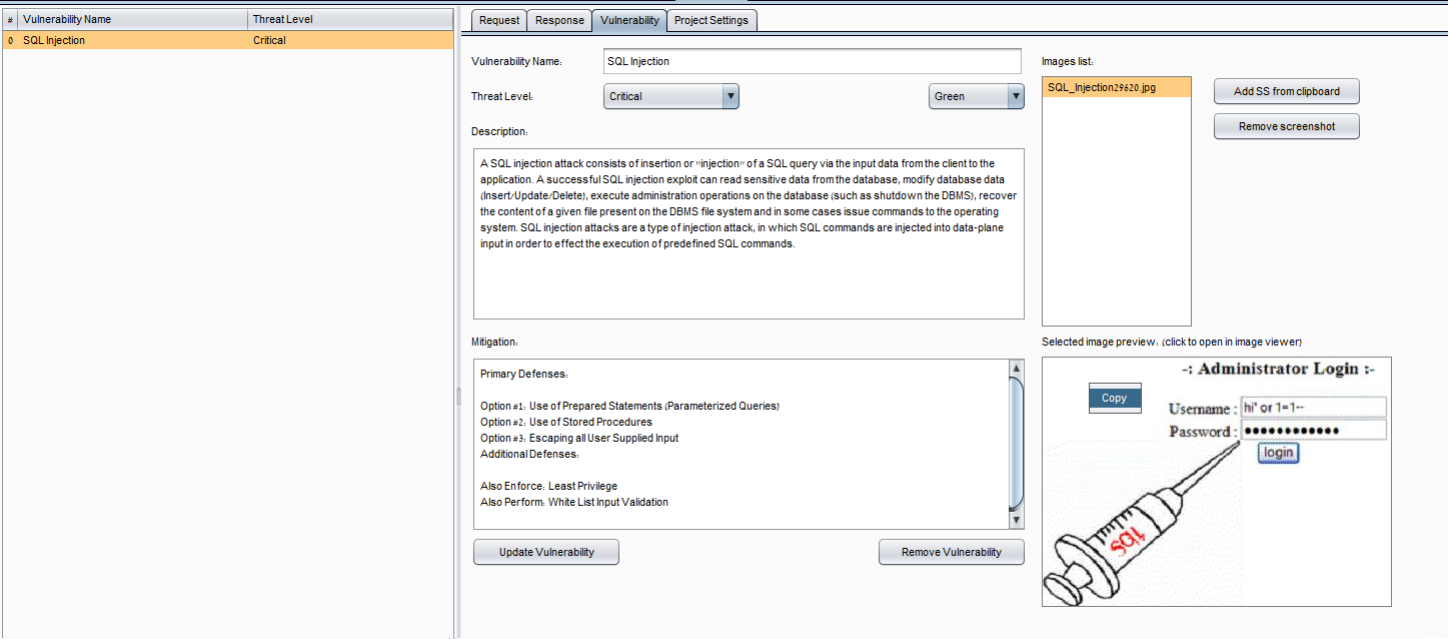
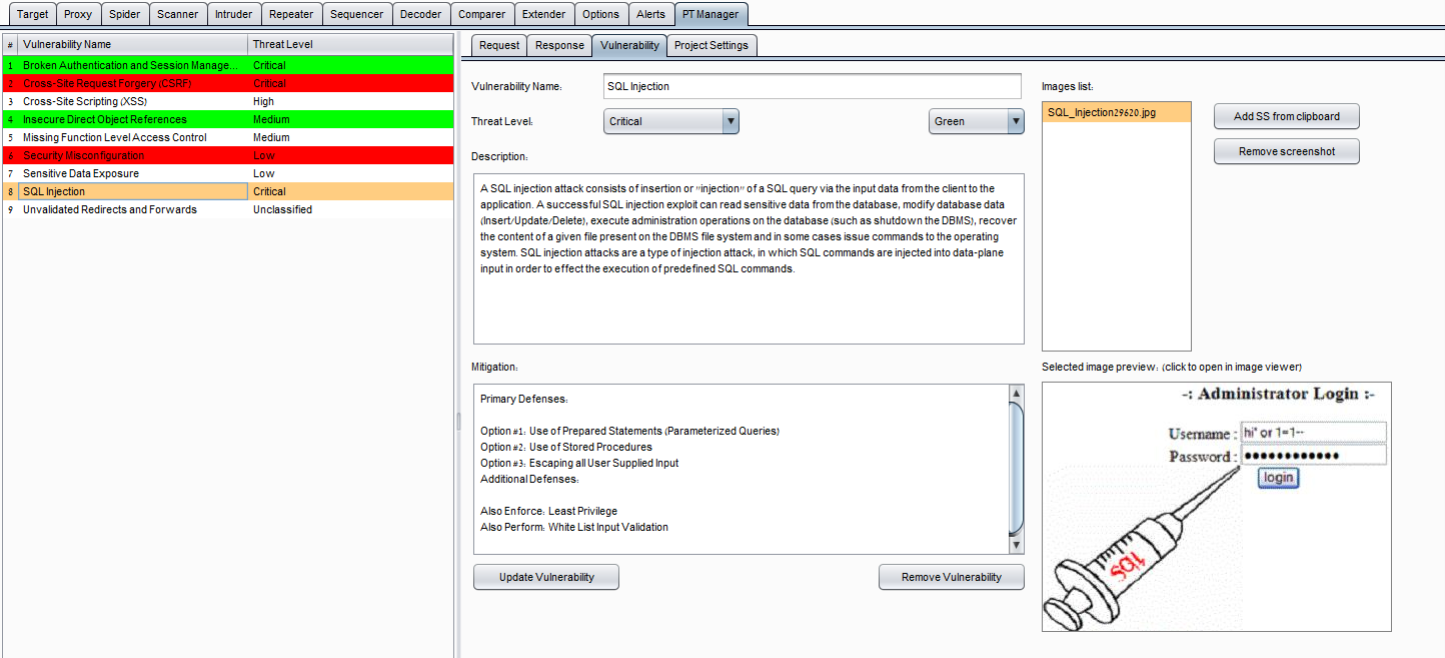
  1. Open the Vulnerability tab and create a new vulnerability.
  2. "Color:" combobox can be used in order to change a specific vulnerability’s background color. it can be used to let you know if the vulnerability was verified (set it green) or if it is false positive (so set it to red or just remove the vulnerability)
  3. "Add SS from clipboard" button will copy a captured image that and save it on your clipboard. It is also possible to add it manually by pasting the jpg file into the vulnerability folder.
  4. It is possible to right-click the selected preview image in order to copy the file into the clipboard in case you would like to get a specific image
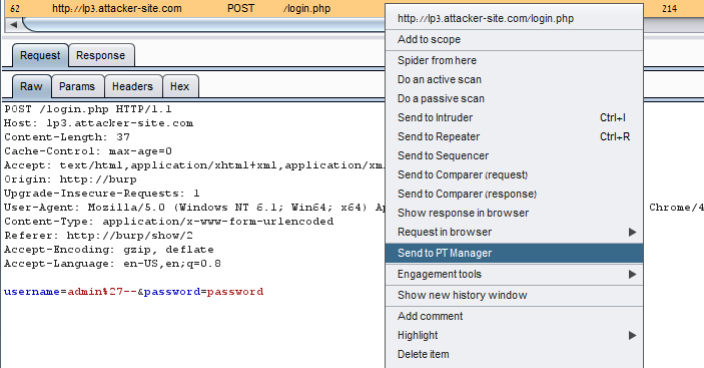
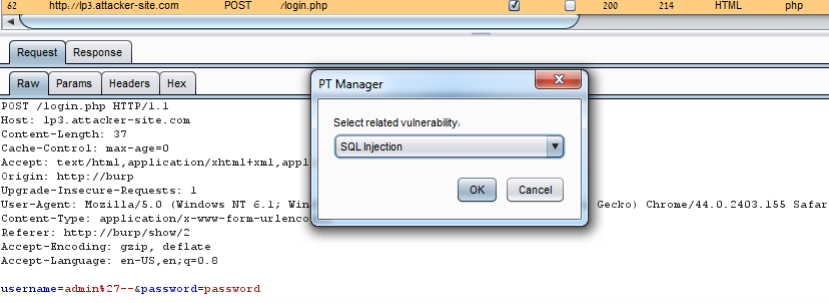
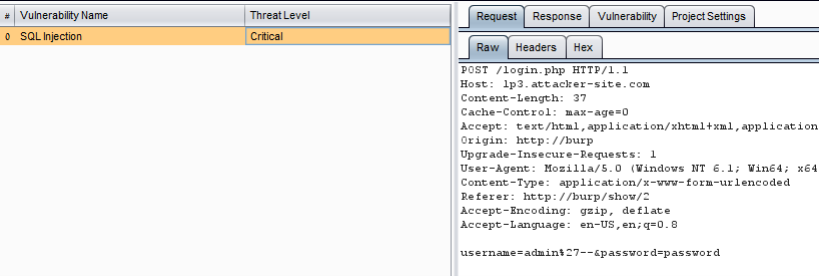
  5. request and response tab will include the requset and response of the vulnerable requset. it is possible to attach specific requests and responses to a vulnerability by right-clicking the request/response from anywhere in Burp then clicking on "Send to PT Manager" alt tag alt tag alt tag
Baixar ferramenta