 dutchosintguy/tiktok-scraper
Faça scraping e baixe postagens de vídeo e metadados do TikTok a partir de perfis de usuários, hashtags e tendências sem autenticação. Gera arquivos JSON, CSV e ZIP.

Extrair e baixar informações úteis do TikTok.
Não é necessário login ou senha.
Este não é um suporte oficial de API, etc. É apenas um raspador que utiliza a API Web do TikTok para extrair mídia.
Nota:
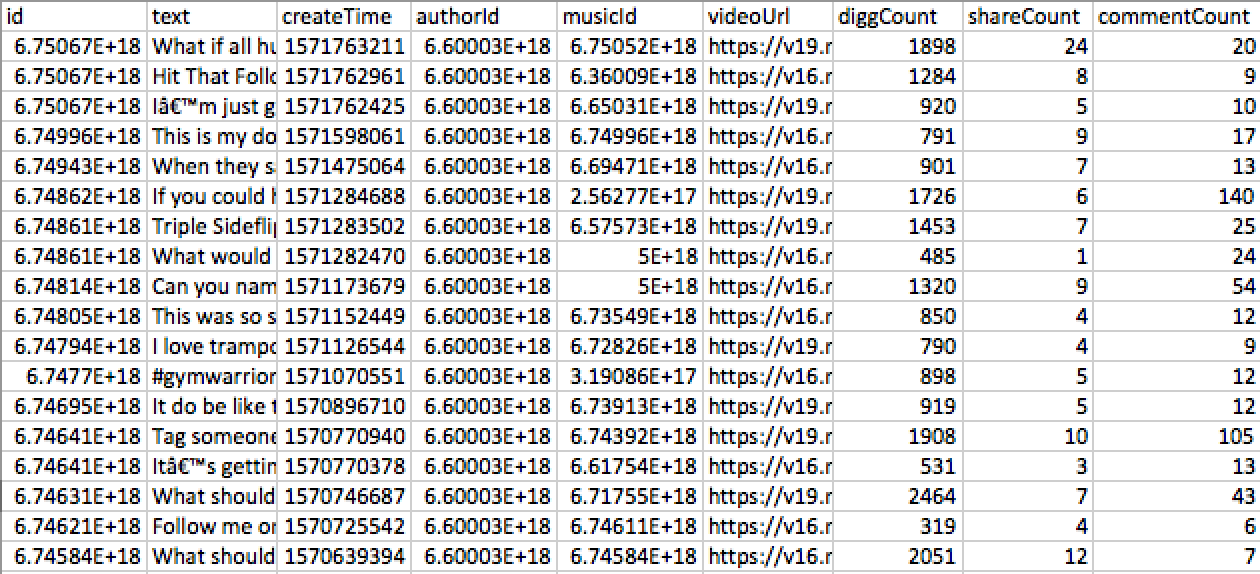
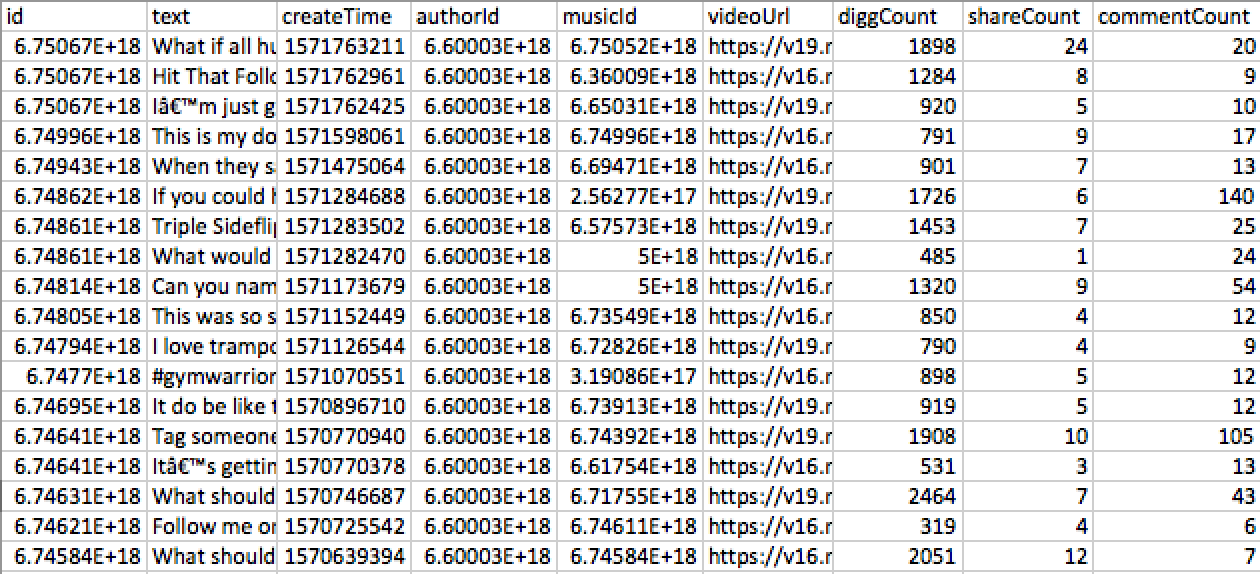
Saída JSON/CSV das postagens:
    id: '6748606789551410438',
    text:'TEXT',
    createTime: '1571282470',
    authorId: '123123',
    musicId: '123123',
    videoUrl: 'VIDEO_URL',
    diggCount: 485,
    shareCount: 1,
    commentCount: 24
Possíveis erros
tiktok-scraper requer Node.js v8.6.0+ para funcionar.
Instalar via NPM
$ npm i -g tiktok-scraper
Instalar via YARN
$ yarn global add tiktok-scraper
$ tiktok-scraper --help

Usage: tiktok-scraper <command> [options]

Commands:
  tiktok-scraper user [id]     Scrape videos from username. Enter only username
  tiktok-scraper hashtag [id]  Scrape videos from hashtag. Enter hashtag without #
  tiktok-scraper trend         Scrape posts from current trends

Options:
  --help, -h              help                                         [boolean]
  --version               Show version number                          [boolean]
  --number, -n            Number of posts to scrape. If you will set 0 then all
                          posts will be scraped                    [default: 20]
  --proxy, -p             Set proxy                                [default: ""]
  --timeout               If you will receive 'rate limit' error , you can try
                          to set timeout. Timeout is in mls: 1000 mls = 1 second
                                                                    [default: 0]
  --download, -d          Download and archive all scraped videos to a ZIP file
                                                      [boolean] [default: false]
  --filepath              Directory to save all output files.
                [default: "/Users/jackass/Documents/lang/NodeJs/tiktok-scraper"]
  --filetype, --type, -t  Type of output file where post information will be
                          saved. 'all' - save information about all posts to a
                          'json' and 'csv'
                                [choices: "csv", "json", "all"] [default: "csv"]

Examples:
  tiktok-scraper user USERNAME -d -n 100
  tiktok-scraper hashtag HASHTAG_NAME -d -n 100
  tiktok-scraper trend -d -n 100
Exemplo 1: Extrair 300 postagens de vídeo do usuário {USERNAME}. Salvar informações das postagens em um arquivo CSV (padrão)
$ tiktok-scraper user USERNAME -n 300

Output:
CSV path: /{CURRENT_PATH}/user_1552945544582.csv
Exemplo 2: Extrair 100 postagens da hashtag {HASHTAG_NAME}, baixar e salvá-las em um arquivo ZIP. Salvar informações das postagens em arquivos JSON e CSV (--filetype all)
$ tiktok-scraper hashtag HASHTAG_NAME -n 100 -d -t all

Output:
ZIP path: /{CURRENT_PATH}/hashtag_1552945659138.zip
JSON path: /{CURRENT_PATH}/hashtag_1552945659138.json
CSV path: /{CURRENT_PATH}/hashtag_1552945659138.csv
Exemplo 3: Extrair 50 postagens da seção de tendências, baixá-las em um ZIP e salvar informações em um arquivo csv
$ tiktok-scraper trend -n 50 -d -t csv

Output:
ZIP path: /{CURRENT_PATH}/trend_1552945659138.zip
CSV path: /{CURRENT_PATH}/tend_1552945659138.csv
Para ficar mais bonito, ao baixar postagens, o progresso será exibido no terminal
Downloading 6750670497744309509 [==============================] 100%
Downloading 6749962264020782342 [==============================] 100%
Downloading 6749433991113264390 [==============================] 100%
Downloading 6750671571968429318 [==============================] 100%
Downloading 6750668198011505926 [==============================] 100%
Downloading 6748611221903117574 [==============================] 100%
Downloading 6748606789551410438 [==============================] 100%
Downloading 6748139550251535621 [==============================] 100%
Downloading 6748616311166799110 [==============================] 100%
Downloading 6748048372625689861 [==============================] 100%
const TikTokScraper = require('tiktok-scraper');

let options = {
    number: 100,
};

(async () => {
    try{
        let posts = await TikTokScraper.user({USERNAME}, options);
        console.log(posts)
    } catch(error){
        console.log(error)
    }
})()
Promise will return current result
{
    collector:[ARRAY_OF_DATA]
    //If {filetype} and {download} options are enbabled then:
    zip: '/{CURRENT_PATH}/user_1552963581094.zip',
    json: '/{CURRENT_PATH}/user_1552963581094.json',
    csv: '/{CURRENT_PATH}/user_1552963581094.csv'
}
const TikTokScraper = require('tiktok-scraper');
let options = {
    count: 100,
    event: true, // Enable event emitter, you won't be able to use promises
};

let posts = TikTokScraper.user({USERNAME}, options);

posts.on('data', (json) => {
  //data in JSON format
})

posts.on('done', () => {
  //completed
})
posts.on('error', (error) => {
  //error message
})
Funções
.user(id, options) //Extrair postagens de um usuário específico
.hashtag(id, options) //Extrair postagens da seção de hashtag
.trend('', options) // Extrair postagens da seção de tendências
Opções
let options = {
    // Number of posts to scrape: {int default: 20}
    number: 50,

    // Set proxy, example: 127.0.0.1:8080: {string default: ''}
    proxy: '',

    // Enable or Disable event emitter. If true then you can accept data through events: {boolean default: false}
    event: false,

    // Timeout between requests. If 'rate limit' error received then this option can be useful: {int default: 0}
    timeout: 0


    // Download posts or not. If true ZIP archive in {filepath} will be created: {boolean default: false}
    download: false,

    // How many post should be downloaded asynchronously. Only if {download:true}: {int default: 5}
    asyncDownload: 5,

    // File path where all files will be saved: {string default: 'CURRENT_DIR'}
    filepath: `CURRENT_DIR`,
};
MIT
Software Livre
