tlsx v1.3.0
Grabber TLS rápido e configurável, focado na coleta de dados baseados em TLS.

Funcionalidades • Instalação • Uso • Executando tlsx • Junte-se ao Discord
Um coletor TLS rápido e configurável, focado em coleta e análise de dados baseados em TLS.
Funcionalidades
- Conexão TLS rápida e totalmente configurável
- Múltiplos modos de conexão TLS
- Múltiplas sondas TLS
- Fallback automático de TLS para versões TLS mais antigas
- Conexão TLS pré-handshake (terminação antecipada)
- Seleção personalizável de Cipher / SNI / TLS
- JARM/JA3 impressão digital TLS
- Más configurações de TLS
- Entrada ASN, CIDR, IP, HOST e URL
- STD IN/OUT e saída TXT/JSON
Instalação
O tlsx requer Go 1.24 para ser instalado com sucesso. Para instalar, basta executar o comando abaixo ou baixar o binário pré-compilado da página de releases.```console go install github.com/projectdiscovery/tlsx/cmd/tlsx@latest
## Uso```console
tlsx -h
Isto exibirá a ajuda da ferramenta. Aqui estão todas as opções que ela suporta.```console TLSX is a tls data gathering and analysis toolkit.
Usage: tlsx [flags]
Flags: INPUT: -u, -host string[] target host to scan (-u INPUT1,INPUT2) -l, -list string target list to scan (-l INPUT_FILE) -p, -port string[] target port to connect (default 443)
SCAN-MODE: -sm, -scan-mode string tls connection mode to use (ctls, ztls, openssl, auto) (default "auto") -ps, -pre-handshake enable pre-handshake tls connection (early termination) using ztls -sa, -scan-all-ips scan all ips for a host (default false) -iv, -ip-version string[] ip version to use (4, 6) (default 4)
PROBES: -san display subject alternative names -cn display subject common names -so display subject organization name -tv, -tls-version display used tls version -cipher display used cipher -hash string display certificate fingerprint hashes (md5,sha1,sha256) -jarm display jarm fingerprint hash -ja3 display ja3 fingerprint hash (using ztls) -wc, -wildcard-cert display host with wildcard ssl certificate -tps, -probe-status display tls probe status -ve, -version-enum enumerate and display supported tls versions -ce, -cipher-enum enumerate and display supported cipher -ct, -cipher-type value ciphers types to enumerate. possible values: all/secure/insecure/weak (comma-separated) (default all) -ch, -client-hello include client hello in json output (ztls mode only) -sh, -server-hello include server hello in json output (ztls mode only) -se, -serial display certificate serial number
MISCONFIGURATIONS: -ex, -expired display host with host expired certificate -ss, -self-signed display host with self-signed certificate -mm, -mismatched display host with mismatched certificate -re, -revoked display host with revoked certificate -un, -untrusted display host with untrusted certificate
CONFIGURATIONS: -config string path to the tlsx configuration file -r, -resolvers string[] list of resolvers to use -cc, -cacert string client certificate authority file -ci, -cipher-input string[] ciphers to use with tls connection -sni string[] tls sni hostname to use -rs, -random-sni use random sni when empty -rps, -rev-ptr-sni perform reverse PTR to retrieve SNI from IP -min-version string minimum tls version to accept (ssl30,tls10,tls11,tls12,tls13) -max-version string maximum tls version to accept (ssl30,tls10,tls11,tls12,tls13) -cert, -certificate include certificates in json output (PEM format) -tc, -tls-chain include certificates chain in json output -vc, -verify-cert enable verification of server certificate -ob, -openssl-binary string OpenSSL Binary Path -hf, -hardfail strategy to use if encountered errors while checking revocation status -proxy string socks5 proxy to use for tlsx
OPTIMIZATIONS: -c, -concurrency int number of concurrent threads to process (default 300) -cec, -cipher-concurrency int cipher enum concurrency for each target (default 10) -timeout int tls connection timeout in seconds (default 5) -retry int number of retries to perform for failures (default 3) -delay string duration to wait between each connection per thread (eg: 200ms, 1s)
UPDATE: -up, -update update tlsx to latest version -duc, -disable-update-check disable automatic tlsx update check
OUTPUT: -o, -output string file to write output to -j, -json display output in jsonline format -dns display unique hostname from SSL certificate response -ro, -resp-only display tls response only -silent display silent output -nc, -no-color disable colors in cli output -v, -verbose display verbose output -version display project version
PDCP: -pd, -dashboard upload or view output in the PDCP UI dashboard -pdu, -dashboard-upload string upload tlsx output file (JSONL format) to the PDCP UI dashboard -auth string PDCP API key for authentication -tid, -team-id string upload asset results to a specified team ID -aid, -asset-id string upload new assets to an existing asset ID -aname, -asset-name string asset group name
DEBUG: -health-check, -hc run diagnostic check up
## Usando tlsx como biblioteca
Exemplos de uso do tlsx como biblioteca são fornecidos na pasta [examples](https://github.com/projectdiscovery/tlsx/blob/HEAD/examples/).
## Executando o tlsx
### Entrada para tlsx
O **tlsx** requer **ip** para fazer a conexão TLS e aceita múltiplos formatos, conforme listado abaixo:```bash
AS1449 # ASN input
173.0.84.0/24 # CIDR input
93.184.216.34 # IP input
example.com # DNS input
example.com:443 # DNS input with port
https://example.com:443 # URL input port
O host de entrada pode ser fornecido usando o sinalizador -host / -u, e vários valores podem ser fornecidos usando entrada separada por vírgulas; da mesma forma, a entrada por arquivo é suportada usando o sinalizador -list / -l.
Exemplo de entrada de host separada por vírgulas:```console $ tlsx -u 93.184.216.34,example.com,example.com:443,https://example.com:443 -silent
Exemplo de entrada de host baseada em arquivo:```console
$ tlsx -list host_list.txt
Entrada de Portas:
tlsx conecta na porta 443 por padrão, que pode ser personalizada usando a flag -port / -p; portas individuais ou múltiplas podem ser especificadas usando entrada separada por vírgulas ou arquivo delimitado por novas linhas contendo uma lista de portas para conectar.
Exemplo de entrada de portas separada por vírgulas:``` $ tlsx -u hackerone.com -p 443,8443
Exemplo de entrada de porta baseada em arquivo:```
$ tlsx -u hackerone.com -p port_list.txt
Nota:
Quando o host de entrada contém porta, por exemplo,
8.8.8.8:443ouhackerone.com:8443, a porta especificada com o host será usada para fazer a conexão TLS em vez da padrão ou da fornecida usando a flag-port / -p.
TLS Probe (execução padrão)
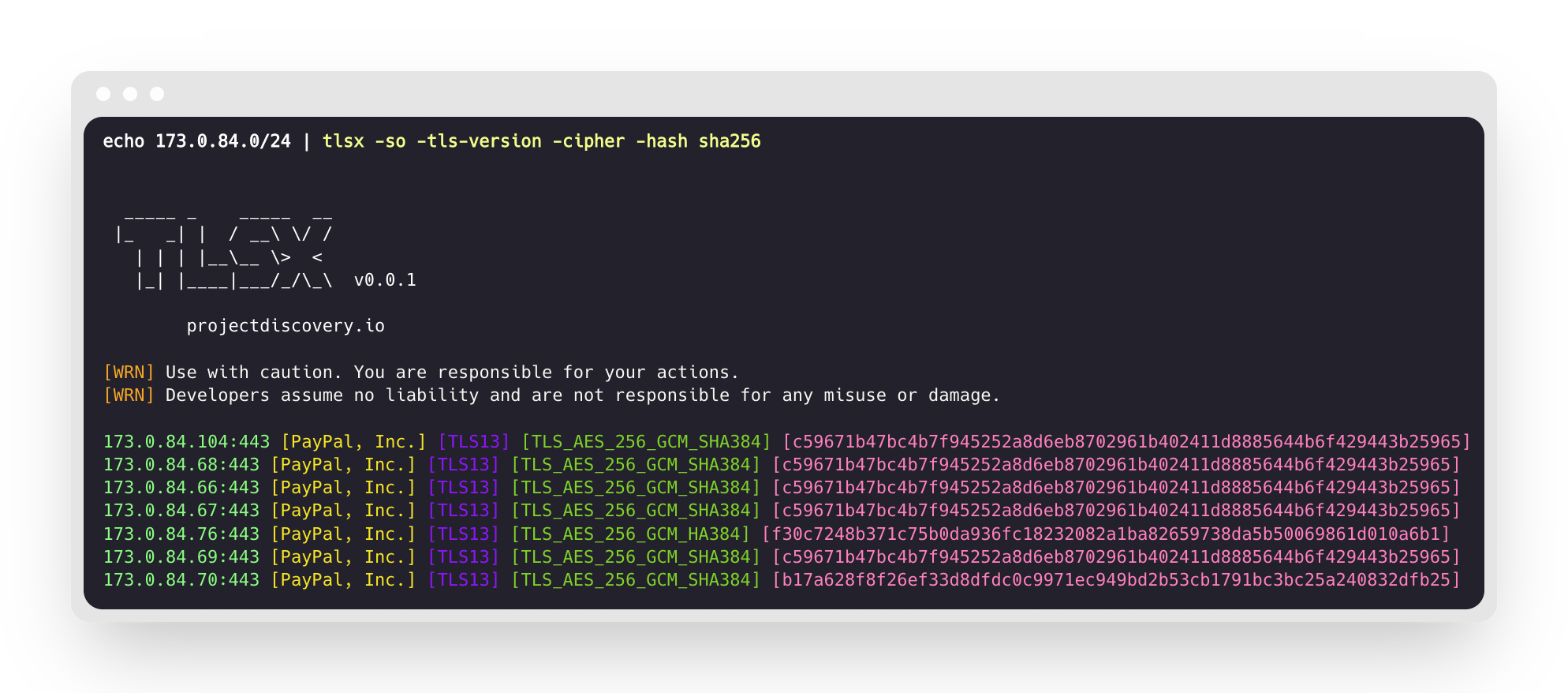
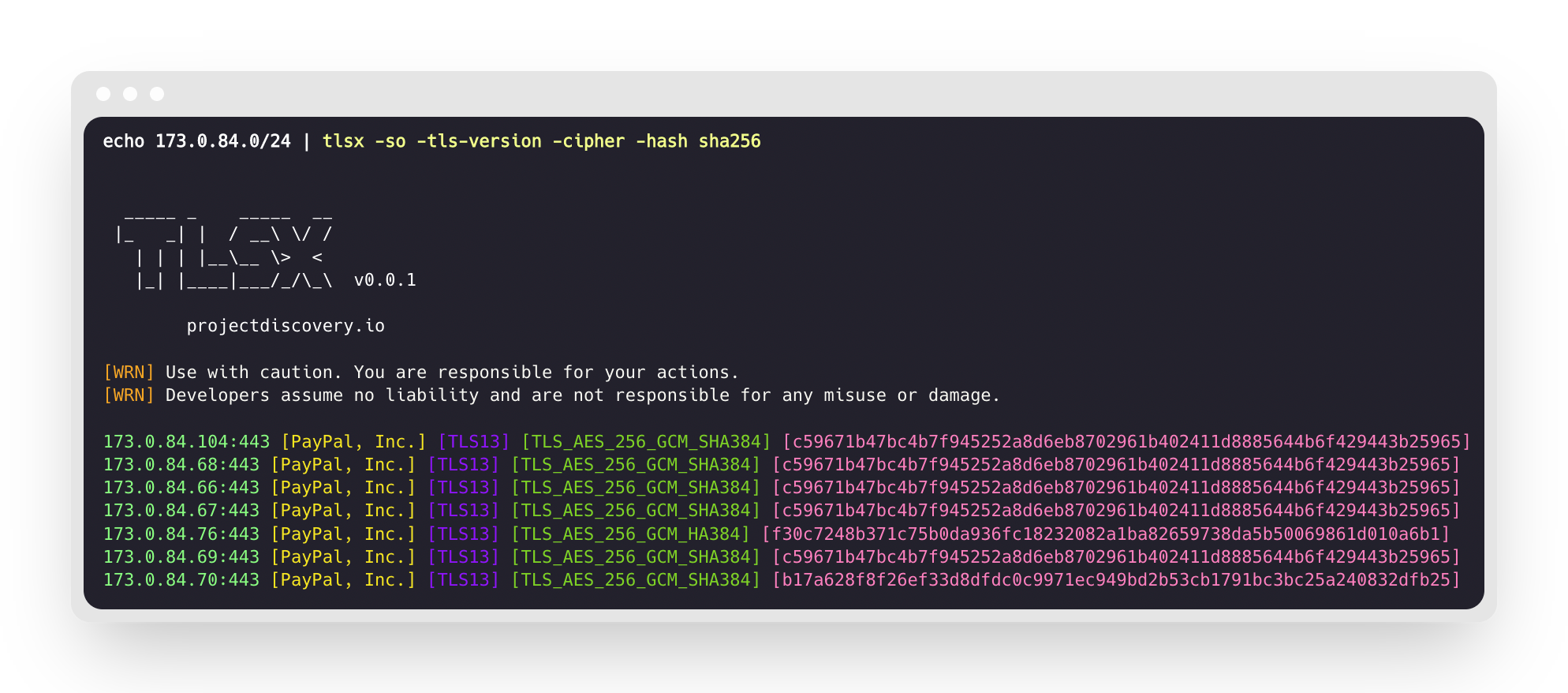
Isto executará a ferramenta contra a faixa CIDR fornecida e retornará os hosts que aceitam conexão TLS na porta 443.```console $ echo 173.0.84.0/24 | tlsx
|_ | | / \ / / | | | |_ > < || ||/_/_\ v0.0.1
projectdiscovery.io
[WRN] Use with caution. You are responsible for your actions. [WRN] Developers assume no liability and are not responsible for any misuse or damage.
173.0.84.69:443 173.0.84.67:443 173.0.84.68:443 173.0.84.66:443 173.0.84.76:443 173.0.84.70:443 173.0.84.72:443
### Sonda SAN/CN
O certificado TLS contém nomes DNS nos campos **subject alternative name** e **common name**, que podem ser extraídos usando as flags `-san`, `-cn`.```console
$ echo 173.0.84.0/24 | tlsx -san -cn -silent
173.0.84.104:443 [uptycspay.paypal.com]
173.0.84.104:443 [api-3t.paypal.com]
173.0.84.104:443 [api-m.paypal.com]
173.0.84.104:443 [payflowpro.paypal.com]
173.0.84.104:443 [pointofsale-s.paypal.com]
173.0.84.104:443 [svcs.paypal.com]
173.0.84.104:443 [uptycsven.paypal.com]
173.0.84.104:443 [api-aa.paypal.com]
173.0.84.104:443 [pilot-payflowpro.paypal.com]
173.0.84.104:443 [pointofsale.paypal.com]
173.0.84.104:443 [uptycshon.paypal.com]
173.0.84.104:443 [api.paypal.com]
173.0.84.104:443 [adjvendor.paypal.com]
173.0.84.104:443 [zootapi.paypal.com]
173.0.84.104:443 [api-aa-3t.paypal.com]
173.0.84.104:443 [uptycsize.paypal.com]
Para facilitar a automação, opcionalmente a flag -resp-only pode ser usada para listar apenas nomes de DNS na saída da CLI.```console
$ echo 173.0.84.0/24 | tlsx -san -cn -silent -resp-only
api-aa-3t.paypal.com pilot-payflowpro.paypal.com pointofsale-s.paypal.com uptycshon.paypal.com a.paypal.com adjvendor.paypal.com zootapi.paypal.com api-aa.paypal.com payflowpro.paypal.com pointofsale.paypal.com uptycspay.paypal.com api-3t.paypal.com uptycsize.paypal.com api.paypal.com api-m.paypal.com svcs.paypal.com uptycsven.paypal.com uptycsven.paypal.com a.paypal.com api.paypal.com pointofsale-s.paypal.com pilot-payflowpro.paypal.com
**subdomínios** obtidos de certificados TLS podem ser canalizados para outras ferramentas PD para inspeção adicional, aqui está um exemplo de envio de subdomínios TLS via pipe para **[dnsx](https://github.com/projectdiscovery/dnsx)** para filtrar subdomínios passivos e passá-los para **[httpx](https://github.com/projectdiscovery/httpx)** para listar hosts que executam serviços web ativos.```console
$ echo 173.0.84.0/24 | tlsx -san -cn -silent -resp-only | dnsx -silent | httpx
__ __ __ _ __
/ /_ / /_/ /_____ | |/ /
/ __ \/ __/ __/ __ \| /
/ / / / /_/ /_/ /_/ / |
/_/ /_/\__/\__/ .___/_/|_|
/_/ v1.2.2
projectdiscovery.io
Use with caution. You are responsible for your actions.
Developers assume no liability and are not responsible for any misuse or damage.
https://api-m.paypal.com
https://uptycsize.paypal.com
https://api.paypal.com
https://uptycspay.paypal.com
https://svcs.paypal.com
https://adjvendor.paypal.com
https://uptycshap.paypal.com
https://uptycshon.paypal.com
https://pilot-payflowpro.paypal.com
https://slc-a-origin-pointofsale.paypal.com
https://uptycsven.paypal.com
https://api-aa.paypal.com
https://api-aa-3t.paypal.com
https://uptycsbrt.paypal.com
https://payflowpro.paypal.com
http://pointofsale-s.paypal.com
http://slc-b-origin-pointofsale.paypal.com
http://api-3t.paypal.com
http://zootapi.paypal.com
http://pointofsale.paypal.com
Sonda de TLS / Cifra```console
$ subfinder -d hackerone.com | tlsx -tls-version -cipher
mta-sts.hackerone.com:443 [TLS1.3] [TLS_AES_128_GCM_SHA256] hackerone.com:443 [TLS1.3] [TLS_AES_128_GCM_SHA256] api.hackerone.com:443 [TLS1.3] [TLS_AES_128_GCM_SHA256] mta-sts.managed.hackerone.com:443 [TLS1.3] [TLS_AES_128_GCM_SHA256] mta-sts.forwarding.hackerone.com:443 [TLS1.3] [TLS_AES_128_GCM_SHA256] www.hackerone.com:443 [TLS1.3] [TLS_AES_128_GCM_SHA256] support.hackerone.com:443 [TLS1.2] [TLS_ECDHE_RSA_WITH_AES_128_GCM_SHA256]
# Má configuração de TLS
### Certificado Expirado / Autoassinado / Não Correspondente / Revogado / Não Confiável
Uma lista de hosts pode ser fornecida ao tlsx para detectar certificados **expirados / autoassinados / não correspondentes / revogados / não confiáveis**.```console
$ tlsx -l hosts.txt -expired -self-signed -mismatched -revoked -untrusted
_____ _ _____ __
|_ _| | / __\ \/ /
| | | |__\__ \> <
|_| |____|___/_/\_\ v0.0.1
projectdiscovery.io
[WRN] Use with caution. You are responsible for your actions.
[WRN] Developers assume no liability and are not responsible for any misuse or damage.
wrong.host.badssl.com:443 [mismatched]
self-signed.badssl.com:443 [self-signed]
expired.badssl.com:443 [expired]
revoked.badssl.com:443 [revoked]
untrusted-root.badssl.com:443 [untrusted]
JARM Impressão Digital TLS```console
$ echo hackerone.com | tlsx -jarm -silent
hackerone.com:443 [29d3dd00029d29d00042d43d00041d5de67cc9954cc85372523050f20b5007]
### [JA3](https://github.com/salesforce/ja3) Impressão digital TLS```console
$ echo hackerone.com | tlsx -ja3 -silent
hackerone.com:443 [20c9baf81bfe96ff89722899e75d0190]
Saída JSON
tlsx suporta múltiplas flags de probe para consultar dados específicos, mas toda a informação está sempre disponível em formato JSON. Para automação e pós-processamento, usar a saída -json é a opção mais conveniente.```console
echo example.com | tlsx -json -silent | jq .
The input chunk is empty — no content was provided to translate. Please resend chunk 35 with its text included.```json
{
"timestamp": "2022-08-22T21:22:59.799053+05:30",
"host": "example.com",
"ip": "93.184.216.34",
"port": "443",
"probe_status": true,
"tls_version": "tls13",
"cipher": "TLS_AES_256_GCM_SHA384",
"not_before": "2022-03-14T00:00:00Z",
"not_after": "2023-03-14T23:59:59Z",
"subject_dn": "CN=www.example.org, O=Internet Corporation for Assigned Names and Numbers, L=Los Angeles, ST=California, C=US",
"subject_cn": "www.example.org",
"subject_org": [
"Internet Corporation for Assigned Names and Numbers"
],
"subject_an": [
"www.example.org",
"example.net",
"example.edu",
"example.com",
"example.org",
"www.example.com",
"www.example.edu",
"www.example.net"
],
"issuer_dn": "CN=DigiCert TLS RSA SHA256 2020 CA1, O=DigiCert Inc, C=US",
"issuer_cn": "DigiCert TLS RSA SHA256 2020 CA1",
"issuer_org": [
"DigiCert Inc"
],
"fingerprint_hash": {
"md5": "c5208a47259d540a6e3404dddb85af91",
"sha1": "df81dfa6b61eafdffffe1a250240db5d2e6cee25",
"sha256": "7f2fe8d6b18e9a47839256cd97938daa70e8515750298ddba2f3f4b8440113fc"
},
"tls_connection": "ctls",
"sni": "example.com"
}
Integração com o Dashboard PDCP
tlsx suporta o envio de resultados de varredura para o painel da ProjectDiscovery Cloud Platform (PDCP) para visualização e análise.
Envio de Resultados em Tempo Real
Ative o upload para o painel para enviar automaticamente os resultados à medida que forem descobertos:```console $ tlsx -u example.com -pd -json
Os resultados serão automaticamente enviados para o PDCP e você receberá um URL de dashboard para visualizá-los.
#### Enviando um arquivo existente
Envie um arquivo de saída JSONL salvo anteriormente para o PDCP:```console
$ tlsx -pdu results.jsonl -tid your-team-id -aname "My Scan"
Opções de Configuração
-pd, --dashboard: Ativar upload em tempo real para o painel PDCP-pdu, --dashboard-upload <file>: Enviar um arquivo JSONL específico para o PDCP-auth <key>: Chave de API do PDCP (também pode ser definida via ambiente ou manipulador de credenciais)-tid, --team-id <id>: Especificar ID da equipe para uploads-aid, --asset-id <id>: Enviar para um ID de ativo existente-aname, --asset-name <name>: Definir um nome personalizado para o grupo de ativos
Exemplo com todas as opções:```console $ tlsx -u example.com -pd -json -tid team123 -aname "Production Scan"
## Configuração
### Modo de varredura
O tlsx fornece vários modos para fazer conexão TLS -
- `auto` (fallback automático para outros modos em caso de falha) - **padrão**
- `ctls` (**[crypto/tls](https://github.com/golang/go/blob/master/src/crypto/tls/tls.go)**)
- `ztls` (**[zcrypto/tls](https://github.com/zmap/zcrypto)**)
- `openssl` (**[openssl](https://github.com/openssl/openssl)**)
Algumas dicas para o modo/biblioteca específico são destacadas em [discussões vinculadas](https://github.com/projectdiscovery/tlsx/discussions/2). O modo `auto` é suportado para garantir a cobertura máxima e a varredura dos hosts que executam versões mais antigas de TLS, repetindo a conexão usando os modos `ztls` e `openssl` em caso de qualquer erro de conexão.
Um exemplo de uso do modo `ztls` para escanear um site que usa versão antiga/desatualizada de TLS.```console
$ echo tls-v1-0.badssl.com | tlsx -port 1010 -sm ztls
_____ _ _____ __
|_ _| | / __\ \/ /
| | | |__\__ \> <
|_| |____|___/_/\_\ v0.0.1
projectdiscovery.io
[WRN] Use with caution. You are responsible for your actions.
[WRN] Developers assume no liability and are not responsible for any misuse or damage.
tls-v1-0.badssl.com:1010
OpenSSL
Para usar o modo de conexão openssl, você precisará ter o openssl instalado no seu sistema. A maioria dos sistemas modernos vem com openssl pré-instalado, mas se não estiver presente no seu sistema, você pode instalá-lo manualmente. Você pode verificar se o openssl está instalado executando o comando openssl version. Se o openssl estiver instalado, esse comando exibirá o número da versão.
Pré-handshake (encerramento antecipado)tlsx suporta o encerramento antecipado da conexão SSL, o que permite varreduras mais rápidas e menos solicitações de conexão (desconectando após o Para mais detalhes, consulte Hunting-Certificates-And-Servers por @erbbysam Um exemplo do uso do modo |_ | | / \ / / | | | |_ > < || ||/_/_\ v0.0.1 [WRN] Use with caution. You are responsible for your actions. [WRN] Developers assume no liability and are not responsible for any misuse or damage. example.com:443 Cifra PersonalizadaA cifra personalizada suportada pode ser fornecida usando a flag AgradecimentosEste programa usa opcionalmente:
tlsx é feito com ❤️ pela equipe projectdiscovery e distribuído sob a Licença MIT. Streaming de Logs de Certificate Transparency (CT)O Ative o modo de logs de CT usando a opção Por padrão, duplicatas são filtradas usando um grande filtro Bloom inverso. Passe |

