
Skip to content
KitploitKITPLOIT
ツールブログ
提出
ツールブログ
提出

ハッキング、侵入テスト、サイバーセキュリティツールをあなたのセキュリティアーセナルに!

Kitploitはハッキング、サイバーセキュリティ、ペネトレーションテストのツールディレクトリです。最新のプロジェクトアップデートを見つけて、脆弱性の発見、システム分析、テストの自動化、セキュリティの強化を行いましょう。

··フィード·お問い合わせ·プライバシー·© 2026 Kitploit

ツールディレクトリ

カテゴリ

すべてのカテゴリを見る
Loading categories
zscan — Zscan スキャンブラストツールセット | Kitploit
ツール/GitHubGitHub/zyylhn/zscan
偵察脆弱性スキャナーネットワークマッピングパスワード攻撃ポートスキャンエクスプロイトペネトレーションテスト
GitHubzyylhn/zscan

zscan

Zscan スキャンブラストツールセット

リポジトリを見る
5397442年前Kitploit レビュー済み

人気

すべて見る →

コミュニティで最も使われているツールを見つけましょう。

すべてのツールを探索

ツールコレクションを閲覧

すべてのツールを見る →
共有

Zscan a scan blasting tool set

Licens Releases go

📄English document

更新内容はログを参照log

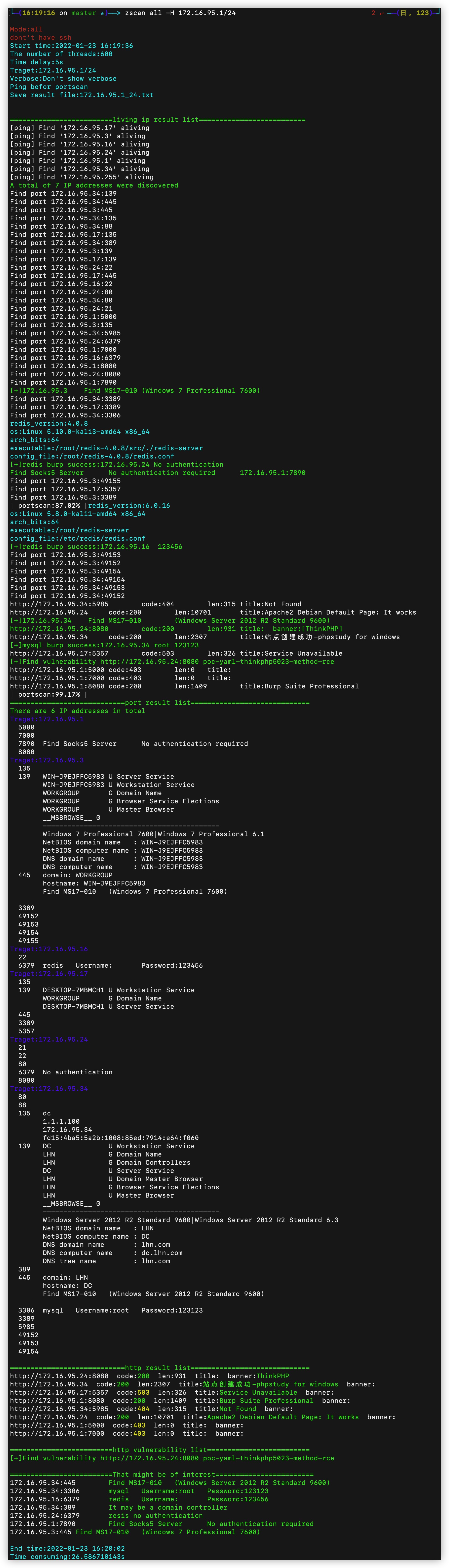
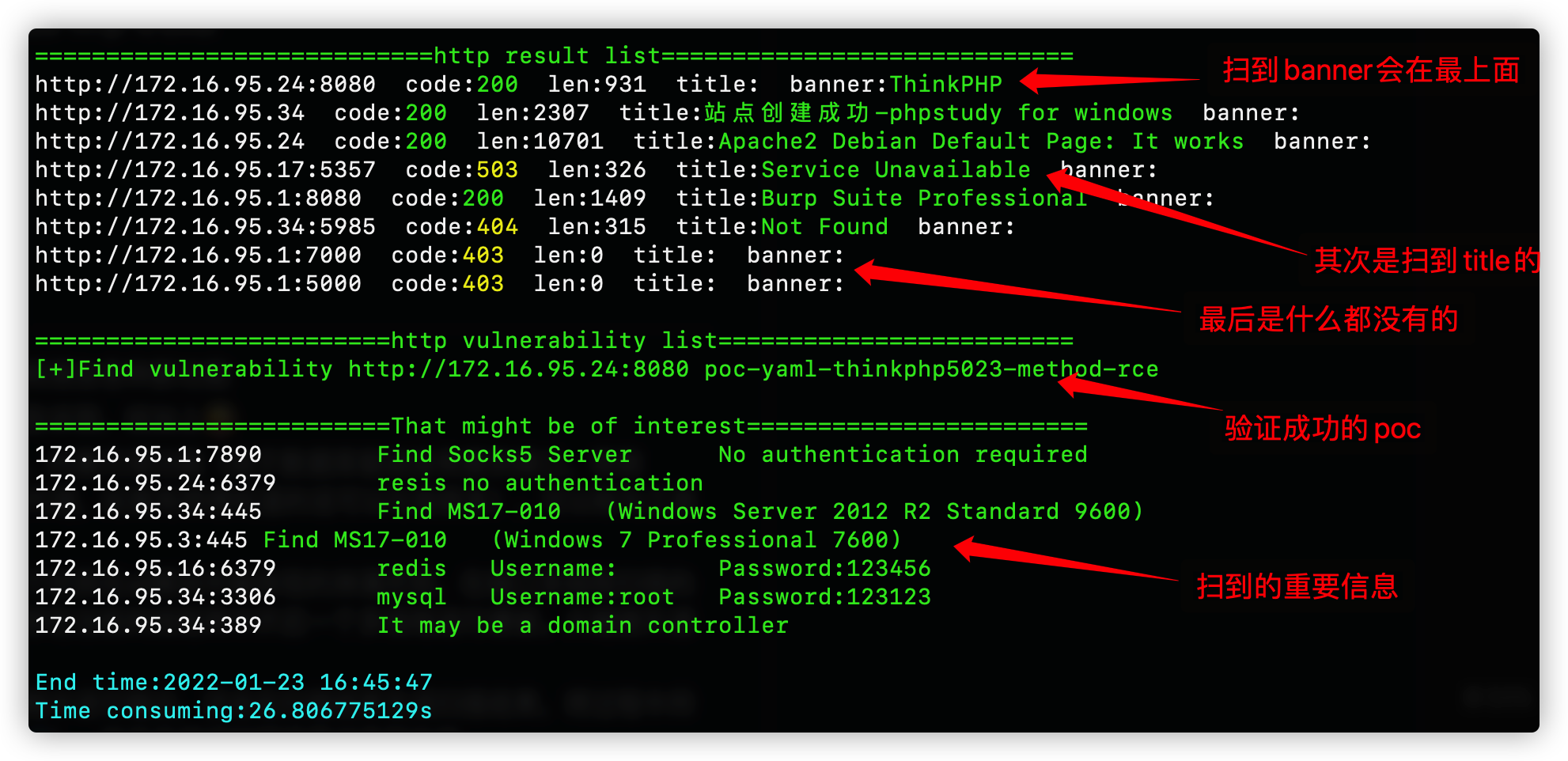
結果出力形式 -出力された結果のスクリーンショット一部。2段階に分かれており、第1段階はスキャン中の出力(ホスト生存検出終了から)、第2段階はすべてのスキャン結果を整理した出力(port result listの出力開始から)

概要🎉

Zscanはオープンソースの内部ネットワークポートスキャナ、ブルートフォースツール、その他の実用的なツールを集めたツールキットです。内部ネットワークセグメントの発見、ホスト発見、ポートスキャンを基礎として、blastモジュールではmysql、mssql、redis、mongo、postgres、ftp、ssh、ldap、rdp、smbなどのサービスに対してブルートフォース攻撃が可能です。scanモジュールではnetbios、smb、oxid、socksサーバ(プロキシサーバのスキャン)、ms17010、httpのPoCスキャンなどのスキャン機能を実行できます。デフォルトでhttpのタイトルとフィンガープリント情報を取得します。serverモジュールではhttp(ファイルのアップロード/ダウンロード可能)とsocks5サーバ(プロキシサーバ)を起動でき、toolsモジュールには実用的な小さなツールとして現在はncのみが統合されています。最新で追加されたexploitモジュールでは、ブルートフォース成功したサービスを利用でき、sshインタラクティブログイン(ユーザ名+パスワードまたはキー)、redisマスタースレーブレプリケーションとLuaサンドボックスエスケープ(ファイルアップロードとコマンド実行)、ldapクエリ(よく使うクエリ文を内蔵)などが可能です。また、allモジュールではスキャン時にすべてのスキャンモジュールとブルートフォースモジュールを呼び出します。IPv6スキャン対応、ドメイン名入力対応、CDN自動識別対応。具体的なモジュール機能は以下の通りです。

ツールのサイズは大きめですが、後日軽量版をリリース予定。モジュール設計なので不要な機能を省くのも簡単です。``` all 调用所有扫描和爆破模块 ping 主机发现和网段发现 ps 基本的端口扫描和http指纹识别title抓取 scan 扫描模块 --->ms17010扫描 --->poc漏洞扫描(内置380个poc) --->proxyfind内网代理服务器扫描 --->winscan Windows的smb,netbios和oxid扫描 blast 爆破服务模块(包括以下爆破模块) --->ftp --->ldap --->mongo --->mssql --->mysql --->postgres --->rdp --->redis --->smb --->ssh server start http server or socks5 server --->http服务器(可上传下载文件) --->socks5服务器(可启动一个代理服务器,支持身份验证) exploit 漏洞利用模块 --->ldap查询 --->redis组从复制上传文件执行命令,lua沙箱逃逸RCE --->snmp查询 --->ssh登陆 --->sunlogin向日葵RCE tools 实用工具模块 --->nc简单的nc,可以开放端口连接端口 --->searchfile支持多线程正则搜索文件

root@kitploit:~
使用形式は```
zscan 模块 参数

I understand. However, I don't see any content after "INPUT:" in your message. It appears the Markdown content for chunk 5 was not actually included. Without input text to translate, I cannot provide a translation. Please provide the content you'd like me to translate.```


/___ \ /\ \ /\ \ /\ __ \ /\ "-.\ \
/
/ /
\ _
\ \ \ _
__ \ \ __ \ \ \ -. \
/_\ /_\ \ ___\ \ _\ _\ \ _\"_\ // // /_____/ //// // //

Usage: zscan [command]

Available Commands: all Use all scan mode blast Common service blasting exploit sshlogin,redisexec help Help about any command ping ping scan to find computer ps Port Scan scan ms17010,proxyfind,snmp,winscan(smb,netbios,oxid),poc server start http server or socks5 server

Flags: -h, --help help for zscan --nobar disable portscan progress bar -o, --output string the path of result file (default "result.txt") --proxy string Connect with a proxy(user:[email protected]:1080 or 172.16.95.1:1080) -T, --thread thread Set thread eg:2000 (default 600) -t, --timeout time Set timeout(s) eg:5s (default 5s) -v, --verbose Show verbose information

root@kitploit:~
模块里面的Flag代表当前命令的参数,Global Flags代表全局参数(所有命令都可以用)
这里的Flags为全局参数,所有模块都可以使用

- --log:启用这个参数会将当前运行结果以追加的形式写到log.txt(可以记下每次运行的结果)
- -o --output:默认在当前目录的中文件名为Hosts -o指定路径
- --proxy :设置代理,用户名密码(user:pass@ip:port)不需要省份验证(ip:port)
- -T --thread:指定线程数,默认100
- -t --timeout:设置延时,网络条件好追求速度的话可以设置成1s
- -v --verbose:设置显示扫描过程信息

## 功能模块😈

目前已有模块:

<details>
<summary><b>ping模块:普通用户权限调用系统ping,root权限可以选择使用icmp数据包</b></summary>```
zscan ping 

Nothing to translate.``` Usage: zscan ping [flags]

Flags: -d, --discover string Live network segment found,local parameter uses the local NIC information。eg:zscan ping -d local/zscan ping -d 172.18.0.0,172.19.0.0 -h, --help help for ping -H, --host hosts Set hosts(The format is similar to Nmap) --hostfile string Set host file -i, --icmp Icmp packets are sent to check whether the host is alive(need root)

Global Flags: --nobar disable portscan progress bar -o, --output string the path of result file (default "result.txt") --proxy string Connect with a proxy(user:[email protected]:1080 or 172.16.95.1:1080) -T, --thread thread Set thread eg:2000 (default 600) -t, --timeout time Set timeout(s) eg:5s (default 5s) -v, --verbose Show verbose information

root@kitploit:~
必须指定host和hostfile两个参数其中的一个,当有root权限的时候可以使用-i不调用本地的ping而是自己发icmp数据包(线程开的特别高的话几千那种,调用本地ping命令会导致cpu占用过高)

--discover两种网段发现模式,一种是ping网络b段网关,一种是oxid扫描

--discover后面需要给一个参数,如果给local(zscan ping --disconver local)就会读取本地网卡信息,去扫描本地的网络b段,例如读取到本地的两张网卡192.168.13.13和172.16.95.23,那么他就会去ping192.168.0.0/16和172.16.0.0/16这两个b段

还可以给定一个或者多个b段ip例如172.17.0.0或者172.18.0.0,10.10.0.0,多个ip段用逗号隔开

</details>

<details>
<summary><b>ps模块:端口扫描和获取httptitle</b></summary>```
zscan ps
  • まず、pythonをインストールし、レジストリでpythonのパスを設定する必要があります。``` Usage: zscan ps [flags]

Flags: -b, --banner Return banner information -h, --help help for ps -H, --host hosts Set hosts(The format is similar to Nmap) eg:192.168.1.1/24,172.16.95.1-100,127.0.0.1 --hostfile string Set host file -i, --icmp Icmp packets are sent to check whether the host is alive(need root) --noping not ping discovery before port scanning --nowebscan Whether to perform HTTP scanning (httpTitle and HTTP vulnerabilities)(default on) -p, --port port Set port eg:1-1000,3306,3389 or use " zscan ps -p l" ) to scan less port(thirty port) -s, --syn use syn scan --vulscan Whether to perform HTTP vulnerabilities(default off)

Global Flags: --nobar disable portscan progress bar -o, --output string the path of result file (default "result.txt") --proxy string Connect with a proxy(user:[email protected]:1080 or 172.16.95.1:1080) -T, --thread thread Set thread eg:2000 (default 600) -t, --timeout time Set timeout(s) eg:5s (default 5s) -v, --verbose Show verbose information

root@kitploit:~
--hostと--hostfileでターゲットを指定

-pでポートを指定、指定しない場合はデフォルトポートを使用、または"l"を指定してless port(約30の一般的なポート)を使用

--nopingでpingを行わずに直接すべてのターゲットをスキャン

--icmpでpingを使用する際にICMPパケットを使用してホスト発見

--nowebscan パラメータでWebスキャンを無効にし、ポートスキャンのみ実行

--vulscan パラメータでPOC検出を有効化(Webスキャンが有効な場合のみ使用可能。そうでなければ意味がない)

--syn でSYNスキャンを使用(高権限が必要)

</details>

<details>
<summary><b>allモジュール:すべてのスキャンとブルートフォースモジュールを呼び出してスキャン</b></summary>```
zscan all

(No input provided.)``` Usage: zscan all [flags]

Flags: -h, --help help for all -H, --host hosts Set hosts(The format is similar to Nmap) eg:192.168.1.1/24,172.16.95.1-100,127.0.0.1 --hostfile string Set host file -i, --icmp Icmp packets are sent to check whether the host is alive(need root) --noburp Set postgres passworddict path --noping Not ping before port scanning --novulscan disable http vulnerability scan --passdict string Set postgres passworddict path -P, --password string Set postgres password -p, --port port Set port eg:1-1000,3306,3389 or use " zscan all -p l" ) to scan less port(thirty port) -U, --username string Set user name

Global Flags: --nobar disable portscan progress bar -o, --output string the path of result file (default "result.txt") --proxy string Connect with a proxy(user:[email protected]:1080 or 172.16.95.1:1080) -T, --thread thread Set thread eg:2000 (default 600) -t, --timeout time Set timeout(s) eg:5s (default 5s) -v, --verbose Show verbose information

root@kitploit:~
allモジュールは本質的にpsモジュールとほぼ同じですが、allモジュールが対応するポートをスキャンした場合、現在のスレッド内でフィンガープリント識別やユーザー名・パスワードのブルートフォースを行います。

allモジュールのパラメータはpsモジュールと同じで、パスワード辞書が1つ追加されています。これは、ブルートフォースが必要なポートをスキャンする際に使用する辞書を設定するためのもので、その他は同じです。

--notburp ブルートフォースを行わず、スキャンのみを実行します。

--novulscan allモジュールはすべてのモジュールを呼び出すため、このパラメータは脆弱性スキャンを無効にするために使用します。

</details>

<details>
<summary><b>blast:ブルートフォースモジュール。一般的なサービスのブルートフォース機能を含む</b></summary>```
zscan blast

VulnCheck IP コンテキストを使用する

  • 説明 VulnCheck IP コンテキスト API を使用して、指定された IP に関連する脅威インテリジェンス情報をクエリします。
  • 使用方法
    root@kitploit:~
    vulncheck_ip_context <ip_address>
    
  • パラメータ
    • <ip_address>: クエリする IP アドレス。``` Usage: zscan blast [command]

Available Commands: ftp burp ftp username and password ldap burp ldap username and password mongo burp mongodb username and password mssql burp mssql username and password mysql burp mysql username and password postgres burp postgres username and password rdp burp remote desktop(3389) redis burp redis password smb burp smb usernamae and password ssh burp ssh username password or traverse the key

Flags: -h, --help help for blast

Global Flags: --nobar disable portscan progress bar -o, --output string the path of result file (default "result.txt") --proxy string Connect with a proxy(user:[email protected]:1080 or 172.16.95.1:1080) -T, --thread thread Set thread eg:2000 (default 600) -t, --timeout time Set timeout(s) eg:5s (default 5s) -v, --verbose Show verbose information

root@kitploit:~
基本的にすべてのブルートフォースモジュールの使用方法は同じで、ユーザー名とパスワード、またはユーザー名とパスワードの辞書を指定するだけでよく、ブルートフォースのスレッド数も指定できます。このスレッドは -T のスレッドとは異なり、-T のスレッドは私たちが並行してスキャンするターゲットの数を表します(このターゲットは IP とポートの組み合わせで、各並行処理はターゲットに1つのデータパケットを送信することに相当します)。burptheard は、上記の並行スキャンの単一スレッド内でターゲットのポート(例:mysql)を発見した場合、そのスキャンスレッド内でマルチスレッドのブルートフォースを開始することを意味します(ここでのターゲットは特定の IP の特定のポートに変わります。この場合、速度制限が必要であり、速度が速すぎるとターゲットサービスが利用できなくなる可能性があります)。

</details>

<details>
<summary><b>scanモジュール:一般的なスキャンモジュール</b></summary>```
Usage:
  zscan scan [command]

Available Commands:
  ms17010     MS17_010 scan
  poc         poc check
  proxyfind   Scan proxy
  snmp        snmp scan
  winscan     netbios、smb、oxid scan

Flags:
  -h, --help   help for scan

Global Flags:
      --nobar           disable portscan progress bar
  -o, --output string   the path of result file (default "result.txt")
      --proxy string    Connect with a proxy(user:[email protected]:1080 or 172.16.95.1:1080)
  -T, --thread thread   Set thread eg:2000 (default 600)
  -t, --timeout time    Set timeout(s) eg:5s (default 5s)
  -v, --verbose         Show verbose information


proxyfindモジュール:ネットワーク内のプロキシをスキャンします。現在socks4/5をサポート、後日httpを追加予定``` zscan scan proxyfind ``` インストール済みの全パッケージとバージョンを一覧表示するには:``` Usage: zscan proxyfind [flags]

Flags: -h, --help help for proxyfind -H, --host hosts Set hosts(The format is similar to Nmap) eg:192.168.1.1/24,172.16.95.1-100,127.0.0.1 --hostfile string Set host file -p, --ports port Set port eg:1-1000,3306,3389 (default "1080,1089,8080,7890,10808") --type string Set the scan proxy type(socks4/socks5/http) (default "socks5")

Global Flags: --log Record the scan results in chronological order,Save path./log.txt -O, --output Whether to enter the results into a file(default ./result.txt),can use --path set --path string the path of result file (default "result.txt") -T, --thread thread Set thread eg:2000 (default 100) -t, --timeout time Set timeout(s) eg:5s (default 3s) -v, --verbose Show verbose information

root@kitploit:~
内部ネットワークのプロキシサーバーをスキャン

-H でターゲットを指定、-p でポートを指定、--type でスキャンするプロキシプロトコルタイプを指定(現在はsocks4/5をサポート、他のプロトコルは開発中)
</details>

<details>
<summary><b>ms17010モジュール:ms17010脆弱性のバッチスキャン</b></summary>```
Usage:
  zscan scan ms17010 [flags]

Flags:
  -h, --help              help for ms17010
  -H, --host string       Set target
      --hostfile string   Set host file

Global Flags:
      --log             Record the scan results in chronological order,Save path./log.txt
  -O, --output          Whether to enter the results into a file(default ./result.txt),can use --path set
      --path string     the path of result file (default "result.txt")
  -T, --thread thread   Set thread eg:2000 (default 100)
  -t, --timeout time    Set timeout(s) eg:5s (default 3s)
  -v, --verbose         Show verbose information

ターゲットを指定するだけでよい

winscanモジュール:oxid、smb、netbiosスキャン機能を含む``` Usage: zscan scan winscan [flags]

Flags: -h, --help help for winscan -H, --host string Set target --hostfile string Set host file --netbios netbios scan --oxid oxid scan --smb smb scan

Global Flags: --log Record the scan results in chronological order,Save path./log.txt -O, --output Whether to enter the results into a file(default ./result.txt),can use --path set --path string the path of result file (default "result.txt") -T, --thread thread Set thread eg:2000 (default 100) -t, --timeout time Set timeout(s) eg:5s (default 3s) -v, --verbose Show verbose information

root@kitploit:~
如果直接给目标的话会同时扫描netbios,oxid,smb。可以使用--来指定只使用某一个

</details>

<details>
<summary><b>poc模块:既是一个单独模块也是一个功能在其他模块调用</b></summary>```
poc check

Usage:
  zscan scan poc [flags]

Flags:
  -h, --help             help for poc
  -l, --listpoc          List built in poc
      --pocname string   set the poc name
      --pocpath string   set target url
      --pocthread int    set poc scan thread (default 500)
  -u, --url string       set target url
      --urlfile string   set target file

Global Flags:
      --nobar           disable portscan progress bar
  -o, --output string   the path of result file (default "result.txt")
      --proxy string    Connect with a proxy(user:[email protected]:1080 or 172.16.95.1:1080)
  -T, --thread thread   Set thread eg:2000 (default 600)
  -t, --timeout time    Set timeout(s) eg:5s (default 5s)
  -v, --verbose         Show verbose information

-l/--list:ツールに内蔵されたPOCを一覧表示

--pocname:実際にはフィルターオプションで、POC名に指定されたフィールドを含むPOCをフィルタリングします(スキャン・表示の両方で使用可能)

--pocpth:ディレクトリを指定するとそのディレクトリ内のすべてのPOCを使用し、POCを指定するとそのPOCのみを使用します

--pocthread:POCスキャンのスレッド数

--url/--urlfile:ターゲットを指定。-u/--urlで単一ターゲットを指定、txtファイルを指定してバッチスキャン可能

serverモジュール:サーバーモジュールを起動``` Usage: zscan server [command]

Available Commands: httpserver Start an authentication HTTP server socks5 Create a socks5 server

Flags: -h, --help help for server

Global Flags: --nobar disable portscan progress bar -o, --output string the path of result file (default "result.txt") --proxy string Connect with a proxy(user:[email protected]:1080 or 172.16.95.1:1080) -T, --thread thread Set thread eg:2000 (default 600) -t, --timeout time Set timeout(s) eg:5s (default 5s) -v, --verbose Show verbose information

root@kitploit:~
<details>
<summary><b>socks5モジュール: socks5サーバーを起動する</b></summary>```
zscan socks5

該示例は MITM を利用してマルウェアを注入し、同時にトラフィックを分析してセキュリティ制限を回避します。``` Usage: zscan server socks5 [flags]

Flags: -a, --addr string Specify the IP address and port of the Socks5 service (default "0.0.0.0:1080") -h, --help help for socks5 -P, --password string Set the socks5 service authentication password -U, --username string Set the socks5 service authentication user name

Global Flags: --log Record the scan results in chronological order,Save path./log.txt -O, --output Whether to enter the results into a file(default ./result.txt),can use --path set --path string the path of result file (default "result.txt") -T, --thread thread Set thread eg:2000 (default 100) -t, --timeout time Set timeout(s) eg:5s (default 3s) -v, --verbose Show verbose information

root@kitploit:~
-a オプションで socks5 サービスがリッスンする IP とポートを指定できます

-p と -u でプロキシのユーザー名とパスワードを指定します

</details>

<details>
<summary><b>httpserver モジュール: HTTP サーバーを起動し、認証とファイルアップロードをサポートします</b></summary>```
Usage:
 zscan server httpserver [flags]

Flags:
  -a, --addr string   set http server addr (default "0.0.0.0:7001")
  -d, --dir string    set HTTP server root directory (default ".")
  -h, --help          help for httpserver
  -P, --pass string   Set the authentication password
  -U, --user string   Set the authentication user

Global Flags:
      --log             Record the scan results in chronological order,Save path./log.txt
  -O, --output          Whether to enter the results into a file(default ./result.txt),can use --path set
      --path string     the path of result file (default "result.txt")
  -T, --thread thread   Set thread eg:2000 (default 100)
  -t, --timeout time    Set timeout(s) eg:5s (default 3s)
  -v, --verbose         Show verbose information
toolsモジュール:よく使うツールを統合しています``` Usage: zscan tools [command]

Available Commands: nc A easy nc

Flags: -h, --help help for tools

Global Flags: --nobar disable portscan progress bar -o, --output string the path of result file (default "result.txt") --proxy string Connect with a proxy(user:[email protected]:1080 or 172.16.95.1:1080) -T, --thread thread Set thread eg:2000 (default 600) -t, --timeout time Set timeout(s) eg:5s (default 5s) -v, --verbose Show verbose information

root@kitploit:~
<details>
<summary><b>ncモジュール: シンプルなnc、ポートを開いて接続できる</b></summary>```
zscan nc
  • arl_files/ # arl プロジェクト静的ファイル``` Usage: zscan nc [flags]

Flags: -a, --addr string listen/connect host address eg(listen):-a 0.0.0.0:4444 eg(connect):-a 172.16.95.1:4444 -h, --help help for nc -l, --listen listen mode(default connect)

Global Flags: --log Record the scan results in chronological order,Save path./log.txt -O, --output Whether to enter the results into a file(default ./result.txt),can use --path set --path string the path of result file (default "result.txt") -T, --thread thread Set thread eg:2000 (default 100) -t, --timeout time Set timeout(s) eg:5s (default 3s) -v, --verbose Show verbose information

-a指定地址,不使用-l的话代表连接目标,使用-l为监听端口

root@kitploit:~
</details>

<details>
<summary><b>searchfileモジュール:マルチスレッドでファイルを検索し、正規表現をサポート</b></summary>```
Search files that support regular matching

Usage:
  zscan tools searchfile [flags]

Flags:
  -d, --dir string           set search base Dir
  -f, --file stringArray     set filename eg:zscan tools searchfile -d ./ -f pass.txt -f user.txt
  -h, --help                 help for searchfile
  -r, --regexp stringArray   Specifies the re matching parameters
      --walk int             Traversal turns on multithreading depth(Try not to go above 5) (default 3)

Global Flags:
      --nobar           disable portscan progress bar
  -o, --output string   the path of result file (default "result.txt")
      --proxy string    Connect with a proxy(user:[email protected]:1080 or 172.16.95.1:1080)
  -T, --thread thread   Set thread eg:2000 (default 600)
  -t, --timeout time    Set timeout(s) eg:5s (default 5s)
  -v, --verbose         Show verbose information
exploitモジュール:サービスクラッキング成功後の利用モジュール``` Usage: zscan exploit [command]

Available Commands: ldap Ldap queries redis Redis utilizes modules snmp snmp scan sshlogin Login using a user name, password, or key sunlogin sunlogin RCE CNVD-2022-10270

Flags: -h, --help help for exploit

Global Flags: --nobar disable portscan progress bar -o, --output string the path of result file (default "result.txt") --proxy string Connect with a proxy(user:[email protected]:1080 or 172.16.95.1:1080) -T, --thread thread Set thread eg:2000 (default 600) -t, --timeout time Set timeout(s) eg:5s (default 5s) -v, --verbose Show verbose information

root@kitploit:~
<details>
<summary><b>snmpモジュール:snmpスキャン</b></summary>```
Usage:
  zscan exploit snmp [flags]

これは多機能なDiscordフィッシングツールであり、複数のフィッシングテンプレートをサポートしています。以下を含みますが、これに限定されません:認証ボット、報酬受け取り、アカウント認証など。このツールは詳細な設定オプションと自動化機能を提供します。

主な機能

  • 複数のフィッシングテンプレート:認証、報酬、アカウント認証など、さまざまなフィッシングシナリオを提供します。
  • 自動化機能:フィッシングリンクを自動送信し、被害者の認証情報を自動収集します。
  • 詳細な設定:フィッシングページやメッセージ内容をカスタマイズ可能です。
  • 使いやすさ:シンプルで明確なコマンドラインインターフェースを提供します。``` Flags: --burpthread int Set burp password thread(recommend not to change) (default 100) --get string set an oid -h, --help help for snmp -H, --host string Set target --hostfile string Set host file -l, --listoid List commonly used OIDs --password string set a password (default "public") --passwordfile string passwords dict file, eg: ./dict/password.txt -p, --port port Set port (default 161) --version string specifies SNMP version to use. 1|2c|3 (default "2c") --walk string set an oid

Global Flags: --log Record the scan results in chronological order,Save path./log.txt -O, --output Whether to enter the results into a file(default ./result.txt),can use --path set --path string the path of result file (default "result.txt") -T, --thread thread Set thread eg:2000 (default 100) -t, --timeout time Set timeout(s) eg:5s (default 3s) -v, --verbose Show verbose information

root@kitploit:~
--listoid一般的なクエリ情報を一覧表示します```
0: 系统基本信息         SysDesc                 GET     1.3.6.1.2.1.1.1.0
1: 监控时间             sysUptime               GET     1.3.6.1.2.1.1.3.0
2: 系统联系人           sysContact              GET     1.3.6.1.2.1.1.4.0
3: 获取机器名           SysName                 GET     1.3.6.1.2.1.1.5.0
4: 机器所在位置         SysLocation             GET     1.3.6.1.2.1.1.6.0
5: 机器提供的服务       SysService              GET     1.3.6.1.2.1.1.7.0
6: 系统运行的进程列表   hrSWRunName             WALK    1.3.6.1.2.1.25.4.2.1.2
7: 系统安装的软件列表   hrSWInstalledName       WALK    1.3.6.1.2.1.25.6.3.1.2
8: 网络接口列表         ipAdEntAddr             WALK    1.3.6.1.2.1.4.20.1.1
sshlogin:可进行ssh账号密码和密钥登陆``` Usage: zscan exploit sshlogin [flags]

Flags: -h, --help help for sshlogin -H, --host string Set ssh server host -d, --keypath string Set public key path -k, --login_key Use public key login -P, --password string Set ssh password -p, --port int Set ssh server port (default 22) -U, --username string Set ssh username

Global Flags: --nobar disable portscan progress bar -o, --output string the path of result file (default "result.txt") --proxy string Connect with a proxy(user:[email protected]:1080 or 172.16.95.1:1080) -T, --thread thread Set thread eg:2000 (default 600) -t, --timeout time Set timeout(s) eg:5s (default 5s) -v, --verbose Show verbose information

root@kitploit:~
​	パスワード認証ログイン:./zscan exploit ssh -H 172.16.95.24 -U root -P 123456

​	公開鍵ログイン:./zscan exploit ssh -H 172.16.95.24 -U root -k

​	公開鍵ログインはデフォルトでカレントユーザディレクトリの .ssh から秘密鍵を取得します。-d/--keypath オプションで秘密鍵のパスを指定できます。

</details>

<details>
<summary><b>redis:redis利用モジュール</b></summary>```
Usage:
  zscan exploit redis [flags]

Flags:
  -c, --command string    Set the command you want to execute eg:(zscan exploit redis -H 172.16.95.16 -P 123456 -c "keys *")
      --dstpath string    set target path
      --exec              use execute the command mode
  -h, --help              help for redis
  -H, --host string       Set redis server host
      --lhost string      set listen host(!!!Make sure the target has access!!!)
      --lport int         set listen port(!!!Make sure the target has access!!!) (default 20001)
      --lua               use CVE-2022-0543 to attack
  -P, --password string   Set redis password
  -p, --port int          Set redis server port (default 6379)
      --so string         set .so file path
      --srcpath string    set upload file path
      --upload            use upload mode

Global Flags:
      --nobar           disable portscan progress bar
  -o, --output string   the path of result file (default "result.txt")
      --proxy string    Connect with a proxy(user:[email protected]:1080 or 172.16.95.1:1080)
  -T, --thread thread   Set thread eg:2000 (default 600)
  -t, --timeout time    Set timeout(s) eg:5s (default 5s)
  -v, --verbose         Show verbose information
sunlogin模块:向日葵RCE的利用模块``` sunlogin RCE CNVD-2022-10270

Usage: zscan exploit sunlogin [flags]

Flags: -c, --command string command you want to execute -h, --help help for sunlogin -H, --host string Set redis server host -p, --port int Set RCE port

Global Flags: --nobar disable portscan progress bar -o, --output string the path of result file (default "result.txt") --proxy string Connect with a proxy(user:[email protected]:1080 or 172.16.95.1:1080) -T, --thread thread Set thread eg:2000 (default 600) -t, --timeout time Set timeout(s) eg:5s (default 5s) -v, --verbose Show verbose information

root@kitploit:~
脆弱性発見にはpsモジュールまたはallモジュールを使用して40000-65535をスキャンでき、脆弱性ポートを自動識別できます

-cを使用してコマンドを1つ実行できます。-cを使用しない場合はインタラクティブモード(疑似インタラクティブ)に入り、入力に従ってコマンドを実行します

-pでポートを指定します

</details>

</details>

## 使用例🤪

<details>
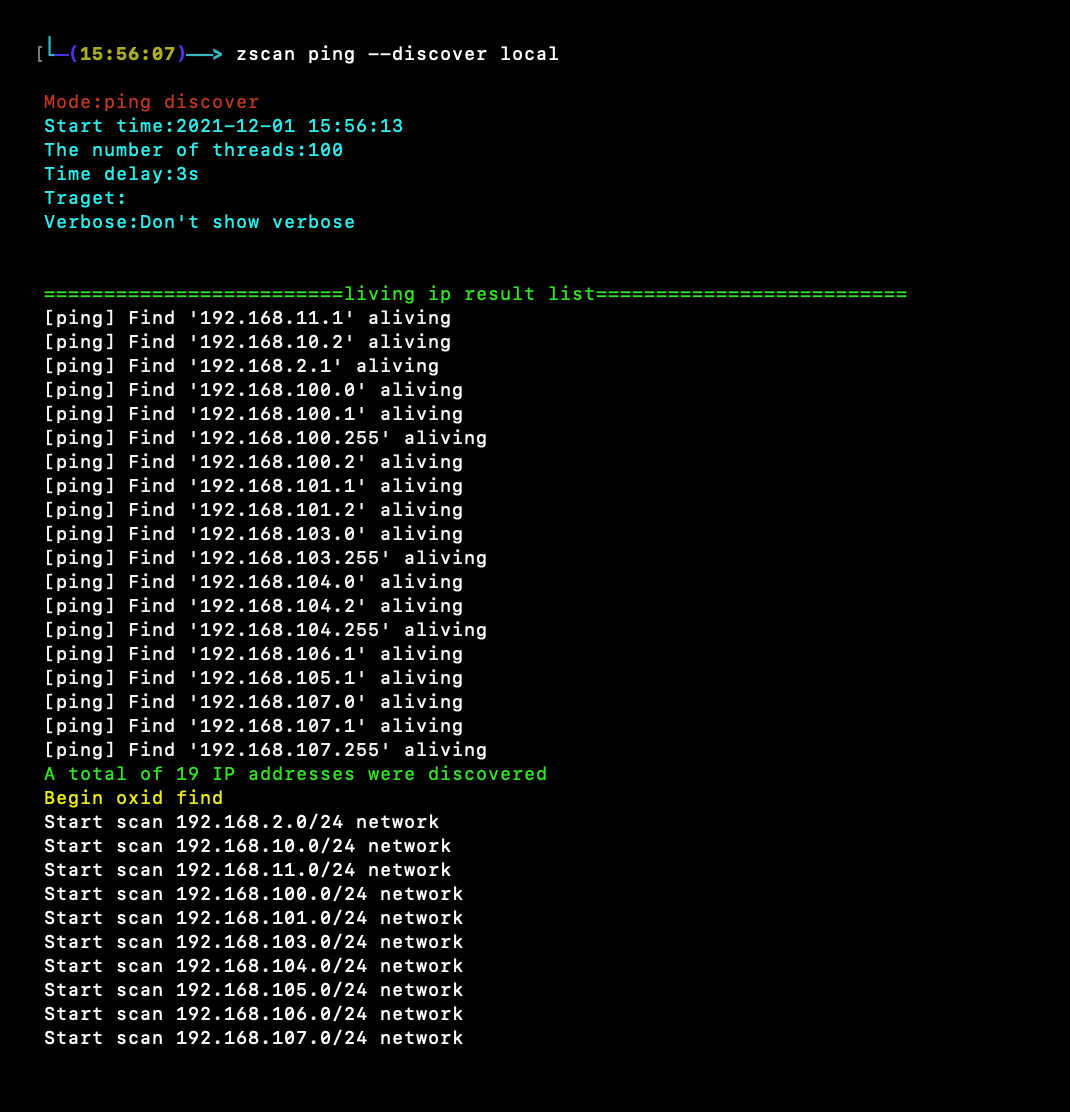
<summary><b>pingネットワークセグメント発見:zscan ping --discover local</b></summary>```
zscan ping --discover local或者
zscan ping --discover 192.168.0.0

psポートスキャン:zscan ps -H ip``` zscan ps -H 172.16.95.1-30 [--noping禁用ping] zscan ps -H 172.16.95.1-30 --vulsacn //扫描完http banner之后进行poc探测 zscan ps -H 172.16.95.1-30 --nowebscan //只扫描端口,不进行http探测 ```
sshモジュールのブルートフォース/ログイン ``` 爆破 zscan blast ssh -H 172.16.95.24 登录 zscan exploit ssh -H 172.16.95.24 -U root -P 123123 ``` ![](https://assets.kitploit.com/production/public/readmes/5177/b7c12e48ab63ea4592a1a8b37b39d35aa305f5dcec44a61a0e03eb83b766c7c0.jpg)
redisモジュールのブルートフォース/コマンド実行``` 爆破 zscan blast redis -H 172.16.95.1-30 登录 zscan exploit redis -H 172.16.95.16 -c cmd ``` ![](https://assets.kitploit.com/production/public/readmes/5177/c105a39b6a4230ee42485b8e3b6fe93624b6ff77a13e061450361946712c5c0a.jpg)

winscanモジュール:zscan scan winscan -H ip``` zscan scan winscan -H 172.16.95.1-33 ``` ![](https://assets.kitploit.com/production/public/readmes/5177/4741150f5ed9a47d1770e04ab344b459e3624ad02634648d4c08a92f9b58397b.jpg)
すべてのスキャンおよびブルートフォースモジュールを呼び出す:zscan all -H ip``` zscan all -H 172.16.95.1-30 zscan all -H 172.16.95.1-30 --novulscan //不进行poc探测 ``` ![](https://assets.kitploit.com/production/public/readmes/5177/35c973af3de607d1483c3d657b5573ae82d27735bc22e64cb033c56c2635fff2.jpg)
POCスキャンモジュール:zscan scan poc -u url``` zscan scan poc -l //列出所有内置poc zscan scan poc -l --pocname weblogic //列出内置和weblogic有关的poc zscan scan poc -u http://172.16.95.24:8080 //使用所有内置poc扫描目标 zscan scan poc -u http://172.16.95.24:8080 --pocname weblogic //只使用weblogic的poc zscan scan poc -U http://172.16.95.24:8080 --pocpath /root/pocs //使用整个pocs目录下的poc zscan scan poc --urlfile url.txt --pocpath /root/pocs/weblogic.yml //使用单个poc批量扫描目标 ```

ツールの利点🚀

  • コマンドはシンプルで便利、モジュール機能の呼び出しは明確で、新しい機能の追加や不要なモジュールの削除が容易
  • 独自のネットワークセグメント発見機能。より良い発見方法があれば教えてください。追加します😜
  • 単なるスキャナーではなく、様々な一般的な実用機能を統合。内蔵プロキシ機能(データベースドライバがインターフェースを提供していないため、mssql、mongo、postgresのブルートフォースとコマンド実行はプロキシを経由できません。もしご存知の方がいればご連絡ください)。ツールキットと呼べるものになっています。
  • ポートスキャンとブルートフォースがシームレスに連携し、スキャン速度を大幅に向上:この利点はallモジュールで遺憾なく発揮されます。ポートのマルチスレッドスキャン中に開放ポートを判断し、ブルートフォースが可能なポートであれば、即座に現在のスレッド内でさらにマルチスレッドを起動してブルートフォースを実行します。速度が大幅に向上。中間で開放ポートを取得してからブルートフォースを実行する手順が削減されます。
  • 美しく読みやすい出力形式:色分けにより、処理中の出力だけでなく、スキャン終了時にスキャン結果を生成し、処理中のすべてのスキャンとブルートフォースの結果を表示します(概要上部の出力形式)。また、スキャン結果をファイルに記録することもサポート。
  • サービスに対してブルートフォースだけでなく、成功すればコマンド実行も可能。後でワンクリック活用機能も追加予定。
  • 開発中です。何か問題やバグ、面白い機能のリクエストがあればご連絡ください。

ソースコードのコンパイル👨

自分でコンパイルすることをお勧めします。リリースは更新されていない場合があります。諸事情により、現在コンパイル済みのzscanは提供していません。コンパイルコマンドは以下をご利用ください。``` go get github.com/zyylhn/zscan go bulid 或者docker编译 docker pull golang docker run -v "$GOPATH":/go -v "$PWD":/go/src/zscan -w /go/src/zscan -e GOOS="darwin" -e GOARC H="amd64" golang go build -v -ldflags="-s -w" -trimpath -o zscan_mac_x64 docker run -v "$GOPATH":/go -v "$PWD":/go/src/zscan -w /go/src/zscan -e GOOS="windows" -e GOAR CH="amd64" golang go build -v -ldflags="-s -w" -trimpath -o zscan_x64.exe docker run -v "$GOPATH":/go -v "$PWD":/go/src/zscan -w /go/src/zscan -e GOOS="linux" -e GOARCH ="amd64" golang go build -v -ldflags="-s -w" -trimpath -o zscan_linux_x64

root@kitploit:~
## 免責事項🧐

本ツールは**合法的な認可**を受けた企業のセキュリティ構築行為にのみ向けられています。本ツールの可用性をテストする必要がある場合は、ご自身で標的環境を構築してください。

本ツールを使用して検出を行う場合、その行為が現地の法律・規制に適合し、十分な認可を得ていることを確認してください。**無認可の対象に対してスキャンを行わないでください。**

本ツールの使用過程において何らかの違法行為があった場合、利用者自身がその結果を負うものとし、当方は一切の法的責任および関連責任を負いません。

本ツールをインストールして使用する前に、各条項の内容を**必ず慎重に読み、十分に理解してください**。制限・免責条項、またはその他利用者の重大な権益に関わる条項は、太字・下線などで強調して表示される場合があります。本契約の全ての条項を十分に読み、完全に理解し、同意しない限り、本ツールをインストールおよび使用しないでください。利用者が本ツールを使用する行為、またはその他明示的もしくは黙示的な方法で本契約を受け入れた場合、本契約を読んで同意したものとみなされます。

## 参考リンク👀

https://github.com/shadow1ng/fscan

https://github.com/k8gege/LadonGo

## 更新状況💪

### 機能モジュール

- [x] pingモジュール:pingによるホスト発見
  - [x] システムpingの呼び出し
  - [x] icmpパケットの送信
  - [x] 内部ネットワークセグメントの発見
    - [x] pingによるセグメントBのゲートウェイ
    - [x] oxidスキャン
- [x] psポートスキャンモジュール
  - [x] httpタイトルとステータスコードの取得
  - [x] httpフィンガープリントの識別
  - [x] http PoCの検証
  - [x] banner情報の返却
  - [x] 先にpingしてからスキャン
- [x] allモジュール:全てのモジュールを呼び出す
- [x] blastモジュール
    - [x] sshモジュール
    - [x] ftpモジュール
    - [x] mysqlモジュール
    - [x] mssql
    - [x] mongoモジュール
    - [x] redisモジュール
    - [x] postgresモジュール
    - [x] ldap
    - [x] smb
    - [x] rdp
- [x] scanモジュール
    - [x] プロキシサーバースキャンモジュール
        - [x] socks5プロキシサーバースキャン
    - [x] winscanモジュール(https://github.com/shenzhibuqins)
        - [x] smbスキャン機能
        - [x] oxidスキャン機能
        - [x] netbiosスキャン機能
    - [x] 17010スキャンモジュール
    - [x] PoC
        - [x] xray v1対応
        - [ ] xray v2対応

- [x] serverモジュール
  - [x] socksサーバーモジュール
    - [x] ユーザー名・パスワード認証
  - [x] HTTPサーバーモジュールの起動
      - [x] 身元認証機能
      - [x] ファイルアップロード機能

- [x] toolモジュール
    - [x] ncモジュール
        - [x] ポート待受機能
        - [x] ポート接続機能

    - [x] ファイル検索機能
        - [x] 複数ファイルの同時検索、マルチスレッド
        - [x] 正規表現検索
        - [ ] ファイル内容の検索
    - [ ] フォルダ圧縮機能

- [x] exploitモジュール
    - [x] sshloinモジュール
        - [x] ユーザー名・パスワードログイン機能(対話型)
        - [x] 鍵ログイン機能(対話型)
    - [x] redisモジュール
        - [x] redisコマンドの実行
        - [x] Luaサンドボックスエスケープ脆弱性
        - [x] マスター・スレーブレプリケーションRCE
    - [x] ldapクエリ
    - [ ] snmpクエリ
    - [ ] wmiモジュール

- [ ] ..........

### ツール自体の機能

- [x] 結果をファイルに出力
- [x] 毎回の実行結果を記録するログ機能
- [x] スレッド設定機能(超高スレッドスキャン対応)
- [x] タイムアウト設定機能
- [x] プロキシ機能
	- [ ] UDPプロトコルプロキシ機能
	- [x] TCPプロトコルプロキシ機能
	- [x] サービスブルートフォースおよびコマンド実行プロキシ機能
		- [x] mysql
		- [ ] mssql
		- [x] redis
		- [x] mongodb
		- [ ] postgres
		- [x] ssh
		- [x] ftp
- [x] ファイルからターゲットを読み込む機能
- [x] ブルートフォースで超大辞書対応
- [ ] ...........

### 今後の目標

- [ ] 現バージョンの各サーバーブルートフォースモジュールを完成させ、より多くのコマンドに対応し、可能な限り障害なくコマンドを使用できるようにし、データベース利用モジュール(ブルートフォース成功後のデータベース利用)を追加する
  - [ ] Mysql
  - [ ] Mssql
  - [ ] Postgres
  - [ ] Mongodb
  - [ ] Ftp
- [ ] 軽量版zscnaのリリース
  - [ ] 全てのデータベースドライバを削除し、サイズを小さくする(代わりにコマンド実行不可)
  - [ ] あまり使われないデータベースモジュール、または不要なデータベースモジュールを削除

スターをありがとう🥳

質問は大歓迎👏

WebフィンガープリントやPoCの共有も歓迎

Goでツールを作るのが好きな方は、[email protected]までご連絡ください😃
ツールをダウンロード

開一個簡単なHTTPサーバーを起動し、ファイルのダウンロードとアップロードが可能です。アップロードには-uパラメーターが必要です。

-a でリッスンするIPアドレスを指定します

-d でHTTPServerのルートディレクトリを指定します

-Pと-Uで認証用のユーザー名とパスワードを設定します

-d指定検索のルートディレクトリ。Linuxでは相対パスを使用できますが、Windowsでは絶対パスが必要です。

-f指定検索するファイル名。-f ファイル名1 -f ファイル名2のように複数のファイルを検索できます。

-rは正規表現を使用します。実は-fも内部的には正規表現を使用しており、指定されたファイル名を^ファイル名$に置き換えているだけです。

--walkはスレッドを開始するディレクトリの深さを指定します。論理的には、指定されたディレクトリの下にあるフォルダの数を走査し、その数だけスレッドを起動してサブフォルダを走査します。そのため、深さを高くしすぎないでください。深いほど高速になりますが、CPU使用率が高くなります(3階層ですでにかなり高くなります。そのため、特殊なシナリオでは1を使用することをお勧めします)。

可以通过使用--walk和--get进行查询

密码不指定的话默认使用public

-c用来执行普通的redis命令模式

--exec:使用主从复制执行命令模式

--upload:使用主从复制的上传文件模式

--lua:使用lua沙箱逃逸漏洞模式

以上四个参数必须需要其中一个

--detpath:用来指定主从复制将文件上传到目标的绝对路径

--lport:主从复制时主节点(也就是zscan)监听的端口,默认20001

--lhost:主从复制时主节点(也就是zscan)监听的地址,必须要保证目标redis能访问到

--so:主从复制执行命令的时候上传到目标上的so文件

--srcpath:主从复制上传文件的源文件
