
Skip to content
KitploitKITPLOIT
ツールブログ
提出
ツールブログ
提出

ハッキング、侵入テスト、サイバーセキュリティツールをあなたのセキュリティアーセナルに!

Kitploitはハッキング、サイバーセキュリティ、ペネトレーションテストのツールディレクトリです。最新のプロジェクトアップデートを見つけて、脆弱性の発見、システム分析、テストの自動化、セキュリティの強化を行いましょう。

··フィード·お問い合わせ·プライバシー·© 2026 Kitploit

ツールディレクトリ

カテゴリ

すべてのカテゴリを見る
Loading categories
ツール/GitHubGitHub/xaitax/sploitscan
OSINT (オープンソースインテリジェンス)エクスプロイトフレームワーク脆弱性分析ペネトレーションテスト脅威インテリジェンス
GitHubxaitax/sploitscan

SploitScan

CVEの詳細、エクスプロイトデータベース、EPSSスコアを集約し、AIによるリスク評価と脆弱性スキャナーのインポート機能を備え、優先順位付けされたパッチ適用を実現します。

リポジトリを見る
1.4k17511日前Kitploit レビュー済み

人気

すべて見る →

コミュニティで最も使われているツールを見つけましょう。

すべてのツールを探索

ツールコレクションを閲覧

すべてのツールを見る →
共有

SploitScan

SPLOITSCAN-LOGO Version License

📜 説明

SploitScanは、既知の脆弱性に対するエクスプロイトとその悪用確率を特定するプロセスを効率化する、強力でユーザーフレンドリーなツールです。サイバーセキュリティの専門家が、既知のエクスプロイトやテスト済みエクスプロイトを迅速に特定し適用できるようにします。これは、セキュリティ対策を強化したり、新たな脅威に対する堅牢な検出戦略を策定しようとする専門家にとって特に価値があります。

📖 目次

  • 📜 説明
  • 🌟 機能
  • 💣 対応エクスプロイトデータベース
  • 📁 対応脆弱性スキャナーインポート
  • ⚙️ インストール
  • 🚀 使用方法
  • 🤖 AI搭載リスク評価
  • 🛡️ パッチ優先度システム
  • 🫱🏼‍🫲🏽 貢献
  • 📌 作成者
  • 📆 変更履歴

🌟 機能

  • CVE情報の取得
    脆弱性に関する詳細情報を取得します。

  • EPSS統合
    悪用予測スコアリングシステム(EPSS)のデータを用いて悪用の可能性を確認します。

  • 公開エクスプロイトの集約
    公開されているエクスプロイトデータを収集し、各脆弱性のコンテキストを理解するのに役立てます。

  • CISA KEV統合
    脆弱性がCISAの既知の悪用された脆弱性カタログに掲載されているかを素早く確認します。

  • AI搭載リスク評価
    複数のAIプロバイダー(OpenAI ChatGPT、Google Gemini、Grok AI、DeepSeek)を使用してリスク評価を取得し、潜在的なリスクを説明し、緩和策のアイデアを提供します。

  • HackerOneレポート
    脆弱性がHackerOneのバグ報奨金プログラムに関与しているかを確認し、基本的なランクや重大度の詳細を提供します。

  • パッチ優先度システム
    CVSS、EPSS、利用可能なエクスプロイト情報に基づいて、パッチ適用のシンプルな優先度評価を提供します。

  • 複数CVE対応とエクスポートオプション
    複数のCVEを同時に処理し、結果をHTML、JSON、またはCSV形式でエクスポートできます。

  • 脆弱性スキャナーインポート
    一般的な脆弱性スキャナー(Nessus、Nexpose、OpenVAS、Docker)のスキャン結果をインポートし、既知のエクスプロイトを直接検索します。--input-dirを使用したディレクトリベースのインポートに対応し、複数のレポートを一括処理できます。

  • 細かいメソッド選択
    実行する特定のデータ取得メソッド(CISA、EPSS、HackerOne、AIなど)を選択できるため、必要な情報だけを取得できます。

  • ローカルCVEデータベースの更新とクローン
    CVE List V5リポジトリのローカルコピーを維持します。これにより、オフラインで使用したり検索するために、完全なCVEデータをマシン上で更新できます。

  • キーワードベースのCVE検索(複数ソース)
    キーワード(例:「Apple」)を使用して、ローカルデータベースとCISAやNucleiテンプレートなどのリモートソースの両方でCVEを検索します。

  • 高速モードによる簡潔な出力
    高速モードを使用すると、基本的なCVE情報のみを表示し、追加のルックアップをスキップして迅速な結果を得られます。

  • ユーザーフレンドリーなインターフェース
    明確で分かりやすいインターフェースを備え、すべての情報を読みやすい形式で表示します。

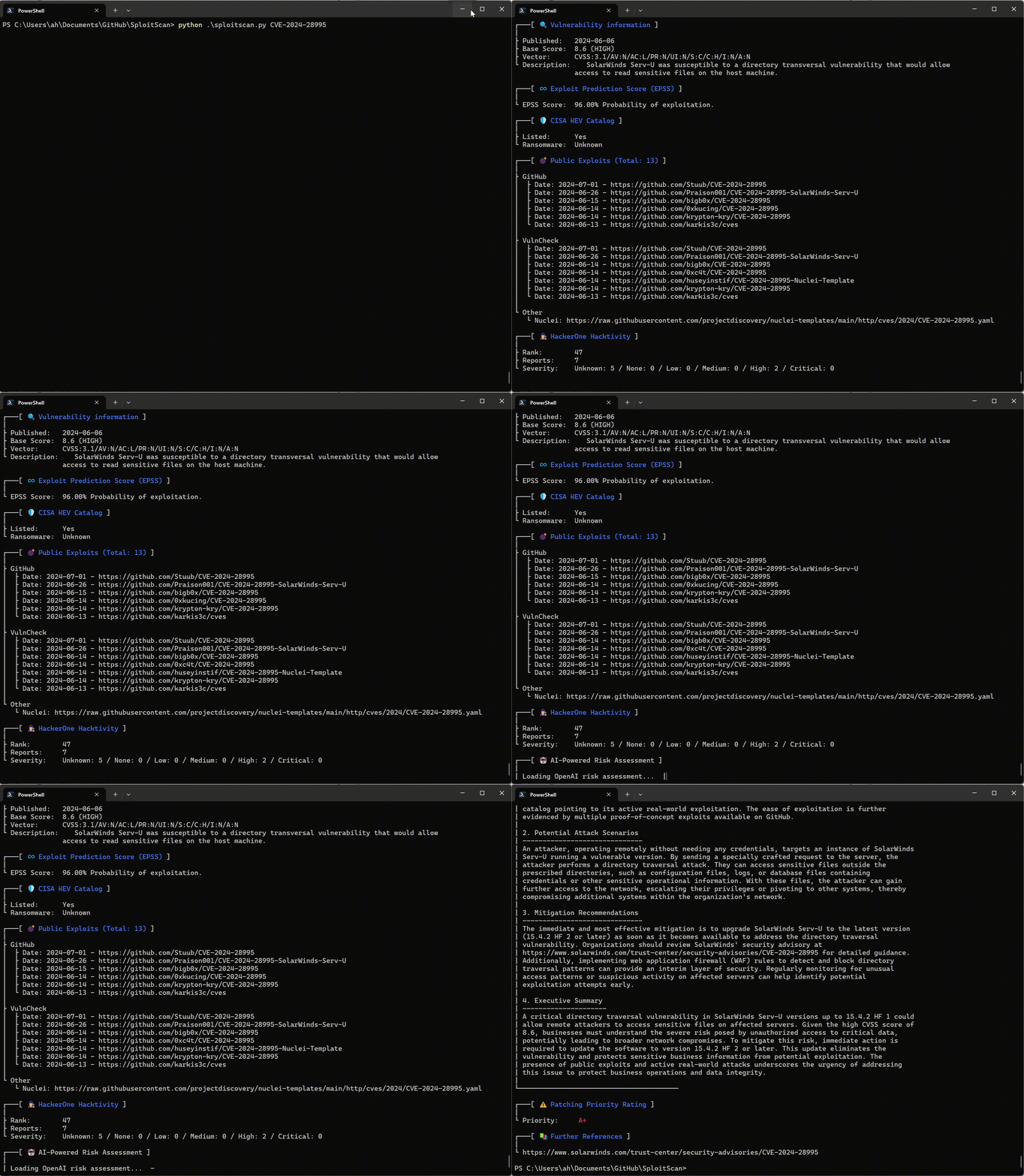
sploitscan_v0 10 4

💣 対応エクスプロイトデータベース

  • GitHub
  • ExploitDB
  • VulnCheck (無料のVulnCheck APIキーが必要)
  • Nuclei
  • Metasploit

📁 対応脆弱性スキャナーインポート

  • Nessus (.nessus)
  • Nexpose (.xml)
  • OpenVAS (.xml)
  • Docker (.json)

⚙️ インストール

GitHub```shell

git clone https://github.com/xaitax/SploitScan.git cd sploitscan pip install -r requirements.txt

root@kitploit:~
### pip```shell
pip install --user sploitscan

Kali/Ubuntu/Debian (最新バージョンではない可能性があります)```shell

apt install sploitscan

root@kitploit:~
### APIキーの取得

- **VulnCheck**: 無料アカウントを登録し、[VulnCheck](https://vulncheck.com/) でAPIキーを取得します。
- **OpenAI**: アカウントを作成し、[OpenAI](https://platform.openai.com/signup/) でAPIキーを取得します。
- **Google Gemini**: アカウントを作成し、[Google AI Studio](https://aistudio.google.com/app/apikey) でAPIキーを取得します。
- **xAI Grok**: アカウントを作成し、[xAI](https://x.ai/api) でAPIキーを取得します。
- **DeepSeek**: アカウントを作成し、[DeepSeek](https://platform.deepseek.com/api_keys) でAPIキーを取得します。

### 設定ファイル

SploitScanはデフォルトで複数の場所から `config.json` を検索します。最初に見つかった有効なファイルを以下の順序で読み込みます:

1. **`--config` または `-c` で指定されたカスタムパス**  
2. **環境変数**: `SPLOITSCAN_CONFIG_PATH`  
3. **ローカルおよび標準の設定ファイルの場所**:  
   - カレントワーキングディレクトリ  
   - `~/.sploitscan/config.json`  
   - `~/.config/sploitscan/config.json`  
   - `~/Library/Application Support/sploitscan/config.json` (macOS)  
   - `%APPDATA%/sploitscan/config.json` (Windows)  
   - `/etc/sploitscan/config.json`

> **注意**: 読み込まれるファイルは1つだけです — 上記の順序で最初に見つかったものです。`config.json` はこれらのパスのいずれかに配置できます。

典型的な `config.json` は次のようになります:

``````json
{
    "vulncheck_api_key": "",
    "openai_api_key": "",
    "google_ai_api_key": "",
    "grok_api_key": "",
    "deepseek_api_key": ""
}

🚀 使い方```shell

$ python .\sploitscan.py -h

███████╗██████╗ ██╗ ██████╗ ██╗████████╗███████╗ ██████╗ █████╗ ███╗ ██╗ ██╔════╝██╔══██╗██║ ██╔═══██╗██║╚══██╔══╝██╔════╝██╔════╝██╔══██╗████╗ ██║ ███████╗██████╔╝██║ ██║ ██║██║ ██║ ███████╗██║ ███████║██╔██╗ ██║ ╚════██║██╔═══╝ ██║ ██║ ██║██║ ██║ ╚════██║██║ ██╔══██║██║╚██╗██║ ███████║██║ ███████╗╚██████╔╝██║ ██║ ███████║╚██████╗██║ ██║██║ ╚████║ ╚══════╝╚═╝ ╚══════╝ ╚═════╝ ╚═╝ ╚═╝ ╚══════╝ ╚═════╝╚═╝ ╚═╝╚═╝ ╚═══╝ v0.14.0 / Alexander Hagenah / @xaitax / [email protected]

usage: sploitscan.py [-h] [-e {json,csv,html}] [-t {nessus,nexpose,openvas,docker}] [--ai {openai,google,grok,deepseek}] [-k KEYWORDS [KEYWORDS ...]] [-local] [-f] [-m METHODS] [-i IMPORT_FILE] [-c CONFIG] [-d] [cve_ids ...]

SploitScan: Retrieve and display vulnerability and exploit data for specified CVE ID(s).

positional arguments: cve_ids Enter one or more CVE IDs (e.g., CVE-YYYY-NNNNN). This is optional if an import file is provided via -i.

options: -h, --help show this help message and exit -e {json,csv,html}, --export {json,csv,html} Export the results in the specified format ('json', 'csv', or 'html'). -t {nessus,nexpose,openvas,docker}, --type {nessus,nexpose,openvas,docker} Specify the type of the import file ('nessus', 'nexpose', 'openvas', or 'docker'). --ai {openai,google,grok,deepseek} Select the AI provider for risk assessment (e.g., 'openai', 'google', 'grok', or 'deepseek'). -k KEYWORDS [KEYWORDS ...], --keywords KEYWORDS [KEYWORDS ...] Search for CVEs related to specific keywords (e.g., product name). -local, --local-database Download the cvelistV5 repository into the local directory. Use the local database over online research if available. -f, --fast-mode Enable fast mode: only display basic CVE information without fetching additional exploits or data. -m METHODS, --methods METHODS Specify which methods to run, separated by commas (e.g., 'cisa,epss,hackerone,ai,prio,references'). -i IMPORT_FILE, --import-file IMPORT_FILE Path to an import file. When provided, positional CVE IDs can be omitted. The file should be a plain text list with one CVE per line. --input-dir INPUT_DIR Path to a directory containing vulnerability reports to scan for CVE IDs. -c CONFIG, --config CONFIG Path to a custom configuration file. -d, --debug Enable debug output.

root@kitploit:~
### 単一CVEクエリ```bash
sploitscan CVE-2024-1709

複数CVEクエリ```bash

sploitscan CVE-2024-1709 CVE-2024-21413

root@kitploit:~
### ローカルCVEデータベースの更新

`--local`オプションを使用して、フルCVEリストV5リポジトリをローカルに更新(または最初にクローン)できるようになりました。このリポジトリは数GBのサイズがあるため、ダウンロードには時間がかかる場合があることに注意してください。例:```bash
sploitscan -local

███████╗██████╗ ██╗      ██████╗ ██╗████████╗███████╗ ██████╗ █████╗ ███╗   ██╗
██╔════╝██╔══██╗██║     ██╔═══██╗██║╚══██╔══╝██╔════╝██╔════╝██╔══██╗████╗  ██║
███████╗██████╔╝██║     ██║   ██║██║   ██║   ███████╗██║     ███████║██╔██╗ ██║
╚════██║██╔═══╝ ██║     ██║   ██║██║   ██║   ╚════██║██║     ██╔══██║██║╚██╗██║
███████║██║     ███████╗╚██████╔╝██║   ██║   ███████║╚██████╗██║  ██║██║ ╚████║
╚══════╝╚═╝     ╚══════╝ ╚═════╝ ╚═╝   ╚═╝   ╚══════╝ ╚═════╝╚═╝  ╚═╝╚═╝  ╚═══╝
v0.14.0 / Alexander Hagenah / @xaitax / [email protected]

📥 Cloning CVE List V5 into 'C:\Users\ah/.sploitscan\cvelistV5'.
⚠️ Warning: The repository is several GB in size and the download may take a while.
🔄 Progress: 100.00% - 940.62 MiB | 4.97 MiB/s
✅ CVE List V5 cloned successfully.

ソース間でのキーワードベース検索

ローカルデータベース、CISA、Nuclei Templates 全体でキーワード(例:"Apple")を使ってCVEを検索します。

[!TIP] これは、searchsploit をほぼ置き換えられます。なぜなら ExploitDB はもはや定期的に更新されていないからです。```bash sploitscan -k "Outlook Express"

███████╗██████╗ ██╗ ██████╗ ██╗████████╗███████╗ ██████╗ █████╗ ███╗ ██╗ ██╔════╝██╔══██╗██║ ██╔═══██╗██║╚══██╔══╝██╔════╝██╔════╝██╔══██╗████╗ ██║ ███████╗██████╔╝██║ ██║ ██║██║ ██║ ███████╗██║ ███████║██╔██╗ ██║ ╚════██║██╔═══╝ ██║ ██║ ██║██║ ██║ ╚════██║██║ ██╔══██║██║╚██╗██║ ███████║██║ ███████╗╚██████╔╝██║ ██║ ███████║╚██████╗██║ ██║██║ ╚████║ ╚══════╝╚═╝ ╚══════╝ ╚═════╝ ╚═╝ ╚═╝ ╚══════╝ ╚═════╝╚═╝ ╚═╝╚═╝ ╚═══╝ v0.14.0 / Alexander Hagenah / @xaitax / [email protected]

┌───[ 🕵️ Searching local database for keywords: outlook express ] Processing CVE files: 100%|████████████████████████████████████████████████████████████████████████████████████████████████████████████████████████████████████| 282372/282372 [04:38<00:00, 1013.92it/s]

╔═══════════════════════════════════════════╗ ║ Found 48 CVE(s) matching: Outlook Express ║ ╚═══════════════════════════════════════════╝

CVE-1999-0967, CVE-1999-1016, CVE-1999-1033, CVE-2000-0036, CVE-2000-0105, CVE-2000-0415, CVE-2000-0524, CVE-2000-0567, CVE-2000-0621, CVE-2000-0653, CVE-2001-0145, CVE-2001-0149, CVE-2001-0945, CVE-2001-0999, CVE-2001-1088, CVE-2001-1325, CVE-2001-1547, CVE-2002-0152, CVE-2002-0285, CVE-2002-0637, CVE-2002-0862, CVE-2002-1121, CVE-2002-1179, CVE-2002-2164, CVE-2002-2202, CVE-2003-0301, CVE-2003-1105, CVE-2003-1378, CVE-2004-0215, CVE-2004-0380, CVE-2004-0526, CVE-2004-2137, CVE-2004-2694, CVE-2005-1213, CVE-2005-2226, CVE-2005-4840, CVE-2006-0014, CVE-2006-2111, CVE-2006-2386, CVE-2006-2766, CVE-2007-2225, CVE-2007-2227, CVE-2007-3897, CVE-2007-4040, CVE-2008-1448, CVE-2008-5424, CVE-2010-0816, CVE-2024-1187

╔═══════════════════════╗ ║ CVE ID: CVE-2001-1547 ║ ╚═══════════════════════╝

┌───[ 🔍 Vulnerability information ] | ├ Published: 2005-07-14 ├ Base Score: N/A (N/A) ├ Vector: N/A └ Description: Outlook Express 6.0, with "Do not allow attachments to be saved or opened that could potentially be a virus" enabled, does not block email attachments from forwarded messages, which could allow remote attackers to execute arbitrary code. [...]

root@kitploit:~
### 高速モード

高速モードを有効にすると、基本的なCVE情報のみが表示されます(追加のルックアップをスキップ)。```bash
sploitscan CVE-2024-1709 --fast-mode

脆弱性スキャナーからのインポート

タイプを指定します:'nessus'、'nexpose'、'openvas'、または'docker'、そしてファイルパスを指定します。```bash sploitscan --import-file path/to/yourfile.nessus --type nessus

root@kitploit:~
### ディレクトリからインポート

ディレクトリ全体を再帰的にスキャンして脆弱性レポートを検索し、すべてのファイルからCVE IDを抽出します。```bash
sploitscan --input-dir path/to/reports/directory

特定のメソッドを選択

特定のデータ取得メソッド(例:CISA、EPSS、AIリスク評価)のみを実行するには、-m 引数を使用します:```bash sploitscan CVE-2024-1709 -m cisa,epss

root@kitploit:~
### エクスポート結果

エクスポート形式を指定してください: 'json', 'csv', または 'html'。```bash
sploitscan CVE-2024-1709 -e html

Docker

Dockerがインストールされていることを確認してください。インストール手順については、Dockerの公式インストールガイドを参照してください。

DockerでSploitScanをビルドして実行するには:```shell docker build -t sploitscan . docker run --rm sploitscan CVE-2024-1709

root@kitploit:~
現在のディレクトリからボリュームをマウントした場合

#### Windows (Powershell)```shell
docker run -v ${PWD}:/app --rm sploitscan CVE-2024-1709 -e JSON

Linux```shell

docker run -v $(pwd):/app --rm sploitscan CVE-2024-1709 -e JSON

root@kitploit:~
## 🤖 AIを活用したリスク評価

リスク評価のためにAIプロバイダを選択します(OpenAI ChatGPT、Google Gemini、Grok AI、DeepSeek)。

SploitScanはOpenAIと連携し、各CVEに対して包括的なAI活用のリスク評価を提供します。この機能には以下が含まれます:

- 詳細なリスク評価:脆弱性の性質とそのビジネス影響を理解します。
- 潜在的な攻撃シナリオ:脆弱性を利用した攻撃シナリオの説明を取得します。
- 緩和策の推奨事項:リスクを軽減するための具体的で実行可能な推奨事項を受け取ります。
- エグゼクティブサマリー:非技術関係者にとって理解しやすい簡潔な要約で、ビジネス影響と緊急性を強調します。

### 出力例```text

$ sploitscan.py --ai openai CVE-2024-21413

[...]

┌───[ 🤖 AI-Powered Risk Assessment ]
|
| 1. Risk Assessment
| -------------------
| The vulnerability identified by CVE-2024-21413 is a critical remote code execution flaw in
| Microsoft Outlook with a CVSS score of 9.8. The impact on business operations can be severe due to
| its high potential to be exploited over a network without any user interactions or elevated
| privileges. This unvalidated input vulnerability (CWE-20) could allow an attacker to execute
| arbitrary code on the target system, thereby compromising the confidentiality, integrity, and
| availability of critical business data and systems. Given its critical rating and the existence of
| multiple exploits on public repositories like GitHub, the likelihood of exploitation is very high.
| This necessitates immediate attention from the security teams to mitigate the risks associated.
|
| 2. Potential Attack Scenarios
| ------------------------------
| An attacker could exploit this vulnerability by sending a specially crafted email to a victim
| using Microsoft Outlook. Once the email is opened or previewed, the malicious payload would
| execute, allowing the attacker to gain control over the victim's system. The process involves: 1.
| Crafting a malicious email leveraging the specific flaw in email handling within Microsoft
| Outlook. 2. Sending the email to the intended victim. 3. Upon opening or previewing the email, the
| victim’s system executes the malicious code. The potential outcomes of this attack include theft
| of sensitive information, installation of malware or ransomware, and compromising other systems
| within the same network due to lateral movement capabilities.
|
| 3. Mitigation Recommendations
| ------------------------------
| Immediate mitigation recommendation includes: 1. Applying the latest security patches provided by
| Microsoft. Reference: https://msrc.microsoft.com/update-guide/vulnerability/CVE-2024-21413 2.
| Implementing network-level protections such as email filtering and network segmentation to limit
| the spread of potential infections. 3. Conducting regular security awareness training for users to
| recognize phishing and malicious emails. 4. Monitoring network and system activity for signs of
| suspicious behavior and unauthorized execution. 5. Regularly backing up critical data and ensuring
| the integrity of backups.
|
| 4. Executive Summary
| ---------------------
| CVE-2024-21413, a critical remote code execution vulnerability in Microsoft Outlook, poses a
| significant risk to businesses due to its potential to be exploited without user interaction.
| Multiple exploit proofs are publicly available, increasing the likelihood of attacks.
| Organizations must act swiftly by applying the necessary patches from Microsoft, enhancing their
| email security protocols, and educating their staff to identify potential phishing attempts.
| Mitigating this vulnerability is essential to protect sensitive information, maintain business
| integrity, and ensure system availability, thus preventing potential financial and reputational
| damage. Immediate action is crucial to safeguard the organization against this severe threat.
|
└────────────────────────────────────────

🛡️ パッチ優先度システム

SplootScanのパッチ優先順位付けシステムは、脆弱性の深刻度と悪用可能性に基づいてセキュリティパッチに優先順位を付ける戦略的アプローチを提供します。CVE Prioritizerのモデルに影響を受けていますが、公開されているエクスプロイトの取り扱いが強化されています。このシステムは、潜在的な影響と悪用の可能性の両方を考慮し、ユーザーがどの脆弱性を最初にパッチするかについて情報に基づいた意思決定を行うのに役立ちます。しきい値はビジネスニーズに合わせて変更できます。 仕組みは次のとおりです。

  • A+ 優先度: CISAの既知の悪用された脆弱性(KEV)カタログに掲載されている脆弱性に割り当てられます。これらは実際の悪用が確認されているため、最も緊急性が高いことを示します。
  • A~D 優先度: CVSS基本スコアとEPSS(エクスプロイト予測スコアリングシステム)確率の組み合わせによって決定されます。
    • A: CVSSスコア >= 6.0 かつ EPSSスコア >= 0.2。高い深刻度と高い悪用の確率。
    • B: CVSSスコア >= 6.0 だが EPSSスコア < 0.2。高い深刻度だが悪用の確率は低い。
    • C: CVSSスコア < 6.0 かつ EPSSスコア >= 0.2。低い深刻度だが悪用の確率は高い。
    • D: CVSSスコア < 6.0 かつ EPSSスコア < 0.2。低い深刻度と低い悪用の確率。

🚨 エクスプロイトベースのエスカレーション

A+と評価されていない脆弱性に対して公開エクスプロイトが存在する場合、その優先度は2段階引き上げられます。 例:

  • C評価の脆弱性で公開エクスプロイトがあるものは、A評価になります。
  • D評価の脆弱性で公開エクスプロイトがあるものは、B評価になります。

これにより、悪用の可能性が知られている脆弱性が適切な緊急性で対処されることが保証されます。

🫱🏼‍🫲🏽 貢献

貢献は大歓迎です!バグ修正、新機能の追加、ドキュメントの改善など、リポジトリをフォークしてプルリクエストを送信してください。また、GitHubのIssueトラッカーを通じて問題を報告したり、改善を提案したりすることもできます。

特に感謝します:

  • UjjwalBudha アイデアとコードについて
  • hexwreaker アイデアとコードについて
  • Nilsonfsilva Debianパッケージングのサポートについて
  • bcoles バグ修正について
  • Javier Álvarez バグ修正について
  • Romullo アイデアと提案について
  • davidfortytwo 機能強化(CVE取得の更新とPacketStormの追加)について
  • con-f-use setuptools/PyPiのサポートと修正について
  • Martijn Russchen HackerOne GraphQLに関するフィードバックとアイデアについて
  • diwskx ディレクトリインポート機能とDockerの改善について
  • Manuel Sommer パッチ優先順位計算の改善とDependabotの追加について

📌 著者

Alexander Hagenah

  • URL
  • Twitter
  • LinkedIn

📆 変更履歴

アップデート、修正、新機能の詳細なリストは、変更履歴をご確認ください。

ツールをダウンロード
SploitScan — CVEの詳細、エクスプロイトデータベース、EPSSスコアを集約し、AIによるリスク評価と脆弱性スキャナーのインポート機能を備え、優先順位付けされたパッチ適用を実現します。 | Kitploit