
Skip to content
KitploitKITPLOIT
ツールブログ
提出
ツールブログ
提出

ハッキング、侵入テスト、サイバーセキュリティツールをあなたのセキュリティアーセナルに!

Kitploitはハッキング、サイバーセキュリティ、ペネトレーションテストのツールディレクトリです。最新のプロジェクトアップデートを見つけて、脆弱性の発見、システム分析、テストの自動化、セキュリティの強化を行いましょう。

··フィード·お問い合わせ·プライバシー·© 2026 Kitploit

ツールディレクトリ

カテゴリ

すべてのカテゴリを見る
Loading categories
super-tart-vphone-writeup — AppleのPCCファームウェアに含まれるVPHONE600APコンポーネントを用いて仮想iPhoneを構築するガイド。ファームウェアのパッチ適用、ブートチェーンの改変、カーネルデバッグを含み、iOSセキュリティ研究のためのものです。 | Kitploit
ツール/GitHubGitHub/wh1te4ever/super-tart-vphone-writeup
iOSセキュリティ脆弱性分析エクスプロイトリバースエンジニアリングデバッガペネトレーションテストモバイルセキュリティハードウェアとIoTセキュリティファームウェア解析

人気

すべて見る →

コミュニティで最も使われているツールを見つけましょう。

すべてのツールを探索

ツールコレクションを閲覧

すべてのツールを見る →
共有
バイナリエクスプロイト
GitHubwh1te4ever/super-tart-vphone-writeup

super-tart-vphone-writeup

AppleのPCCファームウェアに含まれるVPHONE600APコンポーネントを用いて仮想iPhoneを構築するガイド。ファームウェアのパッチ適用、ブートチェーンの改変、カーネルデバッグを含み、iOSセキュリティ研究のためのものです。

リポジトリを見る
1.2k1685ヶ月前Kitploit レビュー済み

最近リリースされたPCCファームウェアのVPHONE600APコンポーネントを使用した仮想iPhoneの構築

特別な感謝 / 謝辞

  • dlevi309 (仮想iPhoneのタッチ操作に関するアイデアを提供)
  • khanhduytran0, 34306, asdfugil, verygenericname (仮想iPhone構築に関するその他のアイデアを提供: Cryptex, デバイスアクティベーション, Ramdiskブートなど)
  • ma4the, Mard, SwallowS (他の環境での動作確認)

動機

2024年末頃、AppleはPrivate Cloud Computeを導入し始め、クラウドベースのAIプライバシーに新たな地平を開くと主張しました。そして、2025年末頃、興味深いニュースが現れました:AppleはcloudOS 26以降で、PCCファームウェアにvphone600ap関連のコンポーネントを新たに追加したのです。

出典: https://x.com/matteyeux/status/2006339694783848660/photo/1

出典: https://x.com/matteyeux/status/2006339694783848660/photo/1

「iPhone Research Environment Virtual Machine」?

これは、Appleが将来他のセキュリティ研究者向けに仮想iPhone環境を構築・配布する計画的な動きだったのでしょうか、それとも単なるミスだったのでしょうか?2021年にiOS 15.0ベータから15.1 beta3のOTAでDEVELOPMENT/KASANビルドカーネルが発見されたことを考えると、ミスの可能性は否定できません。当時、そのカーネルは約4か月間(2021年6月から10月頃)含まれていました。

そして、今年の1月頃、これらのvphone600ap関連コンポーネントを利用して仮想iPhoneを起動しているツイートが投稿されました。

出典: https://x.com/_inside/status/2008951845725548783
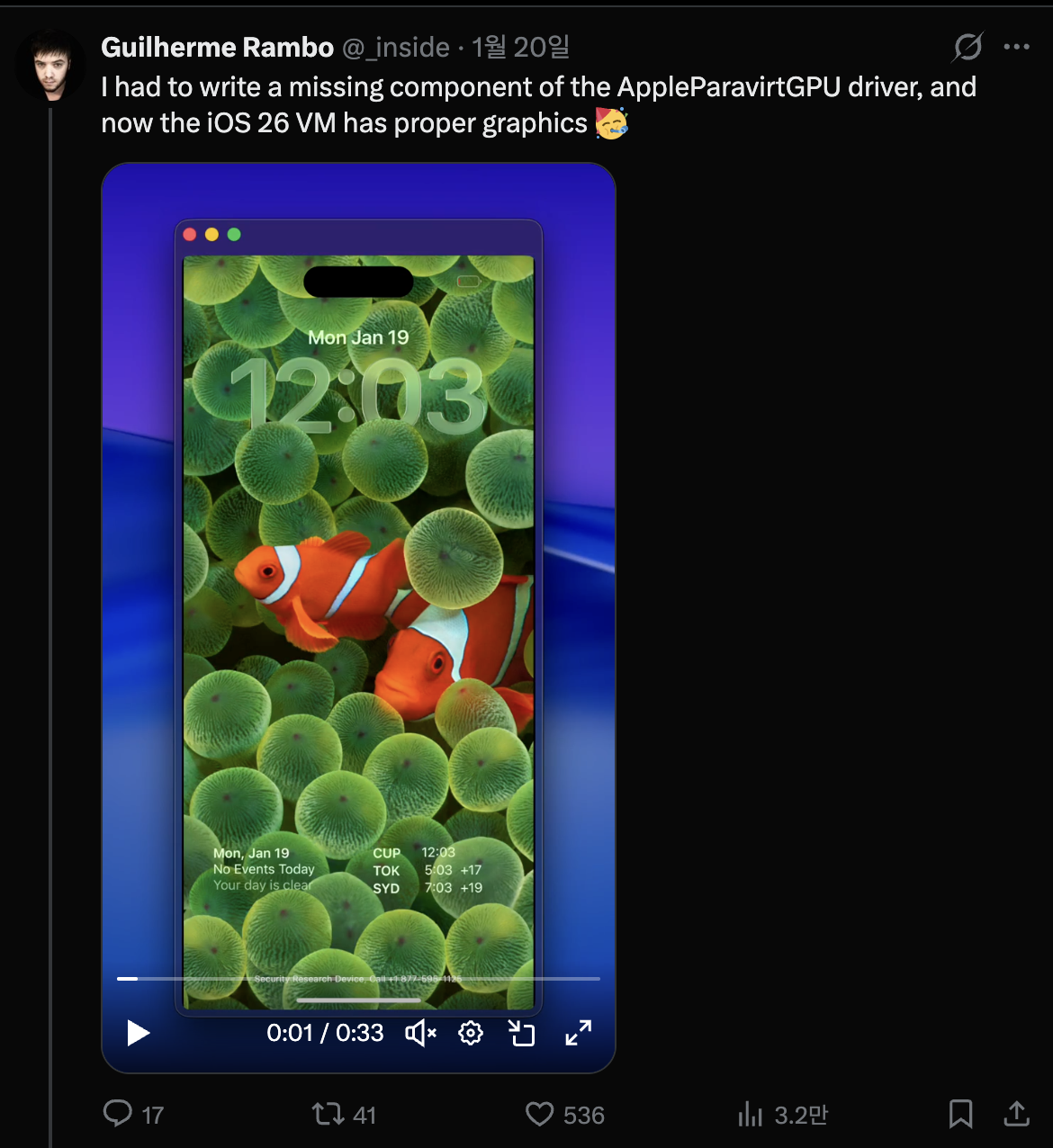
出典: https://x.com/_inside/status/2008951845725548783

Screenshot 2026-02-24 at 7.39.03 PM.png

私が見た限り、ほとんどすべてが本当にエレガントに動作していました。以前見たQEMUAppleSilicon(Inferno)プロジェクトと比較して、はるかに機敏でスムーズに動作します。さらに、Metalアクセラレーションもサポートしているように見えました。結局、それに完全に魅了され、1月31日にすぐに取り組み、自分自身の仮想iPhoneを構築し始めました。

Screenshot 2026-02-24 at 7.46.41 PM.png

仮想iPhoneを起動するためのsuper-tartの修正

参照されているプロジェクトはsecurity-pccです。これは/System/Library/SecurityResearch/usr/bin/vrevmバイナリのソースコードに対応しています。興味深い点は、Virtualization.frameworkが提供するプライベートメソッドを使用していることです。PCC研究で使用される仮想マシンでは、ハードウェアモデルの初期化プロセス中にISAとPlatformVersionが明示的に指定されていることがわかります。
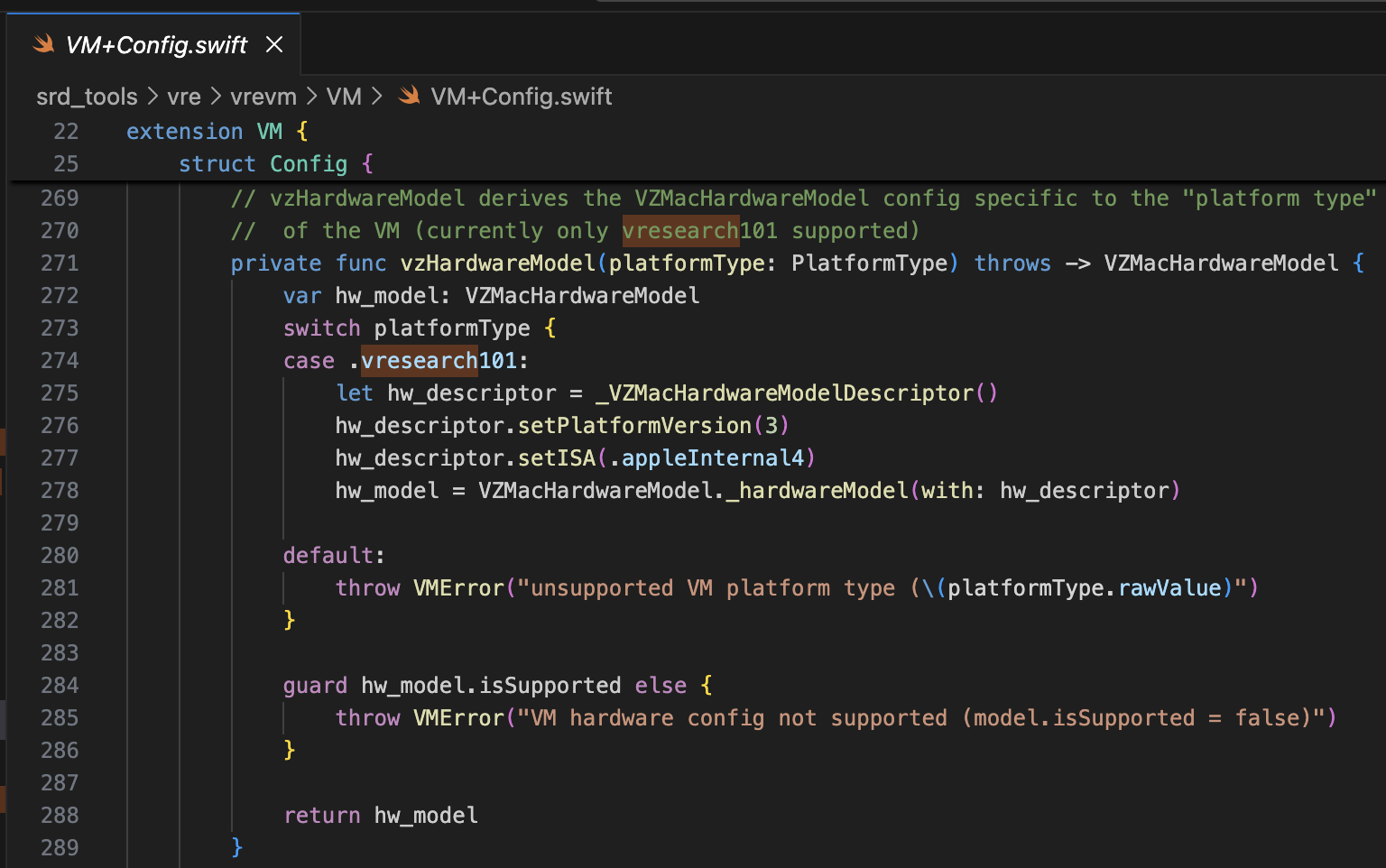
Screenshot 2026-02-24 at 8.27.01 PM.png

ブートROMには、AVPBooter.vresearch1.binが使用されます(/System/Library/Frameworks/Virtualization.framework/Resources/AVPBooter.vresearch1.bin)
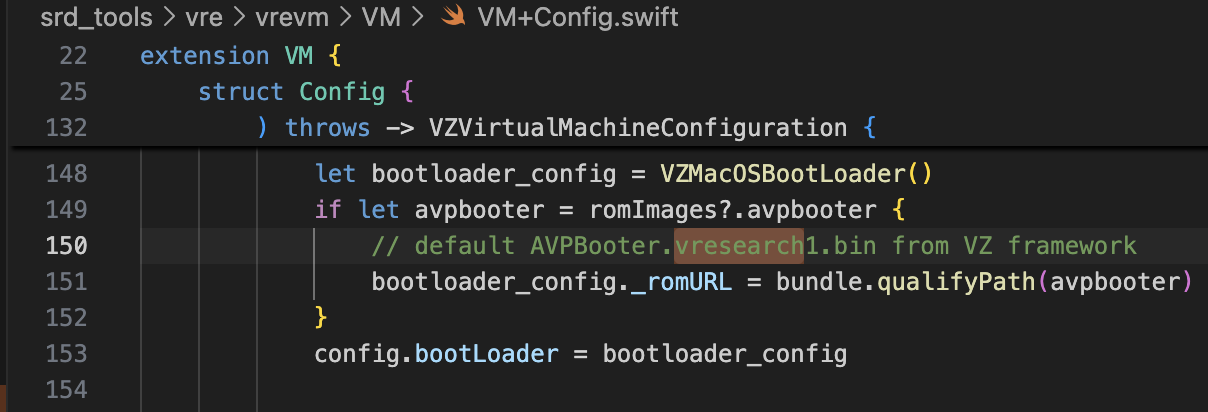
Screenshot 2026-02-24 at 8.32.08 PM.png

また、SEPROM (avpsepbooter)にはAVPSEPBooter.vresearch1.binが使用され、これはAuxiliaryStorageと同様に機能するSEPStorageファイルを個別にロードします。 (/System/Library/Frameworks/Virtualization.framework/Versions/A/Resources/AVPSEPBooter.vresearch1.bin)

もう一つの興味深い点は、解像度を設定するコードを見ると、1290x2796に設定されていることです。これはiPhone 14 Pro Max、15 Plus、15 Pro Max、16 Plusのデバイスに対応しています。
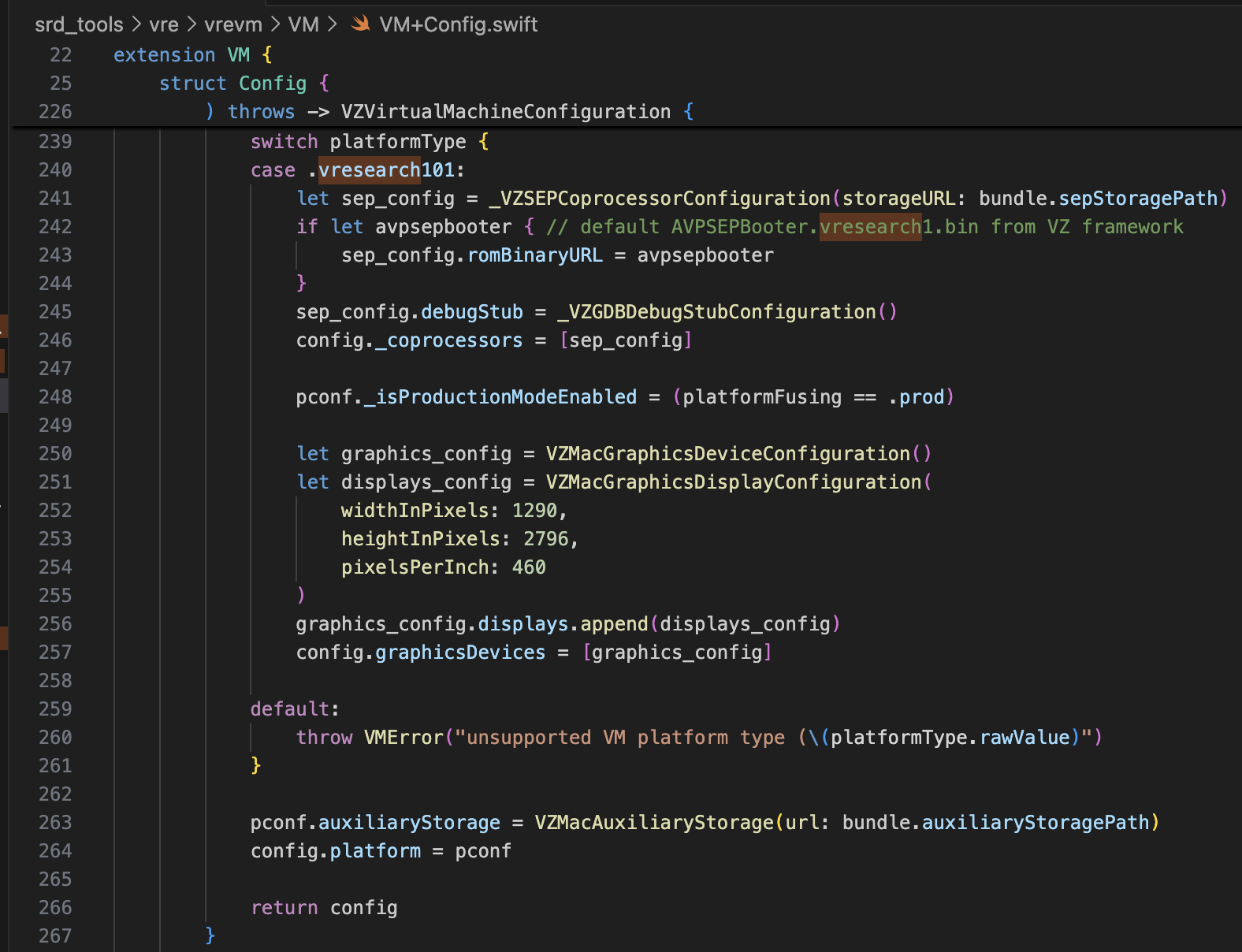
Screenshot 2026-02-24 at 8.34.11 PM.png

この情報だけで、仮想iPhoneを起動するためにsuper-tartを修正するには十分すぎるはずです。以下のように修正を行いました。

  • /Sources/tart/VM.swift```swift ... class VM: NSObject, VZVirtualMachineDelegate, ObservableObject { ... // vzHardwareModel derives the VZMacHardwareModel config specific to the "platform type" // of the VM (currently only vresearch101 supported) static private func vzHardwareModel_VRESEARCH101() throws -> VZMacHardwareModel { var hw_model: VZMacHardwareModel

    guard let hw_descriptor = _VZMacHardwareModelDescriptor() else { fatalError("Failed to create hardware descriptor") } hw_descriptor.setPlatformVersion(3) // .appleInternal4 = 3 hw_descriptor.setBoardID(0x90) hw_descriptor.setISA(2) hw_model = VZMacHardwareModel._hardwareModel(withDescriptor: hw_descriptor)

    guard hw_model.isSupported else { fatalError("VM hardware config not supported (model.isSupported = false)") }

    return hw_model }

    static func craftConfiguration( diskURL: URL, nvramURL: URL, romURL: URL, sepromURL: URL? = nil, vmConfig: VMConfig, network: Network = NetworkShared(), additionalStorageDevices: [VZStorageDeviceConfiguration], directorySharingDevices: [VZDirectorySharingDeviceConfiguration], serialPorts: [VZSerialPortConfiguration], suspendable: Bool = false, nested: Bool = false, audio: Bool = true, clipboard: Bool = true, sync: VZDiskImageSynchronizationMode = .full, caching: VZDiskImageCachingMode? = nil ) throws -> VZVirtualMachineConfiguration { let configuration: VZVirtualMachineConfiguration = .init()

    // Boot loader let bootloader = try vmConfig.platform.bootLoader(nvramURL: nvramURL) Dynamic(bootloader)._setROMURL(romURL) configuration.bootLoader = bootloader

    // SEP ROM let homeURL = FileManager.default.homeDirectoryForCurrentUser var sepstoragePath = homeURL.appendingPathComponent(".tart/vms/vphone/SEPStorage").path let sepstorageURL = URL(fileURLWithPath: sepstoragePath) let sep_config = Dynamic._VZSEPCoprocessorConfiguration(storageURL: sepstorageURL) if let sepromURL { // default AVPSEPBooter.vresearch1.bin from VZ framework sep_config.romBinaryURL = sepromURL } sep_config.debugStub = Dynamic._VZGDBDebugStubConfiguration(port: 8001) configuration._setCoprocessors([sep_config.asObject])

    // Some vresearch101 config let pconf = VZMacPlatformConfiguration() pconf.hardwareModel = try vzHardwareModel_VRESEARCH101()

    let serial = Dynamic._VZMacSerialNumber.initWithString("AAAAAA1337") let identifier = Dynamic.VZMacMachineIdentifier._machineIdentifierWithECID(0x1111111111111111, serialNumber: serial.asObject) pconf.machineIdentifier = identifier.asObject as! VZMacMachineIdentifier

    pconf._setProductionModeEnabled(true) var auxiliaryStoragePath = homeURL.appendingPathComponent(".tart/vms/vphone/nvram.bin").path let auxiliaryStorageURL = URL(fileURLWithPath: auxiliaryStoragePath) pconf.auxiliaryStorage = VZMacAuxiliaryStorage(url: auxiliaryStorageURL)

    if #available(macOS 14, *) { let keyboard = VZUSBKeyboardConfiguration() configuration.keyboards = [keyboard] }

    if #available(macOS 14, *) { let touch = _VZUSBTouchScreenConfiguration() configuration._setMultiTouchDevices([touch]) } ... configuration.platform = pconf

root@kitploit:~
# ファームウェアの改変

参照プロジェクトは[vma2pwn](https://github.com/nick-botticelli/vma2pwn)です。特にバージョン12.0.1では、ブートチェーンのほぼ全体を改変したMac仮想マシンを起動します。

最初に[prepare.sh](https://github.com/nick-botticelli/vma2pwn/blob/main/prepare.sh)スクリプトを見てみましょう。これはブートローダーやカーネルなどのファームウェアコンポーネントをIM4P形式からRAW形式に抽出し、特定のハードコードされたアドレスに対して命令/データのパッチを適用します。RestoreRamdiskはファームウェア復元時に使用されるルートファイルシステムであり、AVPBooterは仮想マシンで使用されるBootROMです。

要約すると、ファームウェアに含まれる個々のファイルを抽出し、カスタムファームウェアの復元を許可するための整合性チェックをパッチするか、またはブート関連のログを表示しやすくするためにboot-argsパラメータを変更します。

最後に、[vma2pwn.sh](https://github.com/nick-botticelli/vma2pwn/blob/main/vma2pwn.sh)はカスタムファームウェアの復元を担当します。これは事前にDFUモードに入ることによって行われます。ここで、仮想マシンはsuper-tartと呼ばれるものを使用します。これは、カスタムBootROM、シリアル出力、DFUモード、GDBデバッグなどの機能が追加された既存のtart仮想マシンのバージョンです。(このためにはSIP/AMFIを無効にする必要があることに注意してください。)

最近、[XNUカーネルの1-day脆弱性(CVE-2021-30937、CVE-2021-30955)を研究](https://github.com/wh1te4ever/xnu_1day_practice)する際に非常に便利に使用しました。ライブカーネルデバッグをサポートしているので素晴らしいです。

## カスタムファームウェアの構築

cloudOS 26.1 (23B85) と iOS 26.1 (iPhone17,3; 23B85) のコンポーネントを混ぜました。えっと…でも正確な詳細は覚えていません。正確には、iPhone 16 と vphone 関連のコンポーネントを適切に混ぜてカスタムファームウェアを作成する必要がありましたが、最終的にどれを混ぜたか正確に忘れてしまいました。私の記憶では:

- BuildManifest.plist:
Manifest キーの下にある辞書要素を変更しました。リストアプロセス中に、iPhone 16 (iOS 26.1) モデルの SystemVolume、SystemVolumeCanonicalMetadata、OS、StaticTrustCache、RestoreTrustCache、RestoreRamDisk が使用されるように設定しました。残りは PCC ファームウェアからの vphone 関連ファイルを使用するように設定しました。
- Restore.plist:
DeviceMap や SupportedProductTypes に関連するプロパティを追加したか、SystemRestoreImageFileSystems 要素を変更したと思います。

以下のファイルが私の混合の最終結果です。

[Restore.plist](https://github.com/wh1te4ever/super-tart-vphone-writeup/blob/HEAD/contents/Restore.plist)

[BuildManifest.plist](https://github.com/wh1te4ever/super-tart-vphone-writeup/blob/HEAD/contents/BuildManifest.plist)

- get_fw.py (Partial)```python
...

# 3. Import things from cloudOS
# kernelcache
os.system("cp 399b664dd623358c3de118ffc114e42dcd51c9309e751d43bc949b98f4e31349_extracted/kernelcache.* iPhone17,3_26.1_23B85_Restore")
# agx, all_flash, ane, dfu, pmp...
os.system("cp 399b664dd623358c3de118ffc114e42dcd51c9309e751d43bc949b98f4e31349_extracted/Firmware/agx/* iPhone17,3_26.1_23B85_Restore/Firmware/agx")
os.system("cp 399b664dd623358c3de118ffc114e42dcd51c9309e751d43bc949b98f4e31349_extracted/Firmware/all_flash/* iPhone17,3_26.1_23B85_Restore/Firmware/all_flash")
os.system("cp 399b664dd623358c3de118ffc114e42dcd51c9309e751d43bc949b98f4e31349_extracted/Firmware/ane/* iPhone17,3_26.1_23B85_Restore/Firmware/ane")
os.system("cp 399b664dd623358c3de118ffc114e42dcd51c9309e751d43bc949b98f4e31349_extracted/Firmware/dfu/* iPhone17,3_26.1_23B85_Restore/Firmware/dfu")
os.system("cp 399b664dd623358c3de118ffc114e42dcd51c9309e751d43bc949b98f4e31349_extracted/Firmware/pmp/* iPhone17,3_26.1_23B85_Restore/Firmware/pmp")
# sptm, txm, etc...
os.system("cp 399b664dd623358c3de118ffc114e42dcd51c9309e751d43bc949b98f4e31349_extracted/Firmware/*.im4p iPhone17,3_26.1_23B85_Restore/Firmware")

# 4. TODO: parse what things needed from BuildManifest.plist, Restore.plist in cloudOS 26.1
# It will be really complicated, so import things from already parse completed
os.system("sudo cp custom_26.1/BuildManifest.plist iPhone17,3_26.1_23B85_Restore")
os.system("sudo cp custom_26.1/Restore.plist iPhone17,3_26.1_23B85_Restore")

os.system("echo 'Done, grabbed all needed components for restoring'")

AVPBooter.vresearch1.bin のパッチ

私はその投稿を参照しました。カスタムブートローダーを後でロードするには、image4_validate_property_callback にパッチを適用する必要があります。IDA Pro の「テキスト検索(低速!)」機能を使用して "0x4447" を検索し、該当する関数のエピローグを常に 0 を返すようにパッチします。

image.png

libirecovery の修正とビルド

ファームウェアを復元する前に、vresearch101ap モデルをサポートするためにいくつかの修正が必要でした。ビルド後は、idevicerestore ツールを使用してファームウェアの復元が可能になります。

https://github.com/wh1te4ever/libirecovery

Screenshot 2026-02-24 at 9.52.14 PM.png

ファームウェアコンポーネントのパッチ

AVPBooter と同様に、復元に使用されるブートローダー iBSS と iBEC にも、署名検証をバイパスするためのパッチが適用されました。また、シリアルログ出力を有効にして、起動の問題があった場合にすぐに原因を特定できるようにしました。

後で説明しますが、任意の Cryptex をロードするには、SSV(Signed System Volume)検証 をバイパスする必要があります。これは、DFU モードではなくノーマルモードで起動する際にロードされる LLB で実行され、検証はカーネルでも時々実行されます。

さらに、TXM にパッチを適用して、バイナリ/ライブラリが Trustcache に登録されていない場合でも、あたかも登録されているかのように認識されるようにしました。

  • patch_fw.py (部分的な内容、パート1)```python

Patch iBSS

patch image4_validate_property_callback

patch(0x9D10, 0xd503201f) #nop patch(0x9D14, 0xd2800000) #mov x0, #0

Patch iBEC

patch image4_validate_property_callback

patch(0x9D10, 0xd503201f) #nop patch(0x9D14, 0xd2800000) #mov x0, #0

patch boot-args with "serial=3 -v debug=0x2014e %s"

patch(0x122d4, 0xd0000082) #adrp x2, #0x12000 patch(0x122d8, 0x9101c042) #add x2, x2, #0x70 patch(0x24070, "serial=3 -v debug=0x2014e %s")

Patch LLB

patch image4_validate_property_callback

patch(0xA0D8, 0xd503201f) #nop patch(0xA0DC, 0xd2800000) #mov x0, #0

patch boot-args with "serial=3 -v debug=0x2014e %s"

patch(0x12888, 0xD0000082) #adrp x2, #0x12000 patch(0x1288C, 0x91264042) #add x2, x2, #0x990 patch(0x24990, "serial=3 -v debug=0x2014e %s")

make possible load edited rootfs (needed to command snaputil -n later)

patch(0x2BFE8, 0x1400000b) patch(0x2bca0, 0xd503201f) patch(0x2C03C, 0x17ffff6a) patch(0x2fcec, 0xd503201f) patch(0x2FEE8, 0x14000009)

some unknown patch, bypass panic

patch(0x1AEE4, 0xd503201f) #nop

6. Grab & Patch TXM

Patch TXM for make running binary which is not registered in trustcache

TXM [Error]: CodeSignature: selector: 24 | 0xA8 | 0x30 | 1

Some trace: FFFFFFF01702B018->sub_FFFFFFF0170306E4->sub_FFFFFFF01703059C->sub_FFFFFFF01703037C->sub_FFFFFFF017030164->sub_FFFFFFF01702EC70 (base: 0xFFFFFFF017004000)

patch(0x2c1f8, 0xd2800000) #FFFFFFF0170301F8 patch(0x2bef4, 0xd2800000) #FFFFFFF01702FEF4 patch(0x2c060, 0xd2800000) #FFFFFFF017030060

7. Grab & patch kernelcache

========= Bypass SSV =========

_apfs_vfsop_mount: Prevent panic "Failed to find the root snapshot. Rooting from the live fs ..."

patch(0x2476964, 0xd503201f) #FFFFFE000947A964

_authapfs_seal_is_broken: Prevent panic "root volume seal is broken ..."

patch(0x23cfde4, 0xd503201f) #FFFFFE00093D3DE4

_bsd_init: Prevent panic "rootvp not authenticated after mounting ..."

patch(0xf6d960, 0xd503201f) #FFFFFE0007F71960 ...

root@kitploit:~
RAW形式に変換してパッチを適用した後、IM4Pに戻す必要があります。
カーネルまたはTXMの場合、PAYP構造が存在するため、その構造を保持する必要がありました。
以下は、[pyimg4](https://pypi.org/project/pyimg4/)、[img4tool](https://github.com/tihmstar/img4tool)、[img4](https://github.com/xerub/img4lib)ツールを使用してIM4P → RAW → IM4Pに変換するコードです。

- patch_fw.py (Partial content, Part 2)```python
...

# Patch iBSS
if not os.path.exists("iPhone17,3_26.1_23B85_Restore/Firmware/dfu/iBSS.vresearch101.RELEASE.im4p.bak"):
    os.system("cp iPhone17,3_26.1_23B85_Restore/Firmware/dfu/iBSS.vresearch101.RELEASE.im4p iPhone17,3_26.1_23B85_Restore/Firmware/dfu/iBSS.vresearch101.RELEASE.im4p.bak")
os.system("tools/img4 -i iPhone17,3_26.1_23B85_Restore/Firmware/dfu/iBSS.vresearch101.RELEASE.im4p.bak -o iBSS.vresearch101.RELEASE")
... # patch things from raw
os.system("tools/img4tool -c iPhone17,3_26.1_23B85_Restore/Firmware/dfu/iBSS.vresearch101.RELEASE.im4p -t ibss iBSS.vresearch101.RELEASE")

# Patch iBEC
if not os.path.exists("iPhone17,3_26.1_23B85_Restore/Firmware/dfu/iBEC.vresearch101.RELEASE.im4p.bak"):
    os.system("cp iPhone17,3_26.1_23B85_Restore/Firmware/dfu/iBEC.vresearch101.RELEASE.im4p iPhone17,3_26.1_23B85_Restore/Firmware/dfu/iBEC.vresearch101.RELEASE.im4p.bak")
os.system("tools/img4 -i iPhone17,3_26.1_23B85_Restore/Firmware/dfu/iBEC.vresearch101.RELEASE.im4p.bak -o iBEC.vresearch101.RELEASE")
... # patch things from raw
os.system("tools/img4tool -c iPhone17,3_26.1_23B85_Restore/Firmware/dfu/iBEC.vresearch101.RELEASE.im4p -t ibec iBEC.vresearch101.RELEASE")

# Patch LLB
if not os.path.exists("iPhone17,3_26.1_23B85_Restore/Firmware/all_flash/LLB.vresearch101.RESEARCH_RELEASE.im4p.bak"):
    os.system("cp iPhone17,3_26.1_23B85_Restore/Firmware/all_flash/LLB.vresearch101.RESEARCH_RELEASE.im4p iPhone17,3_26.1_23B85_Restore/Firmware/all_flash/LLB.vresearch101.RESEARCH_RELEASE.im4p.bak")
os.system("tools/img4 -i iPhone17,3_26.1_23B85_Restore/Firmware/all_flash/LLB.vresearch101.RESEARCH_RELEASE.im4p.bak -o LLB.vresearch101.RESEARCH_RELEASE")
... # patch things from raw
os.system("tools/img4tool -c iPhone17,3_26.1_23B85_Restore/Firmware/all_flash/LLB.vresearch101.RESEARCH_RELEASE.im4p -t illb LLB.vresearch101.RESEARCH_RELEASE")

# 6. Grab & Patch TXM
if not os.path.exists("iPhone17,3_26.1_23B85_Restore/Firmware/txm.iphoneos.research.im4p.bak"):
    os.system("cp iPhone17,3_26.1_23B85_Restore/Firmware/txm.iphoneos.research.im4p iPhone17,3_26.1_23B85_Restore/Firmware/txm.iphoneos.research.im4p.bak")
os.system("pyimg4 im4p extract -i iPhone17,3_26.1_23B85_Restore/Firmware/txm.iphoneos.research.im4p.bak -o txm.raw")
... # patch things from raw
#create im4p
os.system("pyimg4 im4p create -i txm.raw -o txm.im4p -f trxm --lzfse")
# preserve payp structure
txm_im4p_data = Path('iPhone17,3_26.1_23B85_Restore/Firmware/txm.iphoneos.research.im4p.bak').read_bytes()
payp_offset = txm_im4p_data.rfind(b'PAYP')
if payp_offset == -1:
    print("Couldn't find payp structure !!!")
    sys.exit()

with open('txm.im4p', 'ab') as f:
    f.write(txm_im4p_data[(payp_offset-10):])

payp_sz = len(txm_im4p_data[(payp_offset-10):])
print(f"payp sz: {payp_sz}")

txm_im4p_data = bytearray(open('txm.im4p', 'rb').read())
txm_im4p_data[2:5] = (int.from_bytes(txm_im4p_data[2:5], 'big') + payp_sz).to_bytes(3, 'big')
open('txm.im4p', 'wb').write(txm_im4p_data)
os.system("mv txm.im4p iPhone17,3_26.1_23B85_Restore/Firmware/txm.iphoneos.research.im4p")

# 7. Grab & patch kernelcache
if not os.path.exists("iPhone17,3_26.1_23B85_Restore/kernelcache.research.vphone600.bak"):
    os.system("cp iPhone17,3_26.1_23B85_Restore/kernelcache.research.vphone600 iPhone17,3_26.1_23B85_Restore/kernelcache.research.vphone600.bak")
os.system("pyimg4 im4p extract -i iPhone17,3_26.1_23B85_Restore/kernelcache.research.vphone600.bak -o kcache.raw")
... # patch things from raw
#create im4p
os.system("pyimg4 im4p create -i kcache.raw -o krnl.im4p -f krnl --lzfse")

# preserve payp structure
kernel_im4p_data = Path('iPhone17,3_26.1_23B85_Restore/kernelcache.research.vphone600.bak').read_bytes()
payp_offset = kernel_im4p_data.rfind(b'PAYP')
if payp_offset == -1:
    print("Couldn't find payp structure !!!")
    sys.exit()

with open('krnl.im4p', 'ab') as f:
    f.write(kernel_im4p_data[(payp_offset-10):])

payp_sz = len(kernel_im4p_data[(payp_offset-10):])
print(f"payp sz: {payp_sz}")

kernel_im4p_data = bytearray(open('krnl.im4p', 'rb').read())
kernel_im4p_data[2:5] = (int.from_bytes(kernel_im4p_data[2:5], 'big') + payp_sz).to_bytes(3, 'big')
open('krnl.im4p', 'wb').write(kernel_im4p_data)

os.system("mv krnl.im4p iPhone17,3_26.1_23B85_Restore/kernelcache.research.vphone600")
...

ファームウェアの復元

すべての準備が整ったら、仮想マシンをDFUモードにして復元を試みましょう。

以下は、SEPが正しく設定されていない場合に発生するパニックのスクリーンショットです。正しく設定すれば、このポイントを問題なく通過するはずです。

image.png

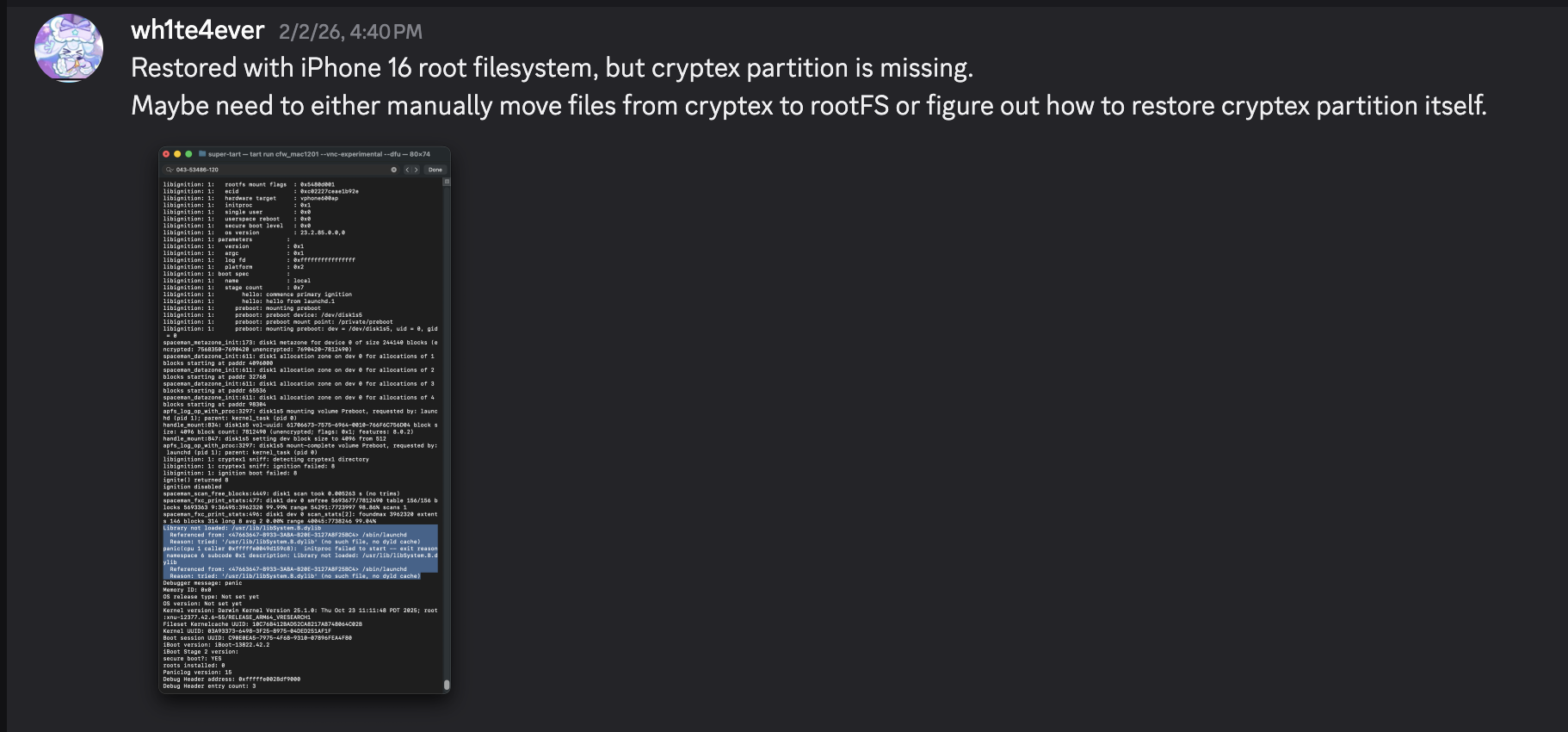
復元が完了すると、自動的に再起動します。 しかし、/usr/lib/libSystem.B.dylibライブラリがないため、launchdプロセスでパニックが発生します。このライブラリはCryptexパーティション上のdyld_shared_cache内にありますが、何らかの理由でCryptexパーティションを復元できませんでした。一時的な回避策として、SSH Ramdiskを作成してルートファイルシステムを変更し、必要なファイルを注入する必要があります。これこそが、SSV検証に関するパッチが必要だった理由です。

Screenshot 2026-02-24 at 10.24.33 PM.png

image.png

SSH Ramdiskで起動して起動問題を修正

https://github.com/verygenericname/SSHRD_Scriptで使用されているRamdiskを利用して、起動失敗問題の修正を試みます。

DFUモードでirecoveryツールを使用してブートローダやカーネルなどのコンポーネントをアップロードおよびロードするには、IMG4イメージが必要であり、それにはIM4Mファイルが必要です。そのため、最初にidevicerestoreツールを使用してshshファイルを取得し、それをIM4Mファイルに変換しました。```bash idevicerestore -e -y ./iPhone17,3_26.1_23B85_Restore -t

mv shsh/[ECID]-iPhone99,11-26.1.shsh shsh/[ECID]-iPhone99,11-26.1.shsh.gz

gunzip shsh/[ECID]-iPhone99,11-26.1.shsh.gz

...

pyimg4 im4m extract -i shsh/[ECID]-iPhone99,11-26.1.shsh -o vphone.im4m

root@kitploit:~
その後、そのIM4Mファイルを使用して、使用された各ファームウェアコンポーネント(iBSS、iBEC、devicetreeなど)に対して複数のIMG4ファイルを生成しました。```python
# 1. Grab & Patch iBSS 
if not os.path.exists("iPhone17\\,3_26.1_23B85_Restore/Firmware/dfu/iBSS.vresearch101.RELEASE.im4p.bak"):
    os.system("cp iPhone17\\,3_26.1_23B85_Restore/Firmware/dfu/iBSS.vresearch101.RELEASE.im4p iPhone17\\,3_26.1_23B85_Restore/Firmware/dfu/iBSS.vresearch101.RELEASE.im4p.bak")
os.system("tools/img4 -i iPhone17\\,3_26.1_23B85_Restore/Firmware/dfu/iBSS.vresearch101.RELEASE.im4p.bak -o iBSS.vresearch101.RELEASE")
... # patch things from raw
os.system("tools/img4tool -c iBSS.vresearch101.RELEASE.im4p -t ibss iBSS.vresearch101.RELEASE")
os.system("tools/img4 -i iBSS.vresearch101.RELEASE.im4p -o ./Ramdisk/iBSS.vresearch101.RELEASE.img4 -M ./vphone.im4m")

# 2. Grab & Patch iBEC
if not os.path.exists("iPhone17\\,3_26.1_23B85_Restore/Firmware/dfu/iBEC.vresearch101.RELEASE.im4p.bak"):
    os.system("cp iPhone17\\,3_26.1_23B85_Restore/Firmware/dfu/iBEC.vresearch101.RELEASE.im4p iPhone17\\,3_26.1_23B85_Restore/Firmware/dfu/iBEC.vresearch101.RELEASE.im4p.bak")
os.system("tools/img4 -i iPhone17\\,3_26.1_23B85_Restore/Firmware/dfu/iBEC.vresearch101.RELEASE.im4p -o iBEC.vresearch101.RELEASE")
... # patch things from raw
os.system("tools/img4tool -c iBEC.vresearch101.RELEASE.im4p -t ibec iBEC.vresearch101.RELEASE")
os.system("tools/img4 -i iBEC.vresearch101.RELEASE.im4p -o Ramdisk/iBEC.vresearch101.RELEASE.img4 -M vphone.im4m")

# 3. Grab SPTM
os.system("tools/img4 -i iPhone17\\,3_26.1_23B85_Restore/Firmware/sptm.vresearch1.release.im4p -o Ramdisk/sptm.vresearch1.release.img4 -M vphone.im4m -T sptm")

# 4. Grab devicetree
os.system("tools/img4 -i iPhone17\\,3_26.1_23B85_Restore/Firmware/all_flash/DeviceTree.vphone600ap.im4p -o Ramdisk/DeviceTree.vphone600ap.img4 -M vphone.im4m -T rdtr")

# 5. Grab sep
os.system("tools/img4 -i iPhone17\\,3_26.1_23B85_Restore/Firmware/all_flash/sep-firmware.vresearch101.RELEASE.im4p -o Ramdisk/sep-firmware.vresearch101.RELEASE.img4 -M vphone.im4m -T rsep")

# 6. Grab & Patch TXM
if not os.path.exists("iPhone17\\,3_26.1_23B85_Restore/Firmware/txm.iphoneos.release.im4p.bak"):
    os.system("cp iPhone17\\,3_26.1_23B85_Restore/Firmware/txm.iphoneos.release.im4p iPhone17\\,3_26.1_23B85_Restore/Firmware/txm.iphoneos.release.im4p.bak")
os.system("pyimg4 im4p extract -i iPhone17\\,3_26.1_23B85_Restore/Firmware/txm.iphoneos.release.im4p.bak -o txm.raw")
... # patch things from raw
#create im4p
os.system("pyimg4 im4p create -i txm.raw -o txm.im4p -f trxm --lzfse")
# preserve payp structure
txm_im4p_data = Path('iPhone17,3_26.1_23B85_Restore/Firmware/txm.iphoneos.release.im4p.bak').read_bytes()
payp_offset = txm_im4p_data.rfind(b'PAYP')
if payp_offset == -1:
    print("Couldn't find payp structure !!!")
    sys.exit()

with open('txm.im4p', 'ab') as f:
    f.write(txm_im4p_data[(payp_offset-10):])

payp_sz = len(txm_im4p_data[(payp_offset-10):])
print(f"payp sz: {payp_sz}")

txm_im4p_data = bytearray(open('txm.im4p', 'rb').read())
txm_im4p_data[2:5] = (int.from_bytes(txm_im4p_data[2:5], 'big') + payp_sz).to_bytes(3, 'big')
open('txm.im4p', 'wb').write(txm_im4p_data)

# sign
os.system("pyimg4 img4 create -p txm.im4p -o Ramdisk/txm.img4 -m vphone.im4m")

# 7. Grab & patch kernelcache
if not os.path.exists("iPhone17\\,3_26.1_23B85_Restore/kernelcache.research.vphone600.bak"):
    os.system("cp iPhone17\\,3_26.1_23B85_Restore/kernelcache.research.vphone600 iPhone17\\,3_26.1_23B85_Restore/kernelcache.research.vphone600.bak")
os.system("pyimg4 im4p extract -i iPhone17\\,3_26.1_23B85_Restore/kernelcache.research.vphone600.bak -o kcache.raw")
... # patch things from raw

#create im4p
os.system("pyimg4 im4p create -i kcache.raw -o krnl.im4p -f rkrn --lzfse")

# preserve payp structure
kernel_im4p_data = Path('iPhone17,3_26.1_23B85_Restore/kernelcache.research.vphone600.bak').read_bytes()
payp_offset = kernel_im4p_data.rfind(b'PAYP')
if payp_offset == -1:
    print("Couldn't find payp structure !!!")
    sys.exit()

with open('krnl.im4p', 'ab') as f:
    f.write(kernel_im4p_data[(payp_offset-10):])

payp_sz = len(kernel_im4p_data[(payp_offset-10):])
print(f"payp sz: {payp_sz}")

kernel_im4p_data = bytearray(open('krnl.im4p', 'rb').read())
kernel_im4p_data[2:5] = (int.from_bytes(kernel_im4p_data[2:5], 'big') + payp_sz).to_bytes(3, 'big')
open('krnl.im4p', 'wb').write(kernel_im4p_data)

# sign
os.system("pyimg4 img4 create -p krnl.im4p -o Ramdisk/krnl.img4 -m vphone.im4m")

# 8. Grab ramdisk & build custom ramdisk
os.system("pyimg4 im4p extract -i iPhone17,3_26.1_23B85_Restore/043-53775-129.dmg -o ramdisk.dmg")
os.system("mkdir SSHRD")
os.system("sudo hdiutil attach -mountpoint SSHRD ramdisk.dmg -owners off")
os.system("sudo hdiutil create -size 254m -imagekey diskimage-class=CRawDiskImage -format UDZO -fs APFS -layout NONE -srcfolder SSHRD -copyuid root ramdisk1.dmg")
os.system("sudo hdiutil detach -force SSHRD")
os.system("sudo hdiutil attach -mountpoint SSHRD ramdisk1.dmg -owners off")

... #remove unneccessary files for expand space

#resign all things preserving ents
target_path= [
    "SSHRD/usr/local/bin/*", "SSHRD/usr/local/lib/*",
    "SSHRD/usr/bin/*", "SSHRD/bin/*",
    "SSHRD/usr/lib/*", "SSHRD/sbin/*", "SSHRD/usr/sbin/*", "SSHRD/usr/libexec/*"
]
for pattern in target_path:
    for path in glob.glob(pattern):
        if os.path.isfile(path) and not os.path.islink(path):
            if "Mach-O" in subprocess.getoutput(f"file \"{path}\""):
                os.system(f"tools/ldid_macosx_arm64 -S -M -Cadhoc \"{path}\"")

#8-2. Grab & build custom ramdisk's trustcache while building custom ramdisk
os.system("pyimg4 im4p extract -i iPhone17,3_26.1_23B85_Restore/Firmware/043-53775-129.dmg.trustcache -o trustcache.raw")
os.system("tools/trustcache_macos_arm64 create sshrd.tc SSHRD")
os.system("pyimg4 im4p create -i sshrd.tc -o trustcache.im4p -f rtsc")
# sign
os.system("pyimg4 img4 create -p trustcache.im4p -o Ramdisk/trustcache.img4 -m vphone.im4m")
#8-2. end

os.system("sudo hdiutil detach -force SSHRD")
os.system("sudo hdiutil resize -sectors min ramdisk1.dmg")
# sign
os.system("pyimg4 im4p create -i ramdisk1.dmg -o ramdisk1.dmg.im4p -f rdsk")
os.system("pyimg4 img4 create -p ramdisk1.dmg.im4p -o Ramdisk/ramdisk.img4 -m vphone.im4m")

すべてのIMG4イメージが作成されたら、それらを1つずつ読み込んで、Ramdiskで起動しましょう。

  • boot_rd.sh```bash #!/bin/zsh irecovery -f Ramdisk/iBSS.vresearch101.RELEASE.img4 irecovery -f Ramdisk/iBEC.vresearch101.RELEASE.img4 irecovery -c go

sleep 1; irecovery -f Ramdisk/sptm.vresearch1.release.img4 irecovery -c firmware

irecovery -f Ramdisk/txm.img4 irecovery -c firmware

irecovery -f Ramdisk/trustcache.img4 irecovery -c firmware irecovery -f Ramdisk/ramdisk.img4 irecovery -c ramdisk irecovery -f Ramdisk/DeviceTree.vphone600ap.img4 irecovery -c devicetree irecovery -f Ramdisk/sep-firmware.vresearch101.RELEASE.img4 irecovery -c firmware irecovery -f Ramdisk/krnl.img4 irecovery -c bootx

root@kitploit:~
次に、以下に示すように、左から3つ目のウィンドウにMinecraftのクリーパーの顔が表示されます。
System InformationアプリのUSBメニューを確認し、「iPhone Research...」と表示された場合、
[iproxy](https://github.com/libimobiledevice/libusbmuxd/blob/master/tools/iproxy.c)ツールを使用して仮想iPhoneシェルにアクセスできるようになります。(`iproxy 2222 22 &`)

![image.png](https://assets.kitploit.com/production/public/readmes/12192/85efc44a2cadf64fa0ee4858541766fd9c9b2b46977b4e9c415d0812e6965d10.png)

ルートファイルシステムを変更するには、スナップショットの名前を変更します。```python
ssh [email protected] -p2222
#pw: alpine

mount_apfs -o rw /dev/disk1s1 /mnt1

snaputil -l /mnt1
# (then will output will be printed with hash, result may be differ)
com.apple.os.update-8AAB8DBA5C8F1F756928411675F4A892087B04559CFB084B9E400E661ABAD119

snaputil -n <com.apple.os.update-hash> orig-fs /mnt1

umount /mnt1

exit

ipswツールを使用してAEAファイルを復号化し、dmgファイルを作成してマウントし、Cryptexパーティションから仮想マシンにファイルを転送します。ファイルの転送とともに、特定のパッチが必要でした。利便性のために、起動時に開始する3つの特定のプロセス(bash、dropbear、trollvnc)を追加しました。seputilにはgigalockerファイルを正しく見つけられない問題があったため、常にAA.glを探すようにパッチを適用しました。さらに、修正された/System/Library/xpc/launchd.plistが正しくロードされるように、launchd_cache_loaderにパッチを適用しました。```python ... ========= INSTALL CRYPTEX(SystemOS, AppOS) =========

Grab and Decrypt Cryptex(SystemOS) AEA

key = subprocess.check_output("ipsw fw aea --key iPhone17,3_26.1_23B85_Restore/043-54303-126.dmg.aea", shell=True, text=True).strip() print(f"key: {key}") os.system(f"aea decrypt -i iPhone17,3_26.1_23B85_Restore/043-54303-126.dmg.aea -o CryptexSystemOS.dmg -key-value '{key}'")

Grab Cryptex(AppOS)

os.system(f"cp iPhone17,3_26.1_23B85_Restore/043-54062-129.dmg CryptexAppOS.dmg")

Mount CryptexSystemOS

os.system("mkdir CryptexSystemOS") os.system("sudo hdiutil attach -mountpoint CryptexSystemOS CryptexSystemOS.dmg -owners off")

Mount CryptexAppOS

os.system("mkdir CryptexAppOS") os.system("sudo hdiutil attach -mountpoint CryptexAppOS CryptexAppOS.dmg -owners off")

Prepare

remote_cmd("/sbin/mount_apfs -o rw /dev/disk1s1 /mnt1")

remote_cmd("/bin/rm -rf /mnt1/System/Cryptexes/App") remote_cmd("/bin/rm -rf /mnt1/System/Cryptexes/OS")

remote_cmd("/bin/mkdir -p /mnt1/System/Cryptexes/App") remote_cmd("/bin/chmod 0755 /mnt1/System/Cryptexes/App") remote_cmd("/bin/mkdir -p /mnt1/System/Cryptexes/OS") remote_cmd("/bin/chmod 0755 /mnt1/System/Cryptexes/OS")

send Cryptex files to device

print("Copying cryptexs to vphone! Will take about 3 mintues...") os.system("tools/sshpass -p 'alpine' scp -q -r -ostricthostkeychecking=false -ouserknownhostsfile=/dev/null -o StrictHostKeyChecking=no -P 2222 CryptexSystemOS/. '[email protected]:/mnt1/System/Cryptexes/OS'") os.system("tools/sshpass -p 'alpine' scp -q -r -ostricthostkeychecking=false -ouserknownhostsfile=/dev/null -o StrictHostKeyChecking=no -P 2222 CryptexAppOS/. '[email protected]:/mnt1/System/Cryptexes/App'")

Thanks nathan for idea

/System/Library/Caches/com.apple.dyld -> /System/Cryptexes/OS/System/Library/Caches/com.apple.dyld/

remote_cmd("/bin/ln -sf ../../../System/Cryptexes/OS/System/Library/Caches/com.apple.dyld /mnt1/System/Library/Caches/com.apple.dyld")

/System/DriverKit/System/Library/dyld -> /System/Cryptexes/OS/System/DriverKit/System/Library/dyld

remote_cmd("/bin/ln -sf ../../../../System/Cryptexes/OS/System/DriverKit/System/Library/dyld /mnt1/System/DriverKit/System/Library/dyld")

========= PATCH SEPUTIL =========

remove if already exist

os.system("rm custom_26.1/seputil 2>/dev/null") os.system("rm custom_26.1/seputil.bak 2>/dev/null")

backup seputil before patch

file_path = "/mnt1/usr/libexec/seputil.bak" if not check_remote_file_exists(file_path): print(f"Created backup {file_path}") remote_cmd("/bin/cp /mnt1/usr/libexec/seputil /mnt1/usr/libexec/seputil.bak")

grab seputil

os.system("tools/sshpass -p 'alpine' scp -q -o StrictHostKeyChecking=no -o UserKnownHostsFile=/dev/null -P 2222 [email protected]:/mnt1/usr/libexec/seputil.bak ./custom_26.1") os.system("mv custom_26.1/seputil.bak custom_26.1/seputil")

patch seputil; prevent error "seputil: Gigalocker file (/mnt7/XXXXXXXX-XXXX-XXXX-XXXX-XXXXXXXXXXXX.gl) doesn't exist: No such file or directory"

fp = open("custom_26.1/seputil", "r+b") patch(0x1B3F1, "AA") fp.close()

sign

os.system("tools/ldid_macosx_arm64 -S -M -Ksigncert.p12 -Icom.apple.seputil custom_26.1/seputil")

send to apply

os.system("tools/sshpass -p 'alpine' scp -q -r -ostricthostkeychecking=false -ouserknownhostsfile=/dev/null -o StrictHostKeyChecking=no -P 2222 custom_26.1/seputil '[email protected]:/mnt1/usr/libexec/seputil'") remote_cmd("/bin/chmod 0755 /mnt1/usr/libexec/seputil")

clean

os.system("rm custom_26.1/seputil 2>/dev/null")

Change gigalocker filename to AA.gl

remote_cmd("/sbin/mount_apfs -o rw /dev/disk1s3 /mnt3") remote_cmd("/bin/mv /mnt3/*.gl /mnt3/AA.gl")

... # ========= INSTALL AppleParavirtGPUMetalIOGPUFamily =========

========= INSTALL iosbinpack64 =========

Send to rootfs

os.system("tools/sshpass -p 'alpine' scp -q -r -ostricthostkeychecking=false -ouserknownhostsfile=/dev/null -o StrictHostKeyChecking=no -P 2222 jb/iosbinpack64.tar '[email protected]:/mnt1'")

Unpack

remote_cmd("/usr/bin/tar --preserve-permissions --no-overwrite-dir -xvf /mnt1/iosbinpack64.tar -C /mnt1") remote_cmd("/bin/rm /mnt1/iosbinpack64.tar")

Setup initial dropbear after normal boot

''' /iosbinpack64/bin/mkdir -p /var/dropbear /iosbinpack64/bin/cp /iosbinpack64/etc/profile /var/profile /iosbinpack64/bin/cp /iosbinpack64/etc/motd /var/motd '''

========= PATCH launchd_cache_loader (patch required if modifying /System/Library/xpc/launchd.plist) =========

remove if already exist

os.system("rm custom_26.1/launchd_cache_loader 2>/dev/null") os.system("rm custom_26.1/launchd_cache_loader.bak 2>/dev/null")

backup launchd_cache_loader before patch

file_path = "/mnt1/usr/libexec/launchd_cache_loader.bak" if not check_remote_file_exists(file_path): print(f"Created backup {file_path}") remote_cmd("/bin/cp /mnt1/usr/libexec/launchd_cache_loader /mnt1/usr/libexec/launchd_cache_loader.bak")

grab launchd_cache_loader

os.system("tools/sshpass -p 'alpine' scp -q -o StrictHostKeyChecking=no -o UserKnownHostsFile=/dev/null -P 2222 [email protected]:/mnt1/usr/libexec/launchd_cache_loader.bak ./custom_26.1") os.system("mv custom_26.1/launchd_cache_loader.bak custom_26.1/launchd_cache_loader")

patch to apply launchd_unsecure_cache=1

fp = open("custom_26.1/launchd_cache_loader", "r+b") patch(0xB58, 0xd503201f) fp.close()

sign

os.system("tools/ldid_macosx_arm64 -S -M -Ksigncert.p12 -Icom.apple.launchd_cache_loader custom_26.1/launchd_cache_loader")

send to apply

os.system("tools/sshpass -p 'alpine' scp -q -r -ostricthostkeychecking=false -ouserknownhostsfile=/dev/null -o StrictHostKeyChecking=no -P 2222 custom_26.1/launchd_cache_loader '[email protected]:/mnt1/usr/libexec/launchd_cache_loader'") remote_cmd("/bin/chmod 0755 /mnt1/usr/libexec/launchd_cache_loader")

clean

os.system("rm custom_26.1/launchd_cache_loader 2>/dev/null")

========= MAKE RUN bash, dropbear, trollvnc automatically when boot =========

Send plist to /System/Library/LaunchDaemons

os.system("tools/sshpass -p 'alpine' scp -q -r -ostricthostkeychecking=false -ouserknownhostsfile=/dev/null -o StrictHostKeyChecking=no -P 2222 jb/LaunchDaemons/bash.plist '[email protected]:/mnt1/System/Library/LaunchDaemons'") os.system("tools/sshpass -p 'alpine' scp -q -r -ostricthostkeychecking=false -ouserknownhostsfile=/dev/null -o StrictHostKeyChecking=no -P 2222 jb/LaunchDaemons/dropbear.plist '[email protected]:/mnt1/System/Library/LaunchDaemons'") os.system("tools/sshpass -p 'alpine' scp -q -r -ostricthostkeychecking=false -ouserknownhostsfile=/dev/null -o StrictHostKeyChecking=no -P 2222 jb/LaunchDaemons/trollvnc.plist '[email protected]:/mnt1/System/Library/LaunchDaemons'") remote_cmd("/bin/chmod 0644 /mnt1/System/Library/LaunchDaemons/bash.plist") remote_cmd("/bin/chmod 0644 /mnt1/System/Library/LaunchDaemons/dropbear.plist") remote_cmd("/bin/chmod 0644 /mnt1/System/Library/LaunchDaemons/trollvnc.plist")

Edit /System/Library/xpc/launchd.plist

remove if already exist

os.system("rm custom_26.1/launchd.plist 2>/dev/null") os.system("rm custom_26.1/launchd.plist.bak 2>/dev/null")

backup launchd.plist before patch

file_path = "/mnt1/System/Library/xpc/launchd.plist.bak" if not check_remote_file_exists(file_path): print(f"Created backup {file_path}") remote_cmd("/bin/cp /mnt1/System/Library/xpc/launchd.plist /mnt1/System/Library/xpc/launchd.plist.bak")

grab launchd.plist

os.system("tools/sshpass -p 'alpine' scp -q -o StrictHostKeyChecking=no -o UserKnownHostsFile=/dev/null -P 2222 [email protected]:/mnt1/System/Library/xpc/launchd.plist.bak ./custom_26.1") os.system("mv custom_26.1/launchd.plist.bak custom_26.1/launchd.plist")

Inject bash, dropbear, trollvnc to launchd.plist

os.system("plutil -convert xml1 custom_26.1/launchd.plist")

1. bash

target_file = 'custom_26.1/launchd.plist' source_file = 'jb/LaunchDaemons/bash.plist' insert_key = '/System/Library/LaunchDaemons/bash.plist'

with open(target_file, 'rb') as ft, open(source_file, 'rb') as fs: target_data = plistlib.load(ft) source_data = plistlib.load(fs)

target_data.setdefault('LaunchDaemons', {})[insert_key] = source_data

with open(target_file, 'wb') as f: plistlib.dump(target_data, f, sort_keys=False)

2. dropbear

source_file = 'jb/LaunchDaemons/dropbear.plist' insert_key = '/System/Library/LaunchDaemons/dropbear.plist'

with open(target_file, 'rb') as ft, open(source_file, 'rb') as fs: target_data = plistlib.load(ft) source_data = plistlib.load(fs)

target_data.setdefault('LaunchDaemons', {})[insert_key] = source_data

with open(target_file, 'wb') as f: plistlib.dump(target_data, f, sort_keys=False)

3. trollvnc

source_file = 'jb/LaunchDaemons/trollvnc.plist' insert_key = '/System/Library/LaunchDaemons/trollvnc.plist'

with open(target_file, 'rb') as ft, open(source_file, 'rb') as fs: target_data = plistlib.load(ft) source_data = plistlib.load(fs)

target_data.setdefault('LaunchDaemons', {})[insert_key] = source_data

with open(target_file, 'wb') as f: plistlib.dump(target_data, f, sort_keys=False)

send to apply

os.system("tools/sshpass -p 'alpine' scp -q -r -ostricthostkeychecking=false -ouserknownhostsfile=/dev/null -o StrictHostKeyChecking=no -P 2222 custom_26.1/launchd.plist '[email protected]:/mnt1/System/Library/xpc'") remote_cmd("/bin/chmod 0644 /mnt1/System/Library/xpc/launchd.plist")

clean

os.system("rm custom_26.1/launchd.plist 2>/dev/null")

========= End of MAKE RUN bash, dropbear, trollvnc automatically when boot =========

... remote_cmd("/sbin/halt") ...

root@kitploit:~
# 初回起動の試み

ブートプロセスは正常に動作するはずですが、黒いセットアップ画面を超えて進もうとすると、再起動してそれ以上進めません。

![image.png](https://assets.kitploit.com/production/public/readmes/12192/0c83d9ac19f4310482d591218a5a501e3e632cf7e1bb166fad6b29915c043490.png)

![image.png](https://assets.kitploit.com/production/public/readmes/12192/81098ce1af2d8558b868db3073e644e43a3f09580fb64010a03fdb7d0f63f9b9.png)

# Metalの実装

MetalTestというカスタムプログラムで確認したところ、Metalがサポートされていないことがわかりました。```python
#import <stdio.h>
#import <Metal/Metal.h>
#import <Foundation/Foundation.h>

int main(int argc, char *argv[], char *envp[]) {
    id<MTLDevice> device = MTLCreateSystemDefaultDevice();
    NSLog(@"device: %@", device);

    if (device) {
        NSLog(@"Metal Device Create Success: %@", [device name]);
    } else {
        NSLog(@"Metal Not Supported!");
    }

    return 0;
}
  • 実行結果```python -bash-4.4# ./MetalTest 2026-02-08 22:49:02.293 MetalTest[633:9434] device: (null) 2026-02-08 22:49:02.294 MetalTest[633:9434] Metal Not Supported! -bash-4.4# sysctl kern.version kern.version: Darwin Kernel Version 25.1.0: Thu Oct 23 11:11:48 PDT 2025; root:xnu-12377.42.6~55/RELEASE_ARM64_VRESEARCH1
root@kitploit:~
通常、出力は以下のような結果になるはずです。```python
seo@seos-Virtual-Machine Desktop % sysctl kern.version
kern.version: Darwin Kernel Version 25.0.0: Mon Aug 25 21:17:21 PDT 2025; root:xnu-12377.1.9~3/RELEASE_ARM64_VMAPPLE
seo@seos-Virtual-Machine Desktop % ./MetalTest        
2026-02-08 23:16:56.846 MetalTest[682:5810] device: <AppleParavirtDevice: 0x102c48fe0>
    name = Apple Paravirtual device
2026-02-08 23:16:56.847 MetalTest[682:5810] Metal Device Create Success: Apple Paravirtual device
seo@seos-Virtual-Machine Desktop % 

ioreg -lで確認すると、ご覧の通り、カーネルが実際にAppleParavirtGPUを認識していました。

image.png

iOS 16.6.1を実行しているiPad第7世代で確認すると、MTLCreateSystemDefaultDevice関数を呼び出すと、内部的にAGXMetalA10という特定のライブラリを介してIOGPUドライバにアクセスします。このAGXMetalA10ライブラリは/System/Library/Extensionsにあります。

ここで突然思いついたのですが、仮想iPhoneでもGPU/Metal関連のライブラリが使われているのではないでしょうか?

image.png

PCC仮想マシンで同じパスを確認すると、そこに7つのファイルが存在することがわかります。

PCCで使用されている/System/Library/Extensions/AppleParavirtGPUMetalIOGPUFamily.bundleを取得し、仮想iPhoneに直接配置しました(これにはSSH Ramdiskを使用しました)。

image.png

もう一度MetalTestを確認すると、MTLCreateSystemDefaultDevice関数が正しく動作するようになりました。

image.png

しかし、iPhone 16モデルのdsc(dyld shared cache)には特定のdylibファイルが存在しないため、PCCのdscから個別にリバースエンジニアリングして実装する必要がありました。

  • /System/Library/Extensions/AppleParavirtGPUMetalIOGPUFamily.bundle/libAppleParavirtCompilerPluginIOGPUFamily.dylib

Screenshot 2026-02-25 at 1.19.40 PM.png

image.png

2回目の起動試行

実装が完了すると、背景付きのセットアップ画面が表示されます。ホームボタンを適切に実装できなかったため、iproxy/VNC経由で制御する一時的な回避策で解決しました。

image.png

互換性

Apple Silicon Macでのみ互換性があり、動作確認済みのデバイス/バージョンは以下の通りです。

  • Apple M3, 16GB RAM, Sequoia 15.7.4
  • Apple M1 Pro, 32GB RAM, Tahoe 26.3

pccvreをサポートする任意のターゲットでも動作する可能性が高いと考えられます。

Source: https://security.apple.com/documentation/private-cloud-compute/vresetup

Source: https://security.apple.com/documentation/private-cloud-compute/vresetup

Sequoiaでのタッチ操作の有効化

Tahoeバージョン26とは異なり、VZVirtualMachineViewオブジェクトだけではタッチ操作ができないため、マウスイベント関数をオーバーライドする必要がありました。

ScreenSharingVNC.swift

プロジェクトSRC

  • https://github.com/wh1te4ever/super-tart-vphone
ツールをダウンロード

// Display let graphics_config = VZMacGraphicsDeviceConfiguration() let displays_config = VZMacGraphicsDisplayConfiguration( widthInPixels: 1179, heightInPixels: 2556, pixelsPerInch: 460 ) graphics_config.displays.append(displays_config) configuration.graphicsDevices = [graphics_config] ...