Skip to content
KitploitKITPLOIT
ツールブログ
提出
ツールブログ
提出

ハッキング、侵入テスト、サイバーセキュリティツールをあなたのセキュリティアーセナルに!

Kitploitはハッキング、サイバーセキュリティ、ペネトレーションテストのツールディレクトリです。最新のプロジェクトアップデートを見つけて、脆弱性の発見、システム分析、テストの自動化、セキュリティの強化を行いましょう。

··フィード·お問い合わせ·プライバシー·© 2026 Kitploit

ツールディレクトリ

カテゴリ

すべてのカテゴリを見る
Loading categories
gotestwaf — APIセキュリティツールやWAFの検出ロジックとバイパスを評価するためのGolang製オープンソースプロジェクト | Kitploit

ツール/GitHubGitHub/wallarm/gotestwaf
脆弱性スキャナーウェブ脆弱性スキャナーAPIセキュリティテストWAFバイパスウェブセキュリティペネトレーションテストAPIセキュリティ
GitHubwallarm/gotestwaf

gotestwaf

APIセキュリティツールやWAFの検出ロジックとバイパスを評価するためのGolang製オープンソースプロジェクト

リポジトリを見る
1.8k2601年前Kitploit レビュー済み

人気

すべて見る →

コミュニティで最も使われているツールを見つけましょう。

すべてのツールを探索

ツールコレクションを閲覧

すべてのツールを見る →
共有
ウェブサイト

GoTestWAF Black Hat Arsenal USA 2022

GoTestWAF は、API および OWASP 攻撃シミュレーションのためのツールであり、REST、GraphQL、gRPC、SOAP、XMLRPC など、幅広い API プロトコルをサポートしています。

API セキュリティプロキシ、Web アプリケーションファイアウォール、IPS、API ゲートウェイなどの Web アプリケーションセキュリティソリューションを評価するために設計されました。


  • 動作の仕組み
  • 要件
  • Docker でのクイックスタート
  • 評価結果の確認
  • デモ
  • GoTestWAF を実行するその他のオプション
  • 設定オプション
  • OWASP Core Rule Set 回帰テストスイートでの実行

動作の仕組み

GoTestWAF は、HTTP リクエストのさまざまな部分(ボディ、ヘッダー、URL パラメータなど)に配置されたエンコードされたペイロードを使用して悪意のあるリクエストを生成します。生成されたリクエストは、GoTestWAF 起動時に指定されたアプリケーションセキュリティソリューションの URL に送信されます。セキュリティソリューションの評価結果は、マシン上に作成されたレポートファイルに記録されます。

リクエスト生成のデフォルト条件は、testcases フォルダ内の次の形式の YAML ファイルで定義されています。```yaml payload:

  • '"union select -7431.1, name, @aaa from u_base--w-'
  • "'or 123.22=123.22"
  • "' waitfor delay '00:00:10'--"
  • "')) or pg_sleep(5)--" encoder:
  • Base64Flat
  • URL placeholder:
  • UrlPath
  • UrlParam
  • JSUnicode
  • Header type: SQL Injection
root@kitploit:~
* `payload` は悪意のある攻撃サンプルです(例:```<script>alert(111)</script>``` のようなXSSペイロード、またはより高度なもの)。
ペイロードにはYAML文字列の形式が必要なため、[バイナリデータとしてエンコード](https://yaml.org/type/binary.html)する必要があります。

* `encoder` は、ペイロードをHTTPリクエストに配置する前に適用するエンコーダです。可能なエンコーダは次のとおりです:

    * Base64
    * Base64Flat
    * JSUnicode
    * URL
    * Plain(ペイロード文字列をそのまま保持)
    * XML Entity

* `placeholder` は、エンコードされたペイロードが配置されるHTTPリクエスト内の場所です。可能なプレースホルダは次のとおりです:

    * gRPC
    * Header
    * UserAgent
    * RequestBody
    * JSONRequest
    * JSONBody
    * HTMLForm
    * HTMLMultipartForm
    * SOAPBody
    * XMLBody
    * URLParam
    * URLPath
    * RawRequest

    `RawRequest` プレースホルダを使用すると、任意のHTTPリクエストを実行できます。ペイロードは、URLパス、ヘッダー、またはボディ内の文字列 `{{payload}}` を置き換えることで代入されます。`RawRequest` プレースホルダのフィールド:

    * `method`
    * `path`
    * `headers`
    * `body`

    `RawRequest` プレースホルダの必須フィールド:
    
    * `method` フィールド

    例:
    
    ```yaml
    payload:
      - test
    encoder:
      - Plain
    placeholder:
      - RawRequest:
          method: "POST"
          path: "/"
          headers:
            Content-Type: "multipart/form-data; boundary=boundary"
          body: |
            --boundary
            Content-disposition: form-data; name="field1"
            
            Test
            --boundary
            Content-disposition: form-data; name="field2"
            Content-Type: text/plain; charset=utf-7
            
            Knock knock.
            {{payload}}
            --boundary--
    type: RawRequest test
    ```

* `type` は、ファイル内のペイロードのグループ全体の名前です。任意の名前を付けられますが、ファイル内の攻撃の種類を反映する必要があります。

リクエスト生成は、ペイロード数とエンコーダ数、プレースホルダ数を乗算する3段階のプロセスです。
たとえば、2つの **ペイロード**、3つの **エンコーダ**(Base64、JSUnicode、URL)、1つの **プレースホルダ**(URLParameter - HTTP GETパラメータ)を定義したとします。
この場合、GoTestWAFはテストケースで2x3x1 = 6つのリクエストを送信します。

GoTestWAFの起動時に、組み込みの2つのテストケース(OWASP Top-10、OWASP-API)、または独自のテストケース([設定オプション](#configuration-options) `testCasePath` を使用)を選択することもできます。

## 必要条件

* GoTestWAF はすべての主要なオペレーティングシステム(Linux、Windows、macOS)をサポートしており、システムに [Go](https://golang.org/doc/install) がインストールされていればネイティブにビルドできます。GoTestWAF をネイティブで実行する場合は、PDFレポートを生成できるように Chrome ウェブブラウザがインストールされていることを確認してください。Chrome がない場合は、HTML形式でレポートを作成できます。
* Docker コンテナとして GoTestWAF を実行する場合は、[Docker のインストールと設定](https://docs.docker.com/get-docker/)が完了していること、および GoTestWAF と評価対象のアプリケーションセキュリティソリューションが同じ [Docker ネットワーク](https://docs.docker.com/network/)に接続されていることを確認してください。
* GoTestWAF を正常に起動するには、GoTestWAF を実行するマシンのIPアドレスが、アプリケーションセキュリティソリューションを実行するマシンでホワイトリストに登録されていることを確認してください。

## Docker を使用したクイックスタート

以下の手順では、Docker 上で最小限の設定で GoTestWAF をダウンロードして起動する方法を説明します。

1. Docker Hub から [GoTestWAF イメージ](https://hub.docker.com/r/wallarm/gotestwaf) をプルします:

    ```
    docker pull wallarm/gotestwaf
    ```

2. GoTestWAF イメージを起動します:

    ```sh
    docker run --rm --network="host" -it -v ${PWD}/reports:/app/reports \
        wallarm/gotestwaf --url=<EVALUATED_SECURITY_SOLUTION_URL>
    ```

    必要に応じて、`${PWD}/reports` を評価レポートを配置する別のフォルダへのパスに置き換えることができます。

    レポートをオプションでメール送信しない場合は、メールリクエストメッセージが表示されたら Enter キーを押すか、`--noEmailReport` を使用してメッセージをスキップします:

    ```sh
    docker run --rm --network="host" -v ${PWD}/reports:/app/reports \
        wallarm/gotestwaf --url=<EVALUATED_SECURITY_SOLUTION_URL> --noEmailReport
    ```

    評価対象のセキュリティツールが外部からアクセス可能な場合は、`--network="host"` オプションを省略できます。このオプションは、127.0.0.1 で実行されている Docker コンテナ間の相互作用を有効にします。

    gRPC テストを実行するには、動作するエンドポイントが必要であり、`--grpcPort <port>` CLI オプションを使用する必要があります。

    ```sh
    docker run --rm --network="host" -it -v ${PWD}/reports:/app/reports \
        wallarm/gotestwaf --grpcPort 9000 --url=http://my.grpc.endpoint
    ```

3. レポートのメールを確認します。

最小限の設定で GoTestWAF を使用して、アプリケーションセキュリティソリューションの評価が正常に完了しました。
高度な設定オプションについては、この[リンク](#configuration-options)を参照してください。

## 評価結果の確認

評価結果は、`STDOUT` および `STDERR` サービスを使用してログに記録されます。確認してください。例:```
INFO[0000] GoTestWAF started                             version=v0.5.6-7-g48e6959
INFO[0000] Test cases loading started                   
INFO[0000] Test cases loading finished                  
INFO[0000] Test cases fingerprint                        fp=c6d14d6138601d19d215bb97806bcda3
INFO[0000] Try to identify WAF solution                 
INFO[0000] WAF was not identified                       
INFO[0000] gohttp is used as an HTTP client to make requests  http_client=gohttp
INFO[0000] WAF pre-check                                 url="http://host.docker.internal:8080"
INFO[0000] WAF pre-check                                 blocked=true code=403 status=done
INFO[0000] gRPC pre-check                                status=started
INFO[0000] gRPC pre-check                                connection="not available" status=done
INFO[0000] GraphQL pre-check                             status=started
INFO[0000] GraphQL pre-check                             connection="not available" status=done
INFO[0000] Scanning started                              url="http://host.docker.internal:8080"
INFO[0005] Scanning finished                             duration=5.422700876s                                                                            
True-Positive Tests:
┌────────────┬───────────────────────────┬──────────────────────┬─────────────────────┬──────────────────────┬────────────────────┬─────────────┬─────────────────┐
│  TEST SET  │         TEST CASE         │    PERCENTAGE , %    │       BLOCKED       │       BYPASSED       │     UNRESOLVED     │    SENT     │     FAILED      │
├────────────┼───────────────────────────┼──────────────────────┼─────────────────────┼──────────────────────┼────────────────────┼─────────────┼─────────────────┤
│ community  │ community-128kb-rce       │ 0.00                 │ 0                   │ 0                    │ 1                  │ 1           │ 0               │
│ community  │ community-128kb-sqli      │ 0.00                 │ 0                   │ 0                    │ 1                  │ 1           │ 0               │
│ community  │ community-128kb-xss       │ 0.00                 │ 0                   │ 0                    │ 1                  │ 1           │ 0               │
│ community  │ community-16kb-rce        │ 100.00               │ 1                   │ 0                    │ 0                  │ 1           │ 0               │
│ community  │ community-16kb-sqli       │ 100.00               │ 1                   │ 0                    │ 0                  │ 1           │ 0               │
│ community  │ community-16kb-xss        │ 100.00               │ 1                   │ 0                    │ 0                  │ 1           │ 0               │
│ community  │ community-32kb-rce        │ 100.00               │ 1                   │ 0                    │ 0                  │ 1           │ 0               │
│ community  │ community-32kb-sqli       │ 100.00               │ 1                   │ 0                    │ 0                  │ 1           │ 0               │
│ community  │ community-32kb-xss        │ 100.00               │ 1                   │ 0                    │ 0                  │ 1           │ 0               │
│ community  │ community-64kb-rce        │ 100.00               │ 1                   │ 0                    │ 0                  │ 1           │ 0               │
│ community  │ community-64kb-sqli       │ 100.00               │ 1                   │ 0                    │ 0                  │ 1           │ 0               │
│ community  │ community-64kb-xss        │ 100.00               │ 1                   │ 0                    │ 0                  │ 1           │ 0               │
│ community  │ community-8kb-rce         │ 100.00               │ 1                   │ 0                    │ 0                  │ 1           │ 0               │
│ community  │ community-8kb-sqli        │ 100.00               │ 1                   │ 0                    │ 0                  │ 1           │ 0               │
│ community  │ community-8kb-xss         │ 100.00               │ 1                   │ 0                    │ 0                  │ 1           │ 0               │
│ community  │ community-lfi             │ 100.00               │ 8                   │ 0                    │ 0                  │ 8           │ 0               │
│ community  │ community-lfi-multipart   │ 0.00                 │ 0                   │ 0                    │ 2                  │ 2           │ 0               │
│ community  │ community-rce             │ 50.00                │ 2                   │ 2                    │ 0                  │ 4           │ 0               │
│ community  │ community-rce-rawrequests │ 100.00               │ 3                   │ 0                    │ 0                  │ 3           │ 0               │
│ community  │ community-sqli            │ 100.00               │ 12                  │ 0                    │ 0                  │ 12          │ 0               │
│ community  │ community-user-agent      │ 66.67                │ 6                   │ 3                    │ 0                  │ 9           │ 0               │
│ community  │ community-xss             │ 88.46                │ 92                  │ 12                   │ 0                  │ 104         │ 0               │
│ community  │ community-xxe             │ 0.00                 │ 0                   │ 1                    │ 1                  │ 2           │ 0               │
│ owasp      │ crlf                      │ 85.71                │ 6                   │ 1                    │ 0                  │ 7           │ 0               │
│ owasp      │ ldap-injection            │ 8.33                 │ 2                   │ 22                   │ 0                  │ 24          │ 0               │
│ owasp      │ mail-injection            │ 12.50                │ 3                   │ 21                   │ 0                  │ 24          │ 0               │
│ owasp      │ nosql-injection           │ 24.00                │ 12                  │ 38                   │ 0                  │ 50          │ 0               │
│ owasp      │ path-traversal            │ 30.00                │ 6                   │ 14                   │ 0                  │ 20          │ 0               │
│ owasp      │ rce                       │ 33.33                │ 2                   │ 4                    │ 0                  │ 6           │ 0               │
│ owasp      │ rce-urlparam              │ 33.33                │ 3                   │ 6                    │ 0                  │ 9           │ 0               │
│ owasp      │ rce-urlpath               │ 0.00                 │ 0                   │ 3                    │ 0                  │ 3           │ 0               │
│ owasp      │ shell-injection           │ 18.75                │ 6                   │ 26                   │ 0                  │ 32          │ 0               │
│ owasp      │ sql-injection             │ 29.17                │ 14                  │ 34                   │ 0                  │ 48          │ 0               │
│ owasp      │ ss-include                │ 50.00                │ 12                  │ 12                   │ 0                  │ 24          │ 0               │
│ owasp      │ sst-injection             │ 29.17                │ 7                   │ 17                   │ 0                  │ 24          │ 0               │
│ owasp      │ xml-injection             │ 0.00                 │ 0                   │ 7                    │ 0                  │ 7           │ 0               │
│ owasp      │ xss-scripting             │ 39.91                │ 89                  │ 134                  │ 1                  │ 224         │ 0               │
│ owasp-api  │ graphql                   │ 0.00                 │ 0                   │ 0                    │ 0                  │ 0           │ 0               │
│ owasp-api  │ graphql-post              │ 0.00                 │ 0                   │ 0                    │ 0                  │ 0           │ 0               │
│ owasp-api  │ grpc                      │ 0.00                 │ 0                   │ 0                    │ 0                  │ 0           │ 0               │
│ owasp-api  │ non-crud                  │ 100.00               │ 2                   │ 0                    │ 0                  │ 2           │ 0               │
│ owasp-api  │ rest                      │ 42.86                │ 3                   │ 4                    │ 0                  │ 7           │ 0               │
│ owasp-api  │ soap                      │ 20.00                │ 1                   │ 4                    │ 0                  │ 5           │ 0               │
├────────────┼───────────────────────────┼──────────────────────┼─────────────────────┼──────────────────────┼────────────────────┼─────────────┼─────────────────┤
│      Date: │             Project Name: │ True-Positive Score: │ Blocked (Resolved): │ Bypassed (Resolved): │ Unresolved (Sent): │ Total Sent: │ Failed (Total): │
│ 2025-07-14 │                   generic │               45.36% │    303/668 (45.36%) │     365/668 (54.64%) │      7/675 (1.04%) │         675 │   0/675 (0.00%) │
└────────────┴───────────────────────────┴──────────────────────┴─────────────────────┴──────────────────────┴────────────────────┴─────────────┴─────────────────┘

True-Negative Tests:
┌────────────┬───────────────┬──────────────────────┬─────────────────────┬──────────────────────┬────────────────────┬─────────────┬─────────────────┐
│  TEST SET  │   TEST CASE   │    PERCENTAGE , %    │       BLOCKED       │       BYPASSED       │     UNRESOLVED     │    SENT     │     FAILED      │
├────────────┼───────────────┼──────────────────────┼─────────────────────┼──────────────────────┼────────────────────┼─────────────┼─────────────────┤
│ false-pos  │ texts         │ 90.78                │ 13                  │ 128                  │ 0                  │ 141         │ 0               │
├────────────┼───────────────┼──────────────────────┼─────────────────────┼──────────────────────┼────────────────────┼─────────────┼─────────────────┤
│      Date: │ Project Name: │ True-Negative Score: │ Blocked (Resolved): │ Bypassed (Resolved): │ Unresolved (Sent): │ Total Sent: │ Failed (Total): │
│ 2025-07-14 │       generic │               90.78% │      13/141 (9.22%) │     128/141 (90.78%) │      0/141 (0.00%) │         141 │   0/141 (0.00%) │
└────────────┴───────────────┴──────────────────────┴─────────────────────┴──────────────────────┴────────────────────┴─────────────┴─────────────────┘

Summary:
┌──────────────────────┬───────────────────────────────┬──────────────────────────────┬─────────┐
│         TYPE         │ TRUE - POSITIVE TESTS BLOCKED │ TRUE - NEGATIVE TESTS PASSED │ AVERAGE │
├──────────────────────┼───────────────────────────────┼──────────────────────────────┼─────────┤
│ API Security         │ 42.86%                        │ n/a                          │ 42.86%  │
│ Application Security │ 45.41%                        │ 90.78%                       │ 68.10%  │
├──────────────────────┼───────────────────────────────┼──────────────────────────────┼─────────┤
│                      │                               │                        Score │  55.48% │
└──────────────────────┴───────────────────────────────┴──────────────────────────────┴─────────┘

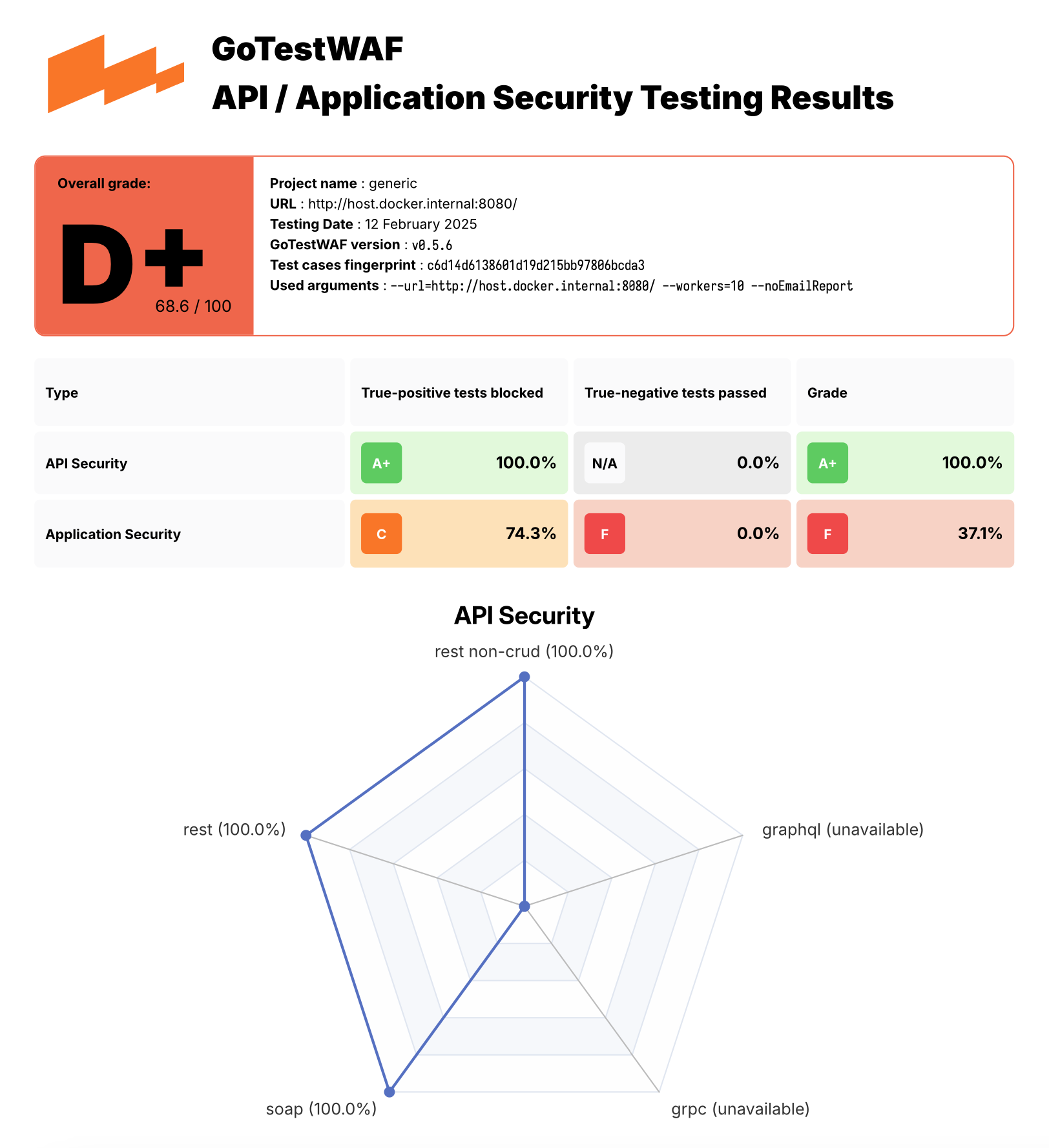
レポートファイル waf-evaluation-report-<date>.pdf は、ユーザーディレクトリの reports フォルダにあります。レポートを保存するディレクトリは reportPath パラメータで、レポートファイルの名前は reportName パラメータで指定することもできます。詳細な設定オプションについては、この リンク を参照してください。

PDF レポートの例は こちら にあります。

Example of GoTestWaf report

デモ

GoTestWAF は、NGINX ベースの ModSecurity (OWASP Core Rule Set 使用) をデプロイするデモ環境と、ModSecurity を評価する GoTestWAF を Docker 上で実行することで試せます。

デモ環境を実行するには:

  1. このリポジトリをクローンし、クローンしたディレクトリに移動します:

    root@kitploit:~
    git clone https://github.com/wallarm/gotestwaf.git
    cd gotestwaf
    
  2. 以下の make コマンドを使用して、Docker イメージ から ModSecurity を起動します:

    root@kitploit:~
    make modsec
    

    ModSecurity Docker コンテナを実行するための設定は、クローンした Makefile の modsec ルールで定義されています。このルールは、ポート 8080 で ModSecurity Docker コンテナを、クローンしたファイル ./resources/default.conf.template で定義された最小限の設定と PARANOIA 値を 1 に設定して実行します。

    必要に応じて、クローンした Makefile の modsec ルールを編集してこれらの設定を変更できます。ModSecurity 設定で利用可能なオプションは Docker Hub に記載されています。

    ModSecurity コンテナを停止するには、次のコマンドを使用します:

    root@kitploit:~
    make modsec_down
    
  3. 以下のいずれかの方法で、最小限の設定で GoTestWAF を起動します:

    Docker イメージ を、以下の docker pull および docker run コマンドを使用して起動します:

GoTestWAF を実行するその他のオプション

Docker Hub からダウンロードした GoTestWAF Docker イメージを実行する以外にも、以下のオプションを使用して GoTestWAF を実行できます:

  • このリポジトリをクローンし、Dockerfile から GoTestWAF Docker イメージをビルドします。例:

    root@kitploit:~
    git clone https://github.com/wallarm/gotestwaf.git
    cd gotestwaf
    DOCKER_BUILDKIT=1 docker build --force-rm -t gotestwaf .
    docker run --rm --network="host" -it -v ${PWD}/reports:/app/reports \
        gotestwaf --url=<EVALUATED_SECURITY_SOLUTION_URL>
    

    評価対象のセキュリティツールが外部からアクセス可能な場合は、オプション --network="host" を省略できます。このオプションは、127.0.0.1 で動作する Docker コンテナ間の相互作用を可能にします。

  • このリポジトリをクローンし、go を使用して GoTestWAF を実行します。例:

    root@kitploit:~
    git clone https://github.com/wallarm/gotestwaf.git
    cd gotestwaf
    go run ./cmd --url=<EVALUATED_SECURITY_SOLUTION_URL>
    
  • このリポジトリをクローンし、Go モジュールとして GoTestWAF をビルドします:

    root@kitploit:~
    git clone https://github.com/wallarm/gotestwaf.git
    cd gotestwaf
    go build -mod vendor -o gotestwaf ./cmd
    

サポートされている GoTestWAF の設定オプションは以下で説明します。

設定オプション```

Usage: ./gotestwaf [OPTIONS] --url

Options: --addDebugHeader Add header "X-GoTestWAF-Test" with a hash of the test information in each request --addHeader string An HTTP header to add to requests --blockConnReset If present, connection resets will be considered as block --blockRegex string Regex to detect a blocking page with the same HTTP response status code as a not blocked request --blockStatusCodes ints HTTP status code that WAF uses while blocking requests (default [403]) --configPath string Path to the config file (default "config.yaml") --email string E-mail to which the report will be sent --followCookies If present, use cookies sent by the server. May work only with --maxIdleConns=1 (gohttp only) --graphqlURL string GraphQL URL to check --grpcPort uint16 gRPC port to check --hideArgsInReport If present, GoTestWAF CLI arguments will not be displayed in the report --httpClient string Which HTTP client use to send requests: chrome, gohttp (default "gohttp") --idleConnTimeout int The maximum amount of time a keep-alive connection will live (gohttp only) (default 2) --ignoreUnresolved If present, unresolved test cases will be considered as bypassed (affect score and results) --includePayloads If present, payloads will be included in HTML/PDF report --logFormat string Set logging format: text, json (default "text") --logLevel string Logging level: panic, fatal, error, warn, info, debug, trace (default "info") --maxIdleConns int The maximum number of keep-alive connections (gohttp only) (default 2) --maxRedirects int The maximum number of handling redirects (gohttp only) (default 50) --noEmailReport Save report locally --nonBlockedAsPassed If present, count requests that weren't blocked as passed. If false, requests that don't satisfy to PassStatusCodes/PassRegExp as blocked --openapiFile string Path to openAPI file --passRegex string Regex to a detect normal (not blocked) web page with the same HTTP status code as a blocked request --passStatusCodes ints HTTP response status code that WAF uses while passing requests (default [200,404]) --proxy string Proxy URL to use --quiet If present, disable verbose logging --randomDelay int Random delay in ms in addition to the delay between requests (default 400) --renewSession Renew cookies before each test. Should be used with --followCookies flag (gohttp only) --reportFormat strings Export report in the following formats: none, json, html, pdf (default [pdf]) --reportName string Report file name. Supports `time' package template format (default "waf-evaluation-report-2006-January-02-15-04-05") --reportPath string A directory to store reports (default "reports") --sendDelay int Delay in ms between requests (default 400) --skipWAFBlockCheck If present, WAF detection tests will be skipped --skipWAFIdentification Skip WAF identification --testCase string If set then only this test case will be run --testCasesPath string Path to a folder with test cases (default "testcases") --testSet string If set then only this test set's cases will be run --tlsVerify If present, the received TLS certificate will be verified --url string URL to check --version Show GoTestWAF version and exit --wafName string Name of the WAF product (default "generic") --workers int The number of workers to scan (default 5)

root@kitploit:~
GoTestWAFは、リクエストを実行するための2つのHTTPクライアントをサポートしており、`--httpClient`オプションで選択できます。デフォルトのクライアントは標準のGolang HTTPクライアントです。2つ目のオプションはChromeで、`--httpClient=chrome` CLI引数で使用できます。Linuxシステムでは、GoTestWAFをChromeでリクエスト実行するために、Dockerの引数に`--cap-add=SYS_ADMIN`を追加する必要があることに注意してください。

### OpenAPIファイルに基づくスキャン

より良いスキャンのために、GTWは有効なアプリケーションリクエストを通じて悪意のあるベクトルを送信することをサポートしています。GoTestWAFは、単純な構造のリクエストを構築して起動時に指定されたURLに送信する代わりに、OpenAPI 3.0形式のアプリケーションのAPI記述に基づいて有効なリクエストを作成します。

動作の仕組み:

1. GoTestWAFはOpenAPIファイルを読み込み、リクエストテンプレートを構築します。すべてのテンプレートは、サポートするプレースホルダーに基づいてグループに分けられます(例:リクエストパスに文字列パラメータがある場合、そのリクエストはURLPathプレースホルダーをサポートするリクエストのグループに割り当てられます)。

2. 送信用キューから次の悪意のあるベクトルが選択されます。そのベクトルに対して指定されたプレースホルダーに基づいて、ベクトルを代入できるすべてのクエリテンプレートが選択されます。次に、ベクトルがテンプレートに代入され、リクエストが送信されます。

3. OpenAPIファイルに指定された可能な応答に基づいて、リクエストがWAFによってブロックされたか、アプリケーションに渡されたかが判定されます。応答コードのステータスとそのスキームがOpenAPIファイルに記述されたものと一致する場合、そのリクエストはバイパスされたとしてマークされます。そうでない場合はブロックされたとしてマークされます。アプリケーションがステータスコードのみで応答し、そのステータスコードがWAFからの応答と一致する可能性があります。この場合、リクエストは未解決としてマークされます。

サポートされているOpenAPIの機能:

* リクエストのヘッダー、パス、クエリパラメータ、本文内の数値および文字列パラメータ。
* リクエスト本文では以下のコンテンツタイプがサポートされています:`application/json`、`application/xml`、`application/x-www-form-urlencoded`、`text/plain`。
* XMLでは以下の修飾子がサポートされています:`name`、`wrapped`、`attribute`、`prefix`、`namespace`。
* 文字列の長さ制限は`minLength`および`maxLength`パラメータでサポートされています。
* 数値の値制限は`minimum`、`maximum`、`exclusiveMinimum`、`exclusiveMaximum`でサポートされています。
* 配列の長さ制限は`minItems`および`maxItems`でサポートされています。
* `oneOf`、`anyOf`、`allOf`によるスキームの組み合わせがサポートされています。

説明した動作原理に基づき、OpenAPIファイルが実装されたアプリケーションAPIを正しく表現することが極めて重要です。したがって、例えばクエリに対する可能な応答を記述するために`default`を使用することはできません。

注意:openapi仕様を含むボリュームをGoTestWAFコンテナに転送する必要があります。```sh
-v ${PWD}/api.yaml:/app/api.yaml

完全なDocker例:```sh docker run --rm --network="host" -it -v ${PWD}/reports:/app/reports -v ${PWD}/api.yaml:/app/api.yaml wallarm/gotestwaf --wafName your_waf_name --url=https://example.com/v1 --openapiFile api.yaml

root@kitploit:~
## OWASP Core Rule Set 回帰テストスイートでの実行

GoTestWAFでは、追加のテストスイートを簡単に統合できます。

この例では、OWASP Core Rule Set 回帰テストスイートからテストを追加する方法を示します。

テストはGoTestWAF形式とは異なる形式で書かれているため、変換が必要です。この目的のために、スクリプト **misc/modsec_regression_testset_converter.rb** が提供されています。

テストを変換するには、`make modsec_crs_regression_tests_convert` を実行します。
次に、更新されたテストセットでコンテナをビルドします。
`make gotestwaf`

デフォルトでは、ルールのサブセットに対してのみテストが変換されることに注意してください。以下のカテゴリが選択されています:

- REQUEST-932-APPLICATION-ATTACK-RCE
- REQUEST-933-APPLICATION-ATTACK-PHP
- REQUEST-941-APPLICATION-ATTACK-XSS
- REQUEST-930-APPLICATION-ATTACK-LFI
- REQUEST-931-APPLICATION-ATTACK-RFI
- REQUEST-942-APPLICATION-ATTACK-SQLI
- REQUEST-944-APPLICATION-ATTACK-JAVA
- REQUEST-934-APPLICATION-ATTACK-GENERIC
- REQUEST-913-SCANNER-DETECTION

必要に応じて、misc/modsec_regression_testset_converter.rb 内の変数 "crs_testcases" を変更して、テストカテゴリを追加または削除します。
ツールをダウンロード
root@kitploit:~
docker pull wallarm/gotestwaf
docker run --rm --network="host" -v ${PWD}/reports:/app/reports \
    wallarm/gotestwaf --url=http://127.0.0.1:8080 --noEmailReport

Dockerfile から GoTestWAF Docker イメージをビルドし、以下の make コマンドを使用してイメージを実行します (ModSec がポート 8080 で実行されていることを確認してください。そうでない場合は、Makefile のポート値を更新してください):

root@kitploit:~
make gotestwaf
make scan_local_from_docker

Go で GoTestWAF をネイティブに起動するには、以下の make コマンドを使用します: (ModSec がポート 8080 で実行されていることを確認してください。そうでない場合は、Makefile のポート値を更新してください):

root@kitploit:~
make scan_local
  • レポート ファイル waf-evaluation-report-<date>.pdf が、コンテナ内の /app/reports にマッピングした reports フォルダにあります。