
Skip to content
KitploitKITPLOIT
ツールブログ
提出
ツールブログ
提出

ハッキング、侵入テスト、サイバーセキュリティツールをあなたのセキュリティアーセナルに!

Kitploitはハッキング、サイバーセキュリティ、ペネトレーションテストのツールディレクトリです。最新のプロジェクトアップデートを見つけて、脆弱性の発見、システム分析、テストの自動化、セキュリティの強化を行いましょう。

··フィード·お問い合わせ·プライバシー·© 2026 Kitploit

ツールディレクトリ

カテゴリ

すべてのカテゴリを見る
Loading categories
Android-PIN-Bruteforce — Androidスマートフォン(またはデバイス)のロック画面PINをブルートフォースで解除します。お使いのKali Nethunterスマホを、Androidデバイス向けブルートフォースPINクラッカーに変身させましょう!(root不要、adb不要) | Kitploit
ツール/GitHubGitHub/urbanadventurer/android-pin-bruteforce
Androidセキュリティパスワード攻撃ハードウェアハッキングモバイルセキュリティ
GitHuburbanadventurer/android-pin-bruteforce

Android-PIN-Bruteforce

Androidスマートフォン(またはデバイス)のロック画面PINをブルートフォースで解除します。お使いのKali Nethunterスマホを、Androidデバイス向けブルートフォースPINクラッカーに変身させましょう!(root不要、adb不要)

リポジトリを見る

人気

すべて見る →

コミュニティで最も使われているツールを見つけましょう。

すべてのツールを探索

ツールコレクションを閲覧

すべてのツールを見る →
共有
4.8k832694年前Kitploit レビュー済み

🔓📱 Android-PIN-Bruteforce

ロック画面のPINをブルートフォースしてAndroidスマートフォン(またはデバイス)のロックを解除します。

Kali Nethunterスマートフォンを、Androidデバイス向けのPINブルートフォースクラッカーに変えましょう!

📱 仕組み

ロックされたスマートフォンをNethunterデバイスに接続するためにUSB OTGケーブルを使用します。キーボードをエミュレートし、自動的にPINを試行し、誤った推測を多く試行した後に待機します。
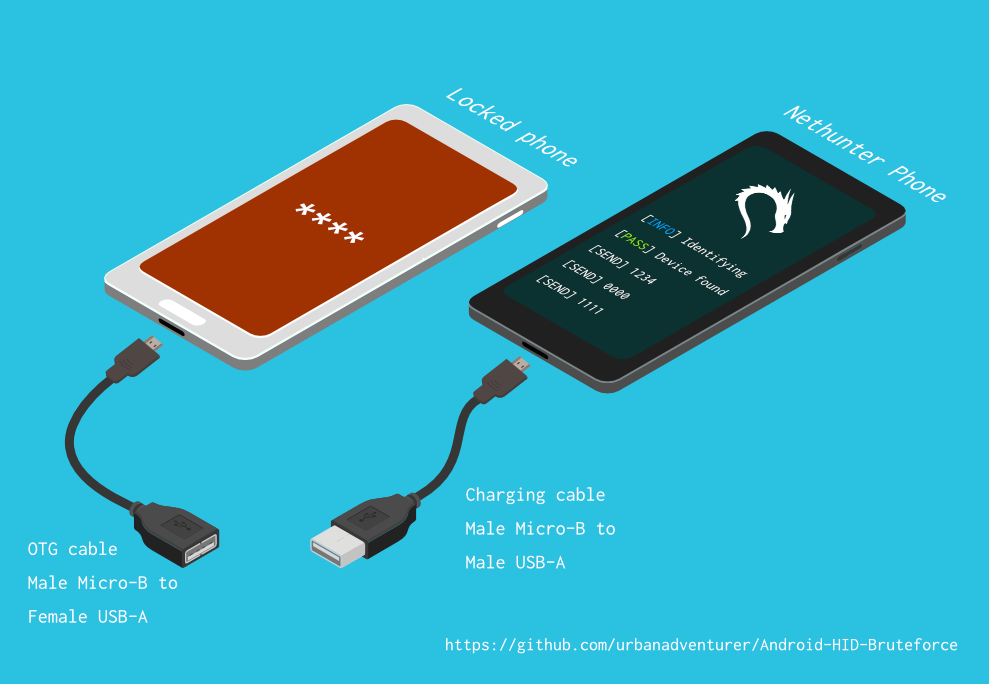
How to Connect Phones

[Nethunterスマートフォン] <--> [USBケーブル] <--> [USB OTGアダプター] <--> [ロックされたAndroidスマートフォン]

USB HID Gadgetドライバーは、USBヒューマンインターフェースデバイス(HID)のエミュレーションを提供します。これにより、Android Nethunterデバイスがロックされたスマートフォンへのキーボード入力をエミュレートできます。ロックされたスマートフォンにキーボードを差し込んでキーを押すのと同じです。

⏱ Samsung S5で4桁のPINをすべて試すには約16.6時間かかりますが、最適化されたPINリストを使用すれば、はるかに短い時間で済みます。

必要なもの

  • ロックされたAndroidスマートフォン
  • Nethunterスマートフォン(またはHIDカーネル対応のroot化されたAndroid端末)
  • USB OTG(On The Go)ケーブル/アダプター(USBオスMicro-BからメスUSB A)と、標準の充電ケーブル(USBオスMicro-BからオスA)。
  • 以上です!

🌟 利点

  • NetHunterスマートフォンをAndroid PINクラッキングマシンに変える
  • 他の方法とは異なり、ロックされたスマートフォンでADBやUSBデバッグを有効にする必要はありません
  • ロックされたAndroidスマートフォンのroot化は不要
  • Rubber Ducky、Teensy、Cellebrite、XPIN Clipなどの特別なハードウェアを購入する必要はありません
  • バックオフ時間を簡単に変更して、他の種類のデバイスをクラックできます
  • 動作します!

⭐ 機能

  • 1桁から10桁までの任意の長さのPINをクラック
  • 設定ファイルを使用して異なるスマートフォンをサポート
  • 3桁、4桁、5桁、6桁のPIN向けに最適化されたPINリスト
  • 低電力警告を含むスマートフォンのポップアップをバイパス
  • スマートフォンが抜かれたり電源が切れたりしたことを検出し、5秒ごとに再試行しながら待機
  • X回のPIN試行ごとにN秒の遅延を設定可能
  • ログファイル

インストール

TBC

スクリプトの実行

スクリプトを /sdcard/ にインストールした場合、以下のコマンドで実行できます。bash ./android-pin-bruteforce

Note that Android mounts /sdcard with the noexec flag. You can verify this with mount.

Usage

root@kitploit:~
Android-PIN-Bruteforce (0.2) は、ロック画面のPINをブルートフォース(総当たり)してAndroid端末のロックを解除するために使用されます。
  詳細情報: https://github.com/urbanadventurer/Android-PIN-Bruteforce

Commands:
  crack                PINの解錠を開始する
  resume               選択したPINから再開する
  rewind               選択したPINから逆順に解錠する
  diag                 診断情報を表示する
  version              バージョン情報を表示して終了する

Options:
  -f, --from PIN       このPINから再開する
  -a, --attempts       開始時の誤った試行回数NUM
  -m, --mask REGEX     PIN内の既知の桁にマスクを使用する
  -t, --type TYPE      PINまたはパターン解錠を選択する
  -l, --length NUM     NUM桁のPINを解錠する
  -c, --config FILE    読み込む設定ファイルを指定する
  -p, --pinlist FILE   カスタムPINリストを指定する
  -d, --dry-run        テスト用のドライラン。キーは送信しない。
  -v, --verbose        詳細なログを出力する

Usage:
  android-pin-bruteforce <command> [options]```


## Supported Android Phones/Devices

This has been successfully tested with various phones including the Samsung S5, S7, Motorola G4 Plus and G5 Plus.

It can unlock Android versions 6.0.1 through to 10.0. The ability to perform a bruteforce attack doesn't depend on the Android version in use. It depends on how the device vendor developed their own lockscreen.

Check the Phone Database for more details
https://github.com/urbanadventurer/Android-PIN-Bruteforce/wiki/Phone-Database

## 🎳 PIN Lists

Optimised PIN lists are used by default unless the user selects a custom PIN list.  

### Cracking PINs of different lengths

Use the `--length` commandline option.

Use this command to crack a 3 digit PIN, 
`./android-pin-bruteforce crack --length 3`

Use this command to crack a 6 digit PIN
`./android-pin-bruteforce crack --length 6`

### Where did the optimised PIN lists come from?

The optimised PIN lists were generated by extracting numeric passwords from database leaks then sorting by frequency. All PINs that did not appear in the password leaks were appended to the list. 

The optimised PIN lists were generated from *Ga$$Pacc DB Leak* (21GB decompressed, 688M Accounts, 243 Databases, 138920 numeric passwords).

#### The 4 digit PIN list

The reason that the 4 digit PIN list is used from a different source is because it gives better results than the generated list from *Ga$$Pacc DB Leak*.

`optimised-pin-length-4.txt` is an optimised list of all possible 4 digit PINs, sorted by order of likelihood.
It can be found with the filename `pinlist.txt` at https://github.com/mandatoryprogrammer/droidbrute

This list is used with permission from Justin Engler & Paul Vines from Senior Security Engineer, iSEC Partners,
and was used in their Defcon talk, [Electromechanical PIN Cracking with Robotic Reconfigurable Button Basher (and C3BO)](https://www.defcon.org/html/defcon-21/dc-21-speakers.html#Engler)

### Cracking with Masks

Masks use regular expressions with the standard grep extended format.

`./android-pin-bruteforce crack --mask "...[45]" --dry-run`

- To try all years from 1900 to 1999, use a mask of `19..`
- To try PINs that have a 1 in the first digit, and a 1 in the last digit, use a mask of `1..1`
- To try PINs that end in 4 or 5, use `...[45]`

## 📱 Configuration for different phones

Device manufacturers create their own lock screens that are different to the default or stock Android. 
To find out what keys your phone needs, plug a keyboard into the phone and try out different combinations.

Load a different configuration file, with the `--config FILE` commandline parameter.

Example:
`./android-pin-bruteforce --config ./config.samsung.s5 crack`

You can also edit the `config` file by customising the timing and keys sent.

The following configuration variables can be used to support a different phone's lockscreen.

タイミング

DELAY_BETWEEN_KEYS は、各キーが送信された後に待機する秒数です

DELAY_BETWEEN_KEYS=0.25

PROGRESSIVE_COOLDOWN_ARRAY 変数は、プログレッシブクールダウンをカスタマイズするための多次元配列として機能します

PROGRESSIVE_ARRAY_ATTEMPT_COUNT__________ は試行番号です

PROGRESSIVE_ARRAY_ATTEMPTS_UNTIL_COOLDOWN はクールダウンするまでに試行する回数です

PROGRESSIVE_ARRAY_COOLDOWN_IN_SECONDS____ はクールダウンの秒数です

PROGRESSIVE_ARRAY_ATTEMPT_COUNT__________=(1 11 41) PROGRESSIVE_ARRAY_ATTEMPTS_UNTIL_COOLDOWN=(5 1 1) PROGRESSIVE_ARRAY_COOLDOWN_IN_SECONDS____=(30 30 60)

SEND_KEYS_DISMISS_POPUPS_N_SECONDS_BEFORE_COOLDOWN_END は、クールダウン期間終了の何秒前にキーを送信するかを定義します

0 に設定すると無効になります

SEND_KEYS_DISMISS_POPUPS_N_SECONDS_BEFORE_COOLDOWN_END=5

SEND_KEYS_DISMISS_POPUPS_AT_COOLDOWN_END は、クールダウン期間終了前にメッセージやポップアップを閉じるために送信されるキーを設定します

SEND_KEYS_DISMISS_POPUPS_AT_COOLDOWN_END="enter enter enter"

KEYS_BEFORE_EACH_PIN は、ロック画面を表示させるために送信されるキーを設定します。これは各 PIN の前に送信されます。

デフォルトでは "escape enter" を送信しますが、一部の端末では他のキーに反応する場合があります。

例:

KEYS_BEFORE_EACH_PIN="ctrl_escape enter"

KEYS_BEFORE_EACH_PIN="escape space"

KEYS_BEFORE_EACH_PIN="escape enter"

KEYS_STAY_AWAKE_DURING_COOLDOWN は、クールダウン期間中に端末を起動状態に保つために送信されるキーです

KEYS_STAY_AWAKE_DURING_COOLDOWN="enter"

SEND_KEYS_STAY_AWAKE_DURING_COOLDOWN_EVERY_N_SECONDS は、キーが送信される頻度(秒単位)です

SEND_KEYS_STAY_AWAKE_DURING_COOLDOWN_EVERY_N_SECONDS=5

DELAY_BEFORE_STARTING は、ブルートフォースを開始する前に待機する秒数です

DELAY_BEFORE_STARTING=2

KEYS_BEFORE_STARTING は、ブルートフォース開始前に送信されるキーを設定します

KEYS_BEFORE_STARTING="enter"```

Popups

We send keys before the end of the cooldown period, or optionally during the cooldown period. This is to keep the lockscreen app active and to dismiss any popups about the number of incorrect PIN attempts or a low battery warning.

Test sending keys from the NetHunter phone

Test sending keys from the terminal

Use ssh from your laptop to the NetHunter phone, and use this command to test sending keys:

In this example, the enter key is sent.

echo "enter" | /system/xbin/hid-keyboard /dev/hidg0 keyboard

In this example, ctrl-escape is sent.

echo "left-ctrl escape" | /system/xbin/hid-keyboard /dev/hidg0 keyboard

Note: Sending combinations of keys in config file variables is different. Currently only ctrl_escape is supported.

In this example, keys a, b, c are sent.

echo a b c | /system/xbin/hid-keyboard /dev/hidg0 keyboard

Test sending keys from an app

This Android app is a virtual USB Keyboard that you can use to test sending keys.

https://store.nethunter.com/en/packages/remote.hid.keyboard.client/

How to send special keys

Use this list for the following variables:

  • KEYS_BEFORE_EACH_PIN
  • KEYS_STAY_AWAKE_DURING_COOLDOWN
  • KEYS_BEFORE_STARTING

To send special keys use the following labels. This list can be found in the hid_gadget_test source code.

To send more than one key at the same time, use the following list:

  • ctrl_escape (This sends left-ctrl and escape)

If you need more key combinations please open a new issue in the GitHub issues list.

Customising the Progressive Cooldown

The following section of the config file controls the progressive cooldown.

root@kitploit:~
## PROGRESSIVE_COOLDOWN_ARRAY 変数は、段階的クールダウンをカスタマイズするための多次元配列として機能します
## PROGRESSIVE_ARRAY_ATTEMPT_COUNT__________ は試行番号です
## PROGRESSIVE_ARRAY_ATTEMPTS_UNTIL_COOLDOWN はクールダウンする前の試行回数です
## PROGRESSIVE_ARRAY_COOLDOWN_IN_SECONDS____ はクールダウン秒数です

PROGRESSIVE_ARRAY_ATTEMPT_COUNT__________=(1  11 41)
PROGRESSIVE_ARRAY_ATTEMPTS_UNTIL_COOLDOWN=(5   1  1)
PROGRESSIVE_ARRAY_COOLDOWN_IN_SECONDS____=(30 30 60)```

The array is the same as this table.

| attempt number   | attempts until cooldown  | cooldown   |
| ---------------- | ------------------------ | ---------- |
| 1                | 5                        | 30         |
| 11               | 1                        | 30         |
| 41               | 1                        | 60         |


### Why can't you use a laptop, or is a Windows or Linux version coming soon?

This script works by emulating USB Human Interface Devices (HID), in this case it is keyboard and mouse input. Laptops have uni-directional USB ports and an Android mobile device/ phone has a bi-directional USB port. A bi-directional port is required to emulate a keyboard.

This might change in the future as USB-C is supposed to be uni-directional.

### How Android emulates a keyboard

Keys are sent using `/system/xbin/hid-keyboard`. To test this and send the key 1 you can use `echo 1 | /system/xbin/hid-keyboard dev/hidg0 keyboard`

In Kali Nethunter, `/system/xbin/hid-keyboard` is a compiled copy of `hid_gadget_test.c`. This is a small program for testing the HID gadget driver that is included in the Linux Kernel. The source code for this file can be found at https://www.kernel.org/doc/html/latest/usb/gadget_hid.html and https://github.com/aagallag/hid_gadget_test.

## 🔧 Troubleshooting

### If it is not bruteforcing PINs

#### Check the orientation of the cables

The Nethunter phone should have a regular USB cable attached, while the locked phone should have an OTG adaptor attached.

The OTG cable should be connected to the locked Android phone. The regular USB cable should be connected to the Nethunter phone.

Refer to the graphic on how to connect the phones.

#### Check it is emulating a keyboard

You can verify that the NetHunter phone is succesfully emulating a keyboard by connecting it to a computer using a regular charging/data USB cable. Open a text editor like Notepad while it is cracking and you should see it entering PIN numbers into the text editor.

Note that you will not need an OTG cable for this. 

#### Try restarting the phones

Try powering off the phones and even taking out the batteries if that is possible.

#### Try new cables

Try using new cables/adaptors as you may have a faulty cable/adaptor.

### If it doesn't unlock the phone with a correct PIN

You might be sending keys too fast for the phone to process. Increase the DELAY_BETWEEN_KEYS variable in the config file.
💡 If you don't see 4 dots come up on the phone's screen then maybe it is not receiving 4 keys.

### 🔋 Managing Power Consumption

If your phone runs out of power too soon, follow these steps:

- Make sure both phones are fully charged to 100% before you begin
- Reduce the screen brightness on both the victim phone and NetHunter phone if possible
- Place both phones into Airplane mode, however you may want to enable WiFi to access the NetHunter phone via SSH.
- The locked phone will power the NetHunter phone, because it appears as a keyboard accessory
- Use a USB OTG cable with a Y splitter for an external power supply, to allow charging of the NetHunter phone while cracking
- Take breaks to charge your devices. Pause the script with CTRL-Z and resume with the `fg` shell command.
- Avoid the SEND_KEYS_STAY_AWAKE_DURING_COOLDOWN_EVERY_N_SECONDS configuration option. This will cause the locked phone to use more battery to keep the screen powered. Instead use the SEND_KEYS_DISMISS_POPUPS_N_SECONDS_BEFORE_COOLDOWN_END option (Default).

### Check the Diagnostics Report

Use the command `diag` display diagnostic information.

```bash ./android-pin-bruteforce diag```
もしこのメッセージがUSBケーブルを接続したときに表示される場合、ロックされたAndroidスマートフォンからバッテリーを取り外し、電源を再投入してみてください。```[FAIL] HID USB device not ready. Return code from /system/xbin/hid-keyboard was 5.```

### How the usb-devices command works

The diagnostics command uses the `usb-devices` script but it is only necessary as part of determining whether the USB cables are incorrectly connected. This can be downloaded from
https://github.com/gregkh/usbutils/blob/master/usb-devices

### Use verbose output

Use the `--verbose` option to check the configuration is as expected. This is especially useful when you are modifying the configuration.

### Use the dry-run

Use the `--dry-run` option to check how it operates without sending any keys to a device. This is especially useful when you are modifying the configuration or during development.

Dry run will:

- Not send any keys
- Will continue instead of aborting if the `KEYBOARD_DEVICE` or `HID_KEYBOARD` is missing.

### HID USB Mode

Try this command in a shell on the NetHunter phone:
```/system/bin/setprop sys.usb.config hid```
## 💣 既知の問題

- 正しいPINが推測され、電話のロックが解除された場合、これを検出できません。
- PINが見つかる前に、電話の🔋バッテリーが切れる可能性があります。
- 信頼できないソースからの電話設定ファイルは、事前に確認せずに信頼しないでください。設定ファイルはシェルスクリプトであり、悪意のあるコマンドが含まれている可能性があります。

## 🚀 ロードマップ

- [DONE] 動作する
- [DONE] USB HID の障害を検出する
- [DONE] 使用法とコマンドラインオプション/設定ファイルの改善
- [DONE] n桁のPINに対するブルートフォースを追加
- [DONE] 既知の桁のマスク
- [DONE] PINリストを逆順で解読(最近どのPINでデバイスのロックが解除されたかを特定)
- [DONE] 設定可能なロック画面プロンプトを実装
- [DONE] 10回試行後のクールダウン変更を実装
- [WORKING] ブルートフォース可能なデバイスをさらに見つけてテスト
- プログレスバーを追加
- ETAを追加
- ASCIIアート
- NetHunter向けのより良いGUI
- iPhone向けに実装
- 電話のロック解除を検出(NetHunterカメラをセンサーとして使用?)
- Androidのパターンを解読(最初に一般的なパターンを試す)

## 🙋 貢献

プルリクエストは歓迎します。大きな変更については、まずIssueを開いて変更内容について話し合ってください。

テストも適宜更新してください。

## 😎 著者と謝辞

Andrew Horton (@urbanadventurer) によって開発されました。

👏 以下の方々が大変役に立ちました:

- Vlad Filatov (@v1adf): Wiki Phone Database 向けに多くの電話をテスト


### 動機

これを開発した元々の動機は、Samsung S5 Android スマートフォンのロックを解除することでした。その電話は亡くなった人のもので、家族がそのデータにアクセスする必要がありました。USB Rubber Ducky や他のハードウェアが手元になかったため、さまざまな方法を試しましたが、最終的には新しいものを作る必要があると気づきました。

### クレジット

最適化されたPINリストは、Justin Engler (@justinengler) と iSEC Partners のシニアセキュリティエンジニア Paul Vines によるもので、彼らのDefconトーク [Electromechanical PIN Cracking with Robotic Reconfigurable Button Basher (and C3BO)](https://www.defcon.org/html/defcon-21/dc-21-speakers.html#Engler) で使用されました。

### グラフィック

Andrew Horton がデザインし、以下の無料ベクターパックを感謝して使用しています:

- [USB Ports Isometric Free Vector by VisionHeldup](https://www.vecteezy.com/vector-art/159576-usb-ports-isometric-free-vector)
- [HDMI and USB Vector Set by Mary Winkler](https://www.vecteezy.com/vector-art/107006-hdmi-and-usb-vector-set)
- [Isometric Data Security Illustration by Rizal.Medanguide](https://www.vecteezy.com/vector-art/661831-isometric-data-security-illustration)
- Kali NetHunter ロゴ

## 🗿 ロックされたAndroidスマートフォンのロック解除に関する他のプロジェクト・手法との比較

### このプロジェクトの独自性は何ですか?

他のオープンソースのAndroid PIN解読プロジェクトがある中で、このプロジェクトの何がユニークなのかとよく聞かれます。

Android-PIN-Bruteforce は、NetHunter スマートフォンから Android スマートフォンの PIN を解読し、ロックされたスマートフォンが事前にハッキングされている必要がない点でユニークです。

以下の条件で動作します:
- Rubber Ducky、Celebrite、XPIN Clip などの特別なハードウェアを購入する必要なし。
- ADB や root アクセスが不要(スマートフォンが事前にハッキングされている必要はありません)。

| プロジェクト                                            | ADB/USB デバッグ | root が必要 | ハードウェアへの出費が必要 | 商用 |
-------------------------------------------------------- | ---------------- | ------------ | ------------------------- | ---- |
| ⭐ Android-PIN-Bruteforce                              | いいえ           | いいえ       | Nethunter スマートフォン  | いいえ |
| github.com/PentesterES/AndroidPINCrack                 | はい             | はい         | いいえ                    | いいえ |
| github.com/ByteRockstar1996/Cracking-Android-Pin-Lock  | はい             | はい         | いいえ                    | いいえ |
| github.com/sch3m4/androidpatternlock                   | はい             | はい         | いいえ                    | いいえ |
| github.com/georgenicolaou/androidlockcracker           | はい             | はい         | いいえ                    | いいえ |
| github.com/MGF15/P-Decode                              | はい             | はい         | いいえ                    | いいえ |
| github.com/BitesFor/ABL                                | はい             | はい         | いいえ                    | いいえ |
| github.com/wuseman/WBRUTER                             | はい             | いいえ       | いいえ                    | いいえ |
| github.com/Gh005t/Android-BruteForce                   | はい             | いいえ       | いいえ                    | いいえ |
| github.com/mandatoryprogrammer/droidbrute              | いいえ           | いいえ       | Rubber Ducky $           | いいえ |
| github.com/hak5darren/USB-Rubber-Ducky                 | いいえ           | いいえ       | Rubber Ducky $           | はい   |
| github.com/bbrother/stm32f4androidbruteforce           | いいえ           | いいえ       | STM32F4 開発ボード $      | いいえ |
| hdb-team.com/product/hdbox/                            | いいえ           | いいえ       | HDBOX  $$                | はい   |
| xpinclip.com                                           | いいえ           | いいえ       | XPINClip  $$             | はい   |
| cellebrite.com/en/ufed/                                | いいえ           | いいえ       | Cellebrite UFED $$$      | はい   |

これらのプロジェクト・製品の中には本当に素晴らしいものもありますが、Android-PIN-Bruteforce とは異なる目標を達成しています。

プロジェクトが gestures.key または password.key を必要とする場合、root が必要としてリストしています。
プロジェクトがカスタムブートローダーを必要とする場合、ADB と root の両方が必要としてリストしています。
この表にプロジェクトを掲載してほしい場合は、新しい Issue を開いてください。
各プロジェクトへのリンクは 📚 関連プロジェクトと参考文献 セクションにあります。

### 😭 一般のスマートフォンユーザー

- [DataGenetics PIN分析](https://datagenetics.com/blog/september32012/index.html) の上位20のPINを試す。これで電話の26.83%がロック解除されるそうです。
- SMS ロック画面バイパスアプリを使用する(電話がロックされる前にアプリをインストールしておく必要があります)
- Samsung Find My Mobile を使用する(電話がロックされる前に設定しておく必要があります)
- ロック画面 UI をクラッシュさせる(Android 5.0および5.1)
- Google のパターン忘れ、PIN忘れ、パスワード忘れを使用する(Android 4.4 KitKat 以前)
- 工場出荷時リセット(すべてのデータが失われます 😭)

### 🤖 すでにAndroid ROMを交換したユーザー

スマートフォンが既に root化されている、USBデバッグが有効になっている、またはadbが有効になっている場合。

- カスタムリカバリを使用して `Pattern Password Disable` ZIP をフラッシュする(TWRP、CMW、Xrec などが必要)
- `/data/system/gesture.key` または `password.key` を削除する(ロックされたデバイスで root と adb が必要)
- `/data/system/gesture.key` と `password.key` を解読する(ロックされたデバイスで root と adb が必要)
- sqlite3 データベース `settings.db` を更新する(ロックされたデバイスで root と adb が必要)

### 🔬 フォレンジック調査者

これらの方法は高価になる場合があり、通常は専門のスマートフォンフォレンジック調査者のみが使用します。

難易度と費用の順:

- USB デバッグが有効であることを利用する(Oxygen Forensic Suite)
- キーボードエミュレーションによるブルートフォース(⭐ Android-PIN-Bruteforce、RubberDucky攻撃、XPIN Clip、HBbox)
- JTAG(デバイス基板上のTAP(テストアクセスポート)とのインターフェース)
- インシステムプログラミング(ISP)(デバイス基板上のフラッシュメモリチップのピンに直接接続)
- チップオフ(デバイスからフラッシュメモリチップをはんだ除去して取り外す)
- クロックグリッチング / 電圧フォールト注入(PIN制限を迂回するためのハードウェアCPUタイミング攻撃)
- ブートローダーエクスプロイト(ブートローダーを攻撃するゼロデイエクスプロイト。GrayKey(Grayshift)やCellebrite)

JTAG、ISP、チップオフの技術は、現在ほとんどのデバイスが暗号化されているため、あまり有用ではありません。
クロックグリッチングを使用したスマートフォンPINへの実用的な攻撃は知りません。この技術を使用する製品をご存知でしたら、お知らせください。

### 🕵 セキュリティ専門家と技術的なスマートフォンユーザー

専用のハードウェアを使用してUSB HIDキーボードブルートフォースを使用します。

- RubberDucky と Darren Kitchen の Hak5 ブルートフォーススクリプト
- USB Teensy 用のスクリプトを作成
- 高価なフォレンジックハードウェアを購入
- または、NetHunter スマートフォンで Android-PIN-Bruteforce を使用!

Android PIN 解読用の RubberDucky ペイロードをエミュレートするために、別の素晴らしいプロジェクト Duck Hunter を使用しようとしましたが、動作しませんでした。ペイロードの長さが原因でスマートフォンがクラッシュした可能性があります。

## 📚 関連プロジェクトと参考文献

### NetHunter なしのUSB HIDハードウェア

hak5 12x17: 16時間でAndroidの4桁PINをすべて解読するUSB Rubber Ducky
https://archive.org/details/hak5_12x17

Hak5: USB Rubber Ducky
https://shop.hak5.org/products/usb-rubber-ducky-deluxe

USB-Rubber-Ducky ペイロード
https://github.com/hak5darren/USB-Rubber-Ducky/wiki/Payloads

Teensy
https://www.pjrc.com/teensy/

STM32F4Discovery開発ボードでAndroidスマートフォンをブルートフォース攻撃
https://github.com/bbrother/stm32f4androidbruteforce
https://hackaday.com/2013/11/10/brute-forcing-an-android-phone/

Mac EFI PINに対する自動ブルートフォース攻撃(Teensyを使用)
https://orvtech.com/atacar-efi-pin-macbook-pro-en.html
https://hackaday.io/project/2196-efi-bruteforcer

Droidbrute: 統計的に生成されたワードリストで効率的にしたAndroid PIN解読用USB Rubber Duckyペイロード
https://github.com/mandatoryprogrammer/droidbrute

hak5エピソードとAndroid 4桁PINブルートフォースに関する議論フォーラム
https://forums.hak5.org/topic/28165-payload-android-brute-force-4-digit-pin/

### NetHunter HIDキーボード攻撃

NetHunter HIDキーボード攻撃
https://www.kali.org/docs/nethunter/nethunter-hid-attacks/

### LinuxカーネルHIDサポート

ヒューマンインターフェースデバイス(HID)
https://www.kernel.org/doc/html/latest/hid/index.html#

Linux USB HID gadget ドライバーと hid-keyboard プログラム
https://www.kernel.org/doc/html/latest/usb/gadget_hid.html
https://github.com/aagallag/hid_gadget_test

usb-devices スクリプト
https://github.com/gregkh/usbutils/blob/master/usb-devices

### Android PINとパターンファイルの解読

AndroidPINCrack - ハッシュとソルトからAndroidパスコードをブルートフォース(スマートフォンのrootが必要)
https://github.com/PentesterES/AndroidPINCrack

Android Pattern Lock Cracker - SHA1ハッシュからAndroidパターンをブルートフォース(スマートフォンのrootが必要)
https://github.com/sch3m4/androidpatternlock

### 一般的な復旧方法

[Android][ガイド] Androidパスワード/パターン/フェイス/PIのハッキングとバイパス
https://forum.xda-developers.com/showthread.php?t=2620456

ADBとシェルスクリプトを使用したAndroidブルートフォース
https://github.com/Gh005t/Android-BruteForce

### フォレンジック手法とハードウェア

PATCtech デジタルフォレンジック: Androidパスコードを突破する
http://patc.com/online/a/Portals/965/Android%20Passcode.pdf

XPIN Clip
https://xpinclip.com/

HDB Team の HDBox
https://hdb-team.com/product/hdbox/

Cellebrite UFED
https://www.cellebrite.com/en/ufed/

Grayshift の GrayKey
https://www.grayshift.com/graykey/

### PIN分析

Electromechanical PIN Cracking with Robotic Reconfigurable Button Basher (and C3BO)
https://www.defcon.org/html/defcon-21/dc-21-speakers.html#Engler

DataGenetics PIN分析 https://datagenetics.com/blog/september32012/index.html
ツールをダウンロード
Key labelKey label
left-ctrlf6
right-ctrlf7
left-shiftf8
right-shiftf9
left-altf10
right-altf11
left-metaf12
right-metainsert
returnhome
escpageup
bckspcdel
tabend
spacebarpagedown
caps-lockright
f1left
f2down
f3kp-enter
f4up
f5num-lock