
 target/strelka
エンタープライズ規模でのリアルタイム・コンテナベースのファイルスキャン

<h1 align="center">
<img src="https://assets.kitploit.com/production/public/readmes/2436/2065ad071dd20cf7e35ddddfba0598d78452e4670e89342eed6f7a190a0a1fcb.png" alt="Strelka バナー" />
</h1>
<div align="center">
[リリース][release] | [ドキュメント][wiki] | [プルリクエスト][pr] | [課題][issues]
[![GitHub release][img-version-badge]][repo] [![Build Status][img-actions-badge]][actions-ci] [![Pull Requests][img-pr-badge]][pr] [![Slack][img-slack-badge]][slack] [![License][img-license-badge]][license]
</div>
Strelkaは、脅威ハンティング、脅威検出、インシデント対応に使用されるリアルタイムのコンテナベースファイルスキャンシステムです。元々はLockheed Martinの[Laika BOSS](https://github.com/lmco/laikaboss)や類似プロジェクト([関連プロジェクト](#関連プロジェクト)を参照)が確立した設計に基づいており、Strelkaの目的はエンタープライズ規模でのファイル抽出とメタデータ収集を実行することです。
Strelkaは、いくつかの重要な点で兄弟プロジェクトとは異なります:
* コアコードベースはGoとPython3.10+
* サーバコンポーネントはデプロイの容易さと柔軟性のためにコンテナ内で実行
* Windows、Mac、Linux向けのOSネイティブクライアントアプリケーション
* クロスプラットフォーム、クロスランゲージ対応を可能にする[ライブラリとフォーマット](#アーキテクチャ)を使用して構築
## 特徴
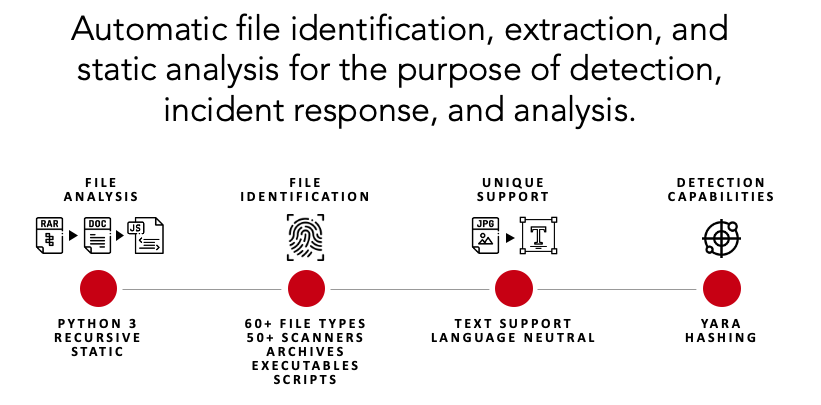
Strelkaはモジュラー式のデータスキャンプラットフォームであり、ユーザーやシステムがファイルを送信して、ファイルの内容とメタデータの分析、抽出、報告を行うことができます。[SIEM](https://en.wikipedia.org/wiki/Security_information_and_event_management)と組み合わせることで、Strelkaは集約、アラート、アナリストに環境をよりよく理解する能力を提供し、直接データ収集や時間のかかるファイル分析を行う必要をなくします。
## クイックスタート
Strelkaでファイルを実行するのは簡単です。このセクションでは、単発分析のためのStrelkaの抽出および分析機能を紹介します。
*エンタープライズ環境でStrelkaを適切に構築およびデプロイする方法の詳細については、[ドキュメント](https://target.github.io/strelka/)を確認してください。*
#### ステップ1: 前提条件のインストール
```bash
# Ubuntu 23.04
sudo apt install -y wget git docker docker-compose golang jq && \
sudo usermod -aG docker $USER && \
newgrp docker
````
#### ステップ2: Strelkaのダウンロード
```bash
git clone https://github.com/target/strelka.git && \
cd strelka
```
#### ステップ3: 推奨のYARAルールをダウンロードしてインストール(オプション)
```bash
rm configs/python/backend/yara/rules.yara && \
git clone https://github.com/Yara-Rules/rules.git configs/python/backend/yara/rules/ && \
echo 'include "./rules/index.yar"' > configs/python/backend/yara/rules.yara
```
#### ステップ4a: 事前コンパイル済みイメージをプルしてStrelkaを起動
**注意**: `go build`プロセスをスキップして、`http://0.0.0.0:9980`の`Strelka UI`を使用してファイルを分析できます。
```bash
docker compose -f build/docker-compose-no-build.yaml up -d && \
go build github.com/target/strelka/src/go/cmd/strelka-oneshot
```
#### ステップ4b: 構築してStrelkaを起動
**注意**: `go build`プロセスをスキップして、`http://0.0.0.0:9980`の`Strelka UI`を使用してファイルを分析できます。
```bash
docker compose -f build/docker-compose.yaml build && \
docker compose -f build/docker-compose.yaml up -d && \
go build github.com/target/strelka/src/go/cmd/strelka-oneshot
```
#### ステップ5: 分析するファイルを準備
任意のマルウェアサンプル、またはStrelkaに分析させたい他のファイルを使用してください。
```bash
wget https://github.com/ytisf/theZoo/raw/master/malware/Binaries/Win32.Emotet/Win32.Emotet.zip -P samples/
```
#### ステップ6: Docker化されたワンショットを使用してStrelkaでファイルを分析
```bash
./strelka-oneshot -f samples/Win32.Emotet.zip -l - | jq
```
#### ここで何が起こっているのか?
1. Strelkaは送信されたファイルが暗号化ZIPであると判断([taste.yara](https://github.com/target/strelka/blob/master/configs/python/backend/taste/taste.yara) [backend.yaml](https://github.com/target/strelka/blob/master/configs/python/backend/backend.yaml) を参照)
2. [ScanEncryptedZip](https://github.com/target/strelka/blob/master/src/python/strelka/scanners/scan_encrypted_zip.py)が辞書を使用してZIPファイルのパスワードをクラックし、圧縮ファイルを抽出
3. 抽出されたファイルはスキャナによってStrelkaパイプラインに戻され、Strelkaは抽出されたファイルがEXEであると判断
4. [ScanPe](https://github.com/target/strelka/blob/master/src/python/strelka/scanners/scan_pe.py)がEXEファイルを解析し、有用なメタデータを出力に追加
5. [ScanYara](https://github.com/target/strelka/blob/master/src/python/strelka/scanners/scan_yara.py)が提供されたルールを使用してEXEファイルを分析し、多数の一致を出力に追加。そのうちいくつかはファイルが悪意がある可能性を示す
*以下の出力は簡潔にするために編集されています。*
```json
{
"file": {
"depth": 0,
"flavors": {
"mime": ["application/zip"],
"yara": ["encrypted_zip", "zip_file"]
},
"scanners": [
"ScanEncryptedZip",
"ScanEntropy",
"ScanFooter",
"ScanHash",
"ScanHeader",
"ScanYara",
"ScanZip"
]
},
"scan": {
"encrypted_zip": {
"cracked_password": "infected",
"elapsed": 0.114269,
"total": {"extracted": 1, "files": 1}
}
}
}
```
```json
{
"file": {
"depth": 1,
"flavors": {
"mime": ["application/x-dosexec"],
"yara": ["mz_file"]
},
"name": "29D6161522C7F7F21B35401907C702BDDB05ED47.bin",
"scanners": [
"ScanEntropy",
"ScanFooter",
"ScanHash",
"ScanHeader",
"ScanPe",
"ScanYara"
]
},
"scan": {
"pe": {
"address_of_entry_point": 5168,
"base_of_code": 4096,
"base_of_data": 32768,
"checksum": 47465,
"compile_time": "2015-03-31T08:53:51",
"elapsed": 0.013076,
"file_alignment": 4096,
"file_info": {
"company_name": "In CSS3",
"file_description": "Note: In CSS3, the text-decoration property is a shorthand property for text-decoration-line, text-decoration-color, and text-decoration-style, but this is currently.",
"file_version": "1.00.0065",
"fixed": {"operating_systems": ["WINDOWS32"]},
"internal_name": "Callstb",
"original_filename": "NOFAstb.exe",
"product_name": "Goodreads",
"product_version": "1.00.0065",
"var": {"character_set": "Unicode", "language": "U.S. English"}
}
},
"yara": {
"elapsed": 0.068918,
"matches": [
"SEH__vba",
"SEH_Init",
"Big_Numbers1",
"IsPE32",
"IsWindowsGUI",
"HasOverlay",
"HasRichSignature",
"Microsoft_Visual_Basic_v50v60",
"Microsoft_Visual_Basic_v50",
"Microsoft_Visual_Basic_v50_v60",
"Microsoft_Visual_Basic_v50_additional",
"Microsoft_Visual_Basic_v50v60_additional"
],
"tags": [
"AntiDebug",
"SEH",
"Tactic_DefensiveEvasion",
"Technique_AntiDebugging",
"SubTechnique_SEH",
"PECheck",
"PEiD"
]
}
}
}
```
#### 次は?
もしStrelkaがデプロイされ、環境内でファイルを取り込んでいる場合、これらのイベントをSIEMに収集しているかもしれません。この分析を使用して、不審なyaraタグに一致するイベントを検索するルールを作成し、潜在的に悪意のあるファイルについて警告することができます。
```
scan.yara.tags:("Technique_AntiDebugging" && "SubTechnique_SEH")
```
## Fileshot UI
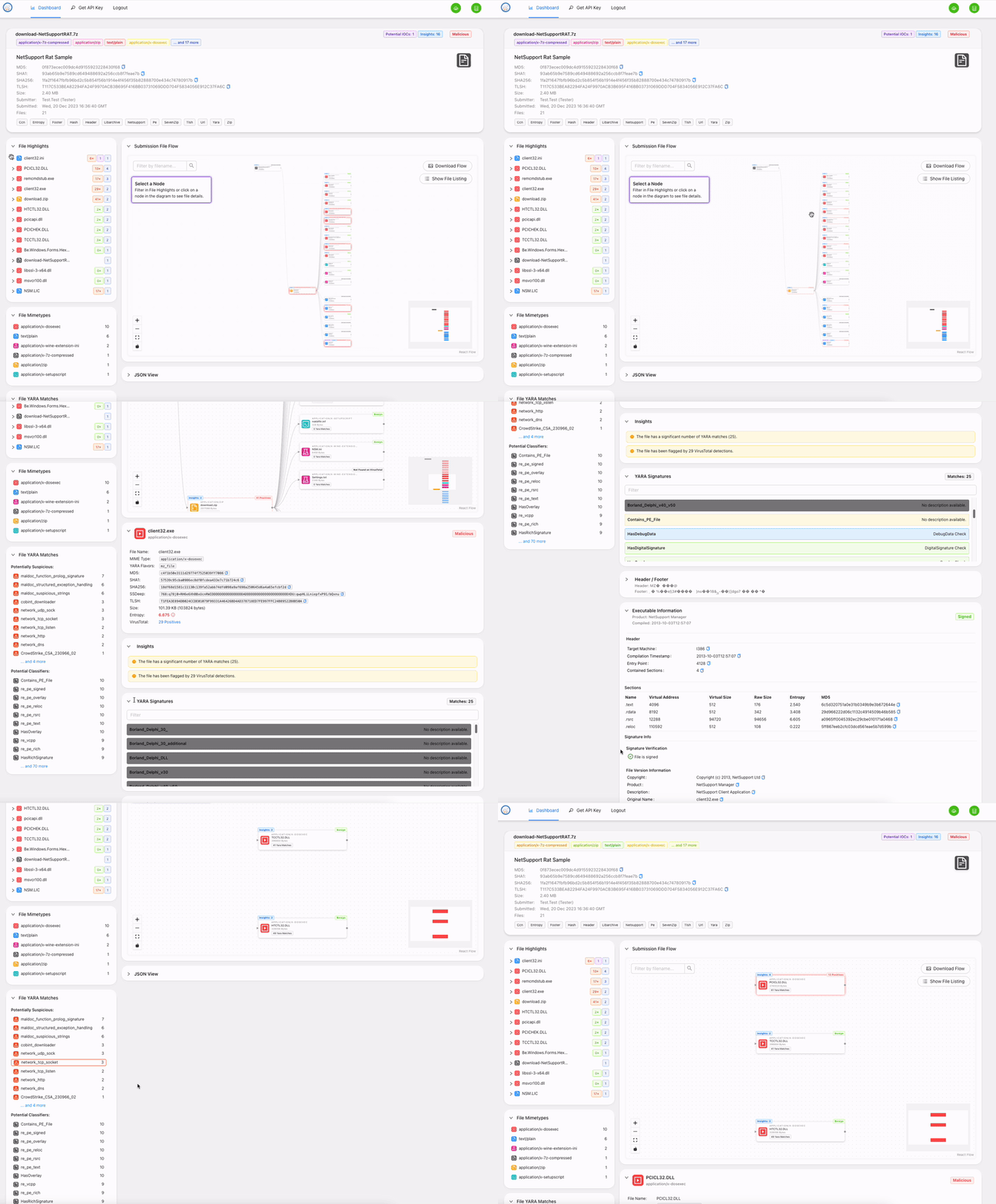
[StrelkaのUI](https://github.com/target/strelka-ui)は、提供されたコンテナをビルドするときに利用可能です。このWebインターフェースを使用すると、ファイルをStrelkaにアップロードしてイベントをキャプチャし、ローカルに保存できます。
http://localhost:9980/ にアクセスし、ログイン情報 strelka/strelka を使用してください。
## 潜在的な用途
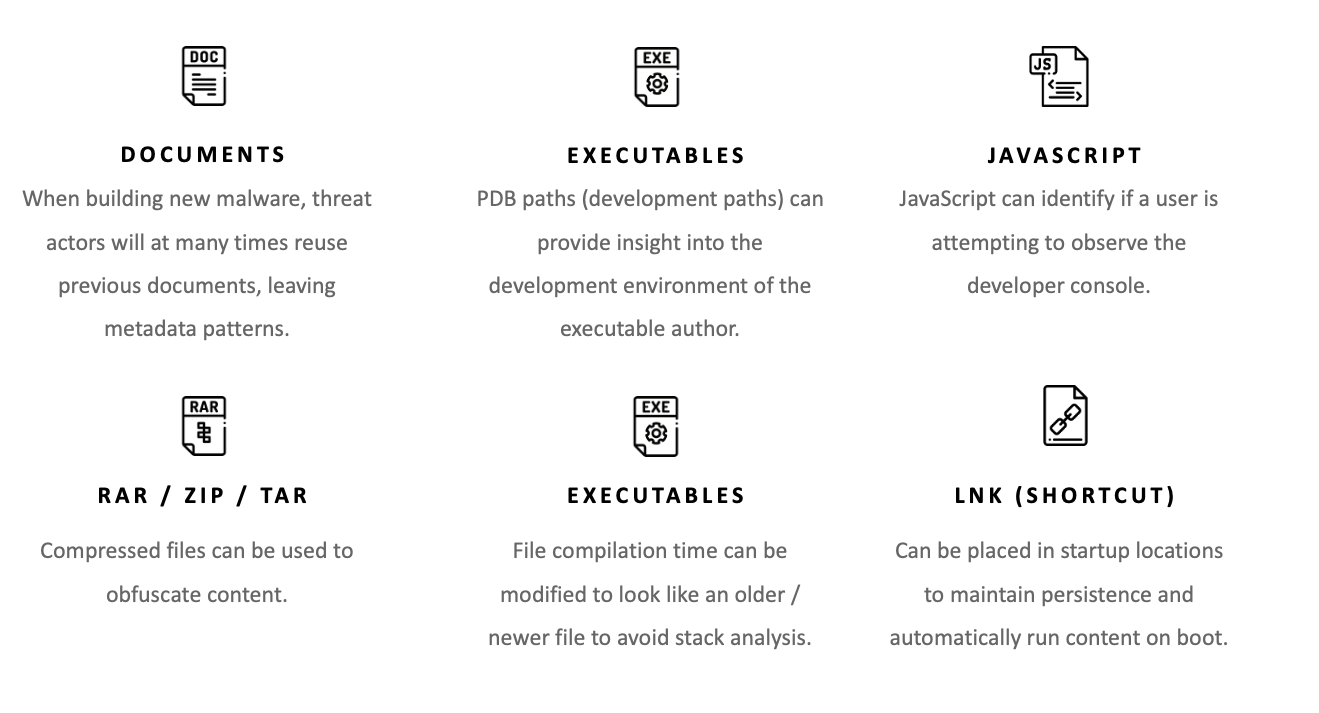
50以上のファイルスキャナ(exe、docx、js、zipなど最も一般的なファイルタイプ向け)を備えたStrelkaは、ユーザーがホスト、ネットワーク、またはエンタープライズ上のファイルに関する新しい洞察を得ることを可能にします。Strelka自体は検出エンジンではありませんが(ただし[YARA](https://virustotal.github.io/yara/)を利用しています)、不審または悪意のあるファイルを特定するのに十分なメタデータを提供できます。Strelkaの潜在的な用途には以下が含まれます:
## 追加ドキュメント
Strelkaに関する詳細なドキュメントは[README](https://target.github.io/strelka/)にあります。以下を含みます:
- [インストール](https://target.github.io/strelka/#/?id=installation)
- [デプロイ](https://target.github.io/strelka/#/?id=deployment)
- [設計](https://target.github.io/strelka/#/?id=design)
- [アーキテクチャ](https://target.github.io/strelka/#/?id=architecture)
- [FAQ](https://target.github.io/strelka/#/?id=frequently-asked-questions)
## 貢献
貢献に関するガイドラインは[こちら](https://github.com/target/strelka/blob/master/CONTRIBUTING.md)にあります。
## 既知の問題
### YARAルールの読み込みに関する問題
ユーザーは、最適なパフォーマンスを得て、実行時の潜在的な問題を回避するために、YARAルールを事前コンパイルすることをお勧めします。事前コンパイルされたYARAファイルを使用すると、特に大量のルールセットがある環境で、読み込み時間とリソース使用量を削減できます。[Strelka設定のコンパイルオプション](https://github.com/target/strelka/blob/master/configs/python/backend/backend.yaml)を使用して、事前コンパイルされたルールファイルを指定してください。
### その他の問題
その他の問題については、トラッカーの[バグとラベル付けされた問題](https://github.com/target/strelka/issues?q=is%3Aissue+is%3Aopen+label%3Abug)を参照してください。
## 関連プロジェクト
* [Laika BOSS](https://github.com/lmco/laikaboss)
* [File Scanning Framework](https://github.com/EmersonElectricCo/fsf)
* [Assemblyline](https://cybercentrecanada.github.io/assemblyline4_docs/)
## ライセンス
Strelkaおよび関連コードは、[Apache 2.0 License](https://github.com/target/strelka/blob/master/LICENSE)の条件の下でリリースされています。
<div align="center">
<img src="https://assets.kitploit.com/production/public/readmes/2436/1bbf5d22a15b9058f400fdd15b49dc4bbca672a6e4ad5bd4773998390025305b.png" alt="Target バナー" />
</div>
<!--
Links
-->
[release]:https://github.com/target/strelka/releases/latest "Strelka 最新リリース ➶"
[issues]:https://github.com/target/strelka/issues "Strelka 課題 ➶"
[pull-requests]:https://github.com/target/strelka/pulls "Strelka プルリクエスト ➶"
[wiki]:https://target.github.io/strelka/#/ "Strelka ドキュメント ➶"
[repo]:https://github.com/target/strelka "Strelka リポジトリ ➶"
[slack]:https://join.slack.com/t/cfc-open-source/shared_invite/zt-e54crchh-a6x4iDy18D5lVwFKQoEeEQ "Slack (外部リンク) ➶"
[actions-ci]:https://github.com/target/strelka/actions/workflows/build_strelka_nightly.yml "Github Actions ➶"
[pr]:https://github.com/target/strelka/pulls "Strelka プルリクエスト ➶"
[license]:https://raw.githubusercontent.com/target/strelka/master/LICENSE "Strelka ライセンスファイル ➶"
[docker]:https://www.docker.com/ "Docker (外部リンク) ➶"
<!--
Badges
-->
[img-version-badge]:https://img.shields.io/github/release/target/strelka.svg?style=for-the-badge
[img-slack-badge]:https://img.shields.io/badge/slack-join-red.svg?style=for-the-badge&logo=slack
[img-actions-badge]:https://img.shields.io/github/actions/workflow/status/target/strelka/build_strelka_nightly.yml?branch=master&style=for-the-badge
[img-pr-badge]:https://img.shields.io/badge/PRs-welcome-orange.svg?style=for-the-badge&logo=data:image/svg+xml;base64,PD94bWwgdmVyc2lvbj0iMS4wIiBlbmNvZGluZz0iVVRGLTgiPz48c3ZnIGlkPSJzdmcyIiB3aWR0aD0iNjQ1IiBoZWlnaHQ9IjU4NSIgdmVyc2lvbj0iMS4wIiB4bWxucz0iaHR0cDovL3d3dy53My5vcmcvMjAwMC9zdmciPiA8ZyBpZD0ibGF5ZXIxIj4gIDxwYXRoIGlkPSJwYXRoMjQxNyIgZD0ibTI5Ny4zIDU1MC44N2MtMTMuNzc1LTE1LjQzNi00OC4xNzEtNDUuNTMtNzYuNDM1LTY2Ljg3NC04My43NDQtNjMuMjQyLTk1LjE0Mi03Mi4zOTQtMTI5LjE0LTEwMy43LTYyLjY4NS01Ny43Mi04OS4zMDYtMTE1LjcxLTg5LjIxNC0xOTQuMzQgMC4wNDQ1MTItMzguMzg0IDIuNjYwOC01My4xNzIgMTMuNDEtNzUuNzk3IDE4LjIzNy0zOC4zODYgNDUuMS02Ni45MDkgNzkuNDQ1LTg0LjM1NSAyNC4zMjUtMTIuMzU2IDM2LjMyMy0xNy44NDUgNzYuOTQ0LTE4LjA3IDQyLjQ5My0wLjIzNDgzIDUxLjQzOSA0LjcxOTcgNzYuNDM1IDE4LjQ1MiAzMC40MjUgMTYuNzE0IDYxLjc0IDUyLjQzNiA2OC4yMTMgNzcuODExbDMuOTk4MSAxNS42NzIgOS44NTk2LTIxLjU4NWM1NS43MTYtMTIxLjk3IDIzMy42LTEyMC4xNSAyOTUuNSAzLjAzMTYgMTkuNjM4IDM5LjA3NiAyMS43OTQgMTIyLjUxIDQuMzgwMSAxNjkuNTEtMjIuNzE1IDYxLjMwOS02NS4zOCAxMDguMDUtMTY0LjAxIDE3OS42OC02NC42ODEgNDYuOTc0LTEzNy44OCAxMTguMDUtMTQyLjk4IDEyOC4wMy01LjkxNTUgMTEuNTg4LTAuMjgyMTYgMS44MTU5LTI2LjQwOC0yNy40NjF6IiBmaWxsPSIjZGQ1MDRmIi8+IDwvZz48L3N2Zz4=
[img-license-badge]:https://img.shields.io/badge/license-apache-ff69b4.svg?style=for-the-badge&logo=apache
[img-docker-badge]:https://img.shields.io/badge/Supports-Docker-yellow.svg?style=for-the-badge&logo=docker