
 soxoj/maigret
🕵️♂️ ユーザー名から6Kのウェブサイトで人物の調査書を収集する
# Maigret
<div align="center">
<div>
<a href="https://pypi.org/project/maigret/">
<img alt="PyPI version badge for Maigret" src="https://img.shields.io/pypi/v/maigret?style=flat-square" />
</a>
<a href="https://pepy.tech/project/maigret">
<img alt="Total downloads" src="https://static.pepy.tech/badge/maigret" />
<img alt="Downloads/month" src="https://static.pepy.tech/badge/maigret/month" />
</a>
</div>
<div>
<a href="https://github.com/soxoj/maigret">
<img alt="View count for Maigret project" src="https://komarev.com/ghpvc/?username=maigret&color=brightgreen&label=views&style=flat-square" />
</a>
<a href="https://github.com/soxoj/maigret">
<img alt="Minimum Python version required: 3.10+" src="https://img.shields.io/badge/Python-3.10+-brightgreen?style=flat-square" />
</a>
<a href="https://github.com/soxoj/maigret/blob/main/LICENSE">
<img alt="License badge for Maigret" src="https://img.shields.io/github/license/soxoj/maigret?style=flat-square" />
</a>
<a href="https://maigret.readthedocs.io/">
<img alt="Maigret documentation" src="https://img.shields.io/readthedocs/maigret?style=flat-square&label=docs" />
</a>
</div>
<br>
<div>
<img src="https://assets.kitploit.com/production/public/readmes/216/f4ea992b7e00fe5e906d35323dd806650b89309c635ef77372bc1f8e497950f7.png" height="300" alt="Maigret logo"/>
</div>
<br>
<div>
<a href="https://codewiki.google/github.com/soxoj/maigret">
<img alt="Ask Code Wiki about Maigret" src="https://img.shields.io/badge/Code_Wiki-ask_about_repo-yellow?logo=googlegemini" />
</a>
<a href="https://deepwiki.com/soxoj/maigret">
<img alt="Ask DeepWiki about Maigret" src="https://img.shields.io/badge/DeepWiki-ask_about_repo-yellow" />
</a>
</div>
<br>
<div>
<b>English</b> · <a href="https://github.com/soxoj/maigret/blob/main/README.zh-CN.md">简体中文</a> · <a href="https://github.com/soxoj/maigret/blob/main/README.fr.md">Français</a>
</div>
<br>
<div>
📖 <a href="https://maigret.readthedocs.io/"><b>Documentation</b></a>
</div>
<br>
</div>
**Maigret** は、**ユーザー名のみ**を使って人物の調査資料を収集し、膨大な数のサイトでアカウントを確認して、ウェブページから入手可能なすべての情報を収集します。API キーは不要です。**[AI プロファイリング (デモ)](#ai-analysis)**。
## スポンサー
<p align="center">
<a href="https://noimosiny.com/?utm_campaign=maigret&utm_source=github">
<img width="600" alt="Noimosiny" src="https://github.com/user-attachments/assets/cef16613-4337-47a3-9105-2621197b17d1" />
</a>
</p>
<p>
<a href="https://noimosiny.com/?utm_campaign=maigret&utm_source=github"><b>Noimosiny</b></a> は、プロの調査員やアナリスト向けの包括的な OSINT プラットフォームです。250 以上のモジュールにわたるメール、電話番号、ユーザー名の逆引き検索を提供します。強力なツールでインテリジェンス収集を自動化しましょう。
</p>
<br>
<p align="center">
<a href="https://www.rapidproxy.io/?ref=soxoj">
<img src="https://assets.kitploit.com/production/public/readmes/216/d0d5d0f98e98ee2bae78bf2fc510e47089760ef9ce72121edc7ce6de19295d9f.jpg" width="500" alt="RapidProxy">
</a>
</p>
<p>
<a href="https://www.rapidproxy.io/?ref=soxoj"><b>RapidProxy</b></a> は、Twitter スクレイピング、Selenium 自動化、ウェブデータ抽出向けの高性能レジデンシャルプロキシを提供します。9,000 万以上の IP • スマートローテーション • アンチブロック • 有効期限なしのトラフィック。<br>
<b>特別オファー</b>: 無料でお試しください — プランは $0.65/GB から。コード <b>RAPID10</b> で 10% オフ。
</p>
<p align="center">
<a href="https://mangoproxy.com/?utm_source=soxoj&utm_medium=partner&utm_campaign=soxoj_github">
<img src="https://github.com/user-attachments/assets/146b6b95-06ae-4fda-bff2-d94946cf7c2e" width="300" alt="MangoProxy">
</a>
</p>
<p>
<a href="https://mangoproxy.com/?utm_source=soxoj&utm_medium=partner&utm_campaign=soxoj_github"><b>MangoProxy</b></a> は、安定性、速度、匿名性が重要なプロフェッショナルなタスク向けに設計されたレジデンシャル、ISP、モバイル、データセンタープロキシサービスです。<br>
<b>プロモコード</b>: SOXOJ - 静的 ISP プロキシが 8% オフ
</p>
<p align="center">
<a href="https://www.thordata.com/?ls=dmt&lk=dmt">
<img src="https://github.com/user-attachments/assets/6d92bda0-c953-49b5-ab7e-73b0e67f17e2" width="350" alt="Thordata">
</a>
</p>
<p>
<a href="https://www.thordata.com/?ls=dmt&lk=dmt"><b>Thordata</b></a>
</a> は、OSINT 調査、ユーザー名検索、公開データ収集ワークフロー向けの信頼性の高いレジデンシャルプロキシを提供します。
<b>195 以上の国々</b>にわたる <b>1 億以上の実レジデンシャル IP</b> にアクセスでき、<b>無制限の同時接続</b>、99.99% の稼働率と安定した接続、ローテーション + スティッキーセッション、高い成功率を実現します。
<br>
<b>特別オファー:</b> 3 日間の無料トライアル + コード <b>SOXOJ10</b> で <b>10% オフ</b>。
</p>
## 目次
- [1 分でわかる](#in-one-minute)
- [主な機能](#main-features)
- [デモ](#demo)
- [インストール](#installation)
- [使用方法](#usage)
- [コントリビューション](#contributing)
- [商用利用](#commercial-use)
- [概要](#about)
<a id="one-minute"></a>
## 1 分でわかる
Python 3.10 以上がインストールされていることを確認してください。
```bash
pip install maigret
maigret YOUR_USERNAME
```
インストール不要ですか?[コミュニティ Telegram ボット](https://maigret.app/readme-en)または[クラウドシェル](#cloud-shells)をお試しください。
ウェブ UI が必要ですか?[起動方法](#web-interface)をご覧ください。
関連情報: [クイックスタート](https://maigret.readthedocs.io/en/latest/quick-start.html)。
## 主な機能
- 5,900 のサイトをサポート([完全なリストを参照](https://github.com/soxoj/maigret/blob/main/sites.md))。デフォルトの実行ではトラフィック上位 500 サイトをチェックします。`-a` を渡すとすべてをスキャンし、`--tags` でカテゴリ/国別に絞り込めます。
- Python プロジェクトに組み込み可能 — `maigret` をインポートしてプログラムから検索を実行できます([ライブラリの使用方法](https://maigret.readthedocs.io/en/latest/library-usage.html)を参照)。
- プロフィールページやサイト API から、他のアカウントへのリンクを含む、アカウント所有者に関する入手可能なすべての情報を[抽出](https://github.com/soxoj/socid_extractor)します。
- 発見されたユーザー名やその他の ID を使用して再帰検索を実行します。
- タグ(サイトカテゴリ、国)によるフィルタリングが可能です。
- ブロック、検閲、CAPTCHA を検出し、部分的に回避します。
- 実行ごとに GitHub から[自動更新されるサイトデータベース](https://maigret.readthedocs.io/en/latest/settings.html#database-auto-update)を取得し(24 時間に 1 回)、オフラインの場合は組み込みデータベースにフォールバックします。
- Tor および I2P のウェブサイトで動作し、ドメインをチェックできます。
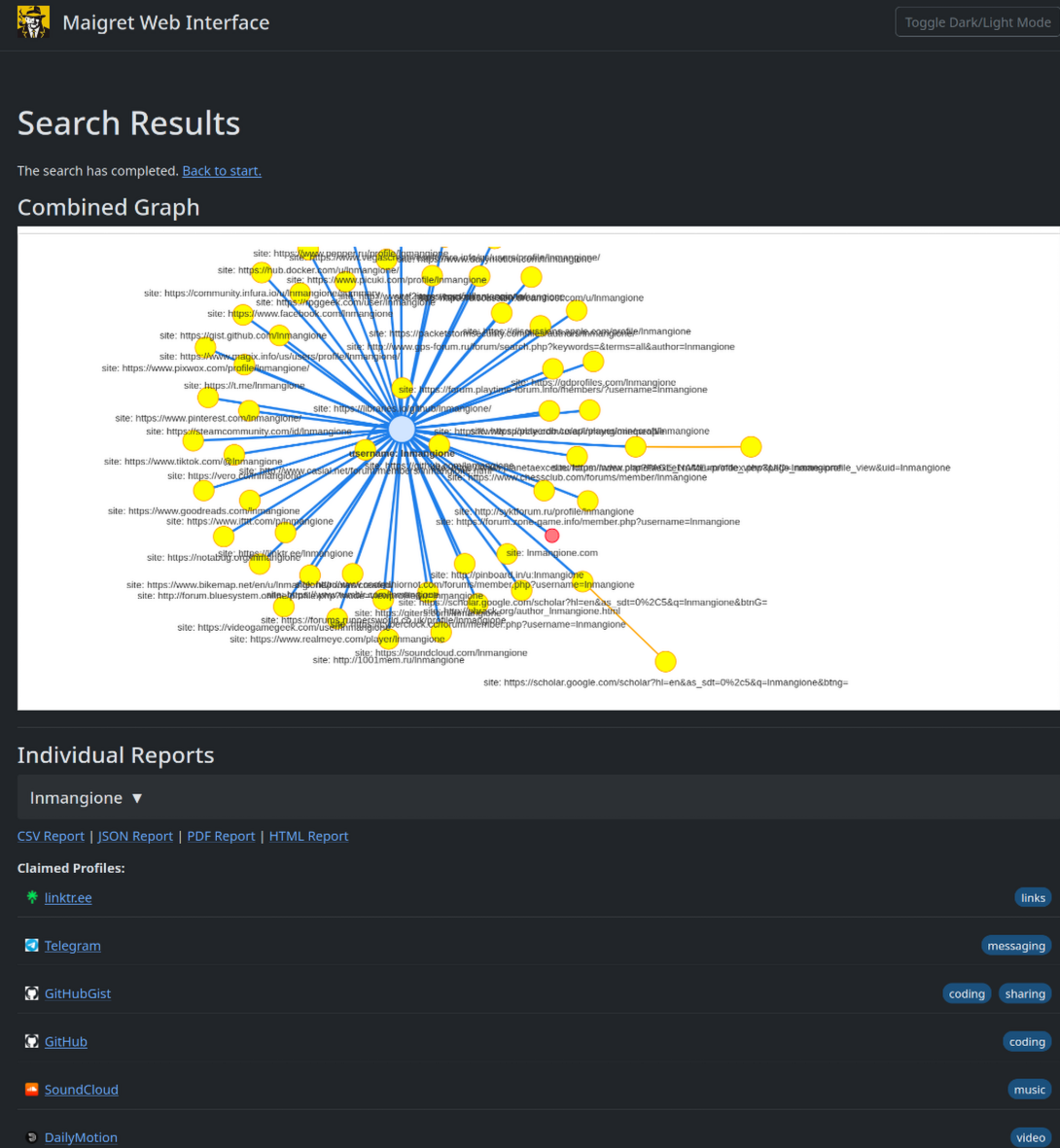
- 結果をグラフとして閲覧し、あらゆる形式のレポートを 1 つのページからダウンロードできる[ウェブインターフェース](#web-interface)を同梱しています。
- オプションの [AI 分析モード](#ai-analysis)(`--ai`)は、OpenAI 互換 API を使用して生の検出結果を短い調査サマリーに変換します。
完全な機能リストについては、[機能ドキュメント](https://maigret.readthedocs.io/en/latest/features.html)を参照してください。
### 採用実績
Maigret を基盤として構築されたプロフェッショナルな OSINT およびソーシャルメディア分析ツール:
<a href="https://github.com/SocialLinks-IO/sociallinks-api"><img height="60" alt="Social Links API" src="https://assets.kitploit.com/production/public/readmes/216/e4e6afb8670aa5d3b703f1073907398ff6cc84031b15f4108bf1da37e01ab023.png"></a>
<a href="https://sociallinks.io/products/sl-crimewall"><img height="60" alt="Social Links Crimewall" src="https://assets.kitploit.com/production/public/readmes/216/fc0028a249da7498721b8783b585545203c93a3e51de565f4d27aa9a71882743.png"></a>
<a href="https://usersearch.ai/"><img height="60" alt="UserSearch" src="https://assets.kitploit.com/production/public/readmes/216/e0b60e01a3af3ac089eebc120d9627aeb0cbf3d9ee68c4f62e8d1e46fa5df5ad.png"></a>
## デモ
### 動画
<a href="https://asciinema.org/a/Ao0y7N0TTxpS0pisoprQJdylZ">
<img src="https://asciinema.org/a/Ao0y7N0TTxpS0pisoprQJdylZ.svg" alt="asciicast" width="600">
</a>
### レポート
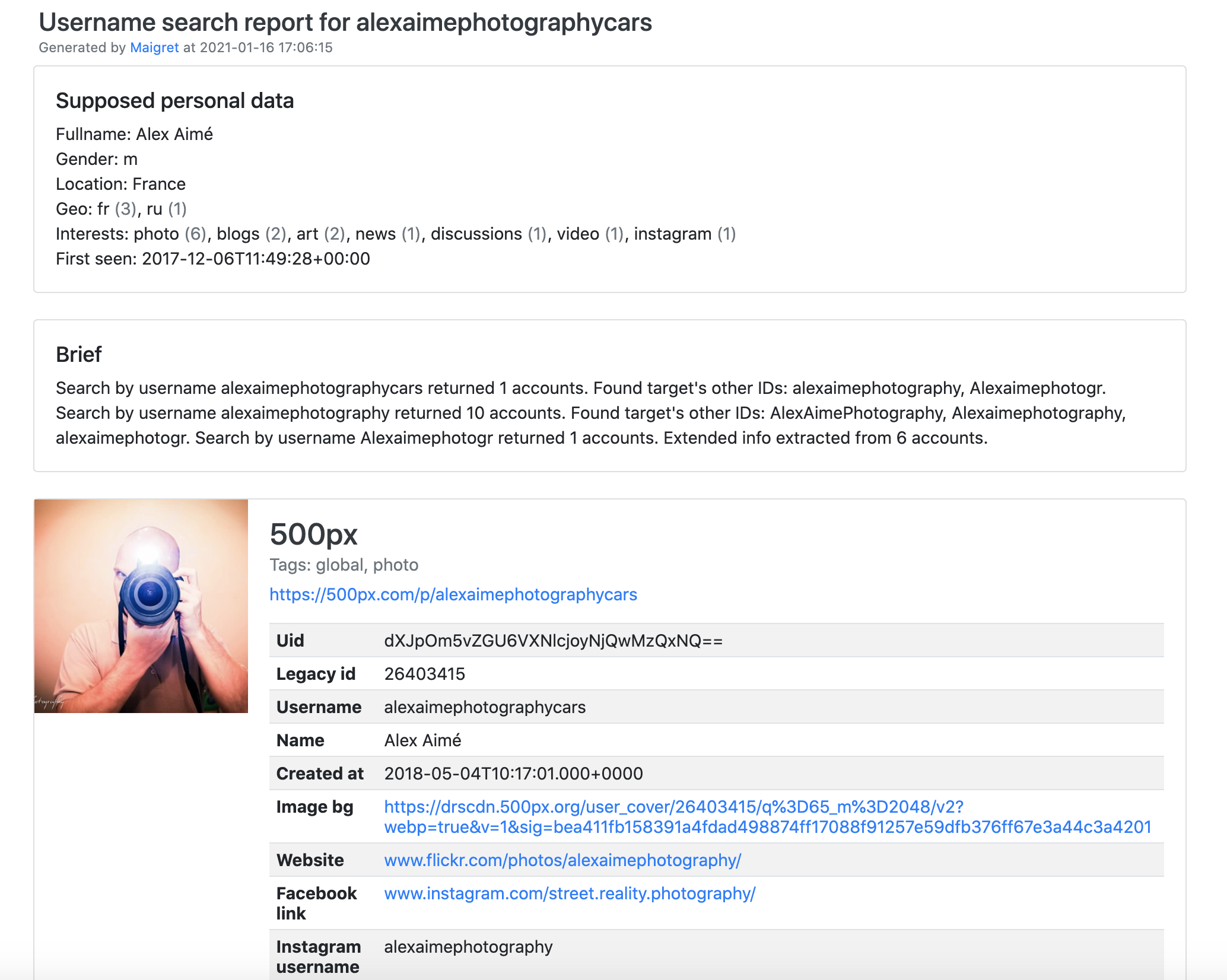
[PDF レポート](https://raw.githubusercontent.com/soxoj/maigret/main/static/report_alexaimephotographycars.pdf)、[HTML レポート](https://htmlpreview.github.io/?https://raw.githubusercontent.com/soxoj/maigret/main/static/report_alexaimephotographycars.html)
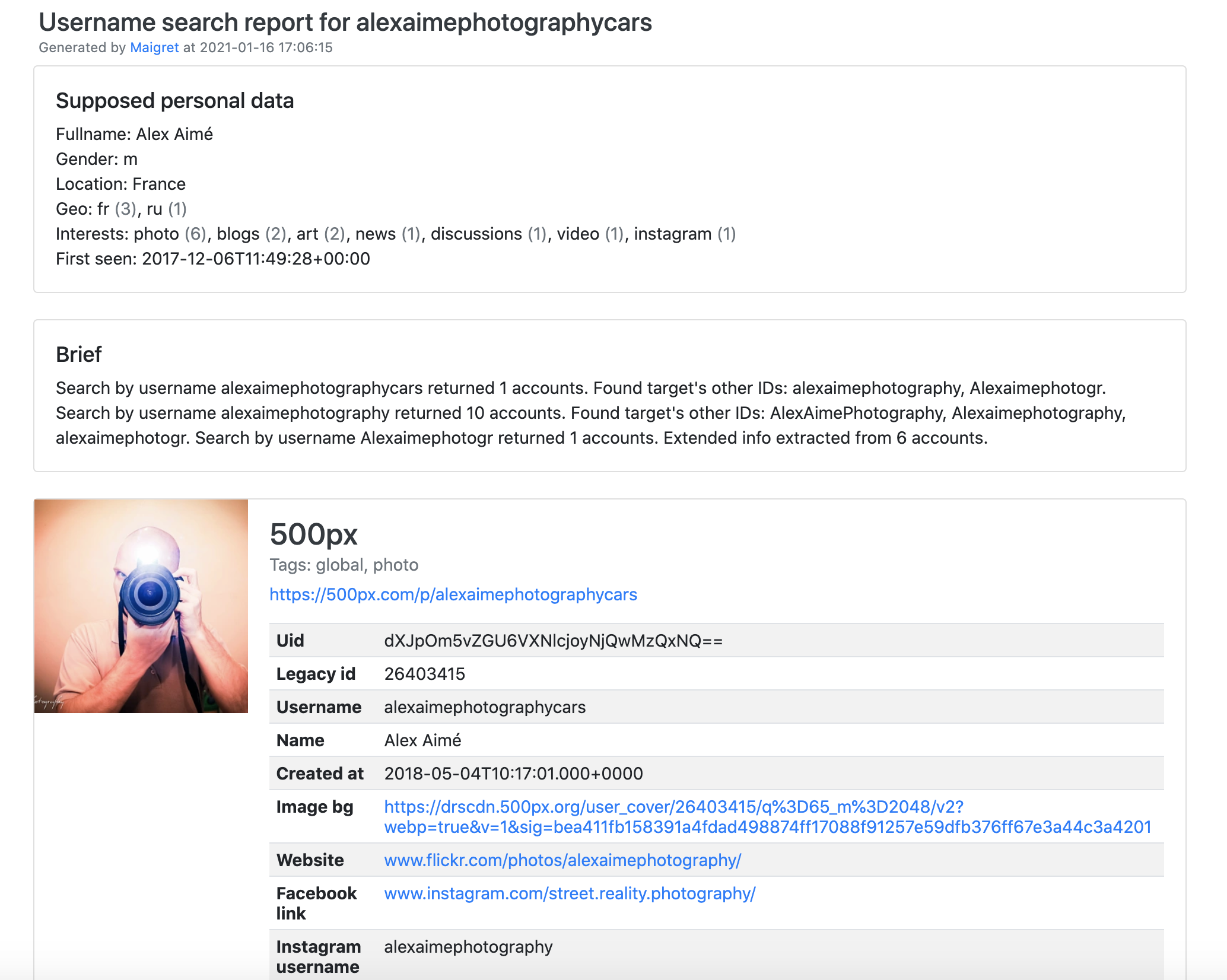
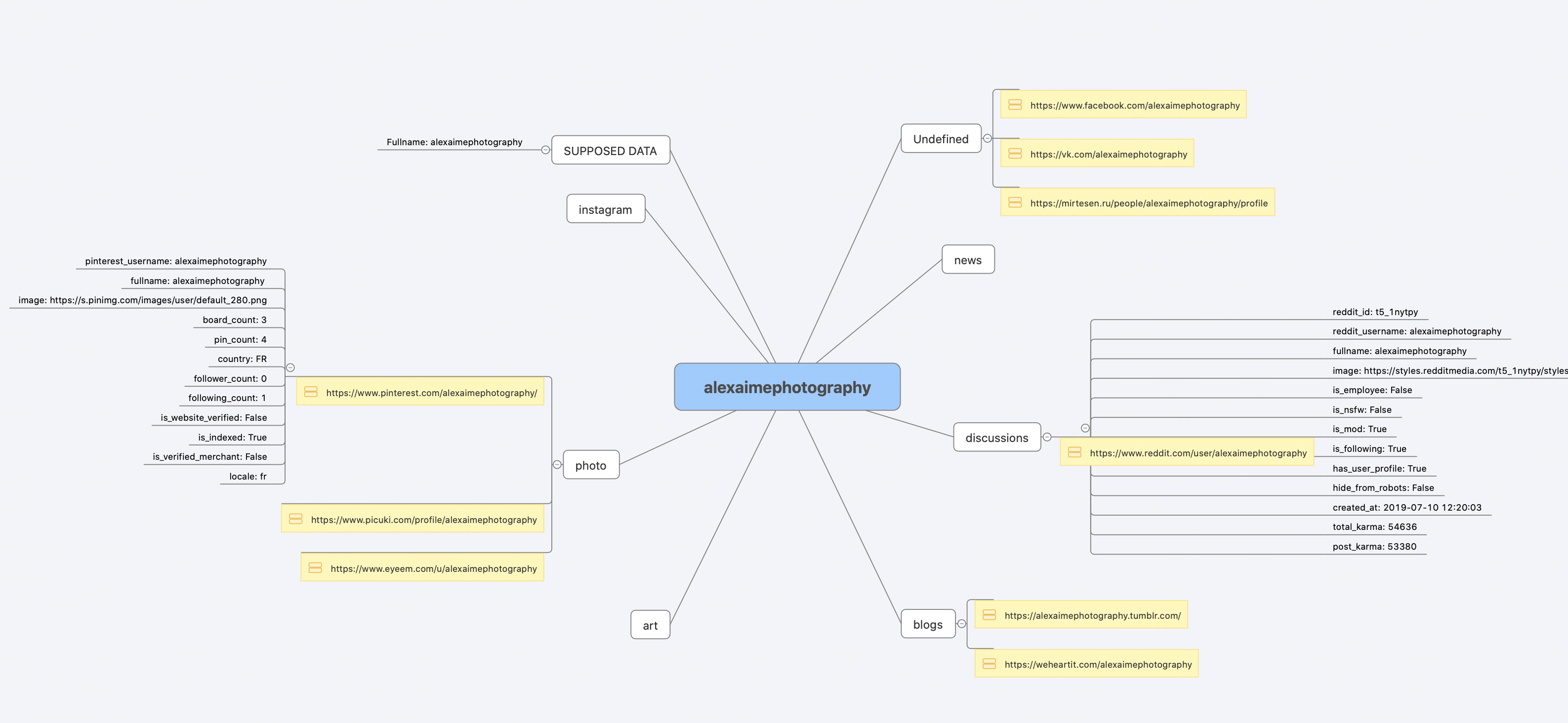
[コンソール出力全体](https://raw.githubusercontent.com/soxoj/maigret/main/static/recursive_search.md)
## インストール
すでに[1 分でわかる](#one-minute)の手順を実行しましたか?それで準備完了です。以下は代替方法です。
何もインストールしたくないですか?[コミュニティ Telegram ボット](https://maigret.app/readme-en)をご利用ください。
### Windows
[Releases](https://github.com/soxoj/maigret/releases)から `maigret_standalone.exe` をダウンロードしてください。起動方法は 2 通りあります:
- **ダブルクリック** — Maigret がユーザー名を尋ね、デフォルトの検索を実行し、最後に待機してレポートリンクが見える状態を保ちます。
- **ターミナルから実行** — コマンドプロンプト(`Win+R` を押し、`cmd` と入力して Enter)または PowerShell を開き、追加オプションを渡します:
```cmd
cd %USERPROFILE%\Downloads
maigret_standalone.exe USERNAME
maigret_standalone.exe USERNAME --html :: also save an HTML report
maigret_standalone.exe --help :: list all options
```
動画ガイド: https://youtu.be/qIgwTZOmMmM。
<a id="cloud-shells"></a>
### クラウドシェル
クラウドシェルまたは Jupyter ノートブックでブラウザから Maigret を実行します:
<a href="https://console.cloud.google.com/cloudshell/open?git_repo=https://github.com/soxoj/maigret&tutorial=cloudshell-tutorial.md"><img src="https://assets.kitploit.com/production/public/readmes/216/7dc64fe3ed672759aab735389c56e594e597a6700b277aaa44a54b833448ea7a.png" alt="Open in Cloud Shell" height="50"></a>
<a href="https://repl.it/github/soxoj/maigret"><img src="https://replit.com/badge/github/soxoj/maigret" alt="Run on Replit" height="50"></a>
<a href="https://colab.research.google.com/gist/soxoj/879b51bc3b2f8b695abb054090645000/maigret-collab.ipynb"><img src="https://colab.research.google.com/assets/colab-badge.svg" alt="Open In Colab" height="45"></a>
<a href="https://mybinder.org/v2/gist/soxoj/9d65c2f4d3bec5dd25949197ea73cf3a/HEAD"><img src="https://mybinder.org/badge_logo.svg" alt="Open In Binder" height="45"></a>
### Snap (Linux)
<a href="https://snapcraft.io/maigret"><img src="https://snapcraft.io/static/images/badges/en/snap-store-black.svg" alt="Get it from the Snap Store" height="50"></a>
```bash
sudo snap install maigret
# usage
maigret username
```
amd64 および arm64 で利用可能で、Python は不要です。snap は厳格に隔離されており、ホームディレクトリ内にのみ書き込めるため、そこから実行してください。USB ドライブの場合は、`sudo snap connect maigret:removable-media` で一度インターフェースを接続してください。
### ローカルインストール (pip)
```bash
# install from pypi
pip3 install maigret
# usage
maigret username
```
### ソースから
```bash
# or clone and install manually
git clone https://github.com/soxoj/maigret && cd maigret
# build and install
pip3 install .
# usage
maigret username
```
### Docker
2 つのイメージバリアントが公開されています:
- `soxoj/maigret:latest` — CLI モード(デフォルト)
- `soxoj/maigret:web` — [ウェブインターフェース](#web-interface)を自動起動
```bash
# official image (CLI)
docker pull soxoj/maigret
# CLI usage
docker run -v /mydir:/app/reports soxoj/maigret:latest username --html
# Web UI (open http://localhost:5000)
docker run -p 5000:5000 soxoj/maigret:web
# Web UI on a custom port
docker run -e PORT=8080 -p 8080:8080 soxoj/maigret:web
# manual build
docker build -t maigret . # CLI image (default target)
docker build --target web -t maigret-web . # Web UI image
```
### トラブルシューティング
ビルドエラーですか?[トラブルシューティングガイド](https://maigret.readthedocs.io/en/latest/installation.html#troubleshooting)を参照してください。
PDF レポート(`--pdf`)はオプションの追加機能です — `pip install 'maigret[pdf]'` でインストールします。Linux/macOS ではシステムレベルのグラフィックスライブラリが必要です。OS ごとのインストール手順については [PDF レポートのセクション](https://maigret.readthedocs.io/en/latest/installation.html#optional-pdf-reports-maigret-pdf)を参照してください。
## 使用方法
### 例
```bash
# make HTML, PDF, and XMind reports
maigret user --html
maigret user --pdf
maigret user --xmind # legacy XML with a manifest for XMind 2022+ readers
# machine-readable exports
maigret user --json ndjson # newline-delimited JSON (also: --json simple)
maigret user --csv
maigret user --txt
maigret user --graph # interactive D3 graph (HTML)
maigret user --neo4j # Neo4j Cypher script (graph database)
# search on sites marked with tags photo & dating
maigret user --tags photo,dating
# search on sites marked with tag us
maigret user --tags us
# highlight sites whose page also mentions specific keywords
maigret user --keywords python rust
# keyword-matched sites are shown with "[++]" in bright green
# search for three usernames on all available sites
maigret user1 user2 user3 -a
# AI-assisted investigation summary (needs OPENAI_API_KEY)
maigret user --ai
```
`--neo4j` は結果グラフの `*_neo4j.cypher` スクリプトを書き出します。`cypher-shell -u neo4j -p <password> < report_user_neo4j.cypher` でインポートするか、Neo4j Browser に貼り付けてください。再インポートは冪等です。[Neo4j エクスポートのドキュメント](https://maigret.readthedocs.io/en/latest/command-line-options.html#neo4j-export)を参照してください。
すべてのオプションについては `maigret --help` を実行してください。ドキュメント: [CLI オプション](https://maigret.readthedocs.io/en/latest/command-line-options.html)、[その他の例](https://maigret.readthedocs.io/en/latest/usage-examples.html)。403 やタイムアウトに遭遇していますか?[TROUBLESHOOTING.md](https://github.com/soxoj/maigret/blob/main/TROUBLESHOOTING.md)を参照してください。
<a id="web-interface"></a>
### ウェブインターフェース
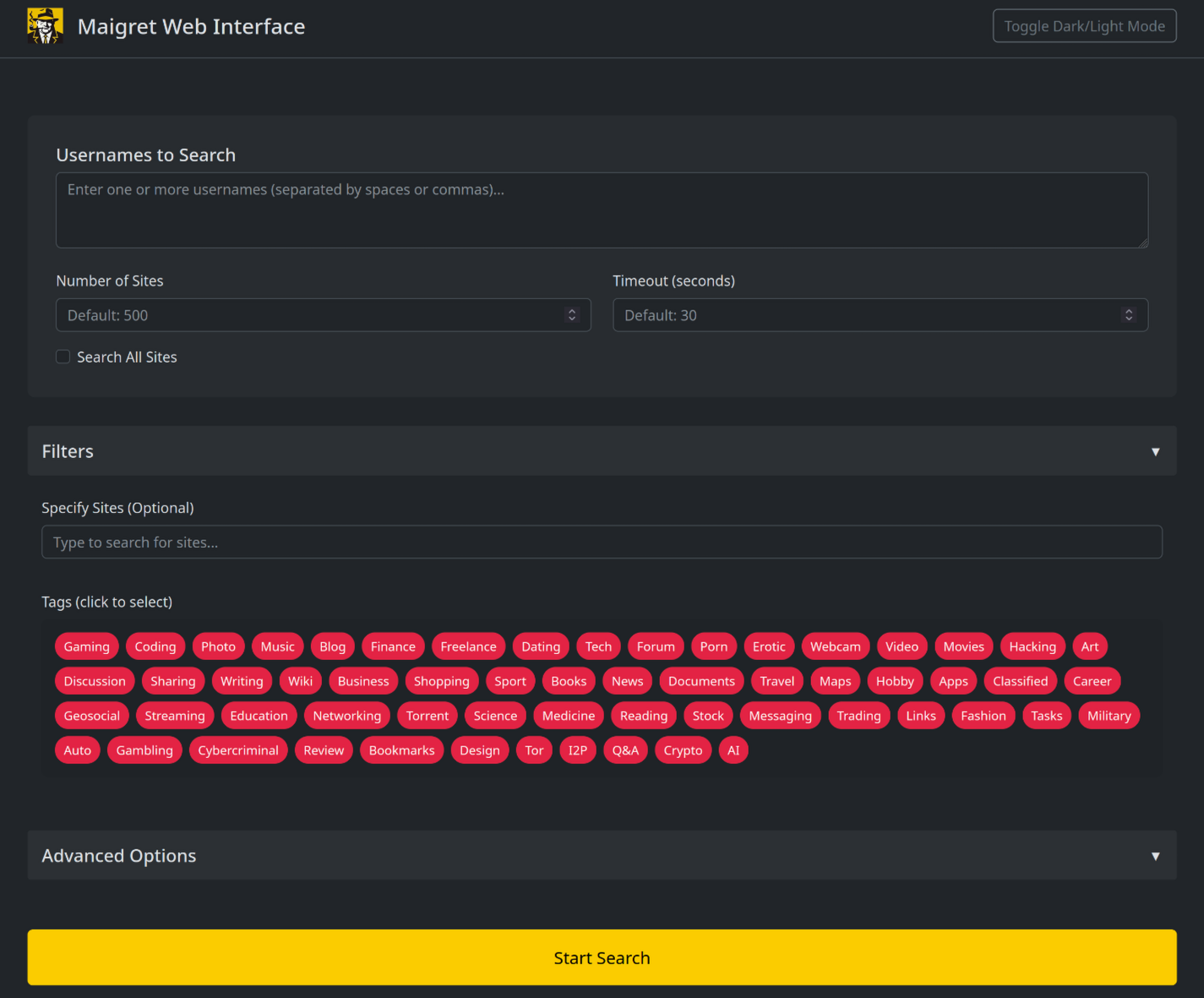
Maigret には、結果グラフとダウンロード可能なレポートを備えた組み込みのウェブ UI があります。
自分で実行したくないですか?公開されている `soxoj/maigret:web` Docker イメージを、ワンクリックでホスト型アプリとしてデプロイできます:
<a href="https://render.com/deploy?repo=https://github.com/soxoj/maigret&path=utils/render.yaml"><img src="https://render.com/images/deploy-to-render-button.svg" alt="Deploy to Render" height="40"></a>
Render の無料枠で動作します(15 分間アイドル状態が続くとスピンダウンし、次のリクエストで再び起動します)。インスタンスにはログインが設定されていないため、URL を知っている人は誰でも使用できます。
<details>
<summary>ウェブインターフェースのスクリーンショット</summary>
</details>
```console
maigret --web 5000
```
http://127.0.0.1:5000 を開き、ユーザー名を入力して結果を表示します。
### Python ライブラリ
**Maigret は独自の Python プロジェクトに組み込むことができます。** CLI は、直接呼び出せる非同期関数の薄いラッパーです — カスタムパイプラインを構築したり、結果を独自のツールに渡したり、より大きな OSINT ワークフロー内で実行したりできます。
実際に動作する例、非同期パターン、タグによるサイトのフィルタリング方法については、完全な[ライブラリ使用ガイド](https://maigret.readthedocs.io/en/latest/library-usage.html)を参照してください。
### 便利な CLI フラグ
- `--parse URL` — プロフィールページを解析し、ID/ユーザー名を抽出して、それらを使って再帰検索を開始します。
- `--permute` — 2 つ以上の入力から可能性の高いユーザー名のバリアントを生成し(例: `john doe` → `johndoe`、`j.doe`、…)、それらすべてを検索します。
- `--self-check [--auto-disable]` — データベースを監査するメンテナー向けに、`usernameClaimed` / `usernameUnclaimed` のペアを実際のサイトに対して検証します。
- `--ai` / `--ai-model` — 検索結果に対して [AI 分析](#ai-analysis)を実行し、短い調査サマリーをターミナルにストリーミングします。
<a id="ai-analysis"></a>
### AI 分析
[](https://asciinema.org/a/979404)
`--ai` は検索結果を収集し、内部の Markdown レポートを構築して、OpenAI 互換のチャット補完エンドポイントに送信し、短く中立的な調査サマリー(推定される本名、所在地、職業、興味、言語、信頼度、フォローアップの手がかり)を生成します。サイトごとの進捗は抑制され、モデルの出力は stdout にストリーミングされます。
```bash
export OPENAI_API_KEY=sk-...
maigret user --ai
# pick a different model
maigret user --ai --ai-model gpt-4o-mini
```
キーは `settings.json` の `openai_api_key` として設定することもできます。エンドポイントはデフォルトで `https://api.openai.com/v1` ですが、`settings.json` の `openai_api_base_url` は任意の OpenAI 互換 API(Azure OpenAI、OpenRouter、ローカルサーバーなど)を指すことができます。オプションの完全なリストについては[設定ドキュメント](https://maigret.readthedocs.io/en/latest/settings.html)を参照してください。
### Tor / I2P / プロキシ
Maigret はプロキシ、Tor、または I2P を経由してチェックをルーティングできます — `.onion` / `.i2p` サイトや、データセンター IP をブロックする WAF の回避に役立ちます。
```bash
# any HTTP/SOCKS proxy
maigret user --proxy socks5://127.0.0.1:1080
# Tor (default gateway socks5://127.0.0.1:9050)
maigret user --tor-proxy socks5://127.0.0.1:9050
# I2P (default gateway http://127.0.0.1:4444)
maigret user --i2p-proxy http://127.0.0.1:4444
```
コマンドを実行する前に Tor / I2P デーモンを起動してください — Maigret はこれらのゲートウェイを管理しません。
### Cloudflare バイパス
> **実験的。** Cloudflare webgate は活発に開発中です。設定スキーマ、CLI の動作、およびルーティングされるサイトのセットは、後方互換性の保証なしに変更される可能性があります。
データベース内の一部のサイトは、JavaScript チャレンジを解決するために実際のブラウザを必要とします。Maigret はこれらのチェックをローカルの [FlareSolverr](https://github.com/FlareSolverr/FlareSolverr) インスタンスにオフロードできます:
```bash
docker run -d -p 8191:8191 --name flaresolverr ghcr.io/flaresolverr/flaresolverr:latest
maigret --cloudflare-bypass <username>
```
バイパスはオプトインです(`--cloudflare-bypass` または `settings.json` の `cloudflare_bypass.enabled`)。`protection` フィールドが一致するサイトに対してのみ発動します。バックエンドのオプションと設定については[機能ドキュメント](https://maigret.readthedocs.io/en/latest/features.html#cloudflare-bypass)を参照してください。
## コントリビューション
`data.json` に新しいサイトを外科的に追加または修正し(`json.load`/`json.dump` は使用しない)、`./utils/update_site_data.py` を実行して `sites.md` とデータベースメタデータを再生成し、プルリクエストを開いてください。詳細については、[CONTRIBUTING ガイド](https://github.com/soxoj/maigret/blob/main/CONTRIBUTING.md)と[開発ドキュメント](https://maigret.readthedocs.io/en/latest/development.html)を参照してください。リリース履歴: [CHANGELOG.md](https://github.com/soxoj/maigret/blob/main/CHANGELOG.md)。
## 商用利用
オープンソースの Maigret は MIT ライセンスで、商用利用も制限なく無料です — ただし、サイトチェックは時間の経過とともに壊れるため、積極的なメンテナンスが必要です。
本格的な商用利用 — **毎日更新されるサイトデータベース**や**ユーザー名チェック API** を伴うもの — については、お問い合わせください: 📧 [[email protected]](mailto:[email protected])
- プライベートサイトデータベース — 5,000 以上のサイト、毎日更新(公開オープンソースデータベースとは別)
- ユーザー名チェック API — Maigret をあなたの製品に統合
## 概要
### 免責事項
**教育および合法的な目的のみ。** お住まいの法域で適用されるすべての法律(GDPR、CCPA など)を遵守する責任はあなたにあります。作者は誤用に対して一切の責任を負いません。
### フィードバック
[Issue を開く](https://github.com/soxoj/maigret/issues) · [GitHub Discussions](https://github.com/soxoj/maigret/discussions) · [Telegram](https://t.me/soxoj)
### SOWEL 分類
使用されている OSINT 手法:
- [SOTL-2.2. Search For Accounts On Other Platforms](https://sowel.soxoj.com/other-platform-accounts)
- [SOTL-6.1. Check Logins Reuse To Find Another Account](https://sowel.soxoj.com/logins-reuse)
- [SOTL-6.2. Check Nicknames Reuse To Find Another Account](https://sowel.soxoj.com/nicknames-reuse)
### ライセンス
MIT © [Maigret](https://github.com/soxoj/maigret)